Trim not functional (AY210 / MSFS / C172)

31 replies 8445 views started Sep 9
#1

Hi,

After updating to 1.5.0 (from 1.4.1, I believe), I noticed that the trim handling was not working anymore.

At some point I felt like it was almost solved by FFB-Bridge, and that it was possible to achieve the correct behaviour. That is, trimming without moving the yoke should have no other effect than changing the perceived pressure on the pilot's hands (not easy to put in a few words but I'm sure you get it).

With the latest version (1.5.0), whatever I use in FFB-Bridge's trim settings, moving the trim without moving the yoke does actually change the plane attitude.

I believe that in the previous version, you did apply an artificial counter-effect on the yoke to cancel the trim effect and generate adverse pressure feedback. But it seems it does not happen anymore.

I think the trim subject is very important for FFB device users, as this is one of the main outcome you can expect from such devices. And unfortunately Moza Cockpit does not handle it very well.

Didn't try the 1.5.1 beta yet, but it's not mentioned in the changes.

(My related post on MSFS forums: https://forums.flightsimulator.com/t/the-new-moza-force-feedback-yoke/711808/84?u=economyarc31614)

Report
#3
In reply to Frederik's post

I have made many changes and improvements to the trim in Beta2. Test it out and provide your feedback, please.

https://ffb-bridge.com/beta

1.5.1-beta.2

This beta includes substantial work on MOZA AY210 trim handling, with particular attention to the Cessna 172 G1000 in MSFS 2024.

The aim is to make trimming feel more natural: progressively relieving the pressure needed to hold the yoke while reducing unwanted aircraft pitch changes when your hand position stays steady.

What changed

  • Improved AY210 trim input compensation while keeping spring resistance and other force effects active.

  • Corrected spring-centre handling and the delivery of small trim adjustments.
    
  • Added aircraft-specific compensation for the MSFS 2024 C172 G1000 Passengers variant, including compensation for changes in control response with airspeed.
    
  • Expanded support diagnostics to help investigate trim behaviour.
    
  • Improved update-check errors: connection failures, certificate problems and server challenges now provide useful details instead of a generic internet error.
    

The aircraft-specific compensation currently targets that C172 variant. Other aircraft receive the shared AY210 changes but do not receive the C172 calibration. A quick X-Plane C172 check found no regression.

Please help test

  • Load the C172 G1000 in MSFS 2024 and establish steady flight with autopilot off, using your usual FFB settings.

  • While holding the yoke reasonably steady, apply a few small nose-up trim adjustments. Stop trimming for several seconds, then try small nose-down adjustments. Fly normally whenever corrections are needed.
    
  • Notice whether the holding pressure changes progressively and whether the nose moves as soon as trim changes, before you move the yoke.
    
  • Pause and immediately export a support bundle from Support → Diagnostics, so the recent trace is included.
    

Send the bundle with your aircraft, simulator version, hardware and trim-control method, plus a short description of what you felt and what the aircraft did.

Feedback on improvements, remaining problems and behaviour in other aircraft is welcome.

Helpful 1Report
#4

Hi, and thanks for the quick turnaround. I jumped right in to test it.

My test routine is based on what I used to practice during my real-world flight training:

  • Established in level flight at normal cruise speed (2400 rpm)
  • Power reduced to transition to slow flight (2100 rpm)
  • Altitude maintained by progressively raising the nose as airspeed decreases, which means noticeable back pressure on the stick
  • Once airspeed has stabilized and the slow-flight attitude is established, trim nose-up to cancel out the stick force (the stick stays still while the trim is adjusted nose-up until no force is needed to hold the attitude)
  • Power increased to get back to cruise speed, with the reverse sequence (progressively lowering the nose until cruise speed is reached, then trimming out the nose-down force without the stick moving)

Setup:

  • MSFS 2024
  • Default C172 G1000
  • Calm weather
  • Default FFB-Bridge settings for the C172 G1000
  • Recommended Hardware settings (35% / 50%)

And... the test passed quite well :-) The trim compensation isn't always 100% exact (sometimes you need to nudge the stick a tiny bit), but we're talking about a hair's width here, and that's already really, really good!

A few remarks along the way since 1.5.0:

  • I couldn't keep the FFB profile I was using before (a modified C172) because I was getting erratic behavior and couldn't figure out which setting was causing it.
  • I had to lower the effects slider in the Hardware section to 50%. In 1.5.0 I'd had to push it to 90% for the effects to be noticeable at all, because they were overly subtle in that version.
  • Even so, taxi effects feel very (too?) strong in 1.5.1. I haven't had time to figure out which setting is responsible, whether it's rumble, shimmy, or something else.
  • I find the spring effect in the default 172 profile too strong. But I was pleasantly surprised to find that I could reduce it without it seeming to cause any trim issues. To be honest, I don't know exactly what it's like in real life, since I've never flown this exact model.

Anyway, great work. I'm really glad to have my trim back :)

If needed I'm happy to help with fine-tuning all this. In particular, I fly Black Square's Commander 144 a lot (excellent aircraft). I haven't tested it yet, but I imagine the trim will need to be calibrated differently. Would be glad to contribute a profile for it eventually.

And it would be really great if FFB-Bridge were "open" enough in this particular area to allow fine-tuning for each aircraft. I think that's the point of this feature request: https://ffb-bridge.com/community/t/108-variable-force-curve-based-on-trim-position?page=1#post-5432. See also this post about the solution VPForce offers for this: https://forums.flightsimulator.com/t/list-of-force-feedback-hardware/648622/39

PS: I saved a support bundle as requested. Let me know if it would be useful for me to send it over.

Best

Helpful 1Report
#5

Thanks, good to know it’s working better. Yes, do send me the support bundle, it will help calibrate that last little bit.

I’m working on building some kind of calibration wizard/test that will be user accessible, and will help dial in that trim on any aircraft.

Helpful 1Report
#6

Okay, done (FB-WEB-GEN-008H)

Helpful 1Report
#7
In reply to Frederik's post

1.5.1-beta3 is out

**Expanded AY210 trim support in MSFS 2024. ** Aircraft-specific trim compensation now covers 48 default aircraft families and 101 variants. FFB-Bridge automatically applies the matching compensation when a supported aircraft loads.

**Improved trim in X-Plane 12.2 and later across supported FFB hardware. ** On aircraft using X-Plane's standard trim system, trimming relieves pressure without adding an unwanted control input while you hold the stick or yoke still. This benefits both modern bases and older devices such as the SideWinder.

I have manually tested a few (Cessna 172, Corvallis, DA40NG, Extra, P51D) of the 48, but not each and every one. It seems to work OK (MSFS animation issue remains, but that's just visual and nothing I can do about that anyway).

Could you try a few planes and tell me your thoughts? And with XP as well (12.2+ needed)

Report
#8

Absolutely, will do this weekend!

XP 12.4.3 b2

M1 MacBook Pro 16GB

AY210 / MFY

FFB-Bridge 1.5.1 b3

Helpful 1Report
#9
In reply to FFB-Bridge's post

Hi, and thanks for this great update!

I've been able to test it with the default C152 and DR400, and it works equally well.

Looking forward to seeing how we'll be able to configure this for other aircrafts beside default ones :)

Report
#10
In reply to Frederik's post

Thanks, and I'll just write here what I emailed you so others can get the context as well.

" Thanks for your help on this. Regarding adding more planes - I'm still working through this. I'd built a wizard, but it's really not working well so I pulled it from the build. The issue is that it was really hard (basically impossible) for me to feel the subtle changes and accurately dial stuff in.

So, instead, I was able to get the aircraft config data from the sim, and use that to build this trim compensation. It seems a better approach because it's deterministic and I can build separate testing tools (I have CLI tools that show the center and force moving, and feel the compensation.).

Wait for a little bit, I will be trying various things on my end. I build lots of things that are stupid ideas that you'll never see :). You only see the stuff I consider "acceptable". I'm not there yet for the custom trim.

"

Helpful 1Report
#11

Version 1.6 beta has major updates on the trim front..

Report
#12

Hello! Fantastic work on trim compensation, thank you!

I am using 1.6.4 and I'm flying wbsim (JPlogistics) c152. I have set trim spring force to 100% - (using the default value of 30%, I have trouble noticing forces being trimmed out).

I've noticed also that while running the test scenario you suggested, the plane's attitude remains constant during the first 2-3 trim wheel rotations. However, attempting to rotate the trim wheel more, in order to completely trim out the forces from the yoke, the plane's attitude slightly changes.

I'm on Moza AY210.

Could you please check if this plane is supported regarding trim compensation?

Report
#13
In reply to NikosT's post

Hi,

That plane does not yet have the auto trim compensation. I need to do that per plane, there are values that I need to know to then compensate for. I don’t have this plane yet, but I can get it and set this up in few days.

Meanwhile, does trim work correctly on say the default C172? If that also is not working, something is messed up. Click on Report an Issue if that is broken and I’ll check it out.

Report
#15

Would the 'Pro' version solve for all planes, and eliminate the need to do per-aircraft trim compensation? Going off the below statement on the store page.

"Route devices through FFB-Bridge so it can move the yoke for autopilot and trim without the simulator reading that as your input."

Thanks

Report
#16
In reply to whitesox313's post

Two parts to this

  1. Can FFB-Bridge get the trim data from the sim - for thrid-party planes, I often have to bind to a custom variable. This is usually quick and easy to do once I have the plane (or the docs), and I've done this for many third party planes. If the data is not there, Control Routing can't do much. But again, this is usually quick to implement with a new third-party plane. All the default planes are already covered along with many many third party planes. As an example, the Bluebird 757 is not done yet, but will get done in a few days once I'm past the Pro launch.

  2. If the data is coming through, then yes, Control Routing can control both the input and the output because it's all flowing through my custom driver; and so trim works as it should.

Also, Moza bases already have proper trim follow because I can talk direct to the base. But for every other stick (including the sidewinder), Control Routing can manage all of it.

PS: The Sidewinder actually has some special treatment in Free -you can unbind the axis in MSFS and let FFB-Bridge manage the trim. This does work quite well. I did this just to support the old stick in Free. If you are using this stick, you don't need Pro unless you want all the other features.

What hardware do you have?

Report
#19

Hi Aditya,

I’m coming back to my trim experiments with FFB-Bridge and my MOZA AY210. First, congratulations on all the progress lately. I fully appreciate how complex an addon like this is (for developing a fairly complicated one myself). That’s especially true with a free tier, which is much to your credit.

But regarding trim, I’m still struggling to get a behavior that is truly faithful to what I know from real life. I may be wrong but I had the impression it was better in earlier versions (see my messages above).

Overall, my main problem is that I don’t feel I have enough information to understand how your tool works at this level, so I can’t tune and test it convincingly. I understand the subject itself well (I’m a real-life pilot and I built a yoke with trim from scratch), but there are things in FFB-Bridge I don’t get.

The main one is the “Pitch trim relief” parameter. From my observations, I usually have to set it around 70% to have something working at cruise speed. But I don’t see, in the first place, why it should be something we have to set :-) To me, as long as trim is handled correctly on a given aircraft, it's binary: as long as the yoke doesn’t move, using the trim should have zero effect on the elevator. You should only feel more or less pressure on the yoke until it is balanced at the desired attitude.

I fully understand the problem is hard for many reasons, that it depends on each aircraft and even on its speed at any given moment, and that MSFS itself doesn’t provide the “handles” to manage this properly, hence the need for compensation with inverse elevator movement.

Still, it would help a lot to understand what exactly happens for a given aircraft, simulator and device, how this parameter can be tuned, and what the end user can and can’t do.

For my part, I would happily pay for the PRO version if it gave access to fine-grained settings at this level, and above all full freedom to tune it myself for a given aircraft. I appreciate that you support a very large number of aircraft, but I fear that’s nearly impossible for you to get right everywhere, and the user should be able to do it as a last resort. Ideally, I think developers of advanced aircraft like BlackSquare or A2A could provide a profile suited to your tool, which in my opinion is the most convincing one to date.

Also, I think it would be perfectly acceptable to "unmap" the pitch axis in MSFS and let FFB-bridge handle the whole thing if it's simpler / more robust.

So... sorry for the rather long message, but I think this is a really important topic for "serious users" using an FFB device, and it could clearly justify buying the PRO version. And of course, since I’ve dug into this subject quite a bit, I’m fully available if I can contribute in any way.

Thanks again for your great work!
Report
#20

Yes, trim is not working to the standard I'd like. Been very busy working on many many things with FFB-Bridge. Remember I'm just one guy, and while AI can do coding and all that, the actual decisions on the architecture, the thinking, the debugging, the testing, the understanding.. that's all me, and to do it right takes time and effort.

However, now that Pro is launched, I have gone really deep into Trim. I've considered various approaches, trying to find the best method that

  1. covers all planes, third-party and first party
  2. is easy for the user to use, no matter the skill level
  3. actually works properly.

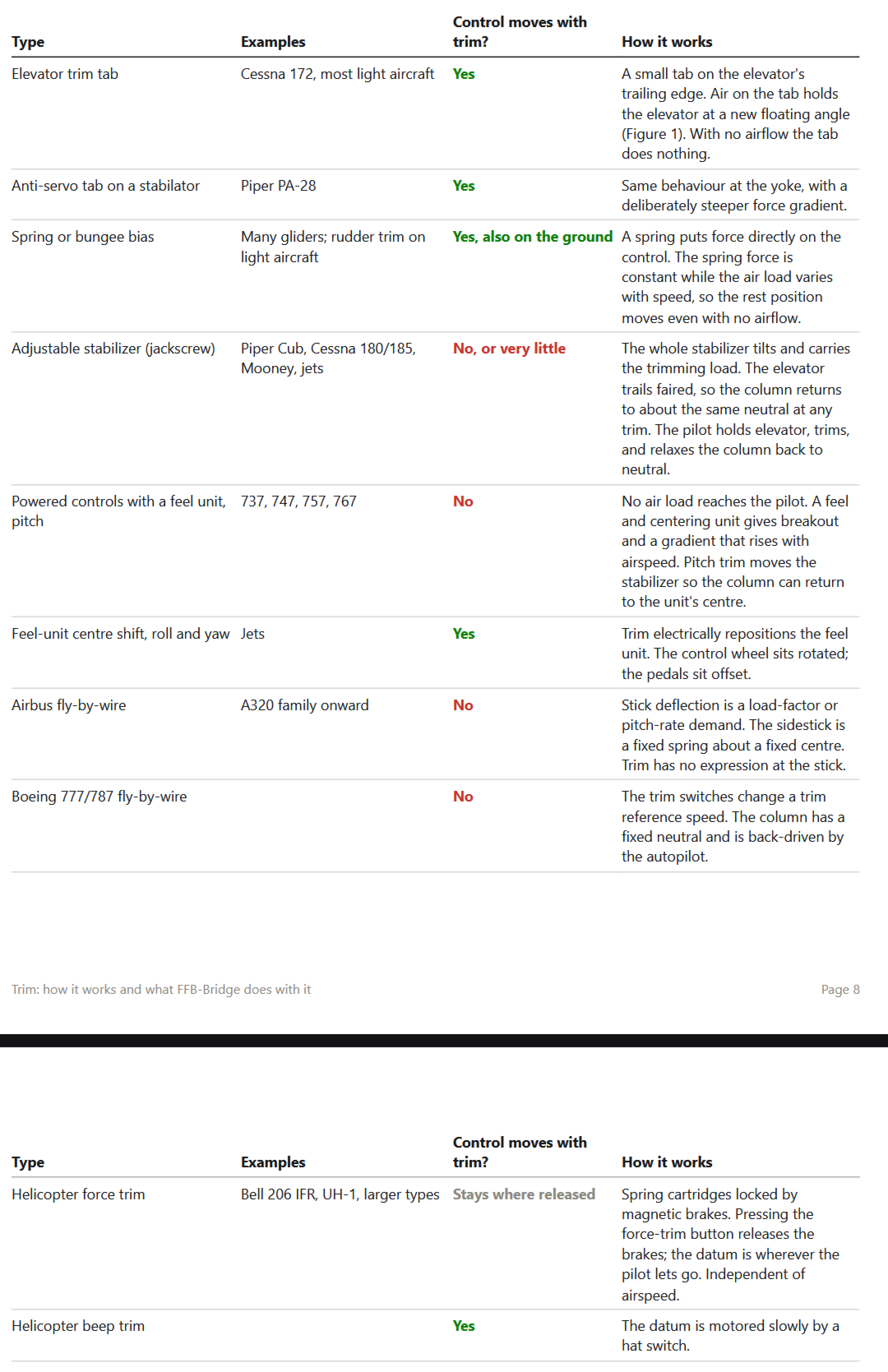
Could you perhaps take a look at the image and tell me if something here looks incorrect?

Report image

I am currently running test harnesses on the default MSFS planes (multiple types) and on various third party (A2A, BlackSquare) planes. I should have something more to share soon.

I'll just say this - what can be done, will be done. MSFS unfortunately does not provide the fine level of detail that X-Plane does, but there's still a lot that can be done. Wait a couple days, I'll have something for you to test.

Report
#21

Thanks a lot for your reply. First, let me say that I never meant to criticise or put any pressure (I fully understand the position of someone running a single-person company on top of a complex piece of software, I do the same with aitc.aero). I also know very well where AI’s contribution to solving thorny problems begins and ends (I must say I find it as powerful as it is exhausting to guide it and monitor its work to catch its mistakes 😅.)

Regarding the table, I have no expertise at all outside GA aircraft, but the first four rows look spot on to me. It’s understood, of course, that the “Yes” in the first two rows means “depending on airflow”. I imagine this one being the hardest case to handle, but it’s probably worth the effort. If FFB-Bridge gets it right even with MSFS as it is, it will be an exceptional achievement that many people have been waiting for !

Keep up the good work, FFB-Bridge is definitely a great piece of software. Of course let me know if you want me to test anything.

Report
#23

fre*****.bil****@gmail.com - is this you? Three Frederiks have emailed me in the past :)

Report
#24

Yes, that’s me, looking forward to testing it :-)

Report
#25
In reply to Frederik's post

You shall have it soon... I'm testing it out right now. Be interested in your thoughts on it. I should have it ready for broader testing in a couple hours.

Report