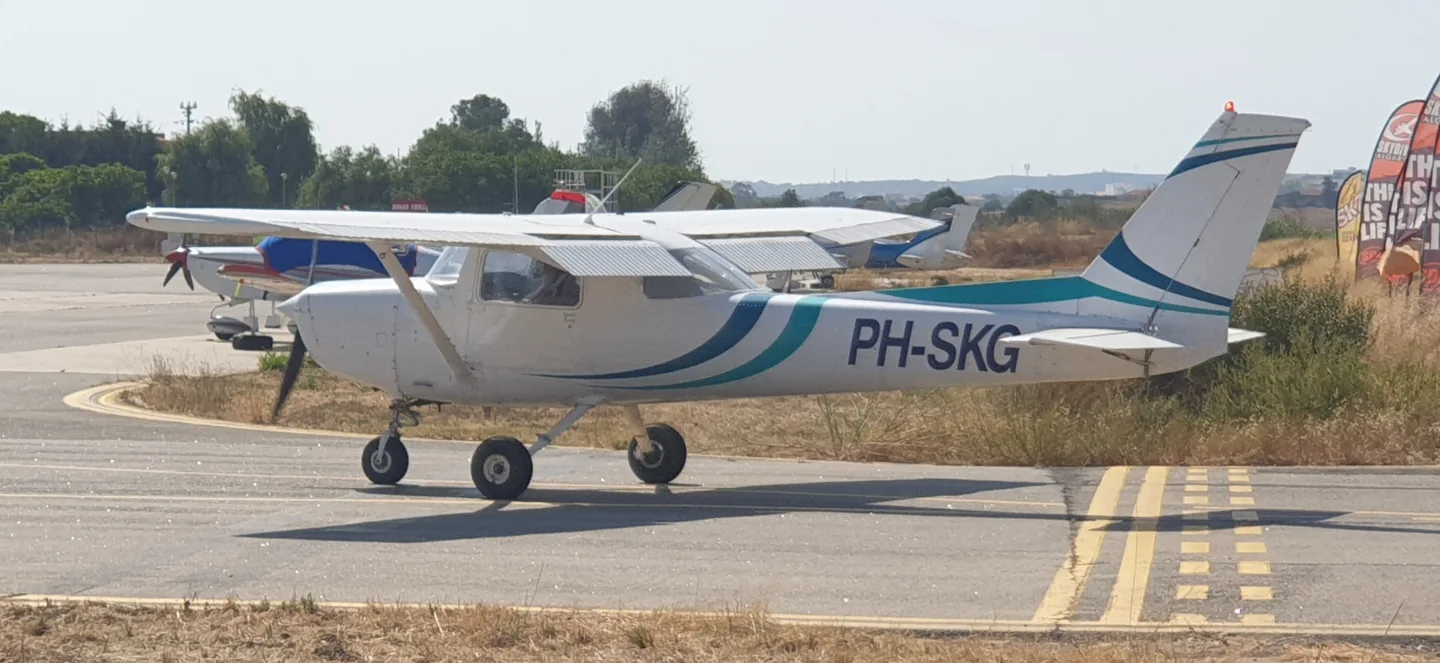
Aircraft libraryCessna 152 / Aerobat
Cessna 152 / AerobatRobbie Klinkenberg · CC BY-SA 4.0 · Cessna 152.

Cessna 152 / Aerobat

A two-seat training single with a high wing and fixed tricycle landing gear.
General aviation6 profile choices

Know the plane

The 152 developed from Cessna's earlier 150, retaining the compact side-by-side cabin and simple high-wing layout. It became a familiar aircraft at flying schools and clubs. The Aerobat branch added equipment and structural provisions for aerobatic use.

Its smaller cabin distinguishes it from the four-seat 172 even when the family styling looks similar. The simulator products identify the standard 152 and Aerobat separately, with their panel layouts and configurations.

Aircraft / family

Propulsion
Single piston↗
Configuration
High wing · Two seats↗

Cessna 152 · Specifications (Cessna 152) · real aircraft; source units retained

Length
24 ft 1 in (7.34 m)↗
Wingspan
33 ft 4 in (10.16 m)↗
Height
8 ft 6 in (2.59 m)↗
Wing area
160 sq ft (15 m² )↗
Empty weight
1,081 lb (490 kg)↗
Gross weight
1,670 lb (757 kg)↗
Powerplant
1 × Lycoming O-235 -L2C flat-4 engine , 110 hp (82 kW)↗
Propellers
2-bladed fixed pitch, 69 inches (175 cm) McCauley or 72 in (183 cm) Sensenich propeller↗
Maximum speed
126 mph (203 km/h, 109 kn)↗
Cruise speed
123 mph (198 km/h, 107 kn)↗

More about this aircraft on AirframeDB

A refinement of the familiar two-seat Cessna

The C152 followed the C150, retaining a two-seat cabin, fixed tricycle undercarriage and fixed-pitch propeller. Its changes included a more powerful Lycoming engine and an increased useful load. Just Flight’s historical introduction dates production from 1977 to 1985, with more than 7,500 aircraft built.

Simple controls with different jobs

The yokes and pedals operate the primary flight controls through mechanical linkages. A separate wheel adjusts the elevator trim tab, while an electric system moves the wing flaps. The two wing fuel tanks feed through a shut-off valve between the seats. These arrangements are described in Just Flight’s C152 systems guide.

An instructor and mechanic gets to know the Aerobat

Griffith writes about the A152 she teaches in and maintains at Fox Aviation. The school calls it Brat, a nickname that reflects the small surprises it can still give students who think they have mastered its habits. To her, it retains the familiar feel of an ordinary 150 or 152, with structural strengthening that makes it useful for stall and spin instruction. She explicitly says she had not flown a full aerobatic programme in this example because the school lacked the required parachutes.

Her account also shows how a working trainer evolves. The school replaced the vacuum instruments with Garmin G5 displays, partly because repeated spin training was shortening gyro life, while retaining much of the straightforward original panel layout. She noticed that this particular Aerobat sometimes resisted developing a strong right-hand spin. Frequent grass-strip use and primary training also led to removing its wheel fairings. Her affection centres on a durable, uncomplicated aeroplane whose individual quirks she knows through both flying and maintenance.

A small trainer opens the door to a first flight

Beckett describes using an Aviat-refurbished Reimagined Cessna 152 to introduce people to general aviation. He appreciates the fresh condition and complete, working panel: familiar round instruments make the aircraft approachable to returning pilots as well as newcomers. The refurbishment matters to his experience because the aeroplane presents the simplicity of a 152 without the missing instruments and inoperative labels that can accompany an elderly training fleet.

He illustrates that role through a familiarisation flight with Alena, a visitor from Germany who had never flown in a light aircraft. Initially she preferred to watch while he taxied. Once airborne, she spent much of their nearly hour-long outing at the controls, alternating flying with sightseeing as her confidence grew. Beckett gave her room to participate at a comfortable level.

Two yellow trainers in a friendly comparison

Hirschman reports a side-by-side comparison in which Mark Evans flew the 1978 Cessna 152 N152UC and Hirschman flew a 1976 Cessna 150M. Both were recently refurbished by Aviat, with full fuel and one pilot aboard. The 152 accelerated ahead and opened a much clearer advantage in the climb. At altitude its speed advantage was small, and Hirschman acknowledged the comparison depended on accurate tachometers and both pilots observing their engine-speed limits.

The slower exercises gave the 150 advantages in their stall and turning comparisons, although Hirschman jokes that his own flying may have influenced the turn result. On approach, he found the 152 less prone to a pronounced sink at idle with full flap than the 150 with its greater flap travel. The lasting memory was the enjoyment of flying the two bright yellow trainers together, with plenty of radio banter. Their observations describe this particular pair and afternoon, including the two pilots' different seats in the comparison.

Public sources 11
  1. Cessna 152Research background · Wikipedia revision 1372668900 · retrieved 2026-09-12
  2. Microsoft Flight Simulator aircraft manuals
  3. MSFS 2024 FAQ and edition aircraft inventory
  4. MSFS 2020 FAQ and edition aircraft inventory
  5. C152 (X-Plane 12)Official developer / designated store catalogue · checked 2026-09-12
  6. C152 (X-Plane 11)Official developer / designated store catalogue · checked 2026-09-12
  7. Cessna Aerobat: CFI’s PerspectiveTamara Griffith · 30 July 2020
  8. Video: Hooking the next generation on flyingJamie Beckett · 2 June 2016
  9. Fly off: 150 versus 152Dave Hirschman · 5 December 2015 · comparison with Mark Evans
  10. C152 X-Plane 12 Operations ManualX-Plane 12 edition · archived 12 September 2026
  11. ICAO Doc 8643 — aircraft type designatorsPublic search data retrieved 2026-09-14; authority update 2026-09-03

How the profile models it

Just Flight C152

Free + Pro
X-Plane 12Just Flight

The 152 developed from Cessna's earlier 150, retaining the compact side-by-side cabin and simple high-wing layout. It became a familiar aircraft at flying schools and clubs. The Aerobat branch added equipment and structural provisions for aerobatic use.

This profile selects Just Flight C152 for X-Plane 12.

Spring resistance builds with the selected airspeed response. A separate aerodynamic term adds speed-dependent control load.

Valid trim provides the configured pressure relief. Autopilot following is off.

This exact revision has not been enabled for public installation.

Controls and trim

The C152 manual describes manual controls, a pitch-trim wheel and electric flaps at 10, 20 and 30 degrees. Pitch trim relieves changing yoke pressure, including flap-related loads. Just Flight's aircraft and WBSim's standard, wheel-fairing and taildragger configurations remain separate products and equipment selections. The Aerobat's extra provisions cannot be inferred for every C152.

C152 2.1.2 public package downloadC152 X-Plane 12 Operations Manual

The selected implementation

Just Flight's XP12 C152 documents manual controls, a trim wheel and electric 10/20/30-degree flaps, without a calibrated physical yoke curve.

C152 X-Plane 12 Operations Manual

About the values

The gains are normalized profile settings. They describe the chosen effect balance; hand force depends on the device and its output limits. IAS references are tuning values rather than operating limits. Physical acceptance of this revision remains pending.

Master gain & control system

Master gain85%

The final overall output scale applied to everything the model produces, before the device cap.

More: everything (spring, loads, effects) gets stronger together.

Less: everything softens together.

Why here: Scales overall profile strength while preserving effect balance, subject to device and output limits.

Forces

Spring strength74%

The base centring force that pulls the stick back to centre. Every other force stacks on it. Too low and the stick feels limp in normal flight; too high and it fights your hand and masks the smaller cues layered above it.

More: firmer centring that resists your hand at all times.

Less: a limper stick that leans on aerodynamic load alone.

Why here: Manual primary controls motivate speed-dependent yoke resistance, with pitch and roll balance supplied by this profile's separate loading terms. The baseline spring is 0.74. Its low-speed blend reaches baseline strength at 47.5 KIAS.

C152 2.1.2 public package downloadC152 X-Plane 12 Operations Manual
Spring deadband4%

A small neutral zone around centre where the spring stays quiet, so tiny movements at rest don't chatter. Wider is calmer but looser; narrower is more precise but can twitch around centre.

More: a calmer but looser centre with more free play.

Less: a tighter centre that may chatter at rest.

Why here: Sets travel around the centre before the baseline spring resists. Smaller values engage it sooner.

Overall aerodynamic load80%

A master scale over both sustained axis loads, applied before their independent balance. Profiles normally leave this alone and tune the two axis loads instead.

More: both axes load up harder.

Less: both axes lighten together.

Why here: The aerodynamic-load gain is 0.8 with an indicated-speed reference of 95 KIAS. This supplies speed-dependent loading alongside the spring.

Airspeed blendingTrue

Enables the low-speed spring engagement window (start/full knots above). Off, the spring is constant at all speeds.

Why here: Allows baseline spring strength to rise with indicated airspeed where the control law permits it.

Low-speed spring floor50%

How much of the spring survives at a standstill, before airspeed can build any aerodynamic force. A high floor keeps the parked stick firm; a low floor gives the loose, cable-slack feel of a parked light aircraft.

More: a firmer stick while parked and taxiing.

Less: a floppier parked stick that only wakes up with airspeed.

Why here: Sets low-speed spring strength as a fraction of baseline when blending is enabled. One keeps full strength.

Spring engagement start8 kt

The airspeed where the spring begins climbing from its low-speed floor toward full strength: the controls "coming alive" on the takeoff roll.

Why here: Sets the IAS where the low-speed spring blend starts rising. This is a feel threshold, not a flight limit.

Spring engagement full47.5 kt

The airspeed where the spring reaches full strength. Between the start and this point, centring firms up progressively as airflow builds over the controls.

Why here: Sets the IAS where the low-speed blend reaches baseline strength; high-speed stiffening also uses it.

Force tuning speed95

The indicated airspeed where aerodynamic load reaches its designed full level. It anchors the whole load curve to the aircraft's real speed range: a 172 loads up by 110 knots, a jet much later.

More: loads arrive later; the stick stays light up to a higher speed.

Less: loads arrive earlier and cruise feels heavier.

Why here: Sets the IAS reference for aerodynamic loading. It is an estimate, not published cruise TAS or a flight limit.

Centre firmness vs speed15%

How much the centring itself stiffens with speed, on top of the deflection loads. Zero keeps centre feel constant; more makes the stick centre harder at cruise and looser in the pattern.

More: a centre that hardens noticeably as you go faster.

Less: constant centre feel at every speed.

Why here: The high-speed spring-stiffening gain is 0.15. It strengthens the permitted spring response above 47.5 KIAS, with the squared-speed ratio capped at 5.

Centre stiffening cap5

The upper limit on speed-driven centre stiffening, so very fast flight can't wind the spring up without bound.

More: more total stiffening allowed at high speed.

Less: stiffening clamps off sooner.

Why here: Limits the squared airspeed ratio used for high-speed spring stiffening; it is not a device-force cap.

Aileron load72%

The sustained roll load from aileron deflection and airspeed, balanced independently of pitch. Together with the elevator load it sets the control-harmony ratio reviewers talk about.

More: heavier roll forces.

Less: lighter, quicker-feeling ailerons.

Why here: Roll and pitch aerodynamic scales are 0.72 and 1, respectively. They set the aerodynamic axis balance. No custom spring-travel curve is enabled.

Elevator load100%

The sustained pitch load from elevator deflection and airspeed, balanced independently of roll. This is the main lever behind a type's pitch weight. It does not touch aileron, spring, trim, or buffet forces.

More: heavier sustained pitch forces at speed.

Less: a lighter elevator that takes less muscle to hold.

Why here: Scales pitch aerodynamic loading; pitch spring travel and trim responses are separate settings.

Max output force55%

A cap on each steady pitch or roll force before it reaches the device, guarding against slamming or saturating the hardware in strong maneuvers.

More: stronger peak steady forces before clipping.

Less: a gentler ceiling; hard maneuvers flatten out sooner.

Why here: Caps directed-force output. Native spring effects and device limits remain separate.

Trim

Trim relief (elevator)30%

How strongly elevator trim relieves held pitch force and shifts where the stick settles. At 100%, a properly trimmed aircraft needs no held pressure, the trim-away-the-load workflow of real flying.

More: trim removes more of the held pitch force; at 100% full trim zeroes it.

Less: you keep holding force even when trimmed.

Why here: The pitch-trim wheel supports elevator pressure relief; it does not establish an in-flight aileron-trim channel. Pitch authority 0.3 provides load relief and permitted centre movement; roll authority is 0.

C152 2.1.2 public package downloadC152 X-Plane 12 Operations Manual
Trim relief (aileron)0%

The same relief for roll trim. Most GA types have no real aileron trim, so this stays at zero; types with roll trim get a matching value.

More: roll trim removes more held roll force.

Less: roll trim does less.

Why here: Scales supported roll-trim relief and permitted centre movement. Zero removes roll response.

Effect gains · ground

Runway rumble40%

Rolling surface vibration from wheel speed and surface type: pavement, grass, or gravel under the gear.

More: louder surface texture through the stick.

Less: a smoother taxi.

Why here: Sets rolling texture strength, modified by speed, surface and undercarriage configuration.

Gear bumps25%

Short discrete bumps from expansion joints, ruts, and rough surface, punctuating the continuous rumble.

More: sharper hits from joints and ruts.

Less: softer ground detail.

Why here: Sets gear-bump texture during ground motion, separate from touchdown impact.

Effect gains · airframe

Stall buffet35%

Airframe shake approaching the stall and while the stall warning is active: how loudly this wing announces it is unhappy. Types with a crisp break get modest buffet and let the horn carry the warning.

More: a louder pre-stall shake.

Less: a quieter wing; the horn carries the warning.

Why here: Sets stall-buffet strength. Zero removes the cue without changing simulator stalls or warnings.

Mach buffet0%

Transonic buffet approaching the Mach limit. Meaningful for jets near MMO, zero for pistons and turboprops that never get there.

More: stronger transonic buffet near the Mach limit.

Less: a smoother high-Mach ride.

Why here: Sets high-Mach buffet strength; onset and full-strength thresholds are separate.

Flap buffet0%

Low-frequency airframe vibration with flaps extended into the airflow, in the speed window where they actually work the air.

More: a rougher ride with flaps working the air.

Less: smoother approach flap.

Why here: Sets flap buffet at the configured position and speed gates. Flap movement texture is separate.

Gear buffet0%

Airframe drumming from retractable gear hanging in the airstream. Zero for fixed-gear types, where the airframe never changes shape.

More: more drumming with the wheels hanging out.

Less: cleaner gear-down flight.

Why here: Sets gear aerodynamic buffet; movement and ground-contact cues are separate.

Stick shaker50%

The dedicated stall stick-shaker buzz, fired by the aircraft's own stall-warning system. Only types with a real shaker get a value; everything else relies on aerodynamic buffet and the horn.

More: a harder stick-shaker buzz.

Less: a subtler shaker.

Why here: Sets triggered shaker strength; inactive while the shaker feature is disabled.

Effect gains · engine, mechanical & drag

Touchdown thump65%

The one-shot kick when the wheels meet the runway, scaled by sink rate: a greaser whispers, a firm arrival thumps.

More: a harder kick at touchdown.

Less: softer arrivals.

Why here: Sets landing-impact strength; landing telemetry and response shape determine the pulse.

Reverse rumble0%

Rollout vibration while reverse thrust or beta-range props are working. Zero for types without reverse.

More: a rougher rollout under reverse.

Less: quieter reverse.

Why here: Sets reverse-thrust vibration with valid reverser and engine conditions. Zero removes the cue.

Engine rumble12%

Continuous powerplant vibration following RPM between idle and full power, the ever-present reminder that something is burning fuel up front.

More: more engine through the stick.

Less: a quieter powerplant.

Why here: Sets estimated engine vibration using configured telemetry and response, not measured cockpit vibration.

Flap motion12%

Continuous vibration only while the sim reports the flap surfaces actually travelling. It follows real actuator motion and failures, not an estimated timer.

More: more vibration while the flap surfaces travel.

Less: quieter flap runs.

Why here: Sets texture from observed flap movement; a command without movement does not establish the cue.

Autopilot follow

AP follow authority10%

How far autopilot commands may physically move the stick. Kept tiny in MSFS, where a moved axis can read back as pilot input; zero disables following entirely.

More: the autopilot visibly moves your stick further.

Less: a barely perceptible follow.

Why here: Sets admitted AP-follow gain, not a percentage of travel. Runtime ownership and input limits still apply.

Stick feel

StickFeel · Trim feel enabledFalse

Whether this feature is active in this profile.

Why here: Retained for compatibility and group membership. Trim relief, rather than this flag, controls centre movement.

StickFeel · Trim relief enabledTrue

Whether this feature is active in this profile.

Why here: Allows trim relief with supported control law and valid telemetry. Axis authorities set its amount.

StickFeel · Force trim enabledFalse

Whether this feature is active in this profile.

Why here: Enables local force trim, separate from aircraft-owned trim and add-on integration qualification.

StickFeel · G load enabledTrue

Whether this feature is active in this profile.

Why here: Allows load-factor changes to modify permitted spring laws. Passive fly-by-wire feel can suppress it.

StickFeel · Rate damping enabledTrue

Whether this feature is active in this profile.

Why here: Enables rate damping with the configured coefficients and control law.

Autopilot

Autopilot · Follow enabledFalse

Whether this feature is active in this profile.

Why here: Autopilot following is off; the configured spring and load retain the hardware feel.

Autopilot · Neutral hold enabledFalse

Whether this feature is active in this profile.

Why here: Permits centering hold during a supported AP state, separate from following a moving target.

Autopilot · Neutral hold strength0.6

Why here: Sets admitted AP neutral-hold strength; inactive while neutral hold is disabled.

Aero

Aero · EnabledTrue

Whether this feature is active in this profile.

Why here: Enables aerodynamic cues; each still needs nonzero strength and its simulator conditions.

Aero · Max flap index3

Where this effect reaches full strength (or has fully faded, for washouts).

More: a more gradual build to a later peak.

Less: a quicker build.

Why here: Sets the final flap index for detent normalization. UP plus three detents uses maximum index3.

Aero · Min flap index2

Where this effect begins fading in.

More: the effect begins later.

Less: it begins earlier.

Why here: Sets the first flap detent that admits buffet; this is a handle index, not degrees.

Aero · Shaker enabledFalse

Whether this feature is active in this profile.

Why here: Permits shaker at supported warning conditions; the switch does not establish aircraft equipment.

Ground

Ground · EnabledTrue

Whether this feature is active in this profile.

Why here: Enables ground effects; each still needs its own strength and contact or motion telemetry.

Engine

Engine · EnabledTrue

Whether this feature is active in this profile.

Why here: Enables engine cues with nonzero settings and valid running-engine telemetry.

Mechanical

Mechanical · EnabledTrue

Whether this feature is active in this profile.

Why here: Enables accessory cues with configured strengths and observed accessory movement.

Mechanical · Gain0

The strength of this effect.

More: a stronger effect.

Less: a weaker one.

Why here: Sets texture from observed gear movement, separate from aerodynamic and touchdown effects.

All profile settings
Estimated profile settings
ParameterValueWhat it controls and why
Spring strength0.74 Manual primary controls motivate speed-dependent yoke resistance, with pitch and roll balance supplied by this profile's separate loading terms. The baseline spring is 0.74. Its low-speed blend reaches baseline strength at 47.5 KIAS.
Spring deadband0.045 Sets travel around the centre before the baseline spring resists. Smaller values engage it sooner.
Force gain0.8 The aerodynamic-load gain is 0.8 with an indicated-speed reference of 95 KIAS. This supplies speed-dependent loading alongside the spring.
Master gain0.85 Scales overall profile strength while preserving effect balance, subject to device and output limits.
Dynamic-pressure blendTrue Allows baseline spring strength to rise with indicated airspeed where the control law permits it.
Minimum spring factor0.5 Sets low-speed spring strength as a fraction of baseline when blending is enabled. One keeps full strength.
Spring wake-up speed8 ktSets the IAS where the low-speed spring blend starts rising. This is a feel threshold, not a flight limit.
Spring full-strength speed47.5 ktSets the IAS where the low-speed blend reaches baseline strength; high-speed stiffening also uses it.
Force tuning speed95 ktSets the IAS reference for aerodynamic loading. It is an estimate, not published cruise TAS or a flight limit.
Airspeed spring stiffening0.15 The high-speed spring-stiffening gain is 0.15. It strengthens the permitted spring response above 47.5 KIAS, with the squared-speed ratio capped at 5.
Airspeed stiffening cap5 Limits the squared airspeed ratio used for high-speed spring stiffening; it is not a device-force cap.
Aileron force scale0.72 Roll and pitch aerodynamic scales are 0.72 and 1, respectively. They set the aerodynamic axis balance. No custom spring-travel curve is enabled.
Elevator force scale1 Scales pitch aerodynamic loading; pitch spring travel and trim responses are separate settings.
Maximum output force0.55 Caps directed-force output. Native spring effects and device limits remain separate.
StickFeel · Trim feel enabledFalse Retained for compatibility and group membership. Trim relief, rather than this flag, controls centre movement.
StickFeel · Trim relief enabledTrue Allows trim relief with supported control law and valid telemetry. Axis authorities set its amount.
StickFeel · Elevator authority0.3 The pitch-trim wheel supports elevator pressure relief; it does not establish an in-flight aileron-trim channel. Pitch authority 0.3 provides load relief and permitted centre movement; roll authority is 0.
StickFeel · Aileron authority0 Scales supported roll-trim relief and permitted centre movement. Zero removes roll response.
StickFeel · Force trim enabledFalse Enables local force trim, separate from aircraft-owned trim and add-on integration qualification.
StickFeel · G load enabledTrue Allows load-factor changes to modify permitted spring laws. Passive fly-by-wire feel can suppress it.
StickFeel · Rate damping enabledTrue Enables rate damping with the configured coefficients and control law.
Autopilot · Follow enabledFalse Autopilot following is off; the configured spring and load retain the hardware feel.
Autopilot · Follow authority0.1 Sets admitted AP-follow gain, not a percentage of travel. Runtime ownership and input limits still apply.
Autopilot · Neutral hold enabledFalse Permits centering hold during a supported AP state, separate from following a moving target.
Autopilot · Neutral hold strength0.6 Sets admitted AP neutral-hold strength; inactive while neutral hold is disabled.
Aero · EnabledTrue Enables aerodynamic cues; each still needs nonzero strength and its simulator conditions.
Aero · Gain0.35 Sets stall-buffet strength. Zero removes the cue without changing simulator stalls or warnings.
Aero · Gain0 Sets high-Mach buffet strength; onset and full-strength thresholds are separate.
Aero · Gain0 Sets flap buffet at the configured position and speed gates. Flap movement texture is separate.
Aero · Max flap index3 Sets the final flap index for detent normalization. UP plus three detents uses maximum index3.
Aero · Min flap index2 Sets the first flap detent that admits buffet; this is a handle index, not degrees.
Aero · Gain0 Sets gear aerodynamic buffet; movement and ground-contact cues are separate.
Aero · Shaker enabledFalse Permits shaker at supported warning conditions; the switch does not establish aircraft equipment.
Aero · Amplitude0.5 Sets triggered shaker strength; inactive while the shaker feature is disabled.
Ground · EnabledTrue Enables ground effects; each still needs its own strength and contact or motion telemetry.
Ground · Gain0.4 Sets rolling texture strength, modified by speed, surface and undercarriage configuration.
Ground · Gain0.25 Sets gear-bump texture during ground motion, separate from touchdown impact.
Ground · Gain0.65 Sets landing-impact strength; landing telemetry and response shape determine the pulse.
Ground · Gain0 Sets reverse-thrust vibration with valid reverser and engine conditions. Zero removes the cue.
Engine · EnabledTrue Enables engine cues with nonzero settings and valid running-engine telemetry.
Engine · Gain0.12 Sets estimated engine vibration using configured telemetry and response, not measured cockpit vibration.
Mechanical · EnabledTrue Enables accessory cues with configured strengths and observed accessory movement.
Mechanical · Gain0.12 Sets texture from observed flap movement; a command without movement does not establish the cue.
Mechanical · Gain0 Sets texture from observed gear movement, separate from aerodynamic and touchdown effects.
Public sources 12
  1. Cessna 152Research background · Wikipedia revision 1372668900 · retrieved 2026-09-12
  2. C152 2.1.2 public package downloadArchived package2.1.2; read-only manifest and three SimObject aircraft/flight_model/system configs in review-evidence/wbsim-c152; manifest.json and three SimObjects aircraft/flight_model/systems configurations
  3. C152 X-Plane 12 Operations ManualPDF 13, flight controls and flapsX-Plane 12 edition · archived 12 September 2026
  4. Microsoft Flight Simulator aircraft manuals
  5. MSFS 2024 FAQ and edition aircraft inventory
  6. MSFS 2020 FAQ and edition aircraft inventory
  7. C152 (X-Plane 12)Official developer / designated store catalogue · checked 2026-09-12
  8. C152 (X-Plane 11)Official developer / designated store catalogue · checked 2026-09-12
  9. Cessna Aerobat: CFI’s PerspectiveTamara Griffith · 30 July 2020
  10. Video: Hooking the next generation on flyingJamie Beckett · 2 June 2016
  11. Fly off: 150 versus 152Dave Hirschman · 5 December 2015 · comparison with Mark Evans
  12. ICAO Doc 8643 — aircraft type designatorsPublic search data retrieved 2026-09-14; authority update 2026-09-03

Community & corrections

If your time in the type says this page got something wrong, correct it here.

Pilot corrections

Fly this aircraft? Correct this page.

This page is built from cited references, and real time in the type beats a citation. Quote the claim that reads wrong and tell us what the actual aircraft does. Corrections go to the maintainer for review and feed the next revision of this research.

Hangar talk

Open conversation about flying and tuning the Cessna 152 / Aerobat, in the community forum. Corrections above go privately to the maintainer; hangar talk is public.

No hangar talk for the Cessna 152 / Aerobat yet. Be the first.

Community

Community profiles for this aircraft

No community profiles for this aircraft yet. Tuned it your way? Share a profile and it will appear here.