Aircraft libraryBell 206 family
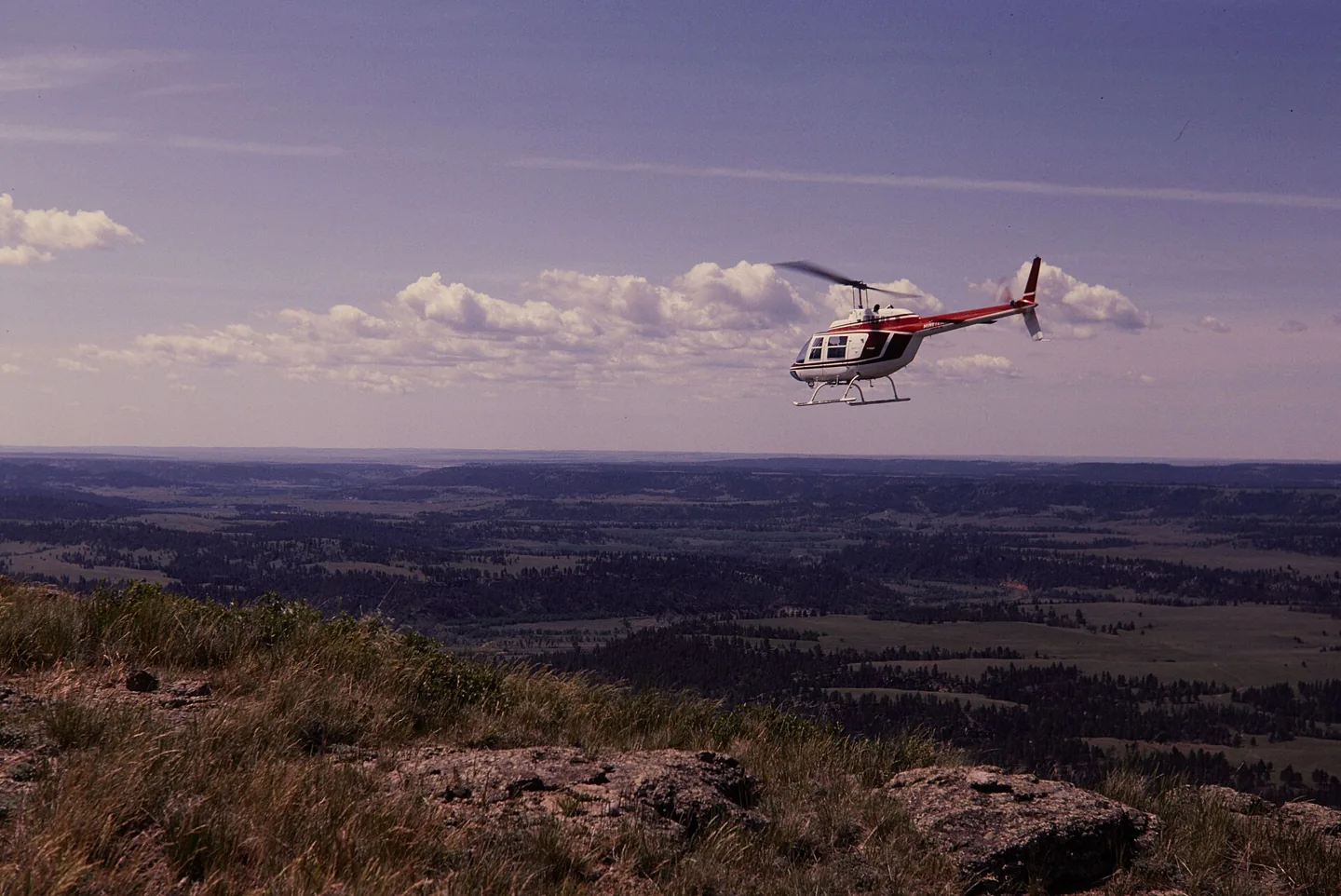
Bell 206 familyThomas C. Gray / National Park Service · Public domain · Bell 206 above Devils Tower National Monument

Bell 206 family

Hydraulically assisted cyclic controls with selected friction and trim behaviour, plus two-blade rotor cues.
HelicopterB0610 profile choices

Know the plane

Bell reworked an unsuccessful military observation-helicopter proposal into the commercial JetRanger. The resulting 206 family became widely used for passenger transport, observation and utility work. The familiar single-engine versions use a two-bladed main rotor.

The 206B JetRanger and stretched 206L LongRanger are separate branches of that story. Their cabins, engines and equipment are not identical. Cowan documents each model's trim, autopilot and stability-assistance features separately.

Bell 206 JetRanger

Powerplant
Rolls-Royce 250-C20J, 420 shp↗
Seats
5↗
Max takeoff weight
3,200 lb (1,451 kg)↗
Main rotor diameter
33 ft 4 in (10.16 m)↗
Length overall
39 ft 8 in (12.09 m)↗
Never exceed (Vne)
122 KIAS↗
Cruise
≈110 kt↗
Service ceiling
13,500 ft↗
Range
≈374 nm↗
Usable fuel
91 US gal↗
Rotor system
Two-blade teetering, hydraulically boosted↗
First flight (206A)
1966↗

More about this aircraft on AirframeDB

The expedition aircraft carried equipment beyond a normal cabin

Powerhouse records additional fuel capacity, navigation equipment, an autopilot and camera installations in VH-DIK. Its description also identifies survival equipment and later North Pole additions, showing why this individual expedition aircraft should not be treated as an ordinary passenger JetRanger.

Development milestones

First flight: December 8, 1962 (206) January 10, 1966 (206A)

Developed from: Bell YOH-4

Force trim has a mechanical basis

The 206B-3 manual describes magnetic brakes and force-gradient springs in the cyclic circuits, alongside adjustable control friction. This describes the documented trim equipment; a simulator profile must separately state whether local force trim is enabled.

A two-blade rotor brings a recognisable rhythm

The FAA handbook explains the characteristic two-per-revolution vibration of a two-bladed rotor. It may be felt through the cyclic as well as the airframe. The profile uses a rotor-related texture to suggest that rhythm; its gain is a simulator setting, not a measured hand force.

A childhood airshow ride becomes a training goal

An eight-minute JetRanger ride at Farnborough when he was nine stayed with Berry for years. A later trial lesson renewed that enthusiasm, but adding the type to his licence meant a difficult choice about a limited training budget. He decided that learning the turbine helicopter was worth the additional commitment.

The course challenged the confidence he had built in the R22. Unfamiliar hydraulic controls, greater weight and a new cockpit made previously comfortable tasks demanding again. Berry especially valued instructor Paul White’s calm approach and emphasis on understanding the aircraft. His account is openly affectionate, including the pleasure of the turbine’s sound, but its strongest theme is the mental adjustment from feeling competent in one helicopter to becoming a learner in another.

A winter demonstration of the developing JetRanger

Middlebrook introduced the reporting team to a JetRanger II from Atlantic Aviation at Teterboro. The aircraft’s cabin helped explain its appeal beyond traditional utility work: entry was straightforward, the windows were generous and the reviewers found useful room in the occupied seats. The middle rear position was less accommodating, a detail retained alongside the favourable first impression.

Flying on a cool winter day, the team found quick control response that could encourage overcorrection at first. The approach also required adjustment to the helicopter’s ability to retain speed. They measured cabin noise and described the vibration rather than relying only on appearance. Their report preserves a contemporary introduction to the developing turbine transport, while distinguishing the conditions they experienced from comments other pilots supplied about turbulence.

Filming the world while flying around it alone

Smith’s journey required him to fly, navigate, communicate and record the view for a documentary. The museum’s account describes the exhaustion of the first Atlantic leg, after which he considered abandoning the attempt. Family reunions and periods of maintenance punctuated a trip completed in three stages, with substantial help from people arranging matters on the ground.

Crossing the North Pacific brought another unusual logistical task: finding a cargo ship able to provide a refuelling stop along the route. The successful return to Texas in July 1983 completed the circumnavigation. Smith continued using the helicopter for further adventures before flying it to the Powerhouse Museum in 1990. The donated aircraft and film preserve both the record and the personal work involved in making the journey visible to others.

Public sources 28
  1. Bell 206Research background · Wikipedia revision 1373277311 · retrieved 2026-09-12
  2. CowanSim 206B3 user manual · MSFS
  3. CowanSim 206L3 user manual · MSFS
  4. CowanSim manuals
  5. Microsoft Flight Simulator aircraft manuals
  6. SAS Autopilot Manual
  7. B206 releases and manual
  8. User Manual for Microsoft Flight Simulator
  9. SAS Manual
  10. User Manual
  11. X-Plane aircraft and avionics manuals
  12. 206B3 for MSFSOfficial developer / designated store catalogue · checked 2026-09-12
  13. 206L3 for MSFSOfficial developer / designated store catalogue · checked 2026-09-12
  14. 206B3 for X-PlaneOfficial developer / designated store catalogue · checked 2026-09-12
  15. 206L3 for X-PlaneOfficial developer / designated store catalogue · checked 2026-09-12
  16. B-206Official developer / designated store catalogue · checked 2026-09-12
  17. Tur-bine or not Tur-bine?James Berry · May 2021, personal type-rating account
  18. Pilot Report: Bell JetRanger IIUncredited May 1973 flight report, republished March 2018; demonstration by Tuck Middlebrook
  19. Dick Smith Australian Explorer, VH-DIKDick Smith’s journey documented by curator Margaret Simpson; object 90/816
  20. Forty years since the first solo helicopter circumnavigationManufacturer retrospective · 2023
  21. ICAO Doc 8643 — aircraft type designatorsPublic search data retrieved 2026-09-14; authority update 2026-09-03
  22. B206 catalogue sourceProduct listing captured 2026-09-24; edition scope from the reviewed catalogue
  23. Bell 206B-3 Flight ManualOriginal published Bell 206 reference; scope given beside each claim
  24. FAA TCDS H2SWPrint or archived reference; no public link
  25. Bell published dataPrint or archived reference; no public link
  26. Vertical Magazine — Bell-heritage pilot on force-trim techniqueOriginal published Bell 206 reference; scope given beside each claim
  27. FAA Helicopter Flying Handbook — ETL, transverse flow, VRSOriginal published Bell 206 reference; scope given beside each claim
  28. Greenspun — Bell 505 (206L4 rotor) vibration notesOriginal published Bell 206 reference; scope given beside each claim

How the profile models it

Bell 206 JetRanger

Free + Pro
MSFS 2024MSFS 2020X-Plane 12X-Plane 11

Bell reworked an unsuccessful military observation-helicopter proposal into the commercial JetRanger. The resulting 206 family became widely used for passenger transport, observation and utility work. The familiar single-engine versions use a two-bladed main rotor.

The factory starting point selects Bell 206 JetRanger across MSFS 2024, MSFS 2020, X-Plane 12, X-Plane 11.

Spring resistance builds with the selected airspeed response. A separate aerodynamic term adds speed-dependent control load.

Local force trim holds the selected hardware centre. Autopilot following is off.

Cyclic damping is on. Its configured gain is 0.35; it resists hardware motion separately from the spring and aircraft stabilization.

This exact revision has not been enabled for public installation.

Controls and trim

The Bell 206B-3 flight manual describes adjustable cyclic and collective friction, together with magnetic brakes and force-gradient springs in its cyclic force-trim system. CowanSim's 206B3 and longer-cabin 206L3 have separate manuals and optional HeliSAS procedures. FlyInside and DreamFoil implement different dynamics and stability options. A software trim-release command, sound or stability setting does not provide a continuous physical cyclic-neutral position.

CowanSim 206B3 user manual — MSFSCowanSim HeloSAS autopilot manualCowanSim 206B3 user manual — X-PlaneCowanSim 206L3 user manual — MSFSFlyInside B206 user manual — MSFSBell 206B-3 Flight Manual

About the values

The gains are normalized profile settings. They describe the chosen effect balance; hand force depends on the device and its output limits. IAS references are tuning values rather than operating limits. Physical acceptance of this revision remains pending.

Master gain & control system

Master gain85%

The final overall output scale applied to everything the model produces, before the device cap.

More: everything (spring, loads, effects) gets stronger together.

Less: everything softens together.

Why here: Scales overall profile strength while preserving effect balance, subject to device and output limits.

Forces

Spring strength0%

The base centring force that pulls the stick back to centre. Every other force stacks on it. Too low and the stick feels limp in normal flight; too high and it fights your hand and masks the smaller cues layered above it.

More: firmer centring that resists your hand at all times.

Less: a limper stick that leans on aerodynamic load alone.

Why here: Magnetic brakes and force-gradient springs provide mechanism context for cyclic centering; longer cabin or rotor audio does not establish a heavier cyclic. The baseline spring is 0. Its low-speed blend reaches baseline strength at 55 KIAS.

CowanSim 206B3 user manual — MSFSCowanSim HeloSAS autopilot manualCowanSim 206B3 user manual — X-PlaneCowanSim 206L3 user manual — MSFSFlyInside B206 user manual — MSFSBell 206B-3 Flight Manual
Spring deadband2%

A small neutral zone around centre where the spring stays quiet, so tiny movements at rest don't chatter. Wider is calmer but looser; narrower is more precise but can twitch around centre.

More: a calmer but looser centre with more free play.

Less: a tighter centre that may chatter at rest.

Why here: Sets travel around the centre before the baseline spring resists. Smaller values engage it sooner.

Overall aerodynamic load35%

A master scale over both sustained axis loads, applied before their independent balance. Profiles normally leave this alone and tune the two axis loads instead.

More: both axes load up harder.

Less: both axes lighten together.

Why here: The aerodynamic-load gain is 0.35 with an indicated-speed reference of 100 KIAS. This supplies speed-dependent loading alongside the spring.

Spring engagement full55 kt

The airspeed where the spring reaches full strength. Between the start and this point, centring firms up progressively as airflow builds over the controls.

Why here: Sets the IAS where the low-speed blend reaches baseline strength; high-speed stiffening also uses it.

Centre firmness vs speed0%

How much the centring itself stiffens with speed, on top of the deflection loads. Zero keeps centre feel constant; more makes the stick centre harder at cruise and looser in the pattern.

More: a centre that hardens noticeably as you go faster.

Less: constant centre feel at every speed.

Why here: Adds permitted spring resistance above the full-blend speed. Zero removes this high-speed increase.

Centre stiffening cap5

The upper limit on speed-driven centre stiffening, so very fast flight can't wind the spring up without bound.

More: more total stiffening allowed at high speed.

Less: stiffening clamps off sooner.

Why here: Limits the squared airspeed ratio used for high-speed spring stiffening; it is not a device-force cap.

Aileron load100%

The sustained roll load from aileron deflection and airspeed, balanced independently of pitch. Together with the elevator load it sets the control-harmony ratio reviewers talk about.

More: heavier roll forces.

Less: lighter, quicker-feeling ailerons.

Why here: Roll and pitch aerodynamic scales are 1 and 1, respectively. They set the aerodynamic axis balance. No custom spring-travel curve is enabled.

Elevator load100%

The sustained pitch load from elevator deflection and airspeed, balanced independently of roll. This is the main lever behind a type's pitch weight. It does not touch aileron, spring, trim, or buffet forces.

More: heavier sustained pitch forces at speed.

Less: a lighter elevator that takes less muscle to hold.

Why here: Scales pitch aerodynamic loading; pitch spring travel and trim responses are separate settings.

Max output force55%

A cap on each steady pitch or roll force before it reaches the device, guarding against slamming or saturating the hardware in strong maneuvers.

More: stronger peak steady forces before clipping.

Less: a gentler ceiling; hard maneuvers flatten out sooner.

Why here: Caps directed-force output. Native spring effects and device limits remain separate.

Airspeed blendingTrue

Enables the low-speed spring engagement window (start/full knots above). Off, the spring is constant at all speeds.

Why here: Allows baseline spring strength to rise with indicated airspeed where the control law permits it.

Low-speed spring floor100%

How much of the spring survives at a standstill, before airspeed can build any aerodynamic force. A high floor keeps the parked stick firm; a low floor gives the loose, cable-slack feel of a parked light aircraft.

More: a firmer stick while parked and taxiing.

Less: a floppier parked stick that only wakes up with airspeed.

Why here: Sets low-speed spring strength as a fraction of baseline when blending is enabled. One keeps full strength.

Spring engagement start15 kt

The airspeed where the spring begins climbing from its low-speed floor toward full strength: the controls "coming alive" on the takeoff roll.

Why here: Sets the IAS where the low-speed spring blend starts rising. This is a feel threshold, not a flight limit.

Force tuning speed100

The indicated airspeed where aerodynamic load reaches its designed full level. It anchors the whole load curve to the aircraft's real speed range: a 172 loads up by 110 knots, a jet much later.

More: loads arrive later; the stick stays light up to a higher speed.

Less: loads arrive earlier and cruise feels heavier.

Why here: Sets the IAS reference for aerodynamic loading. It is an estimate, not published cruise TAS or a flight limit.

Trim

Trim relief (elevator)30%

How strongly elevator trim relieves held pitch force and shifts where the stick settles. At 100%, a properly trimmed aircraft needs no held pressure, the trim-away-the-load workflow of real flying.

More: trim removes more of the held pitch force; at 100% full trim zeroes it.

Less: you keep holding force even when trimmed.

Why here: Scales supported pitch-trim relief and permitted centre movement. Zero removes pitch response.

Trim relief (aileron)30%

The same relief for roll trim. Most GA types have no real aileron trim, so this stays at zero; types with roll trim get a matching value.

More: roll trim removes more held roll force.

Less: roll trim does less.

Why here: Scales supported roll-trim relief and permitted centre movement. Zero removes roll response.

Effect gains · ground

Runway rumble15%

Rolling surface vibration from wheel speed and surface type: pavement, grass, or gravel under the gear.

More: louder surface texture through the stick.

Less: a smoother taxi.

Why here: Sets rolling texture strength, modified by speed, surface and undercarriage configuration.

Gear bumps0%

Short discrete bumps from expansion joints, ruts, and rough surface, punctuating the continuous rumble.

More: sharper hits from joints and ruts.

Less: softer ground detail.

Why here: Sets gear-bump texture during ground motion, separate from touchdown impact.

Effect gains · airframe

Stick shaker50%

The dedicated stall stick-shaker buzz, fired by the aircraft's own stall-warning system. Only types with a real shaker get a value; everything else relies on aerodynamic buffet and the horn.

More: a harder stick-shaker buzz.

Less: a subtler shaker.

Why here: Sets triggered shaker strength; inactive while the shaker feature is disabled.

Stall buffet0%

Airframe shake approaching the stall and while the stall warning is active: how loudly this wing announces it is unhappy. Types with a crisp break get modest buffet and let the horn carry the warning.

More: a louder pre-stall shake.

Less: a quieter wing; the horn carries the warning.

Why here: Sets stall-buffet strength. Zero removes the cue without changing simulator stalls or warnings.

Mach buffet0%

Transonic buffet approaching the Mach limit. Meaningful for jets near MMO, zero for pistons and turboprops that never get there.

More: stronger transonic buffet near the Mach limit.

Less: a smoother high-Mach ride.

Why here: Sets high-Mach buffet strength; onset and full-strength thresholds are separate.

Flap buffet0%

Low-frequency airframe vibration with flaps extended into the airflow, in the speed window where they actually work the air.

More: a rougher ride with flaps working the air.

Less: smoother approach flap.

Why here: Sets flap buffet at the configured position and speed gates. Flap movement texture is separate.

Gear buffet0%

Airframe drumming from retractable gear hanging in the airstream. Zero for fixed-gear types, where the airframe never changes shape.

More: more drumming with the wheels hanging out.

Less: cleaner gear-down flight.

Why here: Sets gear aerodynamic buffet; movement and ground-contact cues are separate.

Effect gains · engine, mechanical & drag

Touchdown thump50%

The one-shot kick when the wheels meet the runway, scaled by sink rate: a greaser whispers, a firm arrival thumps.

More: a harder kick at touchdown.

Less: softer arrivals.

Why here: Sets landing-impact strength; landing telemetry and response shape determine the pulse.

Reverse rumble0%

Rollout vibration while reverse thrust or beta-range props are working. Zero for types without reverse.

More: a rougher rollout under reverse.

Less: quieter reverse.

Why here: Sets reverse-thrust vibration with valid reverser and engine conditions. Zero removes the cue.

Engine rumble12%

Continuous powerplant vibration following RPM between idle and full power, the ever-present reminder that something is burning fuel up front.

More: more engine through the stick.

Less: a quieter powerplant.

Why here: Sets estimated engine vibration using configured telemetry and response, not measured cockpit vibration.

Flap motion0%

Continuous vibration only while the sim reports the flap surfaces actually travelling. It follows real actuator motion and failures, not an estimated timer.

More: more vibration while the flap surfaces travel.

Less: quieter flap runs.

Why here: Sets texture from observed flap movement; a command without movement does not establish the cue.

Autopilot follow

AP follow authority5%

How far autopilot commands may physically move the stick. Kept tiny in MSFS, where a moved axis can read back as pilot input; zero disables following entirely.

More: the autopilot visibly moves your stick further.

Less: a barely perceptible follow.

Why here: Sets admitted AP-follow gain, not a percentage of travel. Runtime ownership and input limits still apply.

Autopilot

Autopilot · Follow enabledFalse

Whether this feature is active in this profile.

Why here: Autopilot following is off; the configured spring and load retain the hardware feel.

Autopilot · Neutral hold enabledFalse

Whether this feature is active in this profile.

Why here: Permits centering hold during a supported AP state, separate from following a moving target.

Autopilot · Neutral hold strength0.6

Why here: Sets admitted AP neutral-hold strength; inactive while neutral hold is disabled.

Stick feel

StickFeel · Trim feel enabledFalse

Whether this feature is active in this profile.

Why here: Retained for compatibility and group membership. Trim relief, rather than this flag, controls centre movement.

StickFeel · Trim relief enabledFalse

Whether this feature is active in this profile.

Why here: Allows trim relief with supported control law and valid telemetry. Axis authorities set its amount.

StickFeel · Force trim enabledTrue

Whether this feature is active in this profile.

Why here: An enabled local latch approximates holding a hardware neutral. CowanSim's SAS-dependent software trim and the aircraft's magnetic-brake system remain separate scope. Local force trim is on. It holds a selected spring centre with strength 0.55.

CowanSim 206B3 user manual — MSFSCowanSim HeloSAS autopilot manualCowanSim 206B3 user manual — X-PlaneCowanSim 206L3 user manual — MSFSFlyInside B206 user manual — MSFSBell 206B-3 Flight Manual
StickFeel · G load enabledTrue

Whether this feature is active in this profile.

Why here: Allows load-factor changes to modify permitted spring laws. Passive fly-by-wire feel can suppress it.

StickFeel · Rate damping enabledTrue

Whether this feature is active in this profile.

Why here: Enables rate damping with the configured coefficients and control law.

Aero

Aero · Max flap index4

Where this effect reaches full strength (or has fully faded, for washouts).

More: a more gradual build to a later peak.

Less: a quicker build.

Why here: Sets the final flap index for detent normalization. UP plus three detents uses maximum index3.

Aero · Min flap index1

Where this effect begins fading in.

More: the effect begins later.

Less: it begins earlier.

Why here: Sets the first flap detent that admits buffet; this is a handle index, not degrees.

Aero · EnabledTrue

Whether this feature is active in this profile.

Why here: Enables aerodynamic cues; each still needs nonzero strength and its simulator conditions.

Aero · Shaker enabledFalse

Whether this feature is active in this profile.

Why here: Permits shaker at supported warning conditions; the switch does not establish aircraft equipment.

Ground

Ground · EnabledTrue

Whether this feature is active in this profile.

Why here: Enables ground effects; each still needs its own strength and contact or motion telemetry.

Engine

Engine · EnabledTrue

Whether this feature is active in this profile.

Why here: Enables engine cues with nonzero settings and valid running-engine telemetry.

Mechanical

Mechanical · EnabledTrue

Whether this feature is active in this profile.

Why here: Enables accessory cues with configured strengths and observed accessory movement.

Mechanical · Gain0

The strength of this effect.

More: a stronger effect.

Less: a weaker one.

Why here: Sets texture from observed gear movement, separate from aerodynamic and touchdown effects.

All profile settings
Estimated profile settings
ParameterValueWhat it controls and why
Spring strength0 Magnetic brakes and force-gradient springs provide mechanism context for cyclic centering; longer cabin or rotor audio does not establish a heavier cyclic. The baseline spring is 0. Its low-speed blend reaches baseline strength at 55 KIAS.
Spring deadband0.02 Sets travel around the centre before the baseline spring resists. Smaller values engage it sooner.
Force gain0.35 The aerodynamic-load gain is 0.35 with an indicated-speed reference of 100 KIAS. This supplies speed-dependent loading alongside the spring.
Master gain0.85 Scales overall profile strength while preserving effect balance, subject to device and output limits.
Spring full-strength speed55 ktSets the IAS where the low-speed blend reaches baseline strength; high-speed stiffening also uses it.
Airspeed spring stiffening0 Adds permitted spring resistance above the full-blend speed. Zero removes this high-speed increase.
Airspeed stiffening cap5 Limits the squared airspeed ratio used for high-speed spring stiffening; it is not a device-force cap.
Aileron force scale1 Roll and pitch aerodynamic scales are 1 and 1, respectively. They set the aerodynamic axis balance. No custom spring-travel curve is enabled.
Elevator force scale1 Scales pitch aerodynamic loading; pitch spring travel and trim responses are separate settings.
Maximum output force0.55 Caps directed-force output. Native spring effects and device limits remain separate.
Autopilot · Follow enabledFalse Autopilot following is off; the configured spring and load retain the hardware feel.
Autopilot · Follow authority0.05 Sets admitted AP-follow gain, not a percentage of travel. Runtime ownership and input limits still apply.
Autopilot · Neutral hold enabledFalse Permits centering hold during a supported AP state, separate from following a moving target.
Autopilot · Neutral hold strength0.6 Sets admitted AP neutral-hold strength; inactive while neutral hold is disabled.
StickFeel · Trim feel enabledFalse Retained for compatibility and group membership. Trim relief, rather than this flag, controls centre movement.
StickFeel · Trim relief enabledFalse Allows trim relief with supported control law and valid telemetry. Axis authorities set its amount.
Aero · Max flap index4 Sets the final flap index for detent normalization. UP plus three detents uses maximum index3.
Aero · Min flap index1 Sets the first flap detent that admits buffet; this is a handle index, not degrees.
Aero · Amplitude0.5 Sets triggered shaker strength; inactive while the shaker feature is disabled.
Dynamic-pressure blendTrue Allows baseline spring strength to rise with indicated airspeed where the control law permits it.
Minimum spring factor1 Sets low-speed spring strength as a fraction of baseline when blending is enabled. One keeps full strength.
Spring wake-up speed15 ktSets the IAS where the low-speed spring blend starts rising. This is a feel threshold, not a flight limit.
Force tuning speed100 ktSets the IAS reference for aerodynamic loading. It is an estimate, not published cruise TAS or a flight limit.
StickFeel · Elevator authority0.3 Scales supported pitch-trim relief and permitted centre movement. Zero removes pitch response.
StickFeel · Aileron authority0.3 Scales supported roll-trim relief and permitted centre movement. Zero removes roll response.
StickFeel · Force trim enabledTrue An enabled local latch approximates holding a hardware neutral. CowanSim's SAS-dependent software trim and the aircraft's magnetic-brake system remain separate scope. Local force trim is on. It holds a selected spring centre with strength 0.55.
StickFeel · G load enabledTrue Allows load-factor changes to modify permitted spring laws. Passive fly-by-wire feel can suppress it.
StickFeel · Rate damping enabledTrue Enables rate damping with the configured coefficients and control law.
Aero · EnabledTrue Enables aerodynamic cues; each still needs nonzero strength and its simulator conditions.
Aero · Gain0 Sets stall-buffet strength. Zero removes the cue without changing simulator stalls or warnings.
Aero · Gain0 Sets high-Mach buffet strength; onset and full-strength thresholds are separate.
Aero · Gain0 Sets flap buffet at the configured position and speed gates. Flap movement texture is separate.
Aero · Gain0 Sets gear aerodynamic buffet; movement and ground-contact cues are separate.
Aero · Shaker enabledFalse Permits shaker at supported warning conditions; the switch does not establish aircraft equipment.
Ground · EnabledTrue Enables ground effects; each still needs its own strength and contact or motion telemetry.
Ground · Gain0.15 Sets rolling texture strength, modified by speed, surface and undercarriage configuration.
Ground · Gain0 Sets gear-bump texture during ground motion, separate from touchdown impact.
Ground · Gain0.5 Sets landing-impact strength; landing telemetry and response shape determine the pulse.
Ground · Gain0 Sets reverse-thrust vibration with valid reverser and engine conditions. Zero removes the cue.
Engine · EnabledTrue Enables engine cues with nonzero settings and valid running-engine telemetry.
Engine · Gain0.12 Sets estimated engine vibration using configured telemetry and response, not measured cockpit vibration.
Mechanical · EnabledTrue Enables accessory cues with configured strengths and observed accessory movement.
Mechanical · Gain0 Sets texture from observed flap movement; a command without movement does not establish the cue.
Mechanical · Gain0 Sets texture from observed gear movement, separate from aerodynamic and touchdown effects.
Public sources 28
  1. Bell 206Research background · Wikipedia revision 1373277311 · retrieved 2026-09-12
  2. CowanSim 206B3 user manual — MSFSExact MSFS aircraft hardware/control manual
  3. CowanSim HeloSAS autopilot manualCowan HeloSAS manual pp.2/5
  4. CowanSim 206B3 user manual — X-PlaneExact XP12 manual, title/configuration and trim sections
  5. CowanSim 206L3 user manual — MSFSExact MSFS aircraft hardware/control manual
  6. FlyInside B206 user manual — MSFSFlight control/model options and startup chapters
  7. Bell 206B-3 Flight ManualBell 206 familyOriginal published Bell 206 reference; scope given beside each claim
  8. CowanSim manuals
  9. Microsoft Flight Simulator aircraft manuals
  10. B206 releases and manual
  11. SAS Manual
  12. X-Plane aircraft and avionics manuals
  13. 206B3 for MSFSOfficial developer / designated store catalogue · checked 2026-09-12
  14. 206L3 for MSFSOfficial developer / designated store catalogue · checked 2026-09-12
  15. 206B3 for X-PlaneOfficial developer / designated store catalogue · checked 2026-09-12
  16. 206L3 for X-PlaneOfficial developer / designated store catalogue · checked 2026-09-12
  17. B-206Official developer / designated store catalogue · checked 2026-09-12
  18. Tur-bine or not Tur-bine?James Berry · May 2021, personal type-rating account
  19. Pilot Report: Bell JetRanger IIUncredited May 1973 flight report, republished March 2018; demonstration by Tuck Middlebrook
  20. Dick Smith Australian Explorer, VH-DIKDick Smith’s journey documented by curator Margaret Simpson; object 90/816
  21. Forty years since the first solo helicopter circumnavigationManufacturer retrospective · 2023
  22. ICAO Doc 8643 — aircraft type designatorsPublic search data retrieved 2026-09-14; authority update 2026-09-03
  23. B206 catalogue sourceProduct listing captured 2026-09-24; edition scope from the reviewed catalogue
  24. FAA TCDS H2SWPrint or archived reference; no public link
  25. Bell published dataPrint or archived reference; no public link
  26. Vertical Magazine — Bell-heritage pilot on force-trim techniqueOriginal published Bell 206 reference; scope given beside each claim
  27. FAA Helicopter Flying Handbook — ETL, transverse flow, VRSOriginal published Bell 206 reference; scope given beside each claim
  28. Greenspun — Bell 505 (206L4 rotor) vibration notesOriginal published Bell 206 reference; scope given beside each claim

Community & corrections

If your time in the type says this page got something wrong, correct it here.

Pilot corrections

Fly this aircraft? Correct this page.

This page is built from cited references, and real time in the type beats a citation. Quote the claim that reads wrong and tell us what the actual aircraft does. Corrections go to the maintainer for review and feed the next revision of this research.

Hangar talk

Open conversation about flying and tuning the Bell 206 family, in the community forum. Corrections above go privately to the maintainer; hangar talk is public.

No hangar talk for the Bell 206 family yet. Be the first.

Community

Community profiles for this aircraft

Browse all 1 in the library
Aircraft Profile Simulator Hardware Added ReviewsDiscussionDownloads Open profile
DreamFoil B206 JetRanger XP12B06 DreamFoil B206 JetRanger XP12 - research candidate 1 by FFB-Bridge X-Plane Unspecified No reviewsStart discussion366