Aircraft libraryBeechcraft Bonanza family
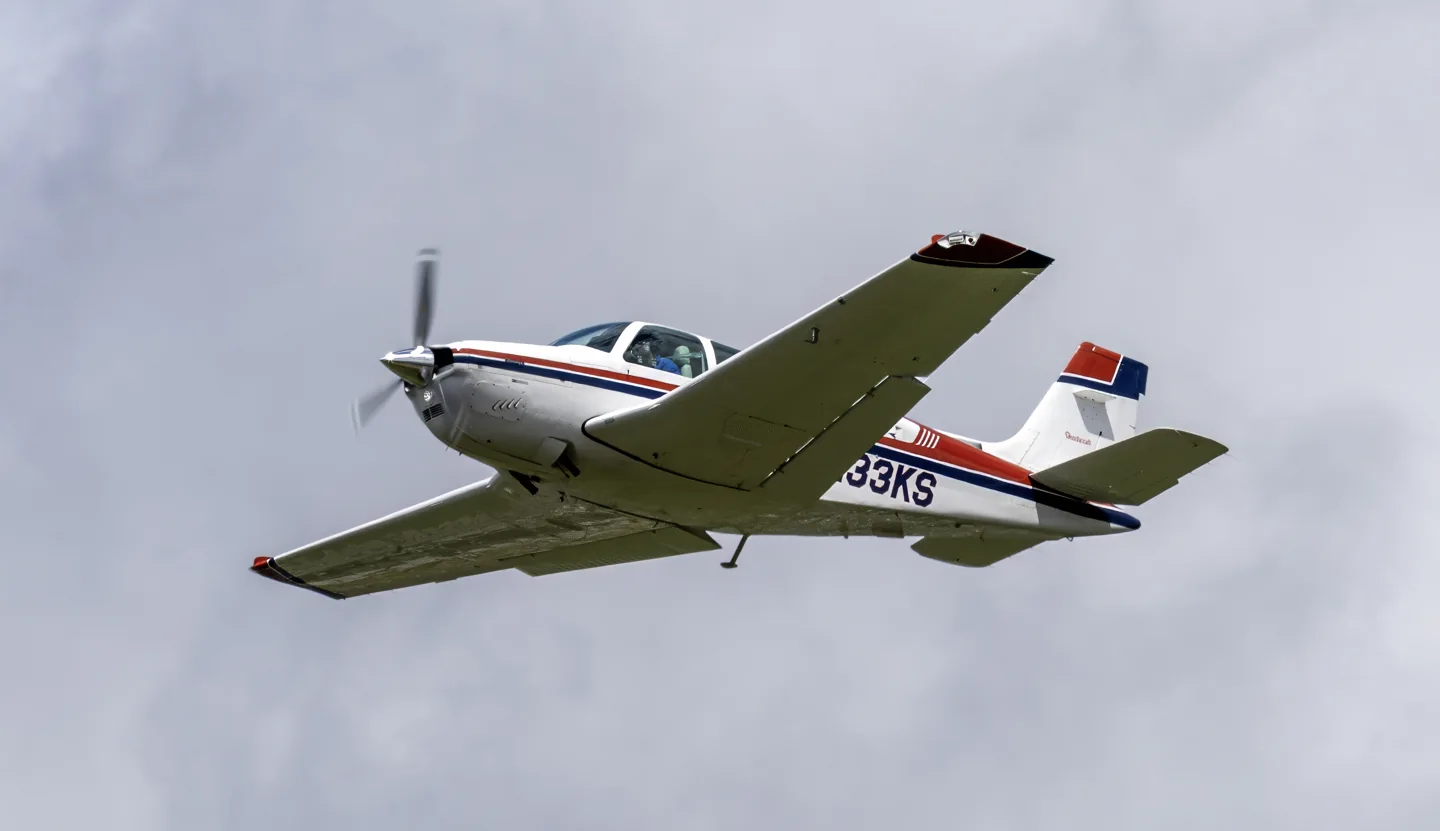
Beechcraft Bonanza familyAcroterion · CC BY-SA 4.0 · Beechcraft F33 Bonanza in flight; an example of the Bonanza family.

Beechcraft Bonanza family

A long-running touring single, familiar in both V-tail and conventional-tail forms.
General aviation20 profile choices

Know the plane

The Bonanza appeared in 1947 as an all-metal aircraft with retractable landing gear. Its distinctive early V-tail became one of general aviation's best-known silhouettes. Conventional-tail versions also developed into a major branch of the family, including the longer Model 36.

Tail arrangement, fuselage and equipment distinguish the V35 and G36 branches. Simulator products range from conventional instruments to integrated glass cockpits.

Aircraft / family

Propulsion
Single piston↗
Configuration
V-tail and conventional-tail branches↗

Beechcraft Bonanza · Specifications (2011 model G36) · real aircraft; source units retained

Length
27 ft 6 in (8.38 m)↗
Wingspan
33 ft 6 in (10.21 m)↗
Height
8 ft 7 in (2.62 m)↗
Wing area
181 sq ft (16.8 m² )↗
Empty weight
2,517 lb (1,142 kg)↗
Gross weight
3,650 lb (1,656 kg)↗
Powerplant
1 × Continental IO-550-B , 300 hp (220 kW)↗
Propellers
three-bladed Hartzell Propeller , 6 ft 8 in (2.03 m) diameter↗
Cruise speed
176 kn (203 mph, 326 km/h)↗
Range
716 nmi (824 mi, 1,326 km) with full passenger load↗

More about this aircraft on AirframeDB

Postwar ideas, several tails

The original Model 35 combined a low wing, retractable tricycle landing gear and a V-tail in a fast personal aircraft. Its two tail surfaces combined pitch and yaw functions through ruddervators. Later Bonanzas also used conventional tails: the Model 33 began as the Debonair, while the longer Model 36 developed the family into a six-seat aircraft. “Bonanza” therefore describes a family with distinct layouts and equipment.

A first aircraft becomes a travelling companion

Ovad bought his F33A as a relatively new private pilot looking for an aircraft that could take him places. He started instrument training before collecting it, then spent the following years using it for both work and exploration. Interviewed after more than 600 hours of ownership, he valued the comfortable cabin and the flexibility of its additional tip-tank fuel. He sometimes flew long days and preferred economical reduced-power cruising to extracting the last few knots.

The Bonanza carried Ovad and his fiancée Deb Mathein to places including Nova Scotia, Belize and Colorado. Shorter trips took clients sightseeing or delivered urgently needed electrical supplies for his business. His attachment went hand in hand with close attention to maintenance: he tracked oil-analysis results and engine data, and found being without the aircraft during a propeller replacement particularly difficult. His range and operating experience concern his specifically equipped F33A.

Across the Pacific in a specially prepared A36TC

Cox ferried Barry Andrews' A36TC from California to Singapore after its owner accepted an overseas posting. Fuel shortages at intended Pacific stops forced a longer route through island destinations and northern Australia. The aircraft had additional ferry tanks, substantially more fuel than a standard Bonanza and a recently overhauled engine. Cox remembers the long ocean legs as hours of repetitive flying punctuated by the relief of seeing the next island.

Andrews joined him in Darwin for the final leg. With two people, luggage, ferry fuel and tropical heat, the overloaded aircraft climbed slowly, making the departure a very different experience from an ordinary lightly loaded demonstration. Later, Cox used the Stormscope while working around thunderstorms toward Singapore. After roughly 65 flying hours over a week, he delivered the Bonanza at Seletar. His account conveys both confidence in the aeroplane and his continuing awareness of the water beneath it; the special ferry configuration is essential context for the distances and handling he describes.

Around the world with Lucy

Maeda completed a six-week circumnavigation in June 2021 in Lucy, his 1963 P-model V-tail Bonanza. Speaking to David Tulis after returning to Washington, he recalled a journey complicated by fuel availability, altered routes, paperwork and pandemic restrictions. Weather added its own challenges, from desert dust to Russian fog and an encounter with icing. He also remembers the loneliness of parts of the trip and the help of a support network following his progress.

One particularly vivid memory was flying over Greenland alongside mentor Adrian Eichhorn in another Bonanza. Clear skies revealed an extraordinary landscape, but looking down at the glaciers also made Maeda intensely conscious of depending on a single engine. He found himself talking encouragingly to Lucy. Elsewhere, welcoming airport staff and strangers helped keep the mission moving. His account ends with a return to his family and a renewed appreciation for the people along the route, giving the long-distance Bonanza journey a distinctly personal scale.

Public sources 21
  1. Beechcraft BonanzaResearch background · Wikipedia revision 1372209707 · retrieved 2026-09-12
  2. Microsoft Flight Simulator aircraft manuals
  3. MSFS 2024 FAQ and edition aircraft inventory
  4. MSFS 2020 FAQ and edition aircraft inventory
  5. Bonanza ProfessionalOfficial developer / designated store catalogue · checked 2026-09-12
  6. Steam Gauge Overhaul - Analog BonanzaOfficial developer / designated store catalogue · checked 2026-09-12
  7. Thranda V35B Bonanza DGS+ SeriesOfficial developer / designated store catalogue · checked 2026-09-12
  8. F33A Bonanza DGS+ SeriesOfficial developer / designated store catalogue · checked 2026-09-12
  9. Reality Expansion Pack · PAE A36 BonanzaOfficial developer / designated store catalogue · checked 2026-09-12
  10. Reality Expansion Pack · PAE G36 BonanzaOfficial developer / designated store catalogue · checked 2026-09-12
  11. Reality Expansion Pack · Beech Bonanza F33AOfficial developer / designated store catalogue · checked 2026-09-12
  12. Reality Expansion Pack · Beech Bonanza V35BOfficial developer / designated store catalogue · checked 2026-09-12
  13. Famous Flyer III: Beechcraft Bonanza V352022-08-18 · release and package scope
  14. Bonanza F33A: Ticket to AdventureSeptember 1998 · David Ovad owner interview
  15. Singapore By BonanzaBill Cox · 26 May 2009
  16. Maeda completes circumnavigation in BonanzaDavid Tulis · 17 June 2021 · Shinji Maeda interview
  17. PAE Beechcraft Bonanza A36 -- Powered by the Reality ExpansiOfficial developer / designated-store reference · checked 2026-09-14
  18. PAE Beechcraft Bonanza G36 -- Powered by the Reality ExpansiOfficial developer / designated-store reference · checked 2026-09-14
  19. ICAO Doc 8643 — aircraft type designatorsPublic search data retrieved 2026-09-14; authority update 2026-09-03
  20. F33A MSFS2020 – CarenadoProduct listing captured 2026-09-23; edition scope from the reviewed catalogue
  21. F33A MSFS2024 – CarenadoProduct listing captured 2026-09-23; edition scope from the reviewed catalogue

How the profile models it

Beechcraft Bonanza V35B

Free + Pro
MSFS 2020MSFS 2024X-Plane 11X-Plane 12

The Bonanza appeared in 1947 as an all-metal aircraft with retractable landing gear. Its distinctive early V-tail became one of general aviation's best-known silhouettes. Conventional-tail versions also developed into a major branch of the family, including the longer Model 36.

This starting point selects Beechcraft Bonanza V35B. Its aircraft-level settings do not select a particular developer’s custom systems.

Spring resistance builds with the selected airspeed response. A separate aerodynamic term adds speed-dependent control load.

Valid trim provides the configured pressure relief. Autopilot following is enabled for supported control references.

Controls and trim

Later A36/G36 Bonanzas use adjustable aileron trim tabs and an electromechanical retractable-gear system. The manufacturer's control-system material should not be replaced by an earlier throw-over-column trimmer description. Black Square separates normally aspirated, turbonormalized and turbine configurations; its Professional manual names KFC150 equipment but also uses Century IV wording in its FAQ. That unresolved label conflict does not establish an autopilot interface.

Operating ManualBeechcraft-authored G36 POH archived copyABS authored Bonanza controls/trim serial applicability

About the values

The gains are normalized profile settings. They describe the chosen effect balance; hand force depends on the device and its output limits. IAS references are tuning values rather than operating limits. Physical acceptance of this revision remains pending.

Master gain & control system

Master gain85%

The final overall output scale applied to everything the model produces, before the device cap.

More: everything (spring, loads, effects) gets stronger together.

Less: everything softens together.

Why here: Scales overall profile strength while preserving effect balance, subject to device and output limits.

Forces

Spring strength74%

The base centring force that pulls the stick back to centre. Every other force stacks on it. Too low and the stick feels limp in normal flight; too high and it fights your hand and masks the smaller cues layered above it.

More: firmer centring that resists your hand at all times.

Less: a limper stick that leans on aerodynamic load alone.

Why here: The selected reversible-control response accompanies the named Bonanza; engine conversion and panel options do not establish a new force law by themselves. The baseline spring is 0.74. Its low-speed blend reaches baseline strength at 80 KIAS.

Operating ManualBeechcraft-authored G36 POH archived copyABS authored Bonanza controls/trim serial applicability
Spring deadband4%

A small neutral zone around centre where the spring stays quiet, so tiny movements at rest don't chatter. Wider is calmer but looser; narrower is more precise but can twitch around centre.

More: a calmer but looser centre with more free play.

Less: a tighter centre that may chatter at rest.

Why here: Sets travel around the centre before the baseline spring resists. Smaller values engage it sooner.

Overall aerodynamic load80%

A master scale over both sustained axis loads, applied before their independent balance. Profiles normally leave this alone and tune the two axis loads instead.

More: both axes load up harder.

Less: both axes lighten together.

Why here: The aerodynamic-load gain is 0.8 with an indicated-speed reference of 160 KIAS. This supplies speed-dependent loading alongside the spring.

Airspeed blendingTrue

Enables the low-speed spring engagement window (start/full knots above). Off, the spring is constant at all speeds.

Why here: Allows baseline spring strength to rise with indicated airspeed where the control law permits it.

Low-speed spring floor50%

How much of the spring survives at a standstill, before airspeed can build any aerodynamic force. A high floor keeps the parked stick firm; a low floor gives the loose, cable-slack feel of a parked light aircraft.

More: a firmer stick while parked and taxiing.

Less: a floppier parked stick that only wakes up with airspeed.

Why here: Sets low-speed spring strength as a fraction of baseline when blending is enabled. One keeps full strength.

Spring engagement start20 kt

The airspeed where the spring begins climbing from its low-speed floor toward full strength: the controls "coming alive" on the takeoff roll.

Why here: Sets the IAS where the low-speed spring blend starts rising. This is a feel threshold, not a flight limit.

Spring engagement full80.0 kt

The airspeed where the spring reaches full strength. Between the start and this point, centring firms up progressively as airflow builds over the controls.

Why here: Sets the IAS where the low-speed blend reaches baseline strength; high-speed stiffening also uses it.

Force tuning speed160

The indicated airspeed where aerodynamic load reaches its designed full level. It anchors the whole load curve to the aircraft's real speed range: a 172 loads up by 110 knots, a jet much later.

More: loads arrive later; the stick stays light up to a higher speed.

Less: loads arrive earlier and cruise feels heavier.

Why here: Sets the IAS reference for aerodynamic loading. It is an estimate, not published cruise TAS or a flight limit.

Centre firmness vs speed15%

How much the centring itself stiffens with speed, on top of the deflection loads. Zero keeps centre feel constant; more makes the stick centre harder at cruise and looser in the pattern.

More: a centre that hardens noticeably as you go faster.

Less: constant centre feel at every speed.

Why here: The high-speed spring-stiffening gain is 0.15. It strengthens the permitted spring response above 80 KIAS, with the squared-speed ratio capped at 5.

Centre stiffening cap5

The upper limit on speed-driven centre stiffening, so very fast flight can't wind the spring up without bound.

More: more total stiffening allowed at high speed.

Less: stiffening clamps off sooner.

Why here: Limits the squared airspeed ratio used for high-speed spring stiffening; it is not a device-force cap.

Aileron load72%

The sustained roll load from aileron deflection and airspeed, balanced independently of pitch. Together with the elevator load it sets the control-harmony ratio reviewers talk about.

More: heavier roll forces.

Less: lighter, quicker-feeling ailerons.

Why here: Roll and pitch aerodynamic scales are 0.72 and 1, respectively. They set the aerodynamic axis balance. No custom spring-travel curve is enabled.

Elevator load100%

The sustained pitch load from elevator deflection and airspeed, balanced independently of roll. This is the main lever behind a type's pitch weight. It does not touch aileron, spring, trim, or buffet forces.

More: heavier sustained pitch forces at speed.

Less: a lighter elevator that takes less muscle to hold.

Why here: Scales pitch aerodynamic loading; pitch spring travel and trim responses are separate settings.

Max output force55%

A cap on each steady pitch or roll force before it reaches the device, guarding against slamming or saturating the hardware in strong maneuvers.

More: stronger peak steady forces before clipping.

Less: a gentler ceiling; hard maneuvers flatten out sooner.

Why here: Caps directed-force output. Native spring effects and device limits remain separate.

Trim

Trim relief (elevator)30%

How strongly elevator trim relieves held pitch force and shifts where the stick settles. At 100%, a properly trimmed aircraft needs no held pressure, the trim-away-the-load workflow of real flying.

More: trim removes more of the held pitch force; at 100% full trim zeroes it.

Less: you keep holding force even when trimmed.

Why here: Elevator trim and flight-adjustable aileron trim support separate pitch and roll relief. The profile's authorities remain selected approximations. Pitch authority 0.3 provides load relief and permitted centre movement; roll authority is 0.

Operating ManualBeechcraft-authored G36 POH archived copyABS authored Bonanza controls/trim serial applicability
Trim relief (aileron)0%

The same relief for roll trim. Most GA types have no real aileron trim, so this stays at zero; types with roll trim get a matching value.

More: roll trim removes more held roll force.

Less: roll trim does less.

Why here: Scales supported roll-trim relief and permitted centre movement. Zero removes roll response.

Effect gains · ground

Runway rumble40%

Rolling surface vibration from wheel speed and surface type: pavement, grass, or gravel under the gear.

More: louder surface texture through the stick.

Less: a smoother taxi.

Why here: Sets rolling texture strength, modified by speed, surface and undercarriage configuration.

Gear bumps25%

Short discrete bumps from expansion joints, ruts, and rough surface, punctuating the continuous rumble.

More: sharper hits from joints and ruts.

Less: softer ground detail.

Why here: Sets gear-bump texture during ground motion, separate from touchdown impact.

Effect gains · airframe

Stall buffet35%

Airframe shake approaching the stall and while the stall warning is active: how loudly this wing announces it is unhappy. Types with a crisp break get modest buffet and let the horn carry the warning.

More: a louder pre-stall shake.

Less: a quieter wing; the horn carries the warning.

Why here: Sets stall-buffet strength. Zero removes the cue without changing simulator stalls or warnings.

Mach buffet0%

Transonic buffet approaching the Mach limit. Meaningful for jets near MMO, zero for pistons and turboprops that never get there.

More: stronger transonic buffet near the Mach limit.

Less: a smoother high-Mach ride.

Why here: Sets high-Mach buffet strength; onset and full-strength thresholds are separate.

Flap buffet14%

Low-frequency airframe vibration with flaps extended into the airflow, in the speed window where they actually work the air.

More: a rougher ride with flaps working the air.

Less: smoother approach flap.

Why here: Sets flap buffet at the configured position and speed gates. Flap movement texture is separate.

Gear buffet10%

Airframe drumming from retractable gear hanging in the airstream. Zero for fixed-gear types, where the airframe never changes shape.

More: more drumming with the wheels hanging out.

Less: cleaner gear-down flight.

Why here: Sets gear aerodynamic buffet; movement and ground-contact cues are separate.

Stick shaker50%

The dedicated stall stick-shaker buzz, fired by the aircraft's own stall-warning system. Only types with a real shaker get a value; everything else relies on aerodynamic buffet and the horn.

More: a harder stick-shaker buzz.

Less: a subtler shaker.

Why here: Sets triggered shaker strength; inactive while the shaker feature is disabled.

Effect gains · engine, mechanical & drag

Touchdown thump65%

The one-shot kick when the wheels meet the runway, scaled by sink rate: a greaser whispers, a firm arrival thumps.

More: a harder kick at touchdown.

Less: softer arrivals.

Why here: Sets landing-impact strength; landing telemetry and response shape determine the pulse.

Reverse rumble0%

Rollout vibration while reverse thrust or beta-range props are working. Zero for types without reverse.

More: a rougher rollout under reverse.

Less: quieter reverse.

Why here: Sets reverse-thrust vibration with valid reverser and engine conditions. Zero removes the cue.

Engine rumble12%

Continuous powerplant vibration following RPM between idle and full power, the ever-present reminder that something is burning fuel up front.

More: more engine through the stick.

Less: a quieter powerplant.

Why here: Sets estimated engine vibration using configured telemetry and response, not measured cockpit vibration.

Flap motion12%

Continuous vibration only while the sim reports the flap surfaces actually travelling. It follows real actuator motion and failures, not an estimated timer.

More: more vibration while the flap surfaces travel.

Less: quieter flap runs.

Why here: Sets texture from observed flap movement; a command without movement does not establish the cue.

Autopilot follow

AP follow authority10%

How far autopilot commands may physically move the stick. Kept tiny in MSFS, where a moved axis can read back as pilot input; zero disables following entirely.

More: the autopilot visibly moves your stick further.

Less: a barely perceptible follow.

Why here: Sets admitted AP-follow gain, not a percentage of travel. Runtime ownership and input limits still apply.

Stick feel

StickFeel · Trim feel enabledTrue

Whether this feature is active in this profile.

Why here: Retained for compatibility and group membership. Trim relief, rather than this flag, controls centre movement.

StickFeel · Trim relief enabledTrue

Whether this feature is active in this profile.

Why here: Allows trim relief with supported control law and valid telemetry. Axis authorities set its amount.

StickFeel · Force trim enabledFalse

Whether this feature is active in this profile.

Why here: Enables local force trim, separate from aircraft-owned trim and add-on integration qualification.

StickFeel · G load enabledTrue

Whether this feature is active in this profile.

Why here: Allows load-factor changes to modify permitted spring laws. Passive fly-by-wire feel can suppress it.

StickFeel · Rate damping enabledTrue

Whether this feature is active in this profile.

Why here: Enables rate damping with the configured coefficients and control law.

Autopilot

Autopilot · Follow enabledTrue

Whether this feature is active in this profile.

Why here: Following is on at 0.1 authority when a supported, valid autopilot control reference is available.

Autopilot · Neutral hold enabledFalse

Whether this feature is active in this profile.

Why here: Permits centering hold during a supported AP state, separate from following a moving target.

Autopilot · Neutral hold strength0.6

Why here: Sets admitted AP neutral-hold strength; inactive while neutral hold is disabled.

Aero

Aero · EnabledTrue

Whether this feature is active in this profile.

Why here: Enables aerodynamic cues; each still needs nonzero strength and its simulator conditions.

Aero · Max flap index2

Where this effect reaches full strength (or has fully faded, for washouts).

More: a more gradual build to a later peak.

Less: a quicker build.

Why here: Sets the final flap index for detent normalization. UP plus three detents uses maximum index3.

Aero · Min flap index2

Where this effect begins fading in.

More: the effect begins later.

Less: it begins earlier.

Why here: Sets the first flap detent that admits buffet; this is a handle index, not degrees.

Aero · Shaker enabledFalse

Whether this feature is active in this profile.

Why here: Permits shaker at supported warning conditions; the switch does not establish aircraft equipment.

Ground

Ground · EnabledTrue

Whether this feature is active in this profile.

Why here: Enables ground effects; each still needs its own strength and contact or motion telemetry.

Engine

Engine · EnabledTrue

Whether this feature is active in this profile.

Why here: Enables engine cues with nonzero settings and valid running-engine telemetry.

Mechanical

Mechanical · EnabledTrue

Whether this feature is active in this profile.

Why here: Enables accessory cues with configured strengths and observed accessory movement.

Mechanical · Gain0.12

The strength of this effect.

More: a stronger effect.

Less: a weaker one.

Why here: Sets texture from observed gear movement, separate from aerodynamic and touchdown effects.

All profile settings
Estimated profile settings
ParameterValueWhat it controls and why
Spring strength0.74 The selected reversible-control response accompanies the named Bonanza; engine conversion and panel options do not establish a new force law by themselves. The baseline spring is 0.74. Its low-speed blend reaches baseline strength at 80 KIAS.
Spring deadband0.045 Sets travel around the centre before the baseline spring resists. Smaller values engage it sooner.
Force gain0.8 The aerodynamic-load gain is 0.8 with an indicated-speed reference of 160 KIAS. This supplies speed-dependent loading alongside the spring.
Master gain0.85 Scales overall profile strength while preserving effect balance, subject to device and output limits.
Dynamic-pressure blendTrue Allows baseline spring strength to rise with indicated airspeed where the control law permits it.
Minimum spring factor0.5 Sets low-speed spring strength as a fraction of baseline when blending is enabled. One keeps full strength.
Spring wake-up speed20 ktSets the IAS where the low-speed spring blend starts rising. This is a feel threshold, not a flight limit.
Spring full-strength speed80.0 ktSets the IAS where the low-speed blend reaches baseline strength; high-speed stiffening also uses it.
Force tuning speed160.0 ktSets the IAS reference for aerodynamic loading. It is an estimate, not published cruise TAS or a flight limit.
Airspeed spring stiffening0.15 The high-speed spring-stiffening gain is 0.15. It strengthens the permitted spring response above 80 KIAS, with the squared-speed ratio capped at 5.
Airspeed stiffening cap5 Limits the squared airspeed ratio used for high-speed spring stiffening; it is not a device-force cap.
Aileron force scale0.72 Roll and pitch aerodynamic scales are 0.72 and 1, respectively. They set the aerodynamic axis balance. No custom spring-travel curve is enabled.
Elevator force scale1.0 Scales pitch aerodynamic loading; pitch spring travel and trim responses are separate settings.
Maximum output force0.55 Caps directed-force output. Native spring effects and device limits remain separate.
StickFeel · Trim feel enabledTrue Retained for compatibility and group membership. Trim relief, rather than this flag, controls centre movement.
StickFeel · Trim relief enabledTrue Allows trim relief with supported control law and valid telemetry. Axis authorities set its amount.
StickFeel · Elevator authority0.3 Elevator trim and flight-adjustable aileron trim support separate pitch and roll relief. The profile's authorities remain selected approximations. Pitch authority 0.3 provides load relief and permitted centre movement; roll authority is 0.
StickFeel · Aileron authority0 Scales supported roll-trim relief and permitted centre movement. Zero removes roll response.
StickFeel · Force trim enabledFalse Enables local force trim, separate from aircraft-owned trim and add-on integration qualification.
StickFeel · G load enabledTrue Allows load-factor changes to modify permitted spring laws. Passive fly-by-wire feel can suppress it.
StickFeel · Rate damping enabledTrue Enables rate damping with the configured coefficients and control law.
Autopilot · Follow enabledTrue Following is on at 0.1 authority when a supported, valid autopilot control reference is available.
Autopilot · Follow authority0.1 Sets admitted AP-follow gain, not a percentage of travel. Runtime ownership and input limits still apply.
Autopilot · Neutral hold enabledFalse Permits centering hold during a supported AP state, separate from following a moving target.
Autopilot · Neutral hold strength0.6 Sets admitted AP neutral-hold strength; inactive while neutral hold is disabled.
Aero · EnabledTrue Enables aerodynamic cues; each still needs nonzero strength and its simulator conditions.
Aero · Gain0.35 Sets stall-buffet strength. Zero removes the cue without changing simulator stalls or warnings.
Aero · Gain0 Sets high-Mach buffet strength; onset and full-strength thresholds are separate.
Aero · Gain0.14 Sets flap buffet at the configured position and speed gates. Flap movement texture is separate.
Aero · Max flap index2 Sets the final flap index for detent normalization. UP plus three detents uses maximum index3.
Aero · Min flap index2 Sets the first flap detent that admits buffet; this is a handle index, not degrees.
Aero · Gain0.1 Sets gear aerodynamic buffet; movement and ground-contact cues are separate.
Aero · Shaker enabledFalse Permits shaker at supported warning conditions; the switch does not establish aircraft equipment.
Aero · Amplitude0.5 Sets triggered shaker strength; inactive while the shaker feature is disabled.
Ground · EnabledTrue Enables ground effects; each still needs its own strength and contact or motion telemetry.
Ground · Gain0.4 Sets rolling texture strength, modified by speed, surface and undercarriage configuration.
Ground · Gain0.25 Sets gear-bump texture during ground motion, separate from touchdown impact.
Ground · Gain0.65 Sets landing-impact strength; landing telemetry and response shape determine the pulse.
Ground · Gain0 Sets reverse-thrust vibration with valid reverser and engine conditions. Zero removes the cue.
Engine · EnabledTrue Enables engine cues with nonzero settings and valid running-engine telemetry.
Engine · Gain0.12 Sets estimated engine vibration using configured telemetry and response, not measured cockpit vibration.
Mechanical · EnabledTrue Enables accessory cues with configured strengths and observed accessory movement.
Mechanical · Gain0.12 Sets texture from observed flap movement; a command without movement does not establish the cue.
Mechanical · Gain0.12 Sets texture from observed gear movement, separate from aerodynamic and touchdown effects.
Public sources 24
  1. Beechcraft BonanzaResearch background · Wikipedia revision 1372209707 · retrieved 2026-09-12
  2. Operating ManualBonanza Professional introduction, KFC150 section, B36TP supplement and FAQ pp.201-204
  3. Beechcraft-authored G36 POH archived copyG36 POH PDF pp269-270,275-276; older A36 applicability separately checked; G36 POH p55 speed table, , p161
  4. ABS authored Bonanza controls/trim serial applicabilityABS guide PDF pp23,41-42
  5. Microsoft Flight Simulator aircraft manuals
  6. MSFS 2024 FAQ and edition aircraft inventory
  7. MSFS 2020 FAQ and edition aircraft inventory
  8. Bonanza ProfessionalOfficial developer / designated store catalogue · checked 2026-09-12
  9. Steam Gauge Overhaul - Analog BonanzaOfficial developer / designated store catalogue · checked 2026-09-12
  10. Thranda V35B Bonanza DGS+ SeriesOfficial developer / designated store catalogue · checked 2026-09-12
  11. F33A Bonanza DGS+ SeriesOfficial developer / designated store catalogue · checked 2026-09-12
  12. Reality Expansion Pack · PAE A36 BonanzaOfficial developer / designated store catalogue · checked 2026-09-12
  13. Reality Expansion Pack · PAE G36 BonanzaOfficial developer / designated store catalogue · checked 2026-09-12
  14. Reality Expansion Pack · Beech Bonanza F33AOfficial developer / designated store catalogue · checked 2026-09-12
  15. Reality Expansion Pack · Beech Bonanza V35BOfficial developer / designated store catalogue · checked 2026-09-12
  16. Famous Flyer III: Beechcraft Bonanza V352022-08-18 · release and package scope
  17. Bonanza F33A: Ticket to AdventureSeptember 1998 · David Ovad owner interview
  18. Singapore By BonanzaBill Cox · 26 May 2009
  19. Maeda completes circumnavigation in BonanzaDavid Tulis · 17 June 2021 · Shinji Maeda interview
  20. PAE Beechcraft Bonanza A36 -- Powered by the Reality ExpansiOfficial developer / designated-store reference · checked 2026-09-14
  21. PAE Beechcraft Bonanza G36 -- Powered by the Reality ExpansiOfficial developer / designated-store reference · checked 2026-09-14
  22. ICAO Doc 8643 — aircraft type designatorsPublic search data retrieved 2026-09-14; authority update 2026-09-03
  23. F33A MSFS2020 – CarenadoProduct listing captured 2026-09-23; edition scope from the reviewed catalogue
  24. F33A MSFS2024 – CarenadoProduct listing captured 2026-09-23; edition scope from the reviewed catalogue

Community & corrections

If your time in the type says this page got something wrong, correct it here.

Pilot corrections

Fly this aircraft? Correct this page.

This page is built from cited references, and real time in the type beats a citation. Quote the claim that reads wrong and tell us what the actual aircraft does. Corrections go to the maintainer for review and feed the next revision of this research.

Hangar talk

Open conversation about flying and tuning the Beechcraft Bonanza family, in the community forum. Corrections above go privately to the maintainer; hangar talk is public.

No hangar talk for the Beechcraft Bonanza family yet. Be the first.

Community

Community profiles for this aircraft

No community profiles for this aircraft yet. Tuned it your way? Share a profile and it will appear here.