Aircraft libraryDe Havilland Canada DHC-6 Twin Otter
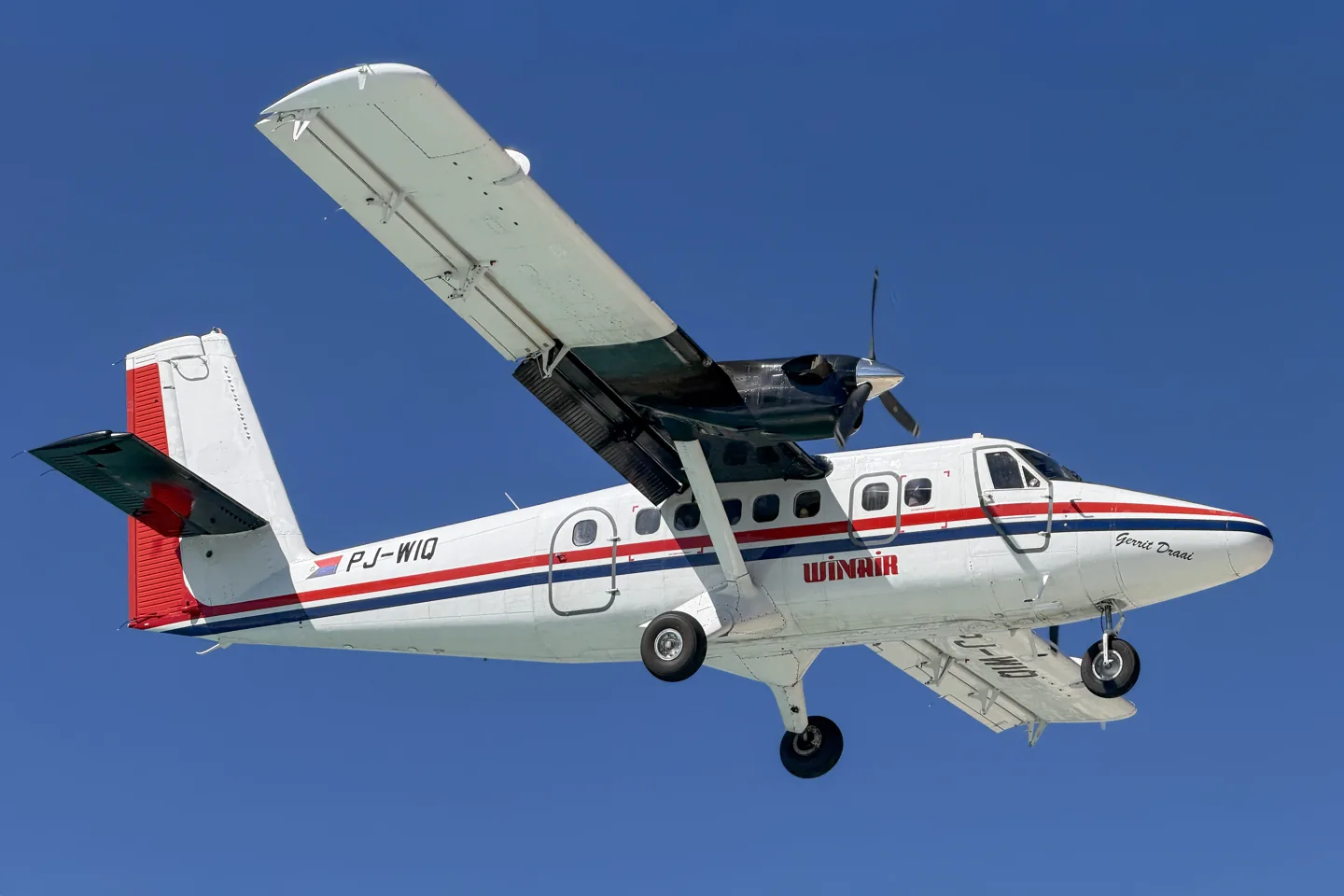
De Havilland Canada DHC-6 Twin OtterQuintin Soloviev · CC BY 4.0 · De Havilland Canada DHC-6 Twin Otter pictured

De Havilland Canada DHC-6 Twin Otter

A fixed-gear twin turboprop with a long history in regional and remote-area transport.
Turboprop7 profile choices

Know the plane

The Twin Otter was developed in the 1960s around short-field utility work. Two turboprops, a high wing and a substantial cabin support passenger and freight operations. Its fixed gear can be replaced or supplemented by specialist wheel, ski and float configurations.

Production resumed under Viking before the programme returned to the De Havilland Canada name. Different series and later developments have their own engines and avionics. The simulator packages identify their series and cockpit generation.

Aircraft / family

Propulsion
Twin turboprop↗
Configuration
High wing · Wheels / skis / floats↗

More about this aircraft on AirframeDB

An airframe adapted to many different jobs

De Havilland Canada’s Series 400 description offers interiors for passenger services, cargo, medical evacuation and special missions. Reconfigurable cabins and a choice of landing equipment allow the same family to serve island communities, remote bases and conventional airports. The role can change substantially with the operator and equipment.

Cockpit generation matters alongside the familiar shape

The Series 400 product description specifies Honeywell Apex avionics, illustrating a later cockpit within the Twin Otter family. Its Guardian derivative adds mission-specific configurations. Those aircraft should be distinguished from earlier Series 300 machines when comparing pilot accounts and the particular model represented by an add-on.

A winter rescue at the South Pole

Loutitt’s Twin Otter work took him far beyond ordinary airport schedules. When an Antarctic station needed a medical evacuation in winter, his crew loaded fuel and equipment and headed south. This was already his second such rescue, following a previous mission to collect the station doctor. His earlier bush flying had included unprepared strips and frozen lakes.

The polar leg depended on a heavily fuelled aircraft and offered little room to divert. He eventually picked out the drums burning beside the snow runway and landed. After rest and refuelling, the crew departed with their patient, staged through the northern Antarctic region and continued to Chile for medical care. The interview describes the aircraft as part of a carefully organised crew effort across an exceptionally isolated route.

Investigating ice from the research cockpit

Ranaudo describes a programme that progressed from measuring icing clouds to understanding what ice did to aircraft performance and control. The Twin Otter carried additional protection, cameras and instruments so the researchers could connect the conditions outside with the aircraft’s response. Later work used artificial ice shapes and a gradual series of increasingly demanding tests.

One test he recounts produced pulsing elevator forces, pitch oscillations and then an abrupt nose-down motion that briefly made the crew weightless. Recovery followed rapidly, but the episode captured how physically demanding the problem could become. His account emphasises the preparation and incremental testing behind that moment. These observations belong to a specially configured research aircraft and its test programme; they do not establish how a desktop simulator models icing.

Flying the science mission includes digging out the fuel

Below describes Twin Otter flying as one part of a much larger field operation. Pilots work closely with scientists to deploy teams, supply their camps and bring them home. Some assignments mean living in tents on the ice alongside the people they support. The aircraft’s retractable skis connect Rothera’s gravel runway with remote snowfields.

Keeping those flights possible also means maintaining a scattered network of fuel depots. Drums may move with the ice beneath them and become buried by winter snowfall, leaving a marker to guide the search. Digging them out becomes a pilot’s task as well. Below finds the combination of demanding flying, unfamiliar landing areas and practical support work deeply satisfying because it contributes directly to scientific understanding of the continent.

Public sources 10
  1. De Havilland Canada DHC-6 Twin OtterResearch background · Wikipedia revision 1369791029 · retrieved 2026-09-12
  2. DH-6 Twin Otter AOM
  3. Microsoft Flight Simulator aircraft manuals
  4. MSFS 2024 FAQ and edition aircraft inventory
  5. Pilots: Sean LoutittPhil Scott interviews Sean Loutitt · 5 February 2005
  6. Discoveries on IceRichard J. Ranaudo · 21 February 2017
  7. Update from Antarctica: A day in the life of a Twin Otter pilotTim Below · 24 April 2024
  8. Twin Otter Series 400Manufacturer’s Series 400 product description · retrieved September 2026
  9. ICAO Doc 8643 — aircraft type designatorsPublic search data retrieved 2026-09-14; authority update 2026-09-03
  10. DHC-6 Twin Otter 300 Series v2Product listing captured 2026-09-24; edition scope from the reviewed catalogue

How the profile models it

RWDesigns DHC-6-300 Floats (community XP12 patch)

Free + Pro
X-Plane 12RWDesigns

The Twin Otter was developed in the 1960s around short-field utility work. Two turboprops, a high wing and a substantial cabin support passenger and freight operations. Its fixed gear can be replaced or supplemented by specialist wheel, ski and float configurations.

This profile selects RWDesigns DHC-6-300 Floats (community XP12 patch) for X-Plane 12.

The selected yoke resistance accompanies the particular Twin Otter configuration. Spring resistance builds with the selected airspeed response. A separate aerodynamic term adds speed-dependent control load.

Trim relief is configured separately from nose length and landing-gear fit. Pitch-trim relief is off. Autopilot following is off.

This exact revision has not been enabled for public installation.

Controls and trim

RWDesigns separates short- and long-nose Twin Otters and four landing-gear fits. Its original V2 aircraft is an XP11 generation with an unofficial XP12 patch. The patch and surface options retain their own implementation scope within the turboprop utility family.

DHC-6 Twin Otter 300 Series v2DH-6 Twin Otter ChecklistDH-6 Twin Otter Introduction Flight

The selected implementation

These configurations use an unofficial XP12 patch on RWDesigns’ original V2 generation, with separate nose/gear choices.

DHC-6 Twin Otter 300 Series v2

About the values

The gains are normalized profile settings. They describe the chosen effect balance; hand force depends on the device and its output limits. IAS references are tuning values rather than operating limits. Physical acceptance of this revision remains pending.

Master gain & control system

Master gain85%

The final overall output scale applied to everything the model produces, before the device cap.

More: everything (spring, loads, effects) gets stronger together.

Less: everything softens together.

Why here: Scales overall profile strength while preserving effect balance, subject to device and output limits.

Forces

Spring strength74%

The base centring force that pulls the stick back to centre. Every other force stacks on it. Too low and the stick feels limp in normal flight; too high and it fights your hand and masks the smaller cues layered above it.

More: firmer centring that resists your hand at all times.

Less: a limper stick that leans on aerodynamic load alone.

Why here: The selected yoke resistance accompanies the particular Twin Otter configuration. The baseline spring is 0.74. Its low-speed blend reaches baseline strength at 65 KIAS.

DHC-6 Twin Otter 300 Series v2DH-6 Twin Otter ChecklistDH-6 Twin Otter Introduction Flight
Spring deadband4%

A small neutral zone around centre where the spring stays quiet, so tiny movements at rest don't chatter. Wider is calmer but looser; narrower is more precise but can twitch around centre.

More: a calmer but looser centre with more free play.

Less: a tighter centre that may chatter at rest.

Why here: Sets travel around the centre before the baseline spring resists. Smaller values engage it sooner.

Overall aerodynamic load80%

A master scale over both sustained axis loads, applied before their independent balance. Profiles normally leave this alone and tune the two axis loads instead.

More: both axes load up harder.

Less: both axes lighten together.

Why here: The aerodynamic-load gain is 0.8 with an indicated-speed reference of 130 KIAS. This supplies speed-dependent loading alongside the spring.

Airspeed blendingTrue

Enables the low-speed spring engagement window (start/full knots above). Off, the spring is constant at all speeds.

Why here: Allows baseline spring strength to rise with indicated airspeed where the control law permits it.

Low-speed spring floor55%

How much of the spring survives at a standstill, before airspeed can build any aerodynamic force. A high floor keeps the parked stick firm; a low floor gives the loose, cable-slack feel of a parked light aircraft.

More: a firmer stick while parked and taxiing.

Less: a floppier parked stick that only wakes up with airspeed.

Why here: Sets low-speed spring strength as a fraction of baseline when blending is enabled. One keeps full strength.

Spring engagement start8 kt

The airspeed where the spring begins climbing from its low-speed floor toward full strength: the controls "coming alive" on the takeoff roll.

Why here: Sets the IAS where the low-speed spring blend starts rising. This is a feel threshold, not a flight limit.

Spring engagement full65 kt

The airspeed where the spring reaches full strength. Between the start and this point, centring firms up progressively as airflow builds over the controls.

Why here: Sets the IAS where the low-speed blend reaches baseline strength; high-speed stiffening also uses it.

Force tuning speed130

The indicated airspeed where aerodynamic load reaches its designed full level. It anchors the whole load curve to the aircraft's real speed range: a 172 loads up by 110 knots, a jet much later.

More: loads arrive later; the stick stays light up to a higher speed.

Less: loads arrive earlier and cruise feels heavier.

Why here: Sets the IAS reference for aerodynamic loading. It is an estimate, not published cruise TAS or a flight limit.

Centre firmness vs speed15%

How much the centring itself stiffens with speed, on top of the deflection loads. Zero keeps centre feel constant; more makes the stick centre harder at cruise and looser in the pattern.

More: a centre that hardens noticeably as you go faster.

Less: constant centre feel at every speed.

Why here: The high-speed spring-stiffening gain is 0.15. It strengthens the permitted spring response above 65 KIAS, with the squared-speed ratio capped at 5.

Centre stiffening cap5

The upper limit on speed-driven centre stiffening, so very fast flight can't wind the spring up without bound.

More: more total stiffening allowed at high speed.

Less: stiffening clamps off sooner.

Why here: Limits the squared airspeed ratio used for high-speed spring stiffening; it is not a device-force cap.

Aileron load72%

The sustained roll load from aileron deflection and airspeed, balanced independently of pitch. Together with the elevator load it sets the control-harmony ratio reviewers talk about.

More: heavier roll forces.

Less: lighter, quicker-feeling ailerons.

Why here: Roll and pitch aerodynamic scales are 0.72 and 1, respectively. They set the aerodynamic axis balance. No custom spring-travel curve is enabled.

Elevator load100%

The sustained pitch load from elevator deflection and airspeed, balanced independently of roll. This is the main lever behind a type's pitch weight. It does not touch aileron, spring, trim, or buffet forces.

More: heavier sustained pitch forces at speed.

Less: a lighter elevator that takes less muscle to hold.

Why here: Scales pitch aerodynamic loading; pitch spring travel and trim responses are separate settings.

Max output force55%

A cap on each steady pitch or roll force before it reaches the device, guarding against slamming or saturating the hardware in strong maneuvers.

More: stronger peak steady forces before clipping.

Less: a gentler ceiling; hard maneuvers flatten out sooner.

Why here: Caps directed-force output. Native spring effects and device limits remain separate.

Trim

Trim relief (elevator)0%

How strongly elevator trim relieves held pitch force and shifts where the stick settles. At 100%, a properly trimmed aircraft needs no held pressure, the trim-away-the-load workflow of real flying.

More: trim removes more of the held pitch force; at 100% full trim zeroes it.

Less: you keep holding force even when trimmed.

Why here: Trim relief is configured separately from nose length and landing-gear fit. Pitch relief is off, with stored authority 0; roll authority is 0.

DHC-6 Twin Otter 300 Series v2DH-6 Twin Otter ChecklistDH-6 Twin Otter Introduction Flight
Trim relief (aileron)0%

The same relief for roll trim. Most GA types have no real aileron trim, so this stays at zero; types with roll trim get a matching value.

More: roll trim removes more held roll force.

Less: roll trim does less.

Why here: Scales supported roll-trim relief and permitted centre movement. Zero removes roll response.

Effect gains · ground

Runway rumble24%

Rolling surface vibration from wheel speed and surface type: pavement, grass, or gravel under the gear.

More: louder surface texture through the stick.

Less: a smoother taxi.

Why here: Sets rolling texture strength, modified by speed, surface and undercarriage configuration.

Gear bumps18%

Short discrete bumps from expansion joints, ruts, and rough surface, punctuating the continuous rumble.

More: sharper hits from joints and ruts.

Less: softer ground detail.

Why here: Sets gear-bump texture during ground motion, separate from touchdown impact.

Effect gains · airframe

Stall buffet35%

Airframe shake approaching the stall and while the stall warning is active: how loudly this wing announces it is unhappy. Types with a crisp break get modest buffet and let the horn carry the warning.

More: a louder pre-stall shake.

Less: a quieter wing; the horn carries the warning.

Why here: Sets stall-buffet strength. Zero removes the cue without changing simulator stalls or warnings.

Mach buffet0%

Transonic buffet approaching the Mach limit. Meaningful for jets near MMO, zero for pistons and turboprops that never get there.

More: stronger transonic buffet near the Mach limit.

Less: a smoother high-Mach ride.

Why here: Sets high-Mach buffet strength; onset and full-strength thresholds are separate.

Flap buffet0%

Low-frequency airframe vibration with flaps extended into the airflow, in the speed window where they actually work the air.

More: a rougher ride with flaps working the air.

Less: smoother approach flap.

Why here: Sets flap buffet at the configured position and speed gates. Flap movement texture is separate.

Gear buffet0%

Airframe drumming from retractable gear hanging in the airstream. Zero for fixed-gear types, where the airframe never changes shape.

More: more drumming with the wheels hanging out.

Less: cleaner gear-down flight.

Why here: Sets gear aerodynamic buffet; movement and ground-contact cues are separate.

Stick shaker50%

The dedicated stall stick-shaker buzz, fired by the aircraft's own stall-warning system. Only types with a real shaker get a value; everything else relies on aerodynamic buffet and the horn.

More: a harder stick-shaker buzz.

Less: a subtler shaker.

Why here: Sets triggered shaker strength; inactive while the shaker feature is disabled.

Effect gains · engine, mechanical & drag

Touchdown thump32%

The one-shot kick when the wheels meet the runway, scaled by sink rate: a greaser whispers, a firm arrival thumps.

More: a harder kick at touchdown.

Less: softer arrivals.

Why here: Sets landing-impact strength; landing telemetry and response shape determine the pulse.

Reverse rumble0%

Rollout vibration while reverse thrust or beta-range props are working. Zero for types without reverse.

More: a rougher rollout under reverse.

Less: quieter reverse.

Why here: Sets reverse-thrust vibration with valid reverser and engine conditions. Zero removes the cue.

Engine rumble12%

Continuous powerplant vibration following RPM between idle and full power, the ever-present reminder that something is burning fuel up front.

More: more engine through the stick.

Less: a quieter powerplant.

Why here: Sets estimated engine vibration using configured telemetry and response, not measured cockpit vibration.

Flap motion12%

Continuous vibration only while the sim reports the flap surfaces actually travelling. It follows real actuator motion and failures, not an estimated timer.

More: more vibration while the flap surfaces travel.

Less: quieter flap runs.

Why here: Sets texture from observed flap movement; a command without movement does not establish the cue.

Autopilot follow

AP follow authority10%

How far autopilot commands may physically move the stick. Kept tiny in MSFS, where a moved axis can read back as pilot input; zero disables following entirely.

More: the autopilot visibly moves your stick further.

Less: a barely perceptible follow.

Why here: Sets admitted AP-follow gain, not a percentage of travel. Runtime ownership and input limits still apply.

Stick feel

StickFeel · Trim feel enabledFalse

Whether this feature is active in this profile.

Why here: Retained for compatibility and group membership. Trim relief, rather than this flag, controls centre movement.

StickFeel · Trim relief enabledFalse

Whether this feature is active in this profile.

Why here: Allows trim relief with supported control law and valid telemetry. Axis authorities set its amount.

StickFeel · Force trim enabledFalse

Whether this feature is active in this profile.

Why here: Enables local force trim, separate from aircraft-owned trim and add-on integration qualification.

StickFeel · G load enabledTrue

Whether this feature is active in this profile.

Why here: Allows load-factor changes to modify permitted spring laws. Passive fly-by-wire feel can suppress it.

StickFeel · Rate damping enabledTrue

Whether this feature is active in this profile.

Why here: Enables rate damping with the configured coefficients and control law.

Autopilot

Autopilot · Follow enabledFalse

Whether this feature is active in this profile.

Why here: Autopilot following is off; the configured spring and load retain the hardware feel.

Autopilot · Neutral hold enabledFalse

Whether this feature is active in this profile.

Why here: Permits centering hold during a supported AP state, separate from following a moving target.

Autopilot · Neutral hold strength0.6

Why here: Sets admitted AP neutral-hold strength; inactive while neutral hold is disabled.

Aero

Aero · EnabledTrue

Whether this feature is active in this profile.

Why here: Enables aerodynamic cues; each still needs nonzero strength and its simulator conditions.

Aero · Max flap index3

Where this effect reaches full strength (or has fully faded, for washouts).

More: a more gradual build to a later peak.

Less: a quicker build.

Why here: Sets the final flap index for detent normalization. UP plus three detents uses maximum index3.

Aero · Min flap index2

Where this effect begins fading in.

More: the effect begins later.

Less: it begins earlier.

Why here: Sets the first flap detent that admits buffet; this is a handle index, not degrees.

Aero · Shaker enabledFalse

Whether this feature is active in this profile.

Why here: Permits shaker at supported warning conditions; the switch does not establish aircraft equipment.

Ground

Ground · EnabledTrue

Whether this feature is active in this profile.

Why here: Enables ground effects; each still needs its own strength and contact or motion telemetry.

Engine

Engine · EnabledTrue

Whether this feature is active in this profile.

Why here: Enables engine cues with nonzero settings and valid running-engine telemetry.

Mechanical

Mechanical · EnabledTrue

Whether this feature is active in this profile.

Why here: Enables accessory cues with configured strengths and observed accessory movement.

Mechanical · Gain0

The strength of this effect.

More: a stronger effect.

Less: a weaker one.

Why here: Sets texture from observed gear movement, separate from aerodynamic and touchdown effects.

All profile settings
Estimated profile settings
ParameterValueWhat it controls and why
Spring strength0.74 The selected yoke resistance accompanies the particular Twin Otter configuration. The baseline spring is 0.74. Its low-speed blend reaches baseline strength at 65 KIAS.
Spring deadband0.04 Sets travel around the centre before the baseline spring resists. Smaller values engage it sooner.
Force gain0.8 The aerodynamic-load gain is 0.8 with an indicated-speed reference of 130 KIAS. This supplies speed-dependent loading alongside the spring.
Master gain0.85 Scales overall profile strength while preserving effect balance, subject to device and output limits.
Dynamic-pressure blendTrue Allows baseline spring strength to rise with indicated airspeed where the control law permits it.
Minimum spring factor0.55 Sets low-speed spring strength as a fraction of baseline when blending is enabled. One keeps full strength.
Spring wake-up speed8 ktSets the IAS where the low-speed spring blend starts rising. This is a feel threshold, not a flight limit.
Spring full-strength speed65 ktSets the IAS where the low-speed blend reaches baseline strength; high-speed stiffening also uses it.
Force tuning speed130 ktSets the IAS reference for aerodynamic loading. It is an estimate, not published cruise TAS or a flight limit.
Airspeed spring stiffening0.15 The high-speed spring-stiffening gain is 0.15. It strengthens the permitted spring response above 65 KIAS, with the squared-speed ratio capped at 5.
Airspeed stiffening cap5 Limits the squared airspeed ratio used for high-speed spring stiffening; it is not a device-force cap.
Aileron force scale0.72 Roll and pitch aerodynamic scales are 0.72 and 1, respectively. They set the aerodynamic axis balance. No custom spring-travel curve is enabled.
Elevator force scale1.0 Scales pitch aerodynamic loading; pitch spring travel and trim responses are separate settings.
Maximum output force0.55 Caps directed-force output. Native spring effects and device limits remain separate.
StickFeel · Trim feel enabledFalse Retained for compatibility and group membership. Trim relief, rather than this flag, controls centre movement.
StickFeel · Trim relief enabledFalse Allows trim relief with supported control law and valid telemetry. Axis authorities set its amount.
StickFeel · Elevator authority0 Trim relief is configured separately from nose length and landing-gear fit. Pitch relief is off, with stored authority 0; roll authority is 0.
StickFeel · Aileron authority0 Scales supported roll-trim relief and permitted centre movement. Zero removes roll response.
StickFeel · Force trim enabledFalse Enables local force trim, separate from aircraft-owned trim and add-on integration qualification.
StickFeel · G load enabledTrue Allows load-factor changes to modify permitted spring laws. Passive fly-by-wire feel can suppress it.
StickFeel · Rate damping enabledTrue Enables rate damping with the configured coefficients and control law.
Autopilot · Follow enabledFalse Autopilot following is off; the configured spring and load retain the hardware feel.
Autopilot · Follow authority0.1 Sets admitted AP-follow gain, not a percentage of travel. Runtime ownership and input limits still apply.
Autopilot · Neutral hold enabledFalse Permits centering hold during a supported AP state, separate from following a moving target.
Autopilot · Neutral hold strength0.6 Sets admitted AP neutral-hold strength; inactive while neutral hold is disabled.
Aero · EnabledTrue Enables aerodynamic cues; each still needs nonzero strength and its simulator conditions.
Aero · Gain0.35 Sets stall-buffet strength. Zero removes the cue without changing simulator stalls or warnings.
Aero · Gain0 Sets high-Mach buffet strength; onset and full-strength thresholds are separate.
Aero · Gain0 Sets flap buffet at the configured position and speed gates. Flap movement texture is separate.
Aero · Max flap index3 Sets the final flap index for detent normalization. UP plus three detents uses maximum index3.
Aero · Min flap index2 Sets the first flap detent that admits buffet; this is a handle index, not degrees.
Aero · Gain0 Sets gear aerodynamic buffet; movement and ground-contact cues are separate.
Aero · Shaker enabledFalse Permits shaker at supported warning conditions; the switch does not establish aircraft equipment.
Aero · Amplitude0.5 Sets triggered shaker strength; inactive while the shaker feature is disabled.
Ground · EnabledTrue Enables ground effects; each still needs its own strength and contact or motion telemetry.
Ground · Gain0.24 Sets rolling texture strength, modified by speed, surface and undercarriage configuration.
Ground · Gain0.18 Sets gear-bump texture during ground motion, separate from touchdown impact.
Ground · Gain0.32 Sets landing-impact strength; landing telemetry and response shape determine the pulse.
Ground · Gain0 Sets reverse-thrust vibration with valid reverser and engine conditions. Zero removes the cue.
Engine · EnabledTrue Enables engine cues with nonzero settings and valid running-engine telemetry.
Engine · Gain0.12 Sets estimated engine vibration using configured telemetry and response, not measured cockpit vibration.
Mechanical · EnabledTrue Enables accessory cues with configured strengths and observed accessory movement.
Mechanical · Gain0.12 Sets texture from observed flap movement; a command without movement does not establish the cue.
Mechanical · Gain0 Sets texture from observed gear movement, separate from aerodynamic and touchdown effects.
Public sources 12
  1. De Havilland Canada DHC-6 Twin OtterResearch background · Wikipedia revision 1369791029 · retrieved 2026-09-12
  2. DHC-6 Twin Otter 300 Series v2Exact product and reviewed configuration passagesProduct listing captured 2026-09-24; edition scope from the reviewed catalogue
  3. DH-6 Twin Otter ChecklistDe Havilland Canada DHC-6 Twin Otter
  4. DH-6 Twin Otter Introduction FlightDe Havilland Canada DHC-6 Twin Otter
  5. DH-6 Twin Otter AOM
  6. Microsoft Flight Simulator aircraft manuals
  7. MSFS 2024 FAQ and edition aircraft inventory
  8. Pilots: Sean LoutittPhil Scott interviews Sean Loutitt · 5 February 2005
  9. Discoveries on IceRichard J. Ranaudo · 21 February 2017
  10. Update from Antarctica: A day in the life of a Twin Otter pilotTim Below · 24 April 2024
  11. Twin Otter Series 400Manufacturer’s Series 400 product description · retrieved September 2026
  12. ICAO Doc 8643 — aircraft type designatorsPublic search data retrieved 2026-09-14; authority update 2026-09-03

Community & corrections

If your time in the type says this page got something wrong, correct it here.

Pilot corrections

Fly this aircraft? Correct this page.

This page is built from cited references, and real time in the type beats a citation. Quote the claim that reads wrong and tell us what the actual aircraft does. Corrections go to the maintainer for review and feed the next revision of this research.

Hangar talk

Open conversation about flying and tuning the De Havilland Canada DHC-6 Twin Otter, in the community forum. Corrections above go privately to the maintainer; hangar talk is public.

No hangar talk for the De Havilland Canada DHC-6 Twin Otter yet. Be the first.

Community

Community profiles for this aircraft

No community profiles for this aircraft yet. Tuned it your way? Share a profile and it will appear here.