Libreria dei velivoliMcDonnell Douglas F-4 Phantom II
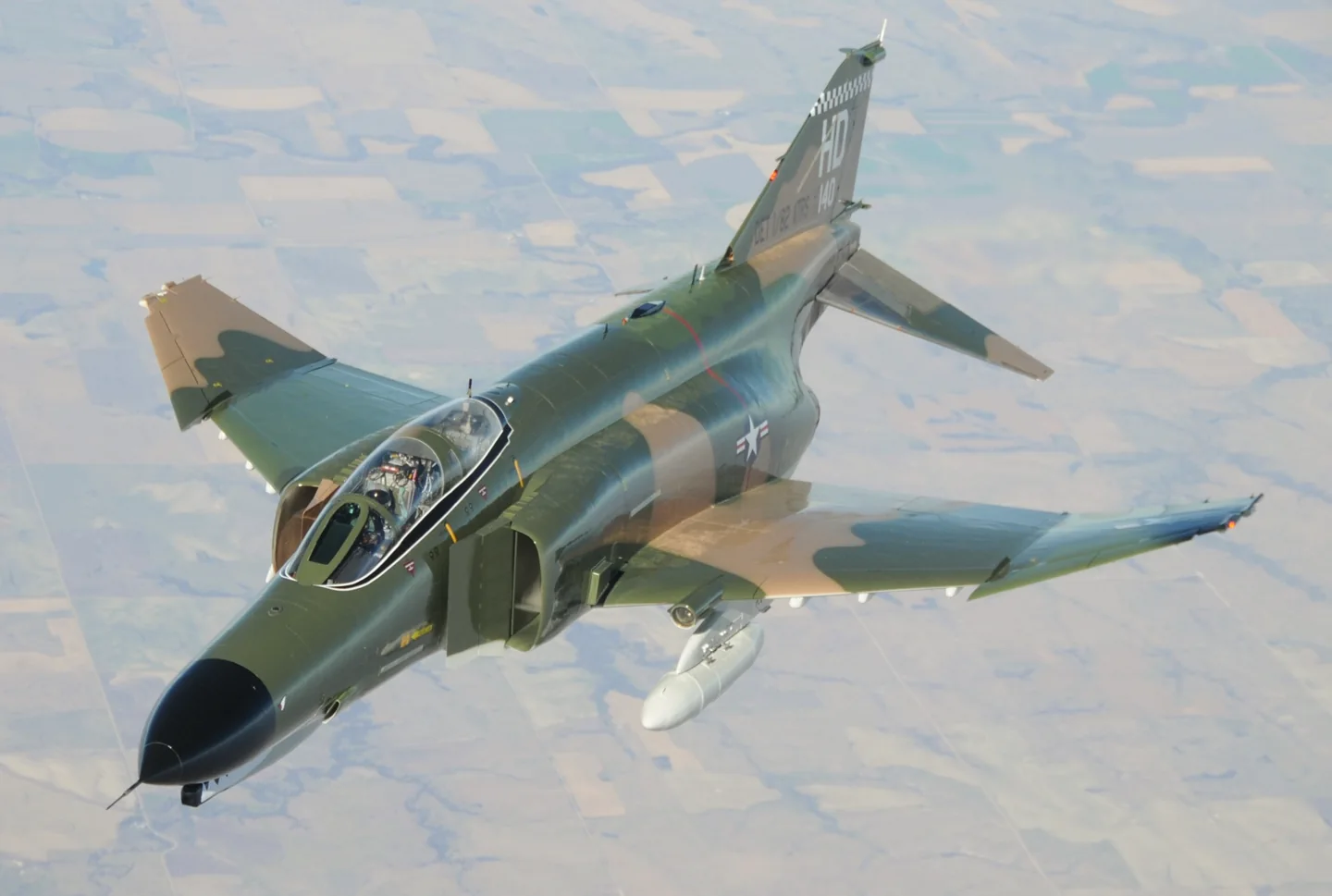
McDonnell Douglas F-4 Phantom IIUSAF · Public domain · McDonnell Douglas F-4 Phantom II pictured

McDonnell Douglas F-4 Phantom II

A two-seat, twin-engine fighter that served naval and land-based air forces in many roles.
Military jet2 opzioni di profilo

Conosci l'aereo

The Phantom began as a US Navy aircraft and was adopted by the US Air Force, Marine Corps and export customers. Large intakes, upward-angled outer wing panels and downward-angled tailplanes distinguish its airframe.

Interceptor, strike and reconnaissance versions carried different engines, radar and cockpit equipment. National upgrades added further differences during the type's long service.

Aircraft / family

Propulsion
Twin jet↗
Configuration
Two-seat multirole fighter↗

McDonnell Douglas F-4 Phantom II · Specifications (F-4E) · real aircraft; source units retained

Length
63 ft 0 in (19.2 m)↗
Wingspan
38 ft 5 in (11.7 m)↗
Height
16 ft 5 in (5 m)↗
Wing area
530 sq ft (49.2 m² )↗
Empty weight
30,328 lb (13,757 kg)↗
Gross weight
41,500 lb (18,824 kg)↗
Max takeoff weight
61,795 lb (28,030 kg)↗
Powerplant
2 × General Electric J79-GE-17A after-burning turbojet engines, 11,905 lbf (52.96 kN) thrust each dry, 17,845 lbf (79.38 kN) with afterburner↗
Maximum speed
1,280 kn (1,470 mph, 2,370 km/h) at 40,000 ft (12,000 m)↗
Cruise speed
510 kn (580 mph, 940 km/h)↗

Scopri di più su questo aeromobile su AirframeDB

The Phantom’s U.S. Air Force farewell includes its civilian instructors

Harkins’s interview places the final U.S. Air Force QF-4 flights at Holloman on 21 December 2016. His nine years as a civilian instructor illustrate the human contribution behind the aircraft’s late target-support career.

Moving from the Hunter into a two-person working cockpit

Bolton’s move from the Hunter to the Phantom meant learning an aircraft with a very different size and reputation. The initial impression of a large, powerful machine gradually gave way to understanding what it did well. The second crew member and the radar became central parts of that experience.

His work also changed when he moved from RAF ground-attack flying to the Royal Navy’s fleet-defence role. Shipboard preparation and practice brought their own audience and pressures, with other people watching how the crew performed. In his recollection, learning the Phantom was therefore more than mastering another set of controls. It involved a working partnership in the cockpit and adapting familiar flying skills to a different service environment.

Forty-five minutes of smiling at the end of a second career

Harkins had not expected to spend the later part of his career flying a fighter designed in the 1950s. Working as a civilian instructor gave him nine years and more than a thousand hours in the Phantom. By the farewell flights at Holloman, it had become a substantial second chapter in his flying life.

He remembered smiling so much during the final forty-five-minute flight that his cheeks hurt. The farewell appearances also brought conversations with veterans, families and old friends who wanted to see the aircraft again. Harkins compared his part in those events to driving the bus for the real star.

Choosing the front seat and learning from returning crews

Rubus had initially hoped for an F-105 assignment, but the available choices led him towards the Phantom. The opportunity to train for its front seat appealed to him, even when others warned that a new second lieutenant might find himself assigned to the rear cockpit instead. Looking back, he regarded the decision as a good one.

At George Air Force Base, instructors who had already served in Southeast Asia helped prepare him for the environment he would enter. Arriving at Ubon brought the classroom and conversion work into a different setting, with learning and staying alive closely connected in his recollection.

Fonti pubbliche 10
  1. McDonnell Douglas F-4 Phantom IIResearch background · Wikipedia revision 1373929760 · retrieved 2026-09-12
  2. X-Plane 12 Desktop Manual
  3. X-Plane aircraft and avionics manuals
  4. X-Plane 11 Desktop Manual
  5. Flying the F-4 Phantom II, British styleChris Bolton · 31 July 2017
  6. Meet the last U.S. Air Force F-4 pilotInterview with Jim Harkins · 30 December 2016
  7. Interview with Gary RubusInterview by Sandor Farkas · 16 January 2016
  8. X-Plane 12 flight model update: supersonic transition, delta wings and mass propertiesAustin Meyer · February 2022
  9. ICAO Doc 8643 — aircraft type designatorsPublic search data retrieved 2026-09-14; authority update 2026-09-03
  10. DC Designs F-4E, F-4J and FGR2 PhantomProduct listing captured 28 September 2026; MSFS 2020 and 2024

Come il profilo lo modella

DC Designs F-4E / F-4J / FGR2 Phantom

Free + Pro
MSFS 2020MSFS 2024DC Designs

The Phantom began as a US Navy aircraft and was adopted by the US Air Force, Marine Corps and export customers. Large intakes, upward-angled outer wing panels and downward-angled tailplanes distinguish its airframe.

This profile selects DC Designs F-4E / F-4J / FGR2 Phantom for MSFS 2020, MSFS 2024.

Hydraulic control assistance motivates artificial stick centering. The spring stays independent of airspeed. Directed aerodynamic loading is omitted.

Pitch trim and pitch/bank hold serve separate cockpit functions. Pitch-trim relief is off. Autopilot following is off.

Questa revisione esatta non è ancora abilitata per l’installazione pubblica.

Controls and trim

The F-4 package includes E, J and FGR2 aircraft, a hydraulic control system and a pitch/bank-hold automatic-flight installation. Those variant and automatic-flight functions define the documented rendition.

DC Designs F-4E, F-4J and FGR2 Phantom product and simulator compatibilityXPlane12 F4 flight model

The selected implementation

DC Designs includes E, J and FGR2 variants and pitch/bank hold in its documented cockpit.

DC Designs F-4E, F-4J and FGR2 Phantom product and simulator compatibility

About the values

The gains are normalized profile settings. They describe the chosen effect balance; hand force depends on the device and its output limits. IAS references are tuning values rather than operating limits. Physical acceptance of this revision remains pending.

Master gain & control system

Master gain85%

La scala finale complessiva applicata a tutto ciò che il modello produce, prima del limite del dispositivo.

Più: tutto (molla, carichi, effetti) si rafforza insieme.

Meno: tutto si ammorbidisce insieme.

Perché qui: Scales overall profile strength while preserving effect balance, subject to device and output limits.

Forces

Spring strength48%

La forza di centraggio di base che riporta la barra al centro. Ogni altra forza si somma a questa. Troppo bassa e la barra sembra molle in volo normale; troppo alta e combatte la mano, mascherando i segnali più piccoli sovrapposti.

Più: un centraggio più fermo che resiste di più alla mano.

Meno: una barra più molle che conta solo sul carico aerodinamico.

Perché qui: Hydraulic control assistance motivates artificial stick centering. The baseline spring is 0.48. Low-speed spring blending is off.

DC Designs F-4E, F-4J and FGR2 Phantom product and simulator compatibilityXPlane12 F4 flight model
Spring deadband4%

Una piccola zona neutra attorno al centro dove la molla resta silenziosa, così i micro-movimenti a riposo non vibrano. Più larga è più tranquilla ma più lasca; più stretta è più precisa ma può fremere attorno al centro.

Più: un centro più calmo ma più lasco, con più gioco.

Meno: un centro più serrato che può fremere a riposo.

Perché qui: Sets travel around the centre before the baseline spring resists. Smaller values engage it sooner.

Overall aerodynamic load25%

Una scala maestra su entrambi i carichi d'asse sostenuti, applicata prima del loro bilanciamento indipendente. Di norma i profili la lasciano stare e regolano i due carichi d'asse.

Più: entrambi gli assi caricano più forte.

Meno: entrambi gli assi si alleggeriscono insieme.

Perché qui: The stored 0.25 aerodynamic-load gain is inactive under the zero hydraulic-load factor.

Airspeed blendingFalse

Attiva la finestra di innesto della molla a bassa velocità (nodi di inizio/pieno qui sopra). Spento, la molla è costante a ogni velocità.

Perché qui: Allows baseline spring strength to rise with indicated airspeed where the control law permits it.

Low-speed spring floor55%

Quanta molla sopravvive da fermo, prima che la velocità possa generare forza aerodinamica. Un pavimento alto tiene salda la barra parcheggiata; uno basso dà la sensazione lasca, da cavi allentati, di un aereo leggero in sosta.

Più: una barra più salda in sosta e al rullaggio.

Meno: una barra molle da fermo che si sveglia solo con la velocità.

Perché qui: Sets low-speed spring strength as a fraction of baseline when blending is enabled. One keeps full strength.

Spring engagement start8 kt

La velocità a cui la molla comincia a salire dal suo pavimento di bassa velocità verso la piena forza: i comandi che «prendono vita» in corsa di decollo.

Perché qui: Sets the IAS where the low-speed spring blend starts rising. This is a feel threshold, not a flight limit.

Spring engagement full65 kt

La velocità a cui la molla raggiunge la piena forza. Tra l'inizio e questo punto il centraggio si irrigidisce progressivamente man mano che il flusso cresce sui comandi.

Perché qui: Sets the IAS where the low-speed blend reaches baseline strength; high-speed stiffening also uses it.

Velocità di regolazione della forza250

La velocità indicata a cui il carico aerodinamico raggiunge il livello pieno di progetto. Ancora l'intera curva di carico al reale intervallo di velocità dell'aereo: un 172 carica verso 110 nodi, un jet molto più tardi.

Più: i carichi arrivano più tardi; la barra resta leggera fino a velocità più alte.

Meno: i carichi arrivano prima e la crociera pesa di più.

Perché qui: Sets the IAS reference for aerodynamic loading. It is an estimate, not published cruise TAS or a flight limit.

Centre firmness vs speed0%

Quanto il centraggio stesso si irrigidisce con la velocità, oltre ai carichi da deflessione. Zero mantiene costante la sensazione del centro; di più fa centrare la barra più dura in crociera e più lasca in circuito.

Più: un centro che si indurisce nettamente con la velocità.

Meno: una sensazione di centro costante a ogni velocità.

Perché qui: The high-speed spring-stiffening gain is 0. No additional speed-driven stiffening is added; this does not disable independent aerodynamic loading.

Centre stiffening cap2

Il limite superiore all'irrigidimento del centro dovuto alla velocità, così il volo molto veloce non può caricare la molla senza limite.

Più: più irrigidimento totale concesso ad alta velocità.

Meno: l'irrigidimento si ferma prima.

Perché qui: Limits the squared airspeed ratio used for high-speed spring stiffening; it is not a device-force cap.

Aileron load72%

Il carico sostenuto di rollio da deflessione degli alettoni e velocità, bilanciato indipendentemente dal beccheggio. Insieme al carico dell'equilibratore fissa il rapporto di armonia dei comandi di cui parlano le recensioni.

Più: sforzi di rollio più pesanti.

Meno: alettoni più leggeri e scattanti.

Perché qui: Roll and pitch aerodynamic scales are 0.72 and 1, respectively. These stored weights do not create directed aerodynamic loading while that term is inactive. No custom spring-travel curve is enabled.

Elevator load100%

Il carico sostenuto di beccheggio da deflessione dell'equilibratore e velocità, bilanciato indipendentemente dal rollio. È la leva principale dietro il peso di beccheggio di un tipo. Non tocca alettoni, molla, trim né forze di buffet.

Più: sforzi di beccheggio sostenuti più pesanti in velocità.

Meno: una profondità più leggera, meno muscolosa da tenere.

Perché qui: Scales pitch aerodynamic loading; pitch spring travel and trim responses are separate settings.

Max output force55%

Un tetto su ogni forza stabile di beccheggio o rollio prima che raggiunga il dispositivo, a protezione da colpi o saturazioni dell'hardware nelle manovre energiche.

Più: picchi di forza stabile più alti prima del taglio.

Meno: un tetto più morbido; le manovre dure si appiattiscono prima.

Perché qui: Caps directed-force output. Native spring effects and device limits remain separate.

Trim

Trim relief (elevator)0%

Quanto il trim di profondità allevia lo sforzo di beccheggio mantenuto e sposta dove la barra si assesta. Al 100 %, un aereo trimmato bene non richiede pressione mantenuta: il flusso di lavoro trimma-via-il-carico del volo reale.

Più: il trim toglie più sforzo mantenuto; al 100 %, trim pieno lo annulla.

Meno: continui a tenere sforzo anche trimmato.

Perché qui: Pitch trim and pitch/bank hold serve separate cockpit functions. Pitch relief is off, with stored authority 0; roll authority is 0.

DC Designs F-4E, F-4J and FGR2 Phantom product and simulator compatibilityXPlane12 F4 flight model
Trim relief (aileron)0%

Lo stesso sollievo per il trim di rollio. La maggior parte dei tipi di aviazione generale non ha un vero trim degli alettoni, quindi resta a zero; i tipi con trim di rollio ricevono un valore corrispondente.

Più: il trim di rollio toglie più sforzo mantenuto.

Meno: il trim di rollio fa meno.

Perché qui: Scales supported roll-trim relief and permitted centre movement. Zero removes roll response.

Effect gains · Ground

Runway rumble40%

Vibrazione di rotolamento da velocità delle ruote e tipo di superficie: asfalto, erba o ghiaia sotto il carrello.

Più: una texture di superficie più forte nella barra.

Meno: un rullaggio più liscio.

Perché qui: Sets rolling texture strength, modified by speed, surface and undercarriage configuration.

Gear bumps25%

Colpi brevi e discreti da giunti di dilatazione, solchi e superficie irregolare, che punteggiano il rombo continuo.

Più: colpi più netti da giunti e solchi.

Meno: dettagli del suolo più morbidi.

Perché qui: Sets gear-bump texture during ground motion, separate from touchdown impact.

Effect gains · Airframe

Stall buffet0%

Scuotimento della cellula in avvicinamento allo stallo e con l'avviso attivo: quanto forte quest'ala annuncia di essere scontenta. I tipi con distacco netto ricevono buffet modesto e lasciano l'avviso alla sirena.

Più: un tremito pre-stallo più forte.

Meno: un'ala più discreta; la sirena porta l'avviso.

Perché qui: Sets stall-buffet strength. Zero removes the cue without changing simulator stalls or warnings.

Mach buffet0%

Buffet transonico in avvicinamento al limite di Mach. Significativo per i jet vicino a MMO, zero per pistoni e turboelica che non ci arrivano mai.

Più: un buffet transonico più forte vicino al limite di Mach.

Meno: un volo più liscio ad alto Mach.

Perché qui: Sets high-Mach buffet strength; onset and full-strength thresholds are separate.

Flap buffet0%

Vibrazione a bassa frequenza della cellula con i flap estesi nel flusso, nella finestra di velocità in cui lavorano davvero l'aria.

Più: un volo più ruvido con i flap al lavoro.

Meno: flap d'avvicinamento più morbidi.

Perché qui: Sets flap buffet at the configured position and speed gates. Flap movement texture is separate.

Gear buffet0%

Il tambureggiare della cellula per il carrello retrattile appeso nel flusso. Zero per i tipi a carrello fisso, dove la cellula non cambia mai forma.

Più: più tambureggiare col carrello fuori.

Meno: un volo col carrello fuori più pulito.

Perché qui: Sets gear aerodynamic buffet; movement and ground-contact cues are separate.

Stick shaker50%

Il ronzio dedicato dello stick shaker di stallo, attivato dal sistema di avviso dell'aereo stesso. Solo i tipi con un vero shaker ricevono un valore; tutti gli altri si affidano al buffet aerodinamico e alla sirena.

Più: uno shaker più duro.

Meno: uno shaker più discreto.

Perché qui: Sets triggered shaker strength; inactive while the shaker feature is disabled.

Effect gains · Engine, mechanical & drag

Touchdown thump65%

Il colpo singolo quando le ruote toccano la pista, scalato dal rateo di discesa: un atterraggio di velluto sussurra, un arrivo deciso batte.

Più: un colpo più duro al contatto.

Meno: arrivi più morbidi.

Perché qui: Sets landing-impact strength; landing telemetry and response shape determine the pulse.

Reverse rumble0%

Vibrazione in corsa mentre lavorano l'inversione di spinta o le eliche in beta. Zero per i tipi senza reverse.

Più: una corsa più ruvida in reverse.

Meno: una reverse più discreta.

Perché qui: Sets reverse-thrust vibration with valid reverser and engine conditions. Zero removes the cue.

Engine rumble0%

Vibrazione continua del propulsore che segue i giri tra minimo e piena potenza, il promemoria sempre presente che qualcosa brucia carburante davanti.

Più: più motore nella barra.

Meno: un motore più discreto.

Perché qui: Sets estimated engine vibration using configured telemetry and response, not measured cockpit vibration.

Flap motion2%

Vibrazione continua solo mentre il simulatore riporta le superfici dei flap davvero in movimento. Segue il moto reale dell'attuatore e i guasti, non un timer stimato.

Più: più vibrazione coi flap in movimento.

Meno: corse dei flap più discrete.

Perché qui: Sets texture from observed flap movement; a command without movement does not establish the cue.

Autopilot follow

AP follow authority10%

Quanto i comandi dell'autopilota possono muovere fisicamente la barra. Tenuto minuscolo in MSFS, dove un asse mosso può essere riletto come ingresso del pilota; zero disattiva del tutto il seguito.

Più: l'autopilota muove visibilmente di più la tua barra.

Meno: un seguito appena percettibile.

Perché qui: Sets admitted AP-follow gain, not a percentage of travel. Runtime ownership and input limits still apply.

Stick feel

StickFeel · Trim feel enabledFalse

Whether this feature is active in this profile.

Perché qui: Retained for compatibility and group membership. Trim relief, rather than this flag, controls centre movement.

StickFeel · Trim relief enabledFalse

Whether this feature is active in this profile.

Perché qui: Allows trim relief with supported control law and valid telemetry. Axis authorities set its amount.

StickFeel · Force trim enabledFalse

Whether this feature is active in this profile.

Perché qui: Enables local force trim, separate from aircraft-owned trim and add-on integration qualification.

StickFeel · G load enabledFalse

Whether this feature is active in this profile.

Perché qui: Allows load-factor changes to modify permitted spring laws. Passive fly-by-wire feel can suppress it.

StickFeel · Rate damping enabledFalse

Whether this feature is active in this profile.

Perché qui: Enables rate damping with the configured coefficients and control law.

Autopilot

Autopilot · Follow enabledFalse

Whether this feature is active in this profile.

Perché qui: Autopilot following is off; the configured spring and load retain the hardware feel.

Autopilot · Neutral hold enabledFalse

Whether this feature is active in this profile.

Perché qui: Permits centering hold during a supported AP state, separate from following a moving target.

Autopilot · Neutral hold strength0.6

Perché qui: Sets admitted AP neutral-hold strength; inactive while neutral hold is disabled.

Aero

Aero · EnabledTrue

Whether this feature is active in this profile.

Perché qui: Enables aerodynamic cues; each still needs nonzero strength and its simulator conditions.

Aero · Max flap index3

Where this effect reaches full strength (or has fully faded, for washouts).

Più: a more gradual build to a later peak.

Meno: a quicker build.

Perché qui: Sets the final flap index for detent normalization. UP plus three detents uses maximum index3.

Aero · Min flap index2

Where this effect begins fading in.

Più: the effect begins later.

Meno: it begins earlier.

Perché qui: Sets the first flap detent that admits buffet; this is a handle index, not degrees.

Aero · Shaker enabledFalse

Whether this feature is active in this profile.

Perché qui: Permits shaker at supported warning conditions; the switch does not establish aircraft equipment.

Ground

Ground · EnabledTrue

Whether this feature is active in this profile.

Perché qui: Enables ground effects; each still needs its own strength and contact or motion telemetry.

Engine

Engine · EnabledFalse

Whether this feature is active in this profile.

Perché qui: Enables engine cues with nonzero settings and valid running-engine telemetry.

Mechanical

Mechanical · EnabledTrue

Whether this feature is active in this profile.

Perché qui: Enables accessory cues with configured strengths and observed accessory movement.

Mechanical · Gain0.025

The strength of this effect.

Più: a stronger effect.

Meno: a weaker one.

Perché qui: Sets texture from observed gear movement, separate from aerodynamic and touchdown effects.

Tutte le impostazioni del profilo
Impostazioni stimate del profilo
ParametroValoreCosa controlla e perché
Spring strength0.48 Hydraulic control assistance motivates artificial stick centering. The baseline spring is 0.48. Low-speed spring blending is off.
Spring deadband0.04 Sets travel around the centre before the baseline spring resists. Smaller values engage it sooner.
Force gain0.25 The stored 0.25 aerodynamic-load gain is inactive under the zero hydraulic-load factor.
Master gain0.85 Scales overall profile strength while preserving effect balance, subject to device and output limits.
Dynamic-pressure blendFalse Allows baseline spring strength to rise with indicated airspeed where the control law permits it.
Minimum spring factor0.55 Sets low-speed spring strength as a fraction of baseline when blending is enabled. One keeps full strength.
Spring wake-up speed8 ktSets the IAS where the low-speed spring blend starts rising. This is a feel threshold, not a flight limit.
Spring full-strength speed65 ktSets the IAS where the low-speed blend reaches baseline strength; high-speed stiffening also uses it.
Velocità di regolazione della forza250 ktSets the IAS reference for aerodynamic loading. It is an estimate, not published cruise TAS or a flight limit.
Airspeed spring stiffening0 The high-speed spring-stiffening gain is 0. No additional speed-driven stiffening is added; this does not disable independent aerodynamic loading.
Airspeed stiffening cap2 Limits the squared airspeed ratio used for high-speed spring stiffening; it is not a device-force cap.
Aileron force scale0.72 Roll and pitch aerodynamic scales are 0.72 and 1, respectively. These stored weights do not create directed aerodynamic loading while that term is inactive. No custom spring-travel curve is enabled.
Elevator force scale1 Scales pitch aerodynamic loading; pitch spring travel and trim responses are separate settings.
Maximum output force0.55 Caps directed-force output. Native spring effects and device limits remain separate.
StickFeel · Trim feel enabledFalse Retained for compatibility and group membership. Trim relief, rather than this flag, controls centre movement.
StickFeel · Trim relief enabledFalse Allows trim relief with supported control law and valid telemetry. Axis authorities set its amount.
StickFeel · Elevator authority0 Pitch trim and pitch/bank hold serve separate cockpit functions. Pitch relief is off, with stored authority 0; roll authority is 0.
StickFeel · Aileron authority0 Scales supported roll-trim relief and permitted centre movement. Zero removes roll response.
StickFeel · Force trim enabledFalse Enables local force trim, separate from aircraft-owned trim and add-on integration qualification.
StickFeel · G load enabledFalse Allows load-factor changes to modify permitted spring laws. Passive fly-by-wire feel can suppress it.
StickFeel · Rate damping enabledFalse Enables rate damping with the configured coefficients and control law.
Autopilot · Follow enabledFalse Autopilot following is off; the configured spring and load retain the hardware feel.
Autopilot · Follow authority0.1 Sets admitted AP-follow gain, not a percentage of travel. Runtime ownership and input limits still apply.
Autopilot · Neutral hold enabledFalse Permits centering hold during a supported AP state, separate from following a moving target.
Autopilot · Neutral hold strength0.6 Sets admitted AP neutral-hold strength; inactive while neutral hold is disabled.
Aero · EnabledTrue Enables aerodynamic cues; each still needs nonzero strength and its simulator conditions.
Aero · Gain0 Sets stall-buffet strength. Zero removes the cue without changing simulator stalls or warnings.
Aero · Gain0 Sets high-Mach buffet strength; onset and full-strength thresholds are separate.
Aero · Gain0 Sets flap buffet at the configured position and speed gates. Flap movement texture is separate.
Aero · Max flap index3 Sets the final flap index for detent normalization. UP plus three detents uses maximum index3.
Aero · Min flap index2 Sets the first flap detent that admits buffet; this is a handle index, not degrees.
Aero · Gain0 Sets gear aerodynamic buffet; movement and ground-contact cues are separate.
Aero · Shaker enabledFalse Permits shaker at supported warning conditions; the switch does not establish aircraft equipment.
Aero · Amplitude0.5 Sets triggered shaker strength; inactive while the shaker feature is disabled.
Ground · EnabledTrue Enables ground effects; each still needs its own strength and contact or motion telemetry.
Ground · Gain0.4 Sets rolling texture strength, modified by speed, surface and undercarriage configuration.
Ground · Gain0.25 Sets gear-bump texture during ground motion, separate from touchdown impact.
Ground · Gain0.65 Sets landing-impact strength; landing telemetry and response shape determine the pulse.
Ground · Gain0 Sets reverse-thrust vibration with valid reverser and engine conditions. Zero removes the cue.
Engine · EnabledFalse Enables engine cues with nonzero settings and valid running-engine telemetry.
Engine · Gain0 Sets estimated engine vibration using configured telemetry and response, not measured cockpit vibration.
Mechanical · EnabledTrue Enables accessory cues with configured strengths and observed accessory movement.
Mechanical · Gain0.018 Sets texture from observed flap movement; a command without movement does not establish the cue.
Mechanical · Gain0.025 Sets texture from observed gear movement, separate from aerodynamic and touchdown effects.
Fonti pubbliche 10
  1. McDonnell Douglas F-4 Phantom IIResearch background · Wikipedia revision 1373929760 · retrieved 2026-09-12
  2. DC Designs F-4E, F-4J and FGR2 Phantom product and simulator compatibilityCompatibility, model and aircraft systemsProduct listing captured 28 September 2026; MSFS 2020 and 2024
  3. XPlane12 F4 flight modelAustin Meyer · February 2022
  4. X-Plane 12 Desktop Manual
  5. X-Plane aircraft and avionics manuals
  6. X-Plane 11 Desktop Manual
  7. Flying the F-4 Phantom II, British styleChris Bolton · 31 July 2017
  8. Meet the last U.S. Air Force F-4 pilotInterview with Jim Harkins · 30 December 2016
  9. Interview with Gary RubusInterview by Sandor Farkas · 16 January 2016
  10. ICAO Doc 8643 — aircraft type designatorsPublic search data retrieved 2026-09-14; authority update 2026-09-03

Comunità e correzioni

Se la tua esperienza sul tipo dice che questa pagina sbaglia, correggila qui.

Correzioni dei piloti

Voli questo velivolo? Correggi questa pagina.

Questa pagina nasce da riferimenti citati, e l'esperienza reale sul tipo vale più di una citazione. Cita l'affermazione errata e dicci cosa fa il velivolo reale. Le correzioni vanno al maintainer per revisione e alimentano la prossima revisione di questa ricerca.

Chiacchiere da hangar

Conversazione aperta su come si vola e si regola il McDonnell Douglas F-4 Phantom II, nel forum della comunità. Le correzioni sopra vanno in privato al maintainer; le chiacchiere da hangar sono pubbliche.

Ancora nessuna chiacchiera da hangar sul McDonnell Douglas F-4 Phantom II. Inizia tu.

Comunità

Profili della comunità per questo velivolo

Ancora nessun profilo della comunità per questo velivolo. Lo hai regolato a modo tuo? Condividi un profilo e apparirà qui.