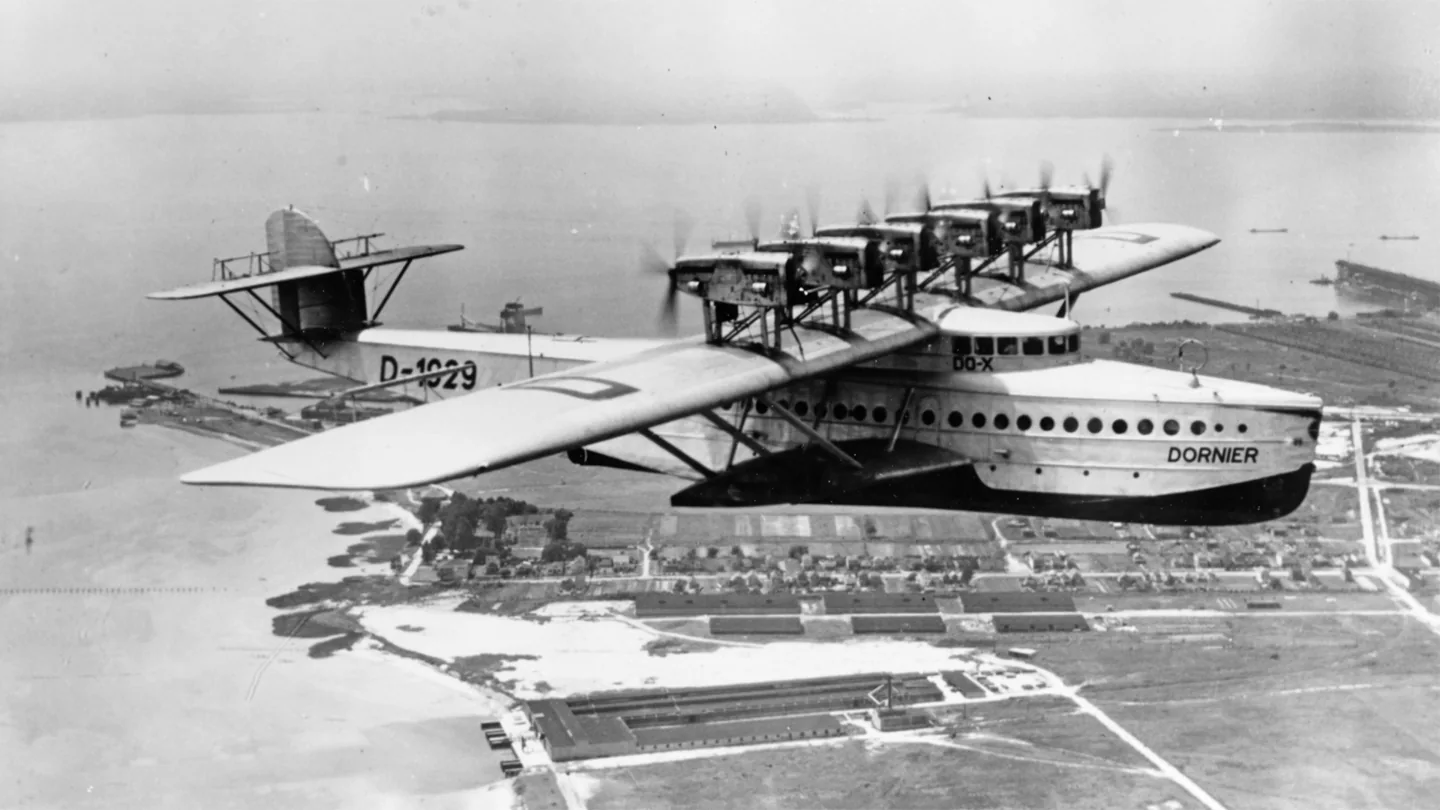
Dornier Do XChief Photographer's Mate John Lee Highfill, USN; SDASM Archives · Public domain · Dornier Do X in flight; historical photograph.

Dornier Do X

A vast inter-war flying boat with twelve engines arranged in six paired installations.
Seaplane1 opzioni di profilo

Conosci l'aereo

Claude Dornier's Do X was conceived on a scale far beyond the light flying boats of its era. Completed in 1929, it combined a broad hull with a high wing and six tractor-and-pusher engine pairs. Its accommodation and public demonstrations reflected ambitions for large-scale air travel over water.

A separate flight engineer managed the twelve engines. The simulator manual describes how that crew role is represented for a single player.

Aircraft / family

Propulsion
Twelve piston engines↗
Configuration
Flying boat · Six engine pairs↗

Dornier Do X · Specifications (Do X1a) · real aircraft; source units retained

Length
40.05 m (131 ft 5 in)↗
Wingspan
47.8 m (156 ft 10 in)↗
Height
10.25 m (33 ft 8 in)↗
Wing area
486.2 m² (5,233 sq ft)↗
Empty weight
28,000 kg (61,729 lb)↗
Gross weight
49,000 kg (108,027 lb)↗
Powerplant
12 × Curtiss V-1570 12-cylinder Liquid-cooled aircraft piston engines, 450 kW (600 hp) each↗
Propellers
4-bladed fixed-pitch wooden propellers↗
Maximum speed
242 km/h (150 mph, 131 kn)↗
Cruise speed
170 km/h (110 mph, 92 kn)↗

Scopri di più su questo aeromobile su AirframeDB

Engine cooling changed the aircraft before its overseas travels

The Smithsonian finding aid records difficulties cooling the original rear engines. Twelve water-cooled Curtiss engines replaced the earlier air-cooled installation, and the modified aircraft first flew in August 1930. Photographs of the initial 1929 aircraft therefore show an earlier powerplant configuration.

The chief pilot is there at the beginning and after a difficult return

Wagner’s first encounter with the Do X in the air reportedly came sooner than intended. During the initial trials on Lake Constance, the great flying boat lifted a few metres above the water. Bartmann attributes that description to the chief pilot’s recollections, then follows the aircraft into its subsequent test programme.

Four years later, Wagner had another task that connected him with the aircraft’s changing fortunes. After a landing accident at Passau, repairs took months, and he brought the Do X back to the place where it had been built. The account sets those two flights at very different moments in its life. It does not supply a detailed first-person handling report or make that return its final flight.

The flying boat depends on a whole crew above the passenger cabin

During a New York demonstration flight, Schildhauer explained the flying boat to reporter Morris Markey. He placed value on the captain’s maritime experience: managing the crew and coordinating the machinery mattered as much as the act of flying. He compared that responsibility with running a steamship.

Schildhauer then invited Markey upstairs to the operating deck. The visit revealed the people working above the comfortable passenger rooms, with navigation and engine management occupying separate spaces. His comments presented the aircraft as a coordinated crew effort. The report records that particular flight and his assessment, without making his comparison a handling guarantee.

A postcard records the excitement of joining the Atlantic crew

Strassmann’s postcard to friends expressed her delight at being allowed to join the Do X crew for its return to Europe. The opportunity followed years of flying, demonstrations and aviation promotion that had brought her into contact with manufacturers on both sides of the Atlantic. She had already made ocean crossings in airships, but this journey placed her aboard the large flying boat.

The museum account records that Captain Friedrich Christiansen handed her the controls over the ocean. Her participation therefore included flying as well as the other duties named in her appointment. The postcard conveys the excitement of securing the place; the biographical record supplies what happened aboard. Her later South American demonstration tour used a separate Klemm aircraft.

Fonti pubbliche 9
  1. Dornier Do XResearch background · Wikipedia revision 1324113414 · retrieved 2026-09-12
  2. Dornier Do X Manual
  3. Microsoft Flight Simulator aircraft manuals
  4. MSFS 2024 FAQ and edition aircraft inventory
  5. Microsoft Flight Simulator Releases Local Legend 12: The Dornier Do X Flying Boat2023-08-23 · release and package scope
  6. Das extravagante Flugschiff Do XStefan Bartmann · 30 May 2022; historical account referring to Wagner’s recollections
  7. Do-XMorris Markey · September 1931
  8. Antonie Strassmann: German Movie Star, American Entrepreneur, Cosmopolitan PilotEvelyn Crellin · 11 April 2014; museum biography with a quoted postcard
  9. Dornier Do X Photograph Album: finding aidPatricia Williams and Melissa Keiser; updated 2022 · PDF pages 3–4

Come il profilo lo modella

Dornier Do X

Free + Pro
MSFS 2024MSFS 2020

Claude Dornier's Do X was conceived on a scale far beyond the light flying boats of its era. Completed in 1929, it combined a broad hull with a high wing and six tractor-and-pusher engine pairs. Its accommodation and public demonstrations reflected ambitions for large-scale air travel over water.

This starting point selects Dornier Do X. Its aircraft-level settings do not select a particular developer’s custom systems.

The profile supplies selected transport resistance while engine cues remain separate. Spring resistance builds with the selected airspeed response. A separate aerodynamic term adds speed-dependent control load.

Trim relief changes the configured pitch load without substituting for the engineer’s engine management. Valid trim provides the configured pressure relief. Autopilot following is off.

Controls and trim

The Do X’s six tractor-and-pusher engine pairs surrounded a large flying-boat hull. A separate flight engineer managed the engines. The 1929 aircraft’s division of crew work and twelve-engine configuration are important parts of its systems description.

Dornier Do X ManualMicrosoft Flight Simulator Releases Local Legend 12: The Dornier Do X Flying Boat

About the values

The gains are normalized profile settings. They describe the chosen effect balance; hand force depends on the device and its output limits. IAS references are tuning values rather than operating limits. Physical acceptance of this revision remains pending.

Master gain & control system

Master gain85%

La scala finale complessiva applicata a tutto ciò che il modello produce, prima del limite del dispositivo.

Più: tutto (molla, carichi, effetti) si rafforza insieme.

Meno: tutto si ammorbidisce insieme.

Perché qui: Scales overall profile strength while preserving effect balance, subject to device and output limits.

Forces

Spring strength74%

La forza di centraggio di base che riporta la barra al centro. Ogni altra forza si somma a questa. Troppo bassa e la barra sembra molle in volo normale; troppo alta e combatte la mano, mascherando i segnali più piccoli sovrapposti.

Più: un centraggio più fermo che resiste di più alla mano.

Meno: una barra più molle che conta solo sul carico aerodinamico.

Perché qui: The profile supplies selected transport resistance while engine cues remain separate. The baseline spring is 0.74. Its low-speed blend reaches baseline strength at 45 KIAS.

Dornier Do X ManualMicrosoft Flight Simulator Releases Local Legend 12: The Dornier Do X Flying Boat
Spring deadband4%

Una piccola zona neutra attorno al centro dove la molla resta silenziosa, così i micro-movimenti a riposo non vibrano. Più larga è più tranquilla ma più lasca; più stretta è più precisa ma può fremere attorno al centro.

Più: un centro più calmo ma più lasco, con più gioco.

Meno: un centro più serrato che può fremere a riposo.

Perché qui: Sets travel around the centre before the baseline spring resists. Smaller values engage it sooner.

Overall aerodynamic load80%

Una scala maestra su entrambi i carichi d'asse sostenuti, applicata prima del loro bilanciamento indipendente. Di norma i profili la lasciano stare e regolano i due carichi d'asse.

Più: entrambi gli assi caricano più forte.

Meno: entrambi gli assi si alleggeriscono insieme.

Perché qui: The aerodynamic-load gain is 0.8 with an indicated-speed reference of 90 KIAS. This supplies speed-dependent loading alongside the spring.

Airspeed blendingTrue

Attiva la finestra di innesto della molla a bassa velocità (nodi di inizio/pieno qui sopra). Spento, la molla è costante a ogni velocità.

Perché qui: Allows baseline spring strength to rise with indicated airspeed where the control law permits it.

Low-speed spring floor50%

Quanta molla sopravvive da fermo, prima che la velocità possa generare forza aerodinamica. Un pavimento alto tiene salda la barra parcheggiata; uno basso dà la sensazione lasca, da cavi allentati, di un aereo leggero in sosta.

Più: una barra più salda in sosta e al rullaggio.

Meno: una barra molle da fermo che si sveglia solo con la velocità.

Perché qui: Sets low-speed spring strength as a fraction of baseline when blending is enabled. One keeps full strength.

Spring engagement start12.6 kt

La velocità a cui la molla comincia a salire dal suo pavimento di bassa velocità verso la piena forza: i comandi che «prendono vita» in corsa di decollo.

Perché qui: Sets the IAS where the low-speed spring blend starts rising. This is a feel threshold, not a flight limit.

Spring engagement full45.0 kt

La velocità a cui la molla raggiunge la piena forza. Tra l'inizio e questo punto il centraggio si irrigidisce progressivamente man mano che il flusso cresce sui comandi.

Perché qui: Sets the IAS where the low-speed blend reaches baseline strength; high-speed stiffening also uses it.

Velocità di regolazione della forza90

La velocità indicata a cui il carico aerodinamico raggiunge il livello pieno di progetto. Ancora l'intera curva di carico al reale intervallo di velocità dell'aereo: un 172 carica verso 110 nodi, un jet molto più tardi.

Più: i carichi arrivano più tardi; la barra resta leggera fino a velocità più alte.

Meno: i carichi arrivano prima e la crociera pesa di più.

Perché qui: Sets the IAS reference for aerodynamic loading. It is an estimate, not published cruise TAS or a flight limit.

Centre firmness vs speed15%

Quanto il centraggio stesso si irrigidisce con la velocità, oltre ai carichi da deflessione. Zero mantiene costante la sensazione del centro; di più fa centrare la barra più dura in crociera e più lasca in circuito.

Più: un centro che si indurisce nettamente con la velocità.

Meno: una sensazione di centro costante a ogni velocità.

Perché qui: The high-speed spring-stiffening gain is 0.15. It strengthens the permitted spring response above 45 KIAS, with the squared-speed ratio capped at 5.

Centre stiffening cap5

Il limite superiore all'irrigidimento del centro dovuto alla velocità, così il volo molto veloce non può caricare la molla senza limite.

Più: più irrigidimento totale concesso ad alta velocità.

Meno: l'irrigidimento si ferma prima.

Perché qui: Limits the squared airspeed ratio used for high-speed spring stiffening; it is not a device-force cap.

Aileron load60%

Il carico sostenuto di rollio da deflessione degli alettoni e velocità, bilanciato indipendentemente dal beccheggio. Insieme al carico dell'equilibratore fissa il rapporto di armonia dei comandi di cui parlano le recensioni.

Più: sforzi di rollio più pesanti.

Meno: alettoni più leggeri e scattanti.

Perché qui: Roll and pitch aerodynamic scales are 0.6 and 0.78, respectively. They set the aerodynamic axis balance. No custom spring-travel curve is enabled.

Elevator load78%

Il carico sostenuto di beccheggio da deflessione dell'equilibratore e velocità, bilanciato indipendentemente dal rollio. È la leva principale dietro il peso di beccheggio di un tipo. Non tocca alettoni, molla, trim né forze di buffet.

Più: sforzi di beccheggio sostenuti più pesanti in velocità.

Meno: una profondità più leggera, meno muscolosa da tenere.

Perché qui: Scales pitch aerodynamic loading; pitch spring travel and trim responses are separate settings.

Max output force55%

Un tetto su ogni forza stabile di beccheggio o rollio prima che raggiunga il dispositivo, a protezione da colpi o saturazioni dell'hardware nelle manovre energiche.

Più: picchi di forza stabile più alti prima del taglio.

Meno: un tetto più morbido; le manovre dure si appiattiscono prima.

Perché qui: Caps directed-force output. Native spring effects and device limits remain separate.

Trim

Trim relief (elevator)30%

Quanto il trim di profondità allevia lo sforzo di beccheggio mantenuto e sposta dove la barra si assesta. Al 100 %, un aereo trimmato bene non richiede pressione mantenuta: il flusso di lavoro trimma-via-il-carico del volo reale.

Più: il trim toglie più sforzo mantenuto; al 100 %, trim pieno lo annulla.

Meno: continui a tenere sforzo anche trimmato.

Perché qui: Trim relief changes the configured pitch load without substituting for the engineer’s engine management. Pitch authority 0.3 provides load relief and permitted centre movement; roll authority is 0.

Dornier Do X ManualMicrosoft Flight Simulator Releases Local Legend 12: The Dornier Do X Flying Boat
Trim relief (aileron)0%

Lo stesso sollievo per il trim di rollio. La maggior parte dei tipi di aviazione generale non ha un vero trim degli alettoni, quindi resta a zero; i tipi con trim di rollio ricevono un valore corrispondente.

Più: il trim di rollio toglie più sforzo mantenuto.

Meno: il trim di rollio fa meno.

Perché qui: Scales supported roll-trim relief and permitted centre movement. Zero removes roll response.

Effect gains · Ground

Runway rumble40%

Vibrazione di rotolamento da velocità delle ruote e tipo di superficie: asfalto, erba o ghiaia sotto il carrello.

Più: una texture di superficie più forte nella barra.

Meno: un rullaggio più liscio.

Perché qui: Sets rolling texture strength, modified by speed, surface and undercarriage configuration.

Gear bumps25%

Colpi brevi e discreti da giunti di dilatazione, solchi e superficie irregolare, che punteggiano il rombo continuo.

Più: colpi più netti da giunti e solchi.

Meno: dettagli del suolo più morbidi.

Perché qui: Sets gear-bump texture during ground motion, separate from touchdown impact.

Effect gains · Airframe

Stall buffet35%

Scuotimento della cellula in avvicinamento allo stallo e con l'avviso attivo: quanto forte quest'ala annuncia di essere scontenta. I tipi con distacco netto ricevono buffet modesto e lasciano l'avviso alla sirena.

Più: un tremito pre-stallo più forte.

Meno: un'ala più discreta; la sirena porta l'avviso.

Perché qui: Sets stall-buffet strength. Zero removes the cue without changing simulator stalls or warnings.

Mach buffet0%

Buffet transonico in avvicinamento al limite di Mach. Significativo per i jet vicino a MMO, zero per pistoni e turboelica che non ci arrivano mai.

Più: un buffet transonico più forte vicino al limite di Mach.

Meno: un volo più liscio ad alto Mach.

Perché qui: Sets high-Mach buffet strength; onset and full-strength thresholds are separate.

Flap buffet0%

Vibrazione a bassa frequenza della cellula con i flap estesi nel flusso, nella finestra di velocità in cui lavorano davvero l'aria.

Più: un volo più ruvido con i flap al lavoro.

Meno: flap d'avvicinamento più morbidi.

Perché qui: Sets flap buffet at the configured position and speed gates. Flap movement texture is separate.

Gear buffet0%

Il tambureggiare della cellula per il carrello retrattile appeso nel flusso. Zero per i tipi a carrello fisso, dove la cellula non cambia mai forma.

Più: più tambureggiare col carrello fuori.

Meno: un volo col carrello fuori più pulito.

Perché qui: Sets gear aerodynamic buffet; movement and ground-contact cues are separate.

Stick shaker50%

Il ronzio dedicato dello stick shaker di stallo, attivato dal sistema di avviso dell'aereo stesso. Solo i tipi con un vero shaker ricevono un valore; tutti gli altri si affidano al buffet aerodinamico e alla sirena.

Più: uno shaker più duro.

Meno: uno shaker più discreto.

Perché qui: Sets triggered shaker strength; inactive while the shaker feature is disabled.

Effect gains · Engine, mechanical & drag

Touchdown thump65%

Il colpo singolo quando le ruote toccano la pista, scalato dal rateo di discesa: un atterraggio di velluto sussurra, un arrivo deciso batte.

Più: un colpo più duro al contatto.

Meno: arrivi più morbidi.

Perché qui: Sets landing-impact strength; landing telemetry and response shape determine the pulse.

Reverse rumble0%

Vibrazione in corsa mentre lavorano l'inversione di spinta o le eliche in beta. Zero per i tipi senza reverse.

Più: una corsa più ruvida in reverse.

Meno: una reverse più discreta.

Perché qui: Sets reverse-thrust vibration with valid reverser and engine conditions. Zero removes the cue.

Engine rumble12%

Vibrazione continua del propulsore che segue i giri tra minimo e piena potenza, il promemoria sempre presente che qualcosa brucia carburante davanti.

Più: più motore nella barra.

Meno: un motore più discreto.

Perché qui: Sets estimated engine vibration using configured telemetry and response, not measured cockpit vibration.

Flap motion0%

Vibrazione continua solo mentre il simulatore riporta le superfici dei flap davvero in movimento. Segue il moto reale dell'attuatore e i guasti, non un timer stimato.

Più: più vibrazione coi flap in movimento.

Meno: corse dei flap più discrete.

Perché qui: Sets texture from observed flap movement; a command without movement does not establish the cue.

Autopilot follow

AP follow authority10%

Quanto i comandi dell'autopilota possono muovere fisicamente la barra. Tenuto minuscolo in MSFS, dove un asse mosso può essere riletto come ingresso del pilota; zero disattiva del tutto il seguito.

Più: l'autopilota muove visibilmente di più la tua barra.

Meno: un seguito appena percettibile.

Perché qui: Sets admitted AP-follow gain, not a percentage of travel. Runtime ownership and input limits still apply.

Stick feel

StickFeel · Trim feel enabledTrue

Whether this feature is active in this profile.

Perché qui: Retained for compatibility and group membership. Trim relief, rather than this flag, controls centre movement.

StickFeel · Trim relief enabledTrue

Whether this feature is active in this profile.

Perché qui: Allows trim relief with supported control law and valid telemetry. Axis authorities set its amount.

StickFeel · Force trim enabledFalse

Whether this feature is active in this profile.

Perché qui: Enables local force trim, separate from aircraft-owned trim and add-on integration qualification.

StickFeel · G load enabledTrue

Whether this feature is active in this profile.

Perché qui: Allows load-factor changes to modify permitted spring laws. Passive fly-by-wire feel can suppress it.

StickFeel · Rate damping enabledTrue

Whether this feature is active in this profile.

Perché qui: Enables rate damping with the configured coefficients and control law.

Autopilot

Autopilot · Follow enabledFalse

Whether this feature is active in this profile.

Perché qui: Autopilot following is off; the configured spring and load retain the hardware feel.

Autopilot · Neutral hold enabledFalse

Whether this feature is active in this profile.

Perché qui: Permits centering hold during a supported AP state, separate from following a moving target.

Autopilot · Neutral hold strength0.6

Perché qui: Sets admitted AP neutral-hold strength; inactive while neutral hold is disabled.

Aero

Aero · EnabledTrue

Whether this feature is active in this profile.

Perché qui: Enables aerodynamic cues; each still needs nonzero strength and its simulator conditions.

Aero · Max flap index1

Where this effect reaches full strength (or has fully faded, for washouts).

Più: a more gradual build to a later peak.

Meno: a quicker build.

Perché qui: Sets the final flap index for detent normalization. UP plus three detents uses maximum index3.

Aero · Min flap index1

Where this effect begins fading in.

Più: the effect begins later.

Meno: it begins earlier.

Perché qui: Sets the first flap detent that admits buffet; this is a handle index, not degrees.

Aero · Shaker enabledFalse

Whether this feature is active in this profile.

Perché qui: Permits shaker at supported warning conditions; the switch does not establish aircraft equipment.

Ground

Ground · EnabledTrue

Whether this feature is active in this profile.

Perché qui: Enables ground effects; each still needs its own strength and contact or motion telemetry.

Engine

Engine · EnabledTrue

Whether this feature is active in this profile.

Perché qui: Enables engine cues with nonzero settings and valid running-engine telemetry.

Mechanical

Mechanical · EnabledTrue

Whether this feature is active in this profile.

Perché qui: Enables accessory cues with configured strengths and observed accessory movement.

Mechanical · Gain0

The strength of this effect.

Più: a stronger effect.

Meno: a weaker one.

Perché qui: Sets texture from observed gear movement, separate from aerodynamic and touchdown effects.

Tutte le impostazioni del profilo
Impostazioni stimate del profilo
ParametroValoreCosa controlla e perché
Spring strength0.74 The profile supplies selected transport resistance while engine cues remain separate. The baseline spring is 0.74. Its low-speed blend reaches baseline strength at 45 KIAS.
Spring deadband0.045 Sets travel around the centre before the baseline spring resists. Smaller values engage it sooner.
Force gain0.8 The aerodynamic-load gain is 0.8 with an indicated-speed reference of 90 KIAS. This supplies speed-dependent loading alongside the spring.
Master gain0.85 Scales overall profile strength while preserving effect balance, subject to device and output limits.
Dynamic-pressure blendTrue Allows baseline spring strength to rise with indicated airspeed where the control law permits it.
Minimum spring factor0.5 Sets low-speed spring strength as a fraction of baseline when blending is enabled. One keeps full strength.
Spring wake-up speed12.6 ktSets the IAS where the low-speed spring blend starts rising. This is a feel threshold, not a flight limit.
Spring full-strength speed45.0 ktSets the IAS where the low-speed blend reaches baseline strength; high-speed stiffening also uses it.
Velocità di regolazione della forza90.0 ktSets the IAS reference for aerodynamic loading. It is an estimate, not published cruise TAS or a flight limit.
Airspeed spring stiffening0.15 The high-speed spring-stiffening gain is 0.15. It strengthens the permitted spring response above 45 KIAS, with the squared-speed ratio capped at 5.
Airspeed stiffening cap5 Limits the squared airspeed ratio used for high-speed spring stiffening; it is not a device-force cap.
Aileron force scale0.6 Roll and pitch aerodynamic scales are 0.6 and 0.78, respectively. They set the aerodynamic axis balance. No custom spring-travel curve is enabled.
Elevator force scale0.78 Scales pitch aerodynamic loading; pitch spring travel and trim responses are separate settings.
Maximum output force0.55 Caps directed-force output. Native spring effects and device limits remain separate.
StickFeel · Trim feel enabledTrue Retained for compatibility and group membership. Trim relief, rather than this flag, controls centre movement.
StickFeel · Trim relief enabledTrue Allows trim relief with supported control law and valid telemetry. Axis authorities set its amount.
StickFeel · Elevator authority0.3 Trim relief changes the configured pitch load without substituting for the engineer’s engine management. Pitch authority 0.3 provides load relief and permitted centre movement; roll authority is 0.
StickFeel · Aileron authority0 Scales supported roll-trim relief and permitted centre movement. Zero removes roll response.
StickFeel · Force trim enabledFalse Enables local force trim, separate from aircraft-owned trim and add-on integration qualification.
StickFeel · G load enabledTrue Allows load-factor changes to modify permitted spring laws. Passive fly-by-wire feel can suppress it.
StickFeel · Rate damping enabledTrue Enables rate damping with the configured coefficients and control law.
Autopilot · Follow enabledFalse Autopilot following is off; the configured spring and load retain the hardware feel.
Autopilot · Follow authority0.1 Sets admitted AP-follow gain, not a percentage of travel. Runtime ownership and input limits still apply.
Autopilot · Neutral hold enabledFalse Permits centering hold during a supported AP state, separate from following a moving target.
Autopilot · Neutral hold strength0.6 Sets admitted AP neutral-hold strength; inactive while neutral hold is disabled.
Aero · EnabledTrue Enables aerodynamic cues; each still needs nonzero strength and its simulator conditions.
Aero · Gain0.35 Sets stall-buffet strength. Zero removes the cue without changing simulator stalls or warnings.
Aero · Gain0 Sets high-Mach buffet strength; onset and full-strength thresholds are separate.
Aero · Gain0 Sets flap buffet at the configured position and speed gates. Flap movement texture is separate.
Aero · Max flap index1 Sets the final flap index for detent normalization. UP plus three detents uses maximum index3.
Aero · Min flap index1 Sets the first flap detent that admits buffet; this is a handle index, not degrees.
Aero · Gain0 Sets gear aerodynamic buffet; movement and ground-contact cues are separate.
Aero · Shaker enabledFalse Permits shaker at supported warning conditions; the switch does not establish aircraft equipment.
Aero · Amplitude0.5 Sets triggered shaker strength; inactive while the shaker feature is disabled.
Ground · EnabledTrue Enables ground effects; each still needs its own strength and contact or motion telemetry.
Ground · Gain0.4 Sets rolling texture strength, modified by speed, surface and undercarriage configuration.
Ground · Gain0.25 Sets gear-bump texture during ground motion, separate from touchdown impact.
Ground · Gain0.65 Sets landing-impact strength; landing telemetry and response shape determine the pulse.
Ground · Gain0 Sets reverse-thrust vibration with valid reverser and engine conditions. Zero removes the cue.
Engine · EnabledTrue Enables engine cues with nonzero settings and valid running-engine telemetry.
Engine · Gain0.12 Sets estimated engine vibration using configured telemetry and response, not measured cockpit vibration.
Mechanical · EnabledTrue Enables accessory cues with configured strengths and observed accessory movement.
Mechanical · Gain0 Sets texture from observed flap movement; a command without movement does not establish the cue.
Mechanical · Gain0 Sets texture from observed gear movement, separate from aerodynamic and touchdown effects.
Fonti pubbliche 9
  1. Dornier Do XResearch background · Wikipedia revision 1324113414 · retrieved 2026-09-12
  2. Dornier Do X ManualDornier Do X
  3. Microsoft Flight Simulator Releases Local Legend 12: The Dornier Do X Flying Boat2023-08-23 · release and package scope
  4. Microsoft Flight Simulator aircraft manuals
  5. MSFS 2024 FAQ and edition aircraft inventory
  6. Das extravagante Flugschiff Do XStefan Bartmann · 30 May 2022; historical account referring to Wagner’s recollections
  7. Do-XMorris Markey · September 1931
  8. Antonie Strassmann: German Movie Star, American Entrepreneur, Cosmopolitan PilotEvelyn Crellin · 11 April 2014; museum biography with a quoted postcard
  9. Dornier Do X Photograph Album: finding aidPatricia Williams and Melissa Keiser; updated 2022 · PDF pages 3–4

Comunità e correzioni

Se la tua esperienza sul tipo dice che questa pagina sbaglia, correggila qui.

Correzioni dei piloti

Voli questo velivolo? Correggi questa pagina.

Questa pagina nasce da riferimenti citati, e l'esperienza reale sul tipo vale più di una citazione. Cita l'affermazione errata e dicci cosa fa il velivolo reale. Le correzioni vanno al maintainer per revisione e alimentano la prossima revisione di questa ricerca.

Chiacchiere da hangar

Conversazione aperta su come si vola e si regola il Dornier Do X, nel forum della comunità. Le correzioni sopra vanno in privato al maintainer; le chiacchiere da hangar sono pubbliche.

Ancora nessuna chiacchiera da hangar sul Dornier Do X. Inizia tu.

Comunità

Profili della comunità per questo velivolo

Ancora nessun profilo della comunità per questo velivolo. Lo hai regolato a modo tuo? Condividi un profilo e apparirà qui.