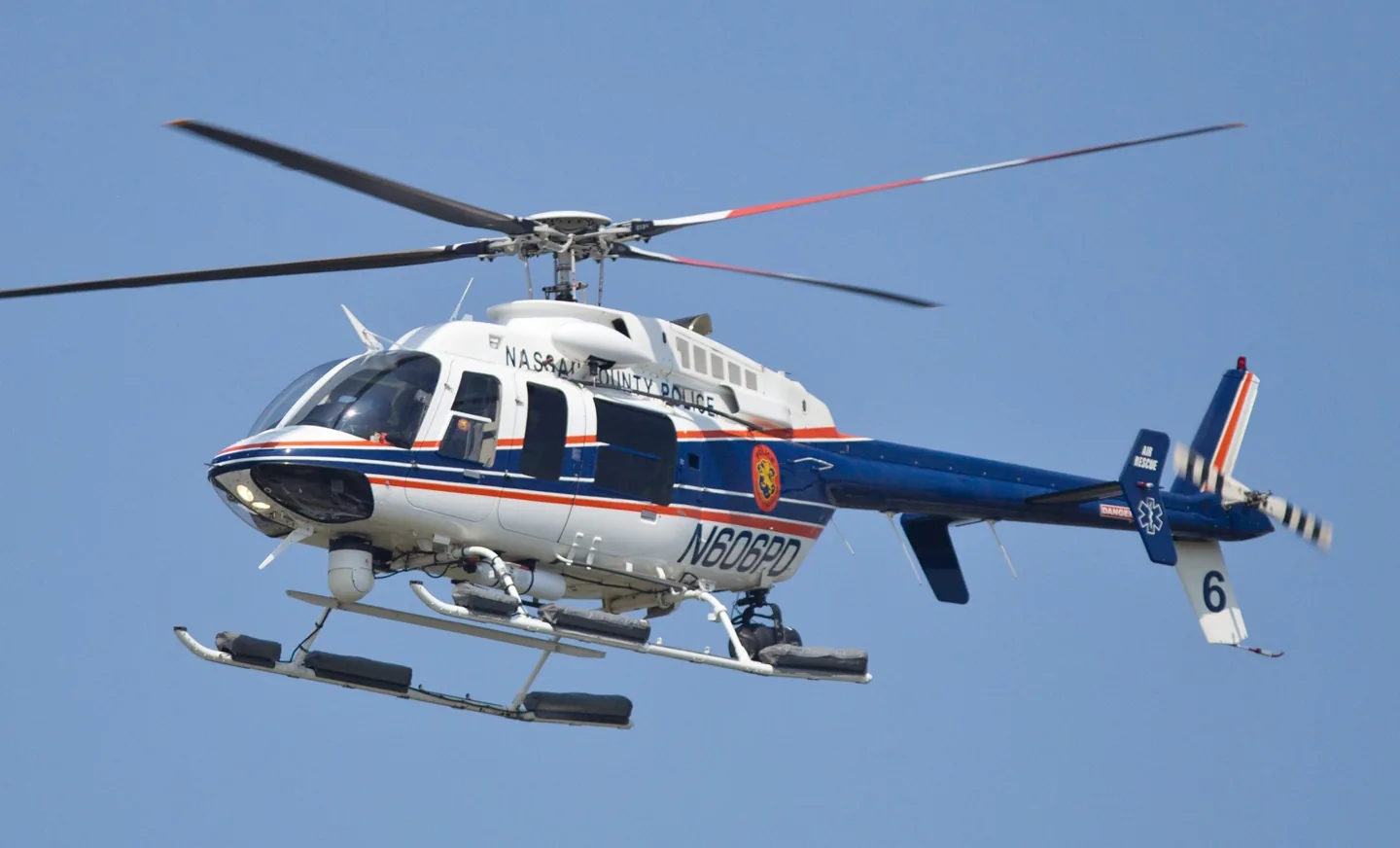
Bell 407Robert Kowal · CC BY-SA 2.0 · Bell 407 pictured

Bell 407

A four-bladed utility helicopter developed from the LongRanger lineage.
Helicopter2 opzioni di profilo

Conosci l'aereo

The Bell 407 retained a family resemblance to the 206L while adopting a four-bladed main rotor and associated structural changes. It is a single-engine helicopter used for passenger, emergency-service and utility missions.

The rotor is an immediate visual clue when comparing a 407 with the two-bladed JetRanger and LongRanger. Cockpit equipment has also evolved through the programme. Simulator implementations can therefore share the 407 name while representing different avionics and assistance systems.

Aircraft / family

Propulsion
Single turboshaft↗
Configuration
Four-bladed main rotor↗

Bell 407 · Specifications (Bell 407) · real aircraft; source units retained

Length
41 ft 8 in (12.70 m)↗
Height
11 ft 8 in (3.56 m)↗
Max takeoff weight
6,000 lb (2,722 kg)↗
Powerplant
1 × Allison 250-C47B turboshaft engine, 813 shp (606 kW)↗
Main rotor diameter
35 ft 0 in (10.67 m)↗
Main rotor area
962 sq ft (89.4 m² )↗
Maximum speed
140 kn (160 mph, 260 km/h)↗
Cruise speed
133 kn (153 mph, 246 km/h)↗
Range
324 nmi (373 mi, 600 km)↗
Service ceiling
18,690 ft (5,700 m)↗

Scopri di più su questo aeromobile su AirframeDB

The 407 develops beyond the LongRanger shape

Malone’s report traces the 407’s lineage through the LongRanger while identifying its four-blade main rotor and later GX and GXP developments. The familiar outline therefore spans meaningful changes in rotor system, engine control and cockpit equipment.

The GXi introduces the NXi flight deck

Rexroth’s 2018 report identifies the G1000H NXi and Rolls-Royce 250-C47E/4 engine as distinguishing the GXi from the preceding GXP. Her demonstration aircraft was an early production example, placing the flight at the start of that configuration’s service.

A glass cockpit becomes familiar over the Kent coast

Malone arrived with reservations about learning a glass cockpit, despite considerable experience in older helicopters. Gary Slater introduced him to the 407GXP at Manston on a hot day, when the aircraft’s air conditioning was particularly welcome. Once airborne, the smooth ride and the view along the Kent coast helped him relax into the flight.

Some cockpit details still required effort. The slip indication was harder to pick out from his seat in strong sunlight, and the boosted pedals needed familiarisation. He found himself using a mixture of traditional and electronic instruments as his scan developed. By the return to Manston, the unfamiliar displays seemed less daunting.

Sharing a long journey with his mother

An invitation from his friend and instructor Lars Gange helped inspire Nai Nan Ko Jr. to consider flying to Alaska. He took his 82-year-old mother on the journey, making it a shared family experience as well as an ambitious use of his helicopter. Weather and the availability of stops shaped their progress across the continent.

The memories included wildlife, glaciers and unexpected hospitality along the route. At Prince Rupert, the Coast Guard helped them find a place to land; other operators offered local knowledge and welcome. Small practical details mattered too, including keeping the windshield clear of insects. He particularly valued sharing the changing views and encounters with his mother over many hours of flying.

Learning the new panel in unfamiliar local airspace

Rexroth’s introduction began with a close look at the new displays and a briefing from Tim Otteson. The aircraft was an early production GXi with little time in service. After adjusting the pedals, she joined an hour-long local flight that included Fort Worth and Bell’s training area, concentrating on how the revised avionics fitted into her scan.

Fast map redraws and clear airport diagrams helped as she flew in unfamiliar surroundings. Otteson demonstrated manoeuvres and then handed over the controls, allowing her confidence with both the helicopter and the panel to grow. They also explored autopilot modes towards the end of the flight. By shutdown, Rexroth had a more practical understanding of the changes than the initial screen comparison alone had supplied, alongside an enjoyable first experience of the GXi.

Fonti pubbliche 11
  1. Bell 407Research background · Wikipedia revision 1365980603 · retrieved 2026-09-12
  2. Microsoft Flight Simulator aircraft manuals
  3. MSFS 2024 FAQ and edition aircraft inventory
  4. MSFS 2020 FAQ and edition aircraft inventory
  5. Flight Test: Bell 407GXPPat Malone · 5 January 2017
  6. From Boston to Alaska in a Bell 407GXiNai Nan Ko Jr. · owner story, 28 August 2025
  7. Pilot Report: Bell 407GXiAlexa Rexroth · August 2018
  8. ICAO Doc 8643 — aircraft type designatorsPublic search data retrieved 2026-09-14; authority update 2026-09-03
  9. MSFS 2024 Sim Update 4 release notesPublisher announcement or release notes
  10. Microsoft Flight Simulator’s 40th Anniversary EditionPublisher announcement or release notes
  11. store.x-plane.orgProduct listing captured 2026-09-24; edition scope from the reviewed catalogue

Come il profilo lo modella

JRX Bell 407

Free + Pro
X-Plane 12JRX Design

The Bell 407 retained a family resemblance to the 206L while adopting a four-bladed main rotor and associated structural changes. It is a single-engine helicopter used for passenger, emergency-service and utility missions.

This profile selects JRX Bell 407 for X-Plane 12.

The spring stays independent of airspeed. Directed aerodynamic loading is omitted.

Local force trim is off. Autopilot following is off.

Cyclic damping is on. Its configured gain is 0.35; it resists hardware motion separately from the spring and aircraft stabilization.

Controls and trim

The Bell 407 has a four-blade main rotor. JRX's X-Plane 12 implementation lists optional autopilot and IFR equipment alongside its AAPS, vibration and engine-exceedance modeling. Those are developer-documented aircraft behaviors. The separate Microsoft default aircraft and an acoustic rotor study do not establish the same interfaces or physical cyclic-vibration amplitudes.

store.x-plane.orgMicrosoft Flight Simulator’s 40th Anniversary EditionUS DOT helicopter noise measurements

The selected implementation

JRX Bell 407 v1.41 targets XP12.3+ with revised AAPS/vibration/exceedance behavior and optional AP/IFR, separate from default MSFS 407.

store.x-plane.org

About the values

The gains are normalized profile settings. They describe the chosen effect balance; hand force depends on the device and its output limits. IAS references are tuning values rather than operating limits. Physical acceptance of this revision remains pending.

Master gain & control system

Master gain65%

La scala finale complessiva applicata a tutto ciò che il modello produce, prima del limite del dispositivo.

Più: tutto (molla, carichi, effetti) si rafforza insieme.

Meno: tutto si ammorbidisce insieme.

Perché qui: Scales overall profile strength while preserving effect balance, subject to device and output limits.

Forces

Spring strength14%

La forza di centraggio di base che riporta la barra al centro. Ogni altra forza si somma a questa. Troppo bassa e la barra sembra molle in volo normale; troppo alta e combatte la mano, mascherando i segnali più piccoli sovrapposti.

Più: un centraggio più fermo che resiste di più alla mano.

Meno: una barra più molle che conta solo sul carico aerodinamico.

Perché qui: The four-bladed rotor establishes configuration, while cyclic spring resistance remains the selected control-feel approximation. The baseline spring is 0.14. Low-speed spring blending is off.

store.x-plane.orgMicrosoft Flight Simulator’s 40th Anniversary EditionUS DOT helicopter noise measurements
Spring deadband2%

Una piccola zona neutra attorno al centro dove la molla resta silenziosa, così i micro-movimenti a riposo non vibrano. Più larga è più tranquilla ma più lasca; più stretta è più precisa ma può fremere attorno al centro.

Più: un centro più calmo ma più lasco, con più gioco.

Meno: un centro più serrato che può fremere a riposo.

Perché qui: Sets travel around the centre before the baseline spring resists. Smaller values engage it sooner.

Overall aerodynamic load0%

Una scala maestra su entrambi i carichi d'asse sostenuti, applicata prima del loro bilanciamento indipendente. Di norma i profili la lasciano stare e regolano i due carichi d'asse.

Più: entrambi gli assi caricano più forte.

Meno: entrambi gli assi si alleggeriscono insieme.

Perché qui: The 0 gain omits sustained directed airspeed loading. Spring resistance remains independent.

Airspeed blendingFalse

Attiva la finestra di innesto della molla a bassa velocità (nodi di inizio/pieno qui sopra). Spento, la molla è costante a ogni velocità.

Perché qui: Allows baseline spring strength to rise with indicated airspeed where the control law permits it.

Low-speed spring floor100%

Quanta molla sopravvive da fermo, prima che la velocità possa generare forza aerodinamica. Un pavimento alto tiene salda la barra parcheggiata; uno basso dà la sensazione lasca, da cavi allentati, di un aereo leggero in sosta.

Più: una barra più salda in sosta e al rullaggio.

Meno: una barra molle da fermo che si sveglia solo con la velocità.

Perché qui: Sets low-speed spring strength as a fraction of baseline when blending is enabled. One keeps full strength.

Spring engagement start8 kt

La velocità a cui la molla comincia a salire dal suo pavimento di bassa velocità verso la piena forza: i comandi che «prendono vita» in corsa di decollo.

Perché qui: Sets the IAS where the low-speed spring blend starts rising. This is a feel threshold, not a flight limit.

Spring engagement full60.0 kt

La velocità a cui la molla raggiunge la piena forza. Tra l'inizio e questo punto il centraggio si irrigidisce progressivamente man mano che il flusso cresce sui comandi.

Perché qui: Sets the IAS where the low-speed blend reaches baseline strength; high-speed stiffening also uses it.

Velocità di regolazione della forza120

La velocità indicata a cui il carico aerodinamico raggiunge il livello pieno di progetto. Ancora l'intera curva di carico al reale intervallo di velocità dell'aereo: un 172 carica verso 110 nodi, un jet molto più tardi.

Più: i carichi arrivano più tardi; la barra resta leggera fino a velocità più alte.

Meno: i carichi arrivano prima e la crociera pesa di più.

Perché qui: Sets the IAS reference for aerodynamic loading. It is an estimate, not published cruise TAS or a flight limit.

Centre firmness vs speed0%

Quanto il centraggio stesso si irrigidisce con la velocità, oltre ai carichi da deflessione. Zero mantiene costante la sensazione del centro; di più fa centrare la barra più dura in crociera e più lasca in circuito.

Più: un centro che si indurisce nettamente con la velocità.

Meno: una sensazione di centro costante a ogni velocità.

Perché qui: Adds permitted spring resistance above the full-blend speed. Zero removes this high-speed increase.

Centre stiffening cap5

Il limite superiore all'irrigidimento del centro dovuto alla velocità, così il volo molto veloce non può caricare la molla senza limite.

Più: più irrigidimento totale concesso ad alta velocità.

Meno: l'irrigidimento si ferma prima.

Perché qui: Limits the squared airspeed ratio used for high-speed spring stiffening; it is not a device-force cap.

Aileron load72%

Il carico sostenuto di rollio da deflessione degli alettoni e velocità, bilanciato indipendentemente dal beccheggio. Insieme al carico dell'equilibratore fissa il rapporto di armonia dei comandi di cui parlano le recensioni.

Più: sforzi di rollio più pesanti.

Meno: alettoni più leggeri e scattanti.

Perché qui: Roll and pitch aerodynamic scales are 0.72 and 1, respectively. These stored weights do not create directed aerodynamic loading while that term is inactive. No custom spring-travel curve is enabled.

Elevator load100%

Il carico sostenuto di beccheggio da deflessione dell'equilibratore e velocità, bilanciato indipendentemente dal rollio. È la leva principale dietro il peso di beccheggio di un tipo. Non tocca alettoni, molla, trim né forze di buffet.

Più: sforzi di beccheggio sostenuti più pesanti in velocità.

Meno: una profondità più leggera, meno muscolosa da tenere.

Perché qui: Scales pitch aerodynamic loading; pitch spring travel and trim responses are separate settings.

Max output force55%

Un tetto su ogni forza stabile di beccheggio o rollio prima che raggiunga il dispositivo, a protezione da colpi o saturazioni dell'hardware nelle manovre energiche.

Più: picchi di forza stabile più alti prima del taglio.

Meno: un tetto più morbido; le manovre dure si appiattiscono prima.

Perché qui: Caps directed-force output. Native spring effects and device limits remain separate.

Trim

Trim relief (elevator)0%

Quanto il trim di profondità allevia lo sforzo di beccheggio mantenuto e sposta dove la barra si assesta. Al 100 %, un aereo trimmato bene non richiede pressione mantenuta: il flusso di lavoro trimma-via-il-carico del volo reale.

Più: il trim toglie più sforzo mantenuto; al 100 %, trim pieno lo annulla.

Meno: continui a tenere sforzo anche trimmato.

Perché qui: Scales supported pitch-trim relief and permitted centre movement. Zero removes pitch response.

Trim relief (aileron)0%

Lo stesso sollievo per il trim di rollio. La maggior parte dei tipi di aviazione generale non ha un vero trim degli alettoni, quindi resta a zero; i tipi con trim di rollio ricevono un valore corrispondente.

Più: il trim di rollio toglie più sforzo mantenuto.

Meno: il trim di rollio fa meno.

Perché qui: Scales supported roll-trim relief and permitted centre movement. Zero removes roll response.

Effect gains · Ground

Runway rumble0%

Vibrazione di rotolamento da velocità delle ruote e tipo di superficie: asfalto, erba o ghiaia sotto il carrello.

Più: una texture di superficie più forte nella barra.

Meno: un rullaggio più liscio.

Perché qui: Sets rolling texture strength, modified by speed, surface and undercarriage configuration.

Gear bumps0%

Colpi brevi e discreti da giunti di dilatazione, solchi e superficie irregolare, che punteggiano il rombo continuo.

Più: colpi più netti da giunti e solchi.

Meno: dettagli del suolo più morbidi.

Perché qui: Sets gear-bump texture during ground motion, separate from touchdown impact.

Effect gains · Airframe

Stall buffet0%

Scuotimento della cellula in avvicinamento allo stallo e con l'avviso attivo: quanto forte quest'ala annuncia di essere scontenta. I tipi con distacco netto ricevono buffet modesto e lasciano l'avviso alla sirena.

Più: un tremito pre-stallo più forte.

Meno: un'ala più discreta; la sirena porta l'avviso.

Perché qui: Sets stall-buffet strength. Zero removes the cue without changing simulator stalls or warnings.

Mach buffet0%

Buffet transonico in avvicinamento al limite di Mach. Significativo per i jet vicino a MMO, zero per pistoni e turboelica che non ci arrivano mai.

Più: un buffet transonico più forte vicino al limite di Mach.

Meno: un volo più liscio ad alto Mach.

Perché qui: Sets high-Mach buffet strength; onset and full-strength thresholds are separate.

Flap buffet0%

Vibrazione a bassa frequenza della cellula con i flap estesi nel flusso, nella finestra di velocità in cui lavorano davvero l'aria.

Più: un volo più ruvido con i flap al lavoro.

Meno: flap d'avvicinamento più morbidi.

Perché qui: Sets flap buffet at the configured position and speed gates. Flap movement texture is separate.

Gear buffet0%

Il tambureggiare della cellula per il carrello retrattile appeso nel flusso. Zero per i tipi a carrello fisso, dove la cellula non cambia mai forma.

Più: più tambureggiare col carrello fuori.

Meno: un volo col carrello fuori più pulito.

Perché qui: Sets gear aerodynamic buffet; movement and ground-contact cues are separate.

Stick shaker50%

Il ronzio dedicato dello stick shaker di stallo, attivato dal sistema di avviso dell'aereo stesso. Solo i tipi con un vero shaker ricevono un valore; tutti gli altri si affidano al buffet aerodinamico e alla sirena.

Più: uno shaker più duro.

Meno: uno shaker più discreto.

Perché qui: Sets triggered shaker strength; inactive while the shaker feature is disabled.

Effect gains · Engine, mechanical & drag

Touchdown thump50%

Il colpo singolo quando le ruote toccano la pista, scalato dal rateo di discesa: un atterraggio di velluto sussurra, un arrivo deciso batte.

Più: un colpo più duro al contatto.

Meno: arrivi più morbidi.

Perché qui: Sets landing-impact strength; landing telemetry and response shape determine the pulse.

Reverse rumble0%

Vibrazione in corsa mentre lavorano l'inversione di spinta o le eliche in beta. Zero per i tipi senza reverse.

Più: una corsa più ruvida in reverse.

Meno: una reverse più discreta.

Perché qui: Sets reverse-thrust vibration with valid reverser and engine conditions. Zero removes the cue.

Engine rumble0%

Vibrazione continua del propulsore che segue i giri tra minimo e piena potenza, il promemoria sempre presente che qualcosa brucia carburante davanti.

Più: più motore nella barra.

Meno: un motore più discreto.

Perché qui: Sets estimated engine vibration using configured telemetry and response, not measured cockpit vibration.

Flap motion0%

Vibrazione continua solo mentre il simulatore riporta le superfici dei flap davvero in movimento. Segue il moto reale dell'attuatore e i guasti, non un timer stimato.

Più: più vibrazione coi flap in movimento.

Meno: corse dei flap più discrete.

Perché qui: Sets texture from observed flap movement; a command without movement does not establish the cue.

Autopilot follow

AP follow authority5%

Quanto i comandi dell'autopilota possono muovere fisicamente la barra. Tenuto minuscolo in MSFS, dove un asse mosso può essere riletto come ingresso del pilota; zero disattiva del tutto il seguito.

Più: l'autopilota muove visibilmente di più la tua barra.

Meno: un seguito appena percettibile.

Perché qui: Sets admitted AP-follow gain, not a percentage of travel. Runtime ownership and input limits still apply.

Stick feel

StickFeel · Trim feel enabledFalse

Whether this feature is active in this profile.

Perché qui: Retained for compatibility and group membership. Trim relief, rather than this flag, controls centre movement.

StickFeel · Trim relief enabledFalse

Whether this feature is active in this profile.

Perché qui: Allows trim relief with supported control law and valid telemetry. Axis authorities set its amount.

StickFeel · G load enabledFalse

Whether this feature is active in this profile.

Perché qui: Allows load-factor changes to modify permitted spring laws. Passive fly-by-wire feel can suppress it.

StickFeel · Rate damping enabledFalse

Whether this feature is active in this profile.

Perché qui: Enables rate damping with the configured coefficients and control law.

Autopilot

Autopilot · Follow enabledFalse

Whether this feature is active in this profile.

Perché qui: Autopilot following is off; the configured spring and load retain the hardware feel.

Autopilot · Neutral hold enabledFalse

Whether this feature is active in this profile.

Perché qui: Permits centering hold during a supported AP state, separate from following a moving target.

Autopilot · Neutral hold strength0.6

Perché qui: Sets admitted AP neutral-hold strength; inactive while neutral hold is disabled.

Aero

Aero · EnabledTrue

Whether this feature is active in this profile.

Perché qui: Enables aerodynamic cues; each still needs nonzero strength and its simulator conditions.

Aero · Max flap index1

Where this effect reaches full strength (or has fully faded, for washouts).

Più: a more gradual build to a later peak.

Meno: a quicker build.

Perché qui: Sets the final flap index for detent normalization. UP plus three detents uses maximum index3.

Aero · Min flap index1

Where this effect begins fading in.

Più: the effect begins later.

Meno: it begins earlier.

Perché qui: Sets the first flap detent that admits buffet; this is a handle index, not degrees.

Aero · Shaker enabledFalse

Whether this feature is active in this profile.

Perché qui: Permits shaker at supported warning conditions; the switch does not establish aircraft equipment.

Ground

Ground · EnabledTrue

Whether this feature is active in this profile.

Perché qui: Enables ground effects; each still needs its own strength and contact or motion telemetry.

Engine

Engine · EnabledTrue

Whether this feature is active in this profile.

Perché qui: Enables engine cues with nonzero settings and valid running-engine telemetry.

Mechanical

Mechanical · EnabledTrue

Whether this feature is active in this profile.

Perché qui: Enables accessory cues with configured strengths and observed accessory movement.

Mechanical · Gain0

The strength of this effect.

Più: a stronger effect.

Meno: a weaker one.

Perché qui: Sets texture from observed gear movement, separate from aerodynamic and touchdown effects.

Tutte le impostazioni del profilo
Impostazioni stimate del profilo
ParametroValoreCosa controlla e perché
Spring strength0.14 The four-bladed rotor establishes configuration, while cyclic spring resistance remains the selected control-feel approximation. The baseline spring is 0.14. Low-speed spring blending is off.
Spring deadband0.02 Sets travel around the centre before the baseline spring resists. Smaller values engage it sooner.
Force gain0 The 0 gain omits sustained directed airspeed loading. Spring resistance remains independent.
Master gain0.65 Scales overall profile strength while preserving effect balance, subject to device and output limits.
Dynamic-pressure blendFalse Allows baseline spring strength to rise with indicated airspeed where the control law permits it.
Minimum spring factor1 Sets low-speed spring strength as a fraction of baseline when blending is enabled. One keeps full strength.
Spring wake-up speed8 ktSets the IAS where the low-speed spring blend starts rising. This is a feel threshold, not a flight limit.
Spring full-strength speed60.0 ktSets the IAS where the low-speed blend reaches baseline strength; high-speed stiffening also uses it.
Velocità di regolazione della forza120 ktSets the IAS reference for aerodynamic loading. It is an estimate, not published cruise TAS or a flight limit.
Airspeed spring stiffening0 Adds permitted spring resistance above the full-blend speed. Zero removes this high-speed increase.
Airspeed stiffening cap5 Limits the squared airspeed ratio used for high-speed spring stiffening; it is not a device-force cap.
Aileron force scale0.72 Roll and pitch aerodynamic scales are 0.72 and 1, respectively. These stored weights do not create directed aerodynamic loading while that term is inactive. No custom spring-travel curve is enabled.
Elevator force scale1 Scales pitch aerodynamic loading; pitch spring travel and trim responses are separate settings.
Maximum output force0.55 Caps directed-force output. Native spring effects and device limits remain separate.
StickFeel · Trim feel enabledFalse Retained for compatibility and group membership. Trim relief, rather than this flag, controls centre movement.
StickFeel · Trim relief enabledFalse Allows trim relief with supported control law and valid telemetry. Axis authorities set its amount.
StickFeel · Elevator authority0 Scales supported pitch-trim relief and permitted centre movement. Zero removes pitch response.
StickFeel · Aileron authority0 Scales supported roll-trim relief and permitted centre movement. Zero removes roll response.
StickFeel · Force trim enabledFalse Local trim is separate from JRX's optional autopilot and aircraft-specific augmentation; the selected documentation does not supply a calibrated cyclic-neutral signal. Local force trim is off. The stored latch parameters are inactive; the profile does not supply a local hold-where-left neutral.
StickFeel · G load enabledFalse Allows load-factor changes to modify permitted spring laws. Passive fly-by-wire feel can suppress it.
StickFeel · Rate damping enabledFalse Enables rate damping with the configured coefficients and control law.
Autopilot · Follow enabledFalse Autopilot following is off; the configured spring and load retain the hardware feel.
Autopilot · Follow authority0.05 Sets admitted AP-follow gain, not a percentage of travel. Runtime ownership and input limits still apply.
Autopilot · Neutral hold enabledFalse Permits centering hold during a supported AP state, separate from following a moving target.
Autopilot · Neutral hold strength0.6 Sets admitted AP neutral-hold strength; inactive while neutral hold is disabled.
Aero · EnabledTrue Enables aerodynamic cues; each still needs nonzero strength and its simulator conditions.
Aero · Gain0 Sets stall-buffet strength. Zero removes the cue without changing simulator stalls or warnings.
Aero · Gain0 Sets high-Mach buffet strength; onset and full-strength thresholds are separate.
Aero · Gain0 Sets flap buffet at the configured position and speed gates. Flap movement texture is separate.
Aero · Max flap index1 Sets the final flap index for detent normalization. UP plus three detents uses maximum index3.
Aero · Min flap index1 Sets the first flap detent that admits buffet; this is a handle index, not degrees.
Aero · Gain0 Sets gear aerodynamic buffet; movement and ground-contact cues are separate.
Aero · Shaker enabledFalse Permits shaker at supported warning conditions; the switch does not establish aircraft equipment.
Aero · Amplitude0.5 Sets triggered shaker strength; inactive while the shaker feature is disabled.
Ground · EnabledTrue Enables ground effects; each still needs its own strength and contact or motion telemetry.
Ground · Gain0 Sets rolling texture strength, modified by speed, surface and undercarriage configuration.
Ground · Gain0 Sets gear-bump texture during ground motion, separate from touchdown impact.
Ground · Gain0.5 Sets landing-impact strength; landing telemetry and response shape determine the pulse.
Ground · Gain0 Sets reverse-thrust vibration with valid reverser and engine conditions. Zero removes the cue.
Engine · EnabledTrue Enables engine cues with nonzero settings and valid running-engine telemetry.
Engine · Gain0 Sets estimated engine vibration using configured telemetry and response, not measured cockpit vibration.
Mechanical · EnabledTrue Enables accessory cues with configured strengths and observed accessory movement.
Mechanical · Gain0 Sets texture from observed flap movement; a command without movement does not establish the cue.
Mechanical · Gain0 Sets texture from observed gear movement, separate from aerodynamic and touchdown effects.
Fonti pubbliche 12
  1. Bell 407Research background · Wikipedia revision 1365980603 · retrieved 2026-09-12
  2. store.x-plane.orgExact developer-authorized product description, version and simulator requirementsProduct listing captured 2026-09-24; edition scope from the reviewed catalogue
  3. Microsoft Flight Simulator’s 40th Anniversary EditionPublisher announcement or release notes
  4. US DOT helicopter noise measurementsBell 407
  5. Microsoft Flight Simulator aircraft manuals
  6. MSFS 2024 FAQ and edition aircraft inventory
  7. MSFS 2020 FAQ and edition aircraft inventory
  8. Flight Test: Bell 407GXPPat Malone · 5 January 2017
  9. From Boston to Alaska in a Bell 407GXiNai Nan Ko Jr. · owner story, 28 August 2025
  10. Pilot Report: Bell 407GXiAlexa Rexroth · August 2018
  11. ICAO Doc 8643 — aircraft type designatorsPublic search data retrieved 2026-09-14; authority update 2026-09-03
  12. MSFS 2024 Sim Update 4 release notesPublisher announcement or release notes

Comunità e correzioni

Se la tua esperienza sul tipo dice che questa pagina sbaglia, correggila qui.

Correzioni dei piloti

Voli questo velivolo? Correggi questa pagina.

Questa pagina nasce da riferimenti citati, e l'esperienza reale sul tipo vale più di una citazione. Cita l'affermazione errata e dicci cosa fa il velivolo reale. Le correzioni vanno al maintainer per revisione e alimentano la prossima revisione di questa ricerca.

Chiacchiere da hangar

Conversazione aperta su come si vola e si regola il Bell 407, nel forum della comunità. Le correzioni sopra vanno in privato al maintainer; le chiacchiere da hangar sono pubbliche.

Ancora nessuna chiacchiera da hangar sul Bell 407. Inizia tu.

Comunità

Profili della comunità per questo velivolo

Ancora nessun profilo della comunità per questo velivolo. Lo hai regolato a modo tuo? Condividi un profilo e apparirà qui.