A prototype travels with its working team
Bourke’s visit finds the H160 programme far from its home base, with engineers, test equipment and a tightly scheduled exhibition appearance.
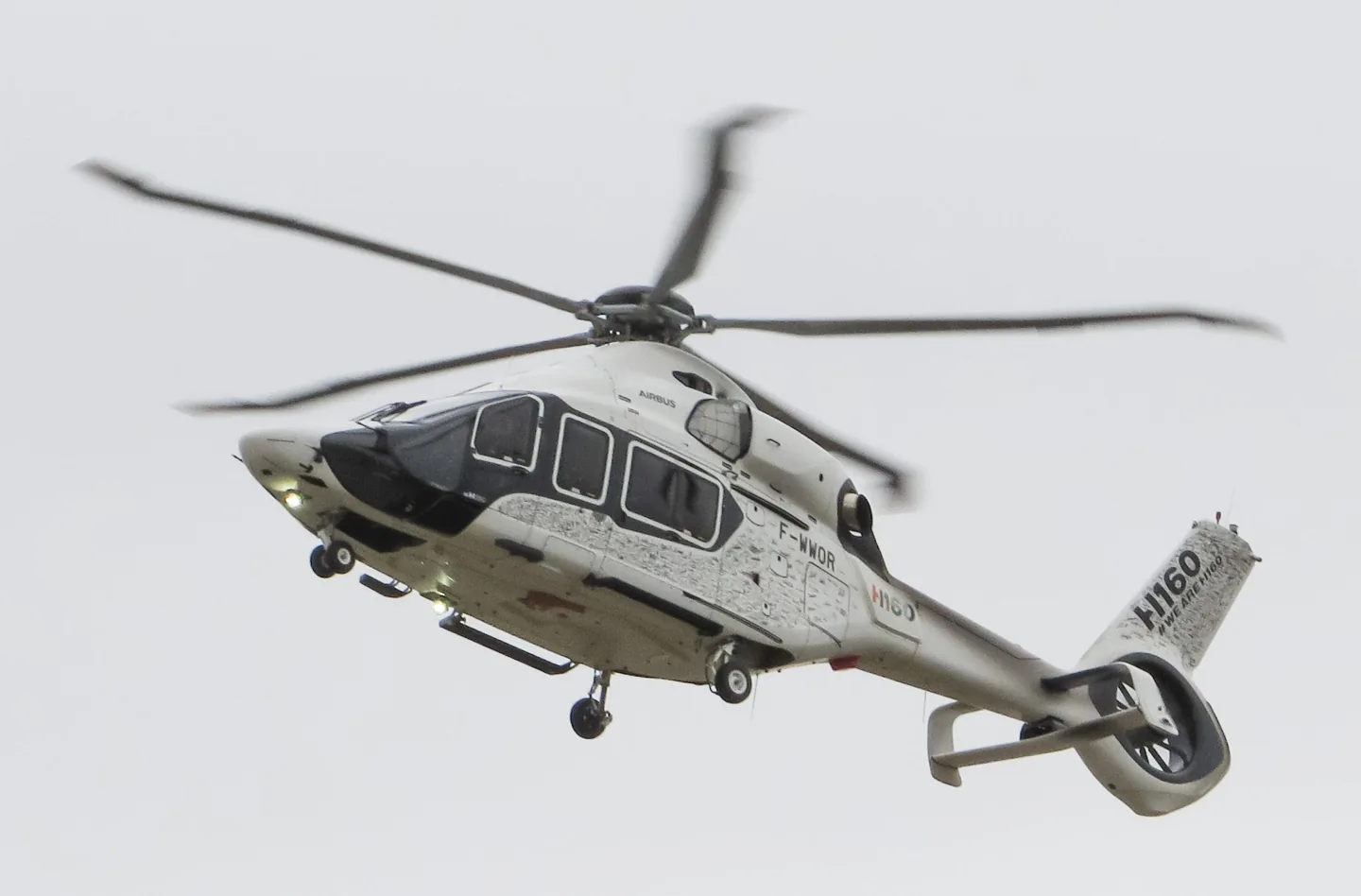 Berg2 · CC BY-SA 3.0 · Airbus Helicopters H160 pictured
Airbus launched the H160 programme publicly in 2015, with the first flight that year. The design combines a composite-intensive airframe with distinctive swept main-rotor tips and an enclosed tail rotor. Its roles include passenger transport and public-service work.
HPG's simulator implementation places particular emphasis on its automatic flight-control system. Its four-axis AFCS and backup stability functions manage flight control; the developer manual describes their modes.
Airbus Helicopters H160 · Specifications (H160) · real aircraft; source units retained
Scopri di più su questo aeromobile su AirframeDB
Bourke’s visit finds the H160 programme far from its home base, with engineers, test equipment and a tightly scheduled exhibition appearance.
Gensse describes windows, noise, vibration and cabin temperature as deliberate priorities alongside cockpit workload. His interview adds the test team’s explanation of the H160’s design choices, while remaining a manufacturer’s account of its own programme.
First flight: 13 June 2015
A winter snow shower was an unexpected obstacle to Bourke’s Las Vegas flight. The camera helicopter was stranded at another airport, and the H160 had to enter the exhibition hall the following morning. While waiting, he talked with the engineers and test crew working from a modest rented hangar. A break in the weather finally made the flight possible.
The changing light sent the two helicopters searching for suitable photographic backgrounds around the mountains. Gensse flew the close formation while Bourke handled radios and lookout. Later, Bourke tried the controls himself, landing at a ridge site and exploring the aircraft before returning for supervised circuit work. Visibility and responsive handling made the helicopter feel smaller than its size suggested. The day combined a demanding promotional schedule with a memorable opportunity to learn from its test pilot.
Having worked on the H160 from its beginnings, Gensse admitted that his enthusiasm was personal. Customer demonstrations gave him a particular reward: watching experienced pilots and passengers react after a flight. He saw those reactions as an encouraging response to years spent developing the aircraft.
His account repeatedly returns to the pilot’s attention. More equipment would have little value, he argued, if it merely created more buttons and monitoring work. The cockpit needed to present relevant information and make the automation useful enough that pilots would actually choose it. Passenger comfort also shaped the work, from windows to cabin temperature. He expressed pride in the result and acknowledged his attachment to the programme.
Mabille began his H160 introduction in the passenger cabin. Wide windows and a quiet environment made an immediate impression, even with the prototype’s test equipment and temporary interior. After watching demonstrations in flight, he landed with the crew at Berre La Fare and moved into the cockpit for his own evaluation.
His naval flying background made visibility during hoisting work a particular interest. He explored the view from a hover and tried supervised handling and simulated emergencies, then let Gensse demonstrate more demanding manoeuvres. On the return to Marignane, the approach and electric brakes supplied further impressions. Afterward, Mabille realised how much time he had spent looking outside instead of being drawn into the displays. The account describes a prototype demonstration, including equipment and expectations that still belonged to the development programme.
Airbus launched the H160 programme publicly in 2015, with the first flight that year. The design combines a composite-intensive airframe with distinctive swept main-rotor tips and an enclosed tail rotor. Its roles include passenger transport and public-service work.
This starting point selects Airbus H160. Its aircraft-level settings do not select a particular developer’s custom systems.
Spring resistance builds with the selected airspeed response. A separate aerodynamic term adds speed-dependent control load.
Local force trim holds the selected hardware centre. Autopilot following is off.
Cyclic damping is on. Its configured gain is 0.35; it resists hardware motion separately from the spring and aircraft stabilization.
HPG's H160 guide connects automatic trim with dual autopilots and backup stabilization. Rotor trim reset pauses AFCS logic for manual cyclic input, and beep trim depends on the active context. FADEC manages the engine throttles. EASA type data separately describes retractable hydraulic tricycle gear. None of these systems is reduced to a single moving hardware-spring centre.
The gains are normalized profile settings. They describe the chosen effect balance; hand force depends on the device and its output limits. IAS references are tuning values rather than operating limits. Physical acceptance of this revision remains pending.
La scala finale complessiva applicata a tutto ciò che il modello produce, prima del limite del dispositivo.
Più: tutto (molla, carichi, effetti) si rafforza insieme.
Meno: tutto si ammorbidisce insieme.
Perché qui: Scales overall profile strength while preserving effect balance, subject to device and output limits.
La forza di centraggio di base che riporta la barra al centro. Ogni altra forza si somma a questa. Troppo bassa e la barra sembra molle in volo normale; troppo alta e combatte la mano, mascherando i segnali più piccoli sovrapposti.
Più: un centraggio più fermo che resiste di più alla mano.
Meno: una barra più molle che conta solo sul carico aerodinamico.
Perché qui: Nominal cyclic spring and damping provide the chosen baseline while the add-on manages AFCS and automatic trim. The baseline spring is 0. Its low-speed blend reaches baseline strength at 70 KIAS.
H160 quick-startExact product and documentation researchwww.hypeperformancegroup.comEASA H160 type certificate rotor referencesUna piccola zona neutra attorno al centro dove la molla resta silenziosa, così i micro-movimenti a riposo non vibrano. Più larga è più tranquilla ma più lasca; più stretta è più precisa ma può fremere attorno al centro.
Più: un centro più calmo ma più lasco, con più gioco.
Meno: un centro più serrato che può fremere a riposo.
Perché qui: Sets travel around the centre before the baseline spring resists. Smaller values engage it sooner.
Una scala maestra su entrambi i carichi d'asse sostenuti, applicata prima del loro bilanciamento indipendente. Di norma i profili la lasciano stare e regolano i due carichi d'asse.
Più: entrambi gli assi caricano più forte.
Meno: entrambi gli assi si alleggeriscono insieme.
Perché qui: The aerodynamic-load gain is 0.35 with an indicated-speed reference of 140 KIAS. This supplies speed-dependent loading alongside the spring.
Attiva la finestra di innesto della molla a bassa velocità (nodi di inizio/pieno qui sopra). Spento, la molla è costante a ogni velocità.
Perché qui: Allows baseline spring strength to rise with indicated airspeed where the control law permits it.
Quanta molla sopravvive da fermo, prima che la velocità possa generare forza aerodinamica. Un pavimento alto tiene salda la barra parcheggiata; uno basso dà la sensazione lasca, da cavi allentati, di un aereo leggero in sosta.
Più: una barra più salda in sosta e al rullaggio.
Meno: una barra molle da fermo che si sveglia solo con la velocità.
Perché qui: Sets low-speed spring strength as a fraction of baseline when blending is enabled. One keeps full strength.
La velocità a cui la molla comincia a salire dal suo pavimento di bassa velocità verso la piena forza: i comandi che «prendono vita» in corsa di decollo.
Perché qui: Sets the IAS where the low-speed spring blend starts rising. This is a feel threshold, not a flight limit.
La velocità a cui la molla raggiunge la piena forza. Tra l'inizio e questo punto il centraggio si irrigidisce progressivamente man mano che il flusso cresce sui comandi.
Perché qui: Sets the IAS where the low-speed blend reaches baseline strength; high-speed stiffening also uses it.
La velocità indicata a cui il carico aerodinamico raggiunge il livello pieno di progetto. Ancora l'intera curva di carico al reale intervallo di velocità dell'aereo: un 172 carica verso 110 nodi, un jet molto più tardi.
Più: i carichi arrivano più tardi; la barra resta leggera fino a velocità più alte.
Meno: i carichi arrivano prima e la crociera pesa di più.
Perché qui: Sets the IAS reference for aerodynamic loading. It is an estimate, not published cruise TAS or a flight limit.
Quanto il centraggio stesso si irrigidisce con la velocità, oltre ai carichi da deflessione. Zero mantiene costante la sensazione del centro; di più fa centrare la barra più dura in crociera e più lasca in circuito.
Più: un centro che si indurisce nettamente con la velocità.
Meno: una sensazione di centro costante a ogni velocità.
Perché qui: Adds permitted spring resistance above the full-blend speed. Zero removes this high-speed increase.
Il limite superiore all'irrigidimento del centro dovuto alla velocità, così il volo molto veloce non può caricare la molla senza limite.
Più: più irrigidimento totale concesso ad alta velocità.
Meno: l'irrigidimento si ferma prima.
Perché qui: Limits the squared airspeed ratio used for high-speed spring stiffening; it is not a device-force cap.
Il carico sostenuto di rollio da deflessione degli alettoni e velocità, bilanciato indipendentemente dal beccheggio. Insieme al carico dell'equilibratore fissa il rapporto di armonia dei comandi di cui parlano le recensioni.
Più: sforzi di rollio più pesanti.
Meno: alettoni più leggeri e scattanti.
Perché qui: Roll and pitch aerodynamic scales are 1 and 1, respectively. They set the aerodynamic axis balance. No custom spring-travel curve is enabled.
Il carico sostenuto di beccheggio da deflessione dell'equilibratore e velocità, bilanciato indipendentemente dal rollio. È la leva principale dietro il peso di beccheggio di un tipo. Non tocca alettoni, molla, trim né forze di buffet.
Più: sforzi di beccheggio sostenuti più pesanti in velocità.
Meno: una profondità più leggera, meno muscolosa da tenere.
Perché qui: Scales pitch aerodynamic loading; pitch spring travel and trim responses are separate settings.
Un tetto su ogni forza stabile di beccheggio o rollio prima che raggiunga il dispositivo, a protezione da colpi o saturazioni dell'hardware nelle manovre energiche.
Più: picchi di forza stabile più alti prima del taglio.
Meno: un tetto più morbido; le manovre dure si appiattiscono prima.
Perché qui: Caps directed-force output. Native spring effects and device limits remain separate.
Quanto il trim di profondità allevia lo sforzo di beccheggio mantenuto e sposta dove la barra si assesta. Al 100 %, un aereo trimmato bene non richiede pressione mantenuta: il flusso di lavoro trimma-via-il-carico del volo reale.
Più: il trim toglie più sforzo mantenuto; al 100 %, trim pieno lo annulla.
Meno: continui a tenere sforzo anche trimmato.
Perché qui: Scales supported pitch-trim relief and permitted centre movement. Zero removes pitch response.
Lo stesso sollievo per il trim di rollio. La maggior parte dei tipi di aviazione generale non ha un vero trim degli alettoni, quindi resta a zero; i tipi con trim di rollio ricevono un valore corrispondente.
Più: il trim di rollio toglie più sforzo mantenuto.
Meno: il trim di rollio fa meno.
Perché qui: Scales supported roll-trim relief and permitted centre movement. Zero removes roll response.
Vibrazione di rotolamento da velocità delle ruote e tipo di superficie: asfalto, erba o ghiaia sotto il carrello.
Più: una texture di superficie più forte nella barra.
Meno: un rullaggio più liscio.
Perché qui: Sets rolling texture strength, modified by speed, surface and undercarriage configuration.
Colpi brevi e discreti da giunti di dilatazione, solchi e superficie irregolare, che punteggiano il rombo continuo.
Più: colpi più netti da giunti e solchi.
Meno: dettagli del suolo più morbidi.
Perché qui: Sets gear-bump texture during ground motion, separate from touchdown impact.
Scuotimento della cellula in avvicinamento allo stallo e con l'avviso attivo: quanto forte quest'ala annuncia di essere scontenta. I tipi con distacco netto ricevono buffet modesto e lasciano l'avviso alla sirena.
Più: un tremito pre-stallo più forte.
Meno: un'ala più discreta; la sirena porta l'avviso.
Perché qui: Sets stall-buffet strength. Zero removes the cue without changing simulator stalls or warnings.
Buffet transonico in avvicinamento al limite di Mach. Significativo per i jet vicino a MMO, zero per pistoni e turboelica che non ci arrivano mai.
Più: un buffet transonico più forte vicino al limite di Mach.
Meno: un volo più liscio ad alto Mach.
Perché qui: Sets high-Mach buffet strength; onset and full-strength thresholds are separate.
Vibrazione a bassa frequenza della cellula con i flap estesi nel flusso, nella finestra di velocità in cui lavorano davvero l'aria.
Più: un volo più ruvido con i flap al lavoro.
Meno: flap d'avvicinamento più morbidi.
Perché qui: Sets flap buffet at the configured position and speed gates. Flap movement texture is separate.
Il tambureggiare della cellula per il carrello retrattile appeso nel flusso. Zero per i tipi a carrello fisso, dove la cellula non cambia mai forma.
Più: più tambureggiare col carrello fuori.
Meno: un volo col carrello fuori più pulito.
Perché qui: Sets gear aerodynamic buffet; movement and ground-contact cues are separate.
Il ronzio dedicato dello stick shaker di stallo, attivato dal sistema di avviso dell'aereo stesso. Solo i tipi con un vero shaker ricevono un valore; tutti gli altri si affidano al buffet aerodinamico e alla sirena.
Più: uno shaker più duro.
Meno: uno shaker più discreto.
Perché qui: Sets triggered shaker strength; inactive while the shaker feature is disabled.
Il colpo singolo quando le ruote toccano la pista, scalato dal rateo di discesa: un atterraggio di velluto sussurra, un arrivo deciso batte.
Più: un colpo più duro al contatto.
Meno: arrivi più morbidi.
Perché qui: Sets landing-impact strength; landing telemetry and response shape determine the pulse.
Vibrazione in corsa mentre lavorano l'inversione di spinta o le eliche in beta. Zero per i tipi senza reverse.
Più: una corsa più ruvida in reverse.
Meno: una reverse più discreta.
Perché qui: Sets reverse-thrust vibration with valid reverser and engine conditions. Zero removes the cue.
Vibrazione continua del propulsore che segue i giri tra minimo e piena potenza, il promemoria sempre presente che qualcosa brucia carburante davanti.
Più: più motore nella barra.
Meno: un motore più discreto.
Perché qui: Sets estimated engine vibration using configured telemetry and response, not measured cockpit vibration.
Vibrazione continua solo mentre il simulatore riporta le superfici dei flap davvero in movimento. Segue il moto reale dell'attuatore e i guasti, non un timer stimato.
Più: più vibrazione coi flap in movimento.
Meno: corse dei flap più discrete.
Perché qui: Sets texture from observed flap movement; a command without movement does not establish the cue.
Quanto i comandi dell'autopilota possono muovere fisicamente la barra. Tenuto minuscolo in MSFS, dove un asse mosso può essere riletto come ingresso del pilota; zero disattiva del tutto il seguito.
Più: l'autopilota muove visibilmente di più la tua barra.
Meno: un seguito appena percettibile.
Perché qui: Sets admitted AP-follow gain, not a percentage of travel. Runtime ownership and input limits still apply.
Whether this feature is active in this profile.
Perché qui: Retained for compatibility and group membership. Trim relief, rather than this flag, controls centre movement.
Whether this feature is active in this profile.
Perché qui: Allows trim relief with supported control law and valid telemetry. Axis authorities set its amount.
Whether this feature is active in this profile.
Perché qui: Local force trim is a limited hardware-neutral function; it does not recreate AFCS pause, upper modes or backup stabilization. Local force trim is on. It holds a selected spring centre with strength 0.55.
H160 quick-startExact product and documentation researchwww.hypeperformancegroup.comEASA H160 type certificate rotor referencesWhether this feature is active in this profile.
Perché qui: Allows load-factor changes to modify permitted spring laws. Passive fly-by-wire feel can suppress it.
Whether this feature is active in this profile.
Perché qui: Enables rate damping with the configured coefficients and control law.
Whether this feature is active in this profile.
Perché qui: Autopilot following is off; the configured spring and load retain the hardware feel.
Whether this feature is active in this profile.
Perché qui: Permits centering hold during a supported AP state, separate from following a moving target.
Perché qui: Sets admitted AP neutral-hold strength; inactive while neutral hold is disabled.
Whether this feature is active in this profile.
Perché qui: Enables aerodynamic cues; each still needs nonzero strength and its simulator conditions.
Where this effect reaches full strength (or has fully faded, for washouts).
Più: a more gradual build to a later peak.
Meno: a quicker build.
Perché qui: Sets the final flap index for detent normalization. UP plus three detents uses maximum index3.
Where this effect begins fading in.
Più: the effect begins later.
Meno: it begins earlier.
Perché qui: Sets the first flap detent that admits buffet; this is a handle index, not degrees.
Whether this feature is active in this profile.
Perché qui: Permits shaker at supported warning conditions; the switch does not establish aircraft equipment.
Whether this feature is active in this profile.
Perché qui: Enables ground effects; each still needs its own strength and contact or motion telemetry.
Whether this feature is active in this profile.
Perché qui: Enables engine cues with nonzero settings and valid running-engine telemetry.
Whether this feature is active in this profile.
Perché qui: Enables accessory cues with configured strengths and observed accessory movement.
The strength of this effect.
Più: a stronger effect.
Meno: a weaker one.
Perché qui: Sets texture from observed gear movement, separate from aerodynamic and touchdown effects.
| Parametro | Valore | Cosa controlla e perché |
|---|---|---|
| Spring strength | 0 | Nominal cyclic spring and damping provide the chosen baseline while the add-on manages AFCS and automatic trim. The baseline spring is 0. Its low-speed blend reaches baseline strength at 70 KIAS. |
| Spring deadband | 0.02 | Sets travel around the centre before the baseline spring resists. Smaller values engage it sooner. |
| Force gain | 0.35 | The aerodynamic-load gain is 0.35 with an indicated-speed reference of 140 KIAS. This supplies speed-dependent loading alongside the spring. |
| Master gain | 0.85 | Scales overall profile strength while preserving effect balance, subject to device and output limits. |
| Dynamic-pressure blend | True | Allows baseline spring strength to rise with indicated airspeed where the control law permits it. |
| Minimum spring factor | 1 | Sets low-speed spring strength as a fraction of baseline when blending is enabled. One keeps full strength. |
| Spring wake-up speed | 19.6 kt | Sets the IAS where the low-speed spring blend starts rising. This is a feel threshold, not a flight limit. |
| Spring full-strength speed | 70.0 kt | Sets the IAS where the low-speed blend reaches baseline strength; high-speed stiffening also uses it. |
| Velocità di regolazione della forza | 140.0 kt | Sets the IAS reference for aerodynamic loading. It is an estimate, not published cruise TAS or a flight limit. |
| Airspeed spring stiffening | 0 | Adds permitted spring resistance above the full-blend speed. Zero removes this high-speed increase. |
| Airspeed stiffening cap | 5 | Limits the squared airspeed ratio used for high-speed spring stiffening; it is not a device-force cap. |
| Aileron force scale | 1 | Roll and pitch aerodynamic scales are 1 and 1, respectively. They set the aerodynamic axis balance. No custom spring-travel curve is enabled. |
| Elevator force scale | 1 | Scales pitch aerodynamic loading; pitch spring travel and trim responses are separate settings. |
| Maximum output force | 0.55 | Caps directed-force output. Native spring effects and device limits remain separate. |
| StickFeel · Trim feel enabled | False | Retained for compatibility and group membership. Trim relief, rather than this flag, controls centre movement. |
| StickFeel · Trim relief enabled | False | Allows trim relief with supported control law and valid telemetry. Axis authorities set its amount. |
| StickFeel · Elevator authority | 0.3 | Scales supported pitch-trim relief and permitted centre movement. Zero removes pitch response. |
| StickFeel · Aileron authority | 0.3 | Scales supported roll-trim relief and permitted centre movement. Zero removes roll response. |
| StickFeel · Force trim enabled | True | Local force trim is a limited hardware-neutral function; it does not recreate AFCS pause, upper modes or backup stabilization. Local force trim is on. It holds a selected spring centre with strength 0.55. |
| StickFeel · G load enabled | False | Allows load-factor changes to modify permitted spring laws. Passive fly-by-wire feel can suppress it. |
| StickFeel · Rate damping enabled | True | Enables rate damping with the configured coefficients and control law. |
| Autopilot · Follow enabled | False | Autopilot following is off; the configured spring and load retain the hardware feel. |
| Autopilot · Follow authority | 0.05 | Sets admitted AP-follow gain, not a percentage of travel. Runtime ownership and input limits still apply. |
| Autopilot · Neutral hold enabled | False | Permits centering hold during a supported AP state, separate from following a moving target. |
| Autopilot · Neutral hold strength | 0.6 | Sets admitted AP neutral-hold strength; inactive while neutral hold is disabled. |
| Aero · Enabled | True | Enables aerodynamic cues; each still needs nonzero strength and its simulator conditions. |
| Aero · Gain | 0 | Sets stall-buffet strength. Zero removes the cue without changing simulator stalls or warnings. |
| Aero · Gain | 0 | Sets high-Mach buffet strength; onset and full-strength thresholds are separate. |
| Aero · Gain | 0 | Sets flap buffet at the configured position and speed gates. Flap movement texture is separate. |
| Aero · Max flap index | 1 | Sets the final flap index for detent normalization. UP plus three detents uses maximum index3. |
| Aero · Min flap index | 1 | Sets the first flap detent that admits buffet; this is a handle index, not degrees. |
| Aero · Gain | 0.1 | Sets gear aerodynamic buffet; movement and ground-contact cues are separate. |
| Aero · Shaker enabled | False | Permits shaker at supported warning conditions; the switch does not establish aircraft equipment. |
| Aero · Amplitude | 0.5 | Sets triggered shaker strength; inactive while the shaker feature is disabled. |
| Ground · Enabled | True | Enables ground effects; each still needs its own strength and contact or motion telemetry. |
| Ground · Gain | 0.15 | Sets rolling texture strength, modified by speed, surface and undercarriage configuration. |
| Ground · Gain | 0 | Sets gear-bump texture during ground motion, separate from touchdown impact. |
| Ground · Gain | 0.5 | Sets landing-impact strength; landing telemetry and response shape determine the pulse. |
| Ground · Gain | 0 | Sets reverse-thrust vibration with valid reverser and engine conditions. Zero removes the cue. |
| Engine · Enabled | True | Enables engine cues with nonzero settings and valid running-engine telemetry. |
| Engine · Gain | 0.06 | Sets estimated engine vibration using configured telemetry and response, not measured cockpit vibration. |
| Mechanical · Enabled | True | Enables accessory cues with configured strengths and observed accessory movement. |
| Mechanical · Gain | 0 | Sets texture from observed flap movement; a command without movement does not establish the cue. |
| Mechanical · Gain | 0.12 | Sets texture from observed gear movement, separate from aerodynamic and touchdown effects. |
Se la tua esperienza sul tipo dice che questa pagina sbaglia, correggila qui.
Questa pagina nasce da riferimenti citati, e l'esperienza reale sul tipo vale più di una citazione. Cita l'affermazione errata e dicci cosa fa il velivolo reale. Le correzioni vanno al maintainer per revisione e alimentano la prossima revisione di questa ricerca.
Conversazione aperta su come si vola e si regola il Airbus H160, nel forum della comunità. Le correzioni sopra vanno in privato al maintainer; le chiacchiere da hangar sono pubbliche.