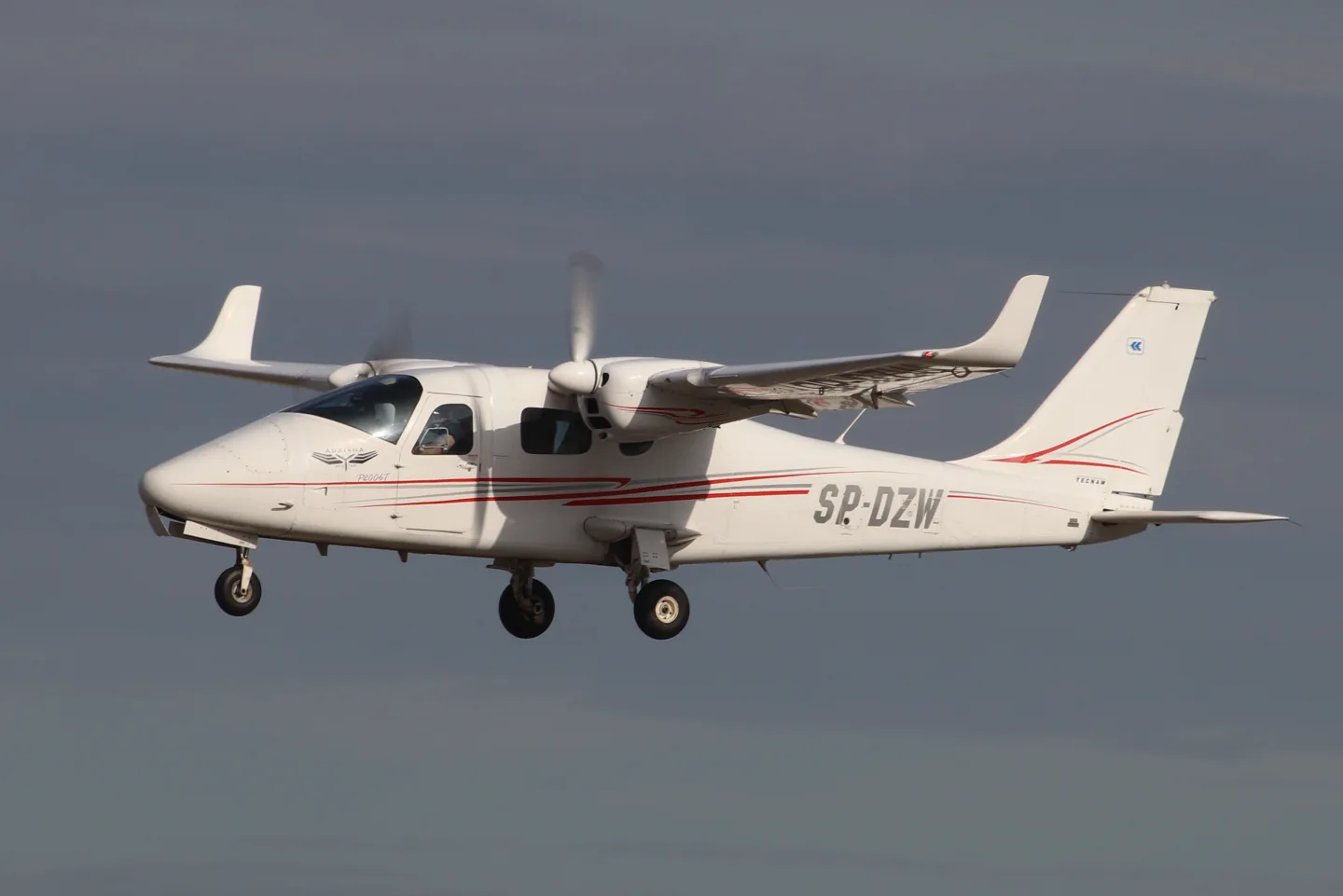
Tecnam P2006TAndrzej Otrębski · CC BY-SA 4.0 · Tecnam P2006T — real-aircraft reference photograph.

Tecnam P2006T

A compact Italian light twin with a shoulder wing and metal airframe.
General aviationLiczba opcji profilu: 4

Poznaj maszynę

Tecnam developed the P2006T light twin at Capua in Italy with a shoulder wing and all-metal construction. MSFS and X-Plane developers offer analog and glass-cockpit versions, with simulator-generation support listed for each product.

Tecnam P2006T · Specifications · real aircraft; source units retained

Length
8.7 m (28 ft 7 in)↗
Wingspan
11.4 m (37 ft 5 in)↗
Height
2.90 m (9 ft 6 in)↗
Wing area
14.8 m² (159 sq ft)↗
Empty weight
880 kg (1,940 lb)↗
Max takeoff weight
1,290 kg (2,844 lb)↗
Powerplant
2 × Rotax 912isc 3 Sport horizontally opposed four-cylinder geared piston engines , 75 kW (100 hp) each↗
Propellers
2-bladed MT Propeller MTV-21, 1.78 m (5 ft 10 in) diameter constant-speed, fully feathering↗
Cruise speed
274 km/h (170 mph, 148 kn)↗
Stall speed
104 km/h (64 mph, 56 kn)↗
Range
1,722 km (1,070 mi, 930 nmi)↗
Service ceiling
4,300 m (14,000 ft)↗

Więcej o tym statku powietrznym w AirframeDB

A demonstration tour explains the small-twin idea

At the Australian launch, regional Tecnam representative Giovanni Nustrini recalled discussing the company’s next project with Paolo Pascale. He argued for a small twin serving training and touring roles, giving Absolon’s report a participant’s account of the market idea behind the P2006T.

A light twin for training

Luigi Pascale’s P2006T was conceived around lightweight Rotax engines and the needs of multiengine training. A shoulder wing, retractable landing gear and feathering propellers gave the compact airframe the equipment of a conventional training twin. Later NG aircraft changed the engine installation and cockpit equipment. Analog and MkII simulator products have their own documented equipment, which differs from the current NG.

A new twin joins the traffic at a vintage gathering

Absolon encountered the P2006T among the aircraft gathered at Watts Bridge for the Festival of Flight. The cold, clear morning provided an inviting setting to try an unfamiliar twin. Starting the Rotax engines struck him as unusually quiet, and once airborne he found the controls light while working through the flight assessment.

The return brought him back into a busy circuit with thermals and a slight quartering tailwind. His companion pointed out that his initial aiming point was too close to the fence, and they crossed higher before landing farther along the strip. Giovanni Nustrini then marshalled the aircraft through the crowd.

A hot cockpit and an instructor’s calm guidance

Rocha’s P2006T flight began on a hot day at Americana with instructor Eduardo Silva. During the taxi he liked the feel of the pedals, but the sun and limited ground ventilation made the cockpit uncomfortable. Getting airborne improved the airflow, allowing him to settle into the evaluation away from the heat on the ground.

On the return, an early turn onto base left the aircraft higher and faster than Rocha wanted. Silva’s verbal guidance helped him make the adjustments, and the eventual landing was smooth. Rocha had been uncertain about landing an aircraft with such closely spaced main wheels.

A renewal flight changes an old opinion of Rotax engines

Boot approached the P2006T with reservations formed by older experiences of two-stroke Rotax engines. His friend Andy Cragg encouraged him to try the twin, and after winter weather delayed the plan, they met Tim Orchard at Lydd. Tea and a few preliminary circuits preceded Boot’s own renewal flight in the unfamiliar aircraft.

The wet, overcast conditions made the exercise a practical introduction. Learning the glass cockpit added work, but Boot completed the check successfully. Orchard’s feedback separated that unfamiliarity from the aircraft’s handling, which he felt Boot had managed accurately. For Boot, the day replaced an old prejudice with direct experience of the modern twin, while also putting a useful qualification renewal in his logbook.

Źródła publiczne 9
  1. Tecnam P2006TResearch background · retrieved 2026-09-12
  2. Tecnam P2006T MKIIOfficial developer / designated store catalogue · checked 2026-09-12
  3. Tecnam P2006T AnalogOfficial developer / designated store catalogue · checked 2026-09-12
  4. P2006T MK-IOfficial developer / designated store catalogue · checked 2026-09-12Official developer / designated-store reference · checked 2026-09-14
  5. Tecnam P2006T flight test: In a class of its ownJohn Absolon · Australian demonstration-tour flight report
  6. Tecnam P2006T flight testMicael Rocha · 9 November 2022; publisher’s English-language page
  7. Twin safety on single moneyGeoffrey Boot · April 2011, pages 30–35
  8. VSKYLABS Tecnam P2006T MK-IDeveloper project documentation · retrieved 13 September 2026Official developer / designated-store reference · checked 2026-09-14
  9. ICAO Doc 8643 — aircraft type designatorsPublic search data retrieved 2026-09-14; authority update 2026-09-03

Jak odwzorowuje to profil

VSKYLABS Tecnam P2006T MK-I

Free + Pro
X-Plane 12VSKYLABS

Tecnam developed the P2006T light twin at Capua in Italy with a shoulder wing and all-metal construction. MSFS and X-Plane developers offer analog and glass-cockpit versions, with simulator-generation support listed for each product.

This profile selects VSKYLABS Tecnam P2006T MK-I for X-Plane 12.

The stabilator/anti-tab arrangement motivates aerodynamic loading. Spring resistance builds with the selected airspeed response. A separate aerodynamic term adds speed-dependent control load.

The anti-tab supplies pitch relief; electrical rudder trim does not supply roll trim. Valid trim provides the configured pressure relief. Autopilot following is off.

Ta konkretna rewizja nie została jeszcze udostępniona do publicznej instalacji.

The selected implementation

VSKYLABS supplies MK-I analog and G1000 aircraft with twin Rotax 912S3 engines. The stabilator anti-tab also serves pitch trim, with electrical rudder trim and a ground-adjustable aileron tab.

Tecnam authored P2006T AFM4th edition; section7-7 Rev0 control architectureVSKYLABS Aerospace Simulations Aircraft Center: VSKYLABS Tecnam P2006T MK-IP2006T developer manual public preview

About the values

The gains are normalized profile settings. They describe the chosen effect balance; hand force depends on the device and its output limits. IAS references are tuning values rather than operating limits. Physical acceptance of this revision remains pending.

Wzmocnienie główne i układ sterowania

Master gain85%

Końcowy, ogólny mnożnik wyjścia stosowany do wszystkiego, co wytwarza model, przed ograniczeniem urządzenia.

Więcej: wszystko (sprężyna, obciążenia, efekty) staje się silniejsze jednocześnie.

Mniej: wszystko jednocześnie łagodnieje.

Dlaczego tutaj: Scales overall profile strength while preserving effect balance, subject to device and output limits.

Siły

Spring strength74%

Podstawowa siła centrująca, która ściąga drążek z powrotem do środka. Wszystkie inne siły nakładają się na nią. Zbyt niska, a drążek w normalnym locie jest wiotki; zbyt wysoka, a walczy z twoją ręką i zagłusza drobniejsze efekty nałożone na nią.

Więcej: mocniejsze centrowanie, które przez cały czas stawia opór twojej ręce.

Mniej: bardziej wiotki drążek, który opiera się wyłącznie na obciążeniu aerodynamicznym.

Dlaczego tutaj: The stabilator/anti-tab arrangement motivates aerodynamic loading. The baseline spring is 0.74. Its low-speed blend reaches baseline strength at 45 KIAS.

Section 6 - Airframe and Systems DescriptionSection 7 - AutopilotAircraft Tecnam P2006T Analog MSFS 2020Key BindingsSection 6 - Airframe and Systems DescriptionSection 7 - AutopilotTecnam P2006TKey BindingsTecnam authored P2006T AFM4th edition; section7-7 Rev0 control architectureVSKYLABS Aerospace Simulations Aircraft Center: VSKYLABS Tecnam P2006T MK-IP2006T developer manual public previewP2006T standard equipment
Spring deadband4%

Niewielka neutralna strefa wokół środka, w której sprężyna pozostaje nieaktywna, dzięki czemu drobne ruchy w spoczynku nie wywołują trzepotania. Szersza strefa jest spokojniejsza, ale luźniejsza; węższa jest precyzyjniejsza, ale drążek może podrygiwać wokół środka.

Więcej: spokojniejszy, lecz swobodniejszy środek z większym luzem.

Mniej: bardziej zwarty środek, który w spoczynku może trzepotać.

Dlaczego tutaj: Sets travel around the centre before the baseline spring resists. Smaller values engage it sooner.

Overall aerodynamic load80%

Nadrzędny mnożnik dla obu utrzymujących się obciążeń osi, stosowany przed ich niezależnym wyważeniem. Profile zwykle zostawiają go bez zmian i zamiast tego dostrajają oba obciążenia osi.

Więcej: obie osie są mocniej obciążone.

Mniej: obie osie jednocześnie stają się lżejsze.

Dlaczego tutaj: The aerodynamic-load gain is 0.8 with an indicated-speed reference of 125 KIAS. This supplies speed-dependent loading alongside the spring.

Airspeed blendingTrue

Włącza okno stopniowego włączania sprężyny przy małej prędkości (węzły początku i pełnej siły powyżej). Po wyłączeniu sprężyna jest stała przy każdej prędkości.

Dlaczego tutaj: Allows baseline spring strength to rise with indicated airspeed where the control law permits it.

Low-speed spring floor55%

Jaka część sprężyny pozostaje na postoju, zanim prędkość zdąży wytworzyć jakąkolwiek siłę aerodynamiczną. Przy wysokiej dolnej granicy drążek na postoju pozostaje sztywny; przy niskiej jest luźny, z luzem linek jak w zaparkowanym lekkim statku powietrznym.

Więcej: sztywniejszy drążek na postoju i podczas kołowania.

Mniej: luźniejszy drążek na postoju, który ożywa dopiero wraz z prędkością.

Dlaczego tutaj: Sets low-speed spring strength as a fraction of baseline when blending is enabled. One keeps full strength.

Spring engagement start10 kt

Prędkość, przy której sprężyna zaczyna rosnąć od dolnej granicy dla małej prędkości w stronę pełnej siły: stery „ożywają” podczas rozbiegu.

Dlaczego tutaj: Sets the IAS where the low-speed spring blend starts rising. This is a feel threshold, not a flight limit.

Spring engagement full45 kt

Prędkość, przy której sprężyna osiąga pełną siłę. Między punktem początkowym a tym punktem centrowanie stopniowo sztywnieje w miarę narastania opływu powietrza wokół sterów.

Dlaczego tutaj: Sets the IAS where the low-speed blend reaches baseline strength; high-speed stiffening also uses it.

Prędkość dostrajania siły125

Prędkość przyrządowa, przy której obciążenie aerodynamiczne osiąga zakładany pełny poziom. Zakotwicza całą krzywą obciążenia w rzeczywistym zakresie prędkości statku powietrznego: 172 nabiera pełnego obciążenia do 110 węzłów, odrzutowiec znacznie później.

Więcej: obciążenia pojawiają się później; drążek pozostaje lekki do wyższej prędkości.

Mniej: obciążenia pojawiają się wcześniej, a przelot wydaje się cięższy.

Dlaczego tutaj: Sets the IAS reference for aerodynamic loading. It is an estimate, not published cruise TAS or a flight limit.

Centre firmness vs speed15%

Jak bardzo samo centrowanie sztywnieje wraz z prędkością, oprócz obciążeń od wychylenia. Zero utrzymuje stałe czucie środka; więcej sprawia, że drążek centruje się mocniej w przelocie i luźniej w kręgu nadlotniskowym.

Więcej: środek, który wyraźnie twardnieje wraz ze wzrostem prędkości.

Mniej: stałe czucie środka przy każdej prędkości.

Dlaczego tutaj: The high-speed spring-stiffening gain is 0.15. It strengthens the permitted spring response above 45 KIAS, with the squared-speed ratio capped at 5.

Centre stiffening cap5

Górna granica zależnego od prędkości sztywnienia środka, aby bardzo szybki lot nie mógł napinać sprężyny bez ograniczeń.

Więcej: większe łączne usztywnienie dopuszczalne przy dużej prędkości.

Mniej: usztywnianie zostaje wcześniej ograniczone.

Dlaczego tutaj: Limits the squared airspeed ratio used for high-speed spring stiffening; it is not a device-force cap.

Aileron load72%

Utrzymujące się obciążenie przechylenia wynikające z wychylenia lotek i prędkości, wyważane niezależnie od pochylenia. Razem z obciążeniem steru wysokości wyznacza proporcję harmonii sterów, o której piszą recenzenci.

Więcej: większe siły przechylenia.

Mniej: lżejsze lotki, które wydają się szybsze.

Dlaczego tutaj: Roll and pitch aerodynamic scales are 0.72 and 1, respectively. They set the aerodynamic axis balance. No custom spring-travel curve is enabled.

Elevator load100%

Utrzymujące się obciążenie pochylenia wynikające z wychylenia steru wysokości i prędkości, wyważane niezależnie od przechylenia. To główny parametr decydujący o ciężarze pochylenia danego typu. Nie wpływa na siły lotek, sprężyny, trymera ani drgań.

Więcej: większe utrzymujące się siły pochylenia w locie.

Mniej: lżejszy ster wysokości, którego utrzymanie wymaga mniej siły mięśni.

Dlaczego tutaj: Scales pitch aerodynamic loading; pitch spring travel and trim responses are separate settings.

Max output force55%

Ograniczenie każdej ustalonej siły pochylenia lub przechylenia, zanim dotrze do urządzenia; chroni sprzęt przed gwałtownymi uderzeniami lub nasyceniem podczas mocnych manewrów.

Więcej: silniejsze szczytowe siły ustalone przed obcięciem.

Mniej: łagodniejszy limit; przy ostrych manewrach siły wcześniej się wypłaszczają.

Dlaczego tutaj: Caps directed-force output. Native spring effects and device limits remain separate.

Trymer

Trim relief (elevator)30%

Jak mocno trymer steru wysokości odciąża utrzymywaną siłę pochylenia i przesuwa punkt, w którym drążek się ustala. Przy 100% poprawnie wytrymowany statek powietrzny nie wymaga utrzymywania nacisku — tak jak w prawdziwym lataniu, gdzie obciążenie usuwa się trymerem.

Więcej: trymer usuwa większą część utrzymywanej siły pochylenia; przy 100% pełne wytrymowanie całkowicie ją znosi.

Mniej: nawet po wytrymowaniu nadal musisz utrzymywać siłę.

Dlaczego tutaj: The anti-tab supplies pitch relief; electrical rudder trim does not supply roll trim. Pitch authority 0.3 provides load relief and permitted centre movement; roll authority is 0.

Section 6 - Airframe and Systems DescriptionSection 7 - AutopilotAircraft Tecnam P2006T Analog MSFS 2020Key BindingsSection 6 - Airframe and Systems DescriptionSection 7 - AutopilotTecnam P2006TKey BindingsTecnam authored P2006T AFM4th edition; section7-7 Rev0 control architectureVSKYLABS Aerospace Simulations Aircraft Center: VSKYLABS Tecnam P2006T MK-IP2006T developer manual public previewP2006T standard equipment
Trim relief (aileron)0%

To samo odciążenie dla trymera przechylenia. Większość typów lotnictwa ogólnego nie ma prawdziwego trymera lotek, więc wartość pozostaje zerowa; typy z trymerem przechylenia otrzymują odpowiednią wartość.

Więcej: trymer przechylenia usuwa więcej utrzymywanej siły przechylenia.

Mniej: trymer przechylenia działa słabiej.

Dlaczego tutaj: Scales supported roll-trim relief and permitted centre movement. Zero removes roll response.

Wzmocnienia efektów · Podłoże

Runway rumble40%

Wibracje toczenia zależne od prędkości kół i rodzaju nawierzchni: asfalt, trawa lub żwir pod podwoziem.

Więcej: wyraźniejsza faktura nawierzchni wyczuwalna w drążku.

Mniej: płynniejsze kołowanie.

Dlaczego tutaj: Sets rolling texture strength, modified by speed, surface and undercarriage configuration.

Gear bumps25%

Krótkie, pojedyncze wstrząsy od szczelin dylatacyjnych, kolein i nierównej nawierzchni, przerywające ciągłe wibracje.

Więcej: ostrzejsze uderzenia od szczelin i kolein.

Mniej: łagodniejsze szczegóły nawierzchni.

Dlaczego tutaj: Sets gear-bump texture during ground motion, separate from touchdown impact.

Wzmocnienia efektów · Płatowiec

Stall buffet35%

Drgania płatowca przy zbliżaniu się do przeciągnięcia i gdy aktywne jest ostrzeżenie o przeciągnięciu: jak głośno to skrzydło sygnalizuje, że coś mu nie odpowiada. Typy z wyraźnym, ostrym przeciągnięciem dostają umiarkowane drgania, a ostrzeżenie przekazuje sygnalizator dźwiękowy.

Więcej: wyraźniejsze drgania przy zbliżaniu się do przeciągnięcia.

Mniej: spokojniejsze skrzydło; ostrzeżenie przekazuje sygnalizator dźwiękowy.

Dlaczego tutaj: Sets stall-buffet strength. Zero removes the cue without changing simulator stalls or warnings.

Mach buffet0%

Drgania transoniczne przy zbliżaniu się do ograniczenia liczby Macha. Istotne dla odrzutowców w pobliżu MMO, zero dla samolotów tłokowych i turbośmigłowych, które nigdy tam nie docierają.

Więcej: silniejsze drgania transoniczne w pobliżu ograniczenia liczby Macha.

Mniej: spokojniejszy lot przy dużej liczbie Macha.

Dlaczego tutaj: Sets high-Mach buffet strength; onset and full-strength thresholds are separate.

Flap buffet0%

Niskoczęstotliwościowe wibracje płatowca przy klapach wypuszczonych w strumień powietrza, w zakresie prędkości, w którym faktycznie pracują w opływie.

Więcej: mniej spokojny lot przy klapach pracujących w opływie.

Mniej: spokojniejsze klapy w podejściu.

Dlaczego tutaj: Sets flap buffet at the configured position and speed gates. Flap movement texture is separate.

Gear buffet0%

Dudnienie płatowca od chowanego podwozia wypuszczonego w strumień powietrza. Zero dla typów z podwoziem stałym, w których kształt płatowca nigdy się nie zmienia.

Więcej: więcej dudnienia przy wypuszczonych kołach.

Mniej: czystszy lot z wypuszczonym podwoziem.

Dlaczego tutaj: Sets gear aerodynamic buffet; movement and ground-contact cues are separate.

Stick shaker50%

Osobne wibracje układu stick shaker ostrzegające o przeciągnięciu, wyzwalane przez własny system ostrzegania o przeciągnięciu statku powietrznego. Wartość otrzymują tylko typy z prawdziwym układem stick shaker; wszystkie pozostałe polegają na drganiach aerodynamicznych i sygnalizatorze dźwiękowym.

Więcej: mocniejsze wibracje układu stick shaker.

Mniej: subtelniejszy stick shaker.

Dlaczego tutaj: Sets triggered shaker strength; inactive while the shaker feature is disabled.

Wzmocnienia efektów · Silnik, mechanika i opór

Touchdown thump65%

Jednorazowe szarpnięcie w chwili zetknięcia kół z pasem startowym, skalowane prędkością opadania: miękkie przyziemienie ledwie szepcze, twarde wyraźnie uderza.

Więcej: mocniejsze szarpnięcie przy przyziemieniu.

Mniej: łagodniejsze przyziemienia.

Dlaczego tutaj: Sets landing-impact strength; landing telemetry and response shape determine the pulse.

Reverse rumble0%

Wibracje podczas dobiegu, gdy pracuje ciąg wsteczny lub śmigła w zakresie beta. Zero dla typów bez ciągu wstecznego.

Więcej: bardziej niespokojny dobieg przy ciągu wstecznym.

Mniej: cichszy ciąg wsteczny.

Dlaczego tutaj: Sets reverse-thrust vibration with valid reverser and engine conditions. Zero removes the cue.

Engine rumble12%

Ciągłe wibracje zespołu napędowego zależne od obrotów, od biegu jałowego do pełnej mocy — stale obecne przypomnienie, że z przodu coś spala paliwo.

Więcej: silnik bardziej wyczuwalny w drążku.

Mniej: cichszy zespół napędowy.

Dlaczego tutaj: Sets estimated engine vibration using configured telemetry and response, not measured cockpit vibration.

Flap motion12%

Ciągłe wibracje tylko wtedy, gdy symulator zgłasza, że klapy faktycznie się przemieszczają. Efekt odwzorowuje rzeczywisty ruch siłowników i ich awarie, a nie szacowany licznik czasu.

Więcej: więcej wibracji podczas ruchu klap.

Mniej: cichsze przestawianie klap.

Dlaczego tutaj: Sets texture from observed flap movement; a command without movement does not establish the cue.

Podążanie za autopilotem

AP follow authority10%

Jak daleko polecenia autopilota mogą fizycznie przesunąć drążek. W MSFS utrzymywane na minimalnym poziomie, bo przesunięta oś może zostać odczytana jako działanie pilota; zero całkowicie wyłącza podążanie.

Więcej: autopilot widocznie wychyla twój drążek dalej.

Mniej: ledwo wyczuwalne podążanie.

Dlaczego tutaj: Sets admitted AP-follow gain, not a percentage of travel. Runtime ownership and input limits still apply.

Stick feel

StickFeel · Trim feel enabledFalse

Whether this feature is active in this profile.

Dlaczego tutaj: Retained for compatibility and group membership. Trim relief, rather than this flag, controls centre movement.

StickFeel · Trim relief enabledTrue

Whether this feature is active in this profile.

Dlaczego tutaj: Allows trim relief with supported control law and valid telemetry. Axis authorities set its amount.

StickFeel · Force trim enabledFalse

Whether this feature is active in this profile.

Dlaczego tutaj: Enables local force trim, separate from aircraft-owned trim and add-on integration qualification.

StickFeel · G load enabledTrue

Whether this feature is active in this profile.

Dlaczego tutaj: Allows load-factor changes to modify permitted spring laws. Passive fly-by-wire feel can suppress it.

StickFeel · Rate damping enabledTrue

Whether this feature is active in this profile.

Dlaczego tutaj: Enables rate damping with the configured coefficients and control law.

Autopilot

Autopilot · Follow enabledFalse

Whether this feature is active in this profile.

Dlaczego tutaj: Autopilot following is off; the configured spring and load retain the hardware feel.

Autopilot · Neutral hold enabledFalse

Whether this feature is active in this profile.

Dlaczego tutaj: Permits centering hold during a supported AP state, separate from following a moving target.

Autopilot · Neutral hold strength0.6

Dlaczego tutaj: Sets admitted AP neutral-hold strength; inactive while neutral hold is disabled.

Aero

Aero · EnabledTrue

Whether this feature is active in this profile.

Dlaczego tutaj: Enables aerodynamic cues; each still needs nonzero strength and its simulator conditions.

Aero · Max flap index3

Where this effect reaches full strength (or has fully faded, for washouts).

Więcej: a more gradual build to a later peak.

Mniej: a quicker build.

Dlaczego tutaj: Sets the final flap index for detent normalization. UP plus three detents uses maximum index3.

Aero · Min flap index2

Where this effect begins fading in.

Więcej: the effect begins later.

Mniej: it begins earlier.

Dlaczego tutaj: Sets the first flap detent that admits buffet; this is a handle index, not degrees.

Aero · Shaker enabledFalse

Whether this feature is active in this profile.

Dlaczego tutaj: Permits shaker at supported warning conditions; the switch does not establish aircraft equipment.

Ground

Ground · EnabledTrue

Whether this feature is active in this profile.

Dlaczego tutaj: Enables ground effects; each still needs its own strength and contact or motion telemetry.

Engine

Engine · EnabledTrue

Whether this feature is active in this profile.

Dlaczego tutaj: Enables engine cues with nonzero settings and valid running-engine telemetry.

Mechanical

Mechanical · EnabledTrue

Whether this feature is active in this profile.

Dlaczego tutaj: Enables accessory cues with configured strengths and observed accessory movement.

Mechanical · Gain0.12

The strength of this effect.

Więcej: a stronger effect.

Mniej: a weaker one.

Dlaczego tutaj: Sets texture from observed gear movement, separate from aerodynamic and touchdown effects.

Wszystkie ustawienia profilu
Szacowane ustawienia profilu
ParametrWartośćCo reguluje i dlaczego
Spring strength0.74 The stabilator/anti-tab arrangement motivates aerodynamic loading. The baseline spring is 0.74. Its low-speed blend reaches baseline strength at 45 KIAS.
Spring deadband0.04 Sets travel around the centre before the baseline spring resists. Smaller values engage it sooner.
Force gain0.8 The aerodynamic-load gain is 0.8 with an indicated-speed reference of 125 KIAS. This supplies speed-dependent loading alongside the spring.
Master gain0.85 Scales overall profile strength while preserving effect balance, subject to device and output limits.
Dynamic-pressure blendTrue Allows baseline spring strength to rise with indicated airspeed where the control law permits it.
Minimum spring factor0.55 Sets low-speed spring strength as a fraction of baseline when blending is enabled. One keeps full strength.
Spring wake-up speed10 ktSets the IAS where the low-speed spring blend starts rising. This is a feel threshold, not a flight limit.
Spring full-strength speed45 ktSets the IAS where the low-speed blend reaches baseline strength; high-speed stiffening also uses it.
Prędkość dostrajania siły125 ktSets the IAS reference for aerodynamic loading. It is an estimate, not published cruise TAS or a flight limit.
Airspeed spring stiffening0.15 The high-speed spring-stiffening gain is 0.15. It strengthens the permitted spring response above 45 KIAS, with the squared-speed ratio capped at 5.
Airspeed stiffening cap5 Limits the squared airspeed ratio used for high-speed spring stiffening; it is not a device-force cap.
Aileron force scale0.72 Roll and pitch aerodynamic scales are 0.72 and 1, respectively. They set the aerodynamic axis balance. No custom spring-travel curve is enabled.
Elevator force scale1.0 Scales pitch aerodynamic loading; pitch spring travel and trim responses are separate settings.
Maximum output force0.55 Caps directed-force output. Native spring effects and device limits remain separate.
StickFeel · Trim feel enabledFalse Retained for compatibility and group membership. Trim relief, rather than this flag, controls centre movement.
StickFeel · Trim relief enabledTrue Allows trim relief with supported control law and valid telemetry. Axis authorities set its amount.
StickFeel · Elevator authority0.3 The anti-tab supplies pitch relief; electrical rudder trim does not supply roll trim. Pitch authority 0.3 provides load relief and permitted centre movement; roll authority is 0.
StickFeel · Aileron authority0 Scales supported roll-trim relief and permitted centre movement. Zero removes roll response.
StickFeel · Force trim enabledFalse Enables local force trim, separate from aircraft-owned trim and add-on integration qualification.
StickFeel · G load enabledTrue Allows load-factor changes to modify permitted spring laws. Passive fly-by-wire feel can suppress it.
StickFeel · Rate damping enabledTrue Enables rate damping with the configured coefficients and control law.
Autopilot · Follow enabledFalse Autopilot following is off; the configured spring and load retain the hardware feel.
Autopilot · Follow authority0.1 Sets admitted AP-follow gain, not a percentage of travel. Runtime ownership and input limits still apply.
Autopilot · Neutral hold enabledFalse Permits centering hold during a supported AP state, separate from following a moving target.
Autopilot · Neutral hold strength0.6 Sets admitted AP neutral-hold strength; inactive while neutral hold is disabled.
Aero · EnabledTrue Enables aerodynamic cues; each still needs nonzero strength and its simulator conditions.
Aero · Gain0.35 Sets stall-buffet strength. Zero removes the cue without changing simulator stalls or warnings.
Aero · Gain0 Sets high-Mach buffet strength; onset and full-strength thresholds are separate.
Aero · Gain0 Sets flap buffet at the configured position and speed gates. Flap movement texture is separate.
Aero · Max flap index3 Sets the final flap index for detent normalization. UP plus three detents uses maximum index3.
Aero · Min flap index2 Sets the first flap detent that admits buffet; this is a handle index, not degrees.
Aero · Gain0 Sets gear aerodynamic buffet; movement and ground-contact cues are separate.
Aero · Shaker enabledFalse Permits shaker at supported warning conditions; the switch does not establish aircraft equipment.
Aero · Amplitude0.5 Sets triggered shaker strength; inactive while the shaker feature is disabled.
Ground · EnabledTrue Enables ground effects; each still needs its own strength and contact or motion telemetry.
Ground · Gain0.4 Sets rolling texture strength, modified by speed, surface and undercarriage configuration.
Ground · Gain0.25 Sets gear-bump texture during ground motion, separate from touchdown impact.
Ground · Gain0.65 Sets landing-impact strength; landing telemetry and response shape determine the pulse.
Ground · Gain0 Sets reverse-thrust vibration with valid reverser and engine conditions. Zero removes the cue.
Engine · EnabledTrue Enables engine cues with nonzero settings and valid running-engine telemetry.
Engine · Gain0.12 Sets estimated engine vibration using configured telemetry and response, not measured cockpit vibration.
Mechanical · EnabledTrue Enables accessory cues with configured strengths and observed accessory movement.
Mechanical · Gain0.12 Sets texture from observed flap movement; a command without movement does not establish the cue.
Mechanical · Gain0.12 Sets texture from observed gear movement, separate from aerodynamic and touchdown effects.
Źródła publiczne 19
  1. Tecnam P2006TResearch background · retrieved 2026-09-12
  2. Section 6 - Airframe and Systems DescriptionSection6: primary controls, trim, flaps, powerplant and gear
  3. Section 7 - AutopilotSection7: S-TEC55X simulation differences
  4. Aircraft Tecnam P2006T Analog MSFS 2020Current product and MSFS2024 FAQ
  5. Key BindingsKey bindings: input LVars and CWS button
  6. Section 6 - Airframe and Systems DescriptionSection6: primary controls, trim, flaps, powerplant and gear
  7. Section 7 - AutopilotSection7: S-TEC55X simulation differences
  8. Tecnam P2006TCurrent product and MSFS2024 FAQOfficial developer / designated store catalogue · checked 2026-09-12
  9. Key BindingsKey bindings: input LVars and CWS button
  10. Tecnam authored P2006T AFM4th edition; section7-7 Rev0 control architectureManufacturer AFM4th edition, section7-7/PDF189 ; developer POH PDF19-21
  11. VSKYLABS Aerospace Simulations Aircraft Center: VSKYLABS Tecnam P2006T MK-ICurrent product9.1.1 and MK-I vs MK-II sectionDeveloper project documentation · retrieved 13 September 2026Official developer / designated-store reference · checked 2026-09-14
  12. P2006T developer manual public previewPublic developer POH rev003 PDF1-3/19-21
  13. P2006T standard equipmentTecnam P2006T
  14. Tecnam P2006T AnalogOfficial developer / designated store catalogue · checked 2026-09-12
  15. P2006T MK-IOfficial developer / designated store catalogue · checked 2026-09-12Official developer / designated-store reference · checked 2026-09-14
  16. Tecnam P2006T flight test: In a class of its ownJohn Absolon · Australian demonstration-tour flight report
  17. Tecnam P2006T flight testMicael Rocha · 9 November 2022; publisher’s English-language page
  18. Twin safety on single moneyGeoffrey Boot · April 2011, pages 30–35
  19. ICAO Doc 8643 — aircraft type designatorsPublic search data retrieved 2026-09-14; authority update 2026-09-03

Społeczność i poprawki

Jeśli twój nalot na tym typie wskazuje, że na tej stronie jest błąd, popraw go tutaj.

Poprawki od pilotów

Latasz tym statkiem powietrznym? Popraw tę stronę.

Ta strona powstała na podstawie cytowanych źródeł, ale rzeczywisty nalot na tym typie jest cenniejszy niż cytat. Zacytuj twierdzenie, które wydaje się błędne, i opisz, jak zachowuje się prawdziwy statek powietrzny. Poprawki trafiają do opiekuna do weryfikacji i zasilają następną wersję tego opracowania.

Rozmowy w hangarze

Otwarta rozmowa na forum społeczności o lataniu statkiem powietrznym Tecnam P2006T i jego strojeniu. Poprawki powyżej trafiają prywatnie do opiekuna; rozmowy w hangarze są publiczne.

Nie ma jeszcze rozmów w hangarze o statku powietrznym Tecnam P2006T. Rozpocznij pierwszą rozmowę.

Społeczność

Profile społeczności dla tego statku powietrznego

Nie ma jeszcze profili społeczności dla tego statku powietrznego. Masz własne strojenie? Udostępnij profil — pojawi się tutaj.