机型库Bell 206 family
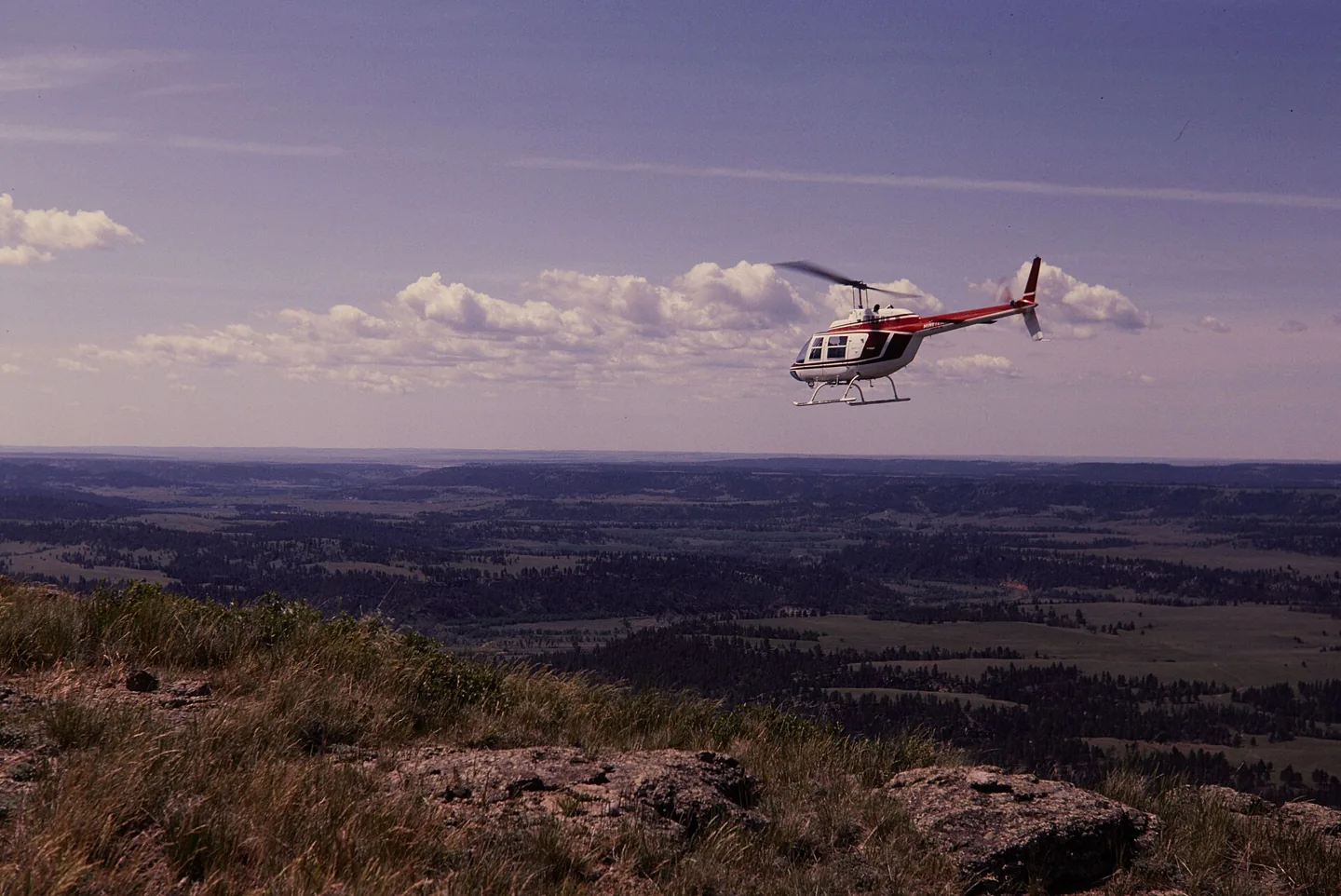
Bell 206 familyThomas C. Gray / National Park Service · Public domain · Bell 206 above Devils Tower National Monument

Bell 206 family

Hydraulically assisted cyclic controls with selected friction and trim behaviour, plus two-blade rotor cues.
HelicopterB06配置文件选项:10 个

了解飞机

Bell reworked an unsuccessful military observation-helicopter proposal into the commercial JetRanger. The resulting 206 family became widely used for passenger transport, observation and utility work. The familiar single-engine versions use a two-bladed main rotor.

The 206B JetRanger and stretched 206L LongRanger are separate branches of that story. Their cabins, engines and equipment are not identical. Cowan documents each model's trim, autopilot and stability-assistance features separately.

Bell 206 JetRanger

Powerplant
Rolls-Royce 250-C20J, 420 shp↗
Seats
5↗
Max takeoff weight
3,200 lb (1,451 kg)↗
Main rotor diameter
33 ft 4 in (10.16 m)↗
Length overall
39 ft 8 in (12.09 m)↗
Never exceed (Vne)
122 KIAS↗
Cruise
≈110 kt↗
Service ceiling
13,500 ft↗
Range
≈374 nm↗
Usable fuel
91 US gal↗
Rotor system
Two-blade teetering, hydraulically boosted↗
First flight (206A)
1966↗

在 AirframeDB 上了解这款航空器

The expedition aircraft carried equipment beyond a normal cabin

Powerhouse records additional fuel capacity, navigation equipment, an autopilot and camera installations in VH-DIK. Its description also identifies survival equipment and later North Pole additions, showing why this individual expedition aircraft should not be treated as an ordinary passenger JetRanger.

Development milestones

First flight: December 8, 1962 (206) January 10, 1966 (206A)

Developed from: Bell YOH-4

Force trim has a mechanical basis

The 206B-3 manual describes magnetic brakes and force-gradient springs in the cyclic circuits, alongside adjustable control friction. This describes the documented trim equipment; a simulator profile must separately state whether local force trim is enabled.

A two-blade rotor brings a recognisable rhythm

The FAA handbook explains the characteristic two-per-revolution vibration of a two-bladed rotor. It may be felt through the cyclic as well as the airframe. The profile uses a rotor-related texture to suggest that rhythm; its gain is a simulator setting, not a measured hand force.

A childhood airshow ride becomes a training goal

An eight-minute JetRanger ride at Farnborough when he was nine stayed with Berry for years. A later trial lesson renewed that enthusiasm, but adding the type to his licence meant a difficult choice about a limited training budget. He decided that learning the turbine helicopter was worth the additional commitment.

The course challenged the confidence he had built in the R22. Unfamiliar hydraulic controls, greater weight and a new cockpit made previously comfortable tasks demanding again. Berry especially valued instructor Paul White’s calm approach and emphasis on understanding the aircraft. His account is openly affectionate, including the pleasure of the turbine’s sound, but its strongest theme is the mental adjustment from feeling competent in one helicopter to becoming a learner in another.

A winter demonstration of the developing JetRanger

Middlebrook introduced the reporting team to a JetRanger II from Atlantic Aviation at Teterboro. The aircraft’s cabin helped explain its appeal beyond traditional utility work: entry was straightforward, the windows were generous and the reviewers found useful room in the occupied seats. The middle rear position was less accommodating, a detail retained alongside the favourable first impression.

Flying on a cool winter day, the team found quick control response that could encourage overcorrection at first. The approach also required adjustment to the helicopter’s ability to retain speed. They measured cabin noise and described the vibration rather than relying only on appearance. Their report preserves a contemporary introduction to the developing turbine transport, while distinguishing the conditions they experienced from comments other pilots supplied about turbulence.

Filming the world while flying around it alone

Smith’s journey required him to fly, navigate, communicate and record the view for a documentary. The museum’s account describes the exhaustion of the first Atlantic leg, after which he considered abandoning the attempt. Family reunions and periods of maintenance punctuated a trip completed in three stages, with substantial help from people arranging matters on the ground.

Crossing the North Pacific brought another unusual logistical task: finding a cargo ship able to provide a refuelling stop along the route. The successful return to Texas in July 1983 completed the circumnavigation. Smith continued using the helicopter for further adventures before flying it to the Powerhouse Museum in 1990. The donated aircraft and film preserve both the record and the personal work involved in making the journey visible to others.

公开来源 28
  1. Bell 206Research background · Wikipedia revision 1373277311 · retrieved 2026-09-12
  2. CowanSim 206B3 user manual · MSFS
  3. CowanSim 206L3 user manual · MSFS
  4. CowanSim manuals
  5. Microsoft Flight Simulator aircraft manuals
  6. SAS Autopilot Manual
  7. B206 releases and manual
  8. User Manual for Microsoft Flight Simulator
  9. SAS Manual
  10. User Manual
  11. X-Plane aircraft and avionics manuals
  12. 206B3 for MSFSOfficial developer / designated store catalogue · checked 2026-09-12
  13. 206L3 for MSFSOfficial developer / designated store catalogue · checked 2026-09-12
  14. 206B3 for X-PlaneOfficial developer / designated store catalogue · checked 2026-09-12
  15. 206L3 for X-PlaneOfficial developer / designated store catalogue · checked 2026-09-12
  16. B-206Official developer / designated store catalogue · checked 2026-09-12
  17. Tur-bine or not Tur-bine?James Berry · May 2021, personal type-rating account
  18. Pilot Report: Bell JetRanger IIUncredited May 1973 flight report, republished March 2018; demonstration by Tuck Middlebrook
  19. Dick Smith Australian Explorer, VH-DIKDick Smith’s journey documented by curator Margaret Simpson; object 90/816
  20. Forty years since the first solo helicopter circumnavigationManufacturer retrospective · 2023
  21. ICAO Doc 8643 — aircraft type designatorsPublic search data retrieved 2026-09-14; authority update 2026-09-03
  22. B206 catalogue sourceProduct listing captured 2026-09-24; edition scope from the reviewed catalogue
  23. Bell 206B-3 Flight ManualOriginal published Bell 206 reference; scope given beside each claim
  24. FAA TCDS H2SW纸质或存档参考资料;无公开链接
  25. Bell published data纸质或存档参考资料;无公开链接
  26. Vertical Magazine — Bell-heritage pilot on force-trim techniqueOriginal published Bell 206 reference; scope given beside each claim
  27. FAA Helicopter Flying Handbook — ETL, transverse flow, VRSOriginal published Bell 206 reference; scope given beside each claim
  28. Greenspun — Bell 505 (206L4 rotor) vibration notesOriginal published Bell 206 reference; scope given beside each claim

配置文件如何建模

Bell 206 JetRanger

Free + Pro
MSFS 2024MSFS 2020X-Plane 12X-Plane 11

Bell reworked an unsuccessful military observation-helicopter proposal into the commercial JetRanger. The resulting 206 family became widely used for passenger transport, observation and utility work. The familiar single-engine versions use a two-bladed main rotor.

The factory starting point selects Bell 206 JetRanger across MSFS 2024, MSFS 2020, X-Plane 12, X-Plane 11.

Spring resistance builds with the selected airspeed response. A separate aerodynamic term adds speed-dependent control load.

Local force trim holds the selected hardware centre. Autopilot following is off.

Cyclic damping is on. Its configured gain is 0.35; it resists hardware motion separately from the spring and aircraft stabilization.

此确切修订版尚未开放公开安装。

Controls and trim

The Bell 206B-3 flight manual describes adjustable cyclic and collective friction, together with magnetic brakes and force-gradient springs in its cyclic force-trim system. CowanSim's 206B3 and longer-cabin 206L3 have separate manuals and optional HeliSAS procedures. FlyInside and DreamFoil implement different dynamics and stability options. A software trim-release command, sound or stability setting does not provide a continuous physical cyclic-neutral position.

CowanSim 206B3 user manual — MSFSCowanSim HeloSAS autopilot manualCowanSim 206B3 user manual — X-PlaneCowanSim 206L3 user manual — MSFSFlyInside B206 user manual — MSFSBell 206B-3 Flight Manual

About the values

The gains are normalized profile settings. They describe the chosen effect balance; hand force depends on the device and its output limits. IAS references are tuning values rather than operating limits. Physical acceptance of this revision remains pending.

Master gain & control system

Master gain85%

施加于模型产出的一切、在设备上限之前的最终整体输出缩放。

调高: 一切(弹簧、载荷、效果)一同增强。

调低: 一切一同变柔。

设定理由: Scales overall profile strength while preserving effect balance, subject to device and output limits.

Forces

Spring strength0%

把摇杆拉回中央的基础回中力。其他所有力都叠加在它之上。太低,正常飞行中摇杆会发软;太高,它会与你的手较劲,并掩盖叠加其上的细微提示。

调高: 更硬的回中,更抗手。

调低: 更软的杆,只靠气动载荷。

设定理由: Magnetic brakes and force-gradient springs provide mechanism context for cyclic centering; longer cabin or rotor audio does not establish a heavier cyclic. The baseline spring is 0. Its low-speed blend reaches baseline strength at 55 KIAS.

CowanSim 206B3 user manual — MSFSCowanSim HeloSAS autopilot manualCowanSim 206B3 user manual — X-PlaneCowanSim 206L3 user manual — MSFSFlyInside B206 user manual — MSFSBell 206B-3 Flight Manual
Spring deadband2%

中央附近弹簧保持安静的小中立区,让静止时的微小移动不会咔嗒作响。更宽更安稳但更松,更窄更精确但可能在中央附近抖动。

调高: 更安静但更松的中央,旷量更大。

调低: 更紧的中央,静止时可能抖动。

设定理由: Sets travel around the centre before the baseline spring resists. Smaller values engage it sooner.

Overall aerodynamic load35%

作用于两条持续轴载荷的主缩放,在它们各自的独立平衡之前施加。配置文件通常不动它,而是调校两条轴载荷。

调高: 两轴载荷一同加重。

调低: 两轴一同减轻。

设定理由: The aerodynamic-load gain is 0.35 with an indicated-speed reference of 100 KIAS. This supplies speed-dependent loading alongside the spring.

Spring engagement full55 kt

弹簧达到全强度的空速。从起点到这里,随着气流在操纵面上增强,回中逐渐变硬。

设定理由: Sets the IAS where the low-speed blend reaches baseline strength; high-speed stiffening also uses it.

Centre firmness vs speed0%

在偏转载荷之外,回中本身随速度变硬的程度。零则中央手感恒定;越大,巡航时回中越硬,起落航线上越松。

调高: 中央随速度明显变硬。

调低: 任何速度下中央手感恒定。

设定理由: Adds permitted spring resistance above the full-blend speed. Zero removes this high-speed increase.

Centre stiffening cap5

速度驱动的中央变硬上限,防止高速飞行把弹簧无限上紧。

调高: 高速允许更多总硬化。

调低: 硬化更早封顶。

设定理由: Limits the squared airspeed ratio used for high-speed spring stiffening; it is not a device-force cap.

Aileron load100%

由副翼偏转和空速产生的持续横滚载荷,独立于俯仰调校。与升降舵载荷一起,决定评测中常说的操纵协调比。

调高: 横滚力更重。

调低: 副翼更轻更灵。

设定理由: Roll and pitch aerodynamic scales are 1 and 1, respectively. They set the aerodynamic axis balance. No custom spring-travel curve is enabled.

Elevator load100%

由升降舵偏转和空速产生的持续俯仰载荷,独立于横滚调校。这是决定机型俯仰重量的主杠杆。它不影响副翼、弹簧、配平或抖振力。

调高: 速度下持续俯仰力更重。

调低: 升降舵更轻,握持更省力。

设定理由: Scales pitch aerodynamic loading; pitch spring travel and trim responses are separate settings.

Max output force55%

每个稳态俯仰或横滚力到达设备前的上限,防止猛烈机动中砸击或饱和硬件。

调高: 削波前更高的稳态力峰值。

调低: 更柔的上限;猛烈机动更早被抹平。

设定理由: Caps directed-force output. Native spring effects and device limits remain separate.

Airspeed blendingTrue

启用低速弹簧介入窗口(上面的起始/全强度节数)。关闭时弹簧在所有速度下恒定。

设定理由: Allows baseline spring strength to rise with indicated airspeed where the control law permits it.

Low-speed spring floor100%

在静止、空速尚未产生气动力之前,弹簧还剩多少。下限高,停机时摇杆结实;下限低,则是停放轻型飞机那种钢索松弛的感觉。

调高: 停机和滑行时杆更结实。

调低: 停机时杆发软,只随速度苏醒。

设定理由: Sets low-speed spring strength as a fraction of baseline when blending is enabled. One keeps full strength.

Spring engagement start15 kt

弹簧从低速下限开始向全强度攀升的空速:起飞滑跑中操纵面"苏醒"的那一刻。

设定理由: Sets the IAS where the low-speed spring blend starts rising. This is a feel threshold, not a flight limit.

力反馈调校速度100

气动载荷达到设计满值的指示空速。它把整条载荷曲线锚定在飞机真实的速度范围:172在110节就载满,喷气机要晚得多。

调高: 载荷来得更晚;杆轻到更高速度。

调低: 载荷来得更早,巡航更沉。

设定理由: Sets the IAS reference for aerodynamic loading. It is an estimate, not published cruise TAS or a flight limit.

Trim

Trim relief (elevator)30%

升降舵配平缓解持续俯仰力、移动杆的安定位置的强度。在100 %时,配平得当的飞机不需要保持压力——正是真实飞行中"用配平消掉载荷"的流程。

调高: 配平消掉更多持续力;100 %时满配平可完全抵消。

调低: 即使配平也仍要持续用力。

设定理由: Scales supported pitch-trim relief and permitted centre movement. Zero removes pitch response.

Trim relief (aileron)30%

横滚配平的同类缓解。多数通航机型没有真正的副翼配平,所以保持为零;有横滚配平的机型获得相应的值。

调高: 横滚配平消掉更多持续力。

调低: 横滚配平作用更小。

设定理由: Scales supported roll-trim relief and permitted centre movement. Zero removes roll response.

Effect gains · Ground

Runway rumble15%

由轮速和地面类型(铺装、草地、砾石)产生的滚动振动。

调高: 杆上更强的地面质感。

调低: 更平滑的滑行。

设定理由: Sets rolling texture strength, modified by speed, surface and undercarriage configuration.

Gear bumps0%

来自伸缩缝、车辙和粗糙地面的短促离散颠簸,为持续隆隆声打上标点。

调高: 接缝与车辙的冲击更清晰。

调低: 更柔的地面细节。

设定理由: Sets gear-bump texture during ground motion, separate from touchdown impact.

Effect gains · Airframe

Stick shaker50%

由飞机自身失速警告系统触发的专用抖杆器振动。只有真有抖杆器的机型才有值;其余全靠气动抖振和喇叭。

调高: 更硬的抖杆器。

调低: 更含蓄的抖杆器。

设定理由: Sets triggered shaker strength; inactive while the shaker feature is disabled.

Stall buffet0%

接近失速及失速警告响起时的机体抖动:这副机翼宣告不满的音量。断失干脆的机型抖振收敛,让喇叭承担警告。

调高: 更强的失速前颤抖。

调低: 更含蓄的机翼;警告交给喇叭。

设定理由: Sets stall-buffet strength. Zero removes the cue without changing simulator stalls or warnings.

Mach buffet0%

接近马赫极限的跨音速抖振。对接近MMO的喷气机有意义,对到不了那里的活塞机和涡桨机为零。

调高: 接近马赫极限时更强的跨音速抖振。

调低: 高马赫下更平滑的飞行。

设定理由: Sets high-Mach buffet strength; onset and full-strength thresholds are separate.

Flap buffet0%

襟翼伸入气流后机体的低频振动,发生在它们真正做功的速度窗口内。

调高: 襟翼做功时更粗糙的飞行。

调低: 更柔的进近襟翼。

设定理由: Sets flap buffet at the configured position and speed gates. Flap movement texture is separate.

Gear buffet0%

可收放起落架悬在气流中引起的机体鼓振。固定起落架机型为零,它们的机体外形从不改变。

调高: 放起落架时更多鼓振。

调低: 放起落架飞行更干净。

设定理由: Sets gear aerodynamic buffet; movement and ground-contact cues are separate.

Effect gains · Engine, mechanical & drag

Touchdown thump50%

机轮触及跑道那一下的单次冲击,按下沉率缩放:轻柔着陆是耳语,结实到达是一记闷响。

调高: 触地时更硬的一击。

调低: 更柔的到达。

设定理由: Sets landing-impact strength; landing telemetry and response shape determine the pulse.

Reverse rumble0%

反推或桨叶beta区工作时的滑跑振动。无反推机型为零。

调高: 反推下更粗糙的滑跑。

调低: 更含蓄的反推。

设定理由: Sets reverse-thrust vibration with valid reverser and engine conditions. Zero removes the cue.

Engine rumble12%

从慢车到全功率跟随转速的持续动力装置振动——前方有东西在烧油的永恒提醒。

调高: 杆里更多发动机。

调低: 更含蓄的发动机。

设定理由: Sets estimated engine vibration using configured telemetry and response, not measured cockpit vibration.

Flap motion0%

仅在模拟器报告襟翼舵面确实移动时的持续振动。它跟随真实作动器的运动和故障,而非估算的计时器。

调高: 襟翼移动中更多振动。

调低: 更含蓄的襟翼行程。

设定理由: Sets texture from observed flap movement; a command without movement does not establish the cue.

Autopilot follow

AP follow authority5%

自动驾驶指令可以让杆实际移动多远。在MSFS中保持极小,因为移动的轴可能被读回为飞行员输入;零则完全禁用跟随。

调高: 自动驾驶让你的杆移动得明显更多。

调低: 几乎察觉不到的跟随。

设定理由: Sets admitted AP-follow gain, not a percentage of travel. Runtime ownership and input limits still apply.

Autopilot

Autopilot · Follow enabledFalse

Whether this feature is active in this profile.

设定理由: Autopilot following is off; the configured spring and load retain the hardware feel.

Autopilot · Neutral hold enabledFalse

Whether this feature is active in this profile.

设定理由: Permits centering hold during a supported AP state, separate from following a moving target.

Autopilot · Neutral hold strength0.6

设定理由: Sets admitted AP neutral-hold strength; inactive while neutral hold is disabled.

Stick feel

StickFeel · Trim feel enabledFalse

Whether this feature is active in this profile.

设定理由: Retained for compatibility and group membership. Trim relief, rather than this flag, controls centre movement.

StickFeel · Trim relief enabledFalse

Whether this feature is active in this profile.

设定理由: Allows trim relief with supported control law and valid telemetry. Axis authorities set its amount.

StickFeel · Force trim enabledTrue

Whether this feature is active in this profile.

设定理由: An enabled local latch approximates holding a hardware neutral. CowanSim's SAS-dependent software trim and the aircraft's magnetic-brake system remain separate scope. Local force trim is on. It holds a selected spring centre with strength 0.55.

CowanSim 206B3 user manual — MSFSCowanSim HeloSAS autopilot manualCowanSim 206B3 user manual — X-PlaneCowanSim 206L3 user manual — MSFSFlyInside B206 user manual — MSFSBell 206B-3 Flight Manual
StickFeel · G load enabledTrue

Whether this feature is active in this profile.

设定理由: Allows load-factor changes to modify permitted spring laws. Passive fly-by-wire feel can suppress it.

StickFeel · Rate damping enabledTrue

Whether this feature is active in this profile.

设定理由: Enables rate damping with the configured coefficients and control law.

Aero

Aero · Max flap index4

Where this effect reaches full strength (or has fully faded, for washouts).

调高: a more gradual build to a later peak.

调低: a quicker build.

设定理由: Sets the final flap index for detent normalization. UP plus three detents uses maximum index3.

Aero · Min flap index1

Where this effect begins fading in.

调高: the effect begins later.

调低: it begins earlier.

设定理由: Sets the first flap detent that admits buffet; this is a handle index, not degrees.

Aero · EnabledTrue

Whether this feature is active in this profile.

设定理由: Enables aerodynamic cues; each still needs nonzero strength and its simulator conditions.

Aero · Shaker enabledFalse

Whether this feature is active in this profile.

设定理由: Permits shaker at supported warning conditions; the switch does not establish aircraft equipment.

Ground

Ground · EnabledTrue

Whether this feature is active in this profile.

设定理由: Enables ground effects; each still needs its own strength and contact or motion telemetry.

Engine

Engine · EnabledTrue

Whether this feature is active in this profile.

设定理由: Enables engine cues with nonzero settings and valid running-engine telemetry.

Mechanical

Mechanical · EnabledTrue

Whether this feature is active in this profile.

设定理由: Enables accessory cues with configured strengths and observed accessory movement.

Mechanical · Gain0

The strength of this effect.

调高: a stronger effect.

调低: a weaker one.

设定理由: Sets texture from observed gear movement, separate from aerodynamic and touchdown effects.

全部配置文件设置
估算的配置文件设置
参数数值控制作用及原因
Spring strength0 Magnetic brakes and force-gradient springs provide mechanism context for cyclic centering; longer cabin or rotor audio does not establish a heavier cyclic. The baseline spring is 0. Its low-speed blend reaches baseline strength at 55 KIAS.
Spring deadband0.02 Sets travel around the centre before the baseline spring resists. Smaller values engage it sooner.
Force gain0.35 The aerodynamic-load gain is 0.35 with an indicated-speed reference of 100 KIAS. This supplies speed-dependent loading alongside the spring.
Master gain0.85 Scales overall profile strength while preserving effect balance, subject to device and output limits.
Spring full-strength speed55 ktSets the IAS where the low-speed blend reaches baseline strength; high-speed stiffening also uses it.
Airspeed spring stiffening0 Adds permitted spring resistance above the full-blend speed. Zero removes this high-speed increase.
Airspeed stiffening cap5 Limits the squared airspeed ratio used for high-speed spring stiffening; it is not a device-force cap.
Aileron force scale1 Roll and pitch aerodynamic scales are 1 and 1, respectively. They set the aerodynamic axis balance. No custom spring-travel curve is enabled.
Elevator force scale1 Scales pitch aerodynamic loading; pitch spring travel and trim responses are separate settings.
Maximum output force0.55 Caps directed-force output. Native spring effects and device limits remain separate.
Autopilot · Follow enabledFalse Autopilot following is off; the configured spring and load retain the hardware feel.
Autopilot · Follow authority0.05 Sets admitted AP-follow gain, not a percentage of travel. Runtime ownership and input limits still apply.
Autopilot · Neutral hold enabledFalse Permits centering hold during a supported AP state, separate from following a moving target.
Autopilot · Neutral hold strength0.6 Sets admitted AP neutral-hold strength; inactive while neutral hold is disabled.
StickFeel · Trim feel enabledFalse Retained for compatibility and group membership. Trim relief, rather than this flag, controls centre movement.
StickFeel · Trim relief enabledFalse Allows trim relief with supported control law and valid telemetry. Axis authorities set its amount.
Aero · Max flap index4 Sets the final flap index for detent normalization. UP plus three detents uses maximum index3.
Aero · Min flap index1 Sets the first flap detent that admits buffet; this is a handle index, not degrees.
Aero · Amplitude0.5 Sets triggered shaker strength; inactive while the shaker feature is disabled.
Dynamic-pressure blendTrue Allows baseline spring strength to rise with indicated airspeed where the control law permits it.
Minimum spring factor1 Sets low-speed spring strength as a fraction of baseline when blending is enabled. One keeps full strength.
Spring wake-up speed15 ktSets the IAS where the low-speed spring blend starts rising. This is a feel threshold, not a flight limit.
力反馈调校速度100 ktSets the IAS reference for aerodynamic loading. It is an estimate, not published cruise TAS or a flight limit.
StickFeel · Elevator authority0.3 Scales supported pitch-trim relief and permitted centre movement. Zero removes pitch response.
StickFeel · Aileron authority0.3 Scales supported roll-trim relief and permitted centre movement. Zero removes roll response.
StickFeel · Force trim enabledTrue An enabled local latch approximates holding a hardware neutral. CowanSim's SAS-dependent software trim and the aircraft's magnetic-brake system remain separate scope. Local force trim is on. It holds a selected spring centre with strength 0.55.
StickFeel · G load enabledTrue Allows load-factor changes to modify permitted spring laws. Passive fly-by-wire feel can suppress it.
StickFeel · Rate damping enabledTrue Enables rate damping with the configured coefficients and control law.
Aero · EnabledTrue Enables aerodynamic cues; each still needs nonzero strength and its simulator conditions.
Aero · Gain0 Sets stall-buffet strength. Zero removes the cue without changing simulator stalls or warnings.
Aero · Gain0 Sets high-Mach buffet strength; onset and full-strength thresholds are separate.
Aero · Gain0 Sets flap buffet at the configured position and speed gates. Flap movement texture is separate.
Aero · Gain0 Sets gear aerodynamic buffet; movement and ground-contact cues are separate.
Aero · Shaker enabledFalse Permits shaker at supported warning conditions; the switch does not establish aircraft equipment.
Ground · EnabledTrue Enables ground effects; each still needs its own strength and contact or motion telemetry.
Ground · Gain0.15 Sets rolling texture strength, modified by speed, surface and undercarriage configuration.
Ground · Gain0 Sets gear-bump texture during ground motion, separate from touchdown impact.
Ground · Gain0.5 Sets landing-impact strength; landing telemetry and response shape determine the pulse.
Ground · Gain0 Sets reverse-thrust vibration with valid reverser and engine conditions. Zero removes the cue.
Engine · EnabledTrue Enables engine cues with nonzero settings and valid running-engine telemetry.
Engine · Gain0.12 Sets estimated engine vibration using configured telemetry and response, not measured cockpit vibration.
Mechanical · EnabledTrue Enables accessory cues with configured strengths and observed accessory movement.
Mechanical · Gain0 Sets texture from observed flap movement; a command without movement does not establish the cue.
Mechanical · Gain0 Sets texture from observed gear movement, separate from aerodynamic and touchdown effects.
公开来源 28
  1. Bell 206Research background · Wikipedia revision 1373277311 · retrieved 2026-09-12
  2. CowanSim 206B3 user manual — MSFSExact MSFS aircraft hardware/control manual
  3. CowanSim HeloSAS autopilot manualCowan HeloSAS manual pp.2/5
  4. CowanSim 206B3 user manual — X-PlaneExact XP12 manual, title/configuration and trim sections
  5. CowanSim 206L3 user manual — MSFSExact MSFS aircraft hardware/control manual
  6. FlyInside B206 user manual — MSFSFlight control/model options and startup chapters
  7. Bell 206B-3 Flight ManualBell 206 familyOriginal published Bell 206 reference; scope given beside each claim
  8. CowanSim manuals
  9. Microsoft Flight Simulator aircraft manuals
  10. B206 releases and manual
  11. SAS Manual
  12. X-Plane aircraft and avionics manuals
  13. 206B3 for MSFSOfficial developer / designated store catalogue · checked 2026-09-12
  14. 206L3 for MSFSOfficial developer / designated store catalogue · checked 2026-09-12
  15. 206B3 for X-PlaneOfficial developer / designated store catalogue · checked 2026-09-12
  16. 206L3 for X-PlaneOfficial developer / designated store catalogue · checked 2026-09-12
  17. B-206Official developer / designated store catalogue · checked 2026-09-12
  18. Tur-bine or not Tur-bine?James Berry · May 2021, personal type-rating account
  19. Pilot Report: Bell JetRanger IIUncredited May 1973 flight report, republished March 2018; demonstration by Tuck Middlebrook
  20. Dick Smith Australian Explorer, VH-DIKDick Smith’s journey documented by curator Margaret Simpson; object 90/816
  21. Forty years since the first solo helicopter circumnavigationManufacturer retrospective · 2023
  22. ICAO Doc 8643 — aircraft type designatorsPublic search data retrieved 2026-09-14; authority update 2026-09-03
  23. B206 catalogue sourceProduct listing captured 2026-09-24; edition scope from the reviewed catalogue
  24. FAA TCDS H2SW纸质或存档参考资料;无公开链接
  25. Bell published data纸质或存档参考资料;无公开链接
  26. Vertical Magazine — Bell-heritage pilot on force-trim techniqueOriginal published Bell 206 reference; scope given beside each claim
  27. FAA Helicopter Flying Handbook — ETL, transverse flow, VRSOriginal published Bell 206 reference; scope given beside each claim
  28. Greenspun — Bell 505 (206L4 rotor) vibration notesOriginal published Bell 206 reference; scope given beside each claim

社区与纠错

如果你的真机经验表明本页有误,请在此指正。

飞行员纠错

飞过这款飞机?纠正本页。

本页基于引用资料构建,而真机经验胜过任何引用。 请引用有误的主张,并告诉我们真机的实际表现。纠错 将交由维护者审核,并纳入本研究的下一次修订。

机库闲谈

关于 Bell 206 family 的飞行与调校的公开讨论(社区论坛)。上方的纠错将私下送达维护者;机库闲谈是公开的。

Bell 206 family 还没有机库闲谈。来做第一个吧。

社区

该机型的社区配置

查看库中全部 1 个
飞机 个人资料 模拟器 硬件 Added ReviewsDiscussion下载 Open profile
DreamFoil B206 JetRanger XP12B06 DreamFoil B206 JetRanger XP12 - research candidate 1 by FFB-Bridge X-Plane Unspecified 暂无评价Start discussion364