기체 라이브러리Boeing 747 family
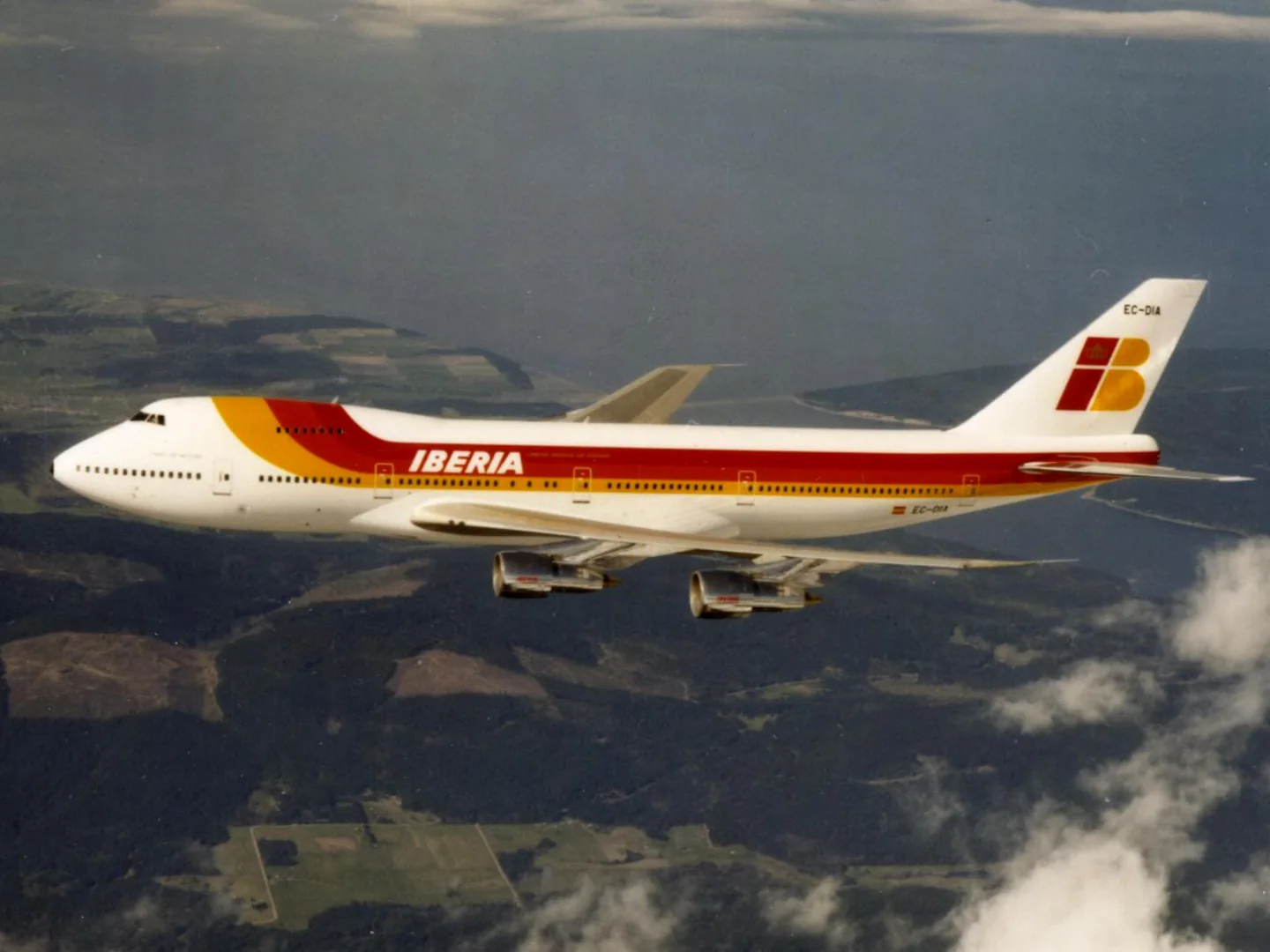
Boeing 747 familyIberia Airlines · CC BY 2.0 · Boeing 747 pictured

Boeing 747 family

Hydraulically powered controls with artificial yoke feel, autopilot backdrive and a stick shaker.
AirlinerB748프로필 선택: 14개

기체 알기

The 747 first flew in 1969 and entered airline service in 1970. Its broad main deck transformed the scale of passenger flying, while the elevated cockpit also suited a freighter with a nose-loading door. Passenger and cargo developments remained important throughout the programme.

The flight deck changed dramatically between classic three-crew 747s and later two-pilot aircraft. The 747-8 also brought a further wing and engine development. The simulator products cover several generations, including the classic 747-200 and modern 747-8.

Boeing 747-8 Intercontinental

Powerplant
4× GEnx-2B67, 66,500 lbf each↗
Seats
≈410 typical three-class↗
Max takeoff weight
987,000 lb (447,700 kg)↗
Wingspan
224 ft 7 in (68.45 m)↗
Length
250 ft 2 in (76.25 m), the longest airliner of its day↗
Max operating (Mmo)
M0.90↗
Typical cruise
M0.855↗
Max operating altitude
43,100 ft↗
Range
≈7,730 nm↗
Fuel capacity
≈63,034 US gal↗
Flight controls
Hydraulic with artificial feel, control column↗
First flight (747-8I)
2011↗

AirframeDB에서 이 항공기에 대해 더 알아보기

How the upper-deck shape emerged

Boeing’s early concept archive shows that the familiar 747 shape was not the starting point. The development team studied several arrangements with two passenger decks. Problems with those configurations led Joe Sutter’s team toward a wide fuselage with most accommodation on one level. Moving the flight deck upstairs also left room for a cargo door in the nose below it.

A production story ending with a freighter

The 747 evolved through several generations, including the 747-400 and the later 747-8, while passenger and freight operations gave the family different careers. Boeing marked the final delivery on 31 January 2023 at Everett, handing a 747-8 freighter to Atlas Air. The manufacturer recorded 1,574 aircraft built over more than half a century.

People who had helped design and build the original aircraft returned for the ceremony. Atlas provided another link across generations: the company began with a converted 747-200 freighter and later operated types including the enlarged Dreamlifter, used to transport 787 components.

Sharing the coveted Kai Tak landing

Westerdijk recalls choosing a first-officer position on the 747 over an opportunity to command the DC-9. After earlier F27 and A310 flying, the prospect of long-haul operations appealed to him, and he eventually became a 747 captain. His recollections of the 200 and 300 include six-day rotations through Dubai and Bangkok to Hong Kong, with the return journey retracing those stops.

Kai Tak made those trips particularly memorable. He describes the transition from instrument guidance to the visual turn beside the city, with buildings close by and western winds sometimes adding turbulence. As a first officer, the allocation of flying duties determined whether he received that prized landing. When he later commanded the aircraft, he discussed the division of sectors with his first officer.

A childhood ambition waiting beside the employee car park

Osborne traces his fascination with the 747 to seeing Airport 1975 as a ten-year-old. Years later, as a US Air Force C-141 instructor, he would look across Frankfurt airport at newly arrived 747-400s and imagine flying one. After leaving the Air Force, his airline employer acquired the aircraft used in the film, and he eventually became part of its crew. The machine that had started the ambition became part of his working life.

Writing as a 747-400 captain, he describes another connection with that childhood excitement: the preserved N661US at the Delta Flight Museum. Passing it near the employee parking area at the beginning and end of trips brought back the same sense of wonder. The recollection is about a lasting attachment to the aircraft rather than a technical evaluation of its handling.

Acceptance flights, an old mentor and a family reunion

By the time of this 2022 interview, Vize had spent more than twenty-two years flying 747s for Atlas and visited more than a hundred destinations in the type. The cargo varied from cars and boats to holiday gifts and equipment for sports teams. Acceptance flights for two new 747-8 freighters gave that career a personal turn: while he flew the aircraft, Joe Masone carried out the functional checks and systems tests. Masone had trained him about twenty-five years earlier and helped him find his way to Atlas.

Vize also recalls a brief meeting with his son Brandon during a military deployment in 2010. His own arrival coincided with his son departing aboard another Atlas 747, flown by a colleague. Among the many journeys and loads he remembers, that chance encounter stands out as a moment when the aircraft joined his professional and family lives.

Flying a 747 with a Space Shuttle on its back

At Oshkosh in 1995, McMurtry stood beside his own Waco biplane and amused his interviewer by describing a much larger two-winged machine he flew: the 747 carrying a Space Shuttle. His route to that unusual assignment included naval aviation, test-pilot training and Lockheed U-2 flying before joining NASA in 1967. He became one of the original 747 project pilots for the Shuttle approach-and-landing test programme.

Asked how the carrier handled with the Shuttle aboard, he said the change was less dramatic than an observer might expect. The added vehicle nevertheless produced considerable drag, and disturbed airflow around it transmitted shaking to the 747’s tail and airframe. These handling observations concern the modified carrier combination.

공개 출처 25
  1. Boeing 747Research background · Wikipedia revision 1373946440 · retrieved 2026-09-12
  2. Boeing 747-8i & 8f Instructions and Reference
  3. Microsoft Flight Simulator aircraft manuals
  4. MSFS 2024 FAQ and edition aircraft inventory
  5. Boeing 747 Global Supertanker Instructions and Reference
  6. Boeing 747 LCF Dreamlifter Instructions and Reference
  7. MSFS 2020 FAQ and edition aircraft inventory
  8. Boeing 747-400 POH
  9. X-Plane 11 Desktop Manual
  10. X-Plane aircraft and avionics manuals
  11. 747-200 passenger productOfficial developer / designated store catalogue · checked 2026-09-12
  12. 747-200F Classic CargoOfficial developer / designated store catalogue · checked 2026-09-12
  13. Gerhard Westerdijk on flying the 747 into Kai TakLieneke Koornstra interview · 17 December 2022
  14. 747 Memories: Captain Tony OsborneTony Osborne recollection · archive page dated 23 October 2024; recollection predates that page date
  15. Delivering the final 747s for our customersTailwinds · 24 October 2022 · captain Tom Vize
  16. Pilots: Tom McMurtryDecember 1995 profile · interview at Oshkosh 1995
  17. Early 747 Concept ModelBoeing historical caption · asset BI222911 / k16432
  18. Boeing and Atlas Air celebrate the final 747 deliveryManufacturer announcement · 31 January 2023
  19. Aircraft & Avionics Update 02 release notesMSFS 2020 · version 1.33.8.0 · 22 June 2023
  20. ICAO Doc 8643 — aircraft type designatorsPublic search data retrieved 2026-09-14; authority update 2026-09-03
  21. B 747-8 Intercontinental Prime Edition-FPS-747-8Product listing captured 2026-09-23; edition scope from the reviewed catalogue
  22. 747-400Product listing captured 2026-09-24; edition scope from the reviewed catalogue
  23. Boeing 747-8 documentation인쇄 또는 보관된 참고 자료; 공개 링크 없음
  24. Boeing published data인쇄 또는 보관된 참고 자료; 공개 링크 없음
  25. FAA TCDS A20WE인쇄 또는 보관된 참고 자료; 공개 링크 없음

프로필의 모델링 방식

Boeing 747-8 Intercontinental

Free + Pro
MSFS 2020MSFS 2024X-Plane 11X-Plane 12

The 747 first flew in 1969 and entered airline service in 1970. Its broad main deck transformed the scale of passenger flying, while the elevated cockpit also suited a freighter with a nose-loading door. Passenger and cargo developments remained important throughout the programme.

This starting point selects Boeing 747-8 Intercontinental. Its aircraft-level settings do not select a particular developer’s custom systems.

Spring resistance builds with the selected airspeed response. Directed aerodynamic loading is omitted.

Pitch-trim relief is off. Autopilot following is enabled for supported control references.

이 리비전은 아직 공개 설치가 활성화되지 않았습니다.

Controls and trim

The 747 family spans the classic -200, -400 and later -8, with separate avionics and engine installations. The cited -400 maintenance discussion reports breakout and full-aft column effort varying with trim; an early-747 handling account describes its wheel effort. These are related-type reports, not measured -8 force curves. Dreamlifter and Supertanker guides additionally describe specialized autopilot controls and mission configurations.

Boeing 747 LCF Dreamlifter Instructions and ReferenceBoeing 747 family reference

About the values

The gains are normalized profile settings. They describe the chosen effect balance; hand force depends on the device and its output limits. IAS references are tuning values rather than operating limits. Physical acceptance of this revision remains pending.

Master gain & control system

Master gain85%

모델이 만드는 모든 것에 적용되는 최종 전체 출력 스케일로, 장치 상한 이전에 적용됩니다.

올리면: 모든 것(스프링, 하중, 효과)이 함께 강해집니다.

내리면: 모든 것이 함께 부드러워집니다.

이 값의 이유: Scales overall profile strength while preserving effect balance, subject to device and output limits.

Forces

Spring strength20%

스틱을 중앙으로 되돌리는 기본 센터링 힘입니다. 다른 모든 힘이 이 위에 쌓입니다. 너무 낮으면 정상 비행에서 스틱이 흐물거리고, 너무 높으면 손에 맞서며 그 위에 겹쳐진 작은 신호들을 가립니다.

올리면: 손에 더 저항하는 단단한 센터링.

내리면: 공기역학 하중에만 기대는 무른 스틱.

이 값의 이유: The powered-control response uses qualitative family feel context; older maintenance and handling accounts do not calibrate every -8 axis. The baseline spring is 0.2. Low-speed spring blending is off.

Boeing 747 LCF Dreamlifter Instructions and ReferenceBoeing 747 family reference
Spring deadband0%

중앙 주변에서 스프링이 조용히 머무는 작은 중립 구역으로, 정지 시의 미세한 움직임이 덜컹거리지 않게 합니다. 넓을수록 차분하지만 느슨해지고, 좁을수록 정밀하지만 중앙에서 떨릴 수 있습니다.

올리면: 더 차분하지만 더 느슨한, 유격이 큰 중앙.

내리면: 정지 시 떨릴 수 있는 더 조인 중앙.

이 값의 이유: Sets travel around the centre before the baseline spring resists. Smaller values engage it sooner.

Forces · Center starting force0.12

이 값의 이유: Adds smoothly ramped resistance outside the centre deadband. Zero removes this preload.

Forces · Center starting force transition0.05

이 값의 이유: Sets the travel used to ramp in centre preload. Wider intervals make its onset more gradual.

Overall aerodynamic load0%

두 지속 축 하중에 걸리는 마스터 스케일로, 각 축의 독립 균형 이전에 적용됩니다. 프로파일은 보통 이것을 두고 두 축 하중을 조정합니다.

올리면: 두 축이 더 강하게 하중을 받습니다.

내리면: 두 축이 함께 가벼워집니다.

이 값의 이유: The 0 gain omits sustained directed airspeed loading. Spring resistance remains independent.

Airspeed blendingFalse

저속 스프링 진입 구간(위의 시작/최대 노트)을 켭니다. 끄면 스프링은 모든 속도에서 일정합니다.

이 값의 이유: Allows baseline spring strength to rise with indicated airspeed where the control law permits it.

Low-speed spring floor55%

속도가 공기역학적 힘을 만들기 전, 정지 상태에서 스프링이 얼마나 남는지입니다. 바닥이 높으면 주기된 스틱이 단단하고, 낮으면 주기된 경비행기의 케이블이 늘어진 듯한 느슨한 감각이 됩니다.

올리면: 주기·지상활주 시 더 단단한 스틱.

내리면: 속도로만 깨어나는 주기 시의 무른 스틱.

이 값의 이유: Sets low-speed spring strength as a fraction of baseline when blending is enabled. One keeps full strength.

Spring engagement start20 kt

스프링이 저속 바닥에서 전체 강도를 향해 오르기 시작하는 속도입니다. 이륙 활주에서 조종면이 "살아나는" 지점입니다.

이 값의 이유: Sets the IAS where the low-speed spring blend starts rising. This is a feel threshold, not a flight limit.

Spring engagement full122 kt

스프링이 전체 강도에 도달하는 속도입니다. 시작점과 이 지점 사이에서 조종면 위 기류가 늘며 센터링이 점차 단단해집니다.

이 값의 이유: Sets the IAS where the low-speed blend reaches baseline strength; high-speed stiffening also uses it.

포스 조정 속도275

공기역학 하중이 설계된 최대치에 도달하는 지시 속도입니다. 하중 곡선 전체를 기체의 실제 속도 범위에 고정합니다. 172는 110노트에서 하중이 차오르고, 제트기는 훨씬 나중입니다.

올리면: 하중이 늦게 오고, 더 빠른 속도까지 스틱이 가볍습니다.

내리면: 하중이 일찍 오고 순항이 더 무겁습니다.

이 값의 이유: Sets the IAS reference for aerodynamic loading. It is an estimate, not published cruise TAS or a flight limit.

Centre firmness vs speed100%

변위 하중에 더해 센터링 자체가 속도에 따라 얼마나 단단해지는지입니다. 0이면 중앙 감각이 일정하고, 클수록 순항에서 더 단단히, 장주에서 더 느슨하게 센터링됩니다.

올리면: 속도에 따라 뚜렷이 단단해지는 중앙.

내리면: 어떤 속도에서도 일정한 중앙 감각.

이 값의 이유: The high-speed spring-stiffening gain is 1. It strengthens the permitted spring response above 122 KIAS, with the squared-speed ratio capped at 7.8.

Centre stiffening cap7.8

속도로 인한 중앙 경화의 상한으로, 초고속 비행이 스프링을 무한정 감아올리지 못하게 합니다.

올리면: 고속에서 더 많은 총 경화 허용.

내리면: 경화가 더 일찍 멈춥니다.

이 값의 이유: Limits the squared airspeed ratio used for high-speed spring stiffening; it is not a device-force cap.

Aileron load65%

에일러론 변위와 속도에 의한 지속적인 롤 하중으로, 피치와 독립적으로 조정됩니다. 승강타 하중과 함께 리뷰에서 말하는 조종 조화 비율을 정합니다.

올리면: 더 무거운 롤 힘.

내리면: 더 가볍고 생기 있는 에일러론.

이 값의 이유: Roll and pitch aerodynamic scales are 0.65 and 0.65, respectively. These stored weights do not create directed aerodynamic loading while that term is inactive. No custom spring-travel curve is enabled.

Elevator load65%

승강타 변위와 속도에 의한 지속적인 피치 하중으로, 롤과 독립적으로 조정됩니다. 기종별 피치 무게를 결정하는 주 레버입니다. 에일러론, 스프링, 트림, 버핏 힘에는 관여하지 않습니다.

올리면: 속도에서 더 무거운 지속 피치 힘.

내리면: 붙들기 가벼운, 더 가뿐한 승강타.

이 값의 이유: Scales pitch aerodynamic loading; pitch spring travel and trim responses are separate settings.

Max output force55%

각 정상 피치·롤 힘이 장치에 닿기 전의 상한으로, 강한 기동에서 하드웨어를 때리거나 포화시키지 않게 보호합니다.

올리면: 잘리기 전의 더 높은 정상 힘 피크.

내리면: 더 부드러운 상한. 거친 기동이 더 일찍 평평해집니다.

이 값의 이유: Caps directed-force output. Native spring effects and device limits remain separate.

Trim

Trim relief (elevator)0%

승강타 트림이 유지 중인 피치 힘을 얼마나 덜어내고 스틱이 안착하는 지점을 옮기는지입니다. 100 %에서는 제대로 트림된 기체에 유지 압력이 필요 없어져, 실제 비행의 하중을-트림으로-지우는 절차 그대로입니다.

올리면: 트림이 더 많은 유지 힘을 덜어냅니다. 100 %에서는 완전 트림이 상쇄합니다.

내리면: 트림해도 힘을 계속 붙들게 됩니다.

이 값의 이유: Trim-sensitive column effort is family mechanism context, while the profile's exact trim authority remains a selected approximation. Pitch relief is off, with stored authority 0; roll authority is 0.

Boeing 747 LCF Dreamlifter Instructions and ReferenceBoeing 747 family reference
Trim relief (aileron)0%

롤 트림에 대한 같은 경감입니다. 대부분의 GA 기종에는 실제 에일러론 트림이 없어 0으로 두고, 롤 트림이 있는 기종은 상응하는 값을 받습니다.

올리면: 롤 트림이 더 많은 유지 힘을 덜어냅니다.

내리면: 롤 트림의 효과가 줄어듭니다.

이 값의 이유: Scales supported roll-trim relief and permitted centre movement. Zero removes roll response.

Effect gains · Ground

Runway rumble40%

바퀴 속도와 노면 종류(포장, 잔디, 자갈)에 따른 구름 진동입니다.

올리면: 스틱의 노면 질감이 더 강하게.

내리면: 더 매끄러운 지상활주.

이 값의 이유: Sets rolling texture strength, modified by speed, surface and undercarriage configuration.

Gear bumps32%

신축 이음, 바퀴 자국, 거친 노면의 짧고 분리된 충격으로, 연속적인 우르릉거림에 마디를 찍습니다.

올리면: 이음과 자국의 더 또렷한 충격.

내리면: 더 부드러운 지면 디테일.

이 값의 이유: Sets gear-bump texture during ground motion, separate from touchdown impact.

Effect gains · Airframe

Stall buffet30%

실속 접근 시와 실속 경고가 울리는 동안의 기체 흔들림, 이 날개가 불만을 얼마나 크게 알리는지입니다. 깔끔하게 떨어지는 기종은 버핏을 절제하고 경적이 경고를 맡습니다.

올리면: 더 강한 실속 전 떨림.

내리면: 더 은은한 날개. 경적이 경고를 맡습니다.

이 값의 이유: Sets stall-buffet strength. Zero removes the cue without changing simulator stalls or warnings.

Mach buffet22%

마하 한계 접근 시의 천음속 버핏입니다. MMO 근처의 제트기에는 의미가 있고, 거기 도달하지 못하는 피스톤과 터보프롭은 0입니다.

올리면: 마하 한계 근처의 더 강한 천음속 버핏.

내리면: 높은 마하에서 더 매끄러운 비행.

이 값의 이유: Sets high-Mach buffet strength; onset and full-strength thresholds are separate.

Flap buffet14%

플랩이 실제로 공기를 일하는 속도 창에서, 기류에 펼쳐진 플랩에 의한 기체의 저주파 진동입니다.

올리면: 플랩 작동 중 더 거친 비행.

내리면: 더 부드러운 접근 플랩.

이 값의 이유: Sets flap buffet at the configured position and speed gates. Flap movement texture is separate.

Gear buffet10%

기류에 매달린 접이식 착륙장치에 의한 기체의 북소리입니다. 기체 형상이 변하지 않는 고정식 기종은 0입니다.

올리면: 착륙장치 내림 시 더 많은 북소리.

내리면: 더 깔끔한 착륙장치 내림 비행.

이 값의 이유: Sets gear aerodynamic buffet; movement and ground-contact cues are separate.

Stick shaker90%

기체 자체의 실속 경보 시스템이 발동하는 전용 스틱 셰이커 진동입니다. 실제 셰이커가 있는 기종만 값을 받고, 나머지는 공기역학 버핏과 경적에 의존합니다.

올리면: 더 단단한 셰이커.

내리면: 더 은은한 셰이커.

이 값의 이유: Sets triggered shaker strength; inactive while the shaker feature is disabled.

Effect gains · Engine, mechanical & drag

Touchdown thump90%

바퀴가 활주로에 닿는 순간의 단발 충격으로, 강하율에 따라 스케일됩니다. 부드러운 착륙은 속삭이고 단단한 도착은 쿵 울립니다.

올리면: 접지 시 더 단단한 충격.

내리면: 더 부드러운 도착.

이 값의 이유: Sets landing-impact strength; landing telemetry and response shape determine the pulse.

Reverse rumble50%

역추력이나 베타 범위 프로펠러가 작동하는 동안의 활주 진동입니다. 리버스가 없는 기종은 0입니다.

올리면: 리버스 중 더 거친 활주.

내리면: 더 은은한 리버스.

이 값의 이유: Sets reverse-thrust vibration with valid reverser and engine conditions. Zero removes the cue.

Engine rumble6%

공회전부터 최대 출력까지 회전수를 따르는 연속적인 동력장치 진동으로, 앞에서 무언가 연료를 태우고 있다는 늘 존재하는 상기입니다.

올리면: 스틱에 더 많은 엔진.

내리면: 더 은은한 엔진.

이 값의 이유: Sets estimated engine vibration using configured telemetry and response, not measured cockpit vibration.

Flap motion12%

시뮬레이터가 플랩 조종면의 실제 이동을 보고하는 동안만의 연속 진동입니다. 추정 타이머가 아니라 실제 액추에이터 동작과 고장을 따릅니다.

올리면: 플랩 이동 중 더 많은 진동.

내리면: 더 은은한 플랩 이동.

이 값의 이유: Sets texture from observed flap movement; a command without movement does not establish the cue.

Autopilot follow

AP follow authority100%

자동조종 명령이 스틱을 물리적으로 얼마나 움직일 수 있는지입니다. 움직인 축이 조종사 입력으로 읽힐 수 있는 MSFS에서는 극소로 유지하며, 0이면 따라가기가 완전히 꺼집니다.

올리면: 자동조종이 스틱을 눈에 띄게 더 움직입니다.

내리면: 거의 느껴지지 않는 따라가기.

이 값의 이유: Sets admitted AP-follow gain, not a percentage of travel. Runtime ownership and input limits still apply.

Stick feel

StickFeel · Trim feel enabledFalse

Whether this feature is active in this profile.

이 값의 이유: Retained for compatibility and group membership. Trim relief, rather than this flag, controls centre movement.

StickFeel · Trim relief enabledFalse

Whether this feature is active in this profile.

이 값의 이유: Allows trim relief with supported control law and valid telemetry. Axis authorities set its amount.

StickFeel · Force trim enabledFalse

Whether this feature is active in this profile.

이 값의 이유: Enables local force trim, separate from aircraft-owned trim and add-on integration qualification.

StickFeel · G load enabledFalse

Whether this feature is active in this profile.

이 값의 이유: Allows load-factor changes to modify permitted spring laws. Passive fly-by-wire feel can suppress it.

StickFeel · Rate damping enabledFalse

Whether this feature is active in this profile.

이 값의 이유: Enables rate damping with the configured coefficients and control law.

Autopilot

Autopilot · Follow enabledTrue

Whether this feature is active in this profile.

이 값의 이유: Following is on at 1 authority when a supported, valid autopilot control reference is available.

Autopilot · Neutral hold enabledFalse

Whether this feature is active in this profile.

이 값의 이유: Permits centering hold during a supported AP state, separate from following a moving target.

Autopilot · Neutral hold strength0.6

이 값의 이유: Sets admitted AP neutral-hold strength; inactive while neutral hold is disabled.

Aero

Aero · EnabledTrue

Whether this feature is active in this profile.

이 값의 이유: Enables aerodynamic cues; each still needs nonzero strength and its simulator conditions.

Aero · Max flap index6

Where this effect reaches full strength (or has fully faded, for washouts).

올리면: a more gradual build to a later peak.

내리면: a quicker build.

이 값의 이유: Sets the final flap index for detent normalization. UP plus three detents uses maximum index3.

Aero · Min flap index2

Where this effect begins fading in.

올리면: the effect begins later.

내리면: it begins earlier.

이 값의 이유: Sets the first flap detent that admits buffet; this is a handle index, not degrees.

Aero · Shaker enabledTrue

Whether this feature is active in this profile.

이 값의 이유: Permits shaker at supported warning conditions; the switch does not establish aircraft equipment.

Ground

Ground · EnabledTrue

Whether this feature is active in this profile.

이 값의 이유: Enables ground effects; each still needs its own strength and contact or motion telemetry.

Engine

Engine · EnabledTrue

Whether this feature is active in this profile.

이 값의 이유: Enables engine cues with nonzero settings and valid running-engine telemetry.

Mechanical

Mechanical · EnabledTrue

Whether this feature is active in this profile.

이 값의 이유: Enables accessory cues with configured strengths and observed accessory movement.

Mechanical · Gain0.12

The strength of this effect.

올리면: a stronger effect.

내리면: a weaker one.

이 값의 이유: Sets texture from observed gear movement, separate from aerodynamic and touchdown effects.

모든 프로필 설정
추정 프로필 설정
매개변수값제어 대상과 설정 이유
Spring strength0.2 The powered-control response uses qualitative family feel context; older maintenance and handling accounts do not calibrate every -8 axis. The baseline spring is 0.2. Low-speed spring blending is off.
Spring deadband0.0 Sets travel around the centre before the baseline spring resists. Smaller values engage it sooner.
Forces · Center starting force0.12 Adds smoothly ramped resistance outside the centre deadband. Zero removes this preload.
Forces · Center starting force transition0.05 Sets the travel used to ramp in centre preload. Wider intervals make its onset more gradual.
Force gain0 The 0 gain omits sustained directed airspeed loading. Spring resistance remains independent.
Master gain0.85 Scales overall profile strength while preserving effect balance, subject to device and output limits.
Dynamic-pressure blendFalse Allows baseline spring strength to rise with indicated airspeed where the control law permits it.
Minimum spring factor0.55 Sets low-speed spring strength as a fraction of baseline when blending is enabled. One keeps full strength.
Spring wake-up speed20 ktSets the IAS where the low-speed spring blend starts rising. This is a feel threshold, not a flight limit.
Spring full-strength speed122 ktSets the IAS where the low-speed blend reaches baseline strength; high-speed stiffening also uses it.
포스 조정 속도275.0 ktSets the IAS reference for aerodynamic loading. It is an estimate, not published cruise TAS or a flight limit.
Airspeed spring stiffening1.0 The high-speed spring-stiffening gain is 1. It strengthens the permitted spring response above 122 KIAS, with the squared-speed ratio capped at 7.8.
Airspeed stiffening cap7.8 Limits the squared airspeed ratio used for high-speed spring stiffening; it is not a device-force cap.
Aileron force scale0.65 Roll and pitch aerodynamic scales are 0.65 and 0.65, respectively. These stored weights do not create directed aerodynamic loading while that term is inactive. No custom spring-travel curve is enabled.
Elevator force scale0.65 Scales pitch aerodynamic loading; pitch spring travel and trim responses are separate settings.
Maximum output force0.55 Caps directed-force output. Native spring effects and device limits remain separate.
StickFeel · Trim feel enabledFalse Retained for compatibility and group membership. Trim relief, rather than this flag, controls centre movement.
StickFeel · Trim relief enabledFalse Allows trim relief with supported control law and valid telemetry. Axis authorities set its amount.
StickFeel · Elevator authority0 Trim-sensitive column effort is family mechanism context, while the profile's exact trim authority remains a selected approximation. Pitch relief is off, with stored authority 0; roll authority is 0.
StickFeel · Aileron authority0 Scales supported roll-trim relief and permitted centre movement. Zero removes roll response.
StickFeel · Force trim enabledFalse Enables local force trim, separate from aircraft-owned trim and add-on integration qualification.
StickFeel · G load enabledFalse Allows load-factor changes to modify permitted spring laws. Passive fly-by-wire feel can suppress it.
StickFeel · Rate damping enabledFalse Enables rate damping with the configured coefficients and control law.
Autopilot · Follow enabledTrue Following is on at 1 authority when a supported, valid autopilot control reference is available.
Autopilot · Follow authority1.0 Sets admitted AP-follow gain, not a percentage of travel. Runtime ownership and input limits still apply.
Autopilot · Neutral hold enabledFalse Permits centering hold during a supported AP state, separate from following a moving target.
Autopilot · Neutral hold strength0.6 Sets admitted AP neutral-hold strength; inactive while neutral hold is disabled.
Aero · EnabledTrue Enables aerodynamic cues; each still needs nonzero strength and its simulator conditions.
Aero · Gain0.3 Sets stall-buffet strength. Zero removes the cue without changing simulator stalls or warnings.
Aero · Gain0.22 Sets high-Mach buffet strength; onset and full-strength thresholds are separate.
Aero · Gain0.14 Sets flap buffet at the configured position and speed gates. Flap movement texture is separate.
Aero · Max flap index6 Sets the final flap index for detent normalization. UP plus three detents uses maximum index3.
Aero · Min flap index2 Sets the first flap detent that admits buffet; this is a handle index, not degrees.
Aero · Gain0.1 Sets gear aerodynamic buffet; movement and ground-contact cues are separate.
Aero · Shaker enabledTrue Permits shaker at supported warning conditions; the switch does not establish aircraft equipment.
Aero · Amplitude0.9 Sets triggered shaker strength; inactive while the shaker feature is disabled.
Ground · EnabledTrue Enables ground effects; each still needs its own strength and contact or motion telemetry.
Ground · Gain0.4 Sets rolling texture strength, modified by speed, surface and undercarriage configuration.
Ground · Gain0.32 Sets gear-bump texture during ground motion, separate from touchdown impact.
Ground · Gain0.9 Sets landing-impact strength; landing telemetry and response shape determine the pulse.
Ground · Gain0.5 Sets reverse-thrust vibration with valid reverser and engine conditions. Zero removes the cue.
Engine · EnabledTrue Enables engine cues with nonzero settings and valid running-engine telemetry.
Engine · Gain0.06 Sets estimated engine vibration using configured telemetry and response, not measured cockpit vibration.
Mechanical · EnabledTrue Enables accessory cues with configured strengths and observed accessory movement.
Mechanical · Gain0.12 Sets texture from observed flap movement; a command without movement does not establish the cue.
Mechanical · Gain0.12 Sets texture from observed gear movement, separate from aerodynamic and touchdown effects.
공개 출처 26
  1. Boeing 747Research background · Wikipedia revision 1373946440 · retrieved 2026-09-12
  2. Boeing 747 LCF Dreamlifter Instructions and ReferenceBoeing 747 family
  3. Boeing 747 family referenceBoeing 747 family
  4. Boeing 747-8i & 8f Instructions and Reference
  5. Microsoft Flight Simulator aircraft manuals
  6. MSFS 2024 FAQ and edition aircraft inventory
  7. Boeing 747 Global Supertanker Instructions and Reference
  8. MSFS 2020 FAQ and edition aircraft inventory
  9. Boeing 747-400 POH
  10. X-Plane 11 Desktop Manual
  11. X-Plane aircraft and avionics manuals
  12. 747-200 passenger productOfficial developer / designated store catalogue · checked 2026-09-12
  13. 747-200F Classic CargoOfficial developer / designated store catalogue · checked 2026-09-12
  14. Gerhard Westerdijk on flying the 747 into Kai TakLieneke Koornstra interview · 17 December 2022
  15. 747 Memories: Captain Tony OsborneTony Osborne recollection · archive page dated 23 October 2024; recollection predates that page date
  16. Delivering the final 747s for our customersTailwinds · 24 October 2022 · captain Tom Vize
  17. Pilots: Tom McMurtryDecember 1995 profile · interview at Oshkosh 1995
  18. Early 747 Concept ModelBoeing historical caption · asset BI222911 / k16432
  19. Boeing and Atlas Air celebrate the final 747 deliveryManufacturer announcement · 31 January 2023
  20. Aircraft & Avionics Update 02 release notesMSFS 2020 · version 1.33.8.0 · 22 June 2023
  21. ICAO Doc 8643 — aircraft type designatorsPublic search data retrieved 2026-09-14; authority update 2026-09-03
  22. B 747-8 Intercontinental Prime Edition-FPS-747-8Product listing captured 2026-09-23; edition scope from the reviewed catalogue
  23. 747-400Product listing captured 2026-09-24; edition scope from the reviewed catalogue
  24. Boeing 747-8 documentation인쇄 또는 보관된 참고 자료; 공개 링크 없음
  25. Boeing published data인쇄 또는 보관된 참고 자료; 공개 링크 없음
  26. FAA TCDS A20WE인쇄 또는 보관된 참고 자료; 공개 링크 없음

커뮤니티와 정정

실기종 경험상 이 페이지가 틀렸다면 여기서 바로잡아 주세요.

조종사 정정

이 기체를 모시나요? 이 페이지를 정정하세요.

이 페이지는 인용된 자료로 만들어졌지만, 실기종 경험은 인용을 이깁니다. 틀린 주장을 인용하고 실제 기체는 어떤지 알려주세요. 정정은 메인테이너가 검토하며 이 조사의 다음 개정에 반영됩니다.

행어 토크

Boeing 747 family의 비행과 튜닝에 대한 열린 대화(커뮤니티 포럼)입니다. 위의 정정은 메인테이너에게 비공개로 전달되며, 행어 토크는 공개입니다.

Boeing 747 family의 행어 토크가 아직 없습니다. 첫 번째가 되어 보세요.

커뮤니티

이 기체의 커뮤니티 프로필

이 기체의 커뮤니티 프로필이 아직 없습니다. 나만의 방식으로 튜닝했나요? 프로필 공유하기 그러면 여기에 표시됩니다.