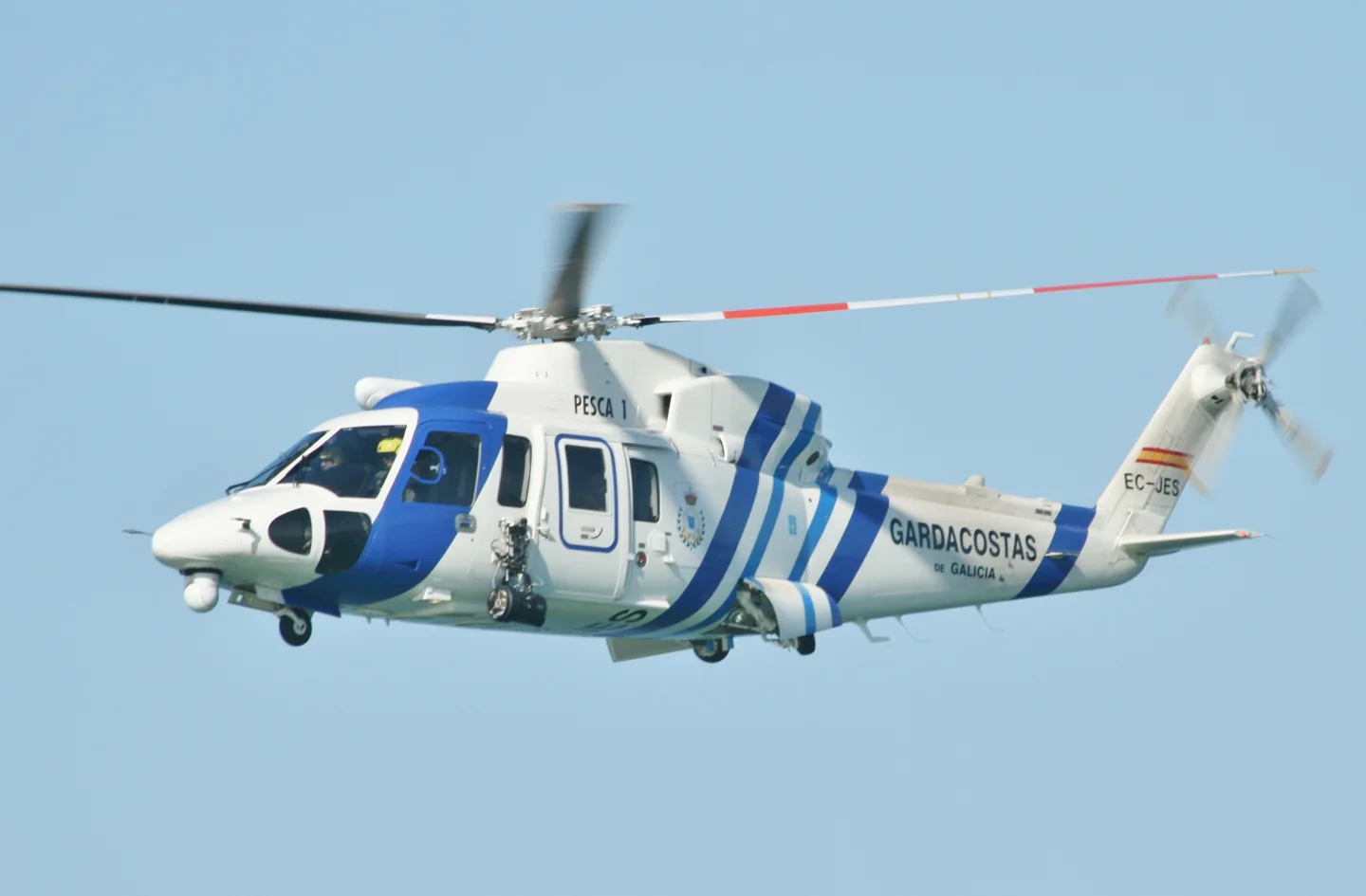
Sikorsky S-76Contando Estrelas from Vigo, España / Spain · CC BY-SA 2.0 · Sikorsky S-76C+ in rescue service

Sikorsky S-76

A medium commercial helicopter designed for passenger and utility transport.
Helicopter2 choix de profil

Connaître l'avion

The S-76 was Sikorsky's first helicopter developed for the civil market. Twin turbines, a four-bladed main rotor and retractable gear supported passenger, offshore and emergency-service roles.

Engines and avionics changed across the programme. An S-76C+ photograph shows that particular version; simulator manuals identify the cockpit and autopilot equipment represented by their models.

Aircraft / family

Propulsion
Twin turboshaft↗
Configuration
Retractable gear · Commercial transport↗

Sikorsky S-76 · Specifications (Sikorsky S-76C++) · real aircraft; source units retained

Length
52 ft 6 in (16 m) from tip of main rotor to tip of tail rotor↗
Height
14 ft 6 in (4.42 m) to tip of tail rotor↗
Empty weight
7,005 lb (3,177 kg) in utility configuration↗
Gross weight
11,700 lb (5,306 kg)↗
Powerplant
2 × Turbomeca Arriel 2S2 turboshaft, 922 shp (688 kW) each↗
Main rotor diameter
44 ft 0 in (13.41 m)↗
Maximum speed
155 kn (178 mph, 287 km/h) at maximum takeoff weight at sea level in standard atmospheric conditions↗
Cruise speed
155 kn (178 mph, 287 km/h) maximum cruise speed is the same as maximum speed↗
Range
411 nmi (473 mi, 761 km) no reserves, at long-range cruise speed at 4,000 ft altitude↗
Service ceiling
13,800 ft (4,200 m)↗

En savoir plus sur cet aéronef sur AirframeDB

An offshore pilot adjusts to the D model

After years flying the S-76, Reid encountered a noticeably different workplace in the D model. He described a quieter cabin and reduced vibration, along with fuel consumption that mattered to the payload available on familiar offshore routes. These were practical comparisons within an operator that had used several generations of the family.

The Thales cockpit required a change from earlier S-76 panels, but Reid welcomed the way information could be selected and controlled. He also valued the accuracy of the flight-control system in everyday flying. His enthusiasm sits within the specific environment of National Helicopter Services: hot, humid conditions and journeys to offshore installations. The interview presents his operating experience, without treating his positive assessment as a guarantee for every load or departure.

The copilot who decided she would not fly another leg

Naktenis recalled passengers waiting in a running S-76 while approaching weather made the departure increasingly uncomfortable. She repeatedly questioned the decision to leave, but the captain continued after speaking with management. As visibility deteriorated further along the short route to JFK, her requests to turn back went unheeded.

They landed, and the passengers continued to their connections. Naktenis’s response was to resign and arrange a car home, leaving the helicopter without its required copilot. In retrospect she wished she had refused to remain aboard before departure. Her account describes the pressure she experienced and the boundary she eventually drew. It is an attributed recollection of one flight, rather than an investigation identifying an operator or a general judgement about the S-76.

Showing visitors an experimental way to share control

Ward accompanied journalist Eric Adams during a demonstration of Sikorsky’s experimental Matrix system. He handled the start and taxi, then supervised as Adams used a tablet and alternative controls in flight. Ward also demonstrated the transition between conventional pilot inputs and the computer-managed flight, a central part of what the visit was intended to show.

In the interview, Ward described the resistance that such technology could initially provoke among experienced pilots. He wanted the system to leave crews more attention for their missions, and reported that pilots who tried it often changed their minds. This account combines his explanation with Adams’s observations during the flight. It concerns an experimental aircraft filled with test equipment, and does not imply that ordinary S-76s or their simulator models provide those capabilities.

Sources publiques 12
  1. Sikorsky S-76Research background · Wikipedia revision 1367154066 · retrieved 2026-09-12
  2. X-Plane 12 Desktop Manual
  3. X-Plane aircraft and avionics manuals
  4. X-Plane 11 Desktop Manual
  5. CowanSim S-76C++ official manual v1.0Package v1.2.0; MSFS 2020 and 2024 · PDF pp.1–2
  6. CowanSim S76C++ setup and controls manualGathered developer guide · PDF pp.1–13
  7. August 21st, 2025 Development UpdateMSFS 2020 Marketplace update listing · 21 August 2025
  8. Over tropical watersSean Reid interviewed by Dan Megna · 10 August 2015
  9. Just say no (go)Christine Naktenis · published 13 January 2026 for the February issue
  10. What is it like to fly a helicopter with a tablet?Mark Ward observed and interviewed by Eric Adams · 30 April 2019
  11. How Helinet Aviation supports CHLA with S-76 helicoptersSkip Robinson · 13 March 2019
  12. ICAO Doc 8643 — aircraft type designatorsPublic search data retrieved 2026-09-14; authority update 2026-09-03

Comment le profil le modélise

Sikorsky S-76

Free + Pro
X-Plane 12X-Plane 11MSFS 2024MSFS 2020

The S-76 was Sikorsky's first helicopter developed for the civil market. Twin turbines, a four-bladed main rotor and retractable gear supported passenger, offshore and emergency-service roles.

This starting point selects Sikorsky S-76. Its aircraft-level settings do not select a particular developer’s custom systems.

The spring and damping approximate a supported cyclic around those AFCS functions. Spring resistance builds with the selected airspeed response. A separate aerodynamic term adds speed-dependent control load. Cyclic damping adds resistance to hardware motion.

Mode-dependent beep trim is broader than a local spring-centre latch. Local force trim is off. Autopilot following is off.

Controls and trim

The S76 documentation separates SAS, attitude retention, four-axis automatic flight and the flight director. Beep-trim meaning changes in IAS and vertical-speed modes; rotor-trim reset is a separate command.

Official User Manual CowanSim-S-76C-Official-Manual-v1.0.pdfAutopilot Guide CowanSim-S76C-Autopilot-Guide.pdf

About the values

The gains are normalized profile settings. They describe the chosen effect balance; hand force depends on the device and its output limits. IAS references are tuning values rather than operating limits. Physical acceptance of this revision remains pending.

Master gain & control system

Master gain85%

L'échelle globale finale appliquée à tout ce que produit le modèle, avant la limite du périphérique.

Plus : tout (ressort, charges, effets) se renforce ensemble.

Moins : tout s'adoucit ensemble.

Pourquoi ici : Scales overall profile strength while preserving effect balance, subject to device and output limits.

Forces

Spring strength0%

La force de rappel de base qui ramène le manche au neutre. Toutes les autres forces s'empilent dessus. Trop faible, le manche paraît mou en vol normal ; trop forte, elle lutte contre la main et masque les signaux plus fins.

Plus : un centrage plus ferme qui résiste davantage à la main.

Moins : un manche plus mou qui ne compte que sur la charge aérodynamique.

Pourquoi ici : The spring and damping approximate a supported cyclic around those AFCS functions. The baseline spring is 0. Its low-speed blend reaches baseline strength at 70 KIAS.

Official User Manual CowanSim-S-76C-Official-Manual-v1.0.pdfAutopilot Guide CowanSim-S76C-Autopilot-Guide.pdf
Spring deadband2%

Une petite zone neutre autour du centre où le ressort reste muet, pour que les micro-mouvements à l'arrêt ne vibrent pas. Plus large, c'est plus calme mais plus lâche ; plus étroite, plus précis mais parfois nerveux au neutre.

Plus : un centre plus calme mais plus lâche, avec plus de jeu.

Moins : un centre plus serré qui peut vibrer au repos.

Pourquoi ici : Sets travel around the centre before the baseline spring resists. Smaller values engage it sooner.

Overall aerodynamic load35%

Une échelle maîtresse sur les deux charges d'axe, appliquée avant leur équilibre individuel. Les profils la laissent en général en place et règlent les deux axes.

Plus : les deux axes chargent plus fort.

Moins : les deux axes s'allègent ensemble.

Pourquoi ici : The aerodynamic-load gain is 0.35 with an indicated-speed reference of 140 KIAS. This supplies speed-dependent loading alongside the spring.

Airspeed blendingTrue

Active la fenêtre d'engagement basse vitesse du ressort (début/plein en nœuds ci-dessus). Désactivé, le ressort est constant à toute vitesse.

Pourquoi ici : Allows baseline spring strength to rise with indicated airspeed where the control law permits it.

Low-speed spring floor100%

La part du ressort qui survit à l'arrêt, avant que la vitesse ne crée la moindre force aérodynamique. Un plancher haut garde le manche ferme au parking ; un plancher bas donne le jeu de câbles d'un avion léger au parking.

Plus : un manche plus ferme au parking et au roulage.

Moins : un manche mou au parking qui ne s'éveille qu'avec la vitesse.

Pourquoi ici : Sets low-speed spring strength as a fraction of baseline when blending is enabled. One keeps full strength.

Spring engagement start19.6 kt

La vitesse à laquelle le ressort quitte son plancher basse vitesse vers la pleine raideur : le début du réveil des commandes au roulage de décollage.

Pourquoi ici : Sets the IAS where the low-speed spring blend starts rising. This is a feel threshold, not a flight limit.

Spring engagement full70.0 kt

La vitesse où le ressort atteint sa pleine raideur. Entre le début et ce point, le centrage se raffermit avec le vent relatif.

Pourquoi ici : Sets the IAS where the low-speed blend reaches baseline strength; high-speed stiffening also uses it.

Vitesse de réglage des forces140

La vitesse indiquée où la charge aérodynamique atteint son niveau de conception. Elle ancre toute la courbe au domaine réel : un 172 charge dès 110 nœuds, un jet bien plus tard.

Plus : les charges arrivent plus tard ; le manche reste léger jusqu'à plus vite.

Moins : les charges arrivent plus tôt et la croisière pèse davantage.

Pourquoi ici : Sets the IAS reference for aerodynamic loading. It is an estimate, not published cruise TAS or a flight limit.

Centre firmness vs speed0%

Combien le centrage lui-même se raidit avec la vitesse, en plus des charges de braquage. Zéro garde un centre constant ; plus fait centrer dur en croisière et souple en tour de piste.

Plus : un centre qui durcit nettement avec la vitesse.

Moins : une sensation de centre constante à toute vitesse.

Pourquoi ici : Adds permitted spring resistance above the full-blend speed. Zero removes this high-speed increase.

Centre stiffening cap5

La limite haute du raidissement lié à la vitesse, pour que le vol très rapide ne remonte pas le ressort sans borne.

Plus : plus de raidissement total permis à haute vitesse.

Moins : le raidissement se bride plus tôt.

Pourquoi ici : Limits the squared airspeed ratio used for high-speed spring stiffening; it is not a device-force cap.

Aileron load100%

La charge de roulis soutenue issue du braquage d'ailerons et de la vitesse, équilibrée indépendamment du tangage. Avec la charge de profondeur, elle fixe l'harmonie des commandes dont parlent les essais.

Plus : des efforts de roulis plus lourds.

Moins : des ailerons plus légers, plus vifs.

Pourquoi ici : Roll and pitch aerodynamic scales are 1 and 1, respectively. They set the aerodynamic axis balance. No custom spring-travel curve is enabled.

Elevator load100%

La charge de tangage soutenue issue du braquage de profondeur et de la vitesse, équilibrée indépendamment du roulis. Le levier principal du poids en tangage d'un type. Il ne touche ni ailerons, ni ressort, ni trim, ni buffet.

Plus : des efforts de tangage soutenus plus lourds en vitesse.

Moins : une profondeur plus légère, moins musclée à tenir.

Pourquoi ici : Scales pitch aerodynamic loading; pitch spring travel and trim responses are separate settings.

Max output force55%

Un plafond par force stable de tangage ou roulis avant le périphérique : la garde contre le claquement ou la saturation du matériel en manœuvre forte.

Plus : des pics de force stable plus élevés avant écrêtage.

Moins : un plafond plus doux ; les manœuvres dures s'aplatissent plus tôt.

Pourquoi ici : Caps directed-force output. Native spring effects and device limits remain separate.

Trim

Trim relief (elevator)30%

Combien le trim de profondeur soulage l'effort tenu et déplace le point de repos du manche. À 100 %, un avion bien compensé ne demande aucune pression : le geste réel de compenser la charge.

Plus : le trim retire plus d'effort tenu ; à 100 %, plein trim l'annule.

Moins : vous continuez à tenir de l'effort même compensé.

Pourquoi ici : Scales supported pitch-trim relief and permitted centre movement. Zero removes pitch response.

Trim relief (aileron)30%

Le même soulagement pour le trim de roulis. La plupart des avions légers n'ont pas de vrai trim d'ailerons, donc zéro ; les types qui en ont reçoivent une valeur adaptée.

Plus : le trim de roulis retire plus d'effort tenu.

Moins : le trim de roulis fait moins.

Pourquoi ici : Scales supported roll-trim relief and permitted centre movement. Zero removes roll response.

Effect gains · Ground

Runway rumble15%

Vibration de roulement issue de la vitesse des roues et du revêtement : la texture du bitume, de l'herbe ou du gravier sous le train.

Plus : une texture de surface plus forte dans le manche.

Moins : un roulage plus lisse.

Pourquoi ici : Sets rolling texture strength, modified by speed, surface and undercarriage configuration.

Gear bumps0%

Chocs courts et distincts des joints, ornières et surfaces rugueuses : la ponctuation au-dessus du grondement continu.

Plus : des chocs plus nets des joints et ornières.

Moins : des détails de sol plus doux.

Pourquoi ici : Sets gear-bump texture during ground motion, separate from touchdown impact.

Effect gains · Airframe

Stall buffet0%

Buffet de cellule à l'approche du décrochage et pendant l'avertisseur : la voix de cette aile quand elle est mécontente. Les types à décrochage franc reçoivent un buffet modéré, le klaxon porte l'alerte.

Plus : un tremblement pré-décrochage plus fort.

Moins : une aile plus discrète ; le klaxon porte l'alerte.

Pourquoi ici : Sets stall-buffet strength. Zero removes the cue without changing simulator stalls or warnings.

Mach buffet0%

Buffet transsonique près de la limite de Mach. Parlant pour les jets près de MMO, zéro pour pistons et turbopropulseurs qui n'y vont jamais.

Plus : un buffet transsonique plus fort près de la limite de Mach.

Moins : un vol plus lisse à haut Mach.

Pourquoi ici : Sets high-Mach buffet strength; onset and full-strength thresholds are separate.

Flap buffet0%

Vibration basse fréquence de cellule avec les volets dans le vent, dans la fenêtre où ils travaillent vraiment l'air.

Plus : un vol plus rugueux volets au travail.

Moins : des volets d'approche plus doux.

Pourquoi ici : Sets flap buffet at the configured position and speed gates. Flap movement texture is separate.

Gear buffet10%

Le tambourinement du train rentrant sorti dans le flux. Zéro pour les trains fixes, dont la cellule ne change jamais de forme.

Plus : plus de tambourinement train sorti.

Moins : un vol train sorti plus propre.

Pourquoi ici : Sets gear aerodynamic buffet; movement and ground-contact cues are separate.

Stick shaker50%

Le vibreur de manche dédié, déclenché par l'avertisseur de décrochage de l'avion. Seuls les types à vrai vibreur reçoivent une valeur ; les autres comptent sur buffet et klaxon.

Plus : un vibreur plus dur.

Moins : un vibreur plus discret.

Pourquoi ici : Sets triggered shaker strength; inactive while the shaker feature is disabled.

Effect gains · Engine, mechanical & drag

Touchdown thump50%

Le coup unique au toucher, proportionnel au taux de chute : un kiss se murmure, une arrivée ferme cogne.

Plus : un coup plus dur au toucher.

Moins : des arrivées plus douces.

Pourquoi ici : Sets landing-impact strength; landing telemetry and response shape determine the pulse.

Reverse rumble0%

Vibration de roulage sous inversion de poussée ou plage bêta. Zéro pour les types sans reverse.

Plus : un roulage plus rugueux sous reverse.

Moins : une reverse plus discrète.

Pourquoi ici : Sets reverse-thrust vibration with valid reverser and engine conditions. Zero removes the cue.

Engine rumble6%

Vibration continue du moteur suivant le régime du ralenti à la pleine puissance : le rappel permanent que quelque chose brûle du carburant devant.

Plus : plus de moteur dans le manche.

Moins : un moteur plus discret.

Pourquoi ici : Sets estimated engine vibration using configured telemetry and response, not measured cockpit vibration.

Flap motion0%

Vibration continue seulement pendant que le simulateur signale les volets réellement en mouvement. Elle suit la course réelle et les pannes, pas un minuteur estimé.

Plus : plus de vibration volets en mouvement.

Moins : des courses de volets plus discrètes.

Pourquoi ici : Sets texture from observed flap movement; a command without movement does not establish the cue.

Autopilot follow

AP follow authority5%

Jusqu'où les ordres du pilote automatique peuvent bouger le manche physique. Minuscule dans MSFS, où un axe déplacé peut être relu comme entrée pilote ; zéro coupe le suivi.

Plus : le pilote automatique bouge visiblement plus votre manche.

Moins : un suivi à peine perceptible.

Pourquoi ici : Sets admitted AP-follow gain, not a percentage of travel. Runtime ownership and input limits still apply.

Stick feel

StickFeel · Trim feel enabledFalse

Whether this feature is active in this profile.

Pourquoi ici : Retained for compatibility and group membership. Trim relief, rather than this flag, controls centre movement.

StickFeel · Trim relief enabledFalse

Whether this feature is active in this profile.

Pourquoi ici : Allows trim relief with supported control law and valid telemetry. Axis authorities set its amount.

StickFeel · G load enabledFalse

Whether this feature is active in this profile.

Pourquoi ici : Allows load-factor changes to modify permitted spring laws. Passive fly-by-wire feel can suppress it.

StickFeel · Rate damping enabledTrue

Whether this feature is active in this profile.

Pourquoi ici : Enables rate damping with the configured coefficients and control law.

Autopilot

Autopilot · Follow enabledFalse

Whether this feature is active in this profile.

Pourquoi ici : Autopilot following is off; the configured spring and load retain the hardware feel.

Autopilot · Neutral hold enabledFalse

Whether this feature is active in this profile.

Pourquoi ici : Permits centering hold during a supported AP state, separate from following a moving target.

Autopilot · Neutral hold strength0.6

Pourquoi ici : Sets admitted AP neutral-hold strength; inactive while neutral hold is disabled.

Aero

Aero · EnabledTrue

Whether this feature is active in this profile.

Pourquoi ici : Enables aerodynamic cues; each still needs nonzero strength and its simulator conditions.

Aero · Max flap index1

Where this effect reaches full strength (or has fully faded, for washouts).

Plus : a more gradual build to a later peak.

Moins : a quicker build.

Pourquoi ici : Sets the final flap index for detent normalization. UP plus three detents uses maximum index3.

Aero · Min flap index1

Where this effect begins fading in.

Plus : the effect begins later.

Moins : it begins earlier.

Pourquoi ici : Sets the first flap detent that admits buffet; this is a handle index, not degrees.

Aero · Shaker enabledFalse

Whether this feature is active in this profile.

Pourquoi ici : Permits shaker at supported warning conditions; the switch does not establish aircraft equipment.

Ground

Ground · EnabledTrue

Whether this feature is active in this profile.

Pourquoi ici : Enables ground effects; each still needs its own strength and contact or motion telemetry.

Engine

Engine · EnabledTrue

Whether this feature is active in this profile.

Pourquoi ici : Enables engine cues with nonzero settings and valid running-engine telemetry.

Mechanical

Mechanical · EnabledTrue

Whether this feature is active in this profile.

Pourquoi ici : Enables accessory cues with configured strengths and observed accessory movement.

Mechanical · Gain0.12

The strength of this effect.

Plus : a stronger effect.

Moins : a weaker one.

Pourquoi ici : Sets texture from observed gear movement, separate from aerodynamic and touchdown effects.

Tous les réglages du profil
Réglages estimés du profil
ParamètreValeurCe que cela contrôle et pourquoi
Spring strength0 The spring and damping approximate a supported cyclic around those AFCS functions. The baseline spring is 0. Its low-speed blend reaches baseline strength at 70 KIAS.
Spring deadband0.02 Sets travel around the centre before the baseline spring resists. Smaller values engage it sooner.
Force gain0.35 The aerodynamic-load gain is 0.35 with an indicated-speed reference of 140 KIAS. This supplies speed-dependent loading alongside the spring.
Master gain0.85 Scales overall profile strength while preserving effect balance, subject to device and output limits.
Dynamic-pressure blendTrue Allows baseline spring strength to rise with indicated airspeed where the control law permits it.
Minimum spring factor1 Sets low-speed spring strength as a fraction of baseline when blending is enabled. One keeps full strength.
Spring wake-up speed19.6 ktSets the IAS where the low-speed spring blend starts rising. This is a feel threshold, not a flight limit.
Spring full-strength speed70.0 ktSets the IAS where the low-speed blend reaches baseline strength; high-speed stiffening also uses it.
Vitesse de réglage des forces140.0 ktSets the IAS reference for aerodynamic loading. It is an estimate, not published cruise TAS or a flight limit.
Airspeed spring stiffening0 Adds permitted spring resistance above the full-blend speed. Zero removes this high-speed increase.
Airspeed stiffening cap5 Limits the squared airspeed ratio used for high-speed spring stiffening; it is not a device-force cap.
Aileron force scale1 Roll and pitch aerodynamic scales are 1 and 1, respectively. They set the aerodynamic axis balance. No custom spring-travel curve is enabled.
Elevator force scale1 Scales pitch aerodynamic loading; pitch spring travel and trim responses are separate settings.
Maximum output force0.55 Caps directed-force output. Native spring effects and device limits remain separate.
StickFeel · Trim feel enabledFalse Retained for compatibility and group membership. Trim relief, rather than this flag, controls centre movement.
StickFeel · Trim relief enabledFalse Allows trim relief with supported control law and valid telemetry. Axis authorities set its amount.
StickFeel · Elevator authority0.3 Scales supported pitch-trim relief and permitted centre movement. Zero removes pitch response.
StickFeel · Aileron authority0.3 Scales supported roll-trim relief and permitted centre movement. Zero removes roll response.
StickFeel · Force trim enabledFalse Mode-dependent beep trim is broader than a local spring-centre latch. Local force trim is off. The stored latch parameters are inactive; the profile does not supply a local hold-where-left neutral.
StickFeel · G load enabledFalse Allows load-factor changes to modify permitted spring laws. Passive fly-by-wire feel can suppress it.
StickFeel · Rate damping enabledTrue Enables rate damping with the configured coefficients and control law.
Autopilot · Follow enabledFalse Autopilot following is off; the configured spring and load retain the hardware feel.
Autopilot · Follow authority0.05 Sets admitted AP-follow gain, not a percentage of travel. Runtime ownership and input limits still apply.
Autopilot · Neutral hold enabledFalse Permits centering hold during a supported AP state, separate from following a moving target.
Autopilot · Neutral hold strength0.6 Sets admitted AP neutral-hold strength; inactive while neutral hold is disabled.
Aero · EnabledTrue Enables aerodynamic cues; each still needs nonzero strength and its simulator conditions.
Aero · Gain0 Sets stall-buffet strength. Zero removes the cue without changing simulator stalls or warnings.
Aero · Gain0 Sets high-Mach buffet strength; onset and full-strength thresholds are separate.
Aero · Gain0 Sets flap buffet at the configured position and speed gates. Flap movement texture is separate.
Aero · Max flap index1 Sets the final flap index for detent normalization. UP plus three detents uses maximum index3.
Aero · Min flap index1 Sets the first flap detent that admits buffet; this is a handle index, not degrees.
Aero · Gain0.1 Sets gear aerodynamic buffet; movement and ground-contact cues are separate.
Aero · Shaker enabledFalse Permits shaker at supported warning conditions; the switch does not establish aircraft equipment.
Aero · Amplitude0.5 Sets triggered shaker strength; inactive while the shaker feature is disabled.
Ground · EnabledTrue Enables ground effects; each still needs its own strength and contact or motion telemetry.
Ground · Gain0.15 Sets rolling texture strength, modified by speed, surface and undercarriage configuration.
Ground · Gain0 Sets gear-bump texture during ground motion, separate from touchdown impact.
Ground · Gain0.5 Sets landing-impact strength; landing telemetry and response shape determine the pulse.
Ground · Gain0 Sets reverse-thrust vibration with valid reverser and engine conditions. Zero removes the cue.
Engine · EnabledTrue Enables engine cues with nonzero settings and valid running-engine telemetry.
Engine · Gain0.06 Sets estimated engine vibration using configured telemetry and response, not measured cockpit vibration.
Mechanical · EnabledTrue Enables accessory cues with configured strengths and observed accessory movement.
Mechanical · Gain0 Sets texture from observed flap movement; a command without movement does not establish the cue.
Mechanical · Gain0.12 Sets texture from observed gear movement, separate from aerodynamic and touchdown effects.
Sources publiques 13
  1. Sikorsky S-76Research background · Wikipedia revision 1367154066 · retrieved 2026-09-12
  2. Official User Manual CowanSim-S-76C-Official-Manual-v1.0.pdfS76C++ official manualv1.0 pp.1-4,29-35Package v1.2.0; MSFS 2020 and 2024 · PDF pp.1–2
  3. Autopilot Guide CowanSim-S76C-Autopilot-Guide.pdfS76C++ AP guide, both pages
  4. X-Plane 12 Desktop Manual
  5. X-Plane aircraft and avionics manuals
  6. X-Plane 11 Desktop Manual
  7. CowanSim S76C++ setup and controls manualGathered developer guide · PDF pp.1–13
  8. August 21st, 2025 Development UpdateMSFS 2020 Marketplace update listing · 21 August 2025
  9. Over tropical watersSean Reid interviewed by Dan Megna · 10 August 2015
  10. Just say no (go)Christine Naktenis · published 13 January 2026 for the February issue
  11. What is it like to fly a helicopter with a tablet?Mark Ward observed and interviewed by Eric Adams · 30 April 2019
  12. How Helinet Aviation supports CHLA with S-76 helicoptersSkip Robinson · 13 March 2019
  13. ICAO Doc 8643 — aircraft type designatorsPublic search data retrieved 2026-09-14; authority update 2026-09-03

Communauté et corrections

Si votre expérience du type dit que cette page se trompe, corrigez-la ici.

Corrections de pilotes

Vous volez sur cet appareil ? Corrigez cette page.

Cette page repose sur des références citées, et l'expérience réelle du type vaut mieux qu'une citation. Citez l'affirmation erronée et dites-nous ce que fait l'appareil réel. Les corrections vont au mainteneur pour examen et nourrissent la prochaine révision de cette recherche.

Discussions de hangar

Conversation ouverte sur le pilotage et le réglage du Sikorsky S-76, sur le forum communautaire. Les corrections ci-dessus vont en privé au mainteneur ; les discussions de hangar sont publiques.

Pas encore de discussion de hangar sur le Sikorsky S-76. Lancez-la.

Communauté

Profils communautaires pour cet appareil

Pas encore de profils communautaires pour cet appareil. Réglé à votre façon ? Partagez un profil et il apparaîtra ici.