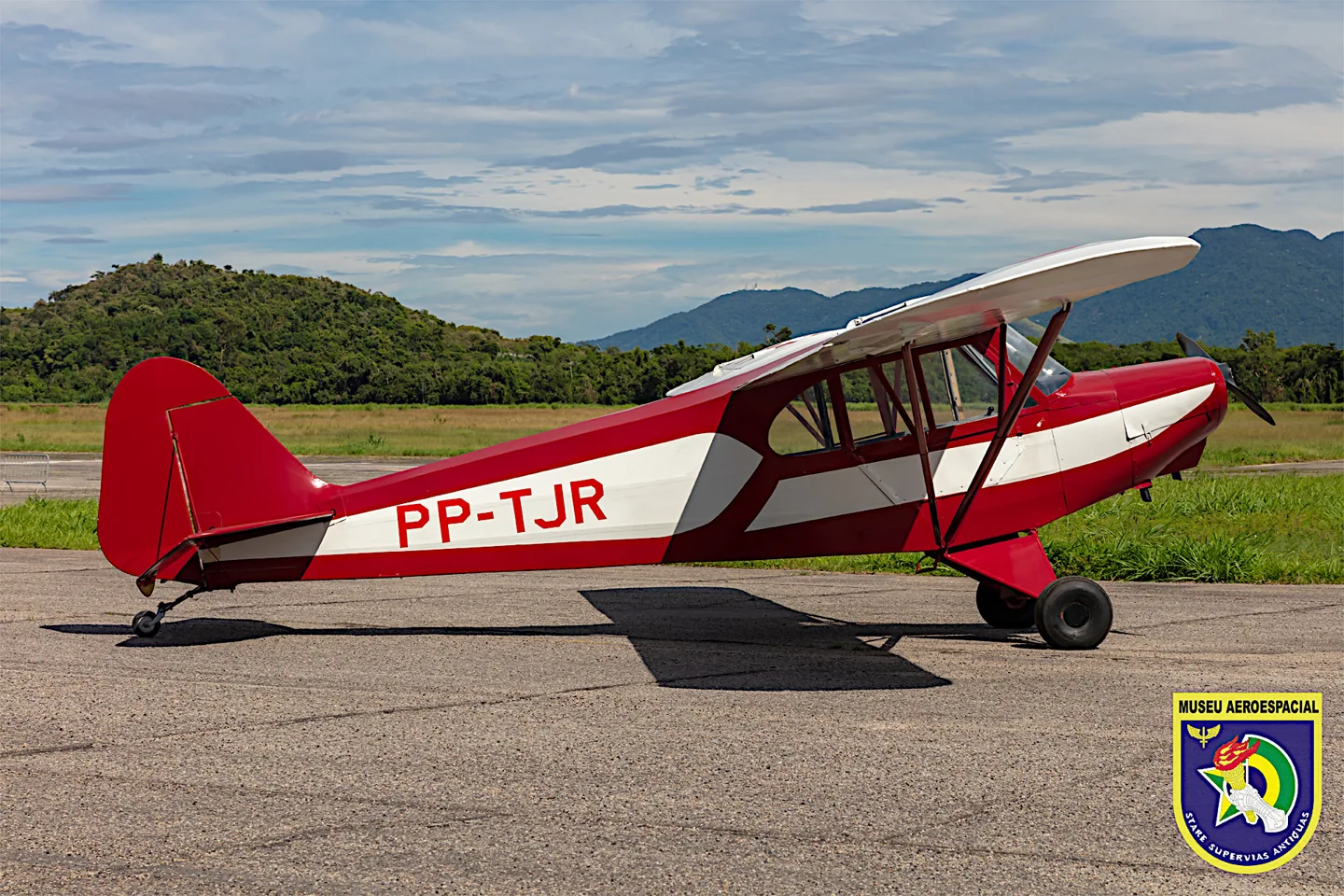
Biblioteca de aeronavesCAP 4 Paulistinha
CAP 4 PaulistinhaMuseu Aeroespacial · Public domain · MUSAL CAP 4 Paulistinha 1.

CAP 4 Paulistinha

A Brazilian light trainer with a high wing, tandem seats and a simple utility layout.
Vintage1 opciones de perfil

Conoce el avión

The Paulistinha belongs to the history of Brazilian flying clubs and basic aviation training. Its braced high wing, enclosed tandem cabin and tailwheel undercarriage follow the practical light-aircraft pattern of the period.

The CAP-4 name identifies a particular development of this compact trainer.

Aircraft / family

Propulsion
Single piston↗
Configuration
High wing · Tandem trainer↗

CAP-4 Paulistinha · Specifications (CAP-4) · real aircraft; source units retained

Length
6.65 m (21 ft 10 in)↗
Wingspan
10.10 m (33 ft 2 in)↗
Height
1.95 m (6 ft 5 in)↗
Wing area
17.0 m² (183 sq ft)↗
Empty weight
320 kg (705 lb)↗
Gross weight
540 kg (1,190 lb)↗
Powerplant
1 × Franklin 4AC air-cooled flat-four engine, 48 kW (65 hp)↗
Maximum speed
155 km/h (96 mph, 84 kn)↗
Cruise speed
140 km/h (87 mph, 76 kn)↗
Range
500 km (310 mi, 270 nmi)↗

Más sobre esta aeronave en AirframeDB

A trainer built for a growing network of flying clubs

The museum places the CAP-4 in the Campanha Nacional de Aviação, which raised private funds for aircraft, airfields and aeroclubs. The EAY-201 design was revised before the CAP-4’s homologation flight in January 1943, with the first production aircraft completed that April. The museum cautions that surviving records do not establish an unquestionable production total.

The later Neiva Paulistinha is a related development

Neiva acquired manufacturing rights in 1955 and developed the design further. The museum identifies its N-56B as a descendant of the CAP-4, with the military L-6 used for liaison and observation as well as training. The P56B and P56C training memories on this page concern that later family, with their differences stated in each account.

An empty front seat changes the whole first-solo flight

Sharp had practised from the CAP-4’s rear seat while his instructor, Salo Roth, occupied the front. Then Roth unfastened his belt, climbed out and handed over the aircraft. The empty seat made the responsibility immediate: Sharp would have to take it into the air and bring it back alone. He had been warned about the missing weight, but was still surprised by the quicker acceleration and more responsive feel.

The change also appeared on approach, when the aircraft seemed reluctant to lose height. Sharp recalled using the sideslip he had practised and completing the landing. Roth sent him around twice more. After parking, Sharp escaped on his Vespa before anyone could give him the customary first-solo bath in used oil.

Learning to fly brings freedom beyond the aeroclub

Negreiros joined the aeroclub at eighteen, remembering how a childhood flight had made her want to become an aviator. Training brought delight in the changing landscape below. Her first solo remained especially vivid: the aircraft was under her own control and responsibility, and the celebration afterwards mattered more than the discomfort of the customary oil bath.

She explicitly recalled soloing both the Paulistinha CAP-4 and the Piper J-3 during her years at the school. Flying also meant negotiating the expectations placed on a young woman in that environment; her father required her to attend the hangar and classes with companions. She remembered those years as an experience of independence and freedom, even after a judicial career occupied her time.

A first lesson turns preparation into the experience of control

Ferrão arrived for his first lesson having studied the manual and completed the aeroclub’s ground assessment. His instructor then explained the training areas, walkaround and departure. PP-GXN differed from the other Paulistinhas there by having electric starting and an intercom. Taxiing brought an early challenge: limited forward visibility and unfamiliar tailwheel steering made progress less straightforward than the preparation on paper.

Once established in flight, the instructor gave him control. He practised holding the aircraft steady, watched demonstrations and explored the training areas around Bragança Paulista. Near the end, the instructor asked him to find the way home. Ferrão remembered the simple act of keeping an aircraft in the air as something difficult to describe, and left looking forward to the next lesson.

Familiarity gradually replaces a student’s first-flight fear

Duque remembered his first Paulistinha flight as a mixture of a fulfilled dream and unexpected fear. Engine power, the departure and even light turbulence felt alarming. When the instructor handed over control, he suddenly understood how different the experience was from imagining himself as a pilot. Those feelings persisted into the early lessons.

With more flying, the movements that had unsettled him became familiar. He learned about thermals, stalls and coordination, and admitted needing three attempts to pass one coordination exercise. His account does not describe instant confidence or effortless mastery. It follows a student becoming more comfortable through practice, learning about his own reactions as well as the aircraft he had wanted so much to fly.

Fuentes públicas 11
  1. CAP-4 PaulistinhaResearch background · Wikipedia revision 1280901579 · retrieved 2026-09-12
  2. Microsoft Flight Simulator aircraft manuals
  3. CAP4 free for MSFS 2024 owners2025-03-11 · release and package scope
  4. Saudade do Paulistinha20 November 2014 · CAP-4 PP-ROL first-solo memoir
  5. Voei 12 anos nos céus de NatalPersonal memoir of training on the CAP-4 and Piper J-3; individual anecdotes do not always name the type
  6. Formação de PPA 048 March 2013 · signed Ferrão; related Neiva P56C PP-GXN, not the CAP-4
  7. A incrível experiência de voar20 June 2016 · student account in the related Neiva P56B, not the CAP-4
  8. Paulistinha — CAP 4AMuseum collection description; predecessor and production aircraft distinguished
  9. O primeiro avião Paulistinha CAP-4 é entregueHistorical article citing INCAER and Autoentusiastas; production totals explicitly uncertain
  10. Neiva N-56B (L-6) PaulistinhaRelated development; not the same aircraft variant
  11. ICAO Doc 8643 — aircraft type designatorsPublic search data retrieved 2026-09-14; authority update 2026-09-03

Cómo lo modela el perfil

CAP 4 Paulistinha

Free + Pro
MSFS 2024MSFS 2020

The Paulistinha belongs to the history of Brazilian flying clubs and basic aviation training. Its braced high wing, enclosed tandem cabin and tailwheel undercarriage follow the practical light-aircraft pattern of the period.

This starting point selects CAP 4 Paulistinha. Its aircraft-level settings do not select a particular developer’s custom systems.

Spring resistance builds with the selected airspeed response. A separate aerodynamic term adds speed-dependent control load.

Valid trim provides the configured pressure relief. Autopilot following is off.

Controls and trim

The CAP-4 announcement describes a high-wing trainer with fixed conventional gear, a 65-hp Franklin engine and a wooden fixed-pitch propeller. These details identify the selected light-aircraft configuration. The source does not establish absence of flaps, so a disabled profile flap cue is an omission rather than an aircraft-system claim.

Microsoft Flight Simulator Releases Local Legend 20: The CAP-4 Paulistinha

About the values

The gains are normalized profile settings. They describe the chosen effect balance; hand force depends on the device and its output limits. IAS references are tuning values rather than operating limits. Physical acceptance of this revision remains pending.

Master gain & control system

Master gain85%

La escala final de salida global aplicada a todo lo que produce el modelo, antes del tope del dispositivo.

Más: todo (muelle, cargas, efectos) se refuerza a la vez.

Menos: todo se suaviza a la vez.

Por qué aquí: Scales overall profile strength while preserving effect balance, subject to device and output limits.

Forces

Spring strength64%

La fuerza base de centrado que devuelve la palanca al centro. Todas las demás fuerzas se apilan sobre ella. Demasiado baja y la palanca se siente floja en vuelo normal; demasiado alta y lucha contra tu mano y enmascara las señales más pequeñas superpuestas.

Más: un centrado más firme que resiste más la mano.

Menos: una palanca más blanda que depende solo de la carga aerodinámica.

Por qué aquí: Nominal manual-control resistance accompanies the light trainer; its published cruise figure does not provide a measured force curve. The baseline spring is 0.64. Its low-speed blend reaches baseline strength at 37.5 KIAS.

Microsoft Flight Simulator Releases Local Legend 20: The CAP-4 Paulistinha
Spring deadband4%

Una pequeña zona neutra alrededor del centro donde el muelle queda en silencio, para que los movimientos mínimos en reposo no traqueteen. Más ancha es más tranquila pero más suelta; más estrecha es más precisa pero puede vibrar en el centro.

Más: un centro más tranquilo pero más suelto, con más holgura.

Menos: un centro más apretado que puede vibrar en reposo.

Por qué aquí: Sets travel around the centre before the baseline spring resists. Smaller values engage it sooner.

Overall aerodynamic load80%

Una escala maestra sobre ambas cargas sostenidas de eje, aplicada antes de su equilibrio independiente. Los perfiles normalmente la dejan quieta y ajustan las dos cargas de eje.

Más: ambos ejes cargan más fuerte.

Menos: ambos ejes se aligeran a la vez.

Por qué aquí: The aerodynamic-load gain is 0.8 with an indicated-speed reference of 75 KIAS. This supplies speed-dependent loading alongside the spring.

Airspeed blendingTrue

Activa la ventana de acoplamiento del muelle a baja velocidad (nudos de inicio/pleno de arriba). Apagado, el muelle es constante a todas las velocidades.

Por qué aquí: Allows baseline spring strength to rise with indicated airspeed where the control law permits it.

Low-speed spring floor50%

Cuánto del muelle sobrevive con el avión parado, antes de que la velocidad pueda generar fuerza aerodinámica. Un suelo alto mantiene firme la palanca aparcada; uno bajo da la sensación suelta, de cables con holgura, de una avioneta estacionada.

Más: una palanca más firme aparcado y rodando.

Menos: una palanca floja aparcado que solo despierta con la velocidad.

Por qué aquí: Sets low-speed spring strength as a fraction of baseline when blending is enabled. One keeps full strength.

Spring engagement start10.5 kt

La velocidad a la que el muelle empieza a subir desde su suelo de baja velocidad hacia la fuerza plena: los mandos «cobrando vida» en la carrera de despegue.

Por qué aquí: Sets the IAS where the low-speed spring blend starts rising. This is a feel threshold, not a flight limit.

Spring engagement full37.5 kt

La velocidad a la que el muelle alcanza su fuerza plena. Entre el inicio y este punto, el centrado se endurece progresivamente a medida que el flujo de aire crece sobre los mandos.

Por qué aquí: Sets the IAS where the low-speed blend reaches baseline strength; high-speed stiffening also uses it.

Velocidad de ajuste de fuerza75

La velocidad indicada a la que la carga aerodinámica alcanza su nivel pleno de diseño. Ancla toda la curva de carga al rango real de velocidades del avión: un 172 carga hacia 110 nudos, un jet mucho después.

Más: las cargas llegan más tarde; la palanca sigue ligera hasta más velocidad.

Menos: las cargas llegan antes y el crucero pesa más.

Por qué aquí: Sets the IAS reference for aerodynamic loading. It is an estimate, not published cruise TAS or a flight limit.

Centre firmness vs speed15%

Cuánto se endurece el propio centrado con la velocidad, además de las cargas por deflexión. Cero mantiene constante la sensación de centro; más hace que la palanca centre más duro en crucero y más suelta en el circuito.

Más: un centro que endurece claramente con la velocidad.

Menos: una sensación de centro constante a cualquier velocidad.

Por qué aquí: The high-speed spring-stiffening gain is 0.15. It strengthens the permitted spring response above 37.5 KIAS, with the squared-speed ratio capped at 5.

Centre stiffening cap5

El límite superior del endurecimiento de centro por velocidad, para que el vuelo muy rápido no pueda tensar el muelle sin freno.

Más: más endurecimiento total permitido a alta velocidad.

Menos: el endurecimiento se corta antes.

Por qué aquí: Limits the squared airspeed ratio used for high-speed spring stiffening; it is not a device-force cap.

Aileron load60%

La carga sostenida de alabeo por deflexión de alerones y velocidad, equilibrada con independencia del cabeceo. Junto con la carga del timón de profundidad fija la relación de armonía de mandos de la que hablan las reseñas.

Más: esfuerzos de alabeo más pesados.

Menos: alerones más ligeros y vivos.

Por qué aquí: Roll and pitch aerodynamic scales are 0.6 and 0.78, respectively. They set the aerodynamic axis balance. No custom spring-travel curve is enabled.

Elevator load78%

La carga sostenida de cabeceo por deflexión del timón de profundidad y velocidad, equilibrada con independencia del alabeo. Es la palanca principal detrás del peso de cabeceo de un tipo. No toca alerones, muelle, compensador ni fuerzas de bataneo.

Más: esfuerzos sostenidos de cabeceo más pesados a velocidad.

Menos: una profundidad más ligera, con menos músculo que sostener.

Por qué aquí: Scales pitch aerodynamic loading; pitch spring travel and trim responses are separate settings.

Max output force55%

Un tope sobre cada fuerza estable de cabeceo o alabeo antes de llegar al dispositivo, protegiendo contra golpes o saturación del hardware en maniobras fuertes.

Más: picos de fuerza estable más altos antes del recorte.

Menos: un techo más suave; las maniobras duras se aplanan antes.

Por qué aquí: Caps directed-force output. Native spring effects and device limits remain separate.

Trim

Trim relief (elevator)30%

Con qué fuerza el compensador de profundidad alivia el esfuerzo de cabeceo mantenido y desplaza dónde se asienta la palanca. Al 100 %, un avión bien compensado no necesita presión mantenida: el flujo de trabajo de compensar la carga del vuelo real.

Más: el compensador quita más esfuerzo mantenido; al 100 %, compensado del todo lo anula.

Menos: sigues sosteniendo esfuerzo aun compensado.

Por qué aquí: Pitch relief remains a selected response to valid trim input, with its numerical authority unresolved by the announcement. Pitch authority 0.3 provides load relief and permitted centre movement; roll authority is 0.

Microsoft Flight Simulator Releases Local Legend 20: The CAP-4 Paulistinha
Trim relief (aileron)0%

El mismo alivio para el compensador de alabeo. La mayoría de los tipos de aviación general no tienen compensador de alerones real, así que se queda a cero; los tipos con compensador de alabeo reciben un valor acorde.

Más: el compensador de alabeo quita más esfuerzo mantenido.

Menos: el compensador de alabeo hace menos.

Por qué aquí: Scales supported roll-trim relief and permitted centre movement. Zero removes roll response.

Effect gains · Ground

Runway rumble40%

Vibración de rodadura según la velocidad de las ruedas y el tipo de superficie: asfalto, hierba o grava bajo el tren.

Más: una textura de superficie más fuerte en la palanca.

Menos: un rodaje más liso.

Por qué aquí: Sets rolling texture strength, modified by speed, surface and undercarriage configuration.

Gear bumps25%

Golpes cortos y discretos de juntas de dilatación, surcos y superficie irregular, que puntúan el retumbo continuo.

Más: golpes más nítidos de juntas y surcos.

Menos: detalles de suelo más suaves.

Por qué aquí: Sets gear-bump texture during ground motion, separate from touchdown impact.

Effect gains · Airframe

Stall buffet35%

Sacudida de la célula al acercarse a la pérdida y mientras suena el aviso: cuán fuerte anuncia esta ala que está incómoda. Los tipos con entrada en pérdida seca reciben bataneo modesto y dejan que la bocina lleve el aviso.

Más: un temblor previo a la pérdida más fuerte.

Menos: un ala más discreta; la bocina lleva el aviso.

Por qué aquí: Sets stall-buffet strength. Zero removes the cue without changing simulator stalls or warnings.

Mach buffet0%

Bataneo transónico al acercarse al límite de Mach. Significativo para jets cerca de MMO, cero para pistones y turbohélices que nunca llegan.

Más: un bataneo transónico más fuerte cerca del límite de Mach.

Menos: un vuelo más liso a Mach alto.

Por qué aquí: Sets high-Mach buffet strength; onset and full-strength thresholds are separate.

Flap buffet0%

Vibración de baja frecuencia de la célula con los flaps extendidos al flujo, en la ventana de velocidad donde realmente trabajan el aire.

Más: un vuelo más áspero con flaps trabajando.

Menos: flaps de aproximación más suaves.

Por qué aquí: Sets flap buffet at the configured position and speed gates. Flap movement texture is separate.

Gear buffet0%

Tamborileo de la célula por el tren retráctil colgando en la corriente. Cero para tipos de tren fijo, donde la célula nunca cambia de forma.

Más: más tamborileo con el tren fuera.

Menos: un vuelo con tren fuera más limpio.

Por qué aquí: Sets gear aerodynamic buffet; movement and ground-contact cues are separate.

Stick shaker50%

El zumbido dedicado del stick shaker de pérdida, disparado por el propio sistema de aviso del avión. Solo los tipos con shaker real reciben un valor; el resto confía en el bataneo aerodinámico y la bocina.

Más: un shaker más duro.

Menos: un shaker más discreto.

Por qué aquí: Sets triggered shaker strength; inactive while the shaker feature is disabled.

Effect gains · Engine, mechanical & drag

Touchdown thump65%

El golpe único cuando las ruedas tocan la pista, escalado por la velocidad vertical: un aterrizaje fino susurra, una llegada firme golpea.

Más: un golpe más duro en la toma.

Menos: llegadas más suaves.

Por qué aquí: Sets landing-impact strength; landing telemetry and response shape determine the pulse.

Reverse rumble0%

Vibración de rodadura mientras trabajan la reversa o las hélices en rango beta. Cero para tipos sin reversa.

Más: un rodaje más áspero con reversa.

Menos: una reversa más discreta.

Por qué aquí: Sets reverse-thrust vibration with valid reverser and engine conditions. Zero removes the cue.

Engine rumble12%

Vibración continua del grupo motopropulsor siguiendo las RPM entre ralentí y plena potencia, el recordatorio siempre presente de que algo quema combustible delante.

Más: más motor en la palanca.

Menos: un motor más discreto.

Por qué aquí: Sets estimated engine vibration using configured telemetry and response, not measured cockpit vibration.

Flap motion0%

Vibración continua solo mientras el simulador informa de que las superficies de flap se mueven realmente. Sigue el movimiento y las averías reales del actuador, no un temporizador estimado.

Más: más vibración con los flaps en movimiento.

Menos: recorridos de flap más discretos.

Por qué aquí: Sets texture from observed flap movement; a command without movement does not establish the cue.

Autopilot follow

AP follow authority10%

Cuánto pueden mover físicamente la palanca las órdenes del piloto automático. Se mantiene minúsculo en MSFS, donde un eje movido puede leerse de vuelta como entrada del piloto; cero desactiva el seguimiento por completo.

Más: el piloto automático mueve tu palanca visiblemente más.

Menos: un seguimiento apenas perceptible.

Por qué aquí: Sets admitted AP-follow gain, not a percentage of travel. Runtime ownership and input limits still apply.

Stick feel

StickFeel · Trim feel enabledTrue

Whether this feature is active in this profile.

Por qué aquí: Retained for compatibility and group membership. Trim relief, rather than this flag, controls centre movement.

StickFeel · Trim relief enabledTrue

Whether this feature is active in this profile.

Por qué aquí: Allows trim relief with supported control law and valid telemetry. Axis authorities set its amount.

StickFeel · Force trim enabledFalse

Whether this feature is active in this profile.

Por qué aquí: Enables local force trim, separate from aircraft-owned trim and add-on integration qualification.

StickFeel · G load enabledTrue

Whether this feature is active in this profile.

Por qué aquí: Allows load-factor changes to modify permitted spring laws. Passive fly-by-wire feel can suppress it.

StickFeel · Rate damping enabledTrue

Whether this feature is active in this profile.

Por qué aquí: Enables rate damping with the configured coefficients and control law.

Autopilot

Autopilot · Follow enabledFalse

Whether this feature is active in this profile.

Por qué aquí: Autopilot following is off; the configured spring and load retain the hardware feel.

Autopilot · Neutral hold enabledFalse

Whether this feature is active in this profile.

Por qué aquí: Permits centering hold during a supported AP state, separate from following a moving target.

Autopilot · Neutral hold strength0.6

Por qué aquí: Sets admitted AP neutral-hold strength; inactive while neutral hold is disabled.

Aero

Aero · EnabledTrue

Whether this feature is active in this profile.

Por qué aquí: Enables aerodynamic cues; each still needs nonzero strength and its simulator conditions.

Aero · Max flap index1

Where this effect reaches full strength (or has fully faded, for washouts).

Más: a more gradual build to a later peak.

Menos: a quicker build.

Por qué aquí: Sets the final flap index for detent normalization. UP plus three detents uses maximum index3.

Aero · Min flap index1

Where this effect begins fading in.

Más: the effect begins later.

Menos: it begins earlier.

Por qué aquí: Sets the first flap detent that admits buffet; this is a handle index, not degrees.

Aero · Shaker enabledFalse

Whether this feature is active in this profile.

Por qué aquí: Permits shaker at supported warning conditions; the switch does not establish aircraft equipment.

Ground

Ground · EnabledTrue

Whether this feature is active in this profile.

Por qué aquí: Enables ground effects; each still needs its own strength and contact or motion telemetry.

Engine

Engine · EnabledTrue

Whether this feature is active in this profile.

Por qué aquí: Enables engine cues with nonzero settings and valid running-engine telemetry.

Mechanical

Mechanical · EnabledTrue

Whether this feature is active in this profile.

Por qué aquí: Enables accessory cues with configured strengths and observed accessory movement.

Mechanical · Gain0

The strength of this effect.

Más: a stronger effect.

Menos: a weaker one.

Por qué aquí: Sets texture from observed gear movement, separate from aerodynamic and touchdown effects.

Todos los ajustes del perfil
Ajustes estimados del perfil
ParámetroValorQué controla y por qué
Spring strength0.64 Nominal manual-control resistance accompanies the light trainer; its published cruise figure does not provide a measured force curve. The baseline spring is 0.64. Its low-speed blend reaches baseline strength at 37.5 KIAS.
Spring deadband0.045 Sets travel around the centre before the baseline spring resists. Smaller values engage it sooner.
Force gain0.8 The aerodynamic-load gain is 0.8 with an indicated-speed reference of 75 KIAS. This supplies speed-dependent loading alongside the spring.
Master gain0.85 Scales overall profile strength while preserving effect balance, subject to device and output limits.
Dynamic-pressure blendTrue Allows baseline spring strength to rise with indicated airspeed where the control law permits it.
Minimum spring factor0.5 Sets low-speed spring strength as a fraction of baseline when blending is enabled. One keeps full strength.
Spring wake-up speed10.5 ktSets the IAS where the low-speed spring blend starts rising. This is a feel threshold, not a flight limit.
Spring full-strength speed37.5 ktSets the IAS where the low-speed blend reaches baseline strength; high-speed stiffening also uses it.
Velocidad de ajuste de fuerza75.0 ktSets the IAS reference for aerodynamic loading. It is an estimate, not published cruise TAS or a flight limit.
Airspeed spring stiffening0.15 The high-speed spring-stiffening gain is 0.15. It strengthens the permitted spring response above 37.5 KIAS, with the squared-speed ratio capped at 5.
Airspeed stiffening cap5 Limits the squared airspeed ratio used for high-speed spring stiffening; it is not a device-force cap.
Aileron force scale0.6 Roll and pitch aerodynamic scales are 0.6 and 0.78, respectively. They set the aerodynamic axis balance. No custom spring-travel curve is enabled.
Elevator force scale0.78 Scales pitch aerodynamic loading; pitch spring travel and trim responses are separate settings.
Maximum output force0.55 Caps directed-force output. Native spring effects and device limits remain separate.
StickFeel · Trim feel enabledTrue Retained for compatibility and group membership. Trim relief, rather than this flag, controls centre movement.
StickFeel · Trim relief enabledTrue Allows trim relief with supported control law and valid telemetry. Axis authorities set its amount.
StickFeel · Elevator authority0.3 Pitch relief remains a selected response to valid trim input, with its numerical authority unresolved by the announcement. Pitch authority 0.3 provides load relief and permitted centre movement; roll authority is 0.
StickFeel · Aileron authority0 Scales supported roll-trim relief and permitted centre movement. Zero removes roll response.
StickFeel · Force trim enabledFalse Enables local force trim, separate from aircraft-owned trim and add-on integration qualification.
StickFeel · G load enabledTrue Allows load-factor changes to modify permitted spring laws. Passive fly-by-wire feel can suppress it.
StickFeel · Rate damping enabledTrue Enables rate damping with the configured coefficients and control law.
Autopilot · Follow enabledFalse Autopilot following is off; the configured spring and load retain the hardware feel.
Autopilot · Follow authority0.1 Sets admitted AP-follow gain, not a percentage of travel. Runtime ownership and input limits still apply.
Autopilot · Neutral hold enabledFalse Permits centering hold during a supported AP state, separate from following a moving target.
Autopilot · Neutral hold strength0.6 Sets admitted AP neutral-hold strength; inactive while neutral hold is disabled.
Aero · EnabledTrue Enables aerodynamic cues; each still needs nonzero strength and its simulator conditions.
Aero · Gain0.35 Sets stall-buffet strength. Zero removes the cue without changing simulator stalls or warnings.
Aero · Gain0 Sets high-Mach buffet strength; onset and full-strength thresholds are separate.
Aero · Gain0 Sets flap buffet at the configured position and speed gates. Flap movement texture is separate.
Aero · Max flap index1 Sets the final flap index for detent normalization. UP plus three detents uses maximum index3.
Aero · Min flap index1 Sets the first flap detent that admits buffet; this is a handle index, not degrees.
Aero · Gain0 Sets gear aerodynamic buffet; movement and ground-contact cues are separate.
Aero · Shaker enabledFalse Permits shaker at supported warning conditions; the switch does not establish aircraft equipment.
Aero · Amplitude0.5 Sets triggered shaker strength; inactive while the shaker feature is disabled.
Ground · EnabledTrue Enables ground effects; each still needs its own strength and contact or motion telemetry.
Ground · Gain0.4 Sets rolling texture strength, modified by speed, surface and undercarriage configuration.
Ground · Gain0.25 Sets gear-bump texture during ground motion, separate from touchdown impact.
Ground · Gain0.65 Sets landing-impact strength; landing telemetry and response shape determine the pulse.
Ground · Gain0 Sets reverse-thrust vibration with valid reverser and engine conditions. Zero removes the cue.
Engine · EnabledTrue Enables engine cues with nonzero settings and valid running-engine telemetry.
Engine · Gain0.12 Sets estimated engine vibration using configured telemetry and response, not measured cockpit vibration.
Mechanical · EnabledTrue Enables accessory cues with configured strengths and observed accessory movement.
Mechanical · Gain0 Sets texture from observed flap movement; a command without movement does not establish the cue.
Mechanical · Gain0 Sets texture from observed gear movement, separate from aerodynamic and touchdown effects.
Fuentes públicas 11
  1. CAP-4 PaulistinhaResearch background · Wikipedia revision 1280901579 · retrieved 2026-09-12
  2. Microsoft Flight Simulator Releases Local Legend 20: The CAP-4 Paulistinha2025-03-11 · release and package scope
  3. Microsoft Flight Simulator aircraft manuals
  4. Saudade do Paulistinha20 November 2014 · CAP-4 PP-ROL first-solo memoir
  5. Voei 12 anos nos céus de NatalPersonal memoir of training on the CAP-4 and Piper J-3; individual anecdotes do not always name the type
  6. Formação de PPA 048 March 2013 · signed Ferrão; related Neiva P56C PP-GXN, not the CAP-4
  7. A incrível experiência de voar20 June 2016 · student account in the related Neiva P56B, not the CAP-4
  8. Paulistinha — CAP 4AMuseum collection description; predecessor and production aircraft distinguished
  9. O primeiro avião Paulistinha CAP-4 é entregueHistorical article citing INCAER and Autoentusiastas; production totals explicitly uncertain
  10. Neiva N-56B (L-6) PaulistinhaRelated development; not the same aircraft variant
  11. ICAO Doc 8643 — aircraft type designatorsPublic search data retrieved 2026-09-14; authority update 2026-09-03

Comunidad y correcciones

Si tu experiencia en el tipo dice que esta página se equivoca, corrígela aquí.

Correcciones de pilotos

¿Vuelas esta aeronave? Corrige esta página.

Esta página se construye con referencias citadas, y la experiencia real en el tipo vale más que una cita. Cita la afirmación errónea y cuéntanos qué hace la aeronave real. Las correcciones van al mantenedor para revisión y alimentan la próxima revisión de esta investigación.

Charla de hangar

Conversación abierta sobre volar y ajustar el CAP 4 Paulistinha, en el foro de la comunidad. Las correcciones de arriba van en privado al mantenedor; la charla de hangar es pública.

Aún no hay charla de hangar sobre el CAP 4 Paulistinha. Sé quien la empiece.

Comunidad

Perfiles de la comunidad para esta aeronave

Aún no hay perfiles de la comunidad para esta aeronave. ¿Lo ajustaste a tu manera? Comparte un perfil y aparecerá aquí.