Created as the C Series
Bombardier launched the C Series programme in 2008. The new aircraft first flew in September 2013, establishing the design that would later become Airbus’s A220 family.
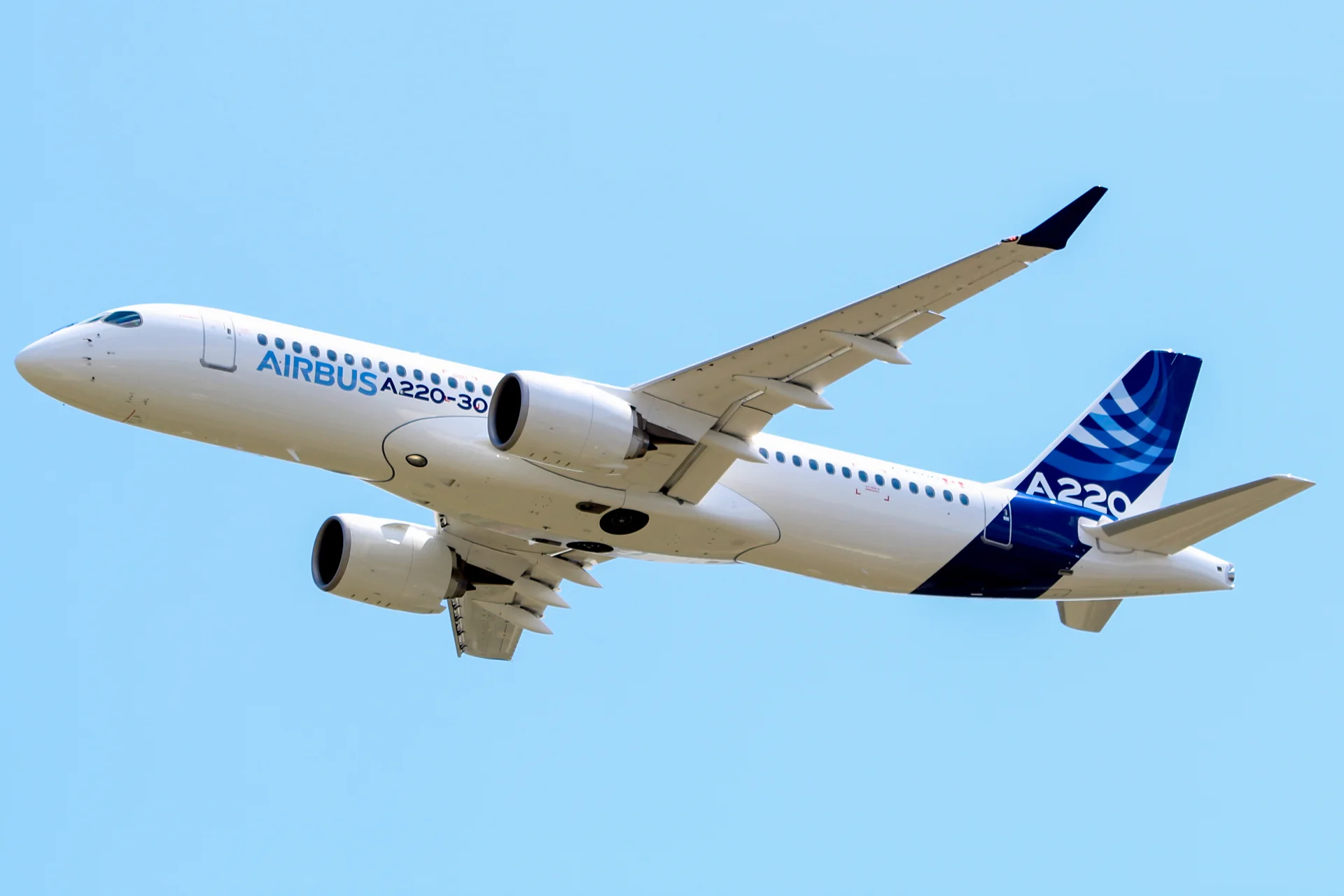 Romain COUPY · CC BY-SA 4.0 · Airbus A220-300.
Airbus describes the A220-300 as the longer member of the A220 family. Sidestick controllers command a fly-by-wire system with normal and direct modes. The real-aircraft guide describes different trim behaviour between these modes.
Más sobre esta aeronave en AirframeDB
Bombardier launched the C Series programme in 2008. The new aircraft first flew in September 2013, establishing the design that would later become Airbus’s A220 family.
Airbus became the programme’s majority partner in 2018 and brought the aircraft into its product range as the A220. The change in programme ownership and name did not turn it into an A320 derivative: its development lineage remains the C Series.
In normal mode, pilot trim requests change trim speed, while automatic trim offloads the elevators. In direct mode, trim commands the horizontal stabiliser; modes can differ by axis. The guide cautions that its real-aircraft descriptions may differ from Synaptic's simulation.
The longer A220 variant with sidestick controllers and fly-by-wire controls.
The spring stays independent of airspeed. Directed aerodynamic loading is omitted.
Pitch-trim relief is off. Autopilot following is off.
Airbus describes the A220-300 as the longer A220 variant with sidestick controllers and two-mode fly-by-wire controls.
In normal mode, pilot trim requests change trim speed, while automatic trim offloads the elevators. In direct mode, trim commands the horizontal stabiliser; modes can differ by axis. The guide cautions that its real-aircraft descriptions may differ from Synaptic's simulation.
Strengths are normalized hardware-feel settings. They set the effect balance; hand force depends on the device and its limits. The IAS reference is a tuning value.
La escala final de salida global aplicada a todo lo que produce el modelo, antes del tope del dispositivo.
Más: todo (muelle, cargas, efectos) se refuerza a la vez.
Menos: todo se suaviza a la vez.
Por qué aquí: Scales overall profile strength while preserving effect balance, subject to device and output limits.
La fuerza base de centrado que devuelve la palanca al centro. Todas las demás fuerzas se apilan sobre ella. Demasiado baja y la palanca se siente floja en vuelo normal; demasiado alta y lucha contra tu mano y enmascara las señales más pequeñas superpuestas.
Más: un centrado más firme que resiste más la mano.
Menos: una palanca más blanda que depende solo de la carga aerodinámica.
Por qué aquí: Control system: Sidesticks · normal and direct fly-by-wire modes. The baseline spring is 0.55. Low-speed spring blending is off.
Airbus A220-300 — aircraft documentationUna escala maestra sobre ambas cargas sostenidas de eje, aplicada antes de su equilibrio independiente. Los perfiles normalmente la dejan quieta y ajustan las dos cargas de eje.
Más: ambos ejes cargan más fuerte.
Menos: ambos ejes se aligeran a la vez.
Por qué aquí: The stored 0.04 aerodynamic-load gain is inactive under the fixed-centre control law.
Un tope sobre cada fuerza estable de cabeceo o alabeo antes de llegar al dispositivo, protegiendo contra golpes o saturación del hardware en maniobras fuertes.
Más: picos de fuerza estable más altos antes del recorte.
Menos: un techo más suave; las maniobras duras se aplanan antes.
Por qué aquí: Caps directed-force output. Native spring effects and device limits remain separate.
La carga sostenida de cabeceo por deflexión del timón de profundidad y velocidad, equilibrada con independencia del alabeo. Es la palanca principal detrás del peso de cabeceo de un tipo. No toca alerones, muelle, compensador ni fuerzas de bataneo.
Más: esfuerzos sostenidos de cabeceo más pesados a velocidad.
Menos: una profundidad más ligera, con menos músculo que sostener.
Por qué aquí: Scales pitch aerodynamic loading; pitch spring travel and trim responses are separate settings.
La carga sostenida de alabeo por deflexión de alerones y velocidad, equilibrada con independencia del cabeceo. Junto con la carga del timón de profundidad fija la relación de armonía de mandos de la que hablan las reseñas.
Más: esfuerzos de alabeo más pesados.
Menos: alerones más ligeros y vivos.
Por qué aquí: Roll and pitch aerodynamic scales are 1 and 1, respectively. These stored weights do not create directed aerodynamic loading while that term is inactive. The pitch spring-travel curve reaches output 1 at input 1. The roll spring-travel curve reaches output 0.3 at input 1. Spring-travel response contributes separately to axis balance.
La velocidad indicada a la que la carga aerodinámica alcanza su nivel pleno de diseño. Ancla toda la curva de carga al rango real de velocidades del avión: un 172 carga hacia 110 nudos, un jet mucho después.
Más: las cargas llegan más tarde; la palanca sigue ligera hasta más velocidad.
Menos: las cargas llegan antes y el crucero pesa más.
Por qué aquí: Sets the IAS reference for aerodynamic loading. It is an estimate, not published cruise TAS or a flight limit.
La velocidad a la que el muelle empieza a subir desde su suelo de baja velocidad hacia la fuerza plena: los mandos «cobrando vida» en la carrera de despegue.
Por qué aquí: Sets the IAS where the low-speed spring blend starts rising. This is a feel threshold, not a flight limit.
La velocidad a la que el muelle alcanza su fuerza plena. Entre el inicio y este punto, el centrado se endurece progresivamente a medida que el flujo de aire crece sobre los mandos.
Por qué aquí: Sets the IAS where the low-speed blend reaches baseline strength; high-speed stiffening also uses it.
Una pequeña zona neutra alrededor del centro donde el muelle queda en silencio, para que los movimientos mínimos en reposo no traqueteen. Más ancha es más tranquila pero más suelta; más estrecha es más precisa pero puede vibrar en el centro.
Más: un centro más tranquilo pero más suelto, con más holgura.
Menos: un centro más apretado que puede vibrar en reposo.
Por qué aquí: Sets travel around the centre before the baseline spring resists. Smaller values engage it sooner.
Por qué aquí: The centre preload is 0.03. It ramps outside the 0.01 deadband across 0.05 travel, shaping the passive centre independently of aircraft autotrim.
Por qué aquí: Sets the travel used to ramp in centre preload. Wider intervals make its onset more gradual.
Activa la ventana de acoplamiento del muelle a baja velocidad (nudos de inicio/pleno de arriba). Apagado, el muelle es constante a todas las velocidades.
Por qué aquí: Allows baseline spring strength to rise with indicated airspeed where the control law permits it.
Cuánto del muelle sobrevive con el avión parado, antes de que la velocidad pueda generar fuerza aerodinámica. Un suelo alto mantiene firme la palanca aparcada; uno bajo da la sensación suelta, de cables con holgura, de una avioneta estacionada.
Más: una palanca más firme aparcado y rodando.
Menos: una palanca floja aparcado que solo despierta con la velocidad.
Por qué aquí: Sets low-speed spring strength as a fraction of baseline when blending is enabled. One keeps full strength.
Cuánto se endurece el propio centrado con la velocidad, además de las cargas por deflexión. Cero mantiene constante la sensación de centro; más hace que la palanca centre más duro en crucero y más suelta en el circuito.
Más: un centro que endurece claramente con la velocidad.
Menos: una sensación de centro constante a cualquier velocidad.
Por qué aquí: Adds permitted spring resistance above the full-blend speed. Zero removes this high-speed increase.
El límite superior del endurecimiento de centro por velocidad, para que el vuelo muy rápido no pueda tensar el muelle sin freno.
Más: más endurecimiento total permitido a alta velocidad.
Menos: el endurecimiento se corta antes.
Por qué aquí: Limits the squared airspeed ratio used for high-speed spring stiffening; it is not a device-force cap.
Con qué fuerza el compensador de profundidad alivia el esfuerzo de cabeceo mantenido y desplaza dónde se asienta la palanca. Al 100 %, un avión bien compensado no necesita presión mantenida: el flujo de trabajo de compensar la carga del vuelo real.
Más: el compensador quita más esfuerzo mantenido; al 100 %, compensado del todo lo anula.
Menos: sigues sosteniendo esfuerzo aun compensado.
Por qué aquí: In normal mode, pilot trim requests change trim speed, while automatic trim offloads the elevators. Pitch relief is off, with stored authority 0; roll authority is 0.
Airbus A220-300 — aircraft documentationEl mismo alivio para el compensador de alabeo. La mayoría de los tipos de aviación general no tienen compensador de alerones real, así que se queda a cero; los tipos con compensador de alabeo reciben un valor acorde.
Más: el compensador de alabeo quita más esfuerzo mantenido.
Menos: el compensador de alabeo hace menos.
Por qué aquí: Scales supported roll-trim relief and permitted centre movement. Zero removes roll response.
Vibración de rodadura según la velocidad de las ruedas y el tipo de superficie: asfalto, hierba o grava bajo el tren.
Más: una textura de superficie más fuerte en la palanca.
Menos: un rodaje más liso.
Por qué aquí: Sets rolling texture strength, modified by speed, surface and undercarriage configuration.
Golpes cortos y discretos de juntas de dilatación, surcos y superficie irregular, que puntúan el retumbo continuo.
Más: golpes más nítidos de juntas y surcos.
Menos: detalles de suelo más suaves.
Por qué aquí: Sets gear-bump texture during ground motion, separate from touchdown impact.
Sacudida de la célula al acercarse a la pérdida y mientras suena el aviso: cuán fuerte anuncia esta ala que está incómoda. Los tipos con entrada en pérdida seca reciben bataneo modesto y dejan que la bocina lleve el aviso.
Más: un temblor previo a la pérdida más fuerte.
Menos: un ala más discreta; la bocina lleva el aviso.
Por qué aquí: Sets stall-buffet strength. Zero removes the cue without changing simulator stalls or warnings.
Bataneo transónico al acercarse al límite de Mach. Significativo para jets cerca de MMO, cero para pistones y turbohélices que nunca llegan.
Más: un bataneo transónico más fuerte cerca del límite de Mach.
Menos: un vuelo más liso a Mach alto.
Por qué aquí: Sets high-Mach buffet strength; onset and full-strength thresholds are separate.
Vibración de baja frecuencia de la célula con los flaps extendidos al flujo, en la ventana de velocidad donde realmente trabajan el aire.
Más: un vuelo más áspero con flaps trabajando.
Menos: flaps de aproximación más suaves.
Por qué aquí: Sets flap buffet at the configured position and speed gates. Flap movement texture is separate.
Tamborileo de la célula por el tren retráctil colgando en la corriente. Cero para tipos de tren fijo, donde la célula nunca cambia de forma.
Más: más tamborileo con el tren fuera.
Menos: un vuelo con tren fuera más limpio.
Por qué aquí: Sets gear aerodynamic buffet; movement and ground-contact cues are separate.
El zumbido dedicado del stick shaker de pérdida, disparado por el propio sistema de aviso del avión. Solo los tipos con shaker real reciben un valor; el resto confía en el bataneo aerodinámico y la bocina.
Más: un shaker más duro.
Menos: un shaker más discreto.
Por qué aquí: Sets triggered shaker strength; inactive while the shaker feature is disabled.
El golpe único cuando las ruedas tocan la pista, escalado por la velocidad vertical: un aterrizaje fino susurra, una llegada firme golpea.
Más: un golpe más duro en la toma.
Menos: llegadas más suaves.
Por qué aquí: Sets landing-impact strength; landing telemetry and response shape determine the pulse.
Vibración de rodadura mientras trabajan la reversa o las hélices en rango beta. Cero para tipos sin reversa.
Más: un rodaje más áspero con reversa.
Menos: una reversa más discreta.
Por qué aquí: Sets reverse-thrust vibration with valid reverser and engine conditions. Zero removes the cue.
Vibración continua del grupo motopropulsor siguiendo las RPM entre ralentí y plena potencia, el recordatorio siempre presente de que algo quema combustible delante.
Más: más motor en la palanca.
Menos: un motor más discreto.
Por qué aquí: Sets estimated engine vibration using configured telemetry and response, not measured cockpit vibration.
Vibración continua solo mientras el simulador informa de que las superficies de flap se mueven realmente. Sigue el movimiento y las averías reales del actuador, no un temporizador estimado.
Más: más vibración con los flaps en movimiento.
Menos: recorridos de flap más discretos.
Por qué aquí: Sets texture from observed flap movement; a command without movement does not establish the cue.
Cuánto pueden mover físicamente la palanca las órdenes del piloto automático. Se mantiene minúsculo en MSFS, donde un eje movido puede leerse de vuelta como entrada del piloto; cero desactiva el seguimiento por completo.
Más: el piloto automático mueve tu palanca visiblemente más.
Menos: un seguimiento apenas perceptible.
Por qué aquí: Sets admitted AP-follow gain, not a percentage of travel. Runtime ownership and input limits still apply.
Whether this feature is active in this profile.
Por qué aquí: Retained for compatibility and group membership. Trim relief, rather than this flag, controls centre movement.
Whether this feature is active in this profile.
Por qué aquí: Allows trim relief with supported control law and valid telemetry. Axis authorities set its amount.
Whether this feature is active in this profile.
Por qué aquí: Enables local force trim, separate from aircraft-owned trim and add-on integration qualification.
Whether this feature is active in this profile.
Por qué aquí: Allows load-factor changes to modify permitted spring laws. Passive fly-by-wire feel can suppress it.
Whether this feature is active in this profile.
Por qué aquí: Enables rate damping with the configured coefficients and control law.
Whether this feature is active in this profile.
Por qué aquí: Autopilot following is off; the configured spring and load retain the hardware feel.
Whether this feature is active in this profile.
Por qué aquí: Permits centering hold during a supported AP state, separate from following a moving target.
Por qué aquí: Sets admitted AP neutral-hold strength; inactive while neutral hold is disabled.
Whether this feature is active in this profile.
Por qué aquí: Applies the configured pitch and roll spring travel curves.
Por qué aquí: Sets response at the second pitch-curve point; it is an endpoint only if its input position is full travel.
Por qué aquí: Sets response at the second roll-curve point; its input position and other points determine the travel law.
Whether this feature is active in this profile.
Por qué aquí: Enables aerodynamic cues; each still needs nonzero strength and its simulator conditions.
Where this effect reaches full strength (or has fully faded, for washouts).
Más: a more gradual build to a later peak.
Menos: a quicker build.
Por qué aquí: Sets the final flap index for detent normalization. UP plus three detents uses maximum index3.
Where this effect begins fading in.
Más: the effect begins later.
Menos: it begins earlier.
Por qué aquí: Sets the first flap detent that admits buffet; this is a handle index, not degrees.
Whether this feature is active in this profile.
Por qué aquí: Permits shaker at supported warning conditions; the switch does not establish aircraft equipment.
Whether this feature is active in this profile.
Por qué aquí: Enables ground effects; each still needs its own strength and contact or motion telemetry.
Whether this feature is active in this profile.
Por qué aquí: Enables engine cues with nonzero settings and valid running-engine telemetry.
Whether this feature is active in this profile.
Por qué aquí: Enables accessory cues with configured strengths and observed accessory movement.
The strength of this effect.
Más: a stronger effect.
Menos: a weaker one.
Por qué aquí: Sets texture from observed gear movement, separate from aerodynamic and touchdown effects.
| Parámetro | Valor | Qué controla y por qué |
|---|---|---|
| Spring strength | 0.55 | Control system: Sidesticks · normal and direct fly-by-wire modes. The baseline spring is 0.55. Low-speed spring blending is off. |
| Force gain | 0.04 | The stored 0.04 aerodynamic-load gain is inactive under the fixed-centre control law. |
| Master gain | 0.85 | Scales overall profile strength while preserving effect balance, subject to device and output limits. |
| Maximum output force | 0.55 | Caps directed-force output. Native spring effects and device limits remain separate. |
| Elevator force scale | 1 | Scales pitch aerodynamic loading; pitch spring travel and trim responses are separate settings. |
| Aileron force scale | 1 | Roll and pitch aerodynamic scales are 1 and 1, respectively. These stored weights do not create directed aerodynamic loading while that term is inactive. The pitch spring-travel curve reaches output 1 at input 1. The roll spring-travel curve reaches output 0.3 at input 1. Spring-travel response contributes separately to axis balance. |
| Velocidad de ajuste de fuerza | 220 kt | Sets the IAS reference for aerodynamic loading. It is an estimate, not published cruise TAS or a flight limit. |
| Spring wake-up speed | 20 kt | Sets the IAS where the low-speed spring blend starts rising. This is a feel threshold, not a flight limit. |
| Spring full-strength speed | 90 kt | Sets the IAS where the low-speed blend reaches baseline strength; high-speed stiffening also uses it. |
| StickFeel · Trim feel enabled | False | Retained for compatibility and group membership. Trim relief, rather than this flag, controls centre movement. |
| StickFeel · Trim relief enabled | False | Allows trim relief with supported control law and valid telemetry. Axis authorities set its amount. |
| StickFeel · Force trim enabled | False | Enables local force trim, separate from aircraft-owned trim and add-on integration qualification. |
| Autopilot · Follow enabled | False | Autopilot following is off; the configured spring and load retain the hardware feel. |
| Autopilot · Neutral hold enabled | False | Permits centering hold during a supported AP state, separate from following a moving target. |
| Spring deadband | 0.01 | Sets travel around the centre before the baseline spring resists. Smaller values engage it sooner. |
| Forces · Center starting force | 0.03 | The centre preload is 0.03. It ramps outside the 0.01 deadband across 0.05 travel, shaping the passive centre independently of aircraft autotrim. |
| Forces · Center starting force transition | 0.05 | Sets the travel used to ramp in centre preload. Wider intervals make its onset more gradual. |
| Dynamic-pressure blend | False | Allows baseline spring strength to rise with indicated airspeed where the control law permits it. |
| Minimum spring factor | 0.5 | Sets low-speed spring strength as a fraction of baseline when blending is enabled. One keeps full strength. |
| Airspeed spring stiffening | 0 | Adds permitted spring resistance above the full-blend speed. Zero removes this high-speed increase. |
| Airspeed stiffening cap | 5 | Limits the squared airspeed ratio used for high-speed spring stiffening; it is not a device-force cap. |
| SpringResponse · Travel enabled | True | Applies the configured pitch and roll spring travel curves. |
| SpringResponse · Output | 1 | Sets response at the second pitch-curve point; it is an endpoint only if its input position is full travel. |
| SpringResponse · Output | 0.3 | Sets response at the second roll-curve point; its input position and other points determine the travel law. |
| StickFeel · Elevator authority | 0 | In normal mode, pilot trim requests change trim speed, while automatic trim offloads the elevators. Pitch relief is off, with stored authority 0; roll authority is 0. |
| StickFeel · Aileron authority | 0 | Scales supported roll-trim relief and permitted centre movement. Zero removes roll response. |
| StickFeel · G load enabled | False | Allows load-factor changes to modify permitted spring laws. Passive fly-by-wire feel can suppress it. |
| StickFeel · Rate damping enabled | False | Enables rate damping with the configured coefficients and control law. |
| Autopilot · Follow authority | 0.05 | Sets admitted AP-follow gain, not a percentage of travel. Runtime ownership and input limits still apply. |
| Autopilot · Neutral hold strength | 0.28 | Sets admitted AP neutral-hold strength; inactive while neutral hold is disabled. |
| Aero · Enabled | True | Enables aerodynamic cues; each still needs nonzero strength and its simulator conditions. |
| Aero · Gain | 0.06 | Sets stall-buffet strength. Zero removes the cue without changing simulator stalls or warnings. |
| Aero · Gain | 0.06 | Sets high-Mach buffet strength; onset and full-strength thresholds are separate. |
| Aero · Gain | 0 | Sets flap buffet at the configured position and speed gates. Flap movement texture is separate. |
| Aero · Max flap index | 5 | Sets the final flap index for detent normalization. UP plus three detents uses maximum index3. |
| Aero · Min flap index | 2 | Sets the first flap detent that admits buffet; this is a handle index, not degrees. |
| Aero · Gain | 0 | Sets gear aerodynamic buffet; movement and ground-contact cues are separate. |
| Aero · Shaker enabled | False | Permits shaker at supported warning conditions; the switch does not establish aircraft equipment. |
| Aero · Amplitude | 0.5 | Sets triggered shaker strength; inactive while the shaker feature is disabled. |
| Ground · Enabled | False | Enables ground effects; each still needs its own strength and contact or motion telemetry. |
| Ground · Gain | 0 | Sets rolling texture strength, modified by speed, surface and undercarriage configuration. |
| Ground · Gain | 0 | Sets gear-bump texture during ground motion, separate from touchdown impact. |
| Ground · Gain | 0 | Sets landing-impact strength; landing telemetry and response shape determine the pulse. |
| Ground · Gain | 0 | Sets reverse-thrust vibration with valid reverser and engine conditions. Zero removes the cue. |
| Engine · Enabled | False | Enables engine cues with nonzero settings and valid running-engine telemetry. |
| Engine · Gain | 0 | Sets estimated engine vibration using configured telemetry and response, not measured cockpit vibration. |
| Mechanical · Enabled | True | Enables accessory cues with configured strengths and observed accessory movement. |
| Mechanical · Gain | 0 | Sets texture from observed flap movement; a command without movement does not establish the cue. |
| Mechanical · Gain | 0 | Sets texture from observed gear movement, separate from aerodynamic and touchdown effects. |
Si tu experiencia en el tipo dice que esta página se equivoca, corrígela aquí.
Esta página se construye con referencias citadas, y la experiencia real en el tipo vale más que una cita. Cita la afirmación errónea y cuéntanos qué hace la aeronave real. Las correcciones van al mantenedor para revisión y alimentan la próxima revisión de esta investigación.
Conversación abierta sobre volar y ajustar el Airbus A220-300, en el foro de la comunidad. Las correcciones de arriba van en privado al mantenedor; la charla de hangar es pública.