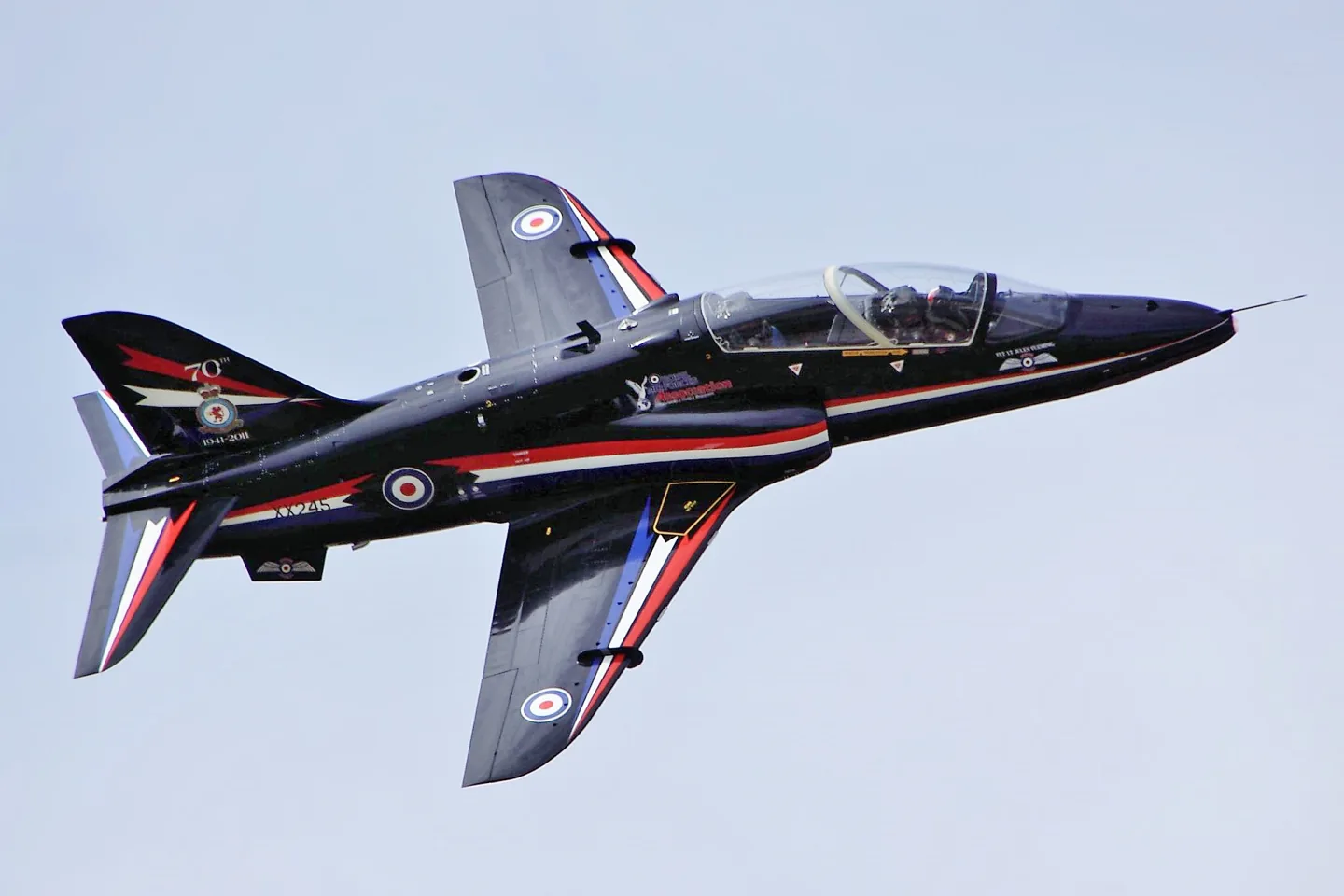
BAe HawkTim Felce (Airwolfhound) · CC BY-SA 2.0 · BAE Systems Hawk — real-aircraft reference photograph.

BAe Hawk

A British jet trainer with tandem seating and a long military training career.
Military2 Profiloptionen

Kenne das Flugzeug

First developed under the Hawker Siddeley name, the Hawk continued through British Aerospace and BAE Systems. Its single-engine, subsonic design serves advanced training and, in some versions, combat roles. The T1 and later Hawks differ in equipment, identified by the model captions on photographs and specifications.

BAE Systems Hawk · Specifications (Hawk 128) · real aircraft; source units retained

Length
12.43 m (40 ft 9 in)↗
Wingspan
9.94 m (32 ft 7 in)↗
Height
3.98 m (13 ft 1 in)↗
Wing area
16.70 m² (179.64 ft² )↗
Empty weight
4,480 kg (9,880 lb)↗
Max takeoff weight
9,100 kg (20,000 lb)↗
Powerplant
1× Rolls-Royce Turbomeca Adour Mk. 951 turbofan with FADEC , 29 kN (6,500 lbf ) 29 kN↗
Maximum speed
Mach 0.84 (1,028 km/h, 639 mph, 555 kn) at altitude↗
Range
2,520 km (1,360 nmi , 1,565 mi)↗
Service ceiling
13,565 m (44,500 ft)↗
Rate of climb
47 m/s (9,300 ft/min)↗

Mehr über dieses Flugzeug auf AirframeDB

An encouraging first flight begins a development programme

Duncan Simpson flew the first Hawk, XX154, from Dunsfold on 21 August 1974. The programme then expanded through several development aircraft and the G-HAWK demonstrator. Early favourable cockpit and handling impressions were followed by aerodynamic problems discovered as the flight envelope widened, leading to further refinement.

Learning to think ahead of the jet

Coming from the Tucano, Heasman found the Hawk’s forward view immediately impressive. Other changes required adjustment. There was no nosewheel steering, and the jet responded differently to power changes from the turboprop he had known. In formation, anticipating what would happen next became especially important when the aircraft was both slippery and slower to respond to throttle movement.

Heasman enjoyed both generations of Hawk, while describing different demands in their cockpits. The T1 kept the pilot close to its basic handling; the T2 added the work of learning and managing a much more capable avionics installation. His enthusiasm for the aircraft survived those differences, with each version offering its own combination of flying pleasure and professional challenge.

A childhood flypast becomes a place on the team

McEwen traced his ambition to seeing the Red Arrows fly over his childhood home with Concorde. Years later, learning that he had been selected for the team brought an excited telephone call to his father. The childhood spectacle had become a job for which he now had to prepare.

Moving from the F-35B to the Hawk T1 meant changing how he worked with the aircraft. He described a closer reliance on basic handling and trust in the people around him. Early preparation included observing the existing team and beginning the long process of building the next display. Progress would take daily work, with the understanding that improvement in such demanding flying would not always arrive in a straight line.

Returning with experience from both sides of the formation

Roberts remembered his three years displaying with the Red Arrows as some of his most demanding and rewarding flying. He had flown on both sides of the formation and finished as Synchro Leader. That experience gave him a useful view of what each pilot was trying to achieve when he was selected to return in a different role.

As Red 10, he would supervise and commentate from the ground while also flying the spare aircraft and photography sorties. Getting a photographer into position for a fleeting opportunity was one challenge he anticipated. He was excited to return, but conscious of the work behind each appearance: mentoring pilots, organising the calendar and making sure the display could take place at each site.

Öffentliche Quellen 8
  1. BAE Systems HawkResearch background · retrieved 2026-09-12
  2. Hawk T1/A Advanced Trainer (MSFS)Official developer / designated store catalogue · checked 2026-09-12
  3. Hawk T1/A Advanced Trainer (X-Plane 11)Official developer / designated store catalogue · checked 2026-09-12
  4. The last Hawker: interview with a Hawk pilotPaul Heasman · 27 September 2017
  5. Training begins for two new Red Arrows pilotsAndrew McEwen · preparations for the 2025 season
  6. New voice of the Red Arrows among pilots joining for 2026Stu Roberts · preparations for the 2026 season
  7. The Hawk StoryHarry Fraser-Mitchell · Journal of Aeronautical History 2013/01 · PDF pp.26–27
  8. ICAO Doc 8643 — aircraft type designatorsPublic search data retrieved 2026-09-14; authority update 2026-09-03

Wie das Profil es modelliert

BAe Hawk

Free + Pro
MSFS 2024MSFS 2020X-Plane 11

First developed under the Hawker Siddeley name, the Hawk continued through British Aerospace and BAE Systems. Its single-engine, subsonic design serves advanced training and, in some versions, combat roles. The T1 and later Hawks differ in equipment; photographs and figures here retain their model captions rather than treating the family as one cockpit.

This starting point selects BAe Hawk. Its aircraft-level settings do not select a particular developer’s custom systems.

Spring resistance builds with the selected airspeed response. A separate aerodynamic term adds speed-dependent control load.

Valid trim provides the configured pressure relief. Autopilot following is off.

Controls and trim

The Hawk T1/A manual describes two hydraulic supplies powering ailerons and the all-moving tailplane without manual reversion. Aileron trim biases spring feel, and tailplane trim relieves column force. The rudder remains manual. Just Flight's optional EFB autopilot is a convenience feature of the simulation rather than evidence of a physical autopilot in every Hawk configuration.

Just Flight exact current manual packageHawk T1/A Advanced Trainer (MSFS)

About the values

The gains are normalized profile settings. They describe the chosen effect balance; hand force depends on the device and its output limits. IAS references are tuning values rather than operating limits. Physical acceptance of this revision remains pending.

Master gain & control system

Master gain85%

Die letzte Gesamtskalierung über alles, was das Modell erzeugt, vor der Gerätegrenze.

Mehr: alles (Feder, Lasten, Effekte) wird gemeinsam stärker.

Weniger: alles wird gemeinsam weicher.

Warum hier: Scales overall profile strength while preserving effect balance, subject to device and output limits.

Forces

Spring strength80%

Die Grundzentrierkraft, die den Stick zur Mitte zieht. Jede andere Kraft baut darauf auf. Zu niedrig fühlt sich der Stick im Normalflug schlaff an; zu hoch kämpft er gegen deine Hand und überdeckt die feineren Signale.

Mehr: festere Zentrierung, die der Hand jederzeit mehr widersteht.

Weniger: ein schlafferer Stick, der sich allein auf die aerodynamische Last stützt.

Warum hier: Artificial centering represents powered ailerons and tailplane; the manual rudder does not turn pitch and roll into reversible controls. The baseline spring is 0.8. Its low-speed blend reaches baseline strength at 90 KIAS.

Just Flight exact current manual packageHawk T1/A Advanced Trainer (MSFS)
Spring deadband4%

Eine kleine neutrale Zone um die Mitte, in der die Feder ruhig bleibt, damit kleinste Bewegungen im Stand nicht flattern. Breiter ist ruhiger, aber lockerer; enger ist präziser, kann aber um die Mitte zittern.

Mehr: eine ruhigere, aber lockerere Mitte mit mehr Spiel.

Weniger: eine straffere Mitte, die in Ruhe zittern kann.

Warum hier: Sets travel around the centre before the baseline spring resists. Smaller values engage it sooner.

Overall aerodynamic load25%

Ein Gesamtmaß über beide anhaltenden Achslasten, vor ihrer Einzelbalance angewendet. Profile lassen es normalerweise stehen und stimmen die beiden Achslasten ab.

Mehr: beide Achsen laden härter auf.

Weniger: beide Achsen werden gemeinsam leichter.

Warum hier: The aerodynamic-load gain is 0.25 with an indicated-speed reference of 250 KIAS. The hydraulic-load factor of 0.35 scales that modeled term; it is a selected artificial-feel approximation.

Airspeed blendingTrue

Aktiviert das Niedrigfahrt-Einblendfenster der Feder (Beginn/Voll in Knoten oben). Aus bleibt die Feder bei jeder Fahrt konstant.

Warum hier: Allows baseline spring strength to rise with indicated airspeed where the control law permits it.

Low-speed spring floor55%

Wie viel Feder im Stillstand übrig bleibt, bevor Fahrt überhaupt aerodynamische Kraft aufbauen kann. Ein hoher Sockel hält den geparkten Stick straff; ein niedriger ergibt das lose Seilzuggefühl eines geparkten Leichtflugzeugs.

Mehr: ein festerer Stick beim Parken und Rollen.

Weniger: ein schlaffer geparkter Stick, der erst mit Fahrt aufwacht.

Warum hier: Sets low-speed spring strength as a fraction of baseline when blending is enabled. One keeps full strength.

Spring engagement start20 kt

Die Fahrt, ab der die Feder vom Niedrigfahrt-Sockel Richtung volle Stärke steigt: der Beginn des "Lebendigwerdens" der Ruder im Startlauf.

Warum hier: Sets the IAS where the low-speed spring blend starts rising. This is a feel threshold, not a flight limit.

Spring engagement full90 kt

Die Fahrt, bei der die Feder volle Stärke erreicht. Zwischen Beginn und diesem Punkt strafft sich die Zentrierung zunehmend mit der Anströmung.

Warum hier: Sets the IAS where the low-speed blend reaches baseline strength; high-speed stiffening also uses it.

Geschwindigkeit zur Kraftabstimmung250

Die angezeigte Fahrt, bei der die aerodynamische Last ihr ausgelegtes Vollniveau erreicht. Sie verankert die gesamte Lastkurve am realen Geschwindigkeitsbereich: eine 172 lädt bis 110 Knoten auf, ein Jet viel später.

Mehr: Lasten kommen später; der Stick bleibt bis zu höherer Fahrt leicht.

Weniger: Lasten kommen früher, und die Reise fühlt sich schwerer an.

Warum hier: Sets the IAS reference for aerodynamic loading. It is an estimate, not published cruise TAS or a flight limit.

Centre firmness vs speed0%

Wie stark sich die Zentrierung selbst mit der Fahrt strafft, zusätzlich zu den Ausschlaglasten. Null hält das Mittengefühl konstant; mehr lässt den Stick im Reiseflug härter und im Anflug lockerer zentrieren.

Mehr: eine Mitte, die mit Fahrt spürbar härter wird.

Weniger: konstantes Mittengefühl bei jeder Fahrt.

Warum hier: The high-speed spring-stiffening gain is 0. No additional speed-driven stiffening is added; this does not disable independent aerodynamic loading.

Centre stiffening cap5

Die Obergrenze der fahrtabhängigen Mittenstraffung, damit sehr hohe Fahrt die Feder nicht grenzenlos aufzieht.

Mehr: mehr Gesamtstraffung bei hoher Fahrt erlaubt.

Weniger: die Straffung klemmt früher ab.

Warum hier: Limits the squared airspeed ratio used for high-speed spring stiffening; it is not a device-force cap.

Aileron load65%

Die anhaltende Rolllast aus Querruderausschlag und Fahrt, unabhängig vom Nick balanciert. Zusammen mit der Höhenruderlast bestimmt sie die Ruderharmonie, von der Testberichte sprechen.

Mehr: schwerere Rollkräfte.

Weniger: leichtere, quirligere Querruder.

Warum hier: Roll and pitch aerodynamic scales are 0.65 and 0.65, respectively. They set the aerodynamic axis balance. No custom spring-travel curve is enabled.

Elevator load65%

Die anhaltende Nicklast aus Höhenruderausschlag und Fahrt, unabhängig von der Rollachse balanciert. Der Haupthebel für das Nickgewicht eines Musters. Er verändert weder Querruder, Feder, Trimmung noch Schüttelkräfte.

Mehr: schwerere anhaltende Nickkräfte bei Fahrt.

Weniger: ein leichteres Höhenruder, das weniger Muskel braucht.

Warum hier: Scales pitch aerodynamic loading; pitch spring travel and trim responses are separate settings.

Max output force55%

Eine Kappe je stetiger Nick- oder Rollkraft vor dem Gerät. Der Schutz davor, die Hardware in harten Manövern zu überfahren oder zu sättigen.

Mehr: stärkere Spitzenkräfte vor dem Abschneiden.

Weniger: eine sanftere Decke; harte Manöver flachen früher ab.

Warum hier: Caps directed-force output. Native spring effects and device limits remain separate.

Trim

Trim relief (elevator)30%

Wie stark Höhenrudertrimmung die gehaltene Nickkraft abbaut und den Ruhepunkt des Sticks verschiebt. Bei 100 % braucht ein sauber getrimmtes Flugzeug keinen gehaltenen Druck: das Wegtrimmen der Last wie im echten Fliegen.

Mehr: Trimmung nimmt mehr der gehaltenen Nickkraft; bei 100 % nullt volle Trimmung sie.

Weniger: du hältst auch getrimmt weiter Kraft.

Warum hier: Aileron trim biases its feel spring and powered tailplane trim relieves column force; any centre response remains a reduced representation of those separate mechanisms. Pitch authority 0.3 relieves permitted loading; hydraulic centre movement is off. Roll authority is 0.09.

Just Flight exact current manual packageHawk T1/A Advanced Trainer (MSFS)
Trim relief (aileron)9%

Dieselbe Entlastung für Rolltrimmung. Die meisten GA-Muster haben keine echte Querrudertrimmung, daher bleibt sie bei null; Muster mit Rolltrimmung bekommen einen passenden Wert.

Mehr: Rolltrimmung nimmt mehr gehaltene Rollkraft.

Weniger: Rolltrimmung bewirkt weniger.

Warum hier: Scales supported roll-trim relief and permitted centre movement. Zero removes roll response.

Effect gains · Ground

Runway rumble40%

Rollende Untergrundvibration aus Radgeschwindigkeit und Oberflächenart: die Textur von Asphalt, Gras oder Schotter unter dem Fahrwerk.

Mehr: lautere Oberflächentextur durch den Stick.

Weniger: ruhigeres Rollen.

Warum hier: Sets rolling texture strength, modified by speed, surface and undercarriage configuration.

Gear bumps32%

Kurze einzelne Stöße von Dehnfugen, Spurrillen und rauem Belag: die Interpunktion über dem kontinuierlichen Rumpeln.

Mehr: schärfere Stöße von Fugen und Rillen.

Weniger: weichere Bodendetails.

Warum hier: Sets gear-bump texture during ground motion, separate from touchdown impact.

Effect gains · Airframe

Stall buffet30%

Zellenschütteln vor dem Überziehen und bei aktiver Überziehwarnung: wie laut diese Fläche ihr Unbehagen ankündigt. Muster mit sauberem Abriss bekommen moderates Schütteln, das Horn trägt die Warnung.

Mehr: lauteres Schütteln vor dem Überziehen.

Weniger: eine leisere Fläche; das Horn trägt die Warnung.

Warum hier: Sets stall-buffet strength. Zero removes the cue without changing simulator stalls or warnings.

Mach buffet0%

Transsonisches Schütteln nahe der Machgrenze. Relevant für Jets nahe MMO, null für Kolben und Turboprops, die nie dort ankommen.

Mehr: stärkeres transsonisches Schütteln nahe der Machgrenze.

Weniger: ruhigerer Flug bei hohem Mach.

Warum hier: Sets high-Mach buffet strength; onset and full-strength thresholds are separate.

Flap buffet14%

Niederfrequente Zellenvibration mit Klappen im Fahrtwind, im Fenster, in dem sie wirklich Luft arbeiten.

Mehr: ein rauerer Lauf mit arbeitenden Klappen.

Weniger: ruhigere Anflugklappen.

Warum hier: Sets flap buffet at the configured position and speed gates. Flap movement texture is separate.

Gear buffet10%

Zellentrommeln vom ausgefahrenen Einziehfahrwerk im Fahrtwind. Null für Festfahrwerke, deren Zelle nie die Form ändert.

Mehr: mehr Trommeln mit hängendem Fahrwerk.

Weniger: saubererer Flug mit Fahrwerk.

Warum hier: Sets gear aerodynamic buffet; movement and ground-contact cues are separate.

Stick shaker90%

Der dedizierte Stall-Stickshaker-Buzz, ausgelöst von der Überziehwarnanlage des Flugzeugs. Nur Muster mit echtem Shaker bekommen einen Wert; alle anderen verlassen sich auf Schütteln und Horn.

Mehr: ein härterer Shaker-Buzz.

Weniger: ein dezenterer Shaker.

Warum hier: Sets triggered shaker strength; inactive while the shaker feature is disabled.

Effect gains · Engine, mechanical & drag

Touchdown thump90%

Der Einmalstoß beim Aufsetzen, skaliert mit der Sinkrate: ein Butterlander flüstert, ein fester Aufsetzer wummst.

Mehr: ein härterer Tritt beim Aufsetzen.

Weniger: weichere Ankünfte.

Warum hier: Sets landing-impact strength; landing telemetry and response shape determine the pulse.

Reverse rumble50%

Ausrollvibration bei Schubumkehr oder Beta-Verstellung. Null für Muster ohne Umkehr.

Mehr: ein rauerer Ausrollvorgang unter Umkehrschub.

Weniger: leisere Umkehr.

Warum hier: Sets reverse-thrust vibration with valid reverser and engine conditions. Zero removes the cue.

Engine rumble6%

Kontinuierliche Triebwerksvibration, die der Drehzahl von Leerlauf bis Volllast folgt: die allgegenwärtige Erinnerung, dass vorn etwas Kraftstoff verbrennt.

Mehr: mehr Triebwerk im Stick.

Weniger: ein leiseres Triebwerk.

Warum hier: Sets estimated engine vibration using configured telemetry and response, not measured cockpit vibration.

Flap motion12%

Dauervibration nur, solange der Simulator tatsächlich fahrende Klappenflächen meldet. Folgt echter Aktuatorbewegung und Ausfällen, keinem geschätzten Timer.

Mehr: mehr Vibration bei fahrenden Klappen.

Weniger: leisere Klappenläufe.

Warum hier: Sets texture from observed flap movement; a command without movement does not establish the cue.

Autopilot follow

AP follow authority10%

Wie weit Autopilotbefehle den physischen Stick bewegen dürfen. In MSFS winzig gehalten, weil eine bewegte Achse als Pilotene ingabe zurückgelesen werden kann; null schaltet das Folgen ab.

Mehr: der Autopilot bewegt deinen Stick sichtbar weiter.

Weniger: ein kaum wahrnehmbares Folgen.

Warum hier: Sets admitted AP-follow gain, not a percentage of travel. Runtime ownership and input limits still apply.

Stick feel

StickFeel · Trim feel enabledTrue

Whether this feature is active in this profile.

Warum hier: Retained for compatibility and group membership. Trim relief, rather than this flag, controls centre movement.

StickFeel · Trim relief enabledTrue

Whether this feature is active in this profile.

Warum hier: Allows trim relief with supported control law and valid telemetry. Axis authorities set its amount.

StickFeel · Force trim enabledFalse

Whether this feature is active in this profile.

Warum hier: Enables local force trim, separate from aircraft-owned trim and add-on integration qualification.

StickFeel · G load enabledTrue

Whether this feature is active in this profile.

Warum hier: Allows load-factor changes to modify permitted spring laws. Passive fly-by-wire feel can suppress it.

StickFeel · Rate damping enabledTrue

Whether this feature is active in this profile.

Warum hier: Enables rate damping with the configured coefficients and control law.

Autopilot

Autopilot · Follow enabledFalse

Whether this feature is active in this profile.

Warum hier: Autopilot following is off; the configured spring and load retain the hardware feel.

Autopilot · Neutral hold enabledFalse

Whether this feature is active in this profile.

Warum hier: Permits centering hold during a supported AP state, separate from following a moving target.

Autopilot · Neutral hold strength0.6

Warum hier: Sets admitted AP neutral-hold strength; inactive while neutral hold is disabled.

Aero

Aero · EnabledTrue

Whether this feature is active in this profile.

Warum hier: Enables aerodynamic cues; each still needs nonzero strength and its simulator conditions.

Aero · Max flap index2

Where this effect reaches full strength (or has fully faded, for washouts).

Mehr: a more gradual build to a later peak.

Weniger: a quicker build.

Warum hier: Sets the final flap index for detent normalization. UP plus three detents uses maximum index3.

Aero · Min flap index2

Where this effect begins fading in.

Mehr: the effect begins later.

Weniger: it begins earlier.

Warum hier: Sets the first flap detent that admits buffet; this is a handle index, not degrees.

Aero · Shaker enabledTrue

Whether this feature is active in this profile.

Warum hier: Permits shaker at supported warning conditions; the switch does not establish aircraft equipment.

Ground

Ground · EnabledTrue

Whether this feature is active in this profile.

Warum hier: Enables ground effects; each still needs its own strength and contact or motion telemetry.

Engine

Engine · EnabledTrue

Whether this feature is active in this profile.

Warum hier: Enables engine cues with nonzero settings and valid running-engine telemetry.

Mechanical

Mechanical · EnabledTrue

Whether this feature is active in this profile.

Warum hier: Enables accessory cues with configured strengths and observed accessory movement.

Mechanical · Gain0.12

The strength of this effect.

Mehr: a stronger effect.

Weniger: a weaker one.

Warum hier: Sets texture from observed gear movement, separate from aerodynamic and touchdown effects.

Alle Profileinstellungen
Geschätzte Profileinstellungen
ParameterWertWas es steuert und warum
Spring strength0.8 Artificial centering represents powered ailerons and tailplane; the manual rudder does not turn pitch and roll into reversible controls. The baseline spring is 0.8. Its low-speed blend reaches baseline strength at 90 KIAS.
Spring deadband0.035 Sets travel around the centre before the baseline spring resists. Smaller values engage it sooner.
Force gain0.25 The aerodynamic-load gain is 0.25 with an indicated-speed reference of 250 KIAS. The hydraulic-load factor of 0.35 scales that modeled term; it is a selected artificial-feel approximation.
Master gain0.85 Scales overall profile strength while preserving effect balance, subject to device and output limits.
Dynamic-pressure blendTrue Allows baseline spring strength to rise with indicated airspeed where the control law permits it.
Minimum spring factor0.55 Sets low-speed spring strength as a fraction of baseline when blending is enabled. One keeps full strength.
Spring wake-up speed20 ktSets the IAS where the low-speed spring blend starts rising. This is a feel threshold, not a flight limit.
Spring full-strength speed90 ktSets the IAS where the low-speed blend reaches baseline strength; high-speed stiffening also uses it.
Geschwindigkeit zur Kraftabstimmung250.0 ktSets the IAS reference for aerodynamic loading. It is an estimate, not published cruise TAS or a flight limit.
Airspeed spring stiffening0 The high-speed spring-stiffening gain is 0. No additional speed-driven stiffening is added; this does not disable independent aerodynamic loading.
Airspeed stiffening cap5 Limits the squared airspeed ratio used for high-speed spring stiffening; it is not a device-force cap.
Aileron force scale0.65 Roll and pitch aerodynamic scales are 0.65 and 0.65, respectively. They set the aerodynamic axis balance. No custom spring-travel curve is enabled.
Elevator force scale0.65 Scales pitch aerodynamic loading; pitch spring travel and trim responses are separate settings.
Maximum output force0.55 Caps directed-force output. Native spring effects and device limits remain separate.
StickFeel · Trim feel enabledTrue Retained for compatibility and group membership. Trim relief, rather than this flag, controls centre movement.
StickFeel · Trim relief enabledTrue Allows trim relief with supported control law and valid telemetry. Axis authorities set its amount.
StickFeel · Elevator authority0.3 Aileron trim biases its feel spring and powered tailplane trim relieves column force; any centre response remains a reduced representation of those separate mechanisms. Pitch authority 0.3 relieves permitted loading; hydraulic centre movement is off. Roll authority is 0.09.
StickFeel · Aileron authority0.09 Scales supported roll-trim relief and permitted centre movement. Zero removes roll response.
StickFeel · Force trim enabledFalse Enables local force trim, separate from aircraft-owned trim and add-on integration qualification.
StickFeel · G load enabledTrue Allows load-factor changes to modify permitted spring laws. Passive fly-by-wire feel can suppress it.
StickFeel · Rate damping enabledTrue Enables rate damping with the configured coefficients and control law.
Autopilot · Follow enabledFalse Autopilot following is off; the configured spring and load retain the hardware feel.
Autopilot · Follow authority0.1 Sets admitted AP-follow gain, not a percentage of travel. Runtime ownership and input limits still apply.
Autopilot · Neutral hold enabledFalse Permits centering hold during a supported AP state, separate from following a moving target.
Autopilot · Neutral hold strength0.6 Sets admitted AP neutral-hold strength; inactive while neutral hold is disabled.
Aero · EnabledTrue Enables aerodynamic cues; each still needs nonzero strength and its simulator conditions.
Aero · Gain0.3 Sets stall-buffet strength. Zero removes the cue without changing simulator stalls or warnings.
Aero · Gain0 Sets high-Mach buffet strength; onset and full-strength thresholds are separate.
Aero · Gain0.14 Sets flap buffet at the configured position and speed gates. Flap movement texture is separate.
Aero · Max flap index2 Sets the final flap index for detent normalization. UP plus three detents uses maximum index3.
Aero · Min flap index2 Sets the first flap detent that admits buffet; this is a handle index, not degrees.
Aero · Gain0.1 Sets gear aerodynamic buffet; movement and ground-contact cues are separate.
Aero · Shaker enabledTrue Permits shaker at supported warning conditions; the switch does not establish aircraft equipment.
Aero · Amplitude0.9 Sets triggered shaker strength; inactive while the shaker feature is disabled.
Ground · EnabledTrue Enables ground effects; each still needs its own strength and contact or motion telemetry.
Ground · Gain0.4 Sets rolling texture strength, modified by speed, surface and undercarriage configuration.
Ground · Gain0.32 Sets gear-bump texture during ground motion, separate from touchdown impact.
Ground · Gain0.9 Sets landing-impact strength; landing telemetry and response shape determine the pulse.
Ground · Gain0.5 Sets reverse-thrust vibration with valid reverser and engine conditions. Zero removes the cue.
Engine · EnabledTrue Enables engine cues with nonzero settings and valid running-engine telemetry.
Engine · Gain0.06 Sets estimated engine vibration using configured telemetry and response, not measured cockpit vibration.
Mechanical · EnabledTrue Enables accessory cues with configured strengths and observed accessory movement.
Mechanical · Gain0.12 Sets texture from observed flap movement; a command without movement does not establish the cue.
Mechanical · Gain0.12 Sets texture from observed gear movement, separate from aerodynamic and touchdown effects.
Öffentliche Quellen 9
  1. BAE Systems HawkResearch background · retrieved 2026-09-12
  2. Just Flight exact current manual packageHawk_MSFS_manual.pdf in developer ZIP, PDF 24, 28-29
  3. Hawk T1/A Advanced Trainer (MSFS)Product compatibility and specificationsOfficial developer / designated store catalogue · checked 2026-09-12
  4. Hawk T1/A Advanced Trainer (X-Plane 11)Official developer / designated store catalogue · checked 2026-09-12
  5. The last Hawker: interview with a Hawk pilotPaul Heasman · 27 September 2017
  6. Training begins for two new Red Arrows pilotsAndrew McEwen · preparations for the 2025 season
  7. New voice of the Red Arrows among pilots joining for 2026Stu Roberts · preparations for the 2026 season
  8. The Hawk StoryHarry Fraser-Mitchell · Journal of Aeronautical History 2013/01 · PDF pp.26–27
  9. ICAO Doc 8643 — aircraft type designatorsPublic search data retrieved 2026-09-14; authority update 2026-09-03

Community & Korrekturen

Wenn deine Erfahrung im Muster sagt, dass hier etwas falsch ist, korrigiere es hier.

Pilotenkorrekturen

Du fliegst dieses Muster? Korrigiere diese Seite.

Diese Seite basiert auf zitierten Quellen, und echte Erfahrung im Muster schlägt jedes Zitat. Zitiere die falsche Aussage und sag uns, was das echte Flugzeug tut. Korrekturen gehen zur Prüfung an den Maintainer und fließen in die nächste Fassung dieser Recherche ein.

Hangargespräche

Offene Unterhaltung über das Fliegen und Tunen der BAe Hawk, im Community-Forum. Korrekturen oben gehen privat an den Maintainer; Hangargespräche sind öffentlich.

Noch keine Hangargespräche zur BAe Hawk. Sei die erste Stimme.

Community

Community-Profile für dieses Luftfahrzeug

Noch keine Community-Profile für dieses Luftfahrzeug. Nach deinem Geschmack getunt? Teile ein Profil und es erscheint hier.