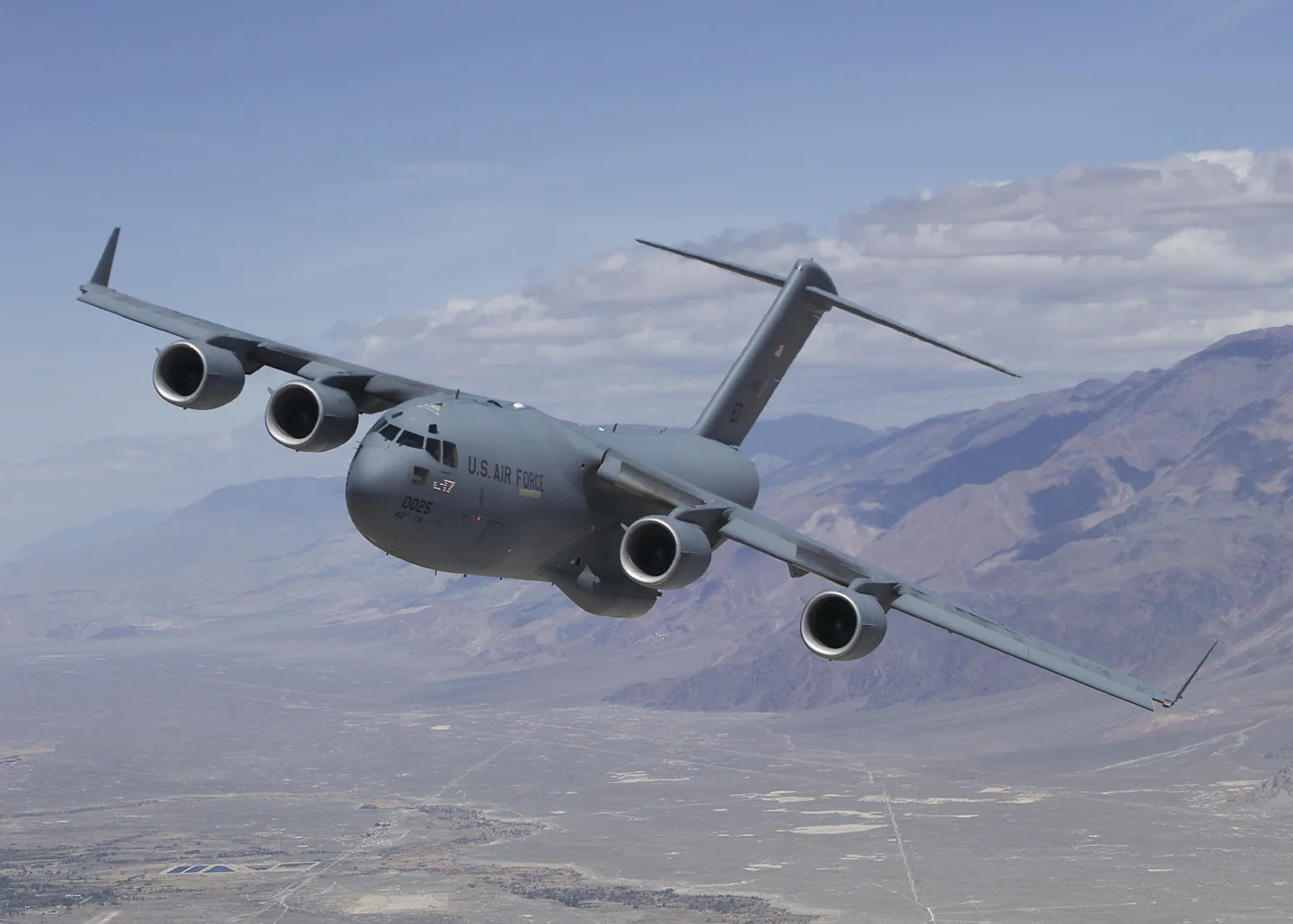
機型庫Boeing C-17 Globemaster III
Boeing C-17 Globemaster IIIU.S. Air Force · Public domain · Boeing C-17 Globemaster III pictured

Boeing C-17 Globemaster III

A jet-powered military transport designed for both strategic loads and tactical airfield access.
Military transport設定檔選項:1 個

瞭解飛機

McDonnell Douglas developed the C-17 for the US Air Force, with its first flight in 1991. Four turbofans, a high wing and a rear cargo ramp support the heavy-transport role. Its landing gear and high-lift design also address operations from relatively constrained airfields.

The Globemaster III can move very large equipment while retaining a modern two-pilot flight deck. The Miltech manual describes the simulator's flight-control and autopilot features, including functions that were not implemented in the documented version.

Aircraft / family

Propulsion
Four jets↗
Configuration
High wing · Rear loading ramp↗

Boeing C-17 Globemaster III · Specifications (C-17A) · real aircraft; source units retained

Length
174 ft (53 m)↗
Wingspan
169 ft 9.6 in (51.755 m)↗
Height
55 ft 1 in (16.79 m)↗
Wing area
3,800 sq ft (350 m² )↗
Empty weight
282,500 lb (128,140 kg)↗
Max takeoff weight
585,000 lb (265,352 kg)↗
Powerplant
4 × Pratt & Whitney PW2000 turbofan engines, 40,440 lbf (179.9 kN) thrust each (U.S. military designation: F117-PW-100)↗
Cruise speed
450 kn (520 mph, 830 km/h) (Mach 0.74–0.79)↗
Range
2,420 nmi (2,780 mi, 4,480 km) with 157,000 lb (71,214 kg) payload↗
Service ceiling
45,000 ft (14,000 m)↗

在 AirframeDB 上了解這款航空器

Reserve crews remember the early relief airdrops

The 315th Airlift Wing’s 2008 retrospective records a Reserve C-17 crew joining a four-aircraft humanitarian-ration drop in October 2001. Its loadmaster’s recollection describes hurried travel, crew briefings and several further missions, adding the cargo crew’s experience alongside the pilots’ accounts.

A first flight in the type marks the final Air Force delivery

For Jackson, taking the final new Air Force C-17 away from Long Beach was also his first flight in the type. Simulator preparation and instruction from experienced crews helped him feel ready. Boeing employees waved below as the aircraft departed, linking the delivery with the people who had spent years building the fleet.

Clarke later flew the arrival at Charleston, also describing it as his first time flying a C-17. He wanted the landing to be especially good for the crowd waiting there and joked about its size compared with fighters. The report follows a crew drawn from active duty, Reserve and Guard organisations, sharing one journey to mark the end of Air Force production deliveries.

A familiar voice on the intercom changes the flight

Buckingham recognised concern in the loadmasters’ voices when they reported a fuel smell shortly after takeoff. He went into the cargo compartment while the other two pilots managed the flight deck. A helicopter was leaking fuel, and the soldiers travelling home had lifted themselves away from the spreading liquid.

The crew returned to Mosul and evacuated the passengers after landing. Buckingham remembered that some soldiers seemed more worried about going back than about the emergency itself. Once the leak had been repaired and the aircraft attended to, the journey resumed. His strongest praise was for the young loadmasters and the crew’s preparation: people with different responsibilities had recognised the problem, shared the workload and brought everyone back to the ground.

Three flags carry a father’s thanks around the world

Eberhart’s final flight from Afghanistan prompted memories of returning to the country over many years. He recalled the contrast between the early airfields he had used in 2001 and the infrastructure visible by 2013. The C-17 had also taken him on embassy-support flights and assignments around the world.

Three flags had travelled with him in the aircraft since 2006, including trips to the South Pole and humanitarian missions. He planned to give one to each son when he retired, as thanks for the time the family had spent without him. The interview also describes his interest in teaching judgment to other crews. Flying, mentoring and the cost of time away from home all form part of his recollection.

公開來源 9
  1. Boeing C-17 Globemaster IIIResearch background · Wikipedia revision 1374113908 · retrieved 2026-09-12
  2. Boeing C-17 Globemaster III
  3. Microsoft Flight Simulator aircraft manuals
  4. MSFS 2024 FAQ and edition aircraft inventory
  5. The journey home: final USAF C-17 takes inaugural flightSenior Airman Dennis Sloan · 13 September 2013
  6. Charleston aircrew thinks fast during combat-zone emergency27 February 2004 · Bill Buckingham and crew interviewed
  7. C-17 pilot reflects during final OEF flightMaster Sgt. Leisa Grant interviews Paul Eberhart · 28 August 2013
  8. Anniversary passes for Reserve C-17s in AfghanistanTech. Sgt. Jeff Kelly · 14 October 2008
  9. ICAO Doc 8643 — aircraft type designatorsPublic search data retrieved 2026-09-14; authority update 2026-09-03

設定檔如何建模

Boeing C-17 Globemaster III

Free + Pro
MSFS 2024

McDonnell Douglas developed the C-17 for the US Air Force, with its first flight in 1991. Four turbofans, a high wing and a rear cargo ramp support the heavy-transport role. Its landing gear and high-lift design also address operations from relatively constrained airfields.

This starting point selects Boeing C-17 Globemaster III. Its aircraft-level settings do not select a particular developer’s custom systems.

The selected control law supplies heavy-transport yoke resistance. Spring resistance builds with the selected airspeed response. A separate aerodynamic term adds speed-dependent control load.

Trim response is independent of cargo-ramp and mission operations. Valid trim provides the configured pressure relief. Autopilot following is enabled for supported control references.

Controls and trim

The C17’s high wing, four turbofans and cargo ramp support heavy transport from constrained airfields. Its first flight was in 1991. The modern two-pilot cockpit and developer-specific automatic-flight functions remain separate from mission and loading equipment.

Boeing C-17 Globemaster III

About the values

The gains are normalized profile settings. They describe the chosen effect balance; hand force depends on the device and its output limits. IAS references are tuning values rather than operating limits. Physical acceptance of this revision remains pending.

Master gain & control system

Master gain85%

施加於模型產出的一切、在裝置上限之前的最終整體輸出縮放。

調高: 一切(彈簧、載荷、效果)一同增強。

調低: 一切一同變柔。

設定理由: Scales overall profile strength while preserving effect balance, subject to device and output limits.

Forces

Spring strength80%

把搖桿拉回中央的基礎回中力。其他所有力都疊加在它之上。太低,正常飛行中搖桿會發軟;太高,它會與你的手較勁,並掩蓋疊加其上的細微提示。

調高: 更硬的回中,更抗手。

調低: 更軟的桿,只靠氣動載荷。

設定理由: The selected control law supplies heavy-transport yoke resistance. The baseline spring is 0.8. Its low-speed blend reaches baseline strength at 90 KIAS.

Boeing C-17 Globemaster III
Spring deadband4%

中央附近彈簧保持安靜的小中立區,讓靜止時的微小移動不會咔嗒作響。更寬更安穩但更松,更窄更精確但可能在中央附近抖動。

調高: 更安靜但更松的中央,曠量更大。

調低: 更緊的中央,靜止時可能抖動。

設定理由: Sets travel around the centre before the baseline spring resists. Smaller values engage it sooner.

Overall aerodynamic load25%

作用於兩條持續軸載荷的主縮放,在它們各自的獨立平衡之前施加。設定檔通常不動它,而是調校兩條軸載荷。

調高: 兩軸載荷一同加重。

調低: 兩軸一同減輕。

設定理由: The aerodynamic-load gain is 0.25 with an indicated-speed reference of 260 KIAS. The hydraulic-load factor of 0.35 scales that modeled term; it is a selected artificial-feel approximation.

Airspeed blendingTrue

啟用低速彈簧介入視窗(上面的起始/全強度節數)。關閉時彈簧在所有速度下恆定。

設定理由: Allows baseline spring strength to rise with indicated airspeed where the control law permits it.

Low-speed spring floor55%

在靜止、空速尚未產生氣動力之前,彈簧還剩多少。下限高,停機時搖桿結實;下限低,則是停放輕型飛機那種鋼索鬆弛的感覺。

調高: 停機和滑行時桿更結實。

調低: 停機時桿發軟,只隨速度甦醒。

設定理由: Sets low-speed spring strength as a fraction of baseline when blending is enabled. One keeps full strength.

Spring engagement start20 kt

彈簧從低速下限開始向全強度攀升的空速:起飛滑跑中操縱面"甦醒"的那一刻。

設定理由: Sets the IAS where the low-speed spring blend starts rising. This is a feel threshold, not a flight limit.

Spring engagement full90 kt

彈簧達到全強度的空速。從起點到這裡,隨著氣流在操縱面上增強,回中逐漸變硬。

設定理由: Sets the IAS where the low-speed blend reaches baseline strength; high-speed stiffening also uses it.

力回饋調校速度260

氣動載荷達到設計滿值的指示空速。它把整條載荷曲線錨定在飛機真實的速度範圍:172在110節就載滿,噴氣機要晚得多。

調高: 載荷來得更晚;桿輕到更高速度。

調低: 載荷來得更早,巡航更沉。

設定理由: Sets the IAS reference for aerodynamic loading. It is an estimate, not published cruise TAS or a flight limit.

Centre firmness vs speed0%

在偏轉載荷之外,回中本身隨速度變硬的程度。零則中央手感恆定;越大,巡航時回中越硬,起落航線上越松。

調高: 中央隨速度明顯變硬。

調低: 任何速度下中央手感恆定。

設定理由: The high-speed spring-stiffening gain is 0. No additional speed-driven stiffening is added; this does not disable independent aerodynamic loading.

Centre stiffening cap5

速度驅動的中央變硬上限,防止高速飛行把彈簧無限上緊。

調高: 高速允許更多總硬化。

調低: 硬化更早封頂。

設定理由: Limits the squared airspeed ratio used for high-speed spring stiffening; it is not a device-force cap.

Aileron load65%

由副翼偏轉和空速產生的持續橫滾載荷,獨立於俯仰調校。與升降舵載荷一起,決定評測中常說的操縱協調比。

調高: 橫滾力更重。

調低: 副翼更輕更靈。

設定理由: Roll and pitch aerodynamic scales are 0.65 and 0.65, respectively. They set the aerodynamic axis balance. No custom spring-travel curve is enabled.

Elevator load65%

由升降舵偏轉和空速產生的持續俯仰載荷,獨立於橫滾調校。這是決定機型俯仰重量的主槓桿。它不影響副翼、彈簧、配平或抖振力。

調高: 速度下持續俯仰力更重。

調低: 升降舵更輕,握持更省力。

設定理由: Scales pitch aerodynamic loading; pitch spring travel and trim responses are separate settings.

Max output force55%

每個穩態俯仰或橫滾力到達裝置前的上限,防止猛烈機動中砸擊或飽和硬體。

調高: 削波前更高的穩態力峰值。

調低: 更柔的上限;猛烈機動更早被抹平。

設定理由: Caps directed-force output. Native spring effects and device limits remain separate.

Trim

Trim relief (elevator)30%

升降舵配平緩解持續俯仰力、移動桿的安定位置的強度。在100 %時,配平得當的飛機不需要保持壓力——正是真實飛行中"用配平消掉載荷"的流程。

調高: 配平消掉更多持續力;100 %時滿配平可完全抵消。

調低: 即使配平也仍要持續用力。

設定理由: Trim response is independent of cargo-ramp and mission operations. Pitch authority 0.3 relieves permitted loading; hydraulic centre movement is off. Roll authority is 0.09.

Boeing C-17 Globemaster III
Trim relief (aileron)9%

橫滾配平的同類緩解。多數通航機型沒有真正的副翼配平,所以保持為零;有橫滾配平的機型獲得相應的值。

調高: 橫滾配平消掉更多持續力。

調低: 橫滾配平作用更小。

設定理由: Scales supported roll-trim relief and permitted centre movement. Zero removes roll response.

Effect gains · Ground

Runway rumble40%

由輪速和地面型別(鋪裝、草地、礫石)產生的滾動振動。

調高: 桿上更強的地面質感。

調低: 更平滑的滑行。

設定理由: Sets rolling texture strength, modified by speed, surface and undercarriage configuration.

Gear bumps32%

來自伸縮縫、車轍和粗糙地面的短促離散顛簸,為持續隆隆聲打上標點。

調高: 接縫與車轍的衝擊更清晰。

調低: 更柔的地面細節。

設定理由: Sets gear-bump texture during ground motion, separate from touchdown impact.

Effect gains · Airframe

Stall buffet30%

接近失速及失速警告響起時的機體抖動:這副機翼宣告不滿的音量。斷失乾脆的機型抖振收斂,讓喇叭承擔警告。

調高: 更強的失速前顫抖。

調低: 更含蓄的機翼;警告交給喇叭。

設定理由: Sets stall-buffet strength. Zero removes the cue without changing simulator stalls or warnings.

Mach buffet22%

接近馬赫極限的跨音速抖振。對接近MMO的噴氣機有意義,對到不了那裡的活塞機和渦槳機為零。

調高: 接近馬赫極限時更強的跨音速抖振。

調低: 高馬赫下更平滑的飛行。

設定理由: Sets high-Mach buffet strength; onset and full-strength thresholds are separate.

Flap buffet14%

襟翼伸入氣流後機體的低頻振動,發生在它們真正做功的速度視窗內。

調高: 襟翼做功時更粗糙的飛行。

調低: 更柔的進近襟翼。

設定理由: Sets flap buffet at the configured position and speed gates. Flap movement texture is separate.

Gear buffet10%

可收放起落架懸在氣流中引起的機體鼓振。固定起落架機型為零,它們的機體外形從不改變。

調高: 放起落架時更多鼓振。

調低: 放起落架飛行更乾淨。

設定理由: Sets gear aerodynamic buffet; movement and ground-contact cues are separate.

Stick shaker90%

由飛機自身失速警告系統觸發的專用抖桿器振動。只有真有抖桿器的機型才有值;其餘全靠氣動抖振和喇叭。

調高: 更硬的抖桿器。

調低: 更含蓄的抖桿器。

設定理由: Sets triggered shaker strength; inactive while the shaker feature is disabled.

Effect gains · Engine, mechanical & drag

Touchdown thump90%

機輪觸及跑道那一下的單次衝擊,按下沉率縮放:輕柔著陸是耳語,結實到達是一記悶響。

調高: 觸地時更硬的一擊。

調低: 更柔的到達。

設定理由: Sets landing-impact strength; landing telemetry and response shape determine the pulse.

Reverse rumble50%

反推或槳葉beta區工作時的滑跑振動。無反推機型為零。

調高: 反推下更粗糙的滑跑。

調低: 更含蓄的反推。

設定理由: Sets reverse-thrust vibration with valid reverser and engine conditions. Zero removes the cue.

Engine rumble6%

從慢車到全功率跟隨轉速的持續動力裝置振動——前方有東西在燒油的永恆提醒。

調高: 桿裡更多引擎。

調低: 更含蓄的引擎。

設定理由: Sets estimated engine vibration using configured telemetry and response, not measured cockpit vibration.

Flap motion12%

僅在模擬器報告襟翼舵面確實移動時的持續振動。它跟隨真實作動器的運動和故障,而非估算的計時器。

調高: 襟翼移動中更多振動。

調低: 更含蓄的襟翼行程。

設定理由: Sets texture from observed flap movement; a command without movement does not establish the cue.

Autopilot follow

AP follow authority10%

自動駕駛指令可以讓桿實際移動多遠。在MSFS中保持極小,因為移動的軸可能被讀回為飛行員輸入;零則完全停用跟隨。

調高: 自動駕駛讓你的桿移動得明顯更多。

調低: 幾乎察覺不到的跟隨。

設定理由: Sets admitted AP-follow gain, not a percentage of travel. Runtime ownership and input limits still apply.

Stick feel

StickFeel · Trim feel enabledTrue

Whether this feature is active in this profile.

設定理由: Retained for compatibility and group membership. Trim relief, rather than this flag, controls centre movement.

StickFeel · Trim relief enabledTrue

Whether this feature is active in this profile.

設定理由: Allows trim relief with supported control law and valid telemetry. Axis authorities set its amount.

StickFeel · Force trim enabledFalse

Whether this feature is active in this profile.

設定理由: Enables local force trim, separate from aircraft-owned trim and add-on integration qualification.

StickFeel · G load enabledTrue

Whether this feature is active in this profile.

設定理由: Allows load-factor changes to modify permitted spring laws. Passive fly-by-wire feel can suppress it.

StickFeel · Rate damping enabledTrue

Whether this feature is active in this profile.

設定理由: Enables rate damping with the configured coefficients and control law.

Autopilot

Autopilot · Follow enabledTrue

Whether this feature is active in this profile.

設定理由: Following is on at 0.1 authority when a supported, valid autopilot control reference is available.

Autopilot · Neutral hold enabledFalse

Whether this feature is active in this profile.

設定理由: Permits centering hold during a supported AP state, separate from following a moving target.

Autopilot · Neutral hold strength0.6

設定理由: Sets admitted AP neutral-hold strength; inactive while neutral hold is disabled.

Aero

Aero · EnabledTrue

Whether this feature is active in this profile.

設定理由: Enables aerodynamic cues; each still needs nonzero strength and its simulator conditions.

Aero · Max flap index3

Where this effect reaches full strength (or has fully faded, for washouts).

調高: a more gradual build to a later peak.

調低: a quicker build.

設定理由: Sets the final flap index for detent normalization. UP plus three detents uses maximum index3.

Aero · Min flap index2

Where this effect begins fading in.

調高: the effect begins later.

調低: it begins earlier.

設定理由: Sets the first flap detent that admits buffet; this is a handle index, not degrees.

Aero · Shaker enabledTrue

Whether this feature is active in this profile.

設定理由: Permits shaker at supported warning conditions; the switch does not establish aircraft equipment.

Ground

Ground · EnabledTrue

Whether this feature is active in this profile.

設定理由: Enables ground effects; each still needs its own strength and contact or motion telemetry.

Engine

Engine · EnabledTrue

Whether this feature is active in this profile.

設定理由: Enables engine cues with nonzero settings and valid running-engine telemetry.

Mechanical

Mechanical · EnabledTrue

Whether this feature is active in this profile.

設定理由: Enables accessory cues with configured strengths and observed accessory movement.

Mechanical · Gain0.12

The strength of this effect.

調高: a stronger effect.

調低: a weaker one.

設定理由: Sets texture from observed gear movement, separate from aerodynamic and touchdown effects.

全部設定檔設定
估算的設定檔設定
引數數值控制作用及原因
Spring strength0.8 The selected control law supplies heavy-transport yoke resistance. The baseline spring is 0.8. Its low-speed blend reaches baseline strength at 90 KIAS.
Spring deadband0.035 Sets travel around the centre before the baseline spring resists. Smaller values engage it sooner.
Force gain0.25 The aerodynamic-load gain is 0.25 with an indicated-speed reference of 260 KIAS. The hydraulic-load factor of 0.35 scales that modeled term; it is a selected artificial-feel approximation.
Master gain0.85 Scales overall profile strength while preserving effect balance, subject to device and output limits.
Dynamic-pressure blendTrue Allows baseline spring strength to rise with indicated airspeed where the control law permits it.
Minimum spring factor0.55 Sets low-speed spring strength as a fraction of baseline when blending is enabled. One keeps full strength.
Spring wake-up speed20 ktSets the IAS where the low-speed spring blend starts rising. This is a feel threshold, not a flight limit.
Spring full-strength speed90 ktSets the IAS where the low-speed blend reaches baseline strength; high-speed stiffening also uses it.
力回饋調校速度260.0 ktSets the IAS reference for aerodynamic loading. It is an estimate, not published cruise TAS or a flight limit.
Airspeed spring stiffening0 The high-speed spring-stiffening gain is 0. No additional speed-driven stiffening is added; this does not disable independent aerodynamic loading.
Airspeed stiffening cap5 Limits the squared airspeed ratio used for high-speed spring stiffening; it is not a device-force cap.
Aileron force scale0.65 Roll and pitch aerodynamic scales are 0.65 and 0.65, respectively. They set the aerodynamic axis balance. No custom spring-travel curve is enabled.
Elevator force scale0.65 Scales pitch aerodynamic loading; pitch spring travel and trim responses are separate settings.
Maximum output force0.55 Caps directed-force output. Native spring effects and device limits remain separate.
StickFeel · Trim feel enabledTrue Retained for compatibility and group membership. Trim relief, rather than this flag, controls centre movement.
StickFeel · Trim relief enabledTrue Allows trim relief with supported control law and valid telemetry. Axis authorities set its amount.
StickFeel · Elevator authority0.3 Trim response is independent of cargo-ramp and mission operations. Pitch authority 0.3 relieves permitted loading; hydraulic centre movement is off. Roll authority is 0.09.
StickFeel · Aileron authority0.09 Scales supported roll-trim relief and permitted centre movement. Zero removes roll response.
StickFeel · Force trim enabledFalse Enables local force trim, separate from aircraft-owned trim and add-on integration qualification.
StickFeel · G load enabledTrue Allows load-factor changes to modify permitted spring laws. Passive fly-by-wire feel can suppress it.
StickFeel · Rate damping enabledTrue Enables rate damping with the configured coefficients and control law.
Autopilot · Follow enabledTrue Following is on at 0.1 authority when a supported, valid autopilot control reference is available.
Autopilot · Follow authority0.1 Sets admitted AP-follow gain, not a percentage of travel. Runtime ownership and input limits still apply.
Autopilot · Neutral hold enabledFalse Permits centering hold during a supported AP state, separate from following a moving target.
Autopilot · Neutral hold strength0.6 Sets admitted AP neutral-hold strength; inactive while neutral hold is disabled.
Aero · EnabledTrue Enables aerodynamic cues; each still needs nonzero strength and its simulator conditions.
Aero · Gain0.3 Sets stall-buffet strength. Zero removes the cue without changing simulator stalls or warnings.
Aero · Gain0.22 Sets high-Mach buffet strength; onset and full-strength thresholds are separate.
Aero · Gain0.14 Sets flap buffet at the configured position and speed gates. Flap movement texture is separate.
Aero · Max flap index3 Sets the final flap index for detent normalization. UP plus three detents uses maximum index3.
Aero · Min flap index2 Sets the first flap detent that admits buffet; this is a handle index, not degrees.
Aero · Gain0.1 Sets gear aerodynamic buffet; movement and ground-contact cues are separate.
Aero · Shaker enabledTrue Permits shaker at supported warning conditions; the switch does not establish aircraft equipment.
Aero · Amplitude0.9 Sets triggered shaker strength; inactive while the shaker feature is disabled.
Ground · EnabledTrue Enables ground effects; each still needs its own strength and contact or motion telemetry.
Ground · Gain0.4 Sets rolling texture strength, modified by speed, surface and undercarriage configuration.
Ground · Gain0.32 Sets gear-bump texture during ground motion, separate from touchdown impact.
Ground · Gain0.9 Sets landing-impact strength; landing telemetry and response shape determine the pulse.
Ground · Gain0.5 Sets reverse-thrust vibration with valid reverser and engine conditions. Zero removes the cue.
Engine · EnabledTrue Enables engine cues with nonzero settings and valid running-engine telemetry.
Engine · Gain0.06 Sets estimated engine vibration using configured telemetry and response, not measured cockpit vibration.
Mechanical · EnabledTrue Enables accessory cues with configured strengths and observed accessory movement.
Mechanical · Gain0.12 Sets texture from observed flap movement; a command without movement does not establish the cue.
Mechanical · Gain0.12 Sets texture from observed gear movement, separate from aerodynamic and touchdown effects.
公開來源 9
  1. Boeing C-17 Globemaster IIIResearch background · Wikipedia revision 1374113908 · retrieved 2026-09-12
  2. Boeing C-17 Globemaster IIIBoeing C-17 Globemaster III
  3. Microsoft Flight Simulator aircraft manuals
  4. MSFS 2024 FAQ and edition aircraft inventory
  5. The journey home: final USAF C-17 takes inaugural flightSenior Airman Dennis Sloan · 13 September 2013
  6. Charleston aircrew thinks fast during combat-zone emergency27 February 2004 · Bill Buckingham and crew interviewed
  7. C-17 pilot reflects during final OEF flightMaster Sgt. Leisa Grant interviews Paul Eberhart · 28 August 2013
  8. Anniversary passes for Reserve C-17s in AfghanistanTech. Sgt. Jeff Kelly · 14 October 2008
  9. ICAO Doc 8643 — aircraft type designatorsPublic search data retrieved 2026-09-14; authority update 2026-09-03

社群與糾錯

如果你的真機經驗表明本頁有誤,請在此指正。

飛行員糾錯

飛過這款飛機?糾正本頁。

本頁基於引用資料構建,而真機經驗勝過任何引用。 請引用有誤的主張,並告訴我們真機的實際表現。糾錯 將交由維護者稽核,並納入本研究的下一次修訂。

機庫閒談

關於 Boeing C-17 Globemaster III 的飛行與調校的公開討論(社群論壇)。上方的糾錯將私下送達維護者;機庫閒談是公開的。

Boeing C-17 Globemaster III 還沒有機庫閒談。來做第一個吧。

社群

該機型的社群配置

該機型還沒有社群配置。 調出了自己的風格? 分享一個配置 它就會出現在這裡。