機型庫Guimbal Cabri G2
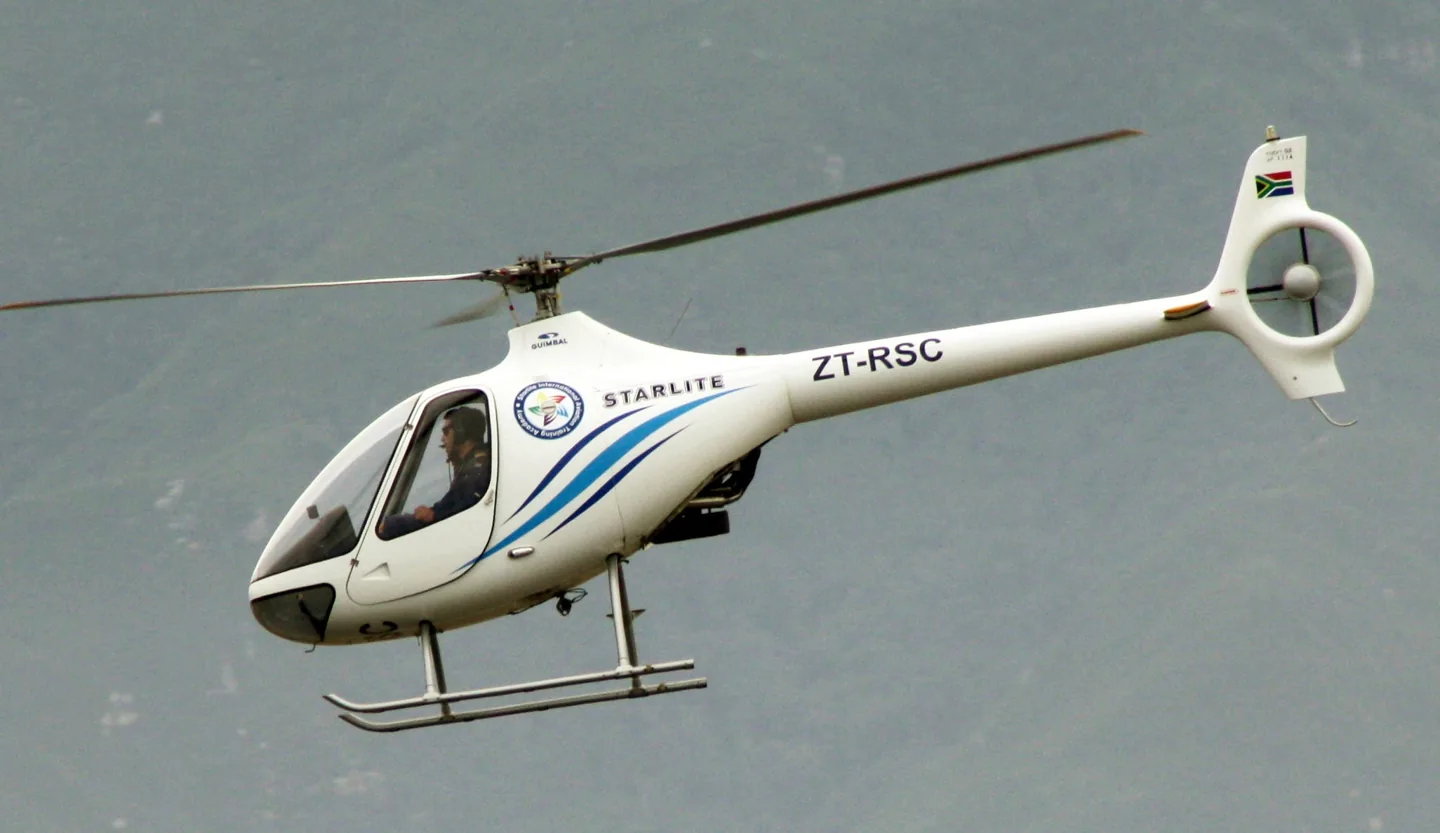
Guimbal Cabri G2Bob Adams · CC BY-SA 2.0 · Guimbal Cabri G2 pictured

Guimbal Cabri G2

Guimbal's two-seat piston training helicopter with a three-bladed main rotor and enclosed tail rotor.
Helicopter設定檔選項:2 個

瞭解飛機

Bruno Guimbal developed the Cabri after working in the helicopter industry. Its first demonstrator flew in 1992, and commercial service began in 2008. The production aircraft has a side-by-side two-seat cabin, a three-bladed main rotor and an enclosed tail rotor.

The Cabri serves the light training role also associated with the Robinson R22. Its rotor, airframe, controls and systems are Guimbal's own design.

Aircraft / family

Propulsion
Single piston↗
Configuration
Two seats · Enclosed tail rotor↗

Guimbal Cabri G2 · Specifications · real aircraft; source units retained

Length
6.31 m (20 ft 8 in)↗
Height
2.37 m (7 ft 9 in)↗
Gross weight
700 kg (1,543 lb)↗
Powerplant
1 × Lycoming O-360 -J2A piston engine , 108 kW (145 hp)↗
Main rotor diameter
7.2 m (23 ft 7 in)↗
Maximum speed
185 km/h (115 mph, 100 kn)↗
Cruise speed
166 km/h (104 mph, 90 kn)↗
Range
700 km (430 mi, 380 nmi)↗
Service ceiling
3,963 m (13,000 ft)↗

在 AirframeDB 上了解這款航空器

An established European design arrives in North America

Precision worked with Guimbal through the FAA certification process completed in February 2015. Head’s visit describes the Oregon operator then putting Cabris into training, adding a North American chapter to a type already used overseas.

A new trainer attracts pilots from older types

Gilbert’s account illustrates the Cabri’s appeal to pilots already invested in Robinson aircraft. Its cabin finish and modern presentation first caught his attention; flying it then made the transition a matter of learning new habits as well as comparing equipment.

An instructor gets a reminder of being a student

Gilbert had learned in Robinsons, owned them and continued to enjoy flying them. The Cabri’s design nevertheless attracted him, and an hour at Elstree finally let him explore it. His main concern was adapting to a rotor turning the opposite way from those he knew. In flight, familiar habits repeatedly demanded conscious correction.

The tour of Hertfordshire became easier once he stopped searching for instruments in their usual places and concentrated on the view outside. Hovering on return was a further challenge, requiring time to adjust his inputs. Gilbert found the experience humbling in a useful way: as an instructor, he was reminded how it felt to be a beginner. He finished the flight keen to train further on the type, with enthusiasm shaped by the learning still ahead.

Enjoyable utility flying, with ownership details that mattered

Bates moved into the Cabri after more than a year flying the MD500. Its cockpit and starting routine took some learning, but he found the cabin comfortable and the helicopter enjoyable to fly. The control feel reminded him of the larger machine, while the compact airframe suited the smaller landing sites involved in his work.

Operating experience also exposed frustrations that a short demonstration might miss. He reported unreliable fuel indications, corrosion concerns in the coastal environment and difficulty obtaining some parts at the time. These observations concerned an early aircraft, and he acknowledged that later examples might differ.

A first introduction at an Oregon training school

The Cabri’s panel and finish made such a modern impression on Head that the sound of its piston engine briefly surprised her. She had subconsciously expected a turbine. At Precision Helicopters in Oregon, Nigel Cooper introduced her to the aircraft as the school began using the new arrival in North American training.

Once flying, the heavy controls required more effort than the cockpit’s resemblance to larger Airbus helicopters had suggested. Head kept her own evaluation conservative, then watched Cooper demonstrate manoeuvres that drew on his greater familiarity with the type. She enjoyed the flight while recognising that she would need more time to feel proficient.

公開來源 12
  1. Guimbal Cabri G2Research background · Wikipedia revision 1366423799 · retrieved 2026-09-12
  2. Microsoft Flight Simulator aircraft manuals
  3. MSFS 2024 FAQ and edition aircraft inventory
  4. MSFS 2020 FAQ and edition aircraft inventory
  5. Tim Gilbert flies the Cabri G2Tim Gilbert · 1 February 2017
  6. The Cabri G2: a pilot’s perspectiveNick Bates · 29 June 2016; real-aircraft operations
  7. Meet the CabriElan Head · 26 February 2016
  8. VSKYLABS Guimbal Cabri G2 add-on for X-Plane Flight Simulator.Official developer / designated-store reference · checked 2026-09-14
  9. VSKYLABS Aerospace Simulations Aircraft Center: VSKYLABS Guimbal Cabri G2Official developer / designated-store reference · checked 2026-09-14
  10. ICAO Doc 8643 — aircraft type designatorsPublic search data retrieved 2026-09-14; authority update 2026-09-03
  11. MSFS 2024 Sim Update 3 release notesPublisher announcement or release notes
  12. Microsoft Flight Simulator’s 40th Anniversary EditionPublisher announcement or release notes

設定檔如何建模

VSKYLABS Guimbal Cabri G2

Free + Pro
X-Plane 12VSKYLABS

Bruno Guimbal developed the Cabri after working in the helicopter industry. Its first demonstrator flew in 1992, and commercial service began in 2008. The production aircraft has a side-by-side two-seat cabin, a three-bladed main rotor and an enclosed tail rotor.

This profile selects VSKYLABS Guimbal Cabri G2 for X-Plane 12.

The cyclic response approximates unboosted mechanical controls. The spring stays independent of airspeed. Directed aerodynamic loading is omitted. Cyclic damping adds resistance to hardware motion.

Electric cyclic trim releases static forces; collective friction does not define cyclic trim. Local force trim is off. Autopilot following is off.

此確切修訂版尚未開放公開安裝。

Controls and trim

The Cabri has unboosted push-pull controls and dual-axis electric cyclic trim. Guimbal explicitly distinguishes collective friction from the cyclic, which has no friction mechanism. Its three-blade main rotor has a separately stated rotor-speed reference.

Guimbal primary-authored RFM hosted by flight-training operatorDeveloper specificationsCabri G2 flight manual reproductionVSKYLABS Aerospace Simulations Aircraft Center: VSKYLABS Guimbal Cabri G2

The selected implementation

The Cabri has unboosted push-pull controls and dual-axis electric cyclic trim. Its manufacturer specifies no cyclic friction mechanism; collective friction is a separate control.

Guimbal primary-authored RFM hosted by flight-training operatorDeveloper specifications

About the values

The gains are normalized profile settings. They describe the chosen effect balance; hand force depends on the device and its output limits. IAS references are tuning values rather than operating limits. Physical acceptance of this revision remains pending.

Master gain & control system

Master gain65%

施加於模型產出的一切、在裝置上限之前的最終整體輸出縮放。

調高: 一切(彈簧、載荷、效果)一同增強。

調低: 一切一同變柔。

設定理由: Scales overall profile strength while preserving effect balance, subject to device and output limits.

Forces

Spring strength12%

把搖桿拉回中央的基礎回中力。其他所有力都疊加在它之上。太低,正常飛行中搖桿會發軟;太高,它會與你的手較勁,並掩蓋疊加其上的細微提示。

調高: 更硬的回中,更抗手。

調低: 更軟的桿,只靠氣動載荷。

設定理由: The cyclic response approximates unboosted mechanical controls. The baseline spring is 0.12. Low-speed spring blending is off.

Guimbal primary-authored RFM hosted by flight-training operatorDeveloper specificationsCabri G2 flight manual reproductionVSKYLABS Aerospace Simulations Aircraft Center: VSKYLABS Guimbal Cabri G2
Spring deadband2%

中央附近彈簧保持安靜的小中立區,讓靜止時的微小移動不會咔嗒作響。更寬更安穩但更松,更窄更精確但可能在中央附近抖動。

調高: 更安靜但更松的中央,曠量更大。

調低: 更緊的中央,靜止時可能抖動。

設定理由: Sets travel around the centre before the baseline spring resists. Smaller values engage it sooner.

Overall aerodynamic load0%

作用於兩條持續軸載荷的主縮放,在它們各自的獨立平衡之前施加。設定檔通常不動它,而是調校兩條軸載荷。

調高: 兩軸載荷一同加重。

調低: 兩軸一同減輕。

設定理由: The 0 gain omits sustained directed airspeed loading. Spring resistance remains independent.

Airspeed blendingFalse

啟用低速彈簧介入視窗(上面的起始/全強度節數)。關閉時彈簧在所有速度下恆定。

設定理由: Allows baseline spring strength to rise with indicated airspeed where the control law permits it.

Low-speed spring floor55%

在靜止、空速尚未產生氣動力之前,彈簧還剩多少。下限高,停機時搖桿結實;下限低,則是停放輕型飛機那種鋼索鬆弛的感覺。

調高: 停機和滑行時桿更結實。

調低: 停機時桿發軟,只隨速度甦醒。

設定理由: Sets low-speed spring strength as a fraction of baseline when blending is enabled. One keeps full strength.

Spring engagement start10 kt

彈簧從低速下限開始向全強度攀升的空速:起飛滑跑中操縱面"甦醒"的那一刻。

設定理由: Sets the IAS where the low-speed spring blend starts rising. This is a feel threshold, not a flight limit.

Spring engagement full45 kt

彈簧達到全強度的空速。從起點到這裡,隨著氣流在操縱面上增強,回中逐漸變硬。

設定理由: Sets the IAS where the low-speed blend reaches baseline strength; high-speed stiffening also uses it.

力回饋調校速度90

氣動載荷達到設計滿值的指示空速。它把整條載荷曲線錨定在飛機真實的速度範圍:172在110節就載滿,噴氣機要晚得多。

調高: 載荷來得更晚;桿輕到更高速度。

調低: 載荷來得更早,巡航更沉。

設定理由: Sets the IAS reference for aerodynamic loading. It is an estimate, not published cruise TAS or a flight limit.

Centre firmness vs speed0%

在偏轉載荷之外,回中本身隨速度變硬的程度。零則中央手感恆定;越大,巡航時回中越硬,起落航線上越松。

調高: 中央隨速度明顯變硬。

調低: 任何速度下中央手感恆定。

設定理由: Adds permitted spring resistance above the full-blend speed. Zero removes this high-speed increase.

Centre stiffening cap2

速度驅動的中央變硬上限,防止高速飛行把彈簧無限上緊。

調高: 高速允許更多總硬化。

調低: 硬化更早封頂。

設定理由: Limits the squared airspeed ratio used for high-speed spring stiffening; it is not a device-force cap.

Aileron load100%

由副翼偏轉和空速產生的持續橫滾載荷,獨立於俯仰調校。與升降舵載荷一起,決定評測中常說的操縱協調比。

調高: 橫滾力更重。

調低: 副翼更輕更靈。

設定理由: Roll and pitch aerodynamic scales are 1 and 1, respectively. These stored weights do not create directed aerodynamic loading while that term is inactive. No custom spring-travel curve is enabled.

Elevator load100%

由升降舵偏轉和空速產生的持續俯仰載荷,獨立於橫滾調校。這是決定機型俯仰重量的主槓桿。它不影響副翼、彈簧、配平或抖振力。

調高: 速度下持續俯仰力更重。

調低: 升降舵更輕,握持更省力。

設定理由: Scales pitch aerodynamic loading; pitch spring travel and trim responses are separate settings.

Max output force55%

每個穩態俯仰或橫滾力到達裝置前的上限,防止猛烈機動中砸擊或飽和硬體。

調高: 削波前更高的穩態力峰值。

調低: 更柔的上限;猛烈機動更早被抹平。

設定理由: Caps directed-force output. Native spring effects and device limits remain separate.

Trim

Trim relief (elevator)0%

升降舵配平緩解持續俯仰力、移動桿的安定位置的強度。在100 %時,配平得當的飛機不需要保持壓力——正是真實飛行中"用配平消掉載荷"的流程。

調高: 配平消掉更多持續力;100 %時滿配平可完全抵消。

調低: 即使配平也仍要持續用力。

設定理由: Scales supported pitch-trim relief and permitted centre movement. Zero removes pitch response.

Trim relief (aileron)0%

橫滾配平的同類緩解。多數通航機型沒有真正的副翼配平,所以保持為零;有橫滾配平的機型獲得相應的值。

調高: 橫滾配平消掉更多持續力。

調低: 橫滾配平作用更小。

設定理由: Scales supported roll-trim relief and permitted centre movement. Zero removes roll response.

Effect gains · Ground

Runway rumble0%

由輪速和地面型別(鋪裝、草地、礫石)產生的滾動振動。

調高: 桿上更強的地面質感。

調低: 更平滑的滑行。

設定理由: Sets rolling texture strength, modified by speed, surface and undercarriage configuration.

Gear bumps0%

來自伸縮縫、車轍和粗糙地面的短促離散顛簸,為持續隆隆聲打上標點。

調高: 接縫與車轍的衝擊更清晰。

調低: 更柔的地面細節。

設定理由: Sets gear-bump texture during ground motion, separate from touchdown impact.

Effect gains · Airframe

Stall buffet0%

接近失速及失速警告響起時的機體抖動:這副機翼宣告不滿的音量。斷失乾脆的機型抖振收斂,讓喇叭承擔警告。

調高: 更強的失速前顫抖。

調低: 更含蓄的機翼;警告交給喇叭。

設定理由: Sets stall-buffet strength. Zero removes the cue without changing simulator stalls or warnings.

Mach buffet0%

接近馬赫極限的跨音速抖振。對接近MMO的噴氣機有意義,對到不了那裡的活塞機和渦槳機為零。

調高: 接近馬赫極限時更強的跨音速抖振。

調低: 高馬赫下更平滑的飛行。

設定理由: Sets high-Mach buffet strength; onset and full-strength thresholds are separate.

Flap buffet0%

襟翼伸入氣流後機體的低頻振動,發生在它們真正做功的速度視窗內。

調高: 襟翼做功時更粗糙的飛行。

調低: 更柔的進近襟翼。

設定理由: Sets flap buffet at the configured position and speed gates. Flap movement texture is separate.

Gear buffet0%

可收放起落架懸在氣流中引起的機體鼓振。固定起落架機型為零,它們的機體外形從不改變。

調高: 放起落架時更多鼓振。

調低: 放起落架飛行更乾淨。

設定理由: Sets gear aerodynamic buffet; movement and ground-contact cues are separate.

Stick shaker50%

由飛機自身失速警告系統觸發的專用抖桿器振動。只有真有抖桿器的機型才有值;其餘全靠氣動抖振和喇叭。

調高: 更硬的抖桿器。

調低: 更含蓄的抖桿器。

設定理由: Sets triggered shaker strength; inactive while the shaker feature is disabled.

Effect gains · Engine, mechanical & drag

Touchdown thump20%

機輪觸及跑道那一下的單次衝擊,按下沉率縮放:輕柔著陸是耳語,結實到達是一記悶響。

調高: 觸地時更硬的一擊。

調低: 更柔的到達。

設定理由: Sets landing-impact strength; landing telemetry and response shape determine the pulse.

Reverse rumble0%

反推或槳葉beta區工作時的滑跑振動。無反推機型為零。

調高: 反推下更粗糙的滑跑。

調低: 更含蓄的反推。

設定理由: Sets reverse-thrust vibration with valid reverser and engine conditions. Zero removes the cue.

Engine rumble0%

從慢車到全功率跟隨轉速的持續動力裝置振動——前方有東西在燒油的永恆提醒。

調高: 桿裡更多引擎。

調低: 更含蓄的引擎。

設定理由: Sets estimated engine vibration using configured telemetry and response, not measured cockpit vibration.

Flap motion0%

僅在模擬器報告襟翼舵面確實移動時的持續振動。它跟隨真實作動器的運動和故障,而非估算的計時器。

調高: 襟翼移動中更多振動。

調低: 更含蓄的襟翼行程。

設定理由: Sets texture from observed flap movement; a command without movement does not establish the cue.

Autopilot follow

AP follow authority5%

自動駕駛指令可以讓桿實際移動多遠。在MSFS中保持極小,因為移動的軸可能被讀回為飛行員輸入;零則完全停用跟隨。

調高: 自動駕駛讓你的桿移動得明顯更多。

調低: 幾乎察覺不到的跟隨。

設定理由: Sets admitted AP-follow gain, not a percentage of travel. Runtime ownership and input limits still apply.

Stick feel

StickFeel · Trim feel enabledFalse

Whether this feature is active in this profile.

設定理由: Retained for compatibility and group membership. Trim relief, rather than this flag, controls centre movement.

StickFeel · Trim relief enabledFalse

Whether this feature is active in this profile.

設定理由: Allows trim relief with supported control law and valid telemetry. Axis authorities set its amount.

StickFeel · Force trim enabledFalse

Whether this feature is active in this profile.

設定理由: Electric cyclic trim releases static forces; collective friction does not define cyclic trim. Local force trim is off. The stored latch parameters are inactive; the profile does not supply a local hold-where-left neutral.

Guimbal primary-authored RFM hosted by flight-training operatorDeveloper specificationsCabri G2 flight manual reproductionVSKYLABS Aerospace Simulations Aircraft Center: VSKYLABS Guimbal Cabri G2
StickFeel · G load enabledTrue

Whether this feature is active in this profile.

設定理由: Allows load-factor changes to modify permitted spring laws. Passive fly-by-wire feel can suppress it.

StickFeel · Rate damping enabledFalse

Whether this feature is active in this profile.

設定理由: Enables rate damping with the configured coefficients and control law.

Autopilot

Autopilot · Follow enabledFalse

Whether this feature is active in this profile.

設定理由: Autopilot following is off; the configured spring and load retain the hardware feel.

Autopilot · Neutral hold enabledFalse

Whether this feature is active in this profile.

設定理由: Permits centering hold during a supported AP state, separate from following a moving target.

Autopilot · Neutral hold strength0.6

設定理由: Sets admitted AP neutral-hold strength; inactive while neutral hold is disabled.

Aero

Aero · EnabledTrue

Whether this feature is active in this profile.

設定理由: Enables aerodynamic cues; each still needs nonzero strength and its simulator conditions.

Aero · Max flap index1

Where this effect reaches full strength (or has fully faded, for washouts).

調高: a more gradual build to a later peak.

調低: a quicker build.

設定理由: Sets the final flap index for detent normalization. UP plus three detents uses maximum index3.

Aero · Min flap index1

Where this effect begins fading in.

調高: the effect begins later.

調低: it begins earlier.

設定理由: Sets the first flap detent that admits buffet; this is a handle index, not degrees.

Aero · Shaker enabledFalse

Whether this feature is active in this profile.

設定理由: Permits shaker at supported warning conditions; the switch does not establish aircraft equipment.

Ground

Ground · EnabledTrue

Whether this feature is active in this profile.

設定理由: Enables ground effects; each still needs its own strength and contact or motion telemetry.

Engine

Engine · EnabledTrue

Whether this feature is active in this profile.

設定理由: Enables engine cues with nonzero settings and valid running-engine telemetry.

Mechanical

Mechanical · EnabledTrue

Whether this feature is active in this profile.

設定理由: Enables accessory cues with configured strengths and observed accessory movement.

Mechanical · Gain0

The strength of this effect.

調高: a stronger effect.

調低: a weaker one.

設定理由: Sets texture from observed gear movement, separate from aerodynamic and touchdown effects.

全部設定檔設定
估算的設定檔設定
引數數值控制作用及原因
Spring strength0.12 The cyclic response approximates unboosted mechanical controls. The baseline spring is 0.12. Low-speed spring blending is off.
Spring deadband0.02 Sets travel around the centre before the baseline spring resists. Smaller values engage it sooner.
Force gain0 The 0 gain omits sustained directed airspeed loading. Spring resistance remains independent.
Master gain0.65 Scales overall profile strength while preserving effect balance, subject to device and output limits.
Dynamic-pressure blendFalse Allows baseline spring strength to rise with indicated airspeed where the control law permits it.
Minimum spring factor0.55 Sets low-speed spring strength as a fraction of baseline when blending is enabled. One keeps full strength.
Spring wake-up speed10 ktSets the IAS where the low-speed spring blend starts rising. This is a feel threshold, not a flight limit.
Spring full-strength speed45 ktSets the IAS where the low-speed blend reaches baseline strength; high-speed stiffening also uses it.
力回饋調校速度90 ktSets the IAS reference for aerodynamic loading. It is an estimate, not published cruise TAS or a flight limit.
Airspeed spring stiffening0 Adds permitted spring resistance above the full-blend speed. Zero removes this high-speed increase.
Airspeed stiffening cap2 Limits the squared airspeed ratio used for high-speed spring stiffening; it is not a device-force cap.
Aileron force scale1 Roll and pitch aerodynamic scales are 1 and 1, respectively. These stored weights do not create directed aerodynamic loading while that term is inactive. No custom spring-travel curve is enabled.
Elevator force scale1 Scales pitch aerodynamic loading; pitch spring travel and trim responses are separate settings.
Maximum output force0.55 Caps directed-force output. Native spring effects and device limits remain separate.
StickFeel · Trim feel enabledFalse Retained for compatibility and group membership. Trim relief, rather than this flag, controls centre movement.
StickFeel · Trim relief enabledFalse Allows trim relief with supported control law and valid telemetry. Axis authorities set its amount.
StickFeel · Elevator authority0 Scales supported pitch-trim relief and permitted centre movement. Zero removes pitch response.
StickFeel · Aileron authority0 Scales supported roll-trim relief and permitted centre movement. Zero removes roll response.
StickFeel · Force trim enabledFalse Electric cyclic trim releases static forces; collective friction does not define cyclic trim. Local force trim is off. The stored latch parameters are inactive; the profile does not supply a local hold-where-left neutral.
StickFeel · G load enabledTrue Allows load-factor changes to modify permitted spring laws. Passive fly-by-wire feel can suppress it.
StickFeel · Rate damping enabledFalse Enables rate damping with the configured coefficients and control law.
Autopilot · Follow enabledFalse Autopilot following is off; the configured spring and load retain the hardware feel.
Autopilot · Follow authority0.05 Sets admitted AP-follow gain, not a percentage of travel. Runtime ownership and input limits still apply.
Autopilot · Neutral hold enabledFalse Permits centering hold during a supported AP state, separate from following a moving target.
Autopilot · Neutral hold strength0.6 Sets admitted AP neutral-hold strength; inactive while neutral hold is disabled.
Aero · EnabledTrue Enables aerodynamic cues; each still needs nonzero strength and its simulator conditions.
Aero · Gain0 Sets stall-buffet strength. Zero removes the cue without changing simulator stalls or warnings.
Aero · Gain0 Sets high-Mach buffet strength; onset and full-strength thresholds are separate.
Aero · Gain0 Sets flap buffet at the configured position and speed gates. Flap movement texture is separate.
Aero · Max flap index1 Sets the final flap index for detent normalization. UP plus three detents uses maximum index3.
Aero · Min flap index1 Sets the first flap detent that admits buffet; this is a handle index, not degrees.
Aero · Gain0 Sets gear aerodynamic buffet; movement and ground-contact cues are separate.
Aero · Shaker enabledFalse Permits shaker at supported warning conditions; the switch does not establish aircraft equipment.
Aero · Amplitude0.5 Sets triggered shaker strength; inactive while the shaker feature is disabled.
Ground · EnabledTrue Enables ground effects; each still needs its own strength and contact or motion telemetry.
Ground · Gain0 Sets rolling texture strength, modified by speed, surface and undercarriage configuration.
Ground · Gain0 Sets gear-bump texture during ground motion, separate from touchdown impact.
Ground · Gain0.2 Sets landing-impact strength; landing telemetry and response shape determine the pulse.
Ground · Gain0 Sets reverse-thrust vibration with valid reverser and engine conditions. Zero removes the cue.
Engine · EnabledTrue Enables engine cues with nonzero settings and valid running-engine telemetry.
Engine · Gain0 Sets estimated engine vibration using configured telemetry and response, not measured cockpit vibration.
Mechanical · EnabledTrue Enables accessory cues with configured strengths and observed accessory movement.
Mechanical · Gain0 Sets texture from observed flap movement; a command without movement does not establish the cue.
Mechanical · Gain0 Sets texture from observed gear movement, separate from aerodynamic and touchdown effects.
公開來源 15
  1. Guimbal Cabri G2Research background · Wikipedia revision 1366423799 · retrieved 2026-09-12
  2. Guimbal primary-authored RFM hosted by flight-training operatorDeveloper POH systems/limitations; Cabri primary PDF110 printed7-4 or R66 section7 PDF9 printed7-7 where applicable
  3. Developer specificationsDeveloper specifications
  4. Cabri G2 flight manual reproductionGuimbal Cabri G2
  5. VSKYLABS Aerospace Simulations Aircraft Center: VSKYLABS Guimbal Cabri G2Official developer / designated-store reference ·Official developer / designated-store reference · checked 2026-09-14
  6. Microsoft Flight Simulator aircraft manuals
  7. MSFS 2024 FAQ and edition aircraft inventory
  8. MSFS 2020 FAQ and edition aircraft inventory
  9. Tim Gilbert flies the Cabri G2Tim Gilbert · 1 February 2017
  10. The Cabri G2: a pilot’s perspectiveNick Bates · 29 June 2016; real-aircraft operations
  11. Meet the CabriElan Head · 26 February 2016
  12. VSKYLABS Guimbal Cabri G2 add-on for X-Plane Flight Simulator.Official developer / designated-store reference · checked 2026-09-14
  13. ICAO Doc 8643 — aircraft type designatorsPublic search data retrieved 2026-09-14; authority update 2026-09-03
  14. MSFS 2024 Sim Update 3 release notesPublisher announcement or release notes
  15. Microsoft Flight Simulator’s 40th Anniversary EditionPublisher announcement or release notes

社群與糾錯

如果你的真機經驗表明本頁有誤,請在此指正。

飛行員糾錯

飛過這款飛機?糾正本頁。

本頁基於引用資料構建,而真機經驗勝過任何引用。 請引用有誤的主張,並告訴我們真機的實際表現。糾錯 將交由維護者稽核,並納入本研究的下一次修訂。

機庫閒談

關於 Guimbal Cabri G2 的飛行與調校的公開討論(社群論壇)。上方的糾錯將私下送達維護者;機庫閒談是公開的。

Guimbal Cabri G2 還沒有機庫閒談。來做第一個吧。

社群

該機型的社群配置

該機型還沒有社群配置。 調出了自己的風格? 分享一個配置 它就會出現在這裡。