機型庫Lockheed F-117A Nighthawk
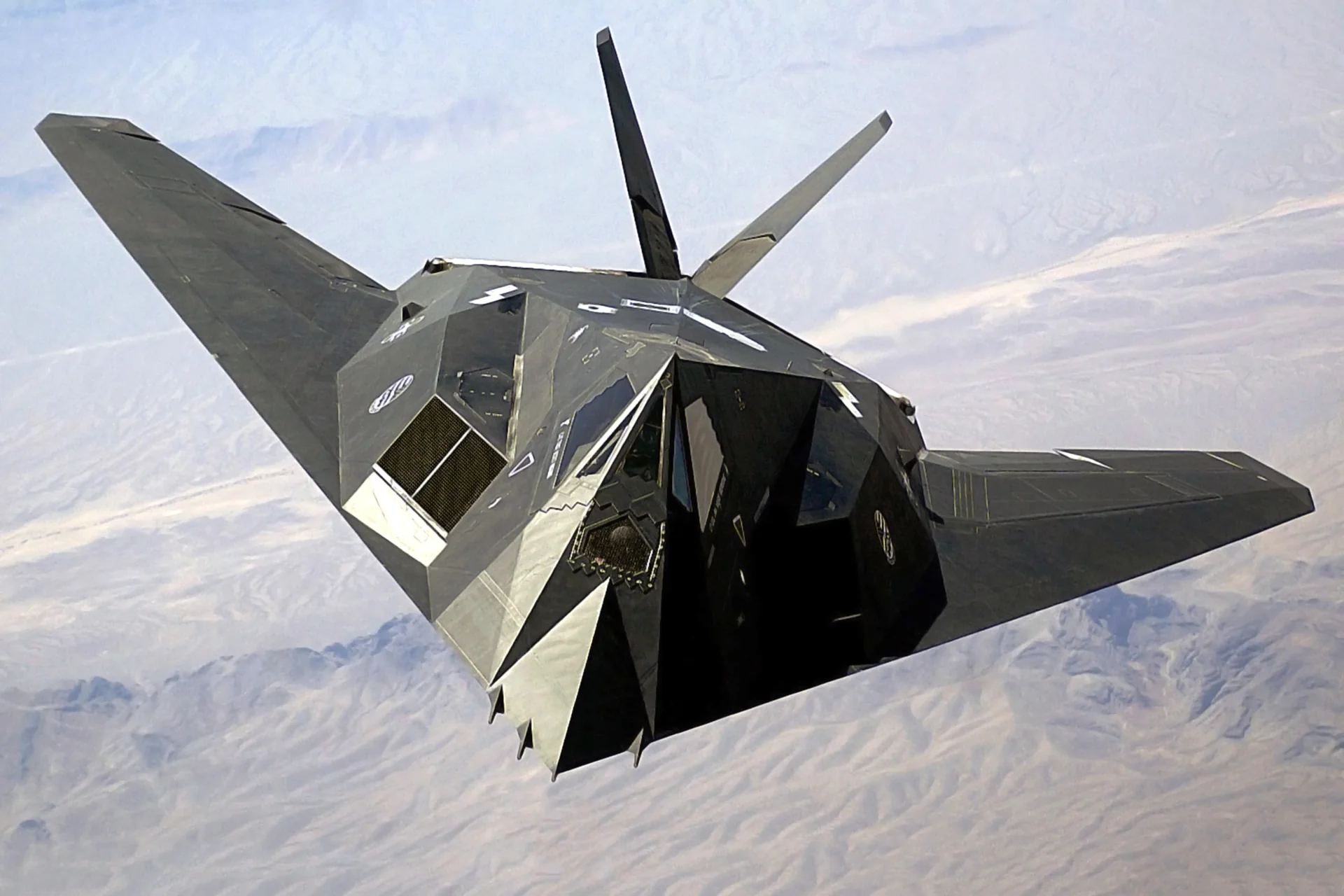
Lockheed F-117A NighthawkStaff Sgt. Aaron Allmon II · Public domain · F-117 Nighthawk Front.

Lockheed F-117A Nighthawk

A single-seat, twin-engine stealth attack aircraft developed by Lockheed.
Military jet設定檔選項:1 個

瞭解飛機

Lockheed developed the F-117A to attack high-value targets while reducing radar detection. Its low-observable design was the basis of the first operational stealth aircraft. A single pilot operates the aircraft, powered by two General Electric F404-F1D2 engines.

Lockheed F-117A Nighthawk

Crew
One↗
Engines
Two General Electric F404-F1D2↗

USAF Museum F-117A reference

Wingspan
43 ft 4 in↗
Length
65 ft 11 in↗
Maximum weight
52,500 lb↗
Internal stores capacity
5,000 lb↗

在 AirframeDB 上了解這款航空器

Low-observable development and a test-aircraft survivor

Developed around reducing detection by radar, the F-117A first flew on 18 June 1981. The 4450th Tactical Group reached initial operating capability in October 1983, several years before the aircraft became publicly familiar. Its first combat use was in Panama in December 1989, followed by the Gulf conflict of 1990–1991.

The National Museum of the USAF records 59 production aircraft built between 1981 and 1990. Its exhibit is the second F-117A, used for development testing from 1981 to 1991. That individual history explains why a museum airframe can represent the programme’s experimental work rather than a front-line combat career.

Pitch commands and Mach hold

The 2023 MSFS 2020 guide describes +6G and -2G commands at full aft and forward stick. Mach hold changes pitch to maintain Mach; altitude, heading and destination/navigation hold are also documented.

公開來源 4
  1. Lockheed F-117A NighthawkMuseum aircraft history and technical notes
  2. F-117A User Guide — version 1.225 June 2023 · MSFS 2020 guide
  3. F-117 Nighthawk for Microsoft Flight SimulatorOriginal MSFS product · checked 11 October 2026
  4. F-117 Nighthawk for Microsoft Flight Simulator 2024Separate MSFS 2024 product · checked 11 October 2026

設定檔如何建模

Lockheed F-117A Nighthawk

Free + Pro
MSFS 2020MSFS 2024Aerial Simulations

Lockheed developed the F-117A to attack high-value targets while reducing radar detection. Its low-observable design was the basis of the first operational stealth aircraft. A single pilot operates the aircraft, powered by two General Electric F404-F1D2 engines.

Aerial Simulations has separate original MSFS and MSFS 2024 products. The preserved June 2023 version 1.2 guide describes the MSFS 2020 implementation.

The 0.55 baseline spring has no low-speed blend or high-speed stiffening. A small 0.04 aerodynamic-load term uses a 300-KIAS reference; these are inherited force estimates.

Trim relief and local force trim are off. Gear-motion texture remains enabled, while flap, spoiler, reverse-thrust and engine-vibration cues are disabled.

此確切修訂版尚未開放公開安裝。

Controls and trim

The MSFS 2020 guide describes +6G at full aft stick and -2G at full forward stick, with angle-of-attack limits. These commanded-load values describe the add-on’s pitch logic. The profile’s fixed-centre spring and damping remain estimates rather than a measured F-117 force law.

F-117A User Guide — version 1.2

Equipment cues

The product listings include radar-cross-section monitoring, custom Mach hold, a drag chute and exterior animations. Gear-motion texture uses observed movement. No carrier, catapult or afterburner effect is introduced.

F-117 Nighthawk for Microsoft Flight SimulatorF-117 Nighthawk for Microsoft Flight Simulator 2024

Autopilot

The guide’s autopilot has altitude, pitch-based Mach, heading and destination/navigation modes. Mach hold changes pitch rather than throttle. The guide does not publish calibrated servo targets, so physical autopilot following and neutral hold stay off.

F-117A User Guide — version 1.2

About the values

Gains are normalized profile estimates. Physical hand force depends on the device and its output limits. Indicated-speed references are tuning scales; physical acceptance of revision 2 remains pending.

Master gain & control system

Master gain85%

施加於模型產出的一切、在裝置上限之前的最終整體輸出縮放。

調高: 一切(彈簧、載荷、效果)一同增強。

調低: 一切一同變柔。

設定理由: Scales overall profile strength while preserving effect balance, subject to device and output limits.

Forces

Spring strength55%

把搖桿拉回中央的基礎回中力。其他所有力都疊加在它之上。太低,正常飛行中搖桿會發軟;太高,它會與你的手較勁,並掩蓋疊加其上的細微提示。

調高: 更硬的回中,更抗手。

調低: 更軟的桿,只靠氣動載荷。

設定理由: The inherited 0.55 spring supplies a fixed centre. Low-speed airspeed blending and high-speed stiffening are disabled.

Spring deadband4%

中央附近彈簧保持安靜的小中立區,讓靜止時的微小移動不會咔嗒作響。更寬更安穩但更松,更窄更精確但可能在中央附近抖動。

調高: 更安靜但更松的中央,曠量更大。

調低: 更緊的中央,靜止時可能抖動。

設定理由: Sets travel around the centre before the baseline spring resists. Smaller values engage it sooner.

Overall aerodynamic load4%

作用於兩條持續軸載荷的主縮放,在它們各自的獨立平衡之前施加。設定檔通常不動它,而是調校兩條軸載荷。

調高: 兩軸載荷一同加重。

調低: 兩軸一同減輕。

設定理由: The 0.04 gain adds a small aerodynamic-load term alongside the fixed-centre spring. It does not reproduce the guide’s commanded-G law.

Airspeed blendingFalse

啟用低速彈簧介入視窗(上面的起始/全強度節數)。關閉時彈簧在所有速度下恆定。

設定理由: Allows baseline spring strength to rise with indicated airspeed where the control law permits it.

Low-speed spring floor50%

在靜止、空速尚未產生氣動力之前,彈簧還剩多少。下限高,停機時搖桿結實;下限低,則是停放輕型飛機那種鋼索鬆弛的感覺。

調高: 停機和滑行時桿更結實。

調低: 停機時桿發軟,只隨速度甦醒。

設定理由: Sets low-speed spring strength as a fraction of baseline when blending is enabled. One keeps full strength.

Spring engagement start20 kt

彈簧從低速下限開始向全強度攀升的空速:起飛滑跑中操縱面"甦醒"的那一刻。

設定理由: Sets the IAS where the low-speed spring blend starts rising. This is a feel threshold, not a flight limit.

Spring engagement full90 kt

彈簧達到全強度的空速。從起點到這裡,隨著氣流在操縱面上增強,回中逐漸變硬。

設定理由: Sets the IAS where the low-speed blend reaches baseline strength; high-speed stiffening also uses it.

力回饋調校速度300

氣動載荷達到設計滿值的指示空速。它把整條載荷曲線錨定在飛機真實的速度範圍:172在110節就載滿,噴氣機要晚得多。

調高: 載荷來得更晚;桿輕到更高速度。

調低: 載荷來得更早,巡航更沉。

設定理由: The retained 300-KIAS reference is the profile’s aerodynamic load scale; it is not a published F-117 cruise speed or limit.

Centre firmness vs speed0%

在偏轉載荷之外,回中本身隨速度變硬的程度。零則中央手感恆定;越大,巡航時回中越硬,起落航線上越松。

調高: 中央隨速度明顯變硬。

調低: 任何速度下中央手感恆定。

設定理由: Adds permitted spring resistance above the full-blend speed. Zero removes this high-speed increase.

Centre stiffening cap5

速度驅動的中央變硬上限,防止高速飛行把彈簧無限上緊。

調高: 高速允許更多總硬化。

調低: 硬化更早封頂。

設定理由: Limits the squared airspeed ratio used for high-speed spring stiffening; it is not a device-force cap.

Aileron load100%

由副翼偏轉和空速產生的持續橫滾載荷,獨立於俯仰調校。與升降舵載荷一起,決定評測中常說的操縱協調比。

調高: 橫滾力更重。

調低: 副翼更輕更靈。

設定理由: Scales roll aerodynamic loading. The separate roll spring curve also affects total axis balance.

Elevator load100%

由升降舵偏轉和空速產生的持續俯仰載荷,獨立於橫滾調校。這是決定機型俯仰重量的主槓桿。它不影響副翼、彈簧、配平或抖振力。

調高: 速度下持續俯仰力更重。

調低: 升降舵更輕,握持更省力。

設定理由: Scales pitch aerodynamic loading; pitch spring travel and trim responses are separate settings.

Max output force55%

每個穩態俯仰或橫滾力到達裝置前的上限,防止猛烈機動中砸擊或飽和硬體。

調高: 削波前更高的穩態力峰值。

調低: 更柔的上限;猛烈機動更早被抹平。

設定理由: Caps directed-force output. Native spring effects and device limits remain separate.

Trim

Trim relief (elevator)30%

升降舵配平緩解持續俯仰力、移動桿的安定位置的強度。在100 %時,配平得當的飛機不需要保持壓力——正是真實飛行中"用配平消掉載荷"的流程。

調高: 配平消掉更多持續力;100 %時滿配平可完全抵消。

調低: 即使配平也仍要持續用力。

設定理由: The stored pitch authority is inactive because trim relief is disabled; simulator trim does not move the hardware neutral through this effect.

Trim relief (aileron)30%

橫滾配平的同類緩解。多數通航機型沒有真正的副翼配平,所以保持為零;有橫滾配平的機型獲得相應的值。

調高: 橫滾配平消掉更多持續力。

調低: 橫滾配平作用更小。

設定理由: Scales supported roll-trim relief and permitted centre movement. Zero removes roll response.

Effect gains · Ground

Runway rumble36%

由輪速和地面型別(鋪裝、草地、礫石)產生的滾動振動。

調高: 桿上更強的地面質感。

調低: 更平滑的滑行。

設定理由: Sets rolling texture strength, modified by speed, surface and undercarriage configuration.

Gear bumps30%

來自伸縮縫、車轍和粗糙地面的短促離散顛簸,為持續隆隆聲打上標點。

調高: 接縫與車轍的衝擊更清晰。

調低: 更柔的地面細節。

設定理由: Sets gear-bump texture during ground motion, separate from touchdown impact.

Effect gains · Airframe

Stall buffet15%

接近失速及失速警告響起時的機體抖動:這副機翼宣告不滿的音量。斷失乾脆的機型抖振收斂,讓喇叭承擔警告。

調高: 更強的失速前顫抖。

調低: 更含蓄的機翼;警告交給喇叭。

設定理由: Sets stall-buffet strength. Zero removes the cue without changing simulator stalls or warnings.

Mach buffet0%

接近馬赫極限的跨音速抖振。對接近MMO的噴氣機有意義,對到不了那裡的活塞機和渦槳機為零。

調高: 接近馬赫極限時更強的跨音速抖振。

調低: 高馬赫下更平滑的飛行。

設定理由: Sets high-Mach buffet strength; onset and full-strength thresholds are separate.

Flap buffet0%

襟翼伸入氣流後機體的低頻振動,發生在它們真正做功的速度視窗內。

調高: 襟翼做功時更粗糙的飛行。

調低: 更柔的進近襟翼。

設定理由: Flap buffet is disabled; conventional flap behavior is not inferred from the shared force parent.

Gear buffet10%

可收放起落架懸在氣流中引起的機體鼓振。固定起落架機型為零,它們的機體外形從不改變。

調高: 放起落架時更多鼓振。

調低: 放起落架飛行更乾淨。

設定理由: Sets gear aerodynamic buffet; movement and ground-contact cues are separate.

Stick shaker50%

由飛機自身失速警告系統觸發的專用抖桿器振動。只有真有抖桿器的機型才有值;其餘全靠氣動抖振和喇叭。

調高: 更硬的抖桿器。

調低: 更含蓄的抖桿器。

設定理由: Sets triggered shaker strength; inactive while the shaker feature is disabled.

Spoiler buffet0%

速度中展開的擾流板或減速板帶來的抖動。沒有的機型為零。

調高: 擾流板展開時更多晃動。

調低: 更含蓄的擾流板。

設定理由: Spoiler buffet is disabled; a spoiler cue is not inferred from the shared force parent.

Effect gains · Engine, mechanical & drag

Touchdown thump88%

機輪觸及跑道那一下的單次衝擊,按下沉率縮放:輕柔著陸是耳語,結實到達是一記悶響。

調高: 觸地時更硬的一擊。

調低: 更柔的到達。

設定理由: Sets landing-impact strength; landing telemetry and response shape determine the pulse.

Reverse rumble0%

反推或槳葉beta區工作時的滑跑振動。無反推機型為零。

調高: 反推下更粗糙的滑跑。

調低: 更含蓄的反推。

設定理由: Reverse-thrust vibration is disabled.

Engine rumble0%

從慢車到全功率跟隨轉速的持續動力裝置振動——前方有東西在燒油的永恆提醒。

調高: 桿裡更多引擎。

調低: 更含蓄的引擎。

設定理由: Engine rumble is off, alongside simulator engine-vibration following. No measured F-117 engine or afterburner vibration is assigned.

Flap motion0%

僅在模擬器報告襟翼舵面確實移動時的持續振動。它跟隨真實作動器的運動和故障,而非估算的計時器。

調高: 襟翼移動中更多振動。

調低: 更含蓄的襟翼行程。

設定理由: Flap-motion texture is disabled.

Flap drag0%

襟翼阻力在速度中帶來的持續俯仰力變化。放襟翼應該改變你手裡握著的東西,而不只是發出聲音。

調高: 放襟翼時更大的力變化。

調低: 襟翼引起的配平漂移更少。

設定理由: This independently configured effect remains subject to valid simulator telemetry and bounded device output.

Spoiler drag0%

展開擾流板帶來的持續載荷變化。沒有的機型為零。

調高: 擾流板更大的載荷變化。

調低: 更少。

設定理由: This independently configured effect remains subject to valid simulator telemetry and bounded device output.

Flap detent click0%

襟翼手柄每個卡位上短促的機械咔嗒。是手柄,不是舵面。

調高: 更清脆的卡位咔嗒。

調低: 更輕的咔嗒。

設定理由: Discrete flap-step texture is disabled.

Flap arrival0%

襟翼舵面行程完成時機體的輕微安定,由舵面到位驅動,而非手柄指令。

調高: 到達卡位時更結實的安定。

調低: 更柔的到位。

設定理由: Flap-arrival texture is disabled.

Autopilot follow

AP follow authority5%

自動駕駛指令可以讓桿實際移動多遠。在MSFS中保持極小,因為移動的軸可能被讀回為飛行員輸入;零則完全停用跟隨。

調高: 自動駕駛讓你的桿移動得明顯更多。

調低: 幾乎察覺不到的跟隨。

設定理由: Sets admitted AP-follow gain, not a percentage of travel. Runtime ownership and input limits still apply.

Stick feel

StickFeel · Trim feel enabledFalse

Whether this feature is active in this profile.

設定理由: Retained for compatibility and group membership. Trim relief, rather than this flag, controls centre movement.

StickFeel · Trim relief enabledFalse

Whether this feature is active in this profile.

設定理由: Trim relief is disabled. The guide’s simulator trim adjustment does not establish a physical neutral-to-trim relationship.

StickFeel · Force trim enabledFalse

Whether this feature is active in this profile.

設定理由: Enables local force trim, separate from aircraft-owned trim and add-on integration qualification.

StickFeel · G load enabledFalse

Whether this feature is active in this profile.

設定理由: Allows load-factor changes to modify permitted spring laws. Passive fly-by-wire feel can suppress it.

StickFeel · Rate damping enabledTrue

Whether this feature is active in this profile.

設定理由: Enables rate damping with the configured coefficients and control law.

Autopilot

Autopilot · Follow enabledFalse

Whether this feature is active in this profile.

設定理由: The guide’s autopilot has altitude, pitch-based Mach, heading and destination/navigation modes. Mach hold changes pitch rather than throttle. The guide does not publish calibrated servo targets, so physical autopilot following and neutral hold stay off.

Autopilot · Neutral hold enabledFalse

Whether this feature is active in this profile.

設定理由: Permits centering hold during a supported AP state, separate from following a moving target.

Autopilot · Neutral hold strength0.6

設定理由: Sets admitted AP neutral-hold strength; inactive while neutral hold is disabled.

Aero

Aero · EnabledTrue

Whether this feature is active in this profile.

設定理由: Enables aerodynamic cues; each still needs nonzero strength and its simulator conditions.

Aero · Max flap index2

Where this effect reaches full strength (or has fully faded, for washouts).

調高: a more gradual build to a later peak.

調低: a quicker build.

設定理由: Sets the final flap index for detent normalization. UP plus three detents uses maximum index3.

Aero · Min flap index2

Where this effect begins fading in.

調高: the effect begins later.

調低: it begins earlier.

設定理由: Sets the first flap detent that admits buffet; this is a handle index, not degrees.

Aero · Shaker enabledFalse

Whether this feature is active in this profile.

設定理由: Permits shaker at supported warning conditions; the switch does not establish aircraft equipment.

Ground

Ground · EnabledTrue

Whether this feature is active in this profile.

設定理由: Enables ground effects; each still needs its own strength and contact or motion telemetry.

Engine

Engine · EnabledFalse

Whether this feature is active in this profile.

設定理由: Enables engine cues with nonzero settings and valid running-engine telemetry.

Mechanical

Mechanical · EnabledTrue

Whether this feature is active in this profile.

設定理由: Enables accessory cues with configured strengths and observed accessory movement.

Mechanical · Gain0.12

The strength of this effect.

調高: a stronger effect.

調低: a weaker one.

設定理由: Sets texture from observed gear movement, separate from aerodynamic and touchdown effects.

Stick alive

StickAlive · EnabledFalse

Whether this feature is active in this profile.

設定理由: This independently configured effect remains subject to valid simulator telemetry and bounded device output.

Sim engine vibrationFalse

在可用時使用模擬器自身的引擎振動訊號,而非合成的隆隆聲。

設定理由: This independently configured effect remains subject to valid simulator telemetry and bounded device output.

Hydraulics

Hydraulics · Loss load increase0

設定理由: Hydraulic-loss loading is zero. An aircraft-specific F-117 failure-to-inceptor response has not been established.

全部設定檔設定
估算的設定檔設定
引數數值控制作用及原因
Spring strength0.55 The inherited 0.55 spring supplies a fixed centre. Low-speed airspeed blending and high-speed stiffening are disabled.
Spring deadband0.04 Sets travel around the centre before the baseline spring resists. Smaller values engage it sooner.
Force gain0.04 The 0.04 gain adds a small aerodynamic-load term alongside the fixed-centre spring. It does not reproduce the guide’s commanded-G law.
Master gain0.85 Scales overall profile strength while preserving effect balance, subject to device and output limits.
Dynamic-pressure blendFalse Allows baseline spring strength to rise with indicated airspeed where the control law permits it.
Minimum spring factor0.5 Sets low-speed spring strength as a fraction of baseline when blending is enabled. One keeps full strength.
Spring wake-up speed20 ktSets the IAS where the low-speed spring blend starts rising. This is a feel threshold, not a flight limit.
Spring full-strength speed90 ktSets the IAS where the low-speed blend reaches baseline strength; high-speed stiffening also uses it.
力回饋調校速度300.0 ktThe retained 300-KIAS reference is the profile’s aerodynamic load scale; it is not a published F-117 cruise speed or limit.
Airspeed spring stiffening0 Adds permitted spring resistance above the full-blend speed. Zero removes this high-speed increase.
Airspeed stiffening cap5 Limits the squared airspeed ratio used for high-speed spring stiffening; it is not a device-force cap.
Aileron force scale1 Scales roll aerodynamic loading. The separate roll spring curve also affects total axis balance.
Elevator force scale1 Scales pitch aerodynamic loading; pitch spring travel and trim responses are separate settings.
Maximum output force0.55 Caps directed-force output. Native spring effects and device limits remain separate.
StickFeel · Trim feel enabledFalse Retained for compatibility and group membership. Trim relief, rather than this flag, controls centre movement.
StickFeel · Trim relief enabledFalse Trim relief is disabled. The guide’s simulator trim adjustment does not establish a physical neutral-to-trim relationship.
StickFeel · Elevator authority0.3 The stored pitch authority is inactive because trim relief is disabled; simulator trim does not move the hardware neutral through this effect.
StickFeel · Aileron authority0.3 Scales supported roll-trim relief and permitted centre movement. Zero removes roll response.
StickFeel · Force trim enabledFalse Enables local force trim, separate from aircraft-owned trim and add-on integration qualification.
StickFeel · G load enabledFalse Allows load-factor changes to modify permitted spring laws. Passive fly-by-wire feel can suppress it.
StickFeel · Rate damping enabledTrue Enables rate damping with the configured coefficients and control law.
Autopilot · Follow enabledFalse The guide’s autopilot has altitude, pitch-based Mach, heading and destination/navigation modes. Mach hold changes pitch rather than throttle. The guide does not publish calibrated servo targets, so physical autopilot following and neutral hold stay off.
Autopilot · Follow authority0.05 Sets admitted AP-follow gain, not a percentage of travel. Runtime ownership and input limits still apply.
Autopilot · Neutral hold enabledFalse Permits centering hold during a supported AP state, separate from following a moving target.
Autopilot · Neutral hold strength0.6 Sets admitted AP neutral-hold strength; inactive while neutral hold is disabled.
Aero · EnabledTrue Enables aerodynamic cues; each still needs nonzero strength and its simulator conditions.
Aero · Gain0.15 Sets stall-buffet strength. Zero removes the cue without changing simulator stalls or warnings.
Aero · Gain0 Sets high-Mach buffet strength; onset and full-strength thresholds are separate.
Aero · Gain0 Flap buffet is disabled; conventional flap behavior is not inferred from the shared force parent.
Aero · Max flap index2 Sets the final flap index for detent normalization. UP plus three detents uses maximum index3.
Aero · Min flap index2 Sets the first flap detent that admits buffet; this is a handle index, not degrees.
Aero · Gain0.1 Sets gear aerodynamic buffet; movement and ground-contact cues are separate.
Aero · Shaker enabledFalse Permits shaker at supported warning conditions; the switch does not establish aircraft equipment.
Aero · Amplitude0.5 Sets triggered shaker strength; inactive while the shaker feature is disabled.
Ground · EnabledTrue Enables ground effects; each still needs its own strength and contact or motion telemetry.
Ground · Gain0.36 Sets rolling texture strength, modified by speed, surface and undercarriage configuration.
Ground · Gain0.3 Sets gear-bump texture during ground motion, separate from touchdown impact.
Ground · Gain0.88 Sets landing-impact strength; landing telemetry and response shape determine the pulse.
Ground · Gain0 Reverse-thrust vibration is disabled.
Engine · EnabledFalse Enables engine cues with nonzero settings and valid running-engine telemetry.
Engine · Gain0 Engine rumble is off, alongside simulator engine-vibration following. No measured F-117 engine or afterburner vibration is assigned.
Mechanical · EnabledTrue Enables accessory cues with configured strengths and observed accessory movement.
Mechanical · Gain0 Flap-motion texture is disabled.
Mechanical · Gain0.12 Sets texture from observed gear movement, separate from aerodynamic and touchdown effects.
StickAlive · EnabledFalse This independently configured effect remains subject to valid simulator telemetry and bounded device output.
StickAlive · Use sim engine vibrationFalse This independently configured effect remains subject to valid simulator telemetry and bounded device output.
Hydraulics · Loss load increase0 Hydraulic-loss loading is zero. An aircraft-specific F-117 failure-to-inceptor response has not been established.
Aero · Gain0 Spoiler buffet is disabled; a spoiler cue is not inferred from the shared force parent.
AeroDrag · Gain0 This independently configured effect remains subject to valid simulator telemetry and bounded device output.
Mechanical · Gain0 Discrete flap-step texture is disabled.
Mechanical · Gain0 Flap-arrival texture is disabled.
公開來源 4
  1. Lockheed F-117A NighthawkMuseum aircraft history and technical notes
  2. F-117A User Guide — version 1.225 June 2023 · MSFS 2020 guide
  3. F-117 Nighthawk for Microsoft Flight SimulatorOriginal MSFS product · checked 11 October 2026
  4. F-117 Nighthawk for Microsoft Flight Simulator 2024Separate MSFS 2024 product · checked 11 October 2026

社群與糾錯

如果你的真機經驗表明本頁有誤,請在此指正。

飛行員糾錯

飛過這款飛機?糾正本頁。

本頁基於引用資料構建,而真機經驗勝過任何引用。 請引用有誤的主張,並告訴我們真機的實際表現。糾錯 將交由維護者稽核,並納入本研究的下一次修訂。

機庫閒談

關於 Lockheed F-117A Nighthawk 的飛行與調校的公開討論(社群論壇)。上方的糾錯將私下送達維護者;機庫閒談是公開的。

Lockheed F-117A Nighthawk 還沒有機庫閒談。來做第一個吧。

社群

該機型的社群配置

該機型還沒有社群配置。 調出了自己的風格? 分享一個配置 它就會出現在這裡。