機型庫Columbia 400 / Cessna Corvalis
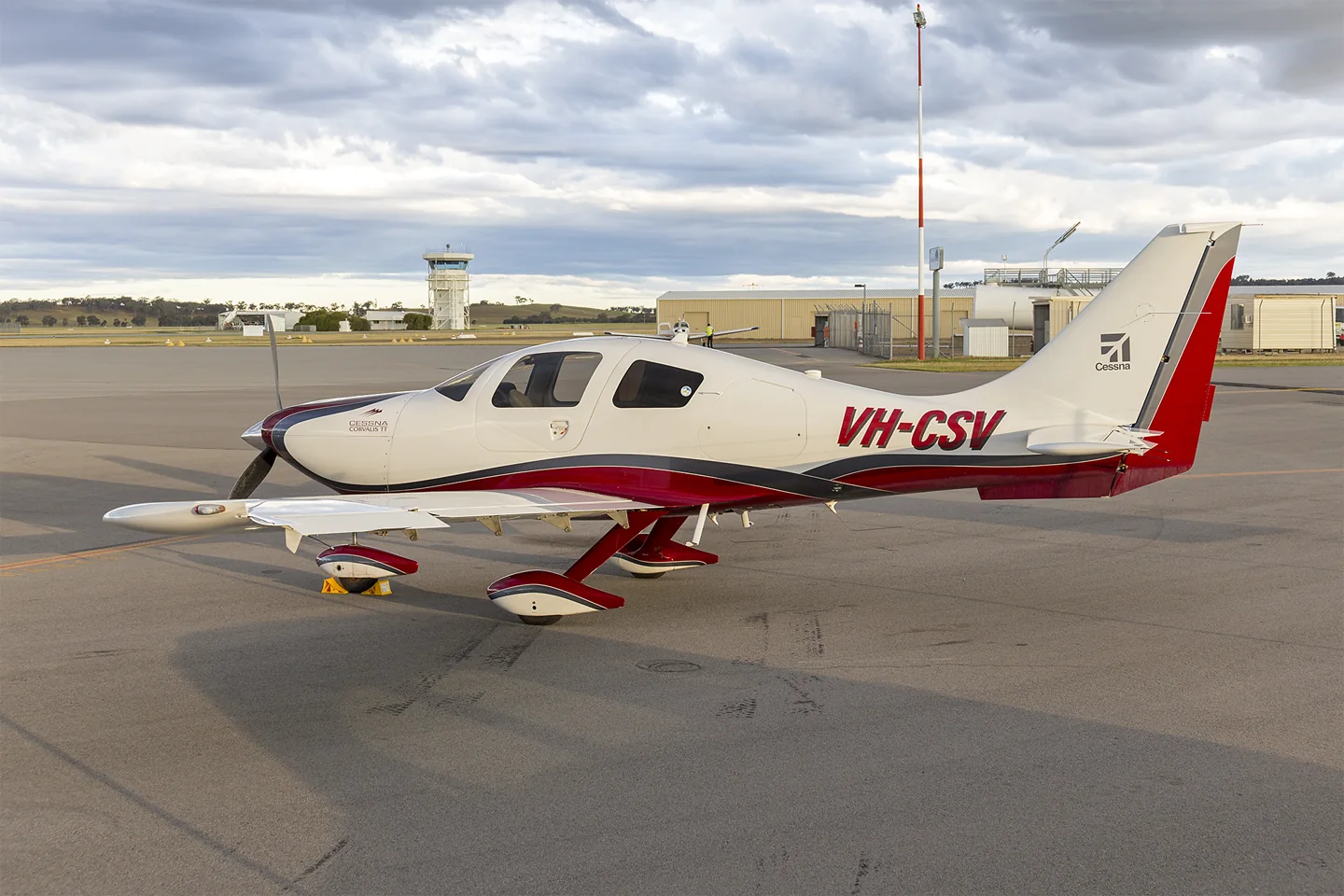
Columbia 400 / Cessna CorvalisBidgee · CC BY-SA 3.0 · Cessna 400 Corvalis TT (VH-CSV) at Wagga Wagga Airport (1).

Columbia 400 / Cessna Corvalis

A composite, low-wing touring single with fixed gear and a turbocharged engine.
General aviation設定檔選項:1 個

瞭解飛機

Originally the Columbia 400, the aircraft became part of Cessna's range after the Columbia acquisition. It was marketed as the Corvalis, with later development leading to the TTx. Its smooth composite airframe is visually distinct from Cessna's traditional metal high-wing singles.

The Columbia 400, Corvalis and TTx names mark equipment and production developments within the same lineage.

Aircraft / family

Propulsion
Single piston↗
Configuration
Composite · Low wing · Fixed gear↗

Cessna 400 · Specifications (Cessna 400) · real aircraft; source units retained

Length
25 ft 2 in (7.67 m)↗
Wingspan
36 ft 1 in (11.00 m)↗
Height
9 ft 0 in (2.74 m)↗
Wing area
141 sq ft (13.1 m² )↗
Empty weight
2,500 lb (1,134 kg)↗
Max takeoff weight
3,600 lb (1,633 kg)↗
Powerplant
1 × Teledyne Continental TSIO-550-C air-cooled flat-6 engine , 310 hp (230 kW)↗
Maximum speed
235 kn (270 mph, 435 km/h) calibrated airspeed↗
Cruise speed
235 kn (270 mph, 435 km/h) true airspeed at 25,000 ft (7,600 m)↗
Stall speed
59 kn (68 mph, 109 km/h)↗

在 AirframeDB 上了解這款航空器

The turbocharged member of the family

Columbia’s 400 paired its composite airframe with a turbocharged Continental engine, while the contemporary 350 was normally aspirated. The 400SLX in this report carried Garmin G1000 avionics; other 400 configurations used Avidyne equipment.

A fast aircraft with one awkward door handle

The reviewer had wanted a Columbia 400 flight since Sun ’n Fun, but the dealer struggled to keep a demonstrator available. An owner’s aircraft finally provided the opportunity. Settling into the left seat brought an immediate appreciation of the cabin layout and furnishings, alongside one personal difficulty: reaching the door handle with the seat positioned far forward.

The flight combined a climb through broken cloud, a cruise-speed check and a demonstration of the speed brakes. Their deployment brought a little buffet and a pronounced change in the descent. Slow flight and landing left a favourable impression, and the reviewer returned to the hangar thinking about comfort as much as performance. The difficult-to-reach handle remained the humorous qualification to an otherwise enthusiastic report.

Crossing the country in a nearly new 400SLX

Ells’s trip put a nearly new demonstrator to work over a long westbound journey. Headwinds influenced the choice of altitude, and he compared the aircraft’s progress with its fuel consumption instead of simply chasing its advertised maximum speed. The aeroplane he flew did not quite reach the published book speeds, a distinction he kept visible in his report.

The cockpit became more persuasive with use. The engine display helped him follow mixture adjustments, and a keypad near the armrest changed his mind about an option he had initially considered excessive. Over the hours and several landings, the cabin comfort and integrated avionics made a strong impression.

A winter ferry changes destination

Cox began with a transatlantic delivery in mind, but severe cold in northeastern Canada exposed difficulties with cabin heating and oil temperature. Looking ahead to still colder conditions over Greenland, he decided the aircraft needed a winterisation kit. The immediate job became returning it from Maine to its dealer in North Carolina.

That southbound flight brought another weather problem, with widespread icing forecasts and strong winds aloft. His account describes choosing a coastal route below the weather, continually checking conditions and stopping at Atlantic City before continuing in improving skies. He finished the day back at the dealer rather than across the ocean. The episode records his decisions and their outcome; it should be read as a particular ferry experience, with the limitations of that aircraft’s preparation.

公開來源 10
  1. Cessna 400Research background · Wikipedia revision 1359871649 · retrieved 2026-09-12
  2. Microsoft Flight Simulator aircraft manuals
  3. MSFS 2024 FAQ and edition aircraft inventory
  4. X-Plane 11 Desktop Manual
  5. X-Plane aircraft and avionics manuals
  6. The need for speed — Flying the Columbia 400Published under Janice Wood’s byline · 19 August 2005
  7. Columbia 400: A Whole Lot of Get Up and GoSteven W. Ells · 5 October 2007
  8. Low Level By ColumbiaBill Cox · 24 May 2011
  9. Release Notes — Sim Update 2 [1.4.20.0]15 May 2025 · aircraft-specific package revisions
  10. ICAO Doc 8643 — aircraft type designatorsPublic search data retrieved 2026-09-14; authority update 2026-09-03

設定檔如何建模

Columbia 400 / Cessna Corvalis

Free + Pro
MSFS 2024X-Plane 11

Originally the Columbia 400, the aircraft became part of Cessna's range after the Columbia acquisition. It was marketed as the Corvalis, with later development leading to the TTx. Its smooth composite airframe is visually distinct from Cessna's traditional metal high-wing singles.

This starting point selects Columbia 400 / Cessna Corvalis. Its aircraft-level settings do not select a particular developer’s custom systems.

Spring resistance builds with the selected airspeed response. A separate aerodynamic term adds speed-dependent control load.

Valid trim provides the configured pressure relief. Autopilot following is enabled for supported control references.

Controls and trim

The Columbia 400 POH documents elevator trim tabs and checks involving autopilot trim. Speed-brake checks are conditional on installed equipment. Columbia, Corvalis and later TTx names retain their production and avionics scope rather than describing one interchangeable configuration. A normal-landing speed range supplies procedure context rather than the profile's general resistance reference.

C400 XPlane POH

About the values

The gains are normalized profile settings. They describe the chosen effect balance; hand force depends on the device and its output limits. IAS references are tuning values rather than operating limits. Physical acceptance of this revision remains pending.

Master gain & control system

Master gain85%

施加於模型產出的一切、在裝置上限之前的最終整體輸出縮放。

調高: 一切(彈簧、載荷、效果)一同增強。

調低: 一切一同變柔。

設定理由: Scales overall profile strength while preserving effect balance, subject to device and output limits.

Forces

Spring strength74%

把搖桿拉回中央的基礎回中力。其他所有力都疊加在它之上。太低,正常飛行中搖桿會發軟;太高,它會與你的手較勁,並掩蓋疊加其上的細微提示。

調高: 更硬的回中,更抗手。

調低: 更軟的桿,只靠氣動載荷。

設定理由: The selected mechanical-control response provides nominal resistance for the Columbia reference; optional speed brakes are separate equipment. The baseline spring is 0.74. Its low-speed blend reaches baseline strength at 87.5 KIAS.

C400 XPlane POH
Spring deadband4%

中央附近彈簧保持安靜的小中立區,讓靜止時的微小移動不會咔嗒作響。更寬更安穩但更松,更窄更精確但可能在中央附近抖動。

調高: 更安靜但更松的中央,曠量更大。

調低: 更緊的中央,靜止時可能抖動。

設定理由: Sets travel around the centre before the baseline spring resists. Smaller values engage it sooner.

Overall aerodynamic load80%

作用於兩條持續軸載荷的主縮放,在它們各自的獨立平衡之前施加。設定檔通常不動它,而是調校兩條軸載荷。

調高: 兩軸載荷一同加重。

調低: 兩軸一同減輕。

設定理由: The aerodynamic-load gain is 0.8 with an indicated-speed reference of 175 KIAS. This supplies speed-dependent loading alongside the spring.

Airspeed blendingTrue

啟用低速彈簧介入視窗(上面的起始/全強度節數)。關閉時彈簧在所有速度下恆定。

設定理由: Allows baseline spring strength to rise with indicated airspeed where the control law permits it.

Low-speed spring floor50%

在靜止、空速尚未產生氣動力之前,彈簧還剩多少。下限高,停機時搖桿結實;下限低,則是停放輕型飛機那種鋼索鬆弛的感覺。

調高: 停機和滑行時桿更結實。

調低: 停機時桿發軟,只隨速度甦醒。

設定理由: Sets low-speed spring strength as a fraction of baseline when blending is enabled. One keeps full strength.

Spring engagement start20 kt

彈簧從低速下限開始向全強度攀升的空速:起飛滑跑中操縱面"甦醒"的那一刻。

設定理由: Sets the IAS where the low-speed spring blend starts rising. This is a feel threshold, not a flight limit.

Spring engagement full87.5 kt

彈簧達到全強度的空速。從起點到這裡,隨著氣流在操縱面上增強,回中逐漸變硬。

設定理由: Sets the IAS where the low-speed blend reaches baseline strength; high-speed stiffening also uses it.

力回饋調校速度175

氣動載荷達到設計滿值的指示空速。它把整條載荷曲線錨定在飛機真實的速度範圍:172在110節就載滿,噴氣機要晚得多。

調高: 載荷來得更晚;桿輕到更高速度。

調低: 載荷來得更早,巡航更沉。

設定理由: Sets the IAS reference for aerodynamic loading. It is an estimate, not published cruise TAS or a flight limit.

Centre firmness vs speed15%

在偏轉載荷之外,回中本身隨速度變硬的程度。零則中央手感恆定;越大,巡航時回中越硬,起落航線上越松。

調高: 中央隨速度明顯變硬。

調低: 任何速度下中央手感恆定。

設定理由: The high-speed spring-stiffening gain is 0.15. It strengthens the permitted spring response above 87.5 KIAS, with the squared-speed ratio capped at 5.

Centre stiffening cap5

速度驅動的中央變硬上限,防止高速飛行把彈簧無限上緊。

調高: 高速允許更多總硬化。

調低: 硬化更早封頂。

設定理由: Limits the squared airspeed ratio used for high-speed spring stiffening; it is not a device-force cap.

Aileron load72%

由副翼偏轉和空速產生的持續橫滾載荷,獨立於俯仰調校。與升降舵載荷一起,決定評測中常說的操縱協調比。

調高: 橫滾力更重。

調低: 副翼更輕更靈。

設定理由: Roll and pitch aerodynamic scales are 0.72 and 1, respectively. They set the aerodynamic axis balance. No custom spring-travel curve is enabled.

Elevator load100%

由升降舵偏轉和空速產生的持續俯仰載荷,獨立於橫滾調校。這是決定機型俯仰重量的主槓桿。它不影響副翼、彈簧、配平或抖振力。

調高: 速度下持續俯仰力更重。

調低: 升降舵更輕,握持更省力。

設定理由: Scales pitch aerodynamic loading; pitch spring travel and trim responses are separate settings.

Max output force55%

每個穩態俯仰或橫滾力到達裝置前的上限,防止猛烈機動中砸擊或飽和硬體。

調高: 削波前更高的穩態力峰值。

調低: 更柔的上限;猛烈機動更早被抹平。

設定理由: Caps directed-force output. Native spring effects and device limits remain separate.

Trim

Trim relief (elevator)30%

升降舵配平緩解持續俯仰力、移動桿的安定位置的強度。在100 %時,配平得當的飛機不需要保持壓力——正是真實飛行中"用配平消掉載荷"的流程。

調高: 配平消掉更多持續力;100 %時滿配平可完全抵消。

調低: 即使配平也仍要持續用力。

設定理由: Elevator trim tabs support pitch relief, while the profile's authority is an estimate independent of the POH's autopilot-trim check. Pitch authority 0.3 provides load relief and permitted centre movement; roll authority is 0.

C400 XPlane POH
Trim relief (aileron)0%

橫滾配平的同類緩解。多數通航機型沒有真正的副翼配平,所以保持為零;有橫滾配平的機型獲得相應的值。

調高: 橫滾配平消掉更多持續力。

調低: 橫滾配平作用更小。

設定理由: Scales supported roll-trim relief and permitted centre movement. Zero removes roll response.

Effect gains · Ground

Runway rumble40%

由輪速和地面型別(鋪裝、草地、礫石)產生的滾動振動。

調高: 桿上更強的地面質感。

調低: 更平滑的滑行。

設定理由: Sets rolling texture strength, modified by speed, surface and undercarriage configuration.

Gear bumps25%

來自伸縮縫、車轍和粗糙地面的短促離散顛簸,為持續隆隆聲打上標點。

調高: 接縫與車轍的衝擊更清晰。

調低: 更柔的地面細節。

設定理由: Sets gear-bump texture during ground motion, separate from touchdown impact.

Effect gains · Airframe

Stall buffet35%

接近失速及失速警告響起時的機體抖動:這副機翼宣告不滿的音量。斷失乾脆的機型抖振收斂,讓喇叭承擔警告。

調高: 更強的失速前顫抖。

調低: 更含蓄的機翼;警告交給喇叭。

設定理由: Sets stall-buffet strength. Zero removes the cue without changing simulator stalls or warnings.

Mach buffet0%

接近馬赫極限的跨音速抖振。對接近MMO的噴氣機有意義,對到不了那裡的活塞機和渦槳機為零。

調高: 接近馬赫極限時更強的跨音速抖振。

調低: 高馬赫下更平滑的飛行。

設定理由: Sets high-Mach buffet strength; onset and full-strength thresholds are separate.

Flap buffet14%

襟翼伸入氣流後機體的低頻振動,發生在它們真正做功的速度視窗內。

調高: 襟翼做功時更粗糙的飛行。

調低: 更柔的進近襟翼。

設定理由: Sets flap buffet at the configured position and speed gates. Flap movement texture is separate.

Gear buffet0%

可收放起落架懸在氣流中引起的機體鼓振。固定起落架機型為零,它們的機體外形從不改變。

調高: 放起落架時更多鼓振。

調低: 放起落架飛行更乾淨。

設定理由: Sets gear aerodynamic buffet; movement and ground-contact cues are separate.

Stick shaker50%

由飛機自身失速警告系統觸發的專用抖桿器振動。只有真有抖桿器的機型才有值;其餘全靠氣動抖振和喇叭。

調高: 更硬的抖桿器。

調低: 更含蓄的抖桿器。

設定理由: Sets triggered shaker strength; inactive while the shaker feature is disabled.

Effect gains · Engine, mechanical & drag

Touchdown thump65%

機輪觸及跑道那一下的單次衝擊,按下沉率縮放:輕柔著陸是耳語,結實到達是一記悶響。

調高: 觸地時更硬的一擊。

調低: 更柔的到達。

設定理由: Sets landing-impact strength; landing telemetry and response shape determine the pulse.

Reverse rumble0%

反推或槳葉beta區工作時的滑跑振動。無反推機型為零。

調高: 反推下更粗糙的滑跑。

調低: 更含蓄的反推。

設定理由: Sets reverse-thrust vibration with valid reverser and engine conditions. Zero removes the cue.

Engine rumble12%

從慢車到全功率跟隨轉速的持續動力裝置振動——前方有東西在燒油的永恆提醒。

調高: 桿裡更多引擎。

調低: 更含蓄的引擎。

設定理由: Sets estimated engine vibration using configured telemetry and response, not measured cockpit vibration.

Flap motion12%

僅在模擬器報告襟翼舵面確實移動時的持續振動。它跟隨真實作動器的運動和故障,而非估算的計時器。

調高: 襟翼移動中更多振動。

調低: 更含蓄的襟翼行程。

設定理由: Sets texture from observed flap movement; a command without movement does not establish the cue.

Autopilot follow

AP follow authority10%

自動駕駛指令可以讓桿實際移動多遠。在MSFS中保持極小,因為移動的軸可能被讀回為飛行員輸入;零則完全停用跟隨。

調高: 自動駕駛讓你的桿移動得明顯更多。

調低: 幾乎察覺不到的跟隨。

設定理由: Sets admitted AP-follow gain, not a percentage of travel. Runtime ownership and input limits still apply.

Stick feel

StickFeel · Trim feel enabledTrue

Whether this feature is active in this profile.

設定理由: Retained for compatibility and group membership. Trim relief, rather than this flag, controls centre movement.

StickFeel · Trim relief enabledTrue

Whether this feature is active in this profile.

設定理由: Allows trim relief with supported control law and valid telemetry. Axis authorities set its amount.

StickFeel · Force trim enabledFalse

Whether this feature is active in this profile.

設定理由: Enables local force trim, separate from aircraft-owned trim and add-on integration qualification.

StickFeel · G load enabledTrue

Whether this feature is active in this profile.

設定理由: Allows load-factor changes to modify permitted spring laws. Passive fly-by-wire feel can suppress it.

StickFeel · Rate damping enabledTrue

Whether this feature is active in this profile.

設定理由: Enables rate damping with the configured coefficients and control law.

Autopilot

Autopilot · Follow enabledTrue

Whether this feature is active in this profile.

設定理由: Following is on at 0.1 authority when a supported, valid autopilot control reference is available.

Autopilot · Neutral hold enabledFalse

Whether this feature is active in this profile.

設定理由: Permits centering hold during a supported AP state, separate from following a moving target.

Autopilot · Neutral hold strength0.6

設定理由: Sets admitted AP neutral-hold strength; inactive while neutral hold is disabled.

Aero

Aero · EnabledTrue

Whether this feature is active in this profile.

設定理由: Enables aerodynamic cues; each still needs nonzero strength and its simulator conditions.

Aero · Max flap index2

Where this effect reaches full strength (or has fully faded, for washouts).

調高: a more gradual build to a later peak.

調低: a quicker build.

設定理由: Sets the final flap index for detent normalization. UP plus three detents uses maximum index3.

Aero · Min flap index2

Where this effect begins fading in.

調高: the effect begins later.

調低: it begins earlier.

設定理由: Sets the first flap detent that admits buffet; this is a handle index, not degrees.

Aero · Shaker enabledFalse

Whether this feature is active in this profile.

設定理由: Permits shaker at supported warning conditions; the switch does not establish aircraft equipment.

Ground

Ground · EnabledTrue

Whether this feature is active in this profile.

設定理由: Enables ground effects; each still needs its own strength and contact or motion telemetry.

Engine

Engine · EnabledTrue

Whether this feature is active in this profile.

設定理由: Enables engine cues with nonzero settings and valid running-engine telemetry.

Mechanical

Mechanical · EnabledTrue

Whether this feature is active in this profile.

設定理由: Enables accessory cues with configured strengths and observed accessory movement.

Mechanical · Gain0

The strength of this effect.

調高: a stronger effect.

調低: a weaker one.

設定理由: Sets texture from observed gear movement, separate from aerodynamic and touchdown effects.

全部設定檔設定
估算的設定檔設定
引數數值控制作用及原因
Spring strength0.74 The selected mechanical-control response provides nominal resistance for the Columbia reference; optional speed brakes are separate equipment. The baseline spring is 0.74. Its low-speed blend reaches baseline strength at 87.5 KIAS.
Spring deadband0.045 Sets travel around the centre before the baseline spring resists. Smaller values engage it sooner.
Force gain0.8 The aerodynamic-load gain is 0.8 with an indicated-speed reference of 175 KIAS. This supplies speed-dependent loading alongside the spring.
Master gain0.85 Scales overall profile strength while preserving effect balance, subject to device and output limits.
Dynamic-pressure blendTrue Allows baseline spring strength to rise with indicated airspeed where the control law permits it.
Minimum spring factor0.5 Sets low-speed spring strength as a fraction of baseline when blending is enabled. One keeps full strength.
Spring wake-up speed20 ktSets the IAS where the low-speed spring blend starts rising. This is a feel threshold, not a flight limit.
Spring full-strength speed87.5 ktSets the IAS where the low-speed blend reaches baseline strength; high-speed stiffening also uses it.
力回饋調校速度175.0 ktSets the IAS reference for aerodynamic loading. It is an estimate, not published cruise TAS or a flight limit.
Airspeed spring stiffening0.15 The high-speed spring-stiffening gain is 0.15. It strengthens the permitted spring response above 87.5 KIAS, with the squared-speed ratio capped at 5.
Airspeed stiffening cap5 Limits the squared airspeed ratio used for high-speed spring stiffening; it is not a device-force cap.
Aileron force scale0.72 Roll and pitch aerodynamic scales are 0.72 and 1, respectively. They set the aerodynamic axis balance. No custom spring-travel curve is enabled.
Elevator force scale1.0 Scales pitch aerodynamic loading; pitch spring travel and trim responses are separate settings.
Maximum output force0.55 Caps directed-force output. Native spring effects and device limits remain separate.
StickFeel · Trim feel enabledTrue Retained for compatibility and group membership. Trim relief, rather than this flag, controls centre movement.
StickFeel · Trim relief enabledTrue Allows trim relief with supported control law and valid telemetry. Axis authorities set its amount.
StickFeel · Elevator authority0.3 Elevator trim tabs support pitch relief, while the profile's authority is an estimate independent of the POH's autopilot-trim check. Pitch authority 0.3 provides load relief and permitted centre movement; roll authority is 0.
StickFeel · Aileron authority0 Scales supported roll-trim relief and permitted centre movement. Zero removes roll response.
StickFeel · Force trim enabledFalse Enables local force trim, separate from aircraft-owned trim and add-on integration qualification.
StickFeel · G load enabledTrue Allows load-factor changes to modify permitted spring laws. Passive fly-by-wire feel can suppress it.
StickFeel · Rate damping enabledTrue Enables rate damping with the configured coefficients and control law.
Autopilot · Follow enabledTrue Following is on at 0.1 authority when a supported, valid autopilot control reference is available.
Autopilot · Follow authority0.1 Sets admitted AP-follow gain, not a percentage of travel. Runtime ownership and input limits still apply.
Autopilot · Neutral hold enabledFalse Permits centering hold during a supported AP state, separate from following a moving target.
Autopilot · Neutral hold strength0.6 Sets admitted AP neutral-hold strength; inactive while neutral hold is disabled.
Aero · EnabledTrue Enables aerodynamic cues; each still needs nonzero strength and its simulator conditions.
Aero · Gain0.35 Sets stall-buffet strength. Zero removes the cue without changing simulator stalls or warnings.
Aero · Gain0 Sets high-Mach buffet strength; onset and full-strength thresholds are separate.
Aero · Gain0.14 Sets flap buffet at the configured position and speed gates. Flap movement texture is separate.
Aero · Max flap index2 Sets the final flap index for detent normalization. UP plus three detents uses maximum index3.
Aero · Min flap index2 Sets the first flap detent that admits buffet; this is a handle index, not degrees.
Aero · Gain0 Sets gear aerodynamic buffet; movement and ground-contact cues are separate.
Aero · Shaker enabledFalse Permits shaker at supported warning conditions; the switch does not establish aircraft equipment.
Aero · Amplitude0.5 Sets triggered shaker strength; inactive while the shaker feature is disabled.
Ground · EnabledTrue Enables ground effects; each still needs its own strength and contact or motion telemetry.
Ground · Gain0.4 Sets rolling texture strength, modified by speed, surface and undercarriage configuration.
Ground · Gain0.25 Sets gear-bump texture during ground motion, separate from touchdown impact.
Ground · Gain0.65 Sets landing-impact strength; landing telemetry and response shape determine the pulse.
Ground · Gain0 Sets reverse-thrust vibration with valid reverser and engine conditions. Zero removes the cue.
Engine · EnabledTrue Enables engine cues with nonzero settings and valid running-engine telemetry.
Engine · Gain0.12 Sets estimated engine vibration using configured telemetry and response, not measured cockpit vibration.
Mechanical · EnabledTrue Enables accessory cues with configured strengths and observed accessory movement.
Mechanical · Gain0.12 Sets texture from observed flap movement; a command without movement does not establish the cue.
Mechanical · Gain0 Sets texture from observed gear movement, separate from aerodynamic and touchdown effects.
公開來源 11
  1. Cessna 400Research background · Wikipedia revision 1359871649 · retrieved 2026-09-12
  2. C400 XPlane POHColumbia 400 / Cessna Corvalis
  3. Microsoft Flight Simulator aircraft manuals
  4. MSFS 2024 FAQ and edition aircraft inventory
  5. X-Plane 11 Desktop Manual
  6. X-Plane aircraft and avionics manuals
  7. The need for speed — Flying the Columbia 400Published under Janice Wood’s byline · 19 August 2005
  8. Columbia 400: A Whole Lot of Get Up and GoSteven W. Ells · 5 October 2007
  9. Low Level By ColumbiaBill Cox · 24 May 2011
  10. Release Notes — Sim Update 2 [1.4.20.0]15 May 2025 · aircraft-specific package revisions
  11. ICAO Doc 8643 — aircraft type designatorsPublic search data retrieved 2026-09-14; authority update 2026-09-03

社群與糾錯

如果你的真機經驗表明本頁有誤,請在此指正。

飛行員糾錯

飛過這款飛機?糾正本頁。

本頁基於引用資料構建,而真機經驗勝過任何引用。 請引用有誤的主張,並告訴我們真機的實際表現。糾錯 將交由維護者稽核,並納入本研究的下一次修訂。

機庫閒談

關於 Columbia 400 / Cessna Corvalis 的飛行與調校的公開討論(社群論壇)。上方的糾錯將私下送達維護者;機庫閒談是公開的。

Columbia 400 / Cessna Corvalis 還沒有機庫閒談。來做第一個吧。

社群

該機型的社群配置

該機型還沒有社群配置。 調出了自己的風格? 分享一個配置 它就會出現在這裡。