机型库Tecnam P2006T
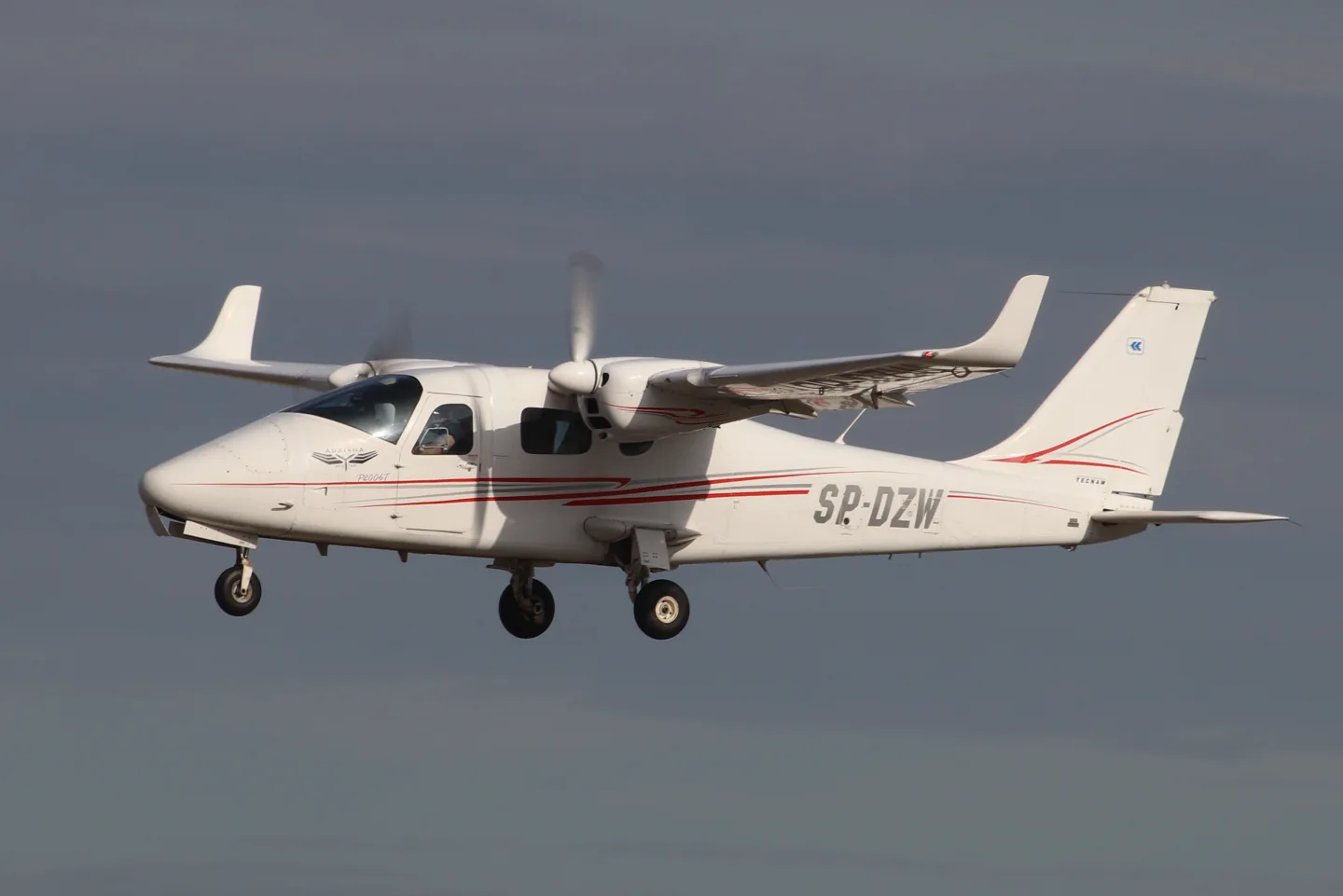
Tecnam P2006TAndrzej Otrębski · CC BY-SA 4.0 · Tecnam P2006T — real-aircraft reference photograph.

Tecnam P2006T

A compact Italian light twin with a shoulder wing and metal airframe.
General aviation配置文件选项:4 个

了解飞机

Tecnam developed the P2006T light twin at Capua in Italy with a shoulder wing and all-metal construction. MSFS and X-Plane developers offer analog and glass-cockpit versions, with simulator-generation support listed for each product.

Tecnam P2006T · Specifications · real aircraft; source units retained

Length
8.7 m (28 ft 7 in)↗
Wingspan
11.4 m (37 ft 5 in)↗
Height
2.90 m (9 ft 6 in)↗
Wing area
14.8 m² (159 sq ft)↗
Empty weight
880 kg (1,940 lb)↗
Max takeoff weight
1,290 kg (2,844 lb)↗
Powerplant
2 × Rotax 912isc 3 Sport horizontally opposed four-cylinder geared piston engines , 75 kW (100 hp) each↗
Propellers
2-bladed MT Propeller MTV-21, 1.78 m (5 ft 10 in) diameter constant-speed, fully feathering↗
Cruise speed
274 km/h (170 mph, 148 kn)↗
Stall speed
104 km/h (64 mph, 56 kn)↗
Range
1,722 km (1,070 mi, 930 nmi)↗
Service ceiling
4,300 m (14,000 ft)↗

在 AirframeDB 上了解这款航空器

A demonstration tour explains the small-twin idea

At the Australian launch, regional Tecnam representative Giovanni Nustrini recalled discussing the company’s next project with Paolo Pascale. He argued for a small twin serving training and touring roles, giving Absolon’s report a participant’s account of the market idea behind the P2006T.

A light twin for training

Luigi Pascale’s P2006T was conceived around lightweight Rotax engines and the needs of multiengine training. A shoulder wing, retractable landing gear and feathering propellers gave the compact airframe the equipment of a conventional training twin. Later NG aircraft changed the engine installation and cockpit equipment. Analog and MkII simulator products have their own documented equipment, which differs from the current NG.

A new twin joins the traffic at a vintage gathering

Absolon encountered the P2006T among the aircraft gathered at Watts Bridge for the Festival of Flight. The cold, clear morning provided an inviting setting to try an unfamiliar twin. Starting the Rotax engines struck him as unusually quiet, and once airborne he found the controls light while working through the flight assessment.

The return brought him back into a busy circuit with thermals and a slight quartering tailwind. His companion pointed out that his initial aiming point was too close to the fence, and they crossed higher before landing farther along the strip. Giovanni Nustrini then marshalled the aircraft through the crowd.

A hot cockpit and an instructor’s calm guidance

Rocha’s P2006T flight began on a hot day at Americana with instructor Eduardo Silva. During the taxi he liked the feel of the pedals, but the sun and limited ground ventilation made the cockpit uncomfortable. Getting airborne improved the airflow, allowing him to settle into the evaluation away from the heat on the ground.

On the return, an early turn onto base left the aircraft higher and faster than Rocha wanted. Silva’s verbal guidance helped him make the adjustments, and the eventual landing was smooth. Rocha had been uncertain about landing an aircraft with such closely spaced main wheels.

A renewal flight changes an old opinion of Rotax engines

Boot approached the P2006T with reservations formed by older experiences of two-stroke Rotax engines. His friend Andy Cragg encouraged him to try the twin, and after winter weather delayed the plan, they met Tim Orchard at Lydd. Tea and a few preliminary circuits preceded Boot’s own renewal flight in the unfamiliar aircraft.

The wet, overcast conditions made the exercise a practical introduction. Learning the glass cockpit added work, but Boot completed the check successfully. Orchard’s feedback separated that unfamiliarity from the aircraft’s handling, which he felt Boot had managed accurately. For Boot, the day replaced an old prejudice with direct experience of the modern twin, while also putting a useful qualification renewal in his logbook.

公开来源 9
  1. Tecnam P2006TResearch background · retrieved 2026-09-12
  2. Tecnam P2006T MKIIOfficial developer / designated store catalogue · checked 2026-09-12
  3. Tecnam P2006T AnalogOfficial developer / designated store catalogue · checked 2026-09-12
  4. P2006T MK-IOfficial developer / designated store catalogue · checked 2026-09-12Official developer / designated-store reference · checked 2026-09-14
  5. Tecnam P2006T flight test: In a class of its ownJohn Absolon · Australian demonstration-tour flight report
  6. Tecnam P2006T flight testMicael Rocha · 9 November 2022; publisher’s English-language page
  7. Twin safety on single moneyGeoffrey Boot · April 2011, pages 30–35
  8. VSKYLABS Tecnam P2006T MK-IDeveloper project documentation · retrieved 13 September 2026Official developer / designated-store reference · checked 2026-09-14
  9. ICAO Doc 8643 — aircraft type designatorsPublic search data retrieved 2026-09-14; authority update 2026-09-03

配置文件如何建模

FlightSim Studio Tecnam P2006T Analog

Free + Pro
MSFS 2020FlightSim Studio

Tecnam developed the P2006T light twin at Capua in Italy with a shoulder wing and all-metal construction. MSFS and X-Plane developers offer analog and glass-cockpit versions, with simulator-generation support listed for each product.

This profile selects FlightSim Studio Tecnam P2006T Analog for MSFS 2020.

The stabilator/anti-tab arrangement motivates aerodynamic loading. Spring resistance builds with the selected airspeed response. A separate aerodynamic term adds speed-dependent control load.

The anti-tab supplies pitch relief; electrical rudder trim does not supply roll trim. Valid trim provides the configured pressure relief. Autopilot following is off.

此确切修订版尚未开放公开安装。

The selected implementation

The Analog S-TEC55X description omits CWS and altitude preselect. MKII/G1000 is separately named equipment.

Section 6 - Airframe and Systems DescriptionSection 7 - AutopilotAircraft Tecnam P2006T Analog MSFS 2020Key Bindings

About the values

The gains are normalized profile settings. They describe the chosen effect balance; hand force depends on the device and its output limits. IAS references are tuning values rather than operating limits. Physical acceptance of this revision remains pending.

Master gain & control system

Master gain85%

施加于模型产出的一切、在设备上限之前的最终整体输出缩放。

调高: 一切(弹簧、载荷、效果)一同增强。

调低: 一切一同变柔。

设定理由: Scales overall profile strength while preserving effect balance, subject to device and output limits.

Forces

Spring strength74%

把摇杆拉回中央的基础回中力。其他所有力都叠加在它之上。太低,正常飞行中摇杆会发软;太高,它会与你的手较劲,并掩盖叠加其上的细微提示。

调高: 更硬的回中,更抗手。

调低: 更软的杆,只靠气动载荷。

设定理由: The stabilator/anti-tab arrangement motivates aerodynamic loading. The baseline spring is 0.74. Its low-speed blend reaches baseline strength at 50 KIAS.

Section 6 - Airframe and Systems DescriptionSection 7 - AutopilotAircraft Tecnam P2006T Analog MSFS 2020Key BindingsSection 6 - Airframe and Systems DescriptionSection 7 - AutopilotTecnam P2006TKey BindingsTecnam authored P2006T AFM4th edition; section7-7 Rev0 control architectureVSKYLABS Aerospace Simulations Aircraft Center: VSKYLABS Tecnam P2006T MK-IP2006T developer manual public previewP2006T standard equipment
Spring deadband4%

中央附近弹簧保持安静的小中立区,让静止时的微小移动不会咔嗒作响。更宽更安稳但更松,更窄更精确但可能在中央附近抖动。

调高: 更安静但更松的中央,旷量更大。

调低: 更紧的中央,静止时可能抖动。

设定理由: Sets travel around the centre before the baseline spring resists. Smaller values engage it sooner.

Overall aerodynamic load80%

作用于两条持续轴载荷的主缩放,在它们各自的独立平衡之前施加。配置文件通常不动它,而是调校两条轴载荷。

调高: 两轴载荷一同加重。

调低: 两轴一同减轻。

设定理由: The aerodynamic-load gain is 0.8 with an indicated-speed reference of 125 KIAS. This supplies speed-dependent loading alongside the spring.

Airspeed blendingTrue

启用低速弹簧介入窗口(上面的起始/全强度节数)。关闭时弹簧在所有速度下恒定。

设定理由: Allows baseline spring strength to rise with indicated airspeed where the control law permits it.

Low-speed spring floor55%

在静止、空速尚未产生气动力之前,弹簧还剩多少。下限高,停机时摇杆结实;下限低,则是停放轻型飞机那种钢索松弛的感觉。

调高: 停机和滑行时杆更结实。

调低: 停机时杆发软,只随速度苏醒。

设定理由: Sets low-speed spring strength as a fraction of baseline when blending is enabled. One keeps full strength.

Spring engagement start8 kt

弹簧从低速下限开始向全强度攀升的空速:起飞滑跑中操纵面"苏醒"的那一刻。

设定理由: Sets the IAS where the low-speed spring blend starts rising. This is a feel threshold, not a flight limit.

Spring engagement full50 kt

弹簧达到全强度的空速。从起点到这里,随着气流在操纵面上增强,回中逐渐变硬。

设定理由: Sets the IAS where the low-speed blend reaches baseline strength; high-speed stiffening also uses it.

力反馈调校速度125

气动载荷达到设计满值的指示空速。它把整条载荷曲线锚定在飞机真实的速度范围:172在110节就载满,喷气机要晚得多。

调高: 载荷来得更晚;杆轻到更高速度。

调低: 载荷来得更早,巡航更沉。

设定理由: Sets the IAS reference for aerodynamic loading. It is an estimate, not published cruise TAS or a flight limit.

Centre firmness vs speed15%

在偏转载荷之外,回中本身随速度变硬的程度。零则中央手感恒定;越大,巡航时回中越硬,起落航线上越松。

调高: 中央随速度明显变硬。

调低: 任何速度下中央手感恒定。

设定理由: The high-speed spring-stiffening gain is 0.15. It strengthens the permitted spring response above 50 KIAS, with the squared-speed ratio capped at 5.

Centre stiffening cap5

速度驱动的中央变硬上限,防止高速飞行把弹簧无限上紧。

调高: 高速允许更多总硬化。

调低: 硬化更早封顶。

设定理由: Limits the squared airspeed ratio used for high-speed spring stiffening; it is not a device-force cap.

Aileron load72%

由副翼偏转和空速产生的持续横滚载荷,独立于俯仰调校。与升降舵载荷一起,决定评测中常说的操纵协调比。

调高: 横滚力更重。

调低: 副翼更轻更灵。

设定理由: Roll and pitch aerodynamic scales are 0.72 and 1, respectively. They set the aerodynamic axis balance. No custom spring-travel curve is enabled.

Elevator load100%

由升降舵偏转和空速产生的持续俯仰载荷,独立于横滚调校。这是决定机型俯仰重量的主杠杆。它不影响副翼、弹簧、配平或抖振力。

调高: 速度下持续俯仰力更重。

调低: 升降舵更轻,握持更省力。

设定理由: Scales pitch aerodynamic loading; pitch spring travel and trim responses are separate settings.

Max output force55%

每个稳态俯仰或横滚力到达设备前的上限,防止猛烈机动中砸击或饱和硬件。

调高: 削波前更高的稳态力峰值。

调低: 更柔的上限;猛烈机动更早被抹平。

设定理由: Caps directed-force output. Native spring effects and device limits remain separate.

Trim

Trim relief (elevator)30%

升降舵配平缓解持续俯仰力、移动杆的安定位置的强度。在100 %时,配平得当的飞机不需要保持压力——正是真实飞行中"用配平消掉载荷"的流程。

调高: 配平消掉更多持续力;100 %时满配平可完全抵消。

调低: 即使配平也仍要持续用力。

设定理由: The anti-tab supplies pitch relief; electrical rudder trim does not supply roll trim. Pitch authority 0.3 provides load relief and permitted centre movement; roll authority is 0.

Section 6 - Airframe and Systems DescriptionSection 7 - AutopilotAircraft Tecnam P2006T Analog MSFS 2020Key BindingsSection 6 - Airframe and Systems DescriptionSection 7 - AutopilotTecnam P2006TKey BindingsTecnam authored P2006T AFM4th edition; section7-7 Rev0 control architectureVSKYLABS Aerospace Simulations Aircraft Center: VSKYLABS Tecnam P2006T MK-IP2006T developer manual public previewP2006T standard equipment
Trim relief (aileron)0%

横滚配平的同类缓解。多数通航机型没有真正的副翼配平,所以保持为零;有横滚配平的机型获得相应的值。

调高: 横滚配平消掉更多持续力。

调低: 横滚配平作用更小。

设定理由: Scales supported roll-trim relief and permitted centre movement. Zero removes roll response.

Effect gains · Ground

Runway rumble40%

由轮速和地面类型(铺装、草地、砾石)产生的滚动振动。

调高: 杆上更强的地面质感。

调低: 更平滑的滑行。

设定理由: Sets rolling texture strength, modified by speed, surface and undercarriage configuration.

Gear bumps25%

来自伸缩缝、车辙和粗糙地面的短促离散颠簸,为持续隆隆声打上标点。

调高: 接缝与车辙的冲击更清晰。

调低: 更柔的地面细节。

设定理由: Sets gear-bump texture during ground motion, separate from touchdown impact.

Effect gains · Airframe

Stall buffet35%

接近失速及失速警告响起时的机体抖动:这副机翼宣告不满的音量。断失干脆的机型抖振收敛,让喇叭承担警告。

调高: 更强的失速前颤抖。

调低: 更含蓄的机翼;警告交给喇叭。

设定理由: Sets stall-buffet strength. Zero removes the cue without changing simulator stalls or warnings.

Mach buffet0%

接近马赫极限的跨音速抖振。对接近MMO的喷气机有意义,对到不了那里的活塞机和涡桨机为零。

调高: 接近马赫极限时更强的跨音速抖振。

调低: 高马赫下更平滑的飞行。

设定理由: Sets high-Mach buffet strength; onset and full-strength thresholds are separate.

Flap buffet0%

襟翼伸入气流后机体的低频振动,发生在它们真正做功的速度窗口内。

调高: 襟翼做功时更粗糙的飞行。

调低: 更柔的进近襟翼。

设定理由: Sets flap buffet at the configured position and speed gates. Flap movement texture is separate.

Gear buffet0%

可收放起落架悬在气流中引起的机体鼓振。固定起落架机型为零,它们的机体外形从不改变。

调高: 放起落架时更多鼓振。

调低: 放起落架飞行更干净。

设定理由: Sets gear aerodynamic buffet; movement and ground-contact cues are separate.

Stick shaker50%

由飞机自身失速警告系统触发的专用抖杆器振动。只有真有抖杆器的机型才有值;其余全靠气动抖振和喇叭。

调高: 更硬的抖杆器。

调低: 更含蓄的抖杆器。

设定理由: Sets triggered shaker strength; inactive while the shaker feature is disabled.

Effect gains · Engine, mechanical & drag

Touchdown thump65%

机轮触及跑道那一下的单次冲击,按下沉率缩放:轻柔着陆是耳语,结实到达是一记闷响。

调高: 触地时更硬的一击。

调低: 更柔的到达。

设定理由: Sets landing-impact strength; landing telemetry and response shape determine the pulse.

Reverse rumble0%

反推或桨叶beta区工作时的滑跑振动。无反推机型为零。

调高: 反推下更粗糙的滑跑。

调低: 更含蓄的反推。

设定理由: Sets reverse-thrust vibration with valid reverser and engine conditions. Zero removes the cue.

Engine rumble12%

从慢车到全功率跟随转速的持续动力装置振动——前方有东西在烧油的永恒提醒。

调高: 杆里更多发动机。

调低: 更含蓄的发动机。

设定理由: Sets estimated engine vibration using configured telemetry and response, not measured cockpit vibration.

Flap motion12%

仅在模拟器报告襟翼舵面确实移动时的持续振动。它跟随真实作动器的运动和故障,而非估算的计时器。

调高: 襟翼移动中更多振动。

调低: 更含蓄的襟翼行程。

设定理由: Sets texture from observed flap movement; a command without movement does not establish the cue.

Autopilot follow

AP follow authority10%

自动驾驶指令可以让杆实际移动多远。在MSFS中保持极小,因为移动的轴可能被读回为飞行员输入;零则完全禁用跟随。

调高: 自动驾驶让你的杆移动得明显更多。

调低: 几乎察觉不到的跟随。

设定理由: Sets admitted AP-follow gain, not a percentage of travel. Runtime ownership and input limits still apply.

Stick feel

StickFeel · Trim feel enabledFalse

Whether this feature is active in this profile.

设定理由: Retained for compatibility and group membership. Trim relief, rather than this flag, controls centre movement.

StickFeel · Trim relief enabledTrue

Whether this feature is active in this profile.

设定理由: Allows trim relief with supported control law and valid telemetry. Axis authorities set its amount.

StickFeel · Force trim enabledFalse

Whether this feature is active in this profile.

设定理由: Enables local force trim, separate from aircraft-owned trim and add-on integration qualification.

StickFeel · G load enabledTrue

Whether this feature is active in this profile.

设定理由: Allows load-factor changes to modify permitted spring laws. Passive fly-by-wire feel can suppress it.

StickFeel · Rate damping enabledTrue

Whether this feature is active in this profile.

设定理由: Enables rate damping with the configured coefficients and control law.

Autopilot

Autopilot · Follow enabledFalse

Whether this feature is active in this profile.

设定理由: Autopilot following is off; the configured spring and load retain the hardware feel.

Autopilot · Neutral hold enabledFalse

Whether this feature is active in this profile.

设定理由: Permits centering hold during a supported AP state, separate from following a moving target.

Autopilot · Neutral hold strength0.6

设定理由: Sets admitted AP neutral-hold strength; inactive while neutral hold is disabled.

Aero

Aero · EnabledTrue

Whether this feature is active in this profile.

设定理由: Enables aerodynamic cues; each still needs nonzero strength and its simulator conditions.

Aero · Max flap index3

Where this effect reaches full strength (or has fully faded, for washouts).

调高: a more gradual build to a later peak.

调低: a quicker build.

设定理由: Sets the final flap index for detent normalization. UP plus three detents uses maximum index3.

Aero · Min flap index2

Where this effect begins fading in.

调高: the effect begins later.

调低: it begins earlier.

设定理由: Sets the first flap detent that admits buffet; this is a handle index, not degrees.

Aero · Shaker enabledFalse

Whether this feature is active in this profile.

设定理由: Permits shaker at supported warning conditions; the switch does not establish aircraft equipment.

Ground

Ground · EnabledTrue

Whether this feature is active in this profile.

设定理由: Enables ground effects; each still needs its own strength and contact or motion telemetry.

Engine

Engine · EnabledTrue

Whether this feature is active in this profile.

设定理由: Enables engine cues with nonzero settings and valid running-engine telemetry.

Mechanical

Mechanical · EnabledTrue

Whether this feature is active in this profile.

设定理由: Enables accessory cues with configured strengths and observed accessory movement.

Mechanical · Gain0.025

The strength of this effect.

调高: a stronger effect.

调低: a weaker one.

设定理由: Sets texture from observed gear movement, separate from aerodynamic and touchdown effects.

全部配置文件设置
估算的配置文件设置
参数数值控制作用及原因
Spring strength0.74 The stabilator/anti-tab arrangement motivates aerodynamic loading. The baseline spring is 0.74. Its low-speed blend reaches baseline strength at 50 KIAS.
Spring deadband0.04 Sets travel around the centre before the baseline spring resists. Smaller values engage it sooner.
Force gain0.8 The aerodynamic-load gain is 0.8 with an indicated-speed reference of 125 KIAS. This supplies speed-dependent loading alongside the spring.
Master gain0.85 Scales overall profile strength while preserving effect balance, subject to device and output limits.
Dynamic-pressure blendTrue Allows baseline spring strength to rise with indicated airspeed where the control law permits it.
Minimum spring factor0.55 Sets low-speed spring strength as a fraction of baseline when blending is enabled. One keeps full strength.
Spring wake-up speed8 ktSets the IAS where the low-speed spring blend starts rising. This is a feel threshold, not a flight limit.
Spring full-strength speed50 ktSets the IAS where the low-speed blend reaches baseline strength; high-speed stiffening also uses it.
力反馈调校速度125 ktSets the IAS reference for aerodynamic loading. It is an estimate, not published cruise TAS or a flight limit.
Airspeed spring stiffening0.15 The high-speed spring-stiffening gain is 0.15. It strengthens the permitted spring response above 50 KIAS, with the squared-speed ratio capped at 5.
Airspeed stiffening cap5 Limits the squared airspeed ratio used for high-speed spring stiffening; it is not a device-force cap.
Aileron force scale0.72 Roll and pitch aerodynamic scales are 0.72 and 1, respectively. They set the aerodynamic axis balance. No custom spring-travel curve is enabled.
Elevator force scale1.0 Scales pitch aerodynamic loading; pitch spring travel and trim responses are separate settings.
Maximum output force0.55 Caps directed-force output. Native spring effects and device limits remain separate.
StickFeel · Trim feel enabledFalse Retained for compatibility and group membership. Trim relief, rather than this flag, controls centre movement.
StickFeel · Trim relief enabledTrue Allows trim relief with supported control law and valid telemetry. Axis authorities set its amount.
StickFeel · Elevator authority0.3 The anti-tab supplies pitch relief; electrical rudder trim does not supply roll trim. Pitch authority 0.3 provides load relief and permitted centre movement; roll authority is 0.
StickFeel · Aileron authority0 Scales supported roll-trim relief and permitted centre movement. Zero removes roll response.
StickFeel · Force trim enabledFalse Enables local force trim, separate from aircraft-owned trim and add-on integration qualification.
StickFeel · G load enabledTrue Allows load-factor changes to modify permitted spring laws. Passive fly-by-wire feel can suppress it.
StickFeel · Rate damping enabledTrue Enables rate damping with the configured coefficients and control law.
Autopilot · Follow enabledFalse Autopilot following is off; the configured spring and load retain the hardware feel.
Autopilot · Follow authority0.1 Sets admitted AP-follow gain, not a percentage of travel. Runtime ownership and input limits still apply.
Autopilot · Neutral hold enabledFalse Permits centering hold during a supported AP state, separate from following a moving target.
Autopilot · Neutral hold strength0.6 Sets admitted AP neutral-hold strength; inactive while neutral hold is disabled.
Aero · EnabledTrue Enables aerodynamic cues; each still needs nonzero strength and its simulator conditions.
Aero · Gain0.35 Sets stall-buffet strength. Zero removes the cue without changing simulator stalls or warnings.
Aero · Gain0 Sets high-Mach buffet strength; onset and full-strength thresholds are separate.
Aero · Gain0 Sets flap buffet at the configured position and speed gates. Flap movement texture is separate.
Aero · Max flap index3 Sets the final flap index for detent normalization. UP plus three detents uses maximum index3.
Aero · Min flap index2 Sets the first flap detent that admits buffet; this is a handle index, not degrees.
Aero · Gain0 Sets gear aerodynamic buffet; movement and ground-contact cues are separate.
Aero · Shaker enabledFalse Permits shaker at supported warning conditions; the switch does not establish aircraft equipment.
Aero · Amplitude0.5 Sets triggered shaker strength; inactive while the shaker feature is disabled.
Ground · EnabledTrue Enables ground effects; each still needs its own strength and contact or motion telemetry.
Ground · Gain0.4 Sets rolling texture strength, modified by speed, surface and undercarriage configuration.
Ground · Gain0.25 Sets gear-bump texture during ground motion, separate from touchdown impact.
Ground · Gain0.65 Sets landing-impact strength; landing telemetry and response shape determine the pulse.
Ground · Gain0 Sets reverse-thrust vibration with valid reverser and engine conditions. Zero removes the cue.
Engine · EnabledTrue Enables engine cues with nonzero settings and valid running-engine telemetry.
Engine · Gain0.12 Sets estimated engine vibration using configured telemetry and response, not measured cockpit vibration.
Mechanical · EnabledTrue Enables accessory cues with configured strengths and observed accessory movement.
Mechanical · Gain0.12 Sets texture from observed flap movement; a command without movement does not establish the cue.
Mechanical · Gain0.025 Sets texture from observed gear movement, separate from aerodynamic and touchdown effects.
公开来源 19
  1. Tecnam P2006TResearch background · retrieved 2026-09-12
  2. Section 6 - Airframe and Systems DescriptionSection6: primary controls, trim, flaps, powerplant and gear
  3. Section 7 - AutopilotSection7: S-TEC55X simulation differences
  4. Aircraft Tecnam P2006T Analog MSFS 2020Current product and MSFS2024 FAQ
  5. Key BindingsKey bindings: input LVars and CWS button
  6. Section 6 - Airframe and Systems DescriptionSection6: primary controls, trim, flaps, powerplant and gear
  7. Section 7 - AutopilotSection7: S-TEC55X simulation differences
  8. Tecnam P2006TCurrent product and MSFS2024 FAQOfficial developer / designated store catalogue · checked 2026-09-12
  9. Key BindingsKey bindings: input LVars and CWS button
  10. Tecnam authored P2006T AFM4th edition; section7-7 Rev0 control architectureManufacturer AFM4th edition, section7-7/PDF189 ; developer POH PDF19-21
  11. VSKYLABS Aerospace Simulations Aircraft Center: VSKYLABS Tecnam P2006T MK-ICurrent product9.1.1 and MK-I vs MK-II sectionDeveloper project documentation · retrieved 13 September 2026Official developer / designated-store reference · checked 2026-09-14
  12. P2006T developer manual public previewPublic developer POH rev003 PDF1-3/19-21
  13. P2006T standard equipmentTecnam P2006T
  14. Tecnam P2006T AnalogOfficial developer / designated store catalogue · checked 2026-09-12
  15. P2006T MK-IOfficial developer / designated store catalogue · checked 2026-09-12Official developer / designated-store reference · checked 2026-09-14
  16. Tecnam P2006T flight test: In a class of its ownJohn Absolon · Australian demonstration-tour flight report
  17. Tecnam P2006T flight testMicael Rocha · 9 November 2022; publisher’s English-language page
  18. Twin safety on single moneyGeoffrey Boot · April 2011, pages 30–35
  19. ICAO Doc 8643 — aircraft type designatorsPublic search data retrieved 2026-09-14; authority update 2026-09-03

社区与纠错

如果你的真机经验表明本页有误,请在此指正。

飞行员纠错

飞过这款飞机?纠正本页。

本页基于引用资料构建,而真机经验胜过任何引用。 请引用有误的主张,并告诉我们真机的实际表现。纠错 将交由维护者审核,并纳入本研究的下一次修订。

机库闲谈

关于 Tecnam P2006T 的飞行与调校的公开讨论(社区论坛)。上方的纠错将私下送达维护者;机库闲谈是公开的。

Tecnam P2006T 还没有机库闲谈。来做第一个吧。

社区

该机型的社区配置

该机型还没有社区配置。 调出了自己的风格? 分享一个配置 它就会出现在这里。