기체 라이브러리Fokker F28 Fellowship
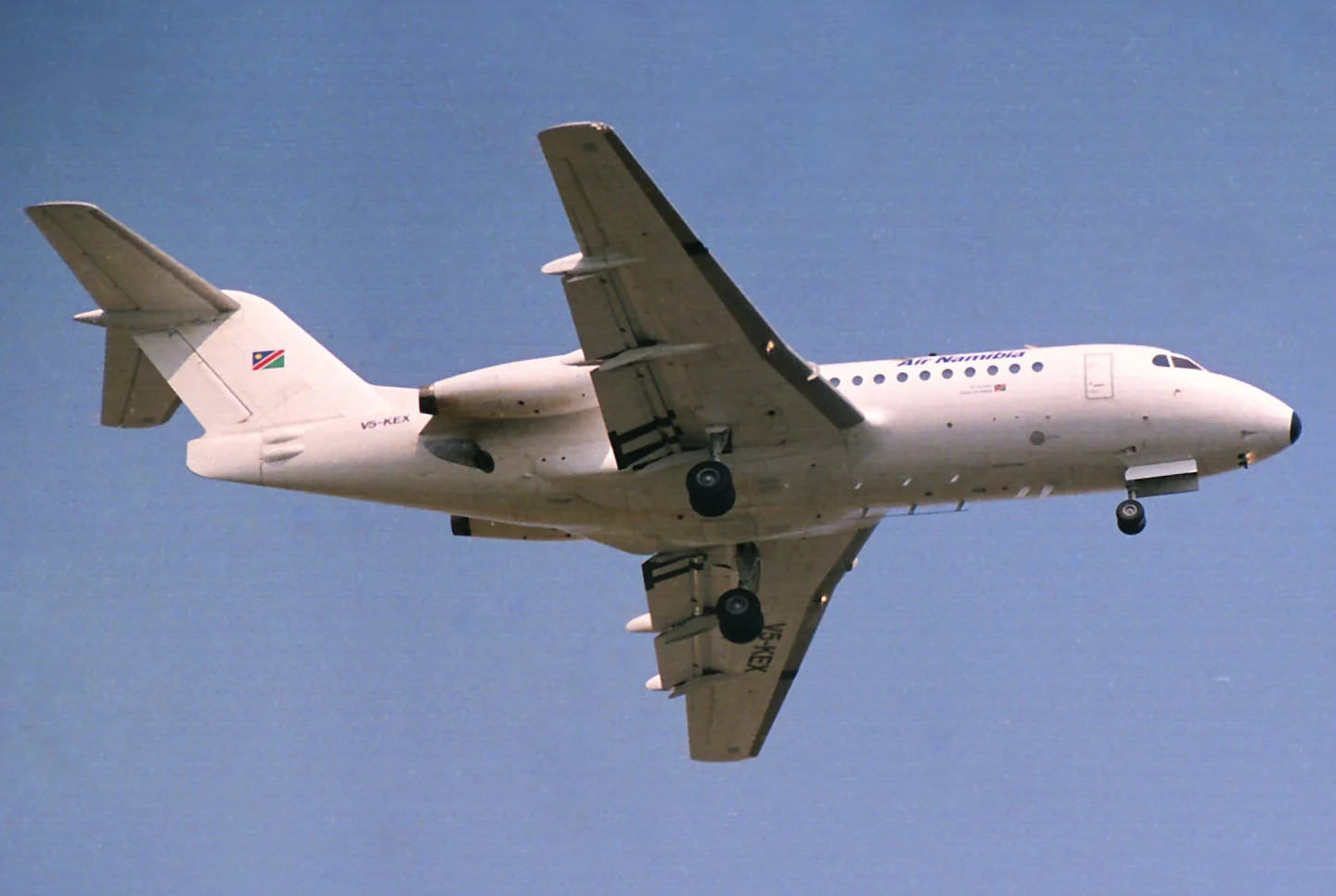
Fokker F28 FellowshipBob Adams from George, South Africa · CC BY-SA 2.0 · The Mk 3000 has the Mk 4000 wider wing and the Mk 1000 shorter fuselage

Fokker F28 Fellowship

Fokker's short-haul regional jet with rear-mounted engines and a T-tail.
Airliner프로필 선택: 8개

기체 알기

The F28 brought Fokker into the regional-jet market after its turboprop transports. Two rear-mounted engines, a low wing and a T-tail formed the basic layout; later versions changed the fuselage and wing.

The Fellowship's flight deck uses an earlier generation of airline equipment and automation than the BAe 146 and Embraer E-Jets. Just Flight's manual describes the variants and systems included in its package.

Aircraft / family

Propulsion
Twin jet↗
Configuration
Rear engines · T-tail↗

AirframeDB에서 이 항공기에 대해 더 알아보기

Teaching new crews while flying a new airline’s routes

An early Fokker assignment took Studstrup to Tripoli for eight months, supporting three F28s at Libyan Arab Airlines. Expatriate crews initially operated the aircraft while local pilots gained experience. The work mixed shuttles between Tripoli and Benghazi with desert oil-field destinations and international trips to cities such as Rome.

Introducing the F28 in the United States brought a different working environment. He supported Altair and Empire and enjoyed the opportunity to operate into the busy airports around New York and Washington. Across these assignments, the aircraft was both an airliner earning its keep and a setting for teaching other pilots.

Leaving an aircraft after twenty-one years in its cockpit

Wallin had flown the F28 since 1978 and regarded it as a particularly pilot-friendly aircraft. By its Swedish farewell in 1999, it had become a familiar part of his working life. His affection for its straightforward handling sat alongside an appreciation of what the aircraft had meant to regional air travel in Sweden.

The farewell brought that wider community together. After the last paying-passenger services, an invited flight returned to Ängelholm with current and former staff, followed by a gathering in the hangar. Wallin flew SE-DGP with Roland Karlsson for the occasion.

From the first prototype flight to demonstrations overseas

Van der Schraaf shared the F28’s first flight with Cees Dik after chief test pilot Jas Moll chose them for the task. The prototype’s interior was sparse, occupied by test equipment rather than the passenger fittings that would later make it an airliner. Development flying then gradually explored what the new aircraft could do.

Demonstration work carried the F28 much farther from its Dutch home. On an Australian trip, bad weather around Sydney and an unserviceable radar complicated the flying, while damage to the radome required repairs and replacement equipment. Recalling those assignments decades later, Van der Schraaf linked the excitement of introducing a new jet with the less glamorous delays and practical problems that accompanied taking it around the world.

공개 출처 9
  1. Fokker F28 FellowshipResearch background · Wikipedia revision 1371843105 · retrieved 2026-09-12
  2. F28 Professional MSFS Manual (version 2.2)
  3. F28 manuals
  4. Microsoft Flight Simulator aircraft manuals
  5. F28 Professional (MSFS)Official developer / designated store catalogue · checked 2026-09-12
  6. My aviation careerEnglish first-person career history; Fokker instructor from February 1975
  7. The last F28 flight for SASRolf Wallin and Jens Ericsson farewell account, reproduced November 1999
  8. Abe van der Schraaf: test pilot at FokkerInterview by Lieneke Koornstra · 17 September 2022
  9. ICAO Doc 8643 — aircraft type designatorsPublic search data retrieved 2026-09-14; authority update 2026-09-03

프로필의 모델링 방식

Just Flight F28-1000

Free + Pro
MSFS 2020MSFS 2024Just Flight

The F28 brought Fokker into the regional-jet market after its turboprop transports. Two rear-mounted engines, a low wing and a T-tail formed the basic layout; later versions changed the fuselage and wing.

This profile selects Just Flight F28-1000 for MSFS 2020, MSFS 2024.

Axis-specific feel motivates a separate pitch/roll balance. The spring stays independent of airspeed. Directed aerodynamic loading is omitted.

Roll and yaw trim move artificial-spring neutral; the documented elevator arrangement is different. Pitch-trim relief is off. Autopilot following is off.

이 리비전은 아직 공개 설치가 활성화되지 않았습니다.

Controls and trim

The F28’s duplicated hydraulic actuators coexist with axis-specific feel systems. Roll and yaw use springs whose neutral is moved by trim; the elevator description identifies natural airloads rather than the same artificial trim spring. The -1000 through -4000 retain distinct airframe variants.

F28 Professionalv2.2 PDF pp.57-60www.justflight.comF28 manuals

The selected implementation

Just Flight includes -1000/-2000/-3000/-4000 variants with shared documented control architecture.

F28 Professionalv2.2 PDF pp.57-60www.justflight.com

About the values

The gains are normalized profile settings. They describe the chosen effect balance; hand force depends on the device and its output limits. IAS references are tuning values rather than operating limits. Physical acceptance of this revision remains pending.

Master gain & control system

Master gain85%

모델이 만드는 모든 것에 적용되는 최종 전체 출력 스케일로, 장치 상한 이전에 적용됩니다.

올리면: 모든 것(스프링, 하중, 효과)이 함께 강해집니다.

내리면: 모든 것이 함께 부드러워집니다.

이 값의 이유: Scales overall profile strength while preserving effect balance, subject to device and output limits.

Forces

Spring strength80%

스틱을 중앙으로 되돌리는 기본 센터링 힘입니다. 다른 모든 힘이 이 위에 쌓입니다. 너무 낮으면 정상 비행에서 스틱이 흐물거리고, 너무 높으면 손에 맞서며 그 위에 겹쳐진 작은 신호들을 가립니다.

올리면: 손에 더 저항하는 단단한 센터링.

내리면: 공기역학 하중에만 기대는 무른 스틱.

이 값의 이유: Axis-specific feel motivates a separate pitch/roll balance. The baseline spring is 0.8. Low-speed spring blending is off.

F28 Professionalv2.2 PDF pp.57-60www.justflight.comF28 manuals
Spring deadband4%

중앙 주변에서 스프링이 조용히 머무는 작은 중립 구역으로, 정지 시의 미세한 움직임이 덜컹거리지 않게 합니다. 넓을수록 차분하지만 느슨해지고, 좁을수록 정밀하지만 중앙에서 떨릴 수 있습니다.

올리면: 더 차분하지만 더 느슨한, 유격이 큰 중앙.

내리면: 정지 시 떨릴 수 있는 더 조인 중앙.

이 값의 이유: Sets travel around the centre before the baseline spring resists. Smaller values engage it sooner.

Overall aerodynamic load0%

두 지속 축 하중에 걸리는 마스터 스케일로, 각 축의 독립 균형 이전에 적용됩니다. 프로파일은 보통 이것을 두고 두 축 하중을 조정합니다.

올리면: 두 축이 더 강하게 하중을 받습니다.

내리면: 두 축이 함께 가벼워집니다.

이 값의 이유: The stored 0 aerodynamic-load gain is inactive under the zero hydraulic-load factor.

Airspeed blendingFalse

저속 스프링 진입 구간(위의 시작/최대 노트)을 켭니다. 끄면 스프링은 모든 속도에서 일정합니다.

이 값의 이유: Allows baseline spring strength to rise with indicated airspeed where the control law permits it.

Low-speed spring floor55%

속도가 공기역학적 힘을 만들기 전, 정지 상태에서 스프링이 얼마나 남는지입니다. 바닥이 높으면 주기된 스틱이 단단하고, 낮으면 주기된 경비행기의 케이블이 늘어진 듯한 느슨한 감각이 됩니다.

올리면: 주기·지상활주 시 더 단단한 스틱.

내리면: 속도로만 깨어나는 주기 시의 무른 스틱.

이 값의 이유: Sets low-speed spring strength as a fraction of baseline when blending is enabled. One keeps full strength.

Spring engagement start8 kt

스프링이 저속 바닥에서 전체 강도를 향해 오르기 시작하는 속도입니다. 이륙 활주에서 조종면이 "살아나는" 지점입니다.

이 값의 이유: Sets the IAS where the low-speed spring blend starts rising. This is a feel threshold, not a flight limit.

Spring engagement full65 kt

스프링이 전체 강도에 도달하는 속도입니다. 시작점과 이 지점 사이에서 조종면 위 기류가 늘며 센터링이 점차 단단해집니다.

이 값의 이유: Sets the IAS where the low-speed blend reaches baseline strength; high-speed stiffening also uses it.

포스 조정 속도225

공기역학 하중이 설계된 최대치에 도달하는 지시 속도입니다. 하중 곡선 전체를 기체의 실제 속도 범위에 고정합니다. 172는 110노트에서 하중이 차오르고, 제트기는 훨씬 나중입니다.

올리면: 하중이 늦게 오고, 더 빠른 속도까지 스틱이 가볍습니다.

내리면: 하중이 일찍 오고 순항이 더 무겁습니다.

이 값의 이유: Sets the IAS reference for aerodynamic loading. It is an estimate, not published cruise TAS or a flight limit.

Centre firmness vs speed0%

변위 하중에 더해 센터링 자체가 속도에 따라 얼마나 단단해지는지입니다. 0이면 중앙 감각이 일정하고, 클수록 순항에서 더 단단히, 장주에서 더 느슨하게 센터링됩니다.

올리면: 속도에 따라 뚜렷이 단단해지는 중앙.

내리면: 어떤 속도에서도 일정한 중앙 감각.

이 값의 이유: The high-speed spring-stiffening gain is 0. No additional speed-driven stiffening is added; this does not disable independent aerodynamic loading.

Centre stiffening cap5

속도로 인한 중앙 경화의 상한으로, 초고속 비행이 스프링을 무한정 감아올리지 못하게 합니다.

올리면: 고속에서 더 많은 총 경화 허용.

내리면: 경화가 더 일찍 멈춥니다.

이 값의 이유: Limits the squared airspeed ratio used for high-speed spring stiffening; it is not a device-force cap.

Aileron load72%

에일러론 변위와 속도에 의한 지속적인 롤 하중으로, 피치와 독립적으로 조정됩니다. 승강타 하중과 함께 리뷰에서 말하는 조종 조화 비율을 정합니다.

올리면: 더 무거운 롤 힘.

내리면: 더 가볍고 생기 있는 에일러론.

이 값의 이유: Roll and pitch aerodynamic scales are 0.72 and 1, respectively. These stored weights do not create directed aerodynamic loading while that term is inactive. No custom spring-travel curve is enabled.

Elevator load100%

승강타 변위와 속도에 의한 지속적인 피치 하중으로, 롤과 독립적으로 조정됩니다. 기종별 피치 무게를 결정하는 주 레버입니다. 에일러론, 스프링, 트림, 버핏 힘에는 관여하지 않습니다.

올리면: 속도에서 더 무거운 지속 피치 힘.

내리면: 붙들기 가벼운, 더 가뿐한 승강타.

이 값의 이유: Scales pitch aerodynamic loading; pitch spring travel and trim responses are separate settings.

Max output force55%

각 정상 피치·롤 힘이 장치에 닿기 전의 상한으로, 강한 기동에서 하드웨어를 때리거나 포화시키지 않게 보호합니다.

올리면: 잘리기 전의 더 높은 정상 힘 피크.

내리면: 더 부드러운 상한. 거친 기동이 더 일찍 평평해집니다.

이 값의 이유: Caps directed-force output. Native spring effects and device limits remain separate.

Trim

Trim relief (elevator)0%

승강타 트림이 유지 중인 피치 힘을 얼마나 덜어내고 스틱이 안착하는 지점을 옮기는지입니다. 100 %에서는 제대로 트림된 기체에 유지 압력이 필요 없어져, 실제 비행의 하중을-트림으로-지우는 절차 그대로입니다.

올리면: 트림이 더 많은 유지 힘을 덜어냅니다. 100 %에서는 완전 트림이 상쇄합니다.

내리면: 트림해도 힘을 계속 붙들게 됩니다.

이 값의 이유: Roll and yaw trim move artificial-spring neutral; the documented elevator arrangement is different. Pitch relief is off, with stored authority 0; roll authority is 0.12.

F28 Professionalv2.2 PDF pp.57-60www.justflight.comF28 manuals
Trim relief (aileron)12%

롤 트림에 대한 같은 경감입니다. 대부분의 GA 기종에는 실제 에일러론 트림이 없어 0으로 두고, 롤 트림이 있는 기종은 상응하는 값을 받습니다.

올리면: 롤 트림이 더 많은 유지 힘을 덜어냅니다.

내리면: 롤 트림의 효과가 줄어듭니다.

이 값의 이유: Scales supported roll-trim relief and permitted centre movement. Zero removes roll response.

Effect gains · Ground

Runway rumble40%

바퀴 속도와 노면 종류(포장, 잔디, 자갈)에 따른 구름 진동입니다.

올리면: 스틱의 노면 질감이 더 강하게.

내리면: 더 매끄러운 지상활주.

이 값의 이유: Sets rolling texture strength, modified by speed, surface and undercarriage configuration.

Gear bumps32%

신축 이음, 바퀴 자국, 거친 노면의 짧고 분리된 충격으로, 연속적인 우르릉거림에 마디를 찍습니다.

올리면: 이음과 자국의 더 또렷한 충격.

내리면: 더 부드러운 지면 디테일.

이 값의 이유: Sets gear-bump texture during ground motion, separate from touchdown impact.

Effect gains · Airframe

Stall buffet0%

실속 접근 시와 실속 경고가 울리는 동안의 기체 흔들림, 이 날개가 불만을 얼마나 크게 알리는지입니다. 깔끔하게 떨어지는 기종은 버핏을 절제하고 경적이 경고를 맡습니다.

올리면: 더 강한 실속 전 떨림.

내리면: 더 은은한 날개. 경적이 경고를 맡습니다.

이 값의 이유: Sets stall-buffet strength. Zero removes the cue without changing simulator stalls or warnings.

Mach buffet0%

마하 한계 접근 시의 천음속 버핏입니다. MMO 근처의 제트기에는 의미가 있고, 거기 도달하지 못하는 피스톤과 터보프롭은 0입니다.

올리면: 마하 한계 근처의 더 강한 천음속 버핏.

내리면: 높은 마하에서 더 매끄러운 비행.

이 값의 이유: Sets high-Mach buffet strength; onset and full-strength thresholds are separate.

Flap buffet0%

플랩이 실제로 공기를 일하는 속도 창에서, 기류에 펼쳐진 플랩에 의한 기체의 저주파 진동입니다.

올리면: 플랩 작동 중 더 거친 비행.

내리면: 더 부드러운 접근 플랩.

이 값의 이유: Sets flap buffet at the configured position and speed gates. Flap movement texture is separate.

Gear buffet0%

기류에 매달린 접이식 착륙장치에 의한 기체의 북소리입니다. 기체 형상이 변하지 않는 고정식 기종은 0입니다.

올리면: 착륙장치 내림 시 더 많은 북소리.

내리면: 더 깔끔한 착륙장치 내림 비행.

이 값의 이유: Sets gear aerodynamic buffet; movement and ground-contact cues are separate.

Stick shaker90%

기체 자체의 실속 경보 시스템이 발동하는 전용 스틱 셰이커 진동입니다. 실제 셰이커가 있는 기종만 값을 받고, 나머지는 공기역학 버핏과 경적에 의존합니다.

올리면: 더 단단한 셰이커.

내리면: 더 은은한 셰이커.

이 값의 이유: Sets triggered shaker strength; inactive while the shaker feature is disabled.

Effect gains · Engine, mechanical & drag

Touchdown thump90%

바퀴가 활주로에 닿는 순간의 단발 충격으로, 강하율에 따라 스케일됩니다. 부드러운 착륙은 속삭이고 단단한 도착은 쿵 울립니다.

올리면: 접지 시 더 단단한 충격.

내리면: 더 부드러운 도착.

이 값의 이유: Sets landing-impact strength; landing telemetry and response shape determine the pulse.

Reverse rumble0%

역추력이나 베타 범위 프로펠러가 작동하는 동안의 활주 진동입니다. 리버스가 없는 기종은 0입니다.

올리면: 리버스 중 더 거친 활주.

내리면: 더 은은한 리버스.

이 값의 이유: Sets reverse-thrust vibration with valid reverser and engine conditions. Zero removes the cue.

Engine rumble6%

공회전부터 최대 출력까지 회전수를 따르는 연속적인 동력장치 진동으로, 앞에서 무언가 연료를 태우고 있다는 늘 존재하는 상기입니다.

올리면: 스틱에 더 많은 엔진.

내리면: 더 은은한 엔진.

이 값의 이유: Sets estimated engine vibration using configured telemetry and response, not measured cockpit vibration.

Flap motion12%

시뮬레이터가 플랩 조종면의 실제 이동을 보고하는 동안만의 연속 진동입니다. 추정 타이머가 아니라 실제 액추에이터 동작과 고장을 따릅니다.

올리면: 플랩 이동 중 더 많은 진동.

내리면: 더 은은한 플랩 이동.

이 값의 이유: Sets texture from observed flap movement; a command without movement does not establish the cue.

Autopilot follow

AP follow authority10%

자동조종 명령이 스틱을 물리적으로 얼마나 움직일 수 있는지입니다. 움직인 축이 조종사 입력으로 읽힐 수 있는 MSFS에서는 극소로 유지하며, 0이면 따라가기가 완전히 꺼집니다.

올리면: 자동조종이 스틱을 눈에 띄게 더 움직입니다.

내리면: 거의 느껴지지 않는 따라가기.

이 값의 이유: Sets admitted AP-follow gain, not a percentage of travel. Runtime ownership and input limits still apply.

Stick feel

StickFeel · Trim feel enabledFalse

Whether this feature is active in this profile.

이 값의 이유: Retained for compatibility and group membership. Trim relief, rather than this flag, controls centre movement.

StickFeel · Trim relief enabledTrue

Whether this feature is active in this profile.

이 값의 이유: Allows trim relief with supported control law and valid telemetry. Axis authorities set its amount.

StickFeel · Force trim enabledFalse

Whether this feature is active in this profile.

이 값의 이유: Enables local force trim, separate from aircraft-owned trim and add-on integration qualification.

StickFeel · G load enabledTrue

Whether this feature is active in this profile.

이 값의 이유: Allows load-factor changes to modify permitted spring laws. Passive fly-by-wire feel can suppress it.

StickFeel · Rate damping enabledTrue

Whether this feature is active in this profile.

이 값의 이유: Enables rate damping with the configured coefficients and control law.

Autopilot

Autopilot · Follow enabledFalse

Whether this feature is active in this profile.

이 값의 이유: Autopilot following is off; the configured spring and load retain the hardware feel.

Autopilot · Neutral hold enabledFalse

Whether this feature is active in this profile.

이 값의 이유: Permits centering hold during a supported AP state, separate from following a moving target.

Autopilot · Neutral hold strength0.6

이 값의 이유: Sets admitted AP neutral-hold strength; inactive while neutral hold is disabled.

Aero

Aero · EnabledTrue

Whether this feature is active in this profile.

이 값의 이유: Enables aerodynamic cues; each still needs nonzero strength and its simulator conditions.

Aero · Max flap index4

Where this effect reaches full strength (or has fully faded, for washouts).

올리면: a more gradual build to a later peak.

내리면: a quicker build.

이 값의 이유: Sets the final flap index for detent normalization. UP plus three detents uses maximum index3.

Aero · Min flap index2

Where this effect begins fading in.

올리면: the effect begins later.

내리면: it begins earlier.

이 값의 이유: Sets the first flap detent that admits buffet; this is a handle index, not degrees.

Aero · Shaker enabledFalse

Whether this feature is active in this profile.

이 값의 이유: Permits shaker at supported warning conditions; the switch does not establish aircraft equipment.

Ground

Ground · EnabledTrue

Whether this feature is active in this profile.

이 값의 이유: Enables ground effects; each still needs its own strength and contact or motion telemetry.

Engine

Engine · EnabledTrue

Whether this feature is active in this profile.

이 값의 이유: Enables engine cues with nonzero settings and valid running-engine telemetry.

Mechanical

Mechanical · EnabledTrue

Whether this feature is active in this profile.

이 값의 이유: Enables accessory cues with configured strengths and observed accessory movement.

Mechanical · Gain0.12

The strength of this effect.

올리면: a stronger effect.

내리면: a weaker one.

이 값의 이유: Sets texture from observed gear movement, separate from aerodynamic and touchdown effects.

모든 프로필 설정
추정 프로필 설정
매개변수값제어 대상과 설정 이유
Spring strength0.8 Axis-specific feel motivates a separate pitch/roll balance. The baseline spring is 0.8. Low-speed spring blending is off.
Spring deadband0.035 Sets travel around the centre before the baseline spring resists. Smaller values engage it sooner.
Force gain0 The stored 0 aerodynamic-load gain is inactive under the zero hydraulic-load factor.
Master gain0.85 Scales overall profile strength while preserving effect balance, subject to device and output limits.
Dynamic-pressure blendFalse Allows baseline spring strength to rise with indicated airspeed where the control law permits it.
Minimum spring factor0.55 Sets low-speed spring strength as a fraction of baseline when blending is enabled. One keeps full strength.
Spring wake-up speed8 ktSets the IAS where the low-speed spring blend starts rising. This is a feel threshold, not a flight limit.
Spring full-strength speed65 ktSets the IAS where the low-speed blend reaches baseline strength; high-speed stiffening also uses it.
포스 조정 속도225 ktSets the IAS reference for aerodynamic loading. It is an estimate, not published cruise TAS or a flight limit.
Airspeed spring stiffening0 The high-speed spring-stiffening gain is 0. No additional speed-driven stiffening is added; this does not disable independent aerodynamic loading.
Airspeed stiffening cap5 Limits the squared airspeed ratio used for high-speed spring stiffening; it is not a device-force cap.
Aileron force scale0.72 Roll and pitch aerodynamic scales are 0.72 and 1, respectively. These stored weights do not create directed aerodynamic loading while that term is inactive. No custom spring-travel curve is enabled.
Elevator force scale1 Scales pitch aerodynamic loading; pitch spring travel and trim responses are separate settings.
Maximum output force0.55 Caps directed-force output. Native spring effects and device limits remain separate.
StickFeel · Trim feel enabledFalse Retained for compatibility and group membership. Trim relief, rather than this flag, controls centre movement.
StickFeel · Trim relief enabledTrue Allows trim relief with supported control law and valid telemetry. Axis authorities set its amount.
StickFeel · Elevator authority0 Roll and yaw trim move artificial-spring neutral; the documented elevator arrangement is different. Pitch relief is off, with stored authority 0; roll authority is 0.12.
StickFeel · Aileron authority0.12 Scales supported roll-trim relief and permitted centre movement. Zero removes roll response.
StickFeel · Force trim enabledFalse Enables local force trim, separate from aircraft-owned trim and add-on integration qualification.
StickFeel · G load enabledTrue Allows load-factor changes to modify permitted spring laws. Passive fly-by-wire feel can suppress it.
StickFeel · Rate damping enabledTrue Enables rate damping with the configured coefficients and control law.
Autopilot · Follow enabledFalse Autopilot following is off; the configured spring and load retain the hardware feel.
Autopilot · Follow authority0.1 Sets admitted AP-follow gain, not a percentage of travel. Runtime ownership and input limits still apply.
Autopilot · Neutral hold enabledFalse Permits centering hold during a supported AP state, separate from following a moving target.
Autopilot · Neutral hold strength0.6 Sets admitted AP neutral-hold strength; inactive while neutral hold is disabled.
Aero · EnabledTrue Enables aerodynamic cues; each still needs nonzero strength and its simulator conditions.
Aero · Gain0 Sets stall-buffet strength. Zero removes the cue without changing simulator stalls or warnings.
Aero · Gain0 Sets high-Mach buffet strength; onset and full-strength thresholds are separate.
Aero · Gain0 Sets flap buffet at the configured position and speed gates. Flap movement texture is separate.
Aero · Max flap index4 Sets the final flap index for detent normalization. UP plus three detents uses maximum index3.
Aero · Min flap index2 Sets the first flap detent that admits buffet; this is a handle index, not degrees.
Aero · Gain0 Sets gear aerodynamic buffet; movement and ground-contact cues are separate.
Aero · Shaker enabledFalse Permits shaker at supported warning conditions; the switch does not establish aircraft equipment.
Aero · Amplitude0.9 Sets triggered shaker strength; inactive while the shaker feature is disabled.
Ground · EnabledTrue Enables ground effects; each still needs its own strength and contact or motion telemetry.
Ground · Gain0.4 Sets rolling texture strength, modified by speed, surface and undercarriage configuration.
Ground · Gain0.32 Sets gear-bump texture during ground motion, separate from touchdown impact.
Ground · Gain0.9 Sets landing-impact strength; landing telemetry and response shape determine the pulse.
Ground · Gain0 Sets reverse-thrust vibration with valid reverser and engine conditions. Zero removes the cue.
Engine · EnabledTrue Enables engine cues with nonzero settings and valid running-engine telemetry.
Engine · Gain0.06 Sets estimated engine vibration using configured telemetry and response, not measured cockpit vibration.
Mechanical · EnabledTrue Enables accessory cues with configured strengths and observed accessory movement.
Mechanical · Gain0.12 Sets texture from observed flap movement; a command without movement does not establish the cue.
Mechanical · Gain0.12 Sets texture from observed gear movement, separate from aerodynamic and touchdown effects.
공개 출처 9
  1. Fokker F28 FellowshipResearch background · Wikipedia revision 1371843105 · retrieved 2026-09-12
  2. F28 Professionalv2.2 PDF pp.57-60F28 Professionalv2.2 PDF pp.57-60
  3. www.justflight.comF28 exact product variants and generationsOfficial developer / designated store catalogue · checked 2026-09-12
  4. F28 manualsFokker F28 Fellowship
  5. Microsoft Flight Simulator aircraft manuals
  6. My aviation careerEnglish first-person career history; Fokker instructor from February 1975
  7. The last F28 flight for SASRolf Wallin and Jens Ericsson farewell account, reproduced November 1999
  8. Abe van der Schraaf: test pilot at FokkerInterview by Lieneke Koornstra · 17 September 2022
  9. ICAO Doc 8643 — aircraft type designatorsPublic search data retrieved 2026-09-14; authority update 2026-09-03

커뮤니티와 정정

실기종 경험상 이 페이지가 틀렸다면 여기서 바로잡아 주세요.

조종사 정정

이 기체를 모시나요? 이 페이지를 정정하세요.

이 페이지는 인용된 자료로 만들어졌지만, 실기종 경험은 인용을 이깁니다. 틀린 주장을 인용하고 실제 기체는 어떤지 알려주세요. 정정은 메인테이너가 검토하며 이 조사의 다음 개정에 반영됩니다.

행어 토크

Fokker F28 Fellowship의 비행과 튜닝에 대한 열린 대화(커뮤니티 포럼)입니다. 위의 정정은 메인테이너에게 비공개로 전달되며, 행어 토크는 공개입니다.

Fokker F28 Fellowship의 행어 토크가 아직 없습니다. 첫 번째가 되어 보세요.

커뮤니티

이 기체의 커뮤니티 프로필

이 기체의 커뮤니티 프로필이 아직 없습니다. 나만의 방식으로 튜닝했나요? 프로필 공유하기 그러면 여기에 표시됩니다.