기체 라이브러리Cessna 152 / Aerobat
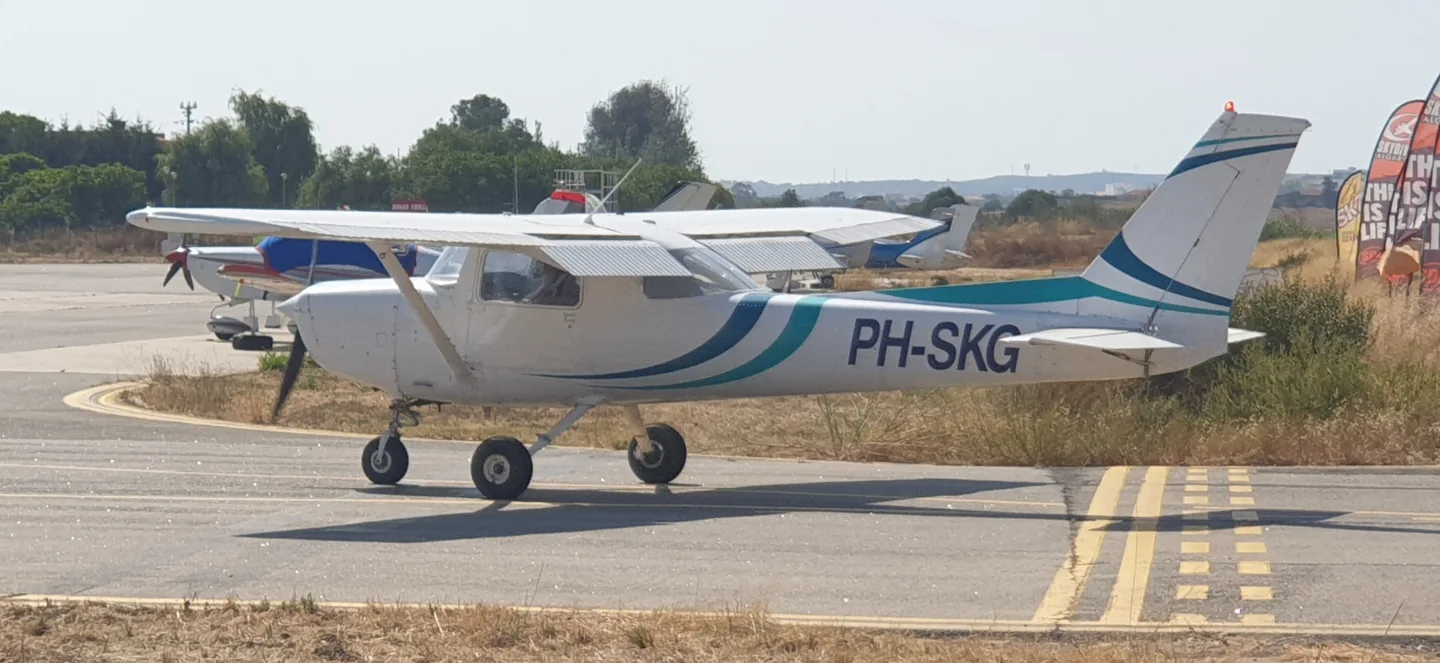
Cessna 152 / AerobatRobbie Klinkenberg · CC BY-SA 4.0 · Cessna 152.

Cessna 152 / Aerobat

A two-seat training single with a high wing and fixed tricycle landing gear.
General aviation프로필 선택: 6개

기체 알기

The 152 developed from Cessna's earlier 150, retaining the compact side-by-side cabin and simple high-wing layout. It became a familiar aircraft at flying schools and clubs. The Aerobat branch added equipment and structural provisions for aerobatic use.

Its smaller cabin distinguishes it from the four-seat 172 even when the family styling looks similar. The simulator products identify the standard 152 and Aerobat separately, with their panel layouts and configurations.

Aircraft / family

Propulsion
Single piston↗
Configuration
High wing · Two seats↗

Cessna 152 · Specifications (Cessna 152) · real aircraft; source units retained

Length
24 ft 1 in (7.34 m)↗
Wingspan
33 ft 4 in (10.16 m)↗
Height
8 ft 6 in (2.59 m)↗
Wing area
160 sq ft (15 m² )↗
Empty weight
1,081 lb (490 kg)↗
Gross weight
1,670 lb (757 kg)↗
Powerplant
1 × Lycoming O-235 -L2C flat-4 engine , 110 hp (82 kW)↗
Propellers
2-bladed fixed pitch, 69 inches (175 cm) McCauley or 72 in (183 cm) Sensenich propeller↗
Maximum speed
126 mph (203 km/h, 109 kn)↗
Cruise speed
123 mph (198 km/h, 107 kn)↗

AirframeDB에서 이 항공기에 대해 더 알아보기

A refinement of the familiar two-seat Cessna

The C152 followed the C150, retaining a two-seat cabin, fixed tricycle undercarriage and fixed-pitch propeller. Its changes included a more powerful Lycoming engine and an increased useful load. Just Flight’s historical introduction dates production from 1977 to 1985, with more than 7,500 aircraft built.

Simple controls with different jobs

The yokes and pedals operate the primary flight controls through mechanical linkages. A separate wheel adjusts the elevator trim tab, while an electric system moves the wing flaps. The two wing fuel tanks feed through a shut-off valve between the seats. These arrangements are described in Just Flight’s C152 systems guide.

An instructor and mechanic gets to know the Aerobat

Griffith writes about the A152 she teaches in and maintains at Fox Aviation. The school calls it Brat, a nickname that reflects the small surprises it can still give students who think they have mastered its habits. To her, it retains the familiar feel of an ordinary 150 or 152, with structural strengthening that makes it useful for stall and spin instruction. She explicitly says she had not flown a full aerobatic programme in this example because the school lacked the required parachutes.

Her account also shows how a working trainer evolves. The school replaced the vacuum instruments with Garmin G5 displays, partly because repeated spin training was shortening gyro life, while retaining much of the straightforward original panel layout. She noticed that this particular Aerobat sometimes resisted developing a strong right-hand spin. Frequent grass-strip use and primary training also led to removing its wheel fairings. Her affection centres on a durable, uncomplicated aeroplane whose individual quirks she knows through both flying and maintenance.

A small trainer opens the door to a first flight

Beckett describes using an Aviat-refurbished Reimagined Cessna 152 to introduce people to general aviation. He appreciates the fresh condition and complete, working panel: familiar round instruments make the aircraft approachable to returning pilots as well as newcomers. The refurbishment matters to his experience because the aeroplane presents the simplicity of a 152 without the missing instruments and inoperative labels that can accompany an elderly training fleet.

He illustrates that role through a familiarisation flight with Alena, a visitor from Germany who had never flown in a light aircraft. Initially she preferred to watch while he taxied. Once airborne, she spent much of their nearly hour-long outing at the controls, alternating flying with sightseeing as her confidence grew. Beckett gave her room to participate at a comfortable level.

Two yellow trainers in a friendly comparison

Hirschman reports a side-by-side comparison in which Mark Evans flew the 1978 Cessna 152 N152UC and Hirschman flew a 1976 Cessna 150M. Both were recently refurbished by Aviat, with full fuel and one pilot aboard. The 152 accelerated ahead and opened a much clearer advantage in the climb. At altitude its speed advantage was small, and Hirschman acknowledged the comparison depended on accurate tachometers and both pilots observing their engine-speed limits.

The slower exercises gave the 150 advantages in their stall and turning comparisons, although Hirschman jokes that his own flying may have influenced the turn result. On approach, he found the 152 less prone to a pronounced sink at idle with full flap than the 150 with its greater flap travel. The lasting memory was the enjoyment of flying the two bright yellow trainers together, with plenty of radio banter. Their observations describe this particular pair and afternoon, including the two pilots' different seats in the comparison.

공개 출처 11
  1. Cessna 152Research background · Wikipedia revision 1372668900 · retrieved 2026-09-12
  2. Microsoft Flight Simulator aircraft manuals
  3. MSFS 2024 FAQ and edition aircraft inventory
  4. MSFS 2020 FAQ and edition aircraft inventory
  5. C152 (X-Plane 12)Official developer / designated store catalogue · checked 2026-09-12
  6. C152 (X-Plane 11)Official developer / designated store catalogue · checked 2026-09-12
  7. Cessna Aerobat: CFI’s PerspectiveTamara Griffith · 30 July 2020
  8. Video: Hooking the next generation on flyingJamie Beckett · 2 June 2016
  9. Fly off: 150 versus 152Dave Hirschman · 5 December 2015 · comparison with Mark Evans
  10. C152 X-Plane 12 Operations ManualX-Plane 12 edition · archived 12 September 2026
  11. ICAO Doc 8643 — aircraft type designatorsPublic search data retrieved 2026-09-14; authority update 2026-09-03

프로필의 모델링 방식

Just Flight C152

Free + Pro
X-Plane 12Just Flight

The 152 developed from Cessna's earlier 150, retaining the compact side-by-side cabin and simple high-wing layout. It became a familiar aircraft at flying schools and clubs. The Aerobat branch added equipment and structural provisions for aerobatic use.

This profile selects Just Flight C152 for X-Plane 12.

Spring resistance builds with the selected airspeed response. A separate aerodynamic term adds speed-dependent control load.

Valid trim provides the configured pressure relief. Autopilot following is off.

이 리비전은 아직 공개 설치가 활성화되지 않았습니다.

Controls and trim

The C152 manual describes manual controls, a pitch-trim wheel and electric flaps at 10, 20 and 30 degrees. Pitch trim relieves changing yoke pressure, including flap-related loads. Just Flight's aircraft and WBSim's standard, wheel-fairing and taildragger configurations remain separate products and equipment selections. The Aerobat's extra provisions cannot be inferred for every C152.

C152 2.1.2 public package downloadC152 X-Plane 12 Operations Manual

The selected implementation

Just Flight's XP12 C152 documents manual controls, a trim wheel and electric 10/20/30-degree flaps, without a calibrated physical yoke curve.

C152 X-Plane 12 Operations Manual

About the values

The gains are normalized profile settings. They describe the chosen effect balance; hand force depends on the device and its output limits. IAS references are tuning values rather than operating limits. Physical acceptance of this revision remains pending.

Master gain & control system

Master gain85%

모델이 만드는 모든 것에 적용되는 최종 전체 출력 스케일로, 장치 상한 이전에 적용됩니다.

올리면: 모든 것(스프링, 하중, 효과)이 함께 강해집니다.

내리면: 모든 것이 함께 부드러워집니다.

이 값의 이유: Scales overall profile strength while preserving effect balance, subject to device and output limits.

Forces

Spring strength74%

스틱을 중앙으로 되돌리는 기본 센터링 힘입니다. 다른 모든 힘이 이 위에 쌓입니다. 너무 낮으면 정상 비행에서 스틱이 흐물거리고, 너무 높으면 손에 맞서며 그 위에 겹쳐진 작은 신호들을 가립니다.

올리면: 손에 더 저항하는 단단한 센터링.

내리면: 공기역학 하중에만 기대는 무른 스틱.

이 값의 이유: Manual primary controls motivate speed-dependent yoke resistance, with pitch and roll balance supplied by this profile's separate loading terms. The baseline spring is 0.74. Its low-speed blend reaches baseline strength at 47.5 KIAS.

C152 2.1.2 public package downloadC152 X-Plane 12 Operations Manual
Spring deadband4%

중앙 주변에서 스프링이 조용히 머무는 작은 중립 구역으로, 정지 시의 미세한 움직임이 덜컹거리지 않게 합니다. 넓을수록 차분하지만 느슨해지고, 좁을수록 정밀하지만 중앙에서 떨릴 수 있습니다.

올리면: 더 차분하지만 더 느슨한, 유격이 큰 중앙.

내리면: 정지 시 떨릴 수 있는 더 조인 중앙.

이 값의 이유: Sets travel around the centre before the baseline spring resists. Smaller values engage it sooner.

Overall aerodynamic load80%

두 지속 축 하중에 걸리는 마스터 스케일로, 각 축의 독립 균형 이전에 적용됩니다. 프로파일은 보통 이것을 두고 두 축 하중을 조정합니다.

올리면: 두 축이 더 강하게 하중을 받습니다.

내리면: 두 축이 함께 가벼워집니다.

이 값의 이유: The aerodynamic-load gain is 0.8 with an indicated-speed reference of 95 KIAS. This supplies speed-dependent loading alongside the spring.

Airspeed blendingTrue

저속 스프링 진입 구간(위의 시작/최대 노트)을 켭니다. 끄면 스프링은 모든 속도에서 일정합니다.

이 값의 이유: Allows baseline spring strength to rise with indicated airspeed where the control law permits it.

Low-speed spring floor50%

속도가 공기역학적 힘을 만들기 전, 정지 상태에서 스프링이 얼마나 남는지입니다. 바닥이 높으면 주기된 스틱이 단단하고, 낮으면 주기된 경비행기의 케이블이 늘어진 듯한 느슨한 감각이 됩니다.

올리면: 주기·지상활주 시 더 단단한 스틱.

내리면: 속도로만 깨어나는 주기 시의 무른 스틱.

이 값의 이유: Sets low-speed spring strength as a fraction of baseline when blending is enabled. One keeps full strength.

Spring engagement start8 kt

스프링이 저속 바닥에서 전체 강도를 향해 오르기 시작하는 속도입니다. 이륙 활주에서 조종면이 "살아나는" 지점입니다.

이 값의 이유: Sets the IAS where the low-speed spring blend starts rising. This is a feel threshold, not a flight limit.

Spring engagement full47.5 kt

스프링이 전체 강도에 도달하는 속도입니다. 시작점과 이 지점 사이에서 조종면 위 기류가 늘며 센터링이 점차 단단해집니다.

이 값의 이유: Sets the IAS where the low-speed blend reaches baseline strength; high-speed stiffening also uses it.

포스 조정 속도95

공기역학 하중이 설계된 최대치에 도달하는 지시 속도입니다. 하중 곡선 전체를 기체의 실제 속도 범위에 고정합니다. 172는 110노트에서 하중이 차오르고, 제트기는 훨씬 나중입니다.

올리면: 하중이 늦게 오고, 더 빠른 속도까지 스틱이 가볍습니다.

내리면: 하중이 일찍 오고 순항이 더 무겁습니다.

이 값의 이유: Sets the IAS reference for aerodynamic loading. It is an estimate, not published cruise TAS or a flight limit.

Centre firmness vs speed15%

변위 하중에 더해 센터링 자체가 속도에 따라 얼마나 단단해지는지입니다. 0이면 중앙 감각이 일정하고, 클수록 순항에서 더 단단히, 장주에서 더 느슨하게 센터링됩니다.

올리면: 속도에 따라 뚜렷이 단단해지는 중앙.

내리면: 어떤 속도에서도 일정한 중앙 감각.

이 값의 이유: The high-speed spring-stiffening gain is 0.15. It strengthens the permitted spring response above 47.5 KIAS, with the squared-speed ratio capped at 5.

Centre stiffening cap5

속도로 인한 중앙 경화의 상한으로, 초고속 비행이 스프링을 무한정 감아올리지 못하게 합니다.

올리면: 고속에서 더 많은 총 경화 허용.

내리면: 경화가 더 일찍 멈춥니다.

이 값의 이유: Limits the squared airspeed ratio used for high-speed spring stiffening; it is not a device-force cap.

Aileron load72%

에일러론 변위와 속도에 의한 지속적인 롤 하중으로, 피치와 독립적으로 조정됩니다. 승강타 하중과 함께 리뷰에서 말하는 조종 조화 비율을 정합니다.

올리면: 더 무거운 롤 힘.

내리면: 더 가볍고 생기 있는 에일러론.

이 값의 이유: Roll and pitch aerodynamic scales are 0.72 and 1, respectively. They set the aerodynamic axis balance. No custom spring-travel curve is enabled.

Elevator load100%

승강타 변위와 속도에 의한 지속적인 피치 하중으로, 롤과 독립적으로 조정됩니다. 기종별 피치 무게를 결정하는 주 레버입니다. 에일러론, 스프링, 트림, 버핏 힘에는 관여하지 않습니다.

올리면: 속도에서 더 무거운 지속 피치 힘.

내리면: 붙들기 가벼운, 더 가뿐한 승강타.

이 값의 이유: Scales pitch aerodynamic loading; pitch spring travel and trim responses are separate settings.

Max output force55%

각 정상 피치·롤 힘이 장치에 닿기 전의 상한으로, 강한 기동에서 하드웨어를 때리거나 포화시키지 않게 보호합니다.

올리면: 잘리기 전의 더 높은 정상 힘 피크.

내리면: 더 부드러운 상한. 거친 기동이 더 일찍 평평해집니다.

이 값의 이유: Caps directed-force output. Native spring effects and device limits remain separate.

Trim

Trim relief (elevator)30%

승강타 트림이 유지 중인 피치 힘을 얼마나 덜어내고 스틱이 안착하는 지점을 옮기는지입니다. 100 %에서는 제대로 트림된 기체에 유지 압력이 필요 없어져, 실제 비행의 하중을-트림으로-지우는 절차 그대로입니다.

올리면: 트림이 더 많은 유지 힘을 덜어냅니다. 100 %에서는 완전 트림이 상쇄합니다.

내리면: 트림해도 힘을 계속 붙들게 됩니다.

이 값의 이유: The pitch-trim wheel supports elevator pressure relief; it does not establish an in-flight aileron-trim channel. Pitch authority 0.3 provides load relief and permitted centre movement; roll authority is 0.

C152 2.1.2 public package downloadC152 X-Plane 12 Operations Manual
Trim relief (aileron)0%

롤 트림에 대한 같은 경감입니다. 대부분의 GA 기종에는 실제 에일러론 트림이 없어 0으로 두고, 롤 트림이 있는 기종은 상응하는 값을 받습니다.

올리면: 롤 트림이 더 많은 유지 힘을 덜어냅니다.

내리면: 롤 트림의 효과가 줄어듭니다.

이 값의 이유: Scales supported roll-trim relief and permitted centre movement. Zero removes roll response.

Effect gains · Ground

Runway rumble40%

바퀴 속도와 노면 종류(포장, 잔디, 자갈)에 따른 구름 진동입니다.

올리면: 스틱의 노면 질감이 더 강하게.

내리면: 더 매끄러운 지상활주.

이 값의 이유: Sets rolling texture strength, modified by speed, surface and undercarriage configuration.

Gear bumps25%

신축 이음, 바퀴 자국, 거친 노면의 짧고 분리된 충격으로, 연속적인 우르릉거림에 마디를 찍습니다.

올리면: 이음과 자국의 더 또렷한 충격.

내리면: 더 부드러운 지면 디테일.

이 값의 이유: Sets gear-bump texture during ground motion, separate from touchdown impact.

Effect gains · Airframe

Stall buffet35%

실속 접근 시와 실속 경고가 울리는 동안의 기체 흔들림, 이 날개가 불만을 얼마나 크게 알리는지입니다. 깔끔하게 떨어지는 기종은 버핏을 절제하고 경적이 경고를 맡습니다.

올리면: 더 강한 실속 전 떨림.

내리면: 더 은은한 날개. 경적이 경고를 맡습니다.

이 값의 이유: Sets stall-buffet strength. Zero removes the cue without changing simulator stalls or warnings.

Mach buffet0%

마하 한계 접근 시의 천음속 버핏입니다. MMO 근처의 제트기에는 의미가 있고, 거기 도달하지 못하는 피스톤과 터보프롭은 0입니다.

올리면: 마하 한계 근처의 더 강한 천음속 버핏.

내리면: 높은 마하에서 더 매끄러운 비행.

이 값의 이유: Sets high-Mach buffet strength; onset and full-strength thresholds are separate.

Flap buffet0%

플랩이 실제로 공기를 일하는 속도 창에서, 기류에 펼쳐진 플랩에 의한 기체의 저주파 진동입니다.

올리면: 플랩 작동 중 더 거친 비행.

내리면: 더 부드러운 접근 플랩.

이 값의 이유: Sets flap buffet at the configured position and speed gates. Flap movement texture is separate.

Gear buffet0%

기류에 매달린 접이식 착륙장치에 의한 기체의 북소리입니다. 기체 형상이 변하지 않는 고정식 기종은 0입니다.

올리면: 착륙장치 내림 시 더 많은 북소리.

내리면: 더 깔끔한 착륙장치 내림 비행.

이 값의 이유: Sets gear aerodynamic buffet; movement and ground-contact cues are separate.

Stick shaker50%

기체 자체의 실속 경보 시스템이 발동하는 전용 스틱 셰이커 진동입니다. 실제 셰이커가 있는 기종만 값을 받고, 나머지는 공기역학 버핏과 경적에 의존합니다.

올리면: 더 단단한 셰이커.

내리면: 더 은은한 셰이커.

이 값의 이유: Sets triggered shaker strength; inactive while the shaker feature is disabled.

Effect gains · Engine, mechanical & drag

Touchdown thump65%

바퀴가 활주로에 닿는 순간의 단발 충격으로, 강하율에 따라 스케일됩니다. 부드러운 착륙은 속삭이고 단단한 도착은 쿵 울립니다.

올리면: 접지 시 더 단단한 충격.

내리면: 더 부드러운 도착.

이 값의 이유: Sets landing-impact strength; landing telemetry and response shape determine the pulse.

Reverse rumble0%

역추력이나 베타 범위 프로펠러가 작동하는 동안의 활주 진동입니다. 리버스가 없는 기종은 0입니다.

올리면: 리버스 중 더 거친 활주.

내리면: 더 은은한 리버스.

이 값의 이유: Sets reverse-thrust vibration with valid reverser and engine conditions. Zero removes the cue.

Engine rumble12%

공회전부터 최대 출력까지 회전수를 따르는 연속적인 동력장치 진동으로, 앞에서 무언가 연료를 태우고 있다는 늘 존재하는 상기입니다.

올리면: 스틱에 더 많은 엔진.

내리면: 더 은은한 엔진.

이 값의 이유: Sets estimated engine vibration using configured telemetry and response, not measured cockpit vibration.

Flap motion12%

시뮬레이터가 플랩 조종면의 실제 이동을 보고하는 동안만의 연속 진동입니다. 추정 타이머가 아니라 실제 액추에이터 동작과 고장을 따릅니다.

올리면: 플랩 이동 중 더 많은 진동.

내리면: 더 은은한 플랩 이동.

이 값의 이유: Sets texture from observed flap movement; a command without movement does not establish the cue.

Autopilot follow

AP follow authority10%

자동조종 명령이 스틱을 물리적으로 얼마나 움직일 수 있는지입니다. 움직인 축이 조종사 입력으로 읽힐 수 있는 MSFS에서는 극소로 유지하며, 0이면 따라가기가 완전히 꺼집니다.

올리면: 자동조종이 스틱을 눈에 띄게 더 움직입니다.

내리면: 거의 느껴지지 않는 따라가기.

이 값의 이유: Sets admitted AP-follow gain, not a percentage of travel. Runtime ownership and input limits still apply.

Stick feel

StickFeel · Trim feel enabledFalse

Whether this feature is active in this profile.

이 값의 이유: Retained for compatibility and group membership. Trim relief, rather than this flag, controls centre movement.

StickFeel · Trim relief enabledTrue

Whether this feature is active in this profile.

이 값의 이유: Allows trim relief with supported control law and valid telemetry. Axis authorities set its amount.

StickFeel · Force trim enabledFalse

Whether this feature is active in this profile.

이 값의 이유: Enables local force trim, separate from aircraft-owned trim and add-on integration qualification.

StickFeel · G load enabledTrue

Whether this feature is active in this profile.

이 값의 이유: Allows load-factor changes to modify permitted spring laws. Passive fly-by-wire feel can suppress it.

StickFeel · Rate damping enabledTrue

Whether this feature is active in this profile.

이 값의 이유: Enables rate damping with the configured coefficients and control law.

Autopilot

Autopilot · Follow enabledFalse

Whether this feature is active in this profile.

이 값의 이유: Autopilot following is off; the configured spring and load retain the hardware feel.

Autopilot · Neutral hold enabledFalse

Whether this feature is active in this profile.

이 값의 이유: Permits centering hold during a supported AP state, separate from following a moving target.

Autopilot · Neutral hold strength0.6

이 값의 이유: Sets admitted AP neutral-hold strength; inactive while neutral hold is disabled.

Aero

Aero · EnabledTrue

Whether this feature is active in this profile.

이 값의 이유: Enables aerodynamic cues; each still needs nonzero strength and its simulator conditions.

Aero · Max flap index3

Where this effect reaches full strength (or has fully faded, for washouts).

올리면: a more gradual build to a later peak.

내리면: a quicker build.

이 값의 이유: Sets the final flap index for detent normalization. UP plus three detents uses maximum index3.

Aero · Min flap index2

Where this effect begins fading in.

올리면: the effect begins later.

내리면: it begins earlier.

이 값의 이유: Sets the first flap detent that admits buffet; this is a handle index, not degrees.

Aero · Shaker enabledFalse

Whether this feature is active in this profile.

이 값의 이유: Permits shaker at supported warning conditions; the switch does not establish aircraft equipment.

Ground

Ground · EnabledTrue

Whether this feature is active in this profile.

이 값의 이유: Enables ground effects; each still needs its own strength and contact or motion telemetry.

Engine

Engine · EnabledTrue

Whether this feature is active in this profile.

이 값의 이유: Enables engine cues with nonzero settings and valid running-engine telemetry.

Mechanical

Mechanical · EnabledTrue

Whether this feature is active in this profile.

이 값의 이유: Enables accessory cues with configured strengths and observed accessory movement.

Mechanical · Gain0

The strength of this effect.

올리면: a stronger effect.

내리면: a weaker one.

이 값의 이유: Sets texture from observed gear movement, separate from aerodynamic and touchdown effects.

모든 프로필 설정
추정 프로필 설정
매개변수값제어 대상과 설정 이유
Spring strength0.74 Manual primary controls motivate speed-dependent yoke resistance, with pitch and roll balance supplied by this profile's separate loading terms. The baseline spring is 0.74. Its low-speed blend reaches baseline strength at 47.5 KIAS.
Spring deadband0.045 Sets travel around the centre before the baseline spring resists. Smaller values engage it sooner.
Force gain0.8 The aerodynamic-load gain is 0.8 with an indicated-speed reference of 95 KIAS. This supplies speed-dependent loading alongside the spring.
Master gain0.85 Scales overall profile strength while preserving effect balance, subject to device and output limits.
Dynamic-pressure blendTrue Allows baseline spring strength to rise with indicated airspeed where the control law permits it.
Minimum spring factor0.5 Sets low-speed spring strength as a fraction of baseline when blending is enabled. One keeps full strength.
Spring wake-up speed8 ktSets the IAS where the low-speed spring blend starts rising. This is a feel threshold, not a flight limit.
Spring full-strength speed47.5 ktSets the IAS where the low-speed blend reaches baseline strength; high-speed stiffening also uses it.
포스 조정 속도95 ktSets the IAS reference for aerodynamic loading. It is an estimate, not published cruise TAS or a flight limit.
Airspeed spring stiffening0.15 The high-speed spring-stiffening gain is 0.15. It strengthens the permitted spring response above 47.5 KIAS, with the squared-speed ratio capped at 5.
Airspeed stiffening cap5 Limits the squared airspeed ratio used for high-speed spring stiffening; it is not a device-force cap.
Aileron force scale0.72 Roll and pitch aerodynamic scales are 0.72 and 1, respectively. They set the aerodynamic axis balance. No custom spring-travel curve is enabled.
Elevator force scale1 Scales pitch aerodynamic loading; pitch spring travel and trim responses are separate settings.
Maximum output force0.55 Caps directed-force output. Native spring effects and device limits remain separate.
StickFeel · Trim feel enabledFalse Retained for compatibility and group membership. Trim relief, rather than this flag, controls centre movement.
StickFeel · Trim relief enabledTrue Allows trim relief with supported control law and valid telemetry. Axis authorities set its amount.
StickFeel · Elevator authority0.3 The pitch-trim wheel supports elevator pressure relief; it does not establish an in-flight aileron-trim channel. Pitch authority 0.3 provides load relief and permitted centre movement; roll authority is 0.
StickFeel · Aileron authority0 Scales supported roll-trim relief and permitted centre movement. Zero removes roll response.
StickFeel · Force trim enabledFalse Enables local force trim, separate from aircraft-owned trim and add-on integration qualification.
StickFeel · G load enabledTrue Allows load-factor changes to modify permitted spring laws. Passive fly-by-wire feel can suppress it.
StickFeel · Rate damping enabledTrue Enables rate damping with the configured coefficients and control law.
Autopilot · Follow enabledFalse Autopilot following is off; the configured spring and load retain the hardware feel.
Autopilot · Follow authority0.1 Sets admitted AP-follow gain, not a percentage of travel. Runtime ownership and input limits still apply.
Autopilot · Neutral hold enabledFalse Permits centering hold during a supported AP state, separate from following a moving target.
Autopilot · Neutral hold strength0.6 Sets admitted AP neutral-hold strength; inactive while neutral hold is disabled.
Aero · EnabledTrue Enables aerodynamic cues; each still needs nonzero strength and its simulator conditions.
Aero · Gain0.35 Sets stall-buffet strength. Zero removes the cue without changing simulator stalls or warnings.
Aero · Gain0 Sets high-Mach buffet strength; onset and full-strength thresholds are separate.
Aero · Gain0 Sets flap buffet at the configured position and speed gates. Flap movement texture is separate.
Aero · Max flap index3 Sets the final flap index for detent normalization. UP plus three detents uses maximum index3.
Aero · Min flap index2 Sets the first flap detent that admits buffet; this is a handle index, not degrees.
Aero · Gain0 Sets gear aerodynamic buffet; movement and ground-contact cues are separate.
Aero · Shaker enabledFalse Permits shaker at supported warning conditions; the switch does not establish aircraft equipment.
Aero · Amplitude0.5 Sets triggered shaker strength; inactive while the shaker feature is disabled.
Ground · EnabledTrue Enables ground effects; each still needs its own strength and contact or motion telemetry.
Ground · Gain0.4 Sets rolling texture strength, modified by speed, surface and undercarriage configuration.
Ground · Gain0.25 Sets gear-bump texture during ground motion, separate from touchdown impact.
Ground · Gain0.65 Sets landing-impact strength; landing telemetry and response shape determine the pulse.
Ground · Gain0 Sets reverse-thrust vibration with valid reverser and engine conditions. Zero removes the cue.
Engine · EnabledTrue Enables engine cues with nonzero settings and valid running-engine telemetry.
Engine · Gain0.12 Sets estimated engine vibration using configured telemetry and response, not measured cockpit vibration.
Mechanical · EnabledTrue Enables accessory cues with configured strengths and observed accessory movement.
Mechanical · Gain0.12 Sets texture from observed flap movement; a command without movement does not establish the cue.
Mechanical · Gain0 Sets texture from observed gear movement, separate from aerodynamic and touchdown effects.
공개 출처 12
  1. Cessna 152Research background · Wikipedia revision 1372668900 · retrieved 2026-09-12
  2. C152 2.1.2 public package downloadArchived package2.1.2; read-only manifest and three SimObject aircraft/flight_model/system configs in review-evidence/wbsim-c152; manifest.json and three SimObjects aircraft/flight_model/systems configurations
  3. C152 X-Plane 12 Operations ManualPDF 13, flight controls and flapsX-Plane 12 edition · archived 12 September 2026
  4. Microsoft Flight Simulator aircraft manuals
  5. MSFS 2024 FAQ and edition aircraft inventory
  6. MSFS 2020 FAQ and edition aircraft inventory
  7. C152 (X-Plane 12)Official developer / designated store catalogue · checked 2026-09-12
  8. C152 (X-Plane 11)Official developer / designated store catalogue · checked 2026-09-12
  9. Cessna Aerobat: CFI’s PerspectiveTamara Griffith · 30 July 2020
  10. Video: Hooking the next generation on flyingJamie Beckett · 2 June 2016
  11. Fly off: 150 versus 152Dave Hirschman · 5 December 2015 · comparison with Mark Evans
  12. ICAO Doc 8643 — aircraft type designatorsPublic search data retrieved 2026-09-14; authority update 2026-09-03

커뮤니티와 정정

실기종 경험상 이 페이지가 틀렸다면 여기서 바로잡아 주세요.

조종사 정정

이 기체를 모시나요? 이 페이지를 정정하세요.

이 페이지는 인용된 자료로 만들어졌지만, 실기종 경험은 인용을 이깁니다. 틀린 주장을 인용하고 실제 기체는 어떤지 알려주세요. 정정은 메인테이너가 검토하며 이 조사의 다음 개정에 반영됩니다.

행어 토크

Cessna 152 / Aerobat의 비행과 튜닝에 대한 열린 대화(커뮤니티 포럼)입니다. 위의 정정은 메인테이너에게 비공개로 전달되며, 행어 토크는 공개입니다.

Cessna 152 / Aerobat의 행어 토크가 아직 없습니다. 첫 번째가 되어 보세요.

커뮤니티

이 기체의 커뮤니티 프로필

이 기체의 커뮤니티 프로필이 아직 없습니다. 나만의 방식으로 튜닝했나요? 프로필 공유하기 그러면 여기에 표시됩니다.