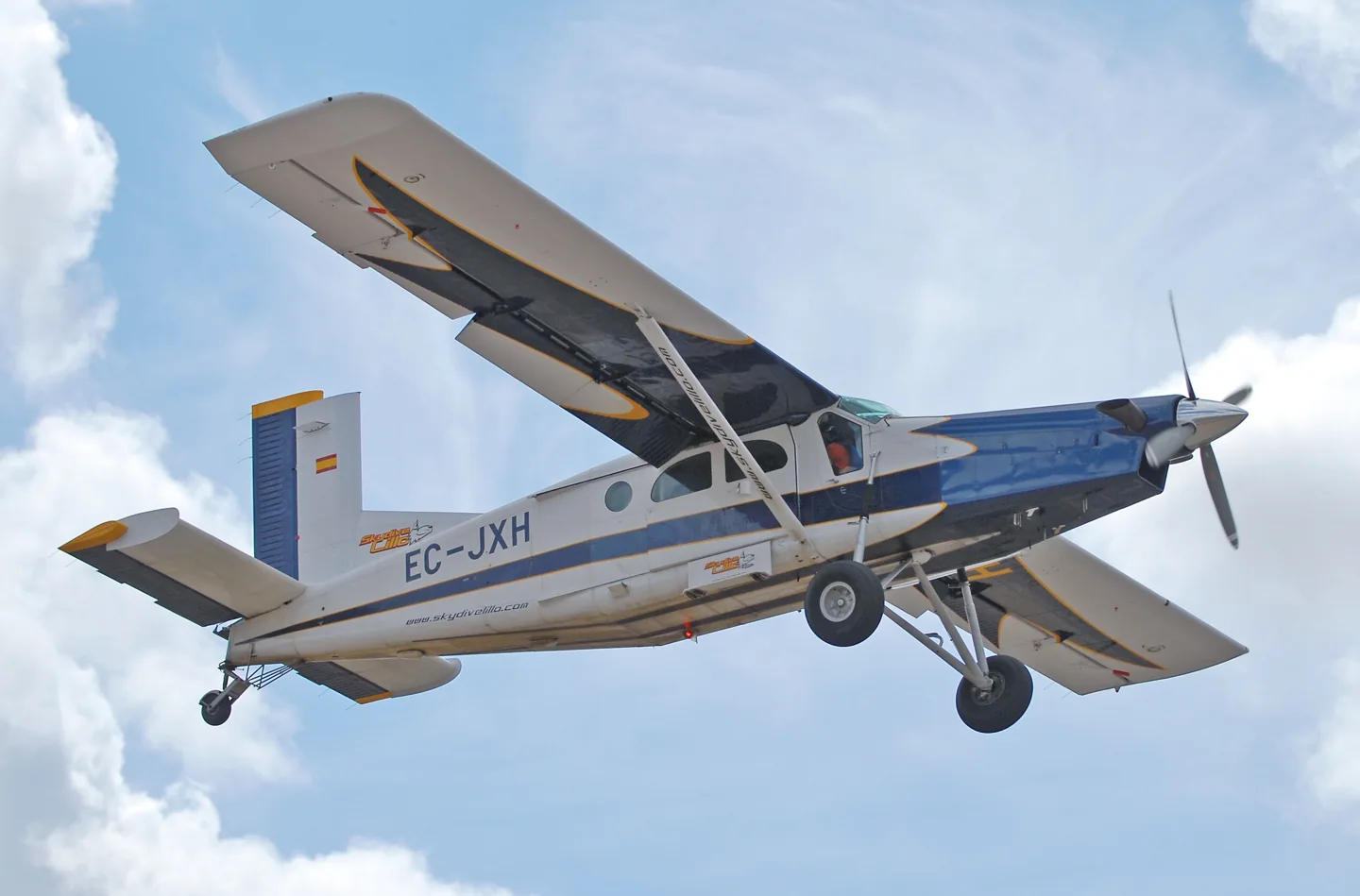
기체 라이브러리Pilatus PC-6 B2
Pilatus PC-6 B2JDrewes (see www.jandrewes.de), slight edit by Alvesgaspar · CC BY-SA 3.0 · Pilatus PC-6 Porter pictured

Pilatus PC-6 B2

A high-wing utility aircraft known for short-field work and a broad choice of working configurations.
Turboprop프로필 선택: 14개

기체 알기

The Porter first flew with piston power in 1959. Turboprop versions later became familiar in parachuting and remote-area transport, retaining the narrow fuselage, high wing and long landing-gear legs.

The simulator represents the PC-6 B2. Engines, limits and equipment differ across Porter variants; wheel and float options, cabin layouts and avionics are documented for each package.

Aircraft / family

Propulsion
Single turboprop (B2)↗
Configuration
High wing · Utility / parachuting↗

Pilatus PC-6 Porter · Specifications (PC-6 B2 Turbo-Porter) · real aircraft; source units retained

Length
11 m (36 ft 1 in)↗
Wingspan
15.87 m (52 ft 1 in)↗
Height
3.2 m (10 ft 6 in)↗
Wing area
30.15 m² (324.5 sq ft)↗
Empty weight
1,270 kg (2,800 lb)↗
Max takeoff weight
2,800 kg (6,173 lb)↗
Powerplant
1 × Pratt & Whitney Canada PT6A-27 turboprop engine, 410 kW (550 hp) (de-rated from 507 kW (680 hp))↗
Propellers
3-bladed constant-speed reversible propeller↗
Maximum speed
232 km/h (144 mph, 125 kn)↗
Cruise speed
213 km/h (132 mph, 115 kn)↗

AirframeDB에서 이 항공기에 대해 더 알아보기

A working link between remote communities

Dearden’s Susi Air account describes the Porter carrying passengers, essential supplies and medical traffic in Papua. Its role included regular government-supported routes as well as individual cargo missions.

Early starts and village arrivals in Papua

Dearden moved from the Caravan to the Porter after training in Borneo, then spent several years flying in Papua. His working days started before sunrise, taking advantage of calmer early conditions. Flights brought passengers and government services to villages, alongside food, building materials, fuel and medical transport when needed.

He liked the Porter’s predictable, balanced controls and the work it could do at steep, short airstrips. The seats were a less comfortable part of the experience. Mountain scenery made the job memorable, but so did the people: an arrival could reunite families and bring a village something it had been waiting for.

A differences course becomes a busy parachuting day

The blogger travelled from Sicily to Sardinia with a colleague for the course. A detailed briefing and an evening meal with the parachuting group made the introduction sociable before the next day’s work with a Zimex examiner. Cockpit familiarisation led into actual parachute flights, with aircraft handling, positioning and radio work competing for attention.

Electric trim and its backup arrangements were among the differences that needed deliberate practice. The writer found the breaker placement awkward during a simulated trim problem, while the changed warning panel and navigation equipment also required adjustment. Repeated flights brought greater familiarity, helped by instruction and a proper debrief.

A tall amphibian that became graceful in flight

Climbing aboard felt more like negotiating gym equipment than entering an ordinary aeroplane. Once in the cockpit, Hirschman appreciated the exceptional downward view through the large transparent doors. The float-equipped Porter looked ungainly on the ground, yet its controls proved balanced and manageable during the flight.

Lake operations introduced another set of details, including water rudders and a depth display that was unfamiliar to him. The session included water landings, runway landings and formation work for photographs. By the end, the aircraft’s precision had changed his impression of its appearance: the awkward-looking machine had become graceful in use. His favourable account belongs to this particular amphibian, intended for medical work in Brazil, rather than to every Porter configuration.

공개 출처 13
  1. Pilatus PC-6 PorterResearch background · Wikipedia revision 1373021552 · retrieved 2026-09-12
  2. Microsoft Flight Simulator aircraft manuals
  3. MSFS 2024 FAQ and edition aircraft inventory
  4. MSFS 2020 FAQ and edition aircraft inventory
  5. Pilatus PC-6 Turbo Porter - DGS Series XP12Official developer / designated store catalogue · checked 2026-09-12
  6. Pilatus PC-6 Turbo Porter - DGS Series XP11Official developer / designated store catalogue · checked 2026-09-12
  7. Reality Expansion Pack · Thranda Pilatus Turbo PorterOfficial developer / designated store catalogue · checked 2026-09-12
  8. Flying in extreme conditionsInterview with Matt Dearden · Susi Air, Papua
  9. Abilitazione su PC6 B2H4GOLF · 15 May 2018 · Italian-language account
  10. A flying Swiss Army knifeDave Hirschman · 1 July 2019
  11. ICAO Doc 8643 — aircraft type designatorsPublic search data retrieved 2026-09-14; authority update 2026-09-03
  12. PC-6 for MSFS2020Product listing captured 2026-09-30; edition scope from the reviewed catalogue
  13. FSG PC6 current product scope, interfaces and documentationProduct listing captured 2026-09-24; edition scope from the reviewed catalogue

프로필의 모델링 방식

Pilatus PC-6 B2 Amphibian

Free + Pro
MSFS 2020MSFS 2024X-Plane 12

A high-wing utility aircraft known for short-field work and a broad choice of working configurations.

Spring resistance builds with the selected airspeed response. A separate aerodynamic term adds speed-dependent control load.

Valid trim provides the configured pressure relief. Autopilot following is off.

이 리비전은 아직 공개 설치가 활성화되지 않았습니다.

Aircraft and configuration

PC6 B2 PT6 turboprop with amphibious floats and retractable wheels, stabilizer and aileron trim. Water-contact preset is selected; accessory hydraulics do not establish primary-control boost.

Pilatus PC-6 Turbo Porter - DGS Series XP12PC 6 MSFS User Guide V2.pdf

About the values

Strengths are normalized hardware-feel settings. They set the effect balance; hand force depends on the device and its limits. The IAS reference is a tuning value.

Master gain & control system

Master gain85%

모델이 만드는 모든 것에 적용되는 최종 전체 출력 스케일로, 장치 상한 이전에 적용됩니다.

올리면: 모든 것(스프링, 하중, 효과)이 함께 강해집니다.

내리면: 모든 것이 함께 부드러워집니다.

이 값의 이유: Scales overall profile strength while preserving effect balance, subject to device and output limits.

Forces

Spring strength74%

스틱을 중앙으로 되돌리는 기본 센터링 힘입니다. 다른 모든 힘이 이 위에 쌓입니다. 너무 낮으면 정상 비행에서 스틱이 흐물거리고, 너무 높으면 손에 맞서며 그 위에 겹쳐진 작은 신호들을 가립니다.

올리면: 손에 더 저항하는 단단한 센터링.

내리면: 공기역학 하중에만 기대는 무른 스틱.

이 값의 이유: This profile uses reversible-control loading for Pilatus PC-6 B2. The baseline spring is 0.74. Its low-speed blend reaches baseline strength at 57.5 KIAS.

Overall aerodynamic load68%

두 지속 축 하중에 걸리는 마스터 스케일로, 각 축의 독립 균형 이전에 적용됩니다. 프로파일은 보통 이것을 두고 두 축 하중을 조정합니다.

올리면: 두 축이 더 강하게 하중을 받습니다.

내리면: 두 축이 함께 가벼워집니다.

이 값의 이유: The aerodynamic-load gain is 0.68 with an indicated-speed reference of 115 KIAS. This supplies speed-dependent loading alongside the spring.

Elevator load100%

승강타 변위와 속도에 의한 지속적인 피치 하중으로, 롤과 독립적으로 조정됩니다. 기종별 피치 무게를 결정하는 주 레버입니다. 에일러론, 스프링, 트림, 버핏 힘에는 관여하지 않습니다.

올리면: 속도에서 더 무거운 지속 피치 힘.

내리면: 붙들기 가벼운, 더 가뿐한 승강타.

이 값의 이유: Scales pitch aerodynamic loading; pitch spring travel and trim responses are separate settings.

Aileron load72%

에일러론 변위와 속도에 의한 지속적인 롤 하중으로, 피치와 독립적으로 조정됩니다. 승강타 하중과 함께 리뷰에서 말하는 조종 조화 비율을 정합니다.

올리면: 더 무거운 롤 힘.

내리면: 더 가볍고 생기 있는 에일러론.

이 값의 이유: Roll and pitch aerodynamic scales are 0.72 and 1, respectively. They set the aerodynamic axis balance. No custom spring-travel curve is enabled.

Max output force55%

각 정상 피치·롤 힘이 장치에 닿기 전의 상한으로, 강한 기동에서 하드웨어를 때리거나 포화시키지 않게 보호합니다.

올리면: 잘리기 전의 더 높은 정상 힘 피크.

내리면: 더 부드러운 상한. 거친 기동이 더 일찍 평평해집니다.

이 값의 이유: Caps directed-force output. Native spring effects and device limits remain separate.

포스 조정 속도115

공기역학 하중이 설계된 최대치에 도달하는 지시 속도입니다. 하중 곡선 전체를 기체의 실제 속도 범위에 고정합니다. 172는 110노트에서 하중이 차오르고, 제트기는 훨씬 나중입니다.

올리면: 하중이 늦게 오고, 더 빠른 속도까지 스틱이 가볍습니다.

내리면: 하중이 일찍 오고 순항이 더 무겁습니다.

이 값의 이유: Sets the IAS reference for aerodynamic loading. It is an estimate, not published cruise TAS or a flight limit.

Spring deadband5%

중앙 주변에서 스프링이 조용히 머무는 작은 중립 구역으로, 정지 시의 미세한 움직임이 덜컹거리지 않게 합니다. 넓을수록 차분하지만 느슨해지고, 좁을수록 정밀하지만 중앙에서 떨릴 수 있습니다.

올리면: 더 차분하지만 더 느슨한, 유격이 큰 중앙.

내리면: 정지 시 떨릴 수 있는 더 조인 중앙.

이 값의 이유: Sets travel around the centre before the baseline spring resists. Smaller values engage it sooner.

Airspeed blendingTrue

저속 스프링 진입 구간(위의 시작/최대 노트)을 켭니다. 끄면 스프링은 모든 속도에서 일정합니다.

이 값의 이유: Allows baseline spring strength to rise with indicated airspeed where the control law permits it.

Low-speed spring floor55%

속도가 공기역학적 힘을 만들기 전, 정지 상태에서 스프링이 얼마나 남는지입니다. 바닥이 높으면 주기된 스틱이 단단하고, 낮으면 주기된 경비행기의 케이블이 늘어진 듯한 느슨한 감각이 됩니다.

올리면: 주기·지상활주 시 더 단단한 스틱.

내리면: 속도로만 깨어나는 주기 시의 무른 스틱.

이 값의 이유: Sets low-speed spring strength as a fraction of baseline when blending is enabled. One keeps full strength.

Spring engagement start8 kt

스프링이 저속 바닥에서 전체 강도를 향해 오르기 시작하는 속도입니다. 이륙 활주에서 조종면이 "살아나는" 지점입니다.

이 값의 이유: Sets the IAS where the low-speed spring blend starts rising. This is a feel threshold, not a flight limit.

Spring engagement full57.5 kt

스프링이 전체 강도에 도달하는 속도입니다. 시작점과 이 지점 사이에서 조종면 위 기류가 늘며 센터링이 점차 단단해집니다.

이 값의 이유: Sets the IAS where the low-speed blend reaches baseline strength; high-speed stiffening also uses it.

Centre firmness vs speed15%

변위 하중에 더해 센터링 자체가 속도에 따라 얼마나 단단해지는지입니다. 0이면 중앙 감각이 일정하고, 클수록 순항에서 더 단단히, 장주에서 더 느슨하게 센터링됩니다.

올리면: 속도에 따라 뚜렷이 단단해지는 중앙.

내리면: 어떤 속도에서도 일정한 중앙 감각.

이 값의 이유: The high-speed spring-stiffening gain is 0.15. It strengthens the permitted spring response above 57.5 KIAS, with the squared-speed ratio capped at 5.

Centre stiffening cap5

속도로 인한 중앙 경화의 상한으로, 초고속 비행이 스프링을 무한정 감아올리지 못하게 합니다.

올리면: 고속에서 더 많은 총 경화 허용.

내리면: 경화가 더 일찍 멈춥니다.

이 값의 이유: Limits the squared airspeed ratio used for high-speed spring stiffening; it is not a device-force cap.

Trim

Trim relief (elevator)30%

승강타 트림이 유지 중인 피치 힘을 얼마나 덜어내고 스틱이 안착하는 지점을 옮기는지입니다. 100 %에서는 제대로 트림된 기체에 유지 압력이 필요 없어져, 실제 비행의 하중을-트림으로-지우는 절차 그대로입니다.

올리면: 트림이 더 많은 유지 힘을 덜어냅니다. 100 %에서는 완전 트림이 상쇄합니다.

내리면: 트림해도 힘을 계속 붙들게 됩니다.

이 값의 이유: The profile uses the trim behaviour configured below. Pitch authority 0.3 provides load relief and permitted centre movement; roll authority is 0.14.

Trim relief (aileron)14%

롤 트림에 대한 같은 경감입니다. 대부분의 GA 기종에는 실제 에일러론 트림이 없어 0으로 두고, 롤 트림이 있는 기종은 상응하는 값을 받습니다.

올리면: 롤 트림이 더 많은 유지 힘을 덜어냅니다.

내리면: 롤 트림의 효과가 줄어듭니다.

이 값의 이유: Scales supported roll-trim relief and permitted centre movement. Zero removes roll response.

Effect gains · Ground

Runway rumble42%

바퀴 속도와 노면 종류(포장, 잔디, 자갈)에 따른 구름 진동입니다.

올리면: 스틱의 노면 질감이 더 강하게.

내리면: 더 매끄러운 지상활주.

이 값의 이유: Sets rolling texture strength, modified by speed, surface and undercarriage configuration.

Gear bumps32%

신축 이음, 바퀴 자국, 거친 노면의 짧고 분리된 충격으로, 연속적인 우르릉거림에 마디를 찍습니다.

올리면: 이음과 자국의 더 또렷한 충격.

내리면: 더 부드러운 지면 디테일.

이 값의 이유: Sets gear-bump texture during ground motion, separate from touchdown impact.

Effect gains · Airframe

Stall buffet28%

실속 접근 시와 실속 경고가 울리는 동안의 기체 흔들림, 이 날개가 불만을 얼마나 크게 알리는지입니다. 깔끔하게 떨어지는 기종은 버핏을 절제하고 경적이 경고를 맡습니다.

올리면: 더 강한 실속 전 떨림.

내리면: 더 은은한 날개. 경적이 경고를 맡습니다.

이 값의 이유: Sets stall-buffet strength. Zero removes the cue without changing simulator stalls or warnings.

Mach buffet0%

마하 한계 접근 시의 천음속 버핏입니다. MMO 근처의 제트기에는 의미가 있고, 거기 도달하지 못하는 피스톤과 터보프롭은 0입니다.

올리면: 마하 한계 근처의 더 강한 천음속 버핏.

내리면: 높은 마하에서 더 매끄러운 비행.

이 값의 이유: Sets high-Mach buffet strength; onset and full-strength thresholds are separate.

Flap buffet0%

플랩이 실제로 공기를 일하는 속도 창에서, 기류에 펼쳐진 플랩에 의한 기체의 저주파 진동입니다.

올리면: 플랩 작동 중 더 거친 비행.

내리면: 더 부드러운 접근 플랩.

이 값의 이유: Sets flap buffet at the configured position and speed gates. Flap movement texture is separate.

Gear buffet0%

기류에 매달린 접이식 착륙장치에 의한 기체의 북소리입니다. 기체 형상이 변하지 않는 고정식 기종은 0입니다.

올리면: 착륙장치 내림 시 더 많은 북소리.

내리면: 더 깔끔한 착륙장치 내림 비행.

이 값의 이유: Sets gear aerodynamic buffet; movement and ground-contact cues are separate.

Stick shaker50%

기체 자체의 실속 경보 시스템이 발동하는 전용 스틱 셰이커 진동입니다. 실제 셰이커가 있는 기종만 값을 받고, 나머지는 공기역학 버핏과 경적에 의존합니다.

올리면: 더 단단한 셰이커.

내리면: 더 은은한 셰이커.

이 값의 이유: Sets triggered shaker strength; inactive while the shaker feature is disabled.

Effect gains · Engine, mechanical & drag

Touchdown thump82%

바퀴가 활주로에 닿는 순간의 단발 충격으로, 강하율에 따라 스케일됩니다. 부드러운 착륙은 속삭이고 단단한 도착은 쿵 울립니다.

올리면: 접지 시 더 단단한 충격.

내리면: 더 부드러운 도착.

이 값의 이유: Sets landing-impact strength; landing telemetry and response shape determine the pulse.

Reverse rumble0%

역추력이나 베타 범위 프로펠러가 작동하는 동안의 활주 진동입니다. 리버스가 없는 기종은 0입니다.

올리면: 리버스 중 더 거친 활주.

내리면: 더 은은한 리버스.

이 값의 이유: Sets reverse-thrust vibration with valid reverser and engine conditions. Zero removes the cue.

Engine rumble6%

공회전부터 최대 출력까지 회전수를 따르는 연속적인 동력장치 진동으로, 앞에서 무언가 연료를 태우고 있다는 늘 존재하는 상기입니다.

올리면: 스틱에 더 많은 엔진.

내리면: 더 은은한 엔진.

이 값의 이유: Sets estimated engine vibration using configured telemetry and response, not measured cockpit vibration.

Flap motion12%

시뮬레이터가 플랩 조종면의 실제 이동을 보고하는 동안만의 연속 진동입니다. 추정 타이머가 아니라 실제 액추에이터 동작과 고장을 따릅니다.

올리면: 플랩 이동 중 더 많은 진동.

내리면: 더 은은한 플랩 이동.

이 값의 이유: Sets texture from observed flap movement; a command without movement does not establish the cue.

Autopilot follow

AP follow authority10%

자동조종 명령이 스틱을 물리적으로 얼마나 움직일 수 있는지입니다. 움직인 축이 조종사 입력으로 읽힐 수 있는 MSFS에서는 극소로 유지하며, 0이면 따라가기가 완전히 꺼집니다.

올리면: 자동조종이 스틱을 눈에 띄게 더 움직입니다.

내리면: 거의 느껴지지 않는 따라가기.

이 값의 이유: Sets admitted AP-follow gain, not a percentage of travel. Runtime ownership and input limits still apply.

Stick feel

StickFeel · Trim feel enabledFalse

Whether this feature is active in this profile.

이 값의 이유: Retained for compatibility and group membership. Trim relief, rather than this flag, controls centre movement.

StickFeel · Trim relief enabledTrue

Whether this feature is active in this profile.

이 값의 이유: Allows trim relief with supported control law and valid telemetry. Axis authorities set its amount.

StickFeel · Force trim enabledFalse

Whether this feature is active in this profile.

이 값의 이유: Enables local force trim, separate from aircraft-owned trim and add-on integration qualification.

StickFeel · G load enabledTrue

Whether this feature is active in this profile.

이 값의 이유: Allows load-factor changes to modify permitted spring laws. Passive fly-by-wire feel can suppress it.

StickFeel · Rate damping enabledTrue

Whether this feature is active in this profile.

이 값의 이유: Enables rate damping with the configured coefficients and control law.

Autopilot

Autopilot · Follow enabledFalse

Whether this feature is active in this profile.

이 값의 이유: Autopilot following is off; the configured spring and load retain the hardware feel.

Autopilot · Neutral hold enabledFalse

Whether this feature is active in this profile.

이 값의 이유: Permits centering hold during a supported AP state, separate from following a moving target.

Autopilot · Neutral hold strength0.6

이 값의 이유: Sets admitted AP neutral-hold strength; inactive while neutral hold is disabled.

Aero

Aero · EnabledTrue

Whether this feature is active in this profile.

이 값의 이유: Enables aerodynamic cues; each still needs nonzero strength and its simulator conditions.

Aero · Max flap index3

Where this effect reaches full strength (or has fully faded, for washouts).

올리면: a more gradual build to a later peak.

내리면: a quicker build.

이 값의 이유: Sets the final flap index for detent normalization. UP plus three detents uses maximum index3.

Aero · Min flap index2

Where this effect begins fading in.

올리면: the effect begins later.

내리면: it begins earlier.

이 값의 이유: Sets the first flap detent that admits buffet; this is a handle index, not degrees.

Aero · Shaker enabledFalse

Whether this feature is active in this profile.

이 값의 이유: Permits shaker at supported warning conditions; the switch does not establish aircraft equipment.

Ground

Ground · EnabledTrue

Whether this feature is active in this profile.

이 값의 이유: Enables ground effects; each still needs its own strength and contact or motion telemetry.

Engine

Engine · EnabledTrue

Whether this feature is active in this profile.

이 값의 이유: Enables engine cues with nonzero settings and valid running-engine telemetry.

Mechanical

Mechanical · EnabledTrue

Whether this feature is active in this profile.

이 값의 이유: Enables accessory cues with configured strengths and observed accessory movement.

Mechanical · Gain0.025

The strength of this effect.

올리면: a stronger effect.

내리면: a weaker one.

이 값의 이유: Sets texture from observed gear movement, separate from aerodynamic and touchdown effects.

모든 프로필 설정
추정 프로필 설정
매개변수값제어 대상과 설정 이유
Spring strength0.74 This profile uses reversible-control loading for Pilatus PC-6 B2. The baseline spring is 0.74. Its low-speed blend reaches baseline strength at 57.5 KIAS.
Force gain0.68 The aerodynamic-load gain is 0.68 with an indicated-speed reference of 115 KIAS. This supplies speed-dependent loading alongside the spring.
Elevator force scale1 Scales pitch aerodynamic loading; pitch spring travel and trim responses are separate settings.
Aileron force scale0.72 Roll and pitch aerodynamic scales are 0.72 and 1, respectively. They set the aerodynamic axis balance. No custom spring-travel curve is enabled.
Maximum output force0.55 Caps directed-force output. Native spring effects and device limits remain separate.
StickFeel · Elevator authority0.3 The profile uses the trim behaviour configured below. Pitch authority 0.3 provides load relief and permitted centre movement; roll authority is 0.14.
StickFeel · Aileron authority0.14 Scales supported roll-trim relief and permitted centre movement. Zero removes roll response.
포스 조정 속도115 ktSets the IAS reference for aerodynamic loading. It is an estimate, not published cruise TAS or a flight limit.
Spring deadband0.05 Sets travel around the centre before the baseline spring resists. Smaller values engage it sooner.
Master gain0.85 Scales overall profile strength while preserving effect balance, subject to device and output limits.
Dynamic-pressure blendTrue Allows baseline spring strength to rise with indicated airspeed where the control law permits it.
Minimum spring factor0.55 Sets low-speed spring strength as a fraction of baseline when blending is enabled. One keeps full strength.
Spring wake-up speed8 ktSets the IAS where the low-speed spring blend starts rising. This is a feel threshold, not a flight limit.
Spring full-strength speed57.5 ktSets the IAS where the low-speed blend reaches baseline strength; high-speed stiffening also uses it.
Airspeed spring stiffening0.15 The high-speed spring-stiffening gain is 0.15. It strengthens the permitted spring response above 57.5 KIAS, with the squared-speed ratio capped at 5.
Airspeed stiffening cap5 Limits the squared airspeed ratio used for high-speed spring stiffening; it is not a device-force cap.
StickFeel · Trim feel enabledFalse Retained for compatibility and group membership. Trim relief, rather than this flag, controls centre movement.
StickFeel · Trim relief enabledTrue Allows trim relief with supported control law and valid telemetry. Axis authorities set its amount.
StickFeel · Force trim enabledFalse Enables local force trim, separate from aircraft-owned trim and add-on integration qualification.
StickFeel · G load enabledTrue Allows load-factor changes to modify permitted spring laws. Passive fly-by-wire feel can suppress it.
StickFeel · Rate damping enabledTrue Enables rate damping with the configured coefficients and control law.
Autopilot · Follow enabledFalse Autopilot following is off; the configured spring and load retain the hardware feel.
Autopilot · Follow authority0.1 Sets admitted AP-follow gain, not a percentage of travel. Runtime ownership and input limits still apply.
Autopilot · Neutral hold enabledFalse Permits centering hold during a supported AP state, separate from following a moving target.
Autopilot · Neutral hold strength0.6 Sets admitted AP neutral-hold strength; inactive while neutral hold is disabled.
Aero · EnabledTrue Enables aerodynamic cues; each still needs nonzero strength and its simulator conditions.
Aero · Gain0.28 Sets stall-buffet strength. Zero removes the cue without changing simulator stalls or warnings.
Aero · Gain0 Sets high-Mach buffet strength; onset and full-strength thresholds are separate.
Aero · Gain0 Sets flap buffet at the configured position and speed gates. Flap movement texture is separate.
Aero · Max flap index3 Sets the final flap index for detent normalization. UP plus three detents uses maximum index3.
Aero · Min flap index2 Sets the first flap detent that admits buffet; this is a handle index, not degrees.
Aero · Gain0 Sets gear aerodynamic buffet; movement and ground-contact cues are separate.
Aero · Shaker enabledFalse Permits shaker at supported warning conditions; the switch does not establish aircraft equipment.
Aero · Amplitude0.5 Sets triggered shaker strength; inactive while the shaker feature is disabled.
Ground · EnabledTrue Enables ground effects; each still needs its own strength and contact or motion telemetry.
Ground · Gain0.42 Sets rolling texture strength, modified by speed, surface and undercarriage configuration.
Ground · Gain0.32 Sets gear-bump texture during ground motion, separate from touchdown impact.
Ground · Gain0.82 Sets landing-impact strength; landing telemetry and response shape determine the pulse.
Ground · Gain0 Sets reverse-thrust vibration with valid reverser and engine conditions. Zero removes the cue.
Engine · EnabledTrue Enables engine cues with nonzero settings and valid running-engine telemetry.
Engine · Gain0.06 Sets estimated engine vibration using configured telemetry and response, not measured cockpit vibration.
Mechanical · EnabledTrue Enables accessory cues with configured strengths and observed accessory movement.
Mechanical · Gain0.12 Sets texture from observed flap movement; a command without movement does not establish the cue.
Mechanical · Gain0.025 Sets texture from observed gear movement, separate from aerodynamic and touchdown effects.
공개 출처 14
  1. Pilatus PC-6 PorterResearch background · Wikipedia revision 1373021552 · retrieved 2026-09-12
  2. Microsoft Flight Simulator aircraft manuals
  3. MSFS 2024 FAQ and edition aircraft inventory
  4. MSFS 2020 FAQ and edition aircraft inventory
  5. Pilatus PC-6 Turbo Porter - DGS Series XP12Official developer / designated store catalogue · checked 2026-09-12
  6. Pilatus PC-6 Turbo Porter - DGS Series XP11Official developer / designated store catalogue · checked 2026-09-12
  7. Reality Expansion Pack · Thranda Pilatus Turbo PorterOfficial developer / designated store catalogue · checked 2026-09-12
  8. Flying in extreme conditionsInterview with Matt Dearden · Susi Air, Papua
  9. Abilitazione su PC6 B2H4GOLF · 15 May 2018 · Italian-language account
  10. A flying Swiss Army knifeDave Hirschman · 1 July 2019
  11. ICAO Doc 8643 — aircraft type designatorsPublic search data retrieved 2026-09-14; authority update 2026-09-03
  12. PC-6 for MSFS2020Product listing captured 2026-09-30; edition scope from the reviewed catalogue
  13. FSG PC6 current product scope, interfaces and documentationProduct listing captured 2026-09-24; edition scope from the reviewed catalogue
  14. PC 6 MSFS User Guide V2.pdfPilatus PC-6 B2 Amphibian

커뮤니티와 정정

실기종 경험상 이 페이지가 틀렸다면 여기서 바로잡아 주세요.

조종사 정정

이 기체를 모시나요? 이 페이지를 정정하세요.

이 페이지는 인용된 자료로 만들어졌지만, 실기종 경험은 인용을 이깁니다. 틀린 주장을 인용하고 실제 기체는 어떤지 알려주세요. 정정은 메인테이너가 검토하며 이 조사의 다음 개정에 반영됩니다.

행어 토크

Pilatus PC-6 B2의 비행과 튜닝에 대한 열린 대화(커뮤니티 포럼)입니다. 위의 정정은 메인테이너에게 비공개로 전달되며, 행어 토크는 공개입니다.

Pilatus PC-6 B2의 행어 토크가 아직 없습니다. 첫 번째가 되어 보세요.

커뮤니티

이 기체의 커뮤니티 프로필

이 기체의 커뮤니티 프로필이 아직 없습니다. 나만의 방식으로 튜닝했나요? 프로필 공유하기 그러면 여기에 표시됩니다.