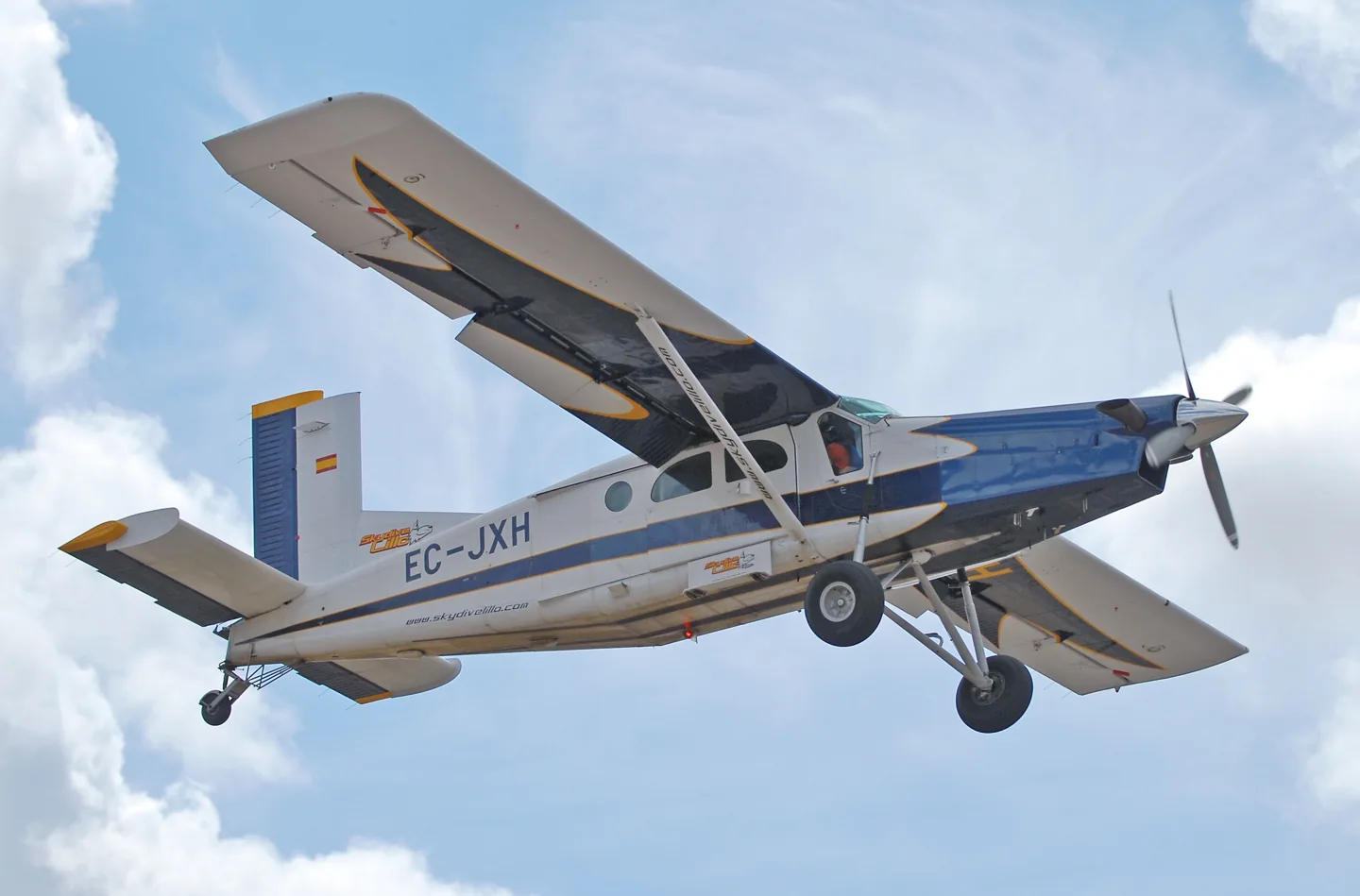
Pilatus PC-6 B2JDrewes (see www.jandrewes.de), slight edit by Alvesgaspar · CC BY-SA 3.0 · Pilatus PC-6 Porter pictured

Pilatus PC-6 B2

A high-wing utility aircraft known for short-field work and a broad choice of working configurations.
Turboprop14 opciones de perfil

Conoce el avión

The Porter first flew with piston power in 1959. Turboprop versions later became familiar in parachuting and remote-area transport, retaining the narrow fuselage, high wing and long landing-gear legs.

The simulator represents the PC-6 B2. Engines, limits and equipment differ across Porter variants; wheel and float options, cabin layouts and avionics are documented for each package.

Aircraft / family

Propulsion
Single turboprop (B2)↗
Configuration
High wing · Utility / parachuting↗

Pilatus PC-6 Porter · Specifications (PC-6 B2 Turbo-Porter) · real aircraft; source units retained

Length
11 m (36 ft 1 in)↗
Wingspan
15.87 m (52 ft 1 in)↗
Height
3.2 m (10 ft 6 in)↗
Wing area
30.15 m² (324.5 sq ft)↗
Empty weight
1,270 kg (2,800 lb)↗
Max takeoff weight
2,800 kg (6,173 lb)↗
Powerplant
1 × Pratt & Whitney Canada PT6A-27 turboprop engine, 410 kW (550 hp) (de-rated from 507 kW (680 hp))↗
Propellers
3-bladed constant-speed reversible propeller↗
Maximum speed
232 km/h (144 mph, 125 kn)↗
Cruise speed
213 km/h (132 mph, 115 kn)↗

Más sobre esta aeronave en AirframeDB

A working link between remote communities

Dearden’s Susi Air account describes the Porter carrying passengers, essential supplies and medical traffic in Papua. Its role included regular government-supported routes as well as individual cargo missions.

Early starts and village arrivals in Papua

Dearden moved from the Caravan to the Porter after training in Borneo, then spent several years flying in Papua. His working days started before sunrise, taking advantage of calmer early conditions. Flights brought passengers and government services to villages, alongside food, building materials, fuel and medical transport when needed.

He liked the Porter’s predictable, balanced controls and the work it could do at steep, short airstrips. The seats were a less comfortable part of the experience. Mountain scenery made the job memorable, but so did the people: an arrival could reunite families and bring a village something it had been waiting for.

A differences course becomes a busy parachuting day

The blogger travelled from Sicily to Sardinia with a colleague for the course. A detailed briefing and an evening meal with the parachuting group made the introduction sociable before the next day’s work with a Zimex examiner. Cockpit familiarisation led into actual parachute flights, with aircraft handling, positioning and radio work competing for attention.

Electric trim and its backup arrangements were among the differences that needed deliberate practice. The writer found the breaker placement awkward during a simulated trim problem, while the changed warning panel and navigation equipment also required adjustment. Repeated flights brought greater familiarity, helped by instruction and a proper debrief.

A tall amphibian that became graceful in flight

Climbing aboard felt more like negotiating gym equipment than entering an ordinary aeroplane. Once in the cockpit, Hirschman appreciated the exceptional downward view through the large transparent doors. The float-equipped Porter looked ungainly on the ground, yet its controls proved balanced and manageable during the flight.

Lake operations introduced another set of details, including water rudders and a depth display that was unfamiliar to him. The session included water landings, runway landings and formation work for photographs. By the end, the aircraft’s precision had changed his impression of its appearance: the awkward-looking machine had become graceful in use. His favourable account belongs to this particular amphibian, intended for medical work in Brazil, rather than to every Porter configuration.

Fuentes públicas 13
  1. Pilatus PC-6 PorterResearch background · Wikipedia revision 1373021552 · retrieved 2026-09-12
  2. Microsoft Flight Simulator aircraft manuals
  3. MSFS 2024 FAQ and edition aircraft inventory
  4. MSFS 2020 FAQ and edition aircraft inventory
  5. Pilatus PC-6 Turbo Porter - DGS Series XP12Official developer / designated store catalogue · checked 2026-09-12
  6. Pilatus PC-6 Turbo Porter - DGS Series XP11Official developer / designated store catalogue · checked 2026-09-12
  7. Reality Expansion Pack · Thranda Pilatus Turbo PorterOfficial developer / designated store catalogue · checked 2026-09-12
  8. Flying in extreme conditionsInterview with Matt Dearden · Susi Air, Papua
  9. Abilitazione su PC6 B2H4GOLF · 15 May 2018 · Italian-language account
  10. A flying Swiss Army knifeDave Hirschman · 1 July 2019
  11. ICAO Doc 8643 — aircraft type designatorsPublic search data retrieved 2026-09-14; authority update 2026-09-03
  12. PC-6 for MSFS2020Product listing captured 2026-09-30; edition scope from the reviewed catalogue
  13. FSG PC6 current product scope, interfaces and documentationProduct listing captured 2026-09-24; edition scope from the reviewed catalogue

Cómo lo modela el perfil

Pilatus PC-6 B2 Amphibian

Free + Pro
MSFS 2020MSFS 2024X-Plane 12

A high-wing utility aircraft known for short-field work and a broad choice of working configurations.

Spring resistance builds with the selected airspeed response. A separate aerodynamic term adds speed-dependent control load.

Valid trim provides the configured pressure relief. Autopilot following is off.

Esta revisión exacta aún no está habilitada para su instalación pública.

Aircraft and configuration

PC6 B2 PT6 turboprop with amphibious floats and retractable wheels, stabilizer and aileron trim. Water-contact preset is selected; accessory hydraulics do not establish primary-control boost.

Pilatus PC-6 Turbo Porter - DGS Series XP12PC 6 MSFS User Guide V2.pdf

About the values

Strengths are normalized hardware-feel settings. They set the effect balance; hand force depends on the device and its limits. The IAS reference is a tuning value.

Master gain & control system

Master gain85%

La escala final de salida global aplicada a todo lo que produce el modelo, antes del tope del dispositivo.

Más: todo (muelle, cargas, efectos) se refuerza a la vez.

Menos: todo se suaviza a la vez.

Por qué aquí: Scales overall profile strength while preserving effect balance, subject to device and output limits.

Forces

Spring strength74%

La fuerza base de centrado que devuelve la palanca al centro. Todas las demás fuerzas se apilan sobre ella. Demasiado baja y la palanca se siente floja en vuelo normal; demasiado alta y lucha contra tu mano y enmascara las señales más pequeñas superpuestas.

Más: un centrado más firme que resiste más la mano.

Menos: una palanca más blanda que depende solo de la carga aerodinámica.

Por qué aquí: This profile uses reversible-control loading for Pilatus PC-6 B2. The baseline spring is 0.74. Its low-speed blend reaches baseline strength at 57.5 KIAS.

Overall aerodynamic load68%

Una escala maestra sobre ambas cargas sostenidas de eje, aplicada antes de su equilibrio independiente. Los perfiles normalmente la dejan quieta y ajustan las dos cargas de eje.

Más: ambos ejes cargan más fuerte.

Menos: ambos ejes se aligeran a la vez.

Por qué aquí: The aerodynamic-load gain is 0.68 with an indicated-speed reference of 115 KIAS. This supplies speed-dependent loading alongside the spring.

Elevator load100%

La carga sostenida de cabeceo por deflexión del timón de profundidad y velocidad, equilibrada con independencia del alabeo. Es la palanca principal detrás del peso de cabeceo de un tipo. No toca alerones, muelle, compensador ni fuerzas de bataneo.

Más: esfuerzos sostenidos de cabeceo más pesados a velocidad.

Menos: una profundidad más ligera, con menos músculo que sostener.

Por qué aquí: Scales pitch aerodynamic loading; pitch spring travel and trim responses are separate settings.

Aileron load72%

La carga sostenida de alabeo por deflexión de alerones y velocidad, equilibrada con independencia del cabeceo. Junto con la carga del timón de profundidad fija la relación de armonía de mandos de la que hablan las reseñas.

Más: esfuerzos de alabeo más pesados.

Menos: alerones más ligeros y vivos.

Por qué aquí: Roll and pitch aerodynamic scales are 0.72 and 1, respectively. They set the aerodynamic axis balance. No custom spring-travel curve is enabled.

Max output force55%

Un tope sobre cada fuerza estable de cabeceo o alabeo antes de llegar al dispositivo, protegiendo contra golpes o saturación del hardware en maniobras fuertes.

Más: picos de fuerza estable más altos antes del recorte.

Menos: un techo más suave; las maniobras duras se aplanan antes.

Por qué aquí: Caps directed-force output. Native spring effects and device limits remain separate.

Velocidad de ajuste de fuerza115

La velocidad indicada a la que la carga aerodinámica alcanza su nivel pleno de diseño. Ancla toda la curva de carga al rango real de velocidades del avión: un 172 carga hacia 110 nudos, un jet mucho después.

Más: las cargas llegan más tarde; la palanca sigue ligera hasta más velocidad.

Menos: las cargas llegan antes y el crucero pesa más.

Por qué aquí: Sets the IAS reference for aerodynamic loading. It is an estimate, not published cruise TAS or a flight limit.

Spring deadband5%

Una pequeña zona neutra alrededor del centro donde el muelle queda en silencio, para que los movimientos mínimos en reposo no traqueteen. Más ancha es más tranquila pero más suelta; más estrecha es más precisa pero puede vibrar en el centro.

Más: un centro más tranquilo pero más suelto, con más holgura.

Menos: un centro más apretado que puede vibrar en reposo.

Por qué aquí: Sets travel around the centre before the baseline spring resists. Smaller values engage it sooner.

Airspeed blendingTrue

Activa la ventana de acoplamiento del muelle a baja velocidad (nudos de inicio/pleno de arriba). Apagado, el muelle es constante a todas las velocidades.

Por qué aquí: Allows baseline spring strength to rise with indicated airspeed where the control law permits it.

Low-speed spring floor55%

Cuánto del muelle sobrevive con el avión parado, antes de que la velocidad pueda generar fuerza aerodinámica. Un suelo alto mantiene firme la palanca aparcada; uno bajo da la sensación suelta, de cables con holgura, de una avioneta estacionada.

Más: una palanca más firme aparcado y rodando.

Menos: una palanca floja aparcado que solo despierta con la velocidad.

Por qué aquí: Sets low-speed spring strength as a fraction of baseline when blending is enabled. One keeps full strength.

Spring engagement start8 kt

La velocidad a la que el muelle empieza a subir desde su suelo de baja velocidad hacia la fuerza plena: los mandos «cobrando vida» en la carrera de despegue.

Por qué aquí: Sets the IAS where the low-speed spring blend starts rising. This is a feel threshold, not a flight limit.

Spring engagement full57.5 kt

La velocidad a la que el muelle alcanza su fuerza plena. Entre el inicio y este punto, el centrado se endurece progresivamente a medida que el flujo de aire crece sobre los mandos.

Por qué aquí: Sets the IAS where the low-speed blend reaches baseline strength; high-speed stiffening also uses it.

Centre firmness vs speed15%

Cuánto se endurece el propio centrado con la velocidad, además de las cargas por deflexión. Cero mantiene constante la sensación de centro; más hace que la palanca centre más duro en crucero y más suelta en el circuito.

Más: un centro que endurece claramente con la velocidad.

Menos: una sensación de centro constante a cualquier velocidad.

Por qué aquí: The high-speed spring-stiffening gain is 0.15. It strengthens the permitted spring response above 57.5 KIAS, with the squared-speed ratio capped at 5.

Centre stiffening cap5

El límite superior del endurecimiento de centro por velocidad, para que el vuelo muy rápido no pueda tensar el muelle sin freno.

Más: más endurecimiento total permitido a alta velocidad.

Menos: el endurecimiento se corta antes.

Por qué aquí: Limits the squared airspeed ratio used for high-speed spring stiffening; it is not a device-force cap.

Trim

Trim relief (elevator)30%

Con qué fuerza el compensador de profundidad alivia el esfuerzo de cabeceo mantenido y desplaza dónde se asienta la palanca. Al 100 %, un avión bien compensado no necesita presión mantenida: el flujo de trabajo de compensar la carga del vuelo real.

Más: el compensador quita más esfuerzo mantenido; al 100 %, compensado del todo lo anula.

Menos: sigues sosteniendo esfuerzo aun compensado.

Por qué aquí: The profile uses the trim behaviour configured below. Pitch authority 0.3 provides load relief and permitted centre movement; roll authority is 0.14.

Trim relief (aileron)14%

El mismo alivio para el compensador de alabeo. La mayoría de los tipos de aviación general no tienen compensador de alerones real, así que se queda a cero; los tipos con compensador de alabeo reciben un valor acorde.

Más: el compensador de alabeo quita más esfuerzo mantenido.

Menos: el compensador de alabeo hace menos.

Por qué aquí: Scales supported roll-trim relief and permitted centre movement. Zero removes roll response.

Effect gains · Ground

Runway rumble42%

Vibración de rodadura según la velocidad de las ruedas y el tipo de superficie: asfalto, hierba o grava bajo el tren.

Más: una textura de superficie más fuerte en la palanca.

Menos: un rodaje más liso.

Por qué aquí: Sets rolling texture strength, modified by speed, surface and undercarriage configuration.

Gear bumps32%

Golpes cortos y discretos de juntas de dilatación, surcos y superficie irregular, que puntúan el retumbo continuo.

Más: golpes más nítidos de juntas y surcos.

Menos: detalles de suelo más suaves.

Por qué aquí: Sets gear-bump texture during ground motion, separate from touchdown impact.

Effect gains · Airframe

Stall buffet28%

Sacudida de la célula al acercarse a la pérdida y mientras suena el aviso: cuán fuerte anuncia esta ala que está incómoda. Los tipos con entrada en pérdida seca reciben bataneo modesto y dejan que la bocina lleve el aviso.

Más: un temblor previo a la pérdida más fuerte.

Menos: un ala más discreta; la bocina lleva el aviso.

Por qué aquí: Sets stall-buffet strength. Zero removes the cue without changing simulator stalls or warnings.

Mach buffet0%

Bataneo transónico al acercarse al límite de Mach. Significativo para jets cerca de MMO, cero para pistones y turbohélices que nunca llegan.

Más: un bataneo transónico más fuerte cerca del límite de Mach.

Menos: un vuelo más liso a Mach alto.

Por qué aquí: Sets high-Mach buffet strength; onset and full-strength thresholds are separate.

Flap buffet0%

Vibración de baja frecuencia de la célula con los flaps extendidos al flujo, en la ventana de velocidad donde realmente trabajan el aire.

Más: un vuelo más áspero con flaps trabajando.

Menos: flaps de aproximación más suaves.

Por qué aquí: Sets flap buffet at the configured position and speed gates. Flap movement texture is separate.

Gear buffet0%

Tamborileo de la célula por el tren retráctil colgando en la corriente. Cero para tipos de tren fijo, donde la célula nunca cambia de forma.

Más: más tamborileo con el tren fuera.

Menos: un vuelo con tren fuera más limpio.

Por qué aquí: Sets gear aerodynamic buffet; movement and ground-contact cues are separate.

Stick shaker50%

El zumbido dedicado del stick shaker de pérdida, disparado por el propio sistema de aviso del avión. Solo los tipos con shaker real reciben un valor; el resto confía en el bataneo aerodinámico y la bocina.

Más: un shaker más duro.

Menos: un shaker más discreto.

Por qué aquí: Sets triggered shaker strength; inactive while the shaker feature is disabled.

Effect gains · Engine, mechanical & drag

Touchdown thump82%

El golpe único cuando las ruedas tocan la pista, escalado por la velocidad vertical: un aterrizaje fino susurra, una llegada firme golpea.

Más: un golpe más duro en la toma.

Menos: llegadas más suaves.

Por qué aquí: Sets landing-impact strength; landing telemetry and response shape determine the pulse.

Reverse rumble0%

Vibración de rodadura mientras trabajan la reversa o las hélices en rango beta. Cero para tipos sin reversa.

Más: un rodaje más áspero con reversa.

Menos: una reversa más discreta.

Por qué aquí: Sets reverse-thrust vibration with valid reverser and engine conditions. Zero removes the cue.

Engine rumble6%

Vibración continua del grupo motopropulsor siguiendo las RPM entre ralentí y plena potencia, el recordatorio siempre presente de que algo quema combustible delante.

Más: más motor en la palanca.

Menos: un motor más discreto.

Por qué aquí: Sets estimated engine vibration using configured telemetry and response, not measured cockpit vibration.

Flap motion12%

Vibración continua solo mientras el simulador informa de que las superficies de flap se mueven realmente. Sigue el movimiento y las averías reales del actuador, no un temporizador estimado.

Más: más vibración con los flaps en movimiento.

Menos: recorridos de flap más discretos.

Por qué aquí: Sets texture from observed flap movement; a command without movement does not establish the cue.

Autopilot follow

AP follow authority10%

Cuánto pueden mover físicamente la palanca las órdenes del piloto automático. Se mantiene minúsculo en MSFS, donde un eje movido puede leerse de vuelta como entrada del piloto; cero desactiva el seguimiento por completo.

Más: el piloto automático mueve tu palanca visiblemente más.

Menos: un seguimiento apenas perceptible.

Por qué aquí: Sets admitted AP-follow gain, not a percentage of travel. Runtime ownership and input limits still apply.

Stick feel

StickFeel · Trim feel enabledFalse

Whether this feature is active in this profile.

Por qué aquí: Retained for compatibility and group membership. Trim relief, rather than this flag, controls centre movement.

StickFeel · Trim relief enabledTrue

Whether this feature is active in this profile.

Por qué aquí: Allows trim relief with supported control law and valid telemetry. Axis authorities set its amount.

StickFeel · Force trim enabledFalse

Whether this feature is active in this profile.

Por qué aquí: Enables local force trim, separate from aircraft-owned trim and add-on integration qualification.

StickFeel · G load enabledTrue

Whether this feature is active in this profile.

Por qué aquí: Allows load-factor changes to modify permitted spring laws. Passive fly-by-wire feel can suppress it.

StickFeel · Rate damping enabledTrue

Whether this feature is active in this profile.

Por qué aquí: Enables rate damping with the configured coefficients and control law.

Autopilot

Autopilot · Follow enabledFalse

Whether this feature is active in this profile.

Por qué aquí: Autopilot following is off; the configured spring and load retain the hardware feel.

Autopilot · Neutral hold enabledFalse

Whether this feature is active in this profile.

Por qué aquí: Permits centering hold during a supported AP state, separate from following a moving target.

Autopilot · Neutral hold strength0.6

Por qué aquí: Sets admitted AP neutral-hold strength; inactive while neutral hold is disabled.

Aero

Aero · EnabledTrue

Whether this feature is active in this profile.

Por qué aquí: Enables aerodynamic cues; each still needs nonzero strength and its simulator conditions.

Aero · Max flap index3

Where this effect reaches full strength (or has fully faded, for washouts).

Más: a more gradual build to a later peak.

Menos: a quicker build.

Por qué aquí: Sets the final flap index for detent normalization. UP plus three detents uses maximum index3.

Aero · Min flap index2

Where this effect begins fading in.

Más: the effect begins later.

Menos: it begins earlier.

Por qué aquí: Sets the first flap detent that admits buffet; this is a handle index, not degrees.

Aero · Shaker enabledFalse

Whether this feature is active in this profile.

Por qué aquí: Permits shaker at supported warning conditions; the switch does not establish aircraft equipment.

Ground

Ground · EnabledTrue

Whether this feature is active in this profile.

Por qué aquí: Enables ground effects; each still needs its own strength and contact or motion telemetry.

Engine

Engine · EnabledTrue

Whether this feature is active in this profile.

Por qué aquí: Enables engine cues with nonzero settings and valid running-engine telemetry.

Mechanical

Mechanical · EnabledTrue

Whether this feature is active in this profile.

Por qué aquí: Enables accessory cues with configured strengths and observed accessory movement.

Mechanical · Gain0.025

The strength of this effect.

Más: a stronger effect.

Menos: a weaker one.

Por qué aquí: Sets texture from observed gear movement, separate from aerodynamic and touchdown effects.

Todos los ajustes del perfil
Ajustes estimados del perfil
ParámetroValorQué controla y por qué
Spring strength0.74 This profile uses reversible-control loading for Pilatus PC-6 B2. The baseline spring is 0.74. Its low-speed blend reaches baseline strength at 57.5 KIAS.
Force gain0.68 The aerodynamic-load gain is 0.68 with an indicated-speed reference of 115 KIAS. This supplies speed-dependent loading alongside the spring.
Elevator force scale1 Scales pitch aerodynamic loading; pitch spring travel and trim responses are separate settings.
Aileron force scale0.72 Roll and pitch aerodynamic scales are 0.72 and 1, respectively. They set the aerodynamic axis balance. No custom spring-travel curve is enabled.
Maximum output force0.55 Caps directed-force output. Native spring effects and device limits remain separate.
StickFeel · Elevator authority0.3 The profile uses the trim behaviour configured below. Pitch authority 0.3 provides load relief and permitted centre movement; roll authority is 0.14.
StickFeel · Aileron authority0.14 Scales supported roll-trim relief and permitted centre movement. Zero removes roll response.
Velocidad de ajuste de fuerza115 ktSets the IAS reference for aerodynamic loading. It is an estimate, not published cruise TAS or a flight limit.
Spring deadband0.05 Sets travel around the centre before the baseline spring resists. Smaller values engage it sooner.
Master gain0.85 Scales overall profile strength while preserving effect balance, subject to device and output limits.
Dynamic-pressure blendTrue Allows baseline spring strength to rise with indicated airspeed where the control law permits it.
Minimum spring factor0.55 Sets low-speed spring strength as a fraction of baseline when blending is enabled. One keeps full strength.
Spring wake-up speed8 ktSets the IAS where the low-speed spring blend starts rising. This is a feel threshold, not a flight limit.
Spring full-strength speed57.5 ktSets the IAS where the low-speed blend reaches baseline strength; high-speed stiffening also uses it.
Airspeed spring stiffening0.15 The high-speed spring-stiffening gain is 0.15. It strengthens the permitted spring response above 57.5 KIAS, with the squared-speed ratio capped at 5.
Airspeed stiffening cap5 Limits the squared airspeed ratio used for high-speed spring stiffening; it is not a device-force cap.
StickFeel · Trim feel enabledFalse Retained for compatibility and group membership. Trim relief, rather than this flag, controls centre movement.
StickFeel · Trim relief enabledTrue Allows trim relief with supported control law and valid telemetry. Axis authorities set its amount.
StickFeel · Force trim enabledFalse Enables local force trim, separate from aircraft-owned trim and add-on integration qualification.
StickFeel · G load enabledTrue Allows load-factor changes to modify permitted spring laws. Passive fly-by-wire feel can suppress it.
StickFeel · Rate damping enabledTrue Enables rate damping with the configured coefficients and control law.
Autopilot · Follow enabledFalse Autopilot following is off; the configured spring and load retain the hardware feel.
Autopilot · Follow authority0.1 Sets admitted AP-follow gain, not a percentage of travel. Runtime ownership and input limits still apply.
Autopilot · Neutral hold enabledFalse Permits centering hold during a supported AP state, separate from following a moving target.
Autopilot · Neutral hold strength0.6 Sets admitted AP neutral-hold strength; inactive while neutral hold is disabled.
Aero · EnabledTrue Enables aerodynamic cues; each still needs nonzero strength and its simulator conditions.
Aero · Gain0.28 Sets stall-buffet strength. Zero removes the cue without changing simulator stalls or warnings.
Aero · Gain0 Sets high-Mach buffet strength; onset and full-strength thresholds are separate.
Aero · Gain0 Sets flap buffet at the configured position and speed gates. Flap movement texture is separate.
Aero · Max flap index3 Sets the final flap index for detent normalization. UP plus three detents uses maximum index3.
Aero · Min flap index2 Sets the first flap detent that admits buffet; this is a handle index, not degrees.
Aero · Gain0 Sets gear aerodynamic buffet; movement and ground-contact cues are separate.
Aero · Shaker enabledFalse Permits shaker at supported warning conditions; the switch does not establish aircraft equipment.
Aero · Amplitude0.5 Sets triggered shaker strength; inactive while the shaker feature is disabled.
Ground · EnabledTrue Enables ground effects; each still needs its own strength and contact or motion telemetry.
Ground · Gain0.42 Sets rolling texture strength, modified by speed, surface and undercarriage configuration.
Ground · Gain0.32 Sets gear-bump texture during ground motion, separate from touchdown impact.
Ground · Gain0.82 Sets landing-impact strength; landing telemetry and response shape determine the pulse.
Ground · Gain0 Sets reverse-thrust vibration with valid reverser and engine conditions. Zero removes the cue.
Engine · EnabledTrue Enables engine cues with nonzero settings and valid running-engine telemetry.
Engine · Gain0.06 Sets estimated engine vibration using configured telemetry and response, not measured cockpit vibration.
Mechanical · EnabledTrue Enables accessory cues with configured strengths and observed accessory movement.
Mechanical · Gain0.12 Sets texture from observed flap movement; a command without movement does not establish the cue.
Mechanical · Gain0.025 Sets texture from observed gear movement, separate from aerodynamic and touchdown effects.
Fuentes públicas 14
  1. Pilatus PC-6 PorterResearch background · Wikipedia revision 1373021552 · retrieved 2026-09-12
  2. Microsoft Flight Simulator aircraft manuals
  3. MSFS 2024 FAQ and edition aircraft inventory
  4. MSFS 2020 FAQ and edition aircraft inventory
  5. Pilatus PC-6 Turbo Porter - DGS Series XP12Official developer / designated store catalogue · checked 2026-09-12
  6. Pilatus PC-6 Turbo Porter - DGS Series XP11Official developer / designated store catalogue · checked 2026-09-12
  7. Reality Expansion Pack · Thranda Pilatus Turbo PorterOfficial developer / designated store catalogue · checked 2026-09-12
  8. Flying in extreme conditionsInterview with Matt Dearden · Susi Air, Papua
  9. Abilitazione su PC6 B2H4GOLF · 15 May 2018 · Italian-language account
  10. A flying Swiss Army knifeDave Hirschman · 1 July 2019
  11. ICAO Doc 8643 — aircraft type designatorsPublic search data retrieved 2026-09-14; authority update 2026-09-03
  12. PC-6 for MSFS2020Product listing captured 2026-09-30; edition scope from the reviewed catalogue
  13. FSG PC6 current product scope, interfaces and documentationProduct listing captured 2026-09-24; edition scope from the reviewed catalogue
  14. PC 6 MSFS User Guide V2.pdfPilatus PC-6 B2 Amphibian

Comunidad y correcciones

Si tu experiencia en el tipo dice que esta página se equivoca, corrígela aquí.

Correcciones de pilotos

¿Vuelas esta aeronave? Corrige esta página.

Esta página se construye con referencias citadas, y la experiencia real en el tipo vale más que una cita. Cita la afirmación errónea y cuéntanos qué hace la aeronave real. Las correcciones van al mantenedor para revisión y alimentan la próxima revisión de esta investigación.

Charla de hangar

Conversación abierta sobre volar y ajustar el Pilatus PC-6 B2, en el foro de la comunidad. Las correcciones de arriba van en privado al mantenedor; la charla de hangar es pública.

Aún no hay charla de hangar sobre el Pilatus PC-6 B2. Sé quien la empiece.

Comunidad

Perfiles de la comunidad para esta aeronave

Aún no hay perfiles de la comunidad para esta aeronave. ¿Lo ajustaste a tu manera? Comparte un perfil y aparecerá aquí.