機体ライブラリHughes H-4 Hercules
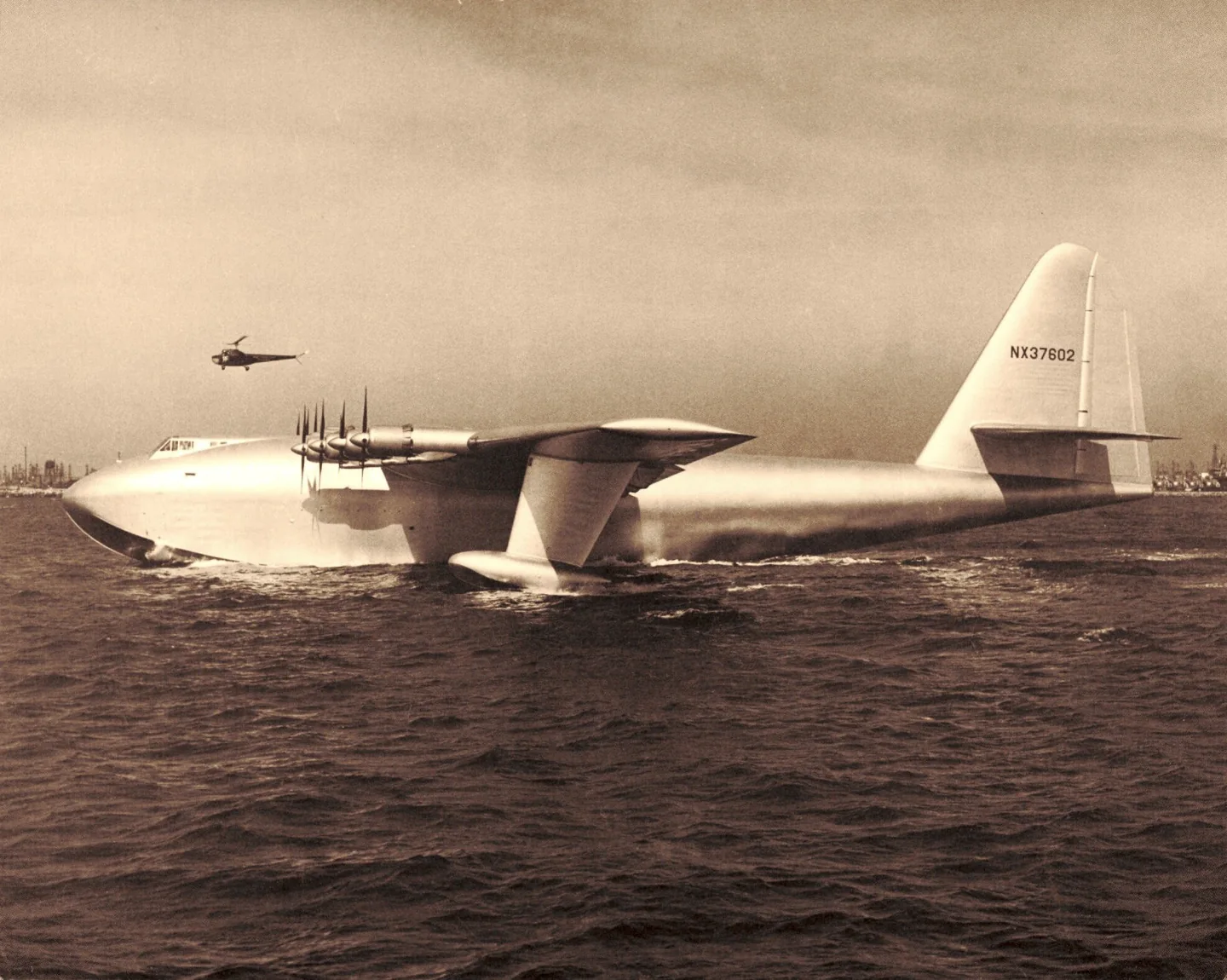
Hughes H-4 HerculesSDASM Archives · Public domain · Hughes H-4 Hercules pictured

Hughes H-4 Hercules

An eight-engine wooden flying-boat prototype that made one brief flight in 1947.
Seaplaneプロファイル候補:1

機体を知る

The H-4 Hercules was conceived as a wartime transatlantic transport and completed after the war. Eight engines and an immense wing surrounded its flying-boat hull. The prototype made one brief flight on 2 November 1947 and never entered operational transport service.

The familiar Spruce Goose nickname conceals a construction detail: birch was a major material in the wooden airframe. The simulator represents this single experimental aircraft.

Aircraft / family

Propulsion
Eight piston engines↗
Configuration
Prototype flying boat↗

Hughes H-4 Hercules · reported specifications; performance figures are estimates, not demonstrated operational capability

Length
218 ft 8 in (66.65 m)↗
Wingspan
319 ft 11 in (97.51 m)↗
Height
79 ft 4 in (24.18 m)↗
Empty weight
250,000 lb (113,398 kg)↗
Powerplant
8 × Pratt & Whitney R-4360 Wasp Major 28-cylinder air-cooled radial piston engines, 3,000 hp (2,200 kW) each↗
Propellers
4-bladed Hamilton Standard , 17 ft 2 in (5.23 m) diameter constant-speed propellers↗

Reported estimate; not demonstrated by the brief 1947 flight

Cruise speed
250 mph (400 km/h, 220 kn)↗
Range
3,000 mi (4,800 km, 2,600 nmi)↗
Service ceiling
20,900 ft (6,400 m)↗

AirframeDBでこの航空機について詳しく見る

Different memories of the decision to take off

In AOPA’s 2000 article, Jack Real relays a different explanation he said Hughes had given him privately: the aircraft became airborne while Hughes was exploring the effect of additional flap. Marsh also discusses recollections suggesting deliberate intent. These later versions conflict with one another and with parts of the immediate reporting; the article does not establish a single uncontested account.

The person in the copilot’s seat was an engineer

Norman Polmar identifies Dave Grant as the project’s chief hydraulic engineer and explicitly says he was not a pilot. Accounts that call Grant the copilot describe his position aboard the aircraft. His presence does not provide evidence of another person piloting the H-4.

The crew remembers crowded workspaces and ordinary pleasures

At the fiftieth-anniversary reunion, flight engineer Don Smith remembered a remarkably crowded flight deck. Systems mechanic Van Storm discussed the care taken over glued joints, while engine mechanic Mel Glaser recalled fishing beneath the wing during shift work. These brief recollections connect the enormous aircraft with the everyday lives of the people who built and tended it.

A wartime transport built around a demanding material choice

Henry Kaiser’s proposal aimed to move people and supplies across the Atlantic while avoiding submarine attacks. Restrictions on materials needed for the war helped shape the wooden structure. The museum describes Duramold, a laminated material made primarily from birch. Kaiser withdrew during development, leaving Hughes to continue the project that became the H-4 Hercules.

An enormous move makes preservation possible

The aircraft’s move to Oregon required disassembly and transport by barge along the coast and inland waterways. Water levels affected the journey, and trucks carried the final sections to McMinnville in February 1993. Volunteers worked on restoration in temporary accommodation before reassembly and the museum’s opening in 2001.

Published performance figures describe estimates

AOPA explicitly labels its H-4 performance table as estimated. A single brief flight over the harbour could not demonstrate a transport’s operational range, cruising performance or service ceiling. The dimensions describe the built aircraft; the performance figures are estimates.

Hughes describes the brief flight over a crowded harbour

Hughes told reporters that the decision to leave the water came only as he made it. Once the aircraft was moving on the step, it felt good enough to take off. He described the controls favourably and was pleased with the landing, explaining that the confined harbour left little room for a longer flight.

The setting had been awkward even before that moment. Shifting winds and pleasure boats disrupted attempts to clear a usable course. Afterwards, Hughes spoke to the press over coffee and credited the people who had helped build the aircraft. He still described further flying as something planned for the following spring. These were his immediate public remarks, rather than a settled explanation of everything that happened.

公開資料 9
  1. Hughes H-4 HerculesResearch background · Wikipedia revision 1372049545 · retrieved 2026-09-12
  2. Microsoft Flight Simulator aircraft manuals
  3. MSFS 2024 FAQ and edition aircraft inventory
  4. MSFS 2020 FAQ and edition aircraft inventory
  5. Hughes’ plywood plane flies mile at 100 mph2 November 1947 · contemporary Hughes interview and reporter’s taxi-run observations
  6. Caution: Goose Crossing5 December 2000 · interview with Jack Real and discussion of competing recollections
  7. Spruce GooseFebruary 2002 · identifies the engineer in the copilot’s seat
  8. Spruce Goose: 50th Anniversary Update1 November 1997 · reporter’s notes from the crew reunion
  9. The Spruce GooseMuseum collection history and construction description · retrieved September 2026

プロファイルによるモデル化

Hughes H-4 Hercules

Free + Pro
MSFS 2024MSFS 2020

The H-4 Hercules was conceived as a wartime transatlantic transport and completed after the war. Eight engines and an immense wing surrounded its flying-boat hull. The prototype made one brief flight on 2 November 1947 and never entered operational transport service.

This starting point selects Hughes H-4 Hercules. Its aircraft-level settings do not select a particular developer’s custom systems.

The profile supplies selected control resistance for the large prototype. Spring resistance builds with the selected airspeed response. A separate aerodynamic term adds speed-dependent control load.

Trim response accompanies the simulator rendition of that one aircraft programme. Valid trim provides the configured pressure relief. Autopilot following is off.

Controls and trim

The H-4 was an eight-engine wooden flying-boat transport conceived during wartime and completed afterwards. Its sole brief flight on 2 November 1947 made it a singular experimental aircraft rather than an operational fleet.

Evergreen Museum Spruce Goose

About the values

The gains are normalized profile settings. They describe the chosen effect balance; hand force depends on the device and its output limits. IAS references are tuning values rather than operating limits. Physical acceptance of this revision remains pending.

Master gain & control system

Master gain85%

モデルが生み出すすべてに適用される最終的な全体出力スケール。デバイス上限の前に適用されます。

上げると: すべて(バネ、荷重、効果)が一緒に強まります。

下げると: すべてが一緒に和らぎます。

この値の理由: Scales overall profile strength while preserving effect balance, subject to device and output limits.

Forces

Spring strength80%

スティックを中央へ引き戻す基本のセンタリング力。他のすべての力はこの上に積み重なります。低すぎると通常飛行でスティックが頼りなく、高すぎると手に逆らい、上に重なる細かな手がかりを覆い隠します。

上げると: 手により強く抵抗する、固いセンタリング。

下げると: 空力荷重だけに頼る、柔らかいスティック。

この値の理由: The profile supplies selected control resistance for the large prototype. The baseline spring is 0.8. Its low-speed blend reaches baseline strength at 65 KIAS.

Evergreen Museum Spruce Goose
Spring deadband4%

中央付近でバネが沈黙する小さなニュートラルゾーン。静止時の微小な動きがガタつかないようにします。広いほど落ち着きますが緩くなり、狭いほど精密ですが中央で震えることがあります。

上げると: より静かだが緩い、遊びの多い中央。

下げると: 静止時に震えうる、締まった中央。

この値の理由: Sets travel around the centre before the baseline spring resists. Smaller values engage it sooner.

Overall aerodynamic load25%

両軸の持続荷重にかかるマスタースケールで、各軸の独立バランスの前に適用されます。プロファイルは通常これに触れず、二つの軸荷重を調整します。

上げると: 両軸がより強く荷重します。

下げると: 両軸が一緒に軽くなります。

この値の理由: The aerodynamic-load gain is 0.25 with an indicated-speed reference of 130 KIAS. The hydraulic-load factor of 0.35 scales that modeled term; it is a selected artificial-feel approximation.

Airspeed blendingTrue

低速のバネ立ち上げ窓(上記の開始/全強度ノット)を有効にします。オフではバネは全速度で一定です。

この値の理由: Allows baseline spring strength to rise with indicated airspeed where the control law permits it.

Low-speed spring floor55%

停止状態で、速度が空力を生む前にバネがどれだけ残るか。床が高いと駐機中のスティックはしっかりし、低いと駐機した軽飛行機のケーブルが緩んだような感触になります。

上げると: 駐機・タキシー時により固いスティック。

下げると: 速度でしか目覚めない、駐機時の柔らかいスティック。

この値の理由: Sets low-speed spring strength as a fraction of baseline when blending is enabled. One keeps full strength.

Spring engagement start18.2 kt

バネが低速の床から全強度へ立ち上がり始める速度。離陸滑走で操縦系統が「目を覚ます」ポイントです。

この値の理由: Sets the IAS where the low-speed spring blend starts rising. This is a feel threshold, not a flight limit.

Spring engagement full65.0 kt

バネが全強度に達する速度。開始点からここまでの間、舵面上の気流が増すにつれセンタリングは徐々に固まります。

この値の理由: Sets the IAS where the low-speed blend reaches baseline strength; high-speed stiffening also uses it.

フォース調整速度130

空力荷重が設計上の満量に達する指示対気速度。荷重カーブ全体を機体の実際の速度域に固定します。172は110ノットで荷重が乗り、ジェットはずっと後です。

上げると: 荷重の到来が遅くなり、より速くまでスティックが軽いまま。

下げると: 荷重が早く到来し、巡航がより重く。

この値の理由: Sets the IAS reference for aerodynamic loading. It is an estimate, not published cruise TAS or a flight limit.

Centre firmness vs speed0%

舵角荷重に加えて、センタリング自体が速度でどれだけ固くなるか。ゼロなら中央の感触は一定、大きくすると巡航で固く、場周で緩くなります。

上げると: 速度とともに明確に固くなる中央。

下げると: どの速度でも一定の中央感覚。

この値の理由: The high-speed spring-stiffening gain is 0. No additional speed-driven stiffening is added; this does not disable independent aerodynamic loading.

Centre stiffening cap5

速度によるセンター硬化の上限。超高速飛行でバネが際限なく巻き上がるのを防ぎます。

上げると: 高速でより多くの総硬化を許容。

下げると: 硬化がより早く頭打ちに。

この値の理由: Limits the squared airspeed ratio used for high-speed spring stiffening; it is not a device-force cap.

Aileron load65%

エルロン舵角と速度による持続的なロール荷重で、ピッチとは独立に調整されます。エレベーター荷重と合わせて、レビューで語られる操縦調和の比率を決めます。

上げると: より重いロール力。

下げると: より軽く機敏なエルロン。

この値の理由: Roll and pitch aerodynamic scales are 0.65 and 0.65, respectively. They set the aerodynamic axis balance. No custom spring-travel curve is enabled.

Elevator load65%

エレベーター舵角と速度による持続的なピッチ荷重で、ロールとは独立に調整されます。機種ごとのピッチの重さを決める主レバーです。エルロン、バネ、トリム、バフェットの力には触れません。

上げると: 速度での持続ピッチ力がより重く。

下げると: 保持する力の軽い、より軽やかなエレベーター。

この値の理由: Scales pitch aerodynamic loading; pitch spring travel and trim responses are separate settings.

Max output force55%

各定常ピッチ・ロール力がデバイスへ届く前の上限。強い機動でハードウェアを叩いたり飽和させたりしないための保護です。

上げると: クリップ前の定常力ピークがより高く。

下げると: より柔らかい天井。激しい機動が早く平らに。

この値の理由: Caps directed-force output. Native spring effects and device limits remain separate.

Trim

Trim relief (elevator)30%

エレベータートリムが保持ピッチ力をどれだけ和らげ、スティックの落ち着き位置をずらすか。100 %では正しくトリムされた機体は保持圧が不要になり、実機の「荷重をトリムで消す」手順そのものです。

上げると: トリムがより多くの保持力を除去。100 %ではフルトリムで打ち消し。

下げると: トリムしても力を保持し続けます。

この値の理由: Trim response accompanies the simulator rendition of that one aircraft programme. Pitch authority 0.3 relieves permitted loading; hydraulic centre movement is off. Roll authority is 0.09.

Evergreen Museum Spruce Goose
Trim relief (aileron)9%

ロールトリムの同じ軽減。多くのGA機には本物のエルロントリムがないためゼロのまま。ロールトリムを持つ機種には相応の値が入ります。

上げると: ロールトリムがより多くの保持力を除去。

下げると: ロールトリムの効きが弱く。

この値の理由: Scales supported roll-trim relief and permitted centre movement. Zero removes roll response.

Effect gains · Ground

Runway rumble40%

車輪速度と路面種別(舗装、草、砂利)による転がりの振動。

上げると: スティックの路面テクスチャがより強く。

下げると: より滑らかなタキシー。

この値の理由: Sets rolling texture strength, modified by speed, surface and undercarriage configuration.

Gear bumps32%

伸縮継ぎ目や轍、荒れた路面からの短い個別の衝撃で、連続的なゴロゴロに句読点を打ちます。

上げると: 継ぎ目と轍の衝撃がより鋭く。

下げると: より柔らかな地面のディテール。

この値の理由: Sets gear-bump texture during ground motion, separate from touchdown impact.

Effect gains · Airframe

Stall buffet30%

失速接近時と失速警報作動中の機体の震え。この翼が不満をどれだけ大声で告げるかです。切れ味よく落ちる機種は控えめなバフェットになり、警報音に警告を任せます。

上げると: より強い失速前の震え。

下げると: より控えめな翼。警報音が警告を担います。

この値の理由: Sets stall-buffet strength. Zero removes the cue without changing simulator stalls or warnings.

Mach buffet0%

マッハ限界接近時の遷音速バフェット。MMO付近のジェットには意味があり、そこへ到達しないレシプロやターボプロップではゼロです。

上げると: マッハ限界近くのより強い遷音速バフェット。

下げると: 高マッハでより滑らかな飛行。

この値の理由: Sets high-Mach buffet strength; onset and full-strength thresholds are separate.

Flap buffet14%

フラップが実際に空気を掴む速度窓で、気流に展開されたフラップによる機体の低周波振動。

上げると: フラップ作動中のより荒い飛行。

下げると: より柔らかな進入フラップ。

この値の理由: Sets flap buffet at the configured position and speed gates. Flap movement texture is separate.

Gear buffet0%

気流中に垂れた引込脚による機体のドラミング。機体形状が変わらない固定脚の機種ではゼロです。

上げると: 脚下げ時のドラミングが増加。

下げると: 脚下げ飛行がより綺麗に。

この値の理由: Sets gear aerodynamic buffet; movement and ground-contact cues are separate.

Stick shaker90%

機体自身の失速警報システムが発火させる専用のスティックシェーカーの振動。本物のシェーカーを持つ機種だけに値が入り、他はすべて空力バフェットと警報音に頼ります。

上げると: より固いシェーカー。

下げると: より控えめなシェーカー。

この値の理由: Sets triggered shaker strength; inactive while the shaker feature is disabled.

Effect gains · Engine, mechanical & drag

Touchdown thump90%

車輪が滑走路に触れる瞬間の単発のキック。沈下率でスケールされ、グリーサーはささやき、固い接地はドンと響きます。

上げると: 接地のより固い衝撃。

下げると: より柔らかな到着。

この値の理由: Sets landing-impact strength; landing telemetry and response shape determine the pulse.

Reverse rumble0%

逆推力やベータ域のプロペラが働いている間の滑走振動。リバースのない機種ではゼロです。

上げると: リバース中のより荒い滑走。

下げると: より控えめなリバース。

この値の理由: Sets reverse-thrust vibration with valid reverser and engine conditions. Zero removes the cue.

Engine rumble12%

アイドルから全出力まで回転数に従う連続的な動力装置の振動。前方で何かが燃料を燃やしている、常に存在する注意喚起です。

上げると: スティックのエンジンが増加。

下げると: より控えめなエンジン。

この値の理由: Sets estimated engine vibration using configured telemetry and response, not measured cockpit vibration.

Flap motion12%

シミュレーターがフラップ舵面の実際の移動を報告している間だけの連続振動。推定タイマーではなく、実際のアクチュエーター動作と故障に従います。

上げると: フラップ移動中の振動が増加。

下げると: より控えめなフラップ走行。

この値の理由: Sets texture from observed flap movement; a command without movement does not establish the cue.

Autopilot follow

AP follow authority10%

オートパイロットの指令がスティックを物理的にどこまで動かせるか。動いた軸がパイロット入力として読み返されうるMSFSでは極小に保ちます。ゼロで追従は完全に無効です。

上げると: オートパイロットがスティックを目に見えて多く動かします。

下げると: ほぼ気づかない追従。

この値の理由: Sets admitted AP-follow gain, not a percentage of travel. Runtime ownership and input limits still apply.

Stick feel

StickFeel · Trim feel enabledTrue

Whether this feature is active in this profile.

この値の理由: Retained for compatibility and group membership. Trim relief, rather than this flag, controls centre movement.

StickFeel · Trim relief enabledTrue

Whether this feature is active in this profile.

この値の理由: Allows trim relief with supported control law and valid telemetry. Axis authorities set its amount.

StickFeel · Force trim enabledFalse

Whether this feature is active in this profile.

この値の理由: Enables local force trim, separate from aircraft-owned trim and add-on integration qualification.

StickFeel · G load enabledTrue

Whether this feature is active in this profile.

この値の理由: Allows load-factor changes to modify permitted spring laws. Passive fly-by-wire feel can suppress it.

StickFeel · Rate damping enabledTrue

Whether this feature is active in this profile.

この値の理由: Enables rate damping with the configured coefficients and control law.

Autopilot

Autopilot · Follow enabledFalse

Whether this feature is active in this profile.

この値の理由: Autopilot following is off; the configured spring and load retain the hardware feel.

Autopilot · Neutral hold enabledFalse

Whether this feature is active in this profile.

この値の理由: Permits centering hold during a supported AP state, separate from following a moving target.

Autopilot · Neutral hold strength0.6

この値の理由: Sets admitted AP neutral-hold strength; inactive while neutral hold is disabled.

Aero

Aero · EnabledTrue

Whether this feature is active in this profile.

この値の理由: Enables aerodynamic cues; each still needs nonzero strength and its simulator conditions.

Aero · Max flap index3

Where this effect reaches full strength (or has fully faded, for washouts).

上げると: a more gradual build to a later peak.

下げると: a quicker build.

この値の理由: Sets the final flap index for detent normalization. UP plus three detents uses maximum index3.

Aero · Min flap index2

Where this effect begins fading in.

上げると: the effect begins later.

下げると: it begins earlier.

この値の理由: Sets the first flap detent that admits buffet; this is a handle index, not degrees.

Aero · Shaker enabledTrue

Whether this feature is active in this profile.

この値の理由: Permits shaker at supported warning conditions; the switch does not establish aircraft equipment.

Ground

Ground · EnabledTrue

Whether this feature is active in this profile.

この値の理由: Enables ground effects; each still needs its own strength and contact or motion telemetry.

Engine

Engine · EnabledTrue

Whether this feature is active in this profile.

この値の理由: Enables engine cues with nonzero settings and valid running-engine telemetry.

Mechanical

Mechanical · EnabledTrue

Whether this feature is active in this profile.

この値の理由: Enables accessory cues with configured strengths and observed accessory movement.

Mechanical · Gain0

The strength of this effect.

上げると: a stronger effect.

下げると: a weaker one.

この値の理由: Sets texture from observed gear movement, separate from aerodynamic and touchdown effects.

すべてのプロファイル設定
推定プロファイル設定
パラメーター値何を制御するのかとその理由
Spring strength0.8 The profile supplies selected control resistance for the large prototype. The baseline spring is 0.8. Its low-speed blend reaches baseline strength at 65 KIAS.
Spring deadband0.035 Sets travel around the centre before the baseline spring resists. Smaller values engage it sooner.
Force gain0.25 The aerodynamic-load gain is 0.25 with an indicated-speed reference of 130 KIAS. The hydraulic-load factor of 0.35 scales that modeled term; it is a selected artificial-feel approximation.
Master gain0.85 Scales overall profile strength while preserving effect balance, subject to device and output limits.
Dynamic-pressure blendTrue Allows baseline spring strength to rise with indicated airspeed where the control law permits it.
Minimum spring factor0.55 Sets low-speed spring strength as a fraction of baseline when blending is enabled. One keeps full strength.
Spring wake-up speed18.2 ktSets the IAS where the low-speed spring blend starts rising. This is a feel threshold, not a flight limit.
Spring full-strength speed65.0 ktSets the IAS where the low-speed blend reaches baseline strength; high-speed stiffening also uses it.
フォース調整速度130.0 ktSets the IAS reference for aerodynamic loading. It is an estimate, not published cruise TAS or a flight limit.
Airspeed spring stiffening0 The high-speed spring-stiffening gain is 0. No additional speed-driven stiffening is added; this does not disable independent aerodynamic loading.
Airspeed stiffening cap5 Limits the squared airspeed ratio used for high-speed spring stiffening; it is not a device-force cap.
Aileron force scale0.65 Roll and pitch aerodynamic scales are 0.65 and 0.65, respectively. They set the aerodynamic axis balance. No custom spring-travel curve is enabled.
Elevator force scale0.65 Scales pitch aerodynamic loading; pitch spring travel and trim responses are separate settings.
Maximum output force0.55 Caps directed-force output. Native spring effects and device limits remain separate.
StickFeel · Trim feel enabledTrue Retained for compatibility and group membership. Trim relief, rather than this flag, controls centre movement.
StickFeel · Trim relief enabledTrue Allows trim relief with supported control law and valid telemetry. Axis authorities set its amount.
StickFeel · Elevator authority0.3 Trim response accompanies the simulator rendition of that one aircraft programme. Pitch authority 0.3 relieves permitted loading; hydraulic centre movement is off. Roll authority is 0.09.
StickFeel · Aileron authority0.09 Scales supported roll-trim relief and permitted centre movement. Zero removes roll response.
StickFeel · Force trim enabledFalse Enables local force trim, separate from aircraft-owned trim and add-on integration qualification.
StickFeel · G load enabledTrue Allows load-factor changes to modify permitted spring laws. Passive fly-by-wire feel can suppress it.
StickFeel · Rate damping enabledTrue Enables rate damping with the configured coefficients and control law.
Autopilot · Follow enabledFalse Autopilot following is off; the configured spring and load retain the hardware feel.
Autopilot · Follow authority0.1 Sets admitted AP-follow gain, not a percentage of travel. Runtime ownership and input limits still apply.
Autopilot · Neutral hold enabledFalse Permits centering hold during a supported AP state, separate from following a moving target.
Autopilot · Neutral hold strength0.6 Sets admitted AP neutral-hold strength; inactive while neutral hold is disabled.
Aero · EnabledTrue Enables aerodynamic cues; each still needs nonzero strength and its simulator conditions.
Aero · Gain0.3 Sets stall-buffet strength. Zero removes the cue without changing simulator stalls or warnings.
Aero · Gain0 Sets high-Mach buffet strength; onset and full-strength thresholds are separate.
Aero · Gain0.14 Sets flap buffet at the configured position and speed gates. Flap movement texture is separate.
Aero · Max flap index3 Sets the final flap index for detent normalization. UP plus three detents uses maximum index3.
Aero · Min flap index2 Sets the first flap detent that admits buffet; this is a handle index, not degrees.
Aero · Gain0 Sets gear aerodynamic buffet; movement and ground-contact cues are separate.
Aero · Shaker enabledTrue Permits shaker at supported warning conditions; the switch does not establish aircraft equipment.
Aero · Amplitude0.9 Sets triggered shaker strength; inactive while the shaker feature is disabled.
Ground · EnabledTrue Enables ground effects; each still needs its own strength and contact or motion telemetry.
Ground · Gain0.4 Sets rolling texture strength, modified by speed, surface and undercarriage configuration.
Ground · Gain0.32 Sets gear-bump texture during ground motion, separate from touchdown impact.
Ground · Gain0.9 Sets landing-impact strength; landing telemetry and response shape determine the pulse.
Ground · Gain0 Sets reverse-thrust vibration with valid reverser and engine conditions. Zero removes the cue.
Engine · EnabledTrue Enables engine cues with nonzero settings and valid running-engine telemetry.
Engine · Gain0.12 Sets estimated engine vibration using configured telemetry and response, not measured cockpit vibration.
Mechanical · EnabledTrue Enables accessory cues with configured strengths and observed accessory movement.
Mechanical · Gain0.12 Sets texture from observed flap movement; a command without movement does not establish the cue.
Mechanical · Gain0 Sets texture from observed gear movement, separate from aerodynamic and touchdown effects.
公開資料 9
  1. Hughes H-4 HerculesResearch background · Wikipedia revision 1372049545 · retrieved 2026-09-12
  2. Evergreen Museum Spruce GooseMuseum collection history and construction description · retrieved September 2026
  3. Microsoft Flight Simulator aircraft manuals
  4. MSFS 2024 FAQ and edition aircraft inventory
  5. MSFS 2020 FAQ and edition aircraft inventory
  6. Hughes’ plywood plane flies mile at 100 mph2 November 1947 · contemporary Hughes interview and reporter’s taxi-run observations
  7. Caution: Goose Crossing5 December 2000 · interview with Jack Real and discussion of competing recollections
  8. Spruce GooseFebruary 2002 · identifies the engineer in the copilot’s seat
  9. Spruce Goose: 50th Anniversary Update1 November 1997 · reporter’s notes from the crew reunion

コミュニティと訂正

実機経験からこのページに誤りがあると思ったら、ここで訂正してください。

パイロットによる訂正

この機体に乗っていますか?このページを訂正。

このページは引用文献に基づいていますが、実機での経験は引用に勝ります。 誤っている主張を引用し、実機が実際にどうかを教えてください。訂正は メンテナーが確認し、この調査の次の改訂に反映されます。

ハンガートーク

Hughes H-4 Herculesの操縦や調整についてのオープンな会話です(コミュニティフォーラム)。上の訂正はメンテナーに非公開で届きます。ハンガートークは公開です。

Hughes H-4 Herculesのハンガートークはまだありません。最初の一人になりましょう。

コミュニティ

この機体のコミュニティプロファイル

この機体のコミュニティプロファイルはまだありません。 自分好みに調整しましたか? プロファイルを共有 するとここに表示されます。