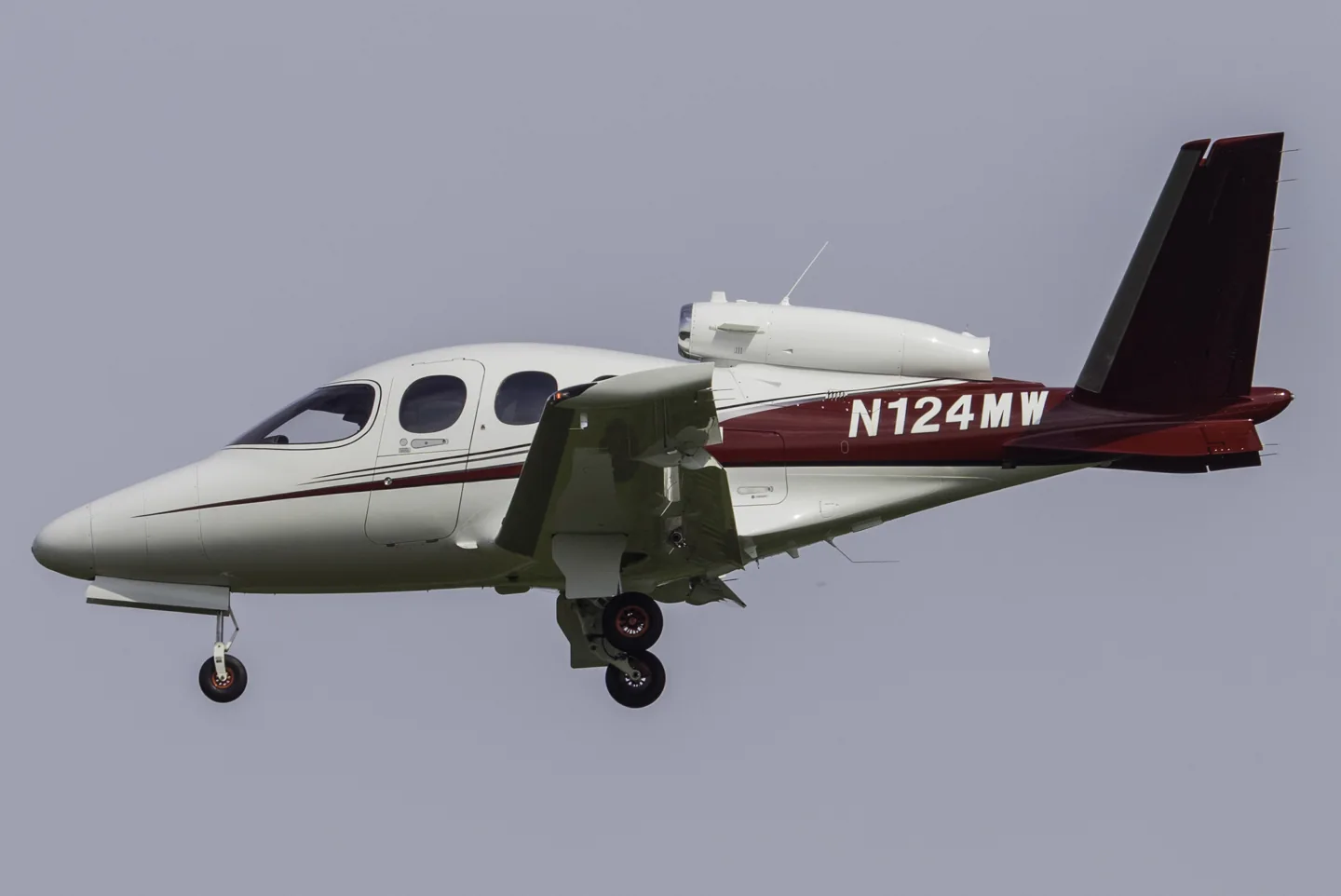
Cirrus Vision SF50Markus Eigenheer from Genève, Schweiz · CC BY-SA 2.0 · Cirrus Vision SF50 pictured

Cirrus Vision SF50

A personal jet with one engine above the rear fuselage and a distinctive V-tail.
Business jet2 प्रोफ़ाइल विकल्प

विमान को जानें

The Vision Jet applies Cirrus's personal-aircraft approach to a small jet. Its single turbofan is mounted above the fuselage, between the surfaces of the V-tail. The cabin and flight deck are arranged for an owner-pilot market, and the aircraft includes a whole-aircraft parachute system.

Avionics and automation evolved between SF50 generations; the simulator products identify their represented equipment.

Aircraft / family

Propulsion
Single jet↗
Configuration
V-tail · Whole-aircraft parachute↗

Cirrus Vision SF50 · Specifications (G2 model) · real aircraft; source units retained

Length
30 ft 11 in (9.42 m)↗
Wingspan
38 ft 9 in (11.8 m)↗
Height
10 ft 11 in (3.32 m)↗
Empty weight
3,550 lb (1,610 kg)↗
Gross weight
6,000 lb (2,722 kg)↗
Powerplant
1 × Williams FJ33 -5A turbofan, 1,846 lbf (8.21 kN) thrust↗
Maximum speed
311 kn (358 mph, 576 km/h) maximum cruise speed↗
Cruise speed
300 kn (350 mph, 560 km/h) max cruise speed, 240 kn (280 mph; 440 km/h) economical cruise speed↗
Stall speed
67 kn (77 mph, 124 km/h) with flaps↗
Range
500 nmi (580 mi, 930 km) with 1,200 lb (544 kg) payload at max cruise to 1,200 nmi (2,222 km; 1,381 mi) with 200 lb (91 kg) payload at economical cruise↗

AirframeDB पर इस विमान के बारे में और जानें

Designed as a step from a piston single

Cirrus positioned the pressurised, single-engine Vision between high-performance piston aircraft and light jets. Its cabin and control arrangement were intended to make that progression familiar to SR-series owners, while the airframe parachute remained a defining part of the concept.

The first demo feels familiar in unexpected places

Pierce arrived excited about an aircraft he had already ordered, and his account is openly enthusiastic. The placement of familiar switches helped him settle into the cockpit, while the turbine startup and broad windows made the departure feel special. Once airborne, he found the controls responsive and the cabin noticeably quieter as the power came back.

Landing at Lakeland produced his strongest reaction: the touchdown felt so gentle that he asked whether they were already on the ground. A second flight back to Orlando gave him another smooth landing and more confidence with the avionics. He left discussing colours, interiors and options. This is a prospective owner’s first demonstration experience, including close relationships with the company, rather than a completed transition course or an independent comparison of jets.

The smile came after demanding transition training

Jolley’s pleasure in taking delivery followed years of waiting and an intensive training programme. Familiar control positions from his SR22 helped, but he described the jet’s systems as demanding serious study. Ground school, instructor flights, a checkride and a cross-country mentorship formed distinct stages of the transition. He needed time afterwards to unwind from the pressure.

Speed management became the lesson he kept returning to. He wrote down mistakes during training and noticed that descent speed was the one issue he repeated. Later journeys linked his Tennessee base with business and family destinations in Texas. The ownership experience also included maintenance: a sensor fault during a Florida trip needed attention the following morning. His enthusiasm is grounded in both the new possibilities and the work involved in reaching them.

A business-jet pilot takes the Vision into real weather

Albright’s introduction finished with a journey whose weather made the avionics useful in a concrete way. In cruise, a replay function recovered a radio frequency he had misheard, and the touchscreen made a complicated amended clearance easy to enter. The broad view impressed him, while the cockpit’s design repeatedly revealed its intended connection with pilots moving up from piston aircraft.

Near Nashua, low cloud and rain brought an instrument approach and a soaked runway. He watched the aircraft slow and change attitude as it was configured, then took it through the landing when the approach lights appeared. The experience left him positive about the transition but alert to the temptation to become complacent with so much assistance. His parachute demonstration had taken place in the simulator, separately from this flight.

सार्वजनिक स्रोत 14
  1. Cirrus Vision SF50Research background · Wikipedia revision 1365077528 · retrieved 2026-09-12
  2. Microsoft Flight Simulator aircraft manuals
  3. MSFS 2024 FAQ and edition aircraft inventory
  4. Cirrus Vision SF50 POH
  5. X-Plane 12 Desktop Manual
  6. X-Plane aircraft and avionics manuals
  7. X-Plane 11 Desktop Manual
  8. Flying the Cirrus Aircraft Vision Jet (SF50)Brad Pierce · 19 March 2017
  9. Cirrus transition training: Jumping from the SR22 to the Vision JetTom Snow interviews Jay Jolley · 27 March 2018
  10. Pilot Report: Cirrus Vision Jet — A Game ChangerAuthor-hosted August 2021 article PDF
  11. First Flight of the Vision Jet25 March 2014 · conforming aircraft C0 milestone
  12. Release Notes — Sim Update 2 [1.4.20.0]15 May 2025 · aircraft-specific package revisions
  13. ICAO Doc 8643 — aircraft type designatorsPublic search data retrieved 2026-09-14; authority update 2026-09-03
  14. SF50 Vision Jet G2Product listing captured 2026-09-24; edition scope from the reviewed catalogue

प्रोफ़ाइल इसे कैसे मॉडल करता है

Cirrus Vision SF50

Free + Pro
MSFS 2024X-Plane 12X-Plane 11

The Vision Jet applies Cirrus's personal-aircraft approach to a small jet. Its single turbofan is mounted above the fuselage, between the surfaces of the V-tail. The cabin and flight deck are arranged for an owner-pilot market, and the aircraft includes a whole-aircraft parachute system.

This starting point selects Cirrus Vision SF50. Its aircraft-level settings do not select a particular developer’s custom systems.

Spring resistance builds with the selected airspeed response. A separate aerodynamic term adds speed-dependent control load.

Valid trim provides the configured pressure relief. Autopilot following is enabled for supported control references.

Controls and trim

The SF50 uses mechanical side controls with pitch trim and a left-aileron trim tab. Its yaw SAS is separate from the pedals; SR22 spring-cartridge trim and airliner fly-by-wire architecture are not inferred. FlightFX's G2 guide documents pitch/roll trim, autopilot and autothrottle, while Laminar's SF50 approach guide leaves throttle management with the pilot. Those implementation differences retain their scope.

SF50 Vision Jet G2SF50V8 manualManufacturer PIM public excerpt, web.runCirrus Vision SF50 POH

About the values

The gains are normalized profile settings. They describe the chosen effect balance; hand force depends on the device and its output limits. IAS references are tuning values rather than operating limits. Physical acceptance of this revision remains pending.

मास्टर गेन और नियंत्रण प्रणाली

Master gain85%

अंतिम समग्र आउटपुट स्केल डिवाइस कैप से पहले, मॉडल द्वारा उत्पादित हर चीज़ पर लागू होता है।

अधिक: सब कुछ (स्प्रिंग, भार, प्रभाव) एक साथ मजबूत हो जाता है।

कम: सब कुछ एक साथ नरम हो जाता है।

यहां क्यों: Scales overall profile strength while preserving effect balance, subject to device and output limits.

बल

Spring strength74%

आधार केन्द्रित करने वाला बल जो स्टिक को वापस केन्द्र की ओर खींचता है। हर दूसरी शक्ति उस पर टिकी हुई है। बहुत नीचे और सामान्य उड़ान में स्टिक ढीली महसूस होती है; बहुत अधिक है और यह आपके हाथ से लड़ता है और इसके ऊपर स्थित छोटे संकेतों को छिपा देता है।

अधिक: मजबूत केन्द्रीकरण जो हर समय आपके हाथ का प्रतिरोध करता है।

कम: एक लंगड़ी स्टिक जो अकेले वायुगतिकीय भार पर निर्भर करती है।

यहां क्यों: Mechanical side controls motivate the selected loading law; sidestick appearance alone does not imply fixed passive Airbus resistance. The baseline spring is 0.74. Its low-speed blend reaches baseline strength at 90 KIAS.

SF50 Vision Jet G2SF50V8 manualManufacturer PIM public excerpt, web.runCirrus Vision SF50 POH
Spring deadband4%

केंद्र के चारों ओर एक छोटा सा तटस्थ क्षेत्र जहां स्प्रिंग शांत रहता है, इसलिए आराम के समय छोटी-छोटी हरकतें बकबक नहीं करतीं। व्यापक शांत लेकिन शिथिल है; संकरा अधिक सटीक है लेकिन केंद्र के चारों ओर घूम सकता है।

अधिक: अधिक मुक्त खेल के साथ एक शांत लेकिन ढीला केंद्र।

कम: एक सघन केंद्र जो विश्राम के समय बकबक कर सकता है।

यहां क्यों: Sets travel around the centre before the baseline spring resists. Smaller values engage it sooner.

Overall aerodynamic load80%

दोनों निरंतर अक्ष भारों पर एक मास्टर स्केल, उनके स्वतंत्र संतुलन से पहले लागू किया गया। प्रोफ़ाइल आम तौर पर इसे अकेला छोड़ दें और इसके बजाय दो अक्ष लोड को ट्यून करें।

अधिक: दोनों अक्ष अधिक ज़ोर से लोड होते हैं।

कम: दोनों अक्ष एक साथ हल्के होते हैं।

यहां क्यों: The aerodynamic-load gain is 0.8 with an indicated-speed reference of 200 KIAS. This supplies speed-dependent loading alongside the spring.

Airspeed blendingTrue

कम गति वाली स्प्रिंग सहभागिता विंडो (ऊपर प्रारंभ/पूर्ण knots) सक्षम करता है। बंद, स्प्रिंग सभी गति पर स्थिर है।

यहां क्यों: Allows baseline spring strength to rise with indicated airspeed where the control law permits it.

Low-speed spring floor50%

स्प्रिंग का कितना हिस्सा एक ठहराव पर जीवित रहता है, इससे पहले कि एयरस्पीड कोई वायुगतिकीय बल बना सके। ऊंची मंजिल पार्क की गई स्टिक को मजबूत बनाए रखती है; निचली मंजिल पार्क की गई लाइट विमान की ढीली, केबल-ढीली अनुभूति देती है।

अधिक: पार्क करते समय और टैक्सी चलाते समय एक मजबूत स्टिक।

कम: एक फ़्लॉपियर पार्क की गई स्टिक जो केवल हवा की गति से जागती है।

यहां क्यों: Sets low-speed spring strength as a fraction of baseline when blending is enabled. One keeps full strength.

Spring engagement start20 kt

एयरस्पीड जहां स्प्रिंग अपनी कम गति वाली मंजिल से पूरी ताकत की ओर चढ़ना शुरू करता है: टेकऑफ़ रोल पर नियंत्रण "जीवित हो जाते हैं"।

यहां क्यों: Sets the IAS where the low-speed spring blend starts rising. This is a feel threshold, not a flight limit.

Spring engagement full90 kt

एयरस्पीड जहां स्प्रिंग पूरी ताकत तक पहुंचता है। प्रारंभ और इस बिंदु के बीच, वायु प्रवाह नियंत्रणों पर बढ़ने के साथ-साथ केंद्रीकरण उत्तरोत्तर मजबूत होता जाता है।

यहां क्यों: Sets the IAS where the low-speed blend reaches baseline strength; high-speed stiffening also uses it.

बल ट्यूनिंग की गति200

संकेतित एयरस्पीड जहां वायुगतिकीय भार अपने डिज़ाइन किए गए पूर्ण स्तर तक पहुंचता है। यह पूरे लोड वक्र को विमान की वास्तविक गति सीमा पर स्थिर करता है: एक 172, 110 knots, एक जेट से बहुत बाद में लोड होता है।

अधिक: भार बाद में आता है; स्टिक अधिक गति तक हल्की रहती है।

कम: सामान पहले पहुँचता है और क्रूज़ भारी लगता है।

यहां क्यों: Sets the IAS reference for aerodynamic loading. It is an estimate, not published cruise TAS or a flight limit.

Centre firmness vs speed15%

विक्षेपण भार के ऊपर, गति के साथ केन्द्रीकरण स्वयं कितना कठोर हो जाता है। शून्य केन्द्र की अनुभूति को स्थिर रखता है; अधिक क्रूज़ पर स्टिक का केंद्र सख्त हो जाता है और पैटर्न ढीला हो जाता है।

अधिक: एक केंद्र जो आपके तेजी से आगे बढ़ने पर स्पष्ट रूप से कठोर हो जाता है।

कम: हर गति पर निरंतर केंद्र की अनुभूति।

यहां क्यों: The high-speed spring-stiffening gain is 0.15. It strengthens the permitted spring response above 90 KIAS, with the squared-speed ratio capped at 5.

Centre stiffening cap5

गति-संचालित केंद्र कठोरता पर ऊपरी सीमा, इसलिए बहुत तेज़ उड़ान स्प्रिंग को बिना किसी सीमा के हवा नहीं दे सकती है।

अधिक: उच्च गति पर अधिक पूर्ण कठोरता की अनुमति दी गई।

कम: सख्त क्लैंप जल्दी बंद हो जाते हैं।

यहां क्यों: Limits the squared airspeed ratio used for high-speed spring stiffening; it is not a device-force cap.

Aileron load72%

एलेरॉन विक्षेपण और एयरस्पीड से निरंतर रोल भार, पिच से स्वतंत्र रूप से संतुलित होता है। एलिवेटर लोड के साथ मिलकर यह नियंत्रण-सद्भाव अनुपात निर्धारित करता है जिसके बारे में समीक्षक बात करते हैं।

अधिक: भारी रोल बल।

कम: हल्का, जल्दी महसूस होने वाला एलेरॉन।

यहां क्यों: Roll and pitch aerodynamic scales are 0.72 and 1, respectively. They set the aerodynamic axis balance. No custom spring-travel curve is enabled.

Elevator load100%

एलिवेटर विक्षेपण और एयरस्पीड से निरंतर पिच भार, रोल से स्वतंत्र रूप से संतुलित होता है। यह एक प्रकार के पिच वजन के पीछे मुख्य लीवर है। यह एलेरॉन, स्प्रिंग, ट्रिम, या वायुगतिकीय कंपन बलों को स्पर्श नहीं करता है।

अधिक: गति से भारी निरंतर पिच बल।

कम: एक हल्का एलिवेटर जिसे धारण करने के लिए कम मांसपेशियों की आवश्यकता होती है।

यहां क्यों: Scales pitch aerodynamic loading; pitch spring travel and trim responses are separate settings.

Max output force55%

डिवाइस तक पहुंचने से पहले प्रत्येक स्थिर पिच या रोल बल पर एक कैप, मजबूत युद्धाभ्यास में हार्डवेयर को पटकने या संतृप्त करने से बचाता है।

अधिक: क्लिपिंग से पहले मजबूत शिखर स्थिर बल।

कम: एक नरम अधिकतम सीमा; कठिन पैंतरेबाज़ी जल्दी ही ख़त्म हो जाती है।

यहां क्यों: Caps directed-force output. Native spring effects and device limits remain separate.

ट्रिम

Trim relief (elevator)30%

कितनी मजबूती से एलिवेटर ट्रिम आयोजित पिच बल को राहत देता है और जहां स्टिक बैठती है वहां शिफ्ट हो जाती है। 100% पर, एक उचित रूप से ट्रिम किए गए विमान को किसी दबाव की आवश्यकता नहीं होती है, वास्तविक उड़ान का ट्रिम-अवे-द-लोड वर्कफ़्लो।

अधिक: ट्रिम रुके हुए अधिक पिच बल को हटा देता है; 100% पूर्ण ट्रिम पर इसे शून्य कर देता है।

कम: आप काटे जाने पर भी बल बनाए रखते हैं।

यहां क्यों: Pitch and left-aileron trim act on separate axes. The selected authority is approximate, with roll trim potentially remaining displaced after autopilot disconnection in the FlightFX guide. Pitch authority 0.3 provides load relief and permitted centre movement; roll authority is 0.

SF50 Vision Jet G2SF50V8 manualManufacturer PIM public excerpt, web.runCirrus Vision SF50 POH
Trim relief (aileron)0%

रोल ट्रिम के लिए भी यही राहत है। अधिकांश GA प्रकारों में कोई वास्तविक एलेरॉन ट्रिम नहीं होता है, इसलिए यह शून्य पर रहता है; रोल ट्रिम वाले प्रकारों को एक मिलान मूल्य मिलता है।

अधिक: रोल ट्रिम अधिक आयोजित रोल बल को हटा देता है।

कम: रोल ट्रिम कम करता है।

यहां क्यों: Scales supported roll-trim relief and permitted centre movement. Zero removes roll response.

प्रभाव गेन · ग्राउंड

Runway rumble40%

पहिया गति और सतह के प्रकार से रोलिंग सतह कंपन: गियर के तहत फुटपाथ, घास, या बजरी।

अधिक: स्टिक के माध्यम से तेज़ सतह बनावट।

कम: एक चिकनी टैक्सी.

यहां क्यों: Sets rolling texture strength, modified by speed, surface and undercarriage configuration.

Gear bumps25%

विस्तार जोड़ों, गड्ढों और खुरदरी सतह से छोटे-छोटे असतत उभार, निरंतर गड़गड़ाहट को रोकते हुए।

अधिक: जोड़ों और गड्ढों से तेज़ प्रहार।

कम: नरम ज़मीनी विवरण.

यहां क्यों: Sets gear-bump texture during ground motion, separate from touchdown impact.

प्रभाव गेन · एयरफ़्रेम

Stall buffet35%

एयरफ़्रेम कंपन स्टॉल के करीब आ रहा है और जबकि स्टॉल चेतावनी सक्रिय है: यह विंग कितनी जोर से घोषणा करता है कि वह नाखुश है। कुरकुरा ब्रेक वाले प्रकार मामूली वायुगतिकीय कंपन प्राप्त करते हैं और हॉर्न को चेतावनी देते हैं।

अधिक: एक तेज़ प्री-स्टॉल शेक।

कम: एक शांत पंख; हार्न चेतावनी देता है।

यहां क्यों: Sets stall-buffet strength. Zero removes the cue without changing simulator stalls or warnings.

Mach buffet0%

ट्रांसोनिक वायुगतिकीय कंपन, Mach सीमा के करीब पहुंच रहा है। एमएमओ के पास जेट के लिए सार्थक, पिस्टन और टर्बोप्रॉप के लिए शून्य जो वहां कभी नहीं पहुंचते।

अधिक: Mach सीमा के पास मजबूत ट्रांसोनिक वायुगतिकीय कंपन।

कम: एक आसान हाई-Mach सवारी।

यहां क्यों: Sets high-Mach buffet strength; onset and full-strength thresholds are separate.

Flap buffet14%

फ़्लैप हवा में खुले होने पर एयरफ़्रेम का कम आवृत्ति वाला कंपन, उस गति क्षेत्र में जहाँ हवा उन पर वास्तव में प्रभाव डालती है।

अधिक: हवा में काम करने वाले फ़्लैप के साथ एक कठिन यात्रा।

कम: सहज दृष्टिकोण फ़्लैप।

यहां क्यों: Sets flap buffet at the configured position and speed gates. Flap movement texture is separate.

Gear buffet10%

वापस लेने योग्य गियर से एयरफ्रेम ड्रमिंग एयरस्ट्रीम में लटका हुआ है। फिक्स्ड-गियर प्रकारों के लिए शून्य, जहां एयरफ्रेम कभी भी आकार नहीं बदलता है।

अधिक: बाहर लटके पहियों के साथ और अधिक ढोल बजना।

कम: क्लीनर गियर-डाउन उड़ान।

यहां क्यों: Sets gear aerodynamic buffet; movement and ground-contact cues are separate.

Stick shaker50%

समर्पित स्टॉल स्टिक-शेकर बज़, विमान के अपने स्टॉल-चेतावनी प्रणाली द्वारा सक्रिय किया गया। केवल वास्तविक शेकर वाले प्रकारों को ही मूल्य मिलता है; बाकी सब कुछ वायुगतिकीय वायुगतिकीय कंपन और हॉर्न पर निर्भर करता है।

अधिक: एक कठिन स्टिक-शेकर बज़।

कम: एक सूक्ष्म शेकर.

यहां क्यों: Sets triggered shaker strength; inactive while the shaker feature is disabled.

प्रभाव गेन · इंजन, मैकेनिकल और ड्रैग

Touchdown thump65%

जब पहिये रनवे से मिलते हैं तो वन-शॉट किक, सिंक दर के आधार पर मापी जाती है: एक ग्रीजर फुसफुसाता है, एक दृढ़ आगमन धड़कता है।

अधिक: टचडाउन पर एक कठिन किक।

कम: नरम आगमन.

यहां क्यों: Sets landing-impact strength; landing telemetry and response shape determine the pulse.

Reverse rumble0%

रोलआउट कंपन जबकि रिवर्स थ्रस्ट या beta-रेंज प्रॉप्स काम कर रहे हैं। बिना उलटे प्रकार के लिए शून्य.

अधिक: रिवर्स के तहत एक कठोर रोलआउट।

कम: शांत उलटा.

यहां क्यों: Sets reverse-thrust vibration with valid reverser and engine conditions. Zero removes the cue.

Engine rumble6%

निष्क्रिय और पूरी शक्ति के बीच लगातार इंजन कंपन के बाद RPM, हमेशा मौजूद रहने वाला अनुस्मारक कि सामने कुछ ईंधन जल रहा है।

अधिक: स्टिक के माध्यम से अधिक इंजन.

कम: एक शांत इंजन।

यहां क्यों: Sets estimated engine vibration using configured telemetry and response, not measured cockpit vibration.

Flap motion12%

निरंतर कंपन केवल जबकि सिम रिपोर्ट करता है कि फ़्लैप सतहें वास्तव में यात्रा कर रही हैं। यह वास्तविक एक्चुएटर गति और विफलताओं का अनुसरण करता है, अनुमानित टाइमर का नहीं।

अधिक: अधिक कंपन जबकि फ़्लैप सतहें यात्रा करती हैं।

कम: शांत फ़्लैप चलता है।

यहां क्यों: Sets texture from observed flap movement; a command without movement does not establish the cue.

ऑटोपायलट का अनुसरण

AP follow authority10%

ऑटोपायलट कमांड भौतिक रूप से स्टिक को कितनी दूर तक ले जा सकते हैं। MSFS में छोटा रखा गया, जहां एक स्थानांतरित अक्ष पायलट इनपुट के रूप में वापस पढ़ सकता है; शून्य अनुसरण को पूरी तरह से अक्षम कर देता है।

अधिक: ऑटोपायलट स्पष्ट रूप से आपकी स्टिक को आगे बढ़ाता है।

कम: एक बमुश्किल बोधगम्य अनुसरण।

यहां क्यों: Sets admitted AP-follow gain, not a percentage of travel. Runtime ownership and input limits still apply.

Stick feel

StickFeel · Trim feel enabledTrue

Whether this feature is active in this profile.

यहां क्यों: Retained for compatibility and group membership. Trim relief, rather than this flag, controls centre movement.

StickFeel · Trim relief enabledTrue

Whether this feature is active in this profile.

यहां क्यों: Allows trim relief with supported control law and valid telemetry. Axis authorities set its amount.

StickFeel · Force trim enabledFalse

Whether this feature is active in this profile.

यहां क्यों: Enables local force trim, separate from aircraft-owned trim and add-on integration qualification.

StickFeel · G load enabledTrue

Whether this feature is active in this profile.

यहां क्यों: Allows load-factor changes to modify permitted spring laws. Passive fly-by-wire feel can suppress it.

StickFeel · Rate damping enabledTrue

Whether this feature is active in this profile.

यहां क्यों: Enables rate damping with the configured coefficients and control law.

Autopilot

Autopilot · Follow enabledTrue

Whether this feature is active in this profile.

यहां क्यों: Following is on at 0.1 authority when a supported, valid autopilot control reference is available.

Autopilot · Neutral hold enabledFalse

Whether this feature is active in this profile.

यहां क्यों: Permits centering hold during a supported AP state, separate from following a moving target.

Autopilot · Neutral hold strength0.6

यहां क्यों: Sets admitted AP neutral-hold strength; inactive while neutral hold is disabled.

Aero

Aero · EnabledTrue

Whether this feature is active in this profile.

यहां क्यों: Enables aerodynamic cues; each still needs nonzero strength and its simulator conditions.

Aero · Max flap index2

Where this effect reaches full strength (or has fully faded, for washouts).

अधिक: a more gradual build to a later peak.

कम: a quicker build.

यहां क्यों: Sets the final flap index for detent normalization. UP plus three detents uses maximum index3.

Aero · Min flap index2

Where this effect begins fading in.

अधिक: the effect begins later.

कम: it begins earlier.

यहां क्यों: Sets the first flap detent that admits buffet; this is a handle index, not degrees.

Aero · Shaker enabledFalse

Whether this feature is active in this profile.

यहां क्यों: Permits shaker at supported warning conditions; the switch does not establish aircraft equipment.

Ground

Ground · EnabledTrue

Whether this feature is active in this profile.

यहां क्यों: Enables ground effects; each still needs its own strength and contact or motion telemetry.

Engine

Engine · EnabledTrue

Whether this feature is active in this profile.

यहां क्यों: Enables engine cues with nonzero settings and valid running-engine telemetry.

Mechanical

Mechanical · EnabledTrue

Whether this feature is active in this profile.

यहां क्यों: Enables accessory cues with configured strengths and observed accessory movement.

Mechanical · Gain0.12

The strength of this effect.

अधिक: a stronger effect.

कम: a weaker one.

यहां क्यों: Sets texture from observed gear movement, separate from aerodynamic and touchdown effects.

प्रोफ़ाइल की सभी सेटिंग
अनुमानित प्रोफ़ाइल सेटिंग
पैरामीटरमानयह क्या नियंत्रित करता है और क्यों
Spring strength0.74 Mechanical side controls motivate the selected loading law; sidestick appearance alone does not imply fixed passive Airbus resistance. The baseline spring is 0.74. Its low-speed blend reaches baseline strength at 90 KIAS.
Spring deadband0.045 Sets travel around the centre before the baseline spring resists. Smaller values engage it sooner.
Force gain0.8 The aerodynamic-load gain is 0.8 with an indicated-speed reference of 200 KIAS. This supplies speed-dependent loading alongside the spring.
Master gain0.85 Scales overall profile strength while preserving effect balance, subject to device and output limits.
Dynamic-pressure blendTrue Allows baseline spring strength to rise with indicated airspeed where the control law permits it.
Minimum spring factor0.5 Sets low-speed spring strength as a fraction of baseline when blending is enabled. One keeps full strength.
Spring wake-up speed20 ktSets the IAS where the low-speed spring blend starts rising. This is a feel threshold, not a flight limit.
Spring full-strength speed90 ktSets the IAS where the low-speed blend reaches baseline strength; high-speed stiffening also uses it.
बल ट्यूनिंग की गति200.0 ktSets the IAS reference for aerodynamic loading. It is an estimate, not published cruise TAS or a flight limit.
Airspeed spring stiffening0.15 The high-speed spring-stiffening gain is 0.15. It strengthens the permitted spring response above 90 KIAS, with the squared-speed ratio capped at 5.
Airspeed stiffening cap5 Limits the squared airspeed ratio used for high-speed spring stiffening; it is not a device-force cap.
Aileron force scale0.72 Roll and pitch aerodynamic scales are 0.72 and 1, respectively. They set the aerodynamic axis balance. No custom spring-travel curve is enabled.
Elevator force scale1.0 Scales pitch aerodynamic loading; pitch spring travel and trim responses are separate settings.
Maximum output force0.55 Caps directed-force output. Native spring effects and device limits remain separate.
StickFeel · Trim feel enabledTrue Retained for compatibility and group membership. Trim relief, rather than this flag, controls centre movement.
StickFeel · Trim relief enabledTrue Allows trim relief with supported control law and valid telemetry. Axis authorities set its amount.
StickFeel · Elevator authority0.3 Pitch and left-aileron trim act on separate axes. The selected authority is approximate, with roll trim potentially remaining displaced after autopilot disconnection in the FlightFX guide. Pitch authority 0.3 provides load relief and permitted centre movement; roll authority is 0.
StickFeel · Aileron authority0 Scales supported roll-trim relief and permitted centre movement. Zero removes roll response.
StickFeel · Force trim enabledFalse Enables local force trim, separate from aircraft-owned trim and add-on integration qualification.
StickFeel · G load enabledTrue Allows load-factor changes to modify permitted spring laws. Passive fly-by-wire feel can suppress it.
StickFeel · Rate damping enabledTrue Enables rate damping with the configured coefficients and control law.
Autopilot · Follow enabledTrue Following is on at 0.1 authority when a supported, valid autopilot control reference is available.
Autopilot · Follow authority0.1 Sets admitted AP-follow gain, not a percentage of travel. Runtime ownership and input limits still apply.
Autopilot · Neutral hold enabledFalse Permits centering hold during a supported AP state, separate from following a moving target.
Autopilot · Neutral hold strength0.6 Sets admitted AP neutral-hold strength; inactive while neutral hold is disabled.
Aero · EnabledTrue Enables aerodynamic cues; each still needs nonzero strength and its simulator conditions.
Aero · Gain0.35 Sets stall-buffet strength. Zero removes the cue without changing simulator stalls or warnings.
Aero · Gain0 Sets high-Mach buffet strength; onset and full-strength thresholds are separate.
Aero · Gain0.14 Sets flap buffet at the configured position and speed gates. Flap movement texture is separate.
Aero · Max flap index2 Sets the final flap index for detent normalization. UP plus three detents uses maximum index3.
Aero · Min flap index2 Sets the first flap detent that admits buffet; this is a handle index, not degrees.
Aero · Gain0.1 Sets gear aerodynamic buffet; movement and ground-contact cues are separate.
Aero · Shaker enabledFalse Permits shaker at supported warning conditions; the switch does not establish aircraft equipment.
Aero · Amplitude0.5 Sets triggered shaker strength; inactive while the shaker feature is disabled.
Ground · EnabledTrue Enables ground effects; each still needs its own strength and contact or motion telemetry.
Ground · Gain0.4 Sets rolling texture strength, modified by speed, surface and undercarriage configuration.
Ground · Gain0.25 Sets gear-bump texture during ground motion, separate from touchdown impact.
Ground · Gain0.65 Sets landing-impact strength; landing telemetry and response shape determine the pulse.
Ground · Gain0 Sets reverse-thrust vibration with valid reverser and engine conditions. Zero removes the cue.
Engine · EnabledTrue Enables engine cues with nonzero settings and valid running-engine telemetry.
Engine · Gain0.06 Sets estimated engine vibration using configured telemetry and response, not measured cockpit vibration.
Mechanical · EnabledTrue Enables accessory cues with configured strengths and observed accessory movement.
Mechanical · Gain0.12 Sets texture from observed flap movement; a command without movement does not establish the cue.
Mechanical · Gain0.12 Sets texture from observed gear movement, separate from aerodynamic and touchdown effects.
सार्वजनिक स्रोत 16
  1. Cirrus Vision SF50Research background · Wikipedia revision 1365077528 · retrieved 2026-09-12
  2. SF50 Vision Jet G2Current exact2020 productProduct listing captured 2026-09-24; edition scope from the reviewed catalogue
  3. SF50V8 manualOfficial FlightFX V8 manual PDF31,61,81,83
  4. Manufacturer PIM public excerpt, web.runPublic manufacturerPIM chapter2 excerpt; original fullPDFnot acquired
  5. Cirrus Vision SF50 POHCirrus Vision SF50
  6. Microsoft Flight Simulator aircraft manuals
  7. MSFS 2024 FAQ and edition aircraft inventory
  8. X-Plane 12 Desktop Manual
  9. X-Plane aircraft and avionics manuals
  10. X-Plane 11 Desktop Manual
  11. Flying the Cirrus Aircraft Vision Jet (SF50)Brad Pierce · 19 March 2017
  12. Cirrus transition training: Jumping from the SR22 to the Vision JetTom Snow interviews Jay Jolley · 27 March 2018
  13. Pilot Report: Cirrus Vision Jet — A Game ChangerAuthor-hosted August 2021 article PDF
  14. First Flight of the Vision Jet25 March 2014 · conforming aircraft C0 milestone
  15. Release Notes — Sim Update 2 [1.4.20.0]15 May 2025 · aircraft-specific package revisions
  16. ICAO Doc 8643 — aircraft type designatorsPublic search data retrieved 2026-09-14; authority update 2026-09-03

समुदाय और सुधार

यदि टाइप में आपका समय कहता है कि इस पृष्ठ में कुछ गलत है, तो इसे यहां ठीक करें।

पायलट सुधार

इस विमान को उड़ाएं? इस पृष्ठ को ठीक करें.

यह पृष्ठ उद्धृत संदर्भों से बनाया गया है, और इस प्रकार का वास्तविक समय एक उद्धरण से बेहतर है। गलत पढ़ने वाले दावे को उद्धृत करें और हमें बताएं कि वास्तविक विमान क्या करता है। सुधार समीक्षा के लिए अनुरक्षक के पास जाएँ और इस शोध का अगला संशोधन फ़ीड करें।

हैंगर वार्ता

सामुदायिक मंच में उड़ान और ट्यूनिंग Cirrus Vision SF50 के बारे में खुली बातचीत। उपरोक्त सुधार निजी तौर पर अनुरक्षक के पास जाते हैं; हैंगर चर्चा सार्वजनिक है.

Cirrus Vision SF50 के लिए अभी तक कोई हैंगर वार्ता नहीं हुई है। प्रथम बनें.

समुदाय

इस विमान के लिए समुदाय प्रोफ़ाइल

इस विमान के लिए अभी तक कोई समुदाय प्रोफ़ाइल नहीं है। इसे अपने तरीके से ट्यून किया? एक प्रोफ़ाइल साझा करें और यह यहां दिखाई देगा.