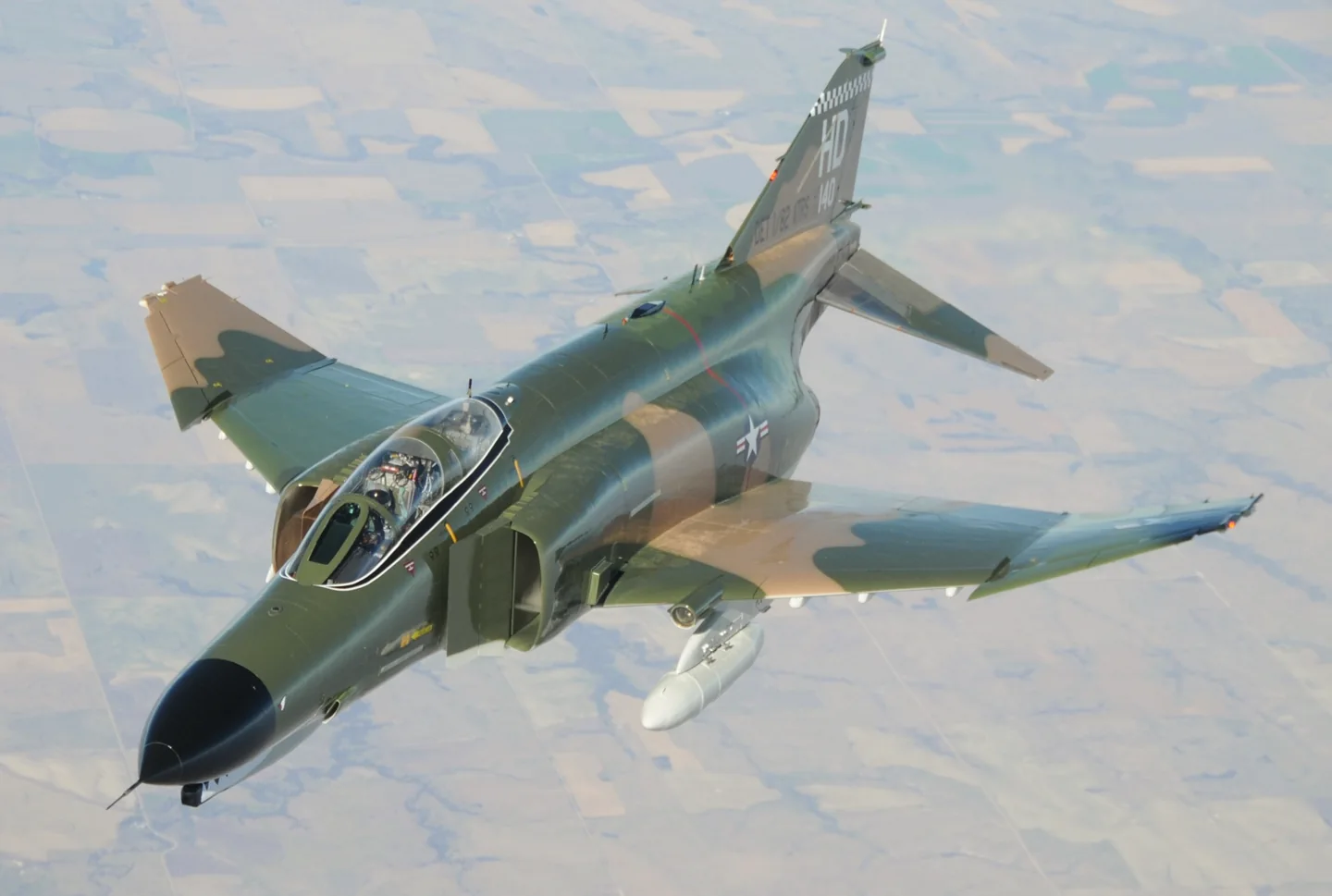
McDonnell Douglas F-4 Phantom IIUSAF · Public domain · McDonnell Douglas F-4 Phantom II pictured

McDonnell Douglas F-4 Phantom II

A two-seat, twin-engine fighter that served naval and land-based air forces in many roles.
Military jetВариантов профиля: 2

Знакомство с воздушным судном

The Phantom began as a US Navy aircraft and was adopted by the US Air Force, Marine Corps and export customers. Large intakes, upward-angled outer wing panels and downward-angled tailplanes distinguish its airframe.

Interceptor, strike and reconnaissance versions carried different engines, radar and cockpit equipment. National upgrades added further differences during the type's long service.

Aircraft / family

Propulsion
Twin jet↗
Configuration
Two-seat multirole fighter↗

McDonnell Douglas F-4 Phantom II · Specifications (F-4E) · real aircraft; source units retained

Length
63 ft 0 in (19.2 m)↗
Wingspan
38 ft 5 in (11.7 m)↗
Height
16 ft 5 in (5 m)↗
Wing area
530 sq ft (49.2 m² )↗
Empty weight
30,328 lb (13,757 kg)↗
Gross weight
41,500 lb (18,824 kg)↗
Max takeoff weight
61,795 lb (28,030 kg)↗
Powerplant
2 × General Electric J79-GE-17A after-burning turbojet engines, 11,905 lbf (52.96 kN) thrust each dry, 17,845 lbf (79.38 kN) with afterburner↗
Maximum speed
1,280 kn (1,470 mph, 2,370 km/h) at 40,000 ft (12,000 m)↗
Cruise speed
510 kn (580 mph, 940 km/h)↗

Подробнее об этом воздушном судне на AirframeDB

Moving from the Hunter into a two-person working cockpit

Bolton’s move from the Hunter to the Phantom meant learning an aircraft with a very different size and reputation. The initial impression of a large, powerful machine gradually gave way to understanding what it did well. The second crew member and the radar became central parts of that experience.

His work also changed when he moved from RAF ground-attack flying to the Royal Navy’s fleet-defence role. Shipboard preparation and practice brought their own audience and pressures, with other people watching how the crew performed. In his recollection, learning the Phantom was therefore more than mastering another set of controls. It involved a working partnership in the cockpit and adapting familiar flying skills to a different service environment.

Forty-five minutes of smiling at the end of a second career

Harkins had not expected to spend the later part of his career flying a fighter designed in the 1950s. Working as a civilian instructor gave him nine years and more than a thousand hours in the Phantom. By the farewell flights at Holloman, it had become a substantial second chapter in his flying life.

He remembered smiling so much during the final forty-five-minute flight that his cheeks hurt. The farewell appearances also brought conversations with veterans, families and old friends who wanted to see the aircraft again. Harkins compared his part in those events to driving the bus for the real star.

Choosing the front seat and learning from returning crews

Rubus had initially hoped for an F-105 assignment, but the available choices led him towards the Phantom. The opportunity to train for its front seat appealed to him, even when others warned that a new second lieutenant might find himself assigned to the rear cockpit instead. Looking back, he regarded the decision as a good one.

At George Air Force Base, instructors who had already served in Southeast Asia helped prepare him for the environment he would enter. Arriving at Ubon brought the classroom and conversion work into a different setting, with learning and staying alive closely connected in his recollection.

Открытые источники 10
  1. McDonnell Douglas F-4 Phantom IIResearch background · Wikipedia revision 1373929760 · retrieved 2026-09-12
  2. X-Plane 12 Desktop Manual
  3. X-Plane aircraft and avionics manuals
  4. X-Plane 11 Desktop Manual
  5. Flying the F-4 Phantom II, British styleChris Bolton · 31 July 2017
  6. Meet the last U.S. Air Force F-4 pilotInterview with Jim Harkins · 30 December 2016
  7. Interview with Gary RubusInterview by Sandor Farkas · 16 January 2016
  8. X-Plane 12 flight model update: supersonic transition, delta wings and mass propertiesAustin Meyer · February 2022
  9. ICAO Doc 8643 — aircraft type designatorsPublic search data retrieved 2026-09-14; authority update 2026-09-03
  10. DC Designs F-4E, F-4J and FGR2 PhantomProduct listing captured 28 September 2026; MSFS 2020 and 2024

Как профиль это моделирует

DC Designs F-4E / F-4J / FGR2 Phantom

Free + Pro
MSFS 2020MSFS 2024DC Designs

The Phantom began as a US Navy aircraft and was adopted by the US Air Force, Marine Corps and export customers. Large intakes, upward-angled outer wing panels and downward-angled tailplanes distinguish its airframe.

This profile selects DC Designs F-4E / F-4J / FGR2 Phantom for MSFS 2020, MSFS 2024.

Hydraulic control assistance motivates artificial stick centering. The spring stays independent of airspeed. Directed aerodynamic loading is omitted.

Pitch trim and pitch/bank hold serve separate cockpit functions. Pitch-trim relief is off. Autopilot following is off.

Эта точная редакция пока не доступна для публичной установки.

Controls and trim

The F-4 package includes E, J and FGR2 aircraft, a hydraulic control system and a pitch/bank-hold automatic-flight installation. Those variant and automatic-flight functions define the documented rendition.

DC Designs F-4E, F-4J and FGR2 Phantom product and simulator compatibilityXPlane12 F4 flight model

The selected implementation

DC Designs includes E, J and FGR2 variants and pitch/bank hold in its documented cockpit.

DC Designs F-4E, F-4J and FGR2 Phantom product and simulator compatibility

About the values

The gains are normalized profile settings. They describe the chosen effect balance; hand force depends on the device and its output limits. IAS references are tuning values rather than operating limits. Physical acceptance of this revision remains pending.

Общее усиление и система управления

Master gain85%

Итоговый общий масштаб вывода, применяемый ко всему, что выдает модель, до ограничения устройства.

Больше: все (пружина, нагрузки, эффекты) одновременно усиливается.

Меньше: все одновременно становится мягче.

Почему так: Scales overall profile strength while preserving effect balance, subject to device and output limits.

Усилия

Spring strength48%

Базовое центрирующее усилие, которое возвращает джойстик в центр. Все остальные усилия накладываются на него. Слишком низкое — и джойстик кажется вялым в обычном полете; слишком высокое — и он сопротивляется руке и заглушает более слабые эффекты, наложенные поверх.

Больше: более жесткое центрирование, постоянно сопротивляющееся руке.

Меньше: более вялый джойстик, опирающийся только на аэродинамическую нагрузку.

Почему так: Hydraulic control assistance motivates artificial stick centering. The baseline spring is 0.48. Low-speed spring blending is off.

DC Designs F-4E, F-4J and FGR2 Phantom product and simulator compatibilityXPlane12 F4 flight model
Spring deadband4%

Небольшая нейтральная зона вокруг центра, в которой пружина не действует, чтобы мелкие движения в покое не вызывали дребезга. Шире — спокойнее, но свободнее; уже — точнее, но джойстик может подергиваться около центра.

Больше: более спокойный, но более свободный центр с большим люфтом.

Меньше: более плотный центр, который может дребезжать в покое.

Почему так: Sets travel around the centre before the baseline spring resists. Smaller values engage it sooner.

Overall aerodynamic load25%

Общий множитель для обеих постоянных нагрузок по осям, применяемый до их независимой балансировки. Обычно профили его не трогают и вместо этого настраивают нагрузки двух осей.

Больше: обе оси нагружаются сильнее.

Меньше: обе оси одновременно становятся легче.

Почему так: The stored 0.25 aerodynamic-load gain is inactive under the zero hydraulic-load factor.

Airspeed blendingFalse

Включает окно нарастания пружины на малой скорости (начальная и полная скорость в узлах, см. выше). Если выключено, пружина постоянна на всех скоростях.

Почему так: Allows baseline spring strength to rise with indicated airspeed where the control law permits it.

Low-speed spring floor55%

Какая доля пружины сохраняется на стоянке, пока скорость еще не создала никакого аэродинамического усилия. Высокий минимум оставляет джойстик на стоянке упругим; низкий дает свободные ощущения провисших тросов, как у легкого самолета на стоянке.

Больше: более упругий джойстик на стоянке и при рулении.

Меньше: более свободно болтающийся джойстик на стоянке, который оживает только с ростом скорости.

Почему так: Sets low-speed spring strength as a fraction of baseline when blending is enabled. One keeps full strength.

Spring engagement start8 kt

Скорость, на которой пружина начинает расти от минимума на малой скорости к полной силе: органы управления «оживают» на разбеге.

Почему так: Sets the IAS where the low-speed spring blend starts rising. This is a feel threshold, not a flight limit.

Spring engagement full65 kt

Скорость, на которой пружина достигает полной силы. Между начальной скоростью и этой точкой центрирование постепенно становится жестче по мере усиления обтекания рулей.

Почему так: Sets the IAS where the low-speed blend reaches baseline strength; high-speed stiffening also uses it.

Скорость настройки усилия250

Приборная скорость, на которой аэродинамическая нагрузка достигает расчетного полного уровня. Она привязывает всю кривую нагрузки к реальному диапазону скоростей воздушного судна: у 172 нагрузка набирается к 110 узлам, у реактивного самолета — намного позже.

Больше: нагрузки приходят позже; джойстик остается легким до более высокой скорости.

Меньше: нагрузки приходят раньше, и в крейсерском полете управление тяжелее.

Почему так: Sets the IAS reference for aerodynamic loading. It is an estimate, not published cruise TAS or a flight limit.

Centre firmness vs speed0%

Насколько само центрирование становится жестче со скоростью, в дополнение к нагрузкам от отклонения. Ноль сохраняет ощущения в центре постоянными; большее значение делает центр джойстика жестче в крейсерском полете и мягче при полете по кругу.

Больше: центр заметно становится жестче с ростом скорости.

Меньше: постоянные ощущения в центре на любой скорости.

Почему так: The high-speed spring-stiffening gain is 0. No additional speed-driven stiffening is added; this does not disable independent aerodynamic loading.

Centre stiffening cap2

Верхний предел скоростного ужесточения центра, чтобы очень быстрый полет не мог затягивать пружину без ограничений.

Больше: на большой скорости допускается большее общее ужесточение.

Меньше: ужесточение ограничивается раньше.

Почему так: Limits the squared airspeed ratio used for high-speed spring stiffening; it is not a device-force cap.

Aileron load72%

Постоянная нагрузка по крену от отклонения элеронов и скорости, балансируемая независимо от тангажа. Вместе с нагрузкой руля высоты она задает соотношение усилий по осям (гармонию управления), о котором пишут обозреватели.

Больше: более тяжелые усилия по крену.

Меньше: более легкие элероны, которые кажутся более быстрыми.

Почему так: Roll and pitch aerodynamic scales are 0.72 and 1, respectively. These stored weights do not create directed aerodynamic loading while that term is inactive. No custom spring-travel curve is enabled.

Elevator load100%

Постоянная нагрузка по тангажу от отклонения руля высоты и скорости, балансируемая независимо от крена. Это главный регулятор тяжести тангажа у данного типа. Он не затрагивает усилия элеронов, пружины, триммера и бафтинга.

Больше: более тяжелые постоянные усилия по тангажу на скорости.

Меньше: более легкий руль высоты, который требует меньше сил для удержания.

Почему так: Scales pitch aerodynamic loading; pitch spring travel and trim responses are separate settings.

Max output force55%

Ограничение каждого постоянного усилия по тангажу или крену до того, как оно дойдет до устройства; защищает оборудование от ударов и насыщения при энергичных маневрах.

Больше: более сильные пиковые постоянные усилия до срезания.

Меньше: более мягкий предел; при резких маневрах усилие раньше перестает расти.

Почему так: Caps directed-force output. Native spring effects and device limits remain separate.

Триммер

Trim relief (elevator)0%

Насколько сильно триммер руля высоты снимает удерживаемое усилие по тангажу и смещает положение, в котором устанавливается джойстик. При 100% правильно оттриммированное воздушное судно не требует удерживающего давления — как в реальном полете, где нагрузку снимают триммером.

Больше: триммер снимает большую часть удерживаемого усилия по тангажу; при 100% полное триммирование сводит его к нулю.

Меньше: даже после триммирования приходится удерживать усилие.

Почему так: Pitch trim and pitch/bank hold serve separate cockpit functions. Pitch relief is off, with stored authority 0; roll authority is 0.

DC Designs F-4E, F-4J and FGR2 Phantom product and simulator compatibilityXPlane12 F4 flight model
Trim relief (aileron)0%

Такая же разгрузка для триммера крена. У большинства типов авиации общего назначения нет настоящего триммера элеронов, поэтому здесь остается ноль; типы с триммером крена получают соответствующее значение.

Больше: триммер крена снимает больше удерживаемого усилия по крену.

Меньше: триммер крена действует слабее.

Почему так: Scales supported roll-trim relief and permitted centre movement. Zero removes roll response.

Усиление эффектов · Земля

Runway rumble40%

Вибрация при качении по поверхности в зависимости от скорости колес и типа покрытия: асфальт, трава или гравий под шасси.

Больше: более выраженная фактура покрытия в джойстике.

Меньше: более плавное руление.

Почему так: Sets rolling texture strength, modified by speed, surface and undercarriage configuration.

Gear bumps25%

Короткие отдельные толчки от деформационных швов, колеи и неровного покрытия, прерывающие непрерывную тряску.

Больше: более резкие удары от стыков и колеи.

Меньше: более мягкие детали покрытия.

Почему так: Sets gear-bump texture during ground motion, separate from touchdown impact.

Усиление эффектов · Планер

Stall buffet0%

Тряска планера при приближении к сваливанию и пока активна сигнализация сваливания: насколько громко это крыло сообщает, что ему плохо. Типы с четким сваливанием получают умеренный бафтинг и оставляют предупреждение звуковой сирене.

Больше: более сильная тряска перед сваливанием.

Меньше: более спокойное крыло; предупреждает звуковая сирена.

Почему так: Sets stall-buffet strength. Zero removes the cue without changing simulator stalls or warnings.

Mach buffet0%

Трансзвуковой бафтинг при приближении к ограничению по числу М. Имеет смысл для реактивных самолетов вблизи MMO; ноль для поршневых и турбовинтовых, которые туда никогда не добираются.

Больше: более сильный трансзвуковой бафтинг вблизи ограничения по числу М.

Меньше: более плавный полет на больших числах М.

Почему так: Sets high-Mach buffet strength; onset and full-strength thresholds are separate.

Flap buffet0%

Низкочастотная вибрация планера при выпущенных в поток закрылках, в том диапазоне скоростей, где они действительно работают в потоке.

Больше: более тряский полет, когда закрылки работают в потоке.

Меньше: более плавный заход с выпущенными закрылками.

Почему так: Sets flap buffet at the configured position and speed gates. Flap movement texture is separate.

Gear buffet0%

Дробная вибрация планера от выпущенного в поток убираемого шасси. Ноль для типов с неубираемым шасси, у которых форма планера никогда не меняется.

Больше: сильнее дробная вибрация с выпущенными колесами.

Меньше: более чистый полет с выпущенным шасси.

Почему так: Sets gear aerodynamic buffet; movement and ground-contact cues are separate.

Stick shaker50%

Отдельное дрожание вибратора штурвала при сваливании, запускаемое собственной системой предупреждения о сваливании воздушного судна. Значение получают только типы с настоящим вибратором штурвала; все остальные полагаются на аэродинамический бафтинг и звуковую сирену.

Больше: более сильное дрожание вибратора штурвала.

Меньше: более слабый вибратор штурвала.

Почему так: Sets triggered shaker strength; inactive while the shaker feature is disabled.

Усиление эффектов · Двигатель, механика и сопротивление

Touchdown thump65%

Разовый толчок при касании колесами ВПП, зависящий от вертикальной скорости снижения: мягкая посадка едва ощутима, жесткая отдается ударом.

Больше: более сильный толчок при касании.

Меньше: более мягкие посадки.

Почему так: Sets landing-impact strength; landing telemetry and response shape determine the pulse.

Reverse rumble0%

Вибрация на пробеге при работе реверса тяги или винтов в бета-режиме. Ноль для типов без реверса.

Больше: более тряский пробег на реверсе.

Меньше: более тихий реверс.

Почему так: Sets reverse-thrust vibration with valid reverser and engine conditions. Zero removes the cue.

Engine rumble0%

Непрерывная вибрация силовой установки, следующая за оборотами от малого газа до полной мощности, — постоянное напоминание о том, что впереди что-то сжигает топливо.

Больше: двигатель сильнее ощущается в джойстике.

Меньше: более тихая силовая установка.

Почему так: Sets estimated engine vibration using configured telemetry and response, not measured cockpit vibration.

Flap motion2%

Непрерывная вибрация, только пока симулятор сообщает, что закрылки действительно движутся. Она следует за реальным движением приводов и отказами, а не за расчетным таймером.

Больше: сильнее вибрация, пока закрылки движутся.

Меньше: более тихое движение закрылков.

Почему так: Sets texture from observed flap movement; a command without movement does not establish the cue.

Следование за автопилотом

AP follow authority10%

Насколько далеко команды автопилота могут физически перемещать джойстик. В MSFS значение минимально, потому что смещенная ось может считываться обратно как ввод пилота; ноль полностью отключает следование.

Больше: автопилот заметно дальше отклоняет ваш джойстик.

Меньше: едва ощутимое следование.

Почему так: Sets admitted AP-follow gain, not a percentage of travel. Runtime ownership and input limits still apply.

Stick feel

StickFeel · Trim feel enabledFalse

Whether this feature is active in this profile.

Почему так: Retained for compatibility and group membership. Trim relief, rather than this flag, controls centre movement.

StickFeel · Trim relief enabledFalse

Whether this feature is active in this profile.

Почему так: Allows trim relief with supported control law and valid telemetry. Axis authorities set its amount.

StickFeel · Force trim enabledFalse

Whether this feature is active in this profile.

Почему так: Enables local force trim, separate from aircraft-owned trim and add-on integration qualification.

StickFeel · G load enabledFalse

Whether this feature is active in this profile.

Почему так: Allows load-factor changes to modify permitted spring laws. Passive fly-by-wire feel can suppress it.

StickFeel · Rate damping enabledFalse

Whether this feature is active in this profile.

Почему так: Enables rate damping with the configured coefficients and control law.

Autopilot

Autopilot · Follow enabledFalse

Whether this feature is active in this profile.

Почему так: Autopilot following is off; the configured spring and load retain the hardware feel.

Autopilot · Neutral hold enabledFalse

Whether this feature is active in this profile.

Почему так: Permits centering hold during a supported AP state, separate from following a moving target.

Autopilot · Neutral hold strength0.6

Почему так: Sets admitted AP neutral-hold strength; inactive while neutral hold is disabled.

Aero

Aero · EnabledTrue

Whether this feature is active in this profile.

Почему так: Enables aerodynamic cues; each still needs nonzero strength and its simulator conditions.

Aero · Max flap index3

Where this effect reaches full strength (or has fully faded, for washouts).

Больше: a more gradual build to a later peak.

Меньше: a quicker build.

Почему так: Sets the final flap index for detent normalization. UP plus three detents uses maximum index3.

Aero · Min flap index2

Where this effect begins fading in.

Больше: the effect begins later.

Меньше: it begins earlier.

Почему так: Sets the first flap detent that admits buffet; this is a handle index, not degrees.

Aero · Shaker enabledFalse

Whether this feature is active in this profile.

Почему так: Permits shaker at supported warning conditions; the switch does not establish aircraft equipment.

Ground

Ground · EnabledTrue

Whether this feature is active in this profile.

Почему так: Enables ground effects; each still needs its own strength and contact or motion telemetry.

Engine

Engine · EnabledFalse

Whether this feature is active in this profile.

Почему так: Enables engine cues with nonzero settings and valid running-engine telemetry.

Mechanical

Mechanical · EnabledTrue

Whether this feature is active in this profile.

Почему так: Enables accessory cues with configured strengths and observed accessory movement.

Mechanical · Gain0.025

The strength of this effect.

Больше: a stronger effect.

Меньше: a weaker one.

Почему так: Sets texture from observed gear movement, separate from aerodynamic and touchdown effects.

Все настройки профиля
Оценочные настройки профиля
ПараметрЗначениеЧто регулирует и почему
Spring strength0.48 Hydraulic control assistance motivates artificial stick centering. The baseline spring is 0.48. Low-speed spring blending is off.
Spring deadband0.04 Sets travel around the centre before the baseline spring resists. Smaller values engage it sooner.
Force gain0.25 The stored 0.25 aerodynamic-load gain is inactive under the zero hydraulic-load factor.
Master gain0.85 Scales overall profile strength while preserving effect balance, subject to device and output limits.
Dynamic-pressure blendFalse Allows baseline spring strength to rise with indicated airspeed where the control law permits it.
Minimum spring factor0.55 Sets low-speed spring strength as a fraction of baseline when blending is enabled. One keeps full strength.
Spring wake-up speed8 ktSets the IAS where the low-speed spring blend starts rising. This is a feel threshold, not a flight limit.
Spring full-strength speed65 ktSets the IAS where the low-speed blend reaches baseline strength; high-speed stiffening also uses it.
Скорость настройки усилия250 ktSets the IAS reference for aerodynamic loading. It is an estimate, not published cruise TAS or a flight limit.
Airspeed spring stiffening0 The high-speed spring-stiffening gain is 0. No additional speed-driven stiffening is added; this does not disable independent aerodynamic loading.
Airspeed stiffening cap2 Limits the squared airspeed ratio used for high-speed spring stiffening; it is not a device-force cap.
Aileron force scale0.72 Roll and pitch aerodynamic scales are 0.72 and 1, respectively. These stored weights do not create directed aerodynamic loading while that term is inactive. No custom spring-travel curve is enabled.
Elevator force scale1 Scales pitch aerodynamic loading; pitch spring travel and trim responses are separate settings.
Maximum output force0.55 Caps directed-force output. Native spring effects and device limits remain separate.
StickFeel · Trim feel enabledFalse Retained for compatibility and group membership. Trim relief, rather than this flag, controls centre movement.
StickFeel · Trim relief enabledFalse Allows trim relief with supported control law and valid telemetry. Axis authorities set its amount.
StickFeel · Elevator authority0 Pitch trim and pitch/bank hold serve separate cockpit functions. Pitch relief is off, with stored authority 0; roll authority is 0.
StickFeel · Aileron authority0 Scales supported roll-trim relief and permitted centre movement. Zero removes roll response.
StickFeel · Force trim enabledFalse Enables local force trim, separate from aircraft-owned trim and add-on integration qualification.
StickFeel · G load enabledFalse Allows load-factor changes to modify permitted spring laws. Passive fly-by-wire feel can suppress it.
StickFeel · Rate damping enabledFalse Enables rate damping with the configured coefficients and control law.
Autopilot · Follow enabledFalse Autopilot following is off; the configured spring and load retain the hardware feel.
Autopilot · Follow authority0.1 Sets admitted AP-follow gain, not a percentage of travel. Runtime ownership and input limits still apply.
Autopilot · Neutral hold enabledFalse Permits centering hold during a supported AP state, separate from following a moving target.
Autopilot · Neutral hold strength0.6 Sets admitted AP neutral-hold strength; inactive while neutral hold is disabled.
Aero · EnabledTrue Enables aerodynamic cues; each still needs nonzero strength and its simulator conditions.
Aero · Gain0 Sets stall-buffet strength. Zero removes the cue without changing simulator stalls or warnings.
Aero · Gain0 Sets high-Mach buffet strength; onset and full-strength thresholds are separate.
Aero · Gain0 Sets flap buffet at the configured position and speed gates. Flap movement texture is separate.
Aero · Max flap index3 Sets the final flap index for detent normalization. UP plus three detents uses maximum index3.
Aero · Min flap index2 Sets the first flap detent that admits buffet; this is a handle index, not degrees.
Aero · Gain0 Sets gear aerodynamic buffet; movement and ground-contact cues are separate.
Aero · Shaker enabledFalse Permits shaker at supported warning conditions; the switch does not establish aircraft equipment.
Aero · Amplitude0.5 Sets triggered shaker strength; inactive while the shaker feature is disabled.
Ground · EnabledTrue Enables ground effects; each still needs its own strength and contact or motion telemetry.
Ground · Gain0.4 Sets rolling texture strength, modified by speed, surface and undercarriage configuration.
Ground · Gain0.25 Sets gear-bump texture during ground motion, separate from touchdown impact.
Ground · Gain0.65 Sets landing-impact strength; landing telemetry and response shape determine the pulse.
Ground · Gain0 Sets reverse-thrust vibration with valid reverser and engine conditions. Zero removes the cue.
Engine · EnabledFalse Enables engine cues with nonzero settings and valid running-engine telemetry.
Engine · Gain0 Sets estimated engine vibration using configured telemetry and response, not measured cockpit vibration.
Mechanical · EnabledTrue Enables accessory cues with configured strengths and observed accessory movement.
Mechanical · Gain0.018 Sets texture from observed flap movement; a command without movement does not establish the cue.
Mechanical · Gain0.025 Sets texture from observed gear movement, separate from aerodynamic and touchdown effects.
Открытые источники 10
  1. McDonnell Douglas F-4 Phantom IIResearch background · Wikipedia revision 1373929760 · retrieved 2026-09-12
  2. DC Designs F-4E, F-4J and FGR2 Phantom product and simulator compatibilityCompatibility, model and aircraft systemsProduct listing captured 28 September 2026; MSFS 2020 and 2024
  3. XPlane12 F4 flight modelAustin Meyer · February 2022
  4. X-Plane 12 Desktop Manual
  5. X-Plane aircraft and avionics manuals
  6. X-Plane 11 Desktop Manual
  7. Flying the F-4 Phantom II, British styleChris Bolton · 31 July 2017
  8. Meet the last U.S. Air Force F-4 pilotInterview with Jim Harkins · 30 December 2016
  9. Interview with Gary RubusInterview by Sandor Farkas · 16 January 2016
  10. ICAO Doc 8643 — aircraft type designatorsPublic search data retrieved 2026-09-14; authority update 2026-09-03

Сообщество и исправления

Если ваш опыт полетов на этом типе говорит о том, что на странице что-то не так, исправьте это здесь.

Исправления от пилотов

Летаете на этом воздушном судне? Исправьте эту страницу.

Эта страница составлена по цитируемым источникам, но реальный опыт полетов на этом типе важнее любой цитаты. Процитируйте утверждение, которое кажется вам ошибочным, и расскажите, как ведет себя настоящее воздушное судно. Исправления направляются сопровождающему проекта на проверку и учитываются в следующей редакции этого исследования.

Разговоры в ангаре

Открытое обсуждение полетов и настройки McDonnell Douglas F-4 Phantom II на форуме сообщества. Исправления выше конфиденциально отправляются сопровождающему проекта, а разговоры в ангаре публичны.

Разговоров в ангаре о McDonnell Douglas F-4 Phantom II пока нет. Станьте первым.

Сообщество

Профили сообщества для этого воздушного судна

Для этого воздушного судна пока нет профилей сообщества. Настроили по-своему? Поделитесь профилем — и он появится здесь.