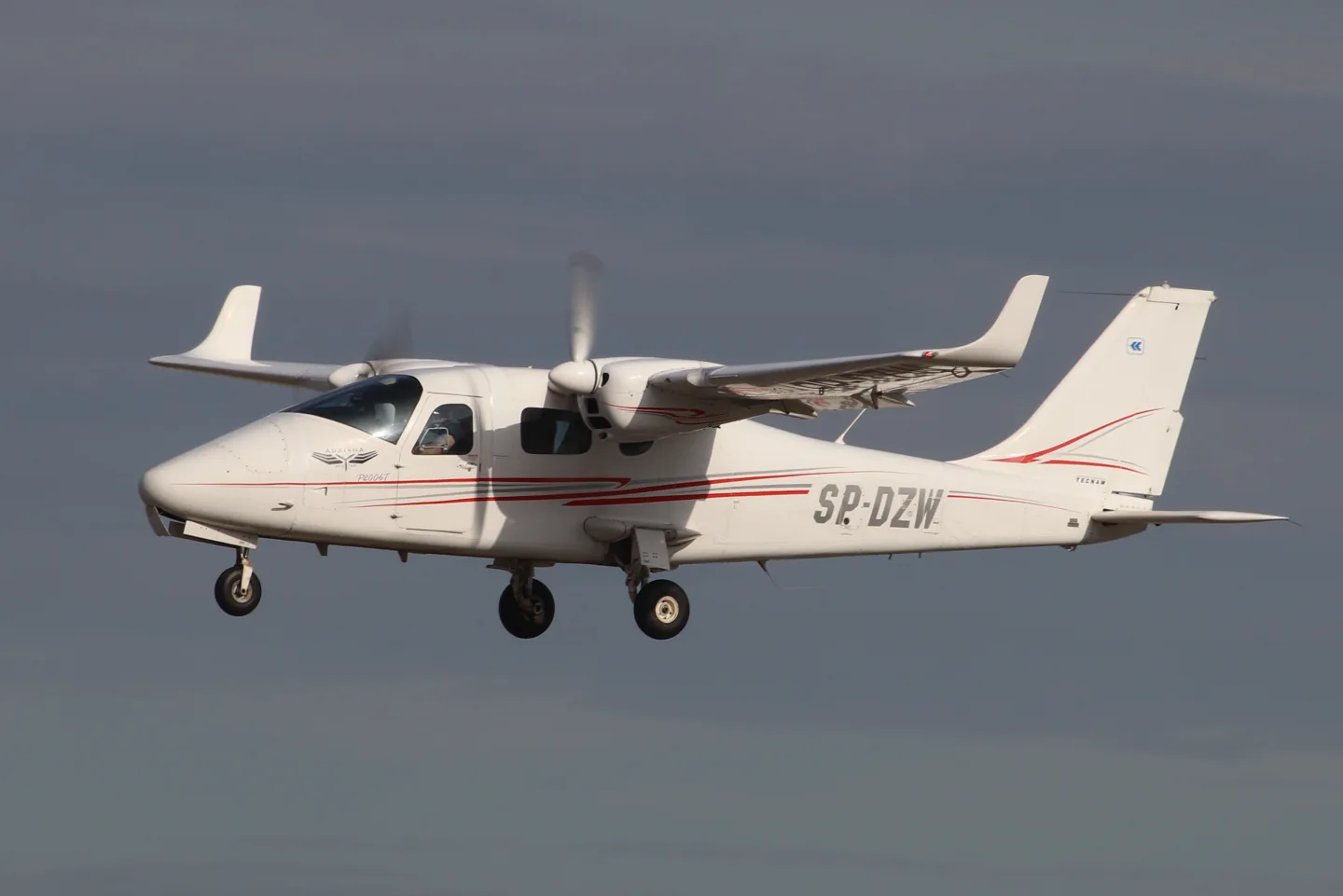
Tecnam P2006TAndrzej Otrębski · CC BY-SA 4.0 · Tecnam P2006T — real-aircraft reference photograph.

Tecnam P2006T

A compact Italian light twin with a shoulder wing and metal airframe.
General aviationВариантов профиля: 4

Знакомство с воздушным судном

Tecnam developed the P2006T light twin at Capua in Italy with a shoulder wing and all-metal construction. MSFS and X-Plane developers offer analog and glass-cockpit versions, with simulator-generation support listed for each product.

Tecnam P2006T · Specifications · real aircraft; source units retained

Length
8.7 m (28 ft 7 in)↗
Wingspan
11.4 m (37 ft 5 in)↗
Height
2.90 m (9 ft 6 in)↗
Wing area
14.8 m² (159 sq ft)↗
Empty weight
880 kg (1,940 lb)↗
Max takeoff weight
1,290 kg (2,844 lb)↗
Powerplant
2 × Rotax 912isc 3 Sport horizontally opposed four-cylinder geared piston engines , 75 kW (100 hp) each↗
Propellers
2-bladed MT Propeller MTV-21, 1.78 m (5 ft 10 in) diameter constant-speed, fully feathering↗
Cruise speed
274 km/h (170 mph, 148 kn)↗
Stall speed
104 km/h (64 mph, 56 kn)↗
Range
1,722 km (1,070 mi, 930 nmi)↗
Service ceiling
4,300 m (14,000 ft)↗

Подробнее об этом воздушном судне на AirframeDB

A demonstration tour explains the small-twin idea

At the Australian launch, regional Tecnam representative Giovanni Nustrini recalled discussing the company’s next project with Paolo Pascale. He argued for a small twin serving training and touring roles, giving Absolon’s report a participant’s account of the market idea behind the P2006T.

A light twin for training

Luigi Pascale’s P2006T was conceived around lightweight Rotax engines and the needs of multiengine training. A shoulder wing, retractable landing gear and feathering propellers gave the compact airframe the equipment of a conventional training twin. Later NG aircraft changed the engine installation and cockpit equipment. Analog and MkII simulator products have their own documented equipment, which differs from the current NG.

A new twin joins the traffic at a vintage gathering

Absolon encountered the P2006T among the aircraft gathered at Watts Bridge for the Festival of Flight. The cold, clear morning provided an inviting setting to try an unfamiliar twin. Starting the Rotax engines struck him as unusually quiet, and once airborne he found the controls light while working through the flight assessment.

The return brought him back into a busy circuit with thermals and a slight quartering tailwind. His companion pointed out that his initial aiming point was too close to the fence, and they crossed higher before landing farther along the strip. Giovanni Nustrini then marshalled the aircraft through the crowd.

A hot cockpit and an instructor’s calm guidance

Rocha’s P2006T flight began on a hot day at Americana with instructor Eduardo Silva. During the taxi he liked the feel of the pedals, but the sun and limited ground ventilation made the cockpit uncomfortable. Getting airborne improved the airflow, allowing him to settle into the evaluation away from the heat on the ground.

On the return, an early turn onto base left the aircraft higher and faster than Rocha wanted. Silva’s verbal guidance helped him make the adjustments, and the eventual landing was smooth. Rocha had been uncertain about landing an aircraft with such closely spaced main wheels.

A renewal flight changes an old opinion of Rotax engines

Boot approached the P2006T with reservations formed by older experiences of two-stroke Rotax engines. His friend Andy Cragg encouraged him to try the twin, and after winter weather delayed the plan, they met Tim Orchard at Lydd. Tea and a few preliminary circuits preceded Boot’s own renewal flight in the unfamiliar aircraft.

The wet, overcast conditions made the exercise a practical introduction. Learning the glass cockpit added work, but Boot completed the check successfully. Orchard’s feedback separated that unfamiliarity from the aircraft’s handling, which he felt Boot had managed accurately. For Boot, the day replaced an old prejudice with direct experience of the modern twin, while also putting a useful qualification renewal in his logbook.

Открытые источники 9
  1. Tecnam P2006TResearch background · retrieved 2026-09-12
  2. Tecnam P2006T MKIIOfficial developer / designated store catalogue · checked 2026-09-12
  3. Tecnam P2006T AnalogOfficial developer / designated store catalogue · checked 2026-09-12
  4. P2006T MK-IOfficial developer / designated store catalogue · checked 2026-09-12Official developer / designated-store reference · checked 2026-09-14
  5. Tecnam P2006T flight test: In a class of its ownJohn Absolon · Australian demonstration-tour flight report
  6. Tecnam P2006T flight testMicael Rocha · 9 November 2022; publisher’s English-language page
  7. Twin safety on single moneyGeoffrey Boot · April 2011, pages 30–35
  8. VSKYLABS Tecnam P2006T MK-IDeveloper project documentation · retrieved 13 September 2026Official developer / designated-store reference · checked 2026-09-14
  9. ICAO Doc 8643 — aircraft type designatorsPublic search data retrieved 2026-09-14; authority update 2026-09-03

Как профиль это моделирует

FlightSim Studio Tecnam P2006T Analog

Free + Pro
MSFS 2020FlightSim Studio

Tecnam developed the P2006T light twin at Capua in Italy with a shoulder wing and all-metal construction. MSFS and X-Plane developers offer analog and glass-cockpit versions, with simulator-generation support listed for each product.

This profile selects FlightSim Studio Tecnam P2006T Analog for MSFS 2020.

The stabilator/anti-tab arrangement motivates aerodynamic loading. Spring resistance builds with the selected airspeed response. A separate aerodynamic term adds speed-dependent control load.

The anti-tab supplies pitch relief; electrical rudder trim does not supply roll trim. Valid trim provides the configured pressure relief. Autopilot following is off.

Эта точная редакция пока не доступна для публичной установки.

The selected implementation

The Analog S-TEC55X description omits CWS and altitude preselect. MKII/G1000 is separately named equipment.

Section 6 - Airframe and Systems DescriptionSection 7 - AutopilotAircraft Tecnam P2006T Analog MSFS 2020Key Bindings

About the values

The gains are normalized profile settings. They describe the chosen effect balance; hand force depends on the device and its output limits. IAS references are tuning values rather than operating limits. Physical acceptance of this revision remains pending.

Общее усиление и система управления

Master gain85%

Итоговый общий масштаб вывода, применяемый ко всему, что выдает модель, до ограничения устройства.

Больше: все (пружина, нагрузки, эффекты) одновременно усиливается.

Меньше: все одновременно становится мягче.

Почему так: Scales overall profile strength while preserving effect balance, subject to device and output limits.

Усилия

Spring strength74%

Базовое центрирующее усилие, которое возвращает джойстик в центр. Все остальные усилия накладываются на него. Слишком низкое — и джойстик кажется вялым в обычном полете; слишком высокое — и он сопротивляется руке и заглушает более слабые эффекты, наложенные поверх.

Больше: более жесткое центрирование, постоянно сопротивляющееся руке.

Меньше: более вялый джойстик, опирающийся только на аэродинамическую нагрузку.

Почему так: The stabilator/anti-tab arrangement motivates aerodynamic loading. The baseline spring is 0.74. Its low-speed blend reaches baseline strength at 50 KIAS.

Section 6 - Airframe and Systems DescriptionSection 7 - AutopilotAircraft Tecnam P2006T Analog MSFS 2020Key BindingsSection 6 - Airframe and Systems DescriptionSection 7 - AutopilotTecnam P2006TKey BindingsTecnam authored P2006T AFM4th edition; section7-7 Rev0 control architectureVSKYLABS Aerospace Simulations Aircraft Center: VSKYLABS Tecnam P2006T MK-IP2006T developer manual public previewP2006T standard equipment
Spring deadband4%

Небольшая нейтральная зона вокруг центра, в которой пружина не действует, чтобы мелкие движения в покое не вызывали дребезга. Шире — спокойнее, но свободнее; уже — точнее, но джойстик может подергиваться около центра.

Больше: более спокойный, но более свободный центр с большим люфтом.

Меньше: более плотный центр, который может дребезжать в покое.

Почему так: Sets travel around the centre before the baseline spring resists. Smaller values engage it sooner.

Overall aerodynamic load80%

Общий множитель для обеих постоянных нагрузок по осям, применяемый до их независимой балансировки. Обычно профили его не трогают и вместо этого настраивают нагрузки двух осей.

Больше: обе оси нагружаются сильнее.

Меньше: обе оси одновременно становятся легче.

Почему так: The aerodynamic-load gain is 0.8 with an indicated-speed reference of 125 KIAS. This supplies speed-dependent loading alongside the spring.

Airspeed blendingTrue

Включает окно нарастания пружины на малой скорости (начальная и полная скорость в узлах, см. выше). Если выключено, пружина постоянна на всех скоростях.

Почему так: Allows baseline spring strength to rise with indicated airspeed where the control law permits it.

Low-speed spring floor55%

Какая доля пружины сохраняется на стоянке, пока скорость еще не создала никакого аэродинамического усилия. Высокий минимум оставляет джойстик на стоянке упругим; низкий дает свободные ощущения провисших тросов, как у легкого самолета на стоянке.

Больше: более упругий джойстик на стоянке и при рулении.

Меньше: более свободно болтающийся джойстик на стоянке, который оживает только с ростом скорости.

Почему так: Sets low-speed spring strength as a fraction of baseline when blending is enabled. One keeps full strength.

Spring engagement start8 kt

Скорость, на которой пружина начинает расти от минимума на малой скорости к полной силе: органы управления «оживают» на разбеге.

Почему так: Sets the IAS where the low-speed spring blend starts rising. This is a feel threshold, not a flight limit.

Spring engagement full50 kt

Скорость, на которой пружина достигает полной силы. Между начальной скоростью и этой точкой центрирование постепенно становится жестче по мере усиления обтекания рулей.

Почему так: Sets the IAS where the low-speed blend reaches baseline strength; high-speed stiffening also uses it.

Скорость настройки усилия125

Приборная скорость, на которой аэродинамическая нагрузка достигает расчетного полного уровня. Она привязывает всю кривую нагрузки к реальному диапазону скоростей воздушного судна: у 172 нагрузка набирается к 110 узлам, у реактивного самолета — намного позже.

Больше: нагрузки приходят позже; джойстик остается легким до более высокой скорости.

Меньше: нагрузки приходят раньше, и в крейсерском полете управление тяжелее.

Почему так: Sets the IAS reference for aerodynamic loading. It is an estimate, not published cruise TAS or a flight limit.

Centre firmness vs speed15%

Насколько само центрирование становится жестче со скоростью, в дополнение к нагрузкам от отклонения. Ноль сохраняет ощущения в центре постоянными; большее значение делает центр джойстика жестче в крейсерском полете и мягче при полете по кругу.

Больше: центр заметно становится жестче с ростом скорости.

Меньше: постоянные ощущения в центре на любой скорости.

Почему так: The high-speed spring-stiffening gain is 0.15. It strengthens the permitted spring response above 50 KIAS, with the squared-speed ratio capped at 5.

Centre stiffening cap5

Верхний предел скоростного ужесточения центра, чтобы очень быстрый полет не мог затягивать пружину без ограничений.

Больше: на большой скорости допускается большее общее ужесточение.

Меньше: ужесточение ограничивается раньше.

Почему так: Limits the squared airspeed ratio used for high-speed spring stiffening; it is not a device-force cap.

Aileron load72%

Постоянная нагрузка по крену от отклонения элеронов и скорости, балансируемая независимо от тангажа. Вместе с нагрузкой руля высоты она задает соотношение усилий по осям (гармонию управления), о котором пишут обозреватели.

Больше: более тяжелые усилия по крену.

Меньше: более легкие элероны, которые кажутся более быстрыми.

Почему так: Roll and pitch aerodynamic scales are 0.72 and 1, respectively. They set the aerodynamic axis balance. No custom spring-travel curve is enabled.

Elevator load100%

Постоянная нагрузка по тангажу от отклонения руля высоты и скорости, балансируемая независимо от крена. Это главный регулятор тяжести тангажа у данного типа. Он не затрагивает усилия элеронов, пружины, триммера и бафтинга.

Больше: более тяжелые постоянные усилия по тангажу на скорости.

Меньше: более легкий руль высоты, который требует меньше сил для удержания.

Почему так: Scales pitch aerodynamic loading; pitch spring travel and trim responses are separate settings.

Max output force55%

Ограничение каждого постоянного усилия по тангажу или крену до того, как оно дойдет до устройства; защищает оборудование от ударов и насыщения при энергичных маневрах.

Больше: более сильные пиковые постоянные усилия до срезания.

Меньше: более мягкий предел; при резких маневрах усилие раньше перестает расти.

Почему так: Caps directed-force output. Native spring effects and device limits remain separate.

Триммер

Trim relief (elevator)30%

Насколько сильно триммер руля высоты снимает удерживаемое усилие по тангажу и смещает положение, в котором устанавливается джойстик. При 100% правильно оттриммированное воздушное судно не требует удерживающего давления — как в реальном полете, где нагрузку снимают триммером.

Больше: триммер снимает большую часть удерживаемого усилия по тангажу; при 100% полное триммирование сводит его к нулю.

Меньше: даже после триммирования приходится удерживать усилие.

Почему так: The anti-tab supplies pitch relief; electrical rudder trim does not supply roll trim. Pitch authority 0.3 provides load relief and permitted centre movement; roll authority is 0.

Section 6 - Airframe and Systems DescriptionSection 7 - AutopilotAircraft Tecnam P2006T Analog MSFS 2020Key BindingsSection 6 - Airframe and Systems DescriptionSection 7 - AutopilotTecnam P2006TKey BindingsTecnam authored P2006T AFM4th edition; section7-7 Rev0 control architectureVSKYLABS Aerospace Simulations Aircraft Center: VSKYLABS Tecnam P2006T MK-IP2006T developer manual public previewP2006T standard equipment
Trim relief (aileron)0%

Такая же разгрузка для триммера крена. У большинства типов авиации общего назначения нет настоящего триммера элеронов, поэтому здесь остается ноль; типы с триммером крена получают соответствующее значение.

Больше: триммер крена снимает больше удерживаемого усилия по крену.

Меньше: триммер крена действует слабее.

Почему так: Scales supported roll-trim relief and permitted centre movement. Zero removes roll response.

Усиление эффектов · Земля

Runway rumble40%

Вибрация при качении по поверхности в зависимости от скорости колес и типа покрытия: асфальт, трава или гравий под шасси.

Больше: более выраженная фактура покрытия в джойстике.

Меньше: более плавное руление.

Почему так: Sets rolling texture strength, modified by speed, surface and undercarriage configuration.

Gear bumps25%

Короткие отдельные толчки от деформационных швов, колеи и неровного покрытия, прерывающие непрерывную тряску.

Больше: более резкие удары от стыков и колеи.

Меньше: более мягкие детали покрытия.

Почему так: Sets gear-bump texture during ground motion, separate from touchdown impact.

Усиление эффектов · Планер

Stall buffet35%

Тряска планера при приближении к сваливанию и пока активна сигнализация сваливания: насколько громко это крыло сообщает, что ему плохо. Типы с четким сваливанием получают умеренный бафтинг и оставляют предупреждение звуковой сирене.

Больше: более сильная тряска перед сваливанием.

Меньше: более спокойное крыло; предупреждает звуковая сирена.

Почему так: Sets stall-buffet strength. Zero removes the cue without changing simulator stalls or warnings.

Mach buffet0%

Трансзвуковой бафтинг при приближении к ограничению по числу М. Имеет смысл для реактивных самолетов вблизи MMO; ноль для поршневых и турбовинтовых, которые туда никогда не добираются.

Больше: более сильный трансзвуковой бафтинг вблизи ограничения по числу М.

Меньше: более плавный полет на больших числах М.

Почему так: Sets high-Mach buffet strength; onset and full-strength thresholds are separate.

Flap buffet0%

Низкочастотная вибрация планера при выпущенных в поток закрылках, в том диапазоне скоростей, где они действительно работают в потоке.

Больше: более тряский полет, когда закрылки работают в потоке.

Меньше: более плавный заход с выпущенными закрылками.

Почему так: Sets flap buffet at the configured position and speed gates. Flap movement texture is separate.

Gear buffet0%

Дробная вибрация планера от выпущенного в поток убираемого шасси. Ноль для типов с неубираемым шасси, у которых форма планера никогда не меняется.

Больше: сильнее дробная вибрация с выпущенными колесами.

Меньше: более чистый полет с выпущенным шасси.

Почему так: Sets gear aerodynamic buffet; movement and ground-contact cues are separate.

Stick shaker50%

Отдельное дрожание вибратора штурвала при сваливании, запускаемое собственной системой предупреждения о сваливании воздушного судна. Значение получают только типы с настоящим вибратором штурвала; все остальные полагаются на аэродинамический бафтинг и звуковую сирену.

Больше: более сильное дрожание вибратора штурвала.

Меньше: более слабый вибратор штурвала.

Почему так: Sets triggered shaker strength; inactive while the shaker feature is disabled.

Усиление эффектов · Двигатель, механика и сопротивление

Touchdown thump65%

Разовый толчок при касании колесами ВПП, зависящий от вертикальной скорости снижения: мягкая посадка едва ощутима, жесткая отдается ударом.

Больше: более сильный толчок при касании.

Меньше: более мягкие посадки.

Почему так: Sets landing-impact strength; landing telemetry and response shape determine the pulse.

Reverse rumble0%

Вибрация на пробеге при работе реверса тяги или винтов в бета-режиме. Ноль для типов без реверса.

Больше: более тряский пробег на реверсе.

Меньше: более тихий реверс.

Почему так: Sets reverse-thrust vibration with valid reverser and engine conditions. Zero removes the cue.

Engine rumble12%

Непрерывная вибрация силовой установки, следующая за оборотами от малого газа до полной мощности, — постоянное напоминание о том, что впереди что-то сжигает топливо.

Больше: двигатель сильнее ощущается в джойстике.

Меньше: более тихая силовая установка.

Почему так: Sets estimated engine vibration using configured telemetry and response, not measured cockpit vibration.

Flap motion12%

Непрерывная вибрация, только пока симулятор сообщает, что закрылки действительно движутся. Она следует за реальным движением приводов и отказами, а не за расчетным таймером.

Больше: сильнее вибрация, пока закрылки движутся.

Меньше: более тихое движение закрылков.

Почему так: Sets texture from observed flap movement; a command without movement does not establish the cue.

Следование за автопилотом

AP follow authority10%

Насколько далеко команды автопилота могут физически перемещать джойстик. В MSFS значение минимально, потому что смещенная ось может считываться обратно как ввод пилота; ноль полностью отключает следование.

Больше: автопилот заметно дальше отклоняет ваш джойстик.

Меньше: едва ощутимое следование.

Почему так: Sets admitted AP-follow gain, not a percentage of travel. Runtime ownership and input limits still apply.

Stick feel

StickFeel · Trim feel enabledFalse

Whether this feature is active in this profile.

Почему так: Retained for compatibility and group membership. Trim relief, rather than this flag, controls centre movement.

StickFeel · Trim relief enabledTrue

Whether this feature is active in this profile.

Почему так: Allows trim relief with supported control law and valid telemetry. Axis authorities set its amount.

StickFeel · Force trim enabledFalse

Whether this feature is active in this profile.

Почему так: Enables local force trim, separate from aircraft-owned trim and add-on integration qualification.

StickFeel · G load enabledTrue

Whether this feature is active in this profile.

Почему так: Allows load-factor changes to modify permitted spring laws. Passive fly-by-wire feel can suppress it.

StickFeel · Rate damping enabledTrue

Whether this feature is active in this profile.

Почему так: Enables rate damping with the configured coefficients and control law.

Autopilot

Autopilot · Follow enabledFalse

Whether this feature is active in this profile.

Почему так: Autopilot following is off; the configured spring and load retain the hardware feel.

Autopilot · Neutral hold enabledFalse

Whether this feature is active in this profile.

Почему так: Permits centering hold during a supported AP state, separate from following a moving target.

Autopilot · Neutral hold strength0.6

Почему так: Sets admitted AP neutral-hold strength; inactive while neutral hold is disabled.

Aero

Aero · EnabledTrue

Whether this feature is active in this profile.

Почему так: Enables aerodynamic cues; each still needs nonzero strength and its simulator conditions.

Aero · Max flap index3

Where this effect reaches full strength (or has fully faded, for washouts).

Больше: a more gradual build to a later peak.

Меньше: a quicker build.

Почему так: Sets the final flap index for detent normalization. UP plus three detents uses maximum index3.

Aero · Min flap index2

Where this effect begins fading in.

Больше: the effect begins later.

Меньше: it begins earlier.

Почему так: Sets the first flap detent that admits buffet; this is a handle index, not degrees.

Aero · Shaker enabledFalse

Whether this feature is active in this profile.

Почему так: Permits shaker at supported warning conditions; the switch does not establish aircraft equipment.

Ground

Ground · EnabledTrue

Whether this feature is active in this profile.

Почему так: Enables ground effects; each still needs its own strength and contact or motion telemetry.

Engine

Engine · EnabledTrue

Whether this feature is active in this profile.

Почему так: Enables engine cues with nonzero settings and valid running-engine telemetry.

Mechanical

Mechanical · EnabledTrue

Whether this feature is active in this profile.

Почему так: Enables accessory cues with configured strengths and observed accessory movement.

Mechanical · Gain0.025

The strength of this effect.

Больше: a stronger effect.

Меньше: a weaker one.

Почему так: Sets texture from observed gear movement, separate from aerodynamic and touchdown effects.

Все настройки профиля
Оценочные настройки профиля
ПараметрЗначениеЧто регулирует и почему
Spring strength0.74 The stabilator/anti-tab arrangement motivates aerodynamic loading. The baseline spring is 0.74. Its low-speed blend reaches baseline strength at 50 KIAS.
Spring deadband0.04 Sets travel around the centre before the baseline spring resists. Smaller values engage it sooner.
Force gain0.8 The aerodynamic-load gain is 0.8 with an indicated-speed reference of 125 KIAS. This supplies speed-dependent loading alongside the spring.
Master gain0.85 Scales overall profile strength while preserving effect balance, subject to device and output limits.
Dynamic-pressure blendTrue Allows baseline spring strength to rise with indicated airspeed where the control law permits it.
Minimum spring factor0.55 Sets low-speed spring strength as a fraction of baseline when blending is enabled. One keeps full strength.
Spring wake-up speed8 ktSets the IAS where the low-speed spring blend starts rising. This is a feel threshold, not a flight limit.
Spring full-strength speed50 ktSets the IAS where the low-speed blend reaches baseline strength; high-speed stiffening also uses it.
Скорость настройки усилия125 ktSets the IAS reference for aerodynamic loading. It is an estimate, not published cruise TAS or a flight limit.
Airspeed spring stiffening0.15 The high-speed spring-stiffening gain is 0.15. It strengthens the permitted spring response above 50 KIAS, with the squared-speed ratio capped at 5.
Airspeed stiffening cap5 Limits the squared airspeed ratio used for high-speed spring stiffening; it is not a device-force cap.
Aileron force scale0.72 Roll and pitch aerodynamic scales are 0.72 and 1, respectively. They set the aerodynamic axis balance. No custom spring-travel curve is enabled.
Elevator force scale1.0 Scales pitch aerodynamic loading; pitch spring travel and trim responses are separate settings.
Maximum output force0.55 Caps directed-force output. Native spring effects and device limits remain separate.
StickFeel · Trim feel enabledFalse Retained for compatibility and group membership. Trim relief, rather than this flag, controls centre movement.
StickFeel · Trim relief enabledTrue Allows trim relief with supported control law and valid telemetry. Axis authorities set its amount.
StickFeel · Elevator authority0.3 The anti-tab supplies pitch relief; electrical rudder trim does not supply roll trim. Pitch authority 0.3 provides load relief and permitted centre movement; roll authority is 0.
StickFeel · Aileron authority0 Scales supported roll-trim relief and permitted centre movement. Zero removes roll response.
StickFeel · Force trim enabledFalse Enables local force trim, separate from aircraft-owned trim and add-on integration qualification.
StickFeel · G load enabledTrue Allows load-factor changes to modify permitted spring laws. Passive fly-by-wire feel can suppress it.
StickFeel · Rate damping enabledTrue Enables rate damping with the configured coefficients and control law.
Autopilot · Follow enabledFalse Autopilot following is off; the configured spring and load retain the hardware feel.
Autopilot · Follow authority0.1 Sets admitted AP-follow gain, not a percentage of travel. Runtime ownership and input limits still apply.
Autopilot · Neutral hold enabledFalse Permits centering hold during a supported AP state, separate from following a moving target.
Autopilot · Neutral hold strength0.6 Sets admitted AP neutral-hold strength; inactive while neutral hold is disabled.
Aero · EnabledTrue Enables aerodynamic cues; each still needs nonzero strength and its simulator conditions.
Aero · Gain0.35 Sets stall-buffet strength. Zero removes the cue without changing simulator stalls or warnings.
Aero · Gain0 Sets high-Mach buffet strength; onset and full-strength thresholds are separate.
Aero · Gain0 Sets flap buffet at the configured position and speed gates. Flap movement texture is separate.
Aero · Max flap index3 Sets the final flap index for detent normalization. UP plus three detents uses maximum index3.
Aero · Min flap index2 Sets the first flap detent that admits buffet; this is a handle index, not degrees.
Aero · Gain0 Sets gear aerodynamic buffet; movement and ground-contact cues are separate.
Aero · Shaker enabledFalse Permits shaker at supported warning conditions; the switch does not establish aircraft equipment.
Aero · Amplitude0.5 Sets triggered shaker strength; inactive while the shaker feature is disabled.
Ground · EnabledTrue Enables ground effects; each still needs its own strength and contact or motion telemetry.
Ground · Gain0.4 Sets rolling texture strength, modified by speed, surface and undercarriage configuration.
Ground · Gain0.25 Sets gear-bump texture during ground motion, separate from touchdown impact.
Ground · Gain0.65 Sets landing-impact strength; landing telemetry and response shape determine the pulse.
Ground · Gain0 Sets reverse-thrust vibration with valid reverser and engine conditions. Zero removes the cue.
Engine · EnabledTrue Enables engine cues with nonzero settings and valid running-engine telemetry.
Engine · Gain0.12 Sets estimated engine vibration using configured telemetry and response, not measured cockpit vibration.
Mechanical · EnabledTrue Enables accessory cues with configured strengths and observed accessory movement.
Mechanical · Gain0.12 Sets texture from observed flap movement; a command without movement does not establish the cue.
Mechanical · Gain0.025 Sets texture from observed gear movement, separate from aerodynamic and touchdown effects.
Открытые источники 19
  1. Tecnam P2006TResearch background · retrieved 2026-09-12
  2. Section 6 - Airframe and Systems DescriptionSection6: primary controls, trim, flaps, powerplant and gear
  3. Section 7 - AutopilotSection7: S-TEC55X simulation differences
  4. Aircraft Tecnam P2006T Analog MSFS 2020Current product and MSFS2024 FAQ
  5. Key BindingsKey bindings: input LVars and CWS button
  6. Section 6 - Airframe and Systems DescriptionSection6: primary controls, trim, flaps, powerplant and gear
  7. Section 7 - AutopilotSection7: S-TEC55X simulation differences
  8. Tecnam P2006TCurrent product and MSFS2024 FAQOfficial developer / designated store catalogue · checked 2026-09-12
  9. Key BindingsKey bindings: input LVars and CWS button
  10. Tecnam authored P2006T AFM4th edition; section7-7 Rev0 control architectureManufacturer AFM4th edition, section7-7/PDF189 ; developer POH PDF19-21
  11. VSKYLABS Aerospace Simulations Aircraft Center: VSKYLABS Tecnam P2006T MK-ICurrent product9.1.1 and MK-I vs MK-II sectionDeveloper project documentation · retrieved 13 September 2026Official developer / designated-store reference · checked 2026-09-14
  12. P2006T developer manual public previewPublic developer POH rev003 PDF1-3/19-21
  13. P2006T standard equipmentTecnam P2006T
  14. Tecnam P2006T AnalogOfficial developer / designated store catalogue · checked 2026-09-12
  15. P2006T MK-IOfficial developer / designated store catalogue · checked 2026-09-12Official developer / designated-store reference · checked 2026-09-14
  16. Tecnam P2006T flight test: In a class of its ownJohn Absolon · Australian demonstration-tour flight report
  17. Tecnam P2006T flight testMicael Rocha · 9 November 2022; publisher’s English-language page
  18. Twin safety on single moneyGeoffrey Boot · April 2011, pages 30–35
  19. ICAO Doc 8643 — aircraft type designatorsPublic search data retrieved 2026-09-14; authority update 2026-09-03

Сообщество и исправления

Если ваш опыт полетов на этом типе говорит о том, что на странице что-то не так, исправьте это здесь.

Исправления от пилотов

Летаете на этом воздушном судне? Исправьте эту страницу.

Эта страница составлена по цитируемым источникам, но реальный опыт полетов на этом типе важнее любой цитаты. Процитируйте утверждение, которое кажется вам ошибочным, и расскажите, как ведет себя настоящее воздушное судно. Исправления направляются сопровождающему проекта на проверку и учитываются в следующей редакции этого исследования.

Разговоры в ангаре

Открытое обсуждение полетов и настройки Tecnam P2006T на форуме сообщества. Исправления выше конфиденциально отправляются сопровождающему проекта, а разговоры в ангаре публичны.

Разговоров в ангаре о Tecnam P2006T пока нет. Станьте первым.

Сообщество

Профили сообщества для этого воздушного судна

Для этого воздушного судна пока нет профилей сообщества. Настроили по-своему? Поделитесь профилем — и он появится здесь.