A new challenge in 1941
The Fw 190 entered Luftwaffe service in August 1941. The RAF Museum describes its arrival as a major challenge to the Spitfire V, with the Spitfire IX providing a more competitive response in 1942.
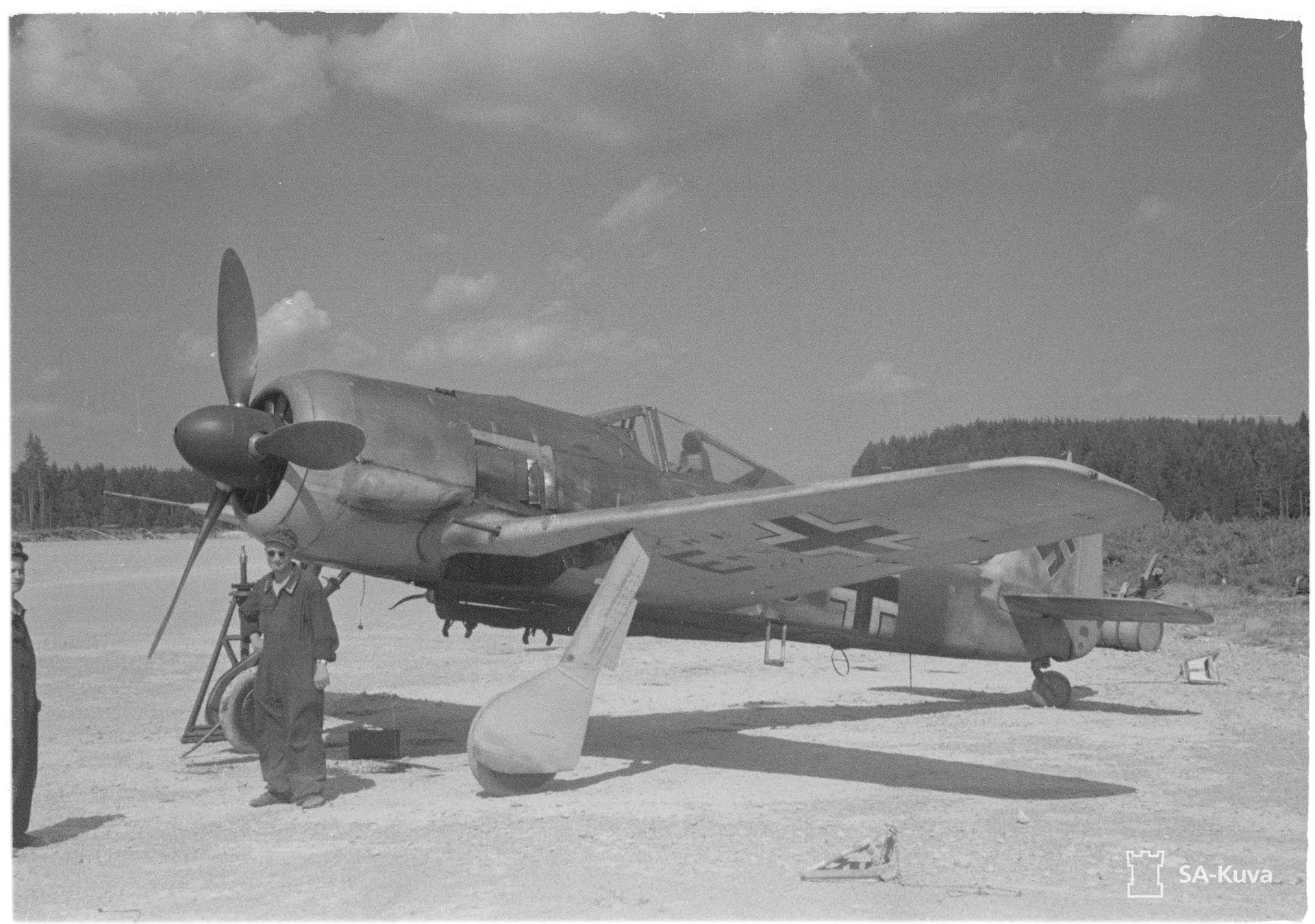 Sot.virk. Eino Nurmi · Public domain · Focke-Wulf Fw 190 F-8 (SA-kuva 155390).
FlyingIron's Fw 190 A-8 manual describes manual pushrod primary controls and electric stabiliser trim. Its dedicated flap section lists 0, 13 and 58 degrees, with a 250 km/h deployment procedure.
Other passages give different flap and speed values. Later product updates revise the flight model and add a persistent rudder trim-tab setting adjusted on the ground.
Focke-Wulf Fw 190 A-8
AirframeDB पर इस विमान के बारे में और जानें
The Fw 190 entered Luftwaffe service in August 1941. The RAF Museum describes its arrival as a major challenge to the Spitfire V, with the Spitfire IX providing a more competitive response in 1942.
The museum’s A-8 served with a Mistel training unit, paired above a Ju 88. After surrender in Denmark in 1945, the combination was separated and the fighter went to Britain for examination. This individual history illustrates one specialised use of a much broader fighter-bomber family.
The manual identifies manual pushrod controls and electric stabiliser trim. Its dedicated flap page gives 0, 13 and 58 degrees and a 250 km/h deployment procedure. Elsewhere it uses 15 degrees and a 300 km/h Vfe, with inconsistent Vd/Vne entries. These remain separate source passages.
FlyingIron's v1.0.1 notes revise the MSFS 2020 aircraft's flight model and meshes for MSFS 2024 compatibility.
Version 1.0.2 adds a persistent rudder trim-tab setting through the tablet while the aircraft is on the ground. The update does not add in-flight roll trim.
FlyingIron Fw 190 A-8 is the selected FlyingIron configuration.
Spring resistance builds with the selected airspeed response. A separate aerodynamic term adds speed-dependent control load.
Valid trim provides the configured pressure relief. Autopilot following is off.
FlyingIron's Fw 190 A-8 manual describes manual pushrod primary controls and electric stabiliser trim. Its dedicated flap section lists 0, 13 and 58 degrees, with a 250 km/h deployment procedure.
The manual identifies manual pushrod controls and electric stabiliser trim. Its dedicated flap page gives 0, 13 and 58 degrees and a 250 km/h deployment procedure. Elsewhere it uses 15 degrees and a 300 km/h Vfe, with inconsistent Vd/Vne entries. These remain separate source passages.
FlyingIron's v1.0.1 notes revise the MSFS 2020 aircraft's flight model and meshes for MSFS 2024 compatibility.
Strengths are normalized hardware-feel settings. They set the effect balance; hand force depends on the device and its limits. The IAS reference is a tuning value.
अंतिम समग्र आउटपुट स्केल डिवाइस कैप से पहले, मॉडल द्वारा उत्पादित हर चीज़ पर लागू होता है।
अधिक: सब कुछ (स्प्रिंग, भार, प्रभाव) एक साथ मजबूत हो जाता है।
कम: सब कुछ एक साथ नरम हो जाता है।
यहां क्यों: Scales overall profile strength while preserving effect balance, subject to device and output limits.
आधार केन्द्रित करने वाला बल जो स्टिक को वापस केन्द्र की ओर खींचता है। हर दूसरी शक्ति उस पर टिकी हुई है। बहुत नीचे और सामान्य उड़ान में स्टिक ढीली महसूस होती है; बहुत अधिक है और यह आपके हाथ से लड़ता है और इसके ऊपर स्थित छोटे संकेतों को छिपा देता है।
अधिक: मजबूत केन्द्रीकरण जो हर समय आपके हाथ का प्रतिरोध करता है।
कम: एक लंगड़ी स्टिक जो अकेले वायुगतिकीय भार पर निर्भर करती है।
यहां क्यों: Primary controls: Manual pushrods. The baseline spring is 0.72. Its low-speed blend reaches baseline strength at 110 KIAS.
Fw 190 A-8 for Microsoft Flight Simulator public manual downloadकेंद्र के चारों ओर एक छोटा सा तटस्थ क्षेत्र जहां स्प्रिंग शांत रहता है, इसलिए आराम के समय छोटी-छोटी हरकतें बकबक नहीं करतीं। व्यापक शांत लेकिन शिथिल है; संकरा अधिक सटीक है लेकिन केंद्र के चारों ओर घूम सकता है।
अधिक: अधिक मुक्त खेल के साथ एक शांत लेकिन ढीला केंद्र।
कम: एक सघन केंद्र जो विश्राम के समय बकबक कर सकता है।
यहां क्यों: Sets travel around the centre before the baseline spring resists. Smaller values engage it sooner.
दोनों निरंतर अक्ष भारों पर एक मास्टर स्केल, उनके स्वतंत्र संतुलन से पहले लागू किया गया। प्रोफ़ाइल आम तौर पर इसे अकेला छोड़ दें और इसके बजाय दो अक्ष लोड को ट्यून करें।
अधिक: दोनों अक्ष अधिक ज़ोर से लोड होते हैं।
कम: दोनों अक्ष एक साथ हल्के होते हैं।
यहां क्यों: The aerodynamic-load gain is 0.68 with an indicated-speed reference of 235 KIAS. This supplies speed-dependent loading alongside the spring.
कम गति वाली स्प्रिंग सहभागिता विंडो (ऊपर प्रारंभ/पूर्ण knots) सक्षम करता है। बंद, स्प्रिंग सभी गति पर स्थिर है।
यहां क्यों: Allows baseline spring strength to rise with indicated airspeed where the control law permits it.
स्प्रिंग का कितना हिस्सा एक ठहराव पर जीवित रहता है, इससे पहले कि एयरस्पीड कोई वायुगतिकीय बल बना सके। ऊंची मंजिल पार्क की गई स्टिक को मजबूत बनाए रखती है; निचली मंजिल पार्क की गई लाइट विमान की ढीली, केबल-ढीली अनुभूति देती है।
अधिक: पार्क करते समय और टैक्सी चलाते समय एक मजबूत स्टिक।
कम: एक फ़्लॉपियर पार्क की गई स्टिक जो केवल हवा की गति से जागती है।
यहां क्यों: Sets low-speed spring strength as a fraction of baseline when blending is enabled. One keeps full strength.
एयरस्पीड जहां स्प्रिंग अपनी कम गति वाली मंजिल से पूरी ताकत की ओर चढ़ना शुरू करता है: टेकऑफ़ रोल पर नियंत्रण "जीवित हो जाते हैं"।
यहां क्यों: Sets the IAS where the low-speed spring blend starts rising. This is a feel threshold, not a flight limit.
एयरस्पीड जहां स्प्रिंग पूरी ताकत तक पहुंचता है। प्रारंभ और इस बिंदु के बीच, वायु प्रवाह नियंत्रणों पर बढ़ने के साथ-साथ केंद्रीकरण उत्तरोत्तर मजबूत होता जाता है।
यहां क्यों: Sets the IAS where the low-speed blend reaches baseline strength; high-speed stiffening also uses it.
संकेतित एयरस्पीड जहां वायुगतिकीय भार अपने डिज़ाइन किए गए पूर्ण स्तर तक पहुंचता है। यह पूरे लोड वक्र को विमान की वास्तविक गति सीमा पर स्थिर करता है: एक 172, 110 knots, एक जेट से बहुत बाद में लोड होता है।
अधिक: भार बाद में आता है; स्टिक अधिक गति तक हल्की रहती है।
कम: सामान पहले पहुँचता है और क्रूज़ भारी लगता है।
यहां क्यों: Sets the IAS reference for aerodynamic loading. It is an estimate, not published cruise TAS or a flight limit.
विक्षेपण भार के ऊपर, गति के साथ केन्द्रीकरण स्वयं कितना कठोर हो जाता है। शून्य केन्द्र की अनुभूति को स्थिर रखता है; अधिक क्रूज़ पर स्टिक का केंद्र सख्त हो जाता है और पैटर्न ढीला हो जाता है।
अधिक: एक केंद्र जो आपके तेजी से आगे बढ़ने पर स्पष्ट रूप से कठोर हो जाता है।
कम: हर गति पर निरंतर केंद्र की अनुभूति।
यहां क्यों: The high-speed spring-stiffening gain is 0.1. It strengthens the permitted spring response above 110 KIAS, with the squared-speed ratio capped at 5.
गति-संचालित केंद्र कठोरता पर ऊपरी सीमा, इसलिए बहुत तेज़ उड़ान स्प्रिंग को बिना किसी सीमा के हवा नहीं दे सकती है।
अधिक: उच्च गति पर अधिक पूर्ण कठोरता की अनुमति दी गई।
कम: सख्त क्लैंप जल्दी बंद हो जाते हैं।
यहां क्यों: Limits the squared airspeed ratio used for high-speed spring stiffening; it is not a device-force cap.
एलेरॉन विक्षेपण और एयरस्पीड से निरंतर रोल भार, पिच से स्वतंत्र रूप से संतुलित होता है। एलिवेटर लोड के साथ मिलकर यह नियंत्रण-सद्भाव अनुपात निर्धारित करता है जिसके बारे में समीक्षक बात करते हैं।
अधिक: भारी रोल बल।
कम: हल्का, जल्दी महसूस होने वाला एलेरॉन।
यहां क्यों: Roll and pitch aerodynamic scales are 0.72 and 1, respectively. They set the aerodynamic axis balance. No custom spring-travel curve is enabled.
एलिवेटर विक्षेपण और एयरस्पीड से निरंतर पिच भार, रोल से स्वतंत्र रूप से संतुलित होता है। यह एक प्रकार के पिच वजन के पीछे मुख्य लीवर है। यह एलेरॉन, स्प्रिंग, ट्रिम, या वायुगतिकीय कंपन बलों को स्पर्श नहीं करता है।
अधिक: गति से भारी निरंतर पिच बल।
कम: एक हल्का एलिवेटर जिसे धारण करने के लिए कम मांसपेशियों की आवश्यकता होती है।
यहां क्यों: Scales pitch aerodynamic loading; pitch spring travel and trim responses are separate settings.
डिवाइस तक पहुंचने से पहले प्रत्येक स्थिर पिच या रोल बल पर एक कैप, मजबूत युद्धाभ्यास में हार्डवेयर को पटकने या संतृप्त करने से बचाता है।
अधिक: क्लिपिंग से पहले मजबूत शिखर स्थिर बल।
कम: एक नरम अधिकतम सीमा; कठिन पैंतरेबाज़ी जल्दी ही ख़त्म हो जाती है।
यहां क्यों: Caps directed-force output. Native spring effects and device limits remain separate.
कितनी मजबूती से एलिवेटर ट्रिम आयोजित पिच बल को राहत देता है और जहां स्टिक बैठती है वहां शिफ्ट हो जाती है। 100% पर, एक उचित रूप से ट्रिम किए गए विमान को किसी दबाव की आवश्यकता नहीं होती है, वास्तविक उड़ान का ट्रिम-अवे-द-लोड वर्कफ़्लो।
अधिक: ट्रिम रुके हुए अधिक पिच बल को हटा देता है; 100% पूर्ण ट्रिम पर इसे शून्य कर देता है।
कम: आप काटे जाने पर भी बल बनाए रखते हैं।
यहां क्यों: Pitch trim: Electric stabiliser. Pitch authority 0.28 provides load relief and permitted centre movement; roll authority is 0.
Fw 190 A-8 for Microsoft Flight Simulator public manual downloadरोल ट्रिम के लिए भी यही राहत है। अधिकांश GA प्रकारों में कोई वास्तविक एलेरॉन ट्रिम नहीं होता है, इसलिए यह शून्य पर रहता है; रोल ट्रिम वाले प्रकारों को एक मिलान मूल्य मिलता है।
अधिक: रोल ट्रिम अधिक आयोजित रोल बल को हटा देता है।
कम: रोल ट्रिम कम करता है।
यहां क्यों: Scales supported roll-trim relief and permitted centre movement. Zero removes roll response.
पहिया गति और सतह के प्रकार से रोलिंग सतह कंपन: गियर के तहत फुटपाथ, घास, या बजरी।
अधिक: स्टिक के माध्यम से तेज़ सतह बनावट।
कम: एक चिकनी टैक्सी.
यहां क्यों: Sets rolling texture strength, modified by speed, surface and undercarriage configuration.
विस्तार जोड़ों, गड्ढों और खुरदरी सतह से छोटे-छोटे असतत उभार, निरंतर गड़गड़ाहट को रोकते हुए।
अधिक: जोड़ों और गड्ढों से तेज़ प्रहार।
कम: नरम ज़मीनी विवरण.
यहां क्यों: Sets gear-bump texture during ground motion, separate from touchdown impact.
एयरफ़्रेम कंपन स्टॉल के करीब आ रहा है और जबकि स्टॉल चेतावनी सक्रिय है: यह विंग कितनी जोर से घोषणा करता है कि वह नाखुश है। कुरकुरा ब्रेक वाले प्रकार मामूली वायुगतिकीय कंपन प्राप्त करते हैं और हॉर्न को चेतावनी देते हैं।
अधिक: एक तेज़ प्री-स्टॉल शेक।
कम: एक शांत पंख; हार्न चेतावनी देता है।
यहां क्यों: Sets stall-buffet strength. Zero removes the cue without changing simulator stalls or warnings.
ट्रांसोनिक वायुगतिकीय कंपन, Mach सीमा के करीब पहुंच रहा है। एमएमओ के पास जेट के लिए सार्थक, पिस्टन और टर्बोप्रॉप के लिए शून्य जो वहां कभी नहीं पहुंचते।
अधिक: Mach सीमा के पास मजबूत ट्रांसोनिक वायुगतिकीय कंपन।
कम: एक आसान हाई-Mach सवारी।
यहां क्यों: Sets high-Mach buffet strength; onset and full-strength thresholds are separate.
फ़्लैप हवा में खुले होने पर एयरफ़्रेम का कम आवृत्ति वाला कंपन, उस गति क्षेत्र में जहाँ हवा उन पर वास्तव में प्रभाव डालती है।
अधिक: हवा में काम करने वाले फ़्लैप के साथ एक कठिन यात्रा।
कम: सहज दृष्टिकोण फ़्लैप।
यहां क्यों: Sets flap buffet at the configured position and speed gates. Flap movement texture is separate.
वापस लेने योग्य गियर से एयरफ्रेम ड्रमिंग एयरस्ट्रीम में लटका हुआ है। फिक्स्ड-गियर प्रकारों के लिए शून्य, जहां एयरफ्रेम कभी भी आकार नहीं बदलता है।
अधिक: बाहर लटके पहियों के साथ और अधिक ढोल बजना।
कम: क्लीनर गियर-डाउन उड़ान।
यहां क्यों: Sets gear aerodynamic buffet; movement and ground-contact cues are separate.
समर्पित स्टॉल स्टिक-शेकर बज़, विमान के अपने स्टॉल-चेतावनी प्रणाली द्वारा सक्रिय किया गया। केवल वास्तविक शेकर वाले प्रकारों को ही मूल्य मिलता है; बाकी सब कुछ वायुगतिकीय वायुगतिकीय कंपन और हॉर्न पर निर्भर करता है।
अधिक: एक कठिन स्टिक-शेकर बज़।
कम: एक सूक्ष्म शेकर.
यहां क्यों: Sets triggered shaker strength; inactive while the shaker feature is disabled.
जब पहिये रनवे से मिलते हैं तो वन-शॉट किक, सिंक दर के आधार पर मापी जाती है: एक ग्रीजर फुसफुसाता है, एक दृढ़ आगमन धड़कता है।
अधिक: टचडाउन पर एक कठिन किक।
कम: नरम आगमन.
यहां क्यों: Sets landing-impact strength; landing telemetry and response shape determine the pulse.
रोलआउट कंपन जबकि रिवर्स थ्रस्ट या beta-रेंज प्रॉप्स काम कर रहे हैं। बिना उलटे प्रकार के लिए शून्य.
अधिक: रिवर्स के तहत एक कठोर रोलआउट।
कम: शांत उलटा.
यहां क्यों: Sets reverse-thrust vibration with valid reverser and engine conditions. Zero removes the cue.
निष्क्रिय और पूरी शक्ति के बीच लगातार इंजन कंपन के बाद RPM, हमेशा मौजूद रहने वाला अनुस्मारक कि सामने कुछ ईंधन जल रहा है।
अधिक: स्टिक के माध्यम से अधिक इंजन.
कम: एक शांत इंजन।
यहां क्यों: Sets estimated engine vibration using configured telemetry and response, not measured cockpit vibration.
निरंतर कंपन केवल जबकि सिम रिपोर्ट करता है कि फ़्लैप सतहें वास्तव में यात्रा कर रही हैं। यह वास्तविक एक्चुएटर गति और विफलताओं का अनुसरण करता है, अनुमानित टाइमर का नहीं।
अधिक: अधिक कंपन जबकि फ़्लैप सतहें यात्रा करती हैं।
कम: शांत फ़्लैप चलता है।
यहां क्यों: Sets texture from observed flap movement; a command without movement does not establish the cue.
ऑटोपायलट कमांड भौतिक रूप से स्टिक को कितनी दूर तक ले जा सकते हैं। MSFS में छोटा रखा गया, जहां एक स्थानांतरित अक्ष पायलट इनपुट के रूप में वापस पढ़ सकता है; शून्य अनुसरण को पूरी तरह से अक्षम कर देता है।
अधिक: ऑटोपायलट स्पष्ट रूप से आपकी स्टिक को आगे बढ़ाता है।
कम: एक बमुश्किल बोधगम्य अनुसरण।
यहां क्यों: Sets admitted AP-follow gain, not a percentage of travel. Runtime ownership and input limits still apply.
Whether this feature is active in this profile.
यहां क्यों: Retained for compatibility and group membership. Trim relief, rather than this flag, controls centre movement.
Whether this feature is active in this profile.
यहां क्यों: Allows trim relief with supported control law and valid telemetry. Axis authorities set its amount.
Whether this feature is active in this profile.
यहां क्यों: Enables local force trim, separate from aircraft-owned trim and add-on integration qualification.
Whether this feature is active in this profile.
यहां क्यों: Allows load-factor changes to modify permitted spring laws. Passive fly-by-wire feel can suppress it.
Whether this feature is active in this profile.
यहां क्यों: Enables rate damping with the configured coefficients and control law.
Whether this feature is active in this profile.
यहां क्यों: Autopilot following is off; the configured spring and load retain the hardware feel.
Whether this feature is active in this profile.
यहां क्यों: Permits centering hold during a supported AP state, separate from following a moving target.
यहां क्यों: Sets admitted AP neutral-hold strength; inactive while neutral hold is disabled.
Whether this feature is active in this profile.
यहां क्यों: Enables aerodynamic cues; each still needs nonzero strength and its simulator conditions.
Where this effect reaches full strength (or has fully faded, for washouts).
अधिक: a more gradual build to a later peak.
कम: a quicker build.
यहां क्यों: Sets the final flap index for detent normalization. UP plus three detents uses maximum index3.
Where this effect begins fading in.
अधिक: the effect begins later.
कम: it begins earlier.
यहां क्यों: Sets the first flap detent that admits buffet; this is a handle index, not degrees.
Whether this feature is active in this profile.
यहां क्यों: Permits shaker at supported warning conditions; the switch does not establish aircraft equipment.
Whether this feature is active in this profile.
यहां क्यों: Enables ground effects; each still needs its own strength and contact or motion telemetry.
Whether this feature is active in this profile.
यहां क्यों: Enables engine cues with nonzero settings and valid running-engine telemetry.
Whether this feature is active in this profile.
यहां क्यों: Enables accessory cues with configured strengths and observed accessory movement.
The strength of this effect.
अधिक: a stronger effect.
कम: a weaker one.
यहां क्यों: Sets texture from observed gear movement, separate from aerodynamic and touchdown effects.
| पैरामीटर | मान | यह क्या नियंत्रित करता है और क्यों |
|---|---|---|
| Spring strength | 0.72 | Primary controls: Manual pushrods. The baseline spring is 0.72. Its low-speed blend reaches baseline strength at 110 KIAS. |
| Spring deadband | 0.045 | Sets travel around the centre before the baseline spring resists. Smaller values engage it sooner. |
| Force gain | 0.68 | The aerodynamic-load gain is 0.68 with an indicated-speed reference of 235 KIAS. This supplies speed-dependent loading alongside the spring. |
| Master gain | 0.85 | Scales overall profile strength while preserving effect balance, subject to device and output limits. |
| Dynamic-pressure blend | True | Allows baseline spring strength to rise with indicated airspeed where the control law permits it. |
| Minimum spring factor | 0.5 | Sets low-speed spring strength as a fraction of baseline when blending is enabled. One keeps full strength. |
| Spring wake-up speed | 25 kt | Sets the IAS where the low-speed spring blend starts rising. This is a feel threshold, not a flight limit. |
| Spring full-strength speed | 110 kt | Sets the IAS where the low-speed blend reaches baseline strength; high-speed stiffening also uses it. |
| बल ट्यूनिंग की गति | 235 kt | Sets the IAS reference for aerodynamic loading. It is an estimate, not published cruise TAS or a flight limit. |
| Airspeed spring stiffening | 0.1 | The high-speed spring-stiffening gain is 0.1. It strengthens the permitted spring response above 110 KIAS, with the squared-speed ratio capped at 5. |
| Airspeed stiffening cap | 5 | Limits the squared airspeed ratio used for high-speed spring stiffening; it is not a device-force cap. |
| Aileron force scale | 0.72 | Roll and pitch aerodynamic scales are 0.72 and 1, respectively. They set the aerodynamic axis balance. No custom spring-travel curve is enabled. |
| Elevator force scale | 1 | Scales pitch aerodynamic loading; pitch spring travel and trim responses are separate settings. |
| Maximum output force | 0.55 | Caps directed-force output. Native spring effects and device limits remain separate. |
| StickFeel · Trim feel enabled | True | Retained for compatibility and group membership. Trim relief, rather than this flag, controls centre movement. |
| StickFeel · Trim relief enabled | True | Allows trim relief with supported control law and valid telemetry. Axis authorities set its amount. |
| StickFeel · Elevator authority | 0.28 | Pitch trim: Electric stabiliser. Pitch authority 0.28 provides load relief and permitted centre movement; roll authority is 0. |
| StickFeel · Aileron authority | 0 | Scales supported roll-trim relief and permitted centre movement. Zero removes roll response. |
| StickFeel · Force trim enabled | False | Enables local force trim, separate from aircraft-owned trim and add-on integration qualification. |
| StickFeel · G load enabled | True | Allows load-factor changes to modify permitted spring laws. Passive fly-by-wire feel can suppress it. |
| StickFeel · Rate damping enabled | True | Enables rate damping with the configured coefficients and control law. |
| Autopilot · Follow enabled | False | Autopilot following is off; the configured spring and load retain the hardware feel. |
| Autopilot · Follow authority | 0.05 | Sets admitted AP-follow gain, not a percentage of travel. Runtime ownership and input limits still apply. |
| Autopilot · Neutral hold enabled | False | Permits centering hold during a supported AP state, separate from following a moving target. |
| Autopilot · Neutral hold strength | 0.6 | Sets admitted AP neutral-hold strength; inactive while neutral hold is disabled. |
| Aero · Enabled | True | Enables aerodynamic cues; each still needs nonzero strength and its simulator conditions. |
| Aero · Gain | 0.25 | Sets stall-buffet strength. Zero removes the cue without changing simulator stalls or warnings. |
| Aero · Gain | 0 | Sets high-Mach buffet strength; onset and full-strength thresholds are separate. |
| Aero · Gain | 0.09 | Sets flap buffet at the configured position and speed gates. Flap movement texture is separate. |
| Aero · Max flap index | 2 | Sets the final flap index for detent normalization. UP plus three detents uses maximum index3. |
| Aero · Min flap index | 2 | Sets the first flap detent that admits buffet; this is a handle index, not degrees. |
| Aero · Gain | 0.065 | Sets gear aerodynamic buffet; movement and ground-contact cues are separate. |
| Aero · Shaker enabled | False | Permits shaker at supported warning conditions; the switch does not establish aircraft equipment. |
| Aero · Amplitude | 0.5 | Sets triggered shaker strength; inactive while the shaker feature is disabled. |
| Ground · Enabled | True | Enables ground effects; each still needs its own strength and contact or motion telemetry. |
| Ground · Gain | 0.28 | Sets rolling texture strength, modified by speed, surface and undercarriage configuration. |
| Ground · Gain | 0.3 | Sets gear-bump texture during ground motion, separate from touchdown impact. |
| Ground · Gain | 0.42 | Sets landing-impact strength; landing telemetry and response shape determine the pulse. |
| Ground · Gain | 0 | Sets reverse-thrust vibration with valid reverser and engine conditions. Zero removes the cue. |
| Engine · Enabled | True | Enables engine cues with nonzero settings and valid running-engine telemetry. |
| Engine · Gain | 0.09 | Sets estimated engine vibration using configured telemetry and response, not measured cockpit vibration. |
| Mechanical · Enabled | True | Enables accessory cues with configured strengths and observed accessory movement. |
| Mechanical · Gain | 0.06 | Sets texture from observed flap movement; a command without movement does not establish the cue. |
| Mechanical · Gain | 0.06 | Sets texture from observed gear movement, separate from aerodynamic and touchdown effects. |
यदि टाइप में आपका समय कहता है कि इस पृष्ठ में कुछ गलत है, तो इसे यहां ठीक करें।
यह पृष्ठ उद्धृत संदर्भों से बनाया गया है, और इस प्रकार का वास्तविक समय एक उद्धरण से बेहतर है। गलत पढ़ने वाले दावे को उद्धृत करें और हमें बताएं कि वास्तविक विमान क्या करता है। सुधार समीक्षा के लिए अनुरक्षक के पास जाएँ और इस शोध का अगला संशोधन फ़ीड करें।
सामुदायिक मंच में उड़ान और ट्यूनिंग Focke-Wulf Fw 190 A-8 के बारे में खुली बातचीत। उपरोक्त सुधार निजी तौर पर अनुरक्षक के पास जाते हैं; हैंगर चर्चा सार्वजनिक है.